
A Rust CAD application with an MCP server for creating, inspecting and rendering drawings, either headlessly or through a connection to the desktop app.
8K
Media & Design
A tool that exposes YouTube channel operations as MCP tools and matching CLI commands, covering analytics, transcripts, uploads, metadata, playlists and comment moderation across multiple channels.
YouTube CLI and MCP server for channel management is cataloged as an MCP server attributed to eukosh. A tool that exposes YouTube channel operations as MCP tools and matching CLI commands, covering analytics, transcripts, uploads, metadata, playlists and comment moderation across multiple channels. It is categorized under media design. See the capability inspector for recorded interfaces and their independent review status; consult upstream documentation for the current interface.
Installation configuration is not reviewed. No executable setup is offered for this entry; inspect the source repository before proceeding.
Catalog license label: MIT. Check the source repository's current license and terms before using, modifying or distributing this software.
Capability definitions are not reviewed. Unreviewed imports are not exposed as trusted interfaces.
No reviewed records to display. This does not establish that upstream lacks this capability.
No reviewed records to display. This does not establish that upstream lacks this capability.
No reviewed records to display. This does not establish that upstream lacks this capability.
Email delivery is not connected. This page does not collect email addresses or create subscriptions.
Browse the registry for current listings instead.
Reviews for YouTube CLI and MCP server for channel management are not available yet
Review publishing and storage are not connected. This page does not collect or publish ratings or comments, including after sign-in.
Yes. Each channel is connected with its own login, and commands run on the default channel unless another is named.
Localizations, live streaming and channel memberships are not covered.
Because YouTube's daily quota belongs to a Cloud project, a shared built-in client would split one quota across all users.
README.md · 0afa5c8df8ed · Fetched 2026-11-13 14:13:00 UTC
Original upstream text, without AI rewriting. Scripts, forms and unsafe links are filtered for safety.
Showing the last retrieved documentation snapshot; check the source for current changes.





YouTube CLI (ytk) and MCP server, built for agents and humans. Let Claude Code, Codex, Cursor, Claude Desktop or ChatGPT work on your channel: analytics, transcripts, uploads, metadata, playlists and comment moderation. It handles several channels, and you can run the same commands in your own terminal.
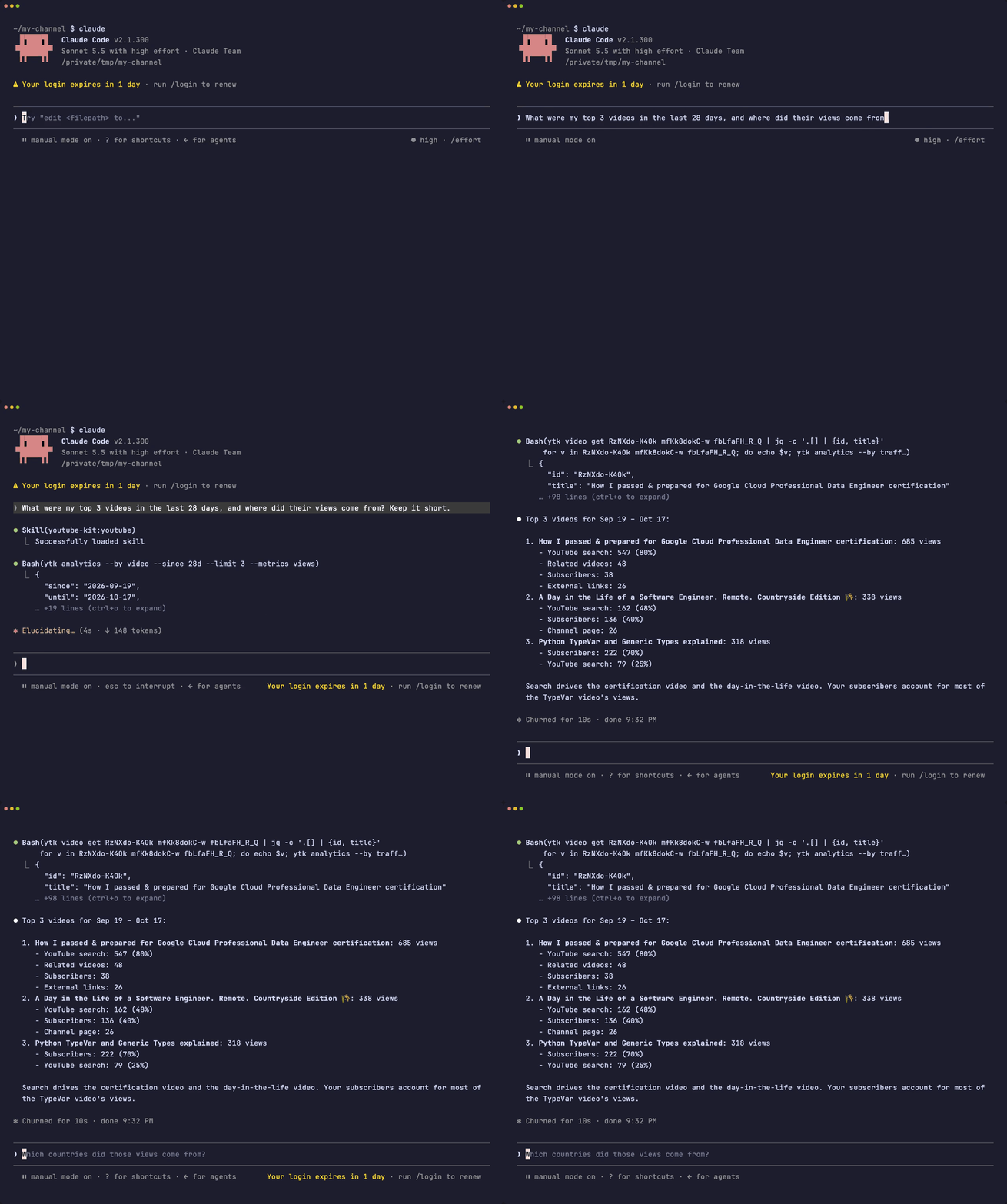
uv tool install youtube-kit
ytk auth login      # one-time Google Cloud setup, then pick your channel
You need a Google account with a YouTube channel, and uv (brew install uv on macOS). The first ytk auth login takes about 5 minutes: it opens each Google Cloud page, says what to click and picks up the file you download.
ytk analytics --by video --since 90d --limit 5     # your top videos of the last 90 days
ytk comment list --status held                     # comments waiting for review
ytk caption transcript VIDEO | jq -r .text         # what you say in one of your videos
ytk channel get @mkbhd | jq .stats                 # any public channel
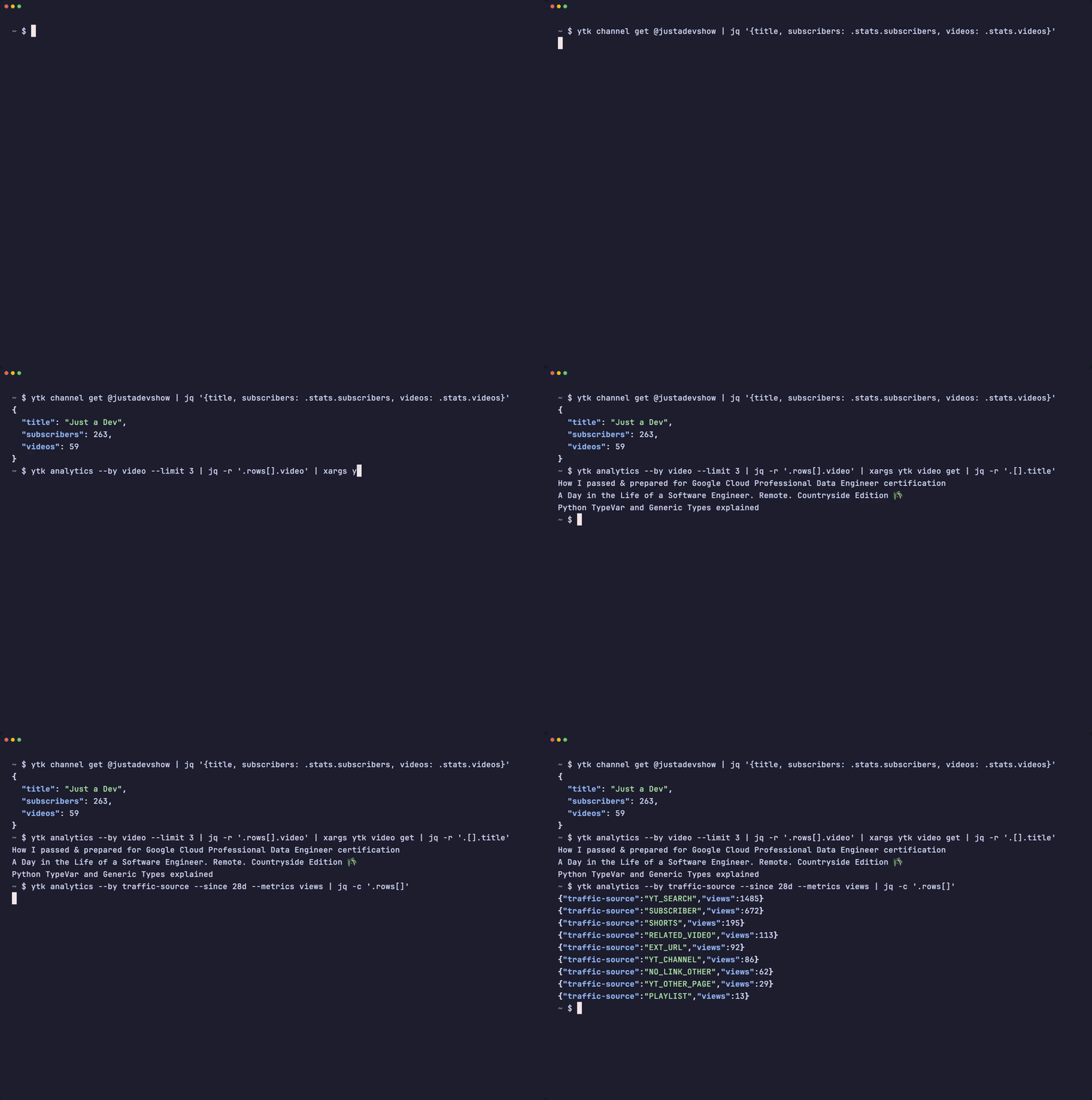
Or ask your agent: "Which of my videos got the most views this month, and are any comments waiting for review?"
A short skill teaches the agent the CLI. It loads only when a YouTube task comes up.
claude plugin install youtube-kit --marketplace eukosh/youtube-kit   # Claude Code
codex plugin marketplace add eukosh/youtube-kit                      # Codex, then:
codex plugin add youtube-kit@youtube-kit
npx skills add eukosh/youtube-kit -g                                 # Cursor and others
The plugins follow ytk releases. Codex updates them at startup; Claude Code does once you turn on auto-update under /plugin → Marketplaces. With npx skills, run npx skills update.
ytk mcp serves the same operations as tools. In Claude Code:
claude mcp add youtube -- uvx youtube-kit mcp
In clients configured with JSON (Claude Desktop, Cursor and others):
{
  "mcpServers": {
    "youtube": { "command": "uvx", "args": ["youtube-kit", "mcp"] }
  }
}
In the ChatGPT desktop app: Settings → MCP servers → Add server → STDIO, with the command uvx youtube-kit mcp. Codex shares that setting (codex mcp add youtube -- uvx youtube-kit mcp).
The server uses your ytk auth login logins. If you also installed ytk with uv tool install, uvx runs that installed version: ytk upgrade updates both. Restart the MCP client afterwards. Not set up yet? The model can walk you through it with the setup_guide tool.
| Area | Operations |
|---|---|
| Analytics | totals, or breakdowns by day, month, video, country, device, OS, traffic source and what's behind it (search terms, suggesting videos, sites), playback location, age, gender, subscribed status, content type (long-form, Shorts, live) or sharing service; audience retention of a video; filters by video, content type, country or traffic source |
| Impressions | thumbnail impressions and click-through rate, in total, by day or by video |
| Videos | get, categories, upload (resumable, with progress), update metadata, set thumbnail, wait for processing, like or dislike, check your rating, delete |
| Captions | transcripts of your videos, from your captions or YouTube's automatic ones, optionally machine-translated; list tracks on any video; upload, replace, hide, delete |
| Comments | list (published, held for review, likely spam), replies, post, reply, edit, delete, approve, hold, reject, ban the author |
| Playlists | list, get, items, create, update, set image, add, remove, move, delete |
| Channel | get, recent activity, your logged-in channels, about info (description, keywords, country, language, trailer), banner, watermark, home page sections |
| Search | videos, channels and playlists, filtered by channel or date |
| Subscriptions | list, subscribe, unsubscribe |
Not covered: localizations, live streaming and channel memberships. ytk --help lists every command, and the skill fits them on one page with jq recipes.
ytk auth login connects one channel. Run it again for each of your other channels, including brand channels: pick the one you want when Google asks.
ytk channel mine                                           # your channels; one is the default
ytk auth switch @second                                    # change the default
ytk video upload clip.mp4 --title Hi --my-channel @third   # use another channel for one command
ytk auth logout @third
Commands work on the default channel unless --my-channel names another, by UC… ID, @handle or exact title. MCP tools take my_channel the same way, so you can say "upload this to my gaming channel". YOUTUBE_CHANNEL sets the default for one shell or one MCP server.
Why your own Google Cloud client. YouTube's daily quota of 10,000 units belongs to a Cloud project. A client shipped inside ytk would split one quota among all its users. Yours is shared by your channels only.
Let an agent set it up. ytk auth guide (setup_guide over MCP) lists what's left, with links and the values to enter. With the gcloud CLI signed in, the agent can create the project and enable the APIs for you. The rest needs your browser. Already have the client JSON? Run ytk auth login --client-secrets FILE.
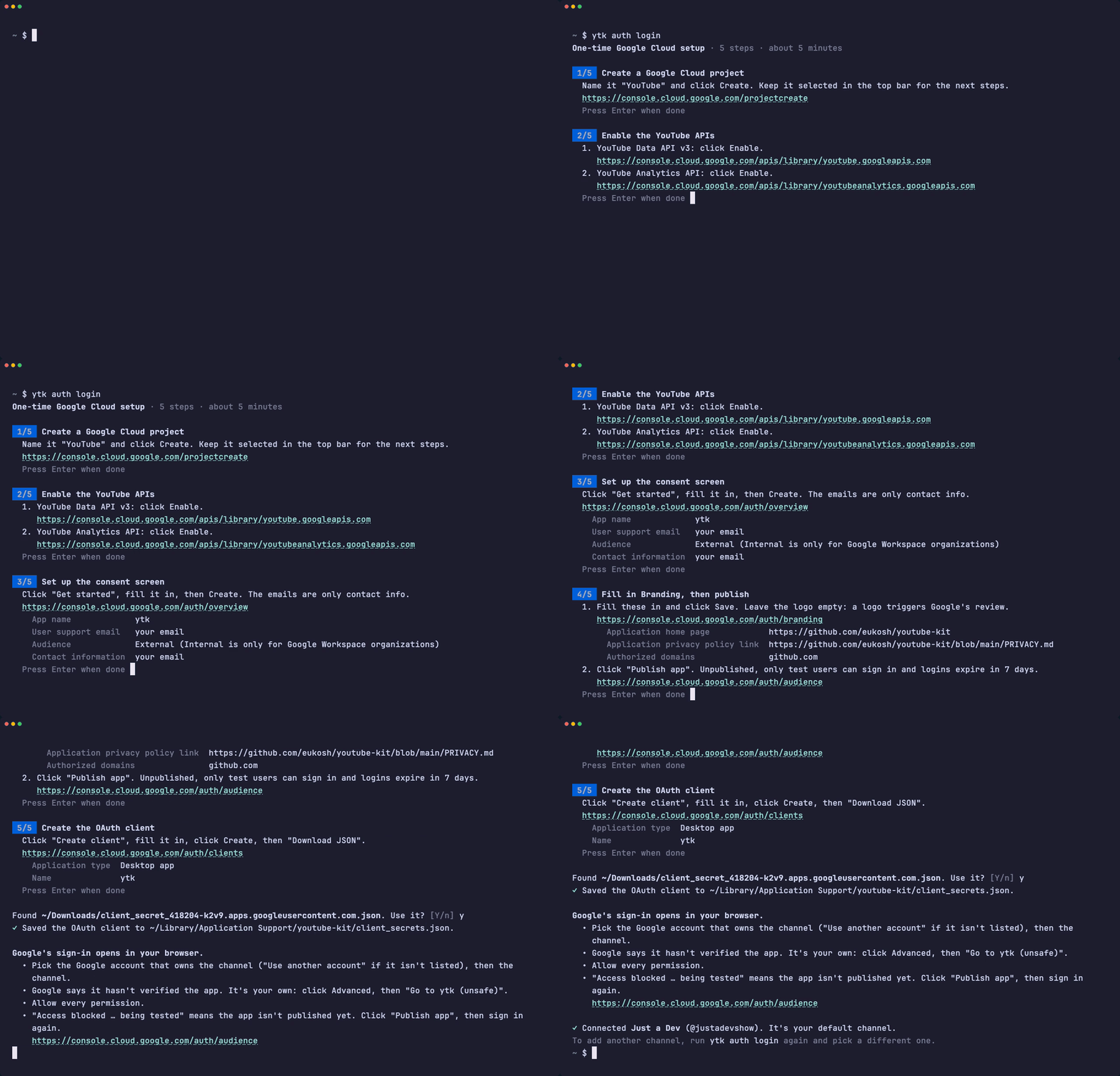
The guided setup does this:
https://github.com/eukosh/youtube-kit), the privacy policy link (https://github.com/eukosh/youtube-kit/blob/main/PRIVACY.md) and the authorized domain github.com; Google won't publish without them. Then on Audience click Publish app. While the app is in Testing, only listed test users can sign in and Google logs them out after 7 days.ytk auth login --client-secrets path/to/client_secret.json. Google warns that it hasn't verified the app: it's your own, so click Advanced, then Go to ytk (unsafe).Public data (search, videos, channels, playlists, comments) also works with just an API key: create one in the same project and export YOUTUBE_API_KEY=..., or put it in the MCP server's env. Without a key, ytk reads public data through your login.
ytk remembers each channel's handle from when you logged in. After renaming a channel on YouTube, name it by its UC… ID or run ytk auth login for it again.
Credentials and config.toml live in the user config directory (~/Library/Application Support/youtube-kit/ on macOS, ~/.config/youtube-kit/ on Linux). ytk auth status prints the exact paths. These environment variables override them:
| Variable | Purpose |
|---|---|
YOUTUBE_API_KEY | API key for public data |
YOUTUBE_CLIENT_SECRETS | Path to the OAuth client JSON |
YOUTUBE_TOKEN_DIR | Directory of stored logins, one file per channel |
YOUTUBE_CHANNEL | Channel to work on by default (UC… ID, @handle or exact title), overriding ytk auth switch |
YOUTUBE_CONFIG_FILE | Path to config.toml (delete limits, update check) |
YTK_NO_UPDATE_CHECK | Set (even empty): no daily check for a newer release |
{"error": {"type": "not_found", "message": "..."}}, and the exit code names the type: 2 bad input, 3 not found, 4 not authorized, 5 quota exceeded, 6 forbidden, 7 network, 8 confirmation required, 9 protected, 10 timeout, 1 anything else. The skill tells agents what to do about each. At a terminal you get colored JSON and plain-sentence errors.@handles for channels, and dates or spans like 90d.--help and each MCP tool description states what it spends.ytk checks PyPI once a day in the background and tells you when a newer release is out: after the output at a terminal, as an {"update": ...} stderr line for agents, and in the MCP server's instructions at startup. ytk upgrade installs it. Turn the check off with check = false under [updates] in config.toml or YTK_NO_UPDATE_CHECK=1; it's also off when CI or NO_UPDATE_NOTIFIER is set.YouTube has no trash, and agents make mistakes. So deleting videos, playlists, comments and caption tracks is guarded:
Two steps. The first call deletes nothing. At a terminal you get a [y/N] prompt. An agent gets exit 8 with a description of the target and must run the command again with --confirm <id>, so the approval always names the exact thing being deleted.
Damage limit. A video with more than 100 views, or one that is public and was uploaded more than 7 days ago, can't be deleted here at all (exit 9). Delete those in YouTube Studio. The limits live in config.toml (ytk auth status shows where):
[delete_protection]
max_views = 100
max_public_age_days = 7
Harness approval. Have your agent ask you before every delete. In Claude Code, add this to .claude/settings.json:
{"permissions": {"ask": ["Bash(ytk video delete:*)", "Bash(ytk playlist delete:*)", "Bash(ytk comment delete:*)", "Bash(ytk caption delete:*)"]}}
Idempotent. Deleting something that is already gone succeeds with "already_gone": true.
This stops mistakes, not a determined agent. Anything holding your OAuth token can call the API directly.
Google gives each Cloud project 10,000 units a day, resetting at midnight Pacific time. Reads cost 1 unit per request, most writes 50, and guarded deletes 52, or 102 for a caption track (they look up the target and check ownership first). search and uploads don't use those units: each gets its own 100 calls a day, one per page of 50 search results or per upload. ytk analytics and ytk impressions use the separate YouTube Analytics and Reporting API quotas.
See CONTRIBUTING.md for the development setup and CHANGELOG.md for what changed. Report security issues privately, as SECURITY.md describes.
MIT. youtube-kit is not affiliated with or endorsed by Google or YouTube. YouTube is a trademark of Google LLC.
Claim this server with your GitHub account to request manual ownership verification.
Link to the catalog listing for YouTube CLI and MCP server for channel management from your README. This badge does not certify ownership, compatibility or security.
[](https://awesome-mcp.com/servers/youtube-kit)Public repository statistics could not be verified. Check the configured source address; unavailable counts are not zero.
Separate sources, scopes and periods. Never combined or treated as installations, active users or security reviews.
No reviewed package or image identity; download statistics are not listed yet.
Alternative and complementary servers in the same category
A Rust CAD application with an MCP server for creating, inspecting and rendering drawings, either headlessly or through a connection to the desktop app.

Liquid Composer is a browser-based Liquid Glass icon design tool that offers a local MCP server for agent-driven icon workflows.

agent-media makes short drama series and other short vertical videos from Claude, ChatGPT or Codex through one MCP connection, with OAuth sign-in and no API keys.