

A Rust CAD application with an MCP server for creating, inspecting and rendering drawings, either headlessly or through a connection to the desktop app.
8K
Media & Design
An unofficial MCP server that provides tools for uploading videos, creating processing tasks, and monitoring their progress through the ZapCap API.
ZapCap MCP Server is cataloged as an MCP server attributed to bogdan01m. An unofficial MCP server that provides tools for uploading videos, creating processing tasks, and monitoring their progress through the ZapCap API. It is categorized under media design. See the capability inspector for recorded interfaces and their independent review status; consult upstream documentation for the current interface.
Installation configuration is not reviewed. No executable setup is offered for this entry; inspect the source repository before proceeding.
Catalog license label: Not specified. Check the source repository's current license and terms before using, modifying or distributing this software.
Capability definitions are not reviewed. Unreviewed imports are not exposed as trusted interfaces.
No reviewed records to display. This does not establish that upstream lacks this capability.
No reviewed records to display. This does not establish that upstream lacks this capability.
No reviewed records to display. This does not establish that upstream lacks this capability.
Email delivery is not connected. This page does not collect email addresses or create subscriptions.
Browse the registry for current listings instead.
Reviews for ZapCap MCP Server are not available yet
Review publishing and storage are not connected. This page does not collect or publish ratings or comments, including after sign-in.
README.md · 16f68701a351 · Fetched 2026-11-13 13:42:56 UTC
Original upstream text, without AI rewriting. Scripts, forms and unsafe links are filtered for safety.
Showing the last retrieved documentation snapshot; check the source for current changes.


NOTE: This is an unofficial implementation of MCP Server for ZapCap.
An MCP (Model Context Protocol) server that provides tools for uploading videos, creating processing tasks, and monitoring their progress through the ZapCap API.
You can install uv from here: https://docs.astral.sh/uv/
You can get api key from ZapCap API after registation at https://zapcap.ai/ in their platform here: https://platform.zapcap.ai/dashboard/api-key
Add to your MCP client mcp.json configuration (e.g., Claude Desktop, Cursor and etc.):
{
  "mcpServers": {
    "zapcap": {
      "command": "uvx",
      "args": ["zapcap-mcp-server"],
      "env": {
        "ZAPCAP_API_KEY": "your_api_key_here"
      }
    }
  }
}
uv tool install zapcap-mcp-server
You can also run the MCP server in a Docker container using the pre-built image from Docker Hub:
{
  "mcpServers": {
    "zapcap": {
      "command": "docker",
      "args": [
        "run",
        "--rm",
        "--init",
        "-i",
        "--net=host",
        "-v", "/home/$USER:/host/home/$USER",
        "-e", "ZAPCAP_API_KEY=your_api_key_here",
        "bogdan01m/zapcap-mcp-server:latest"
      ],
      "env": {
        "DOCKER_CLI_HINTS": "false"
      }
    }
  }
}
Set your ZapCap API key as an environment variable:
export ZAPCAP_API_KEY="your_api_key_here"
How to use:
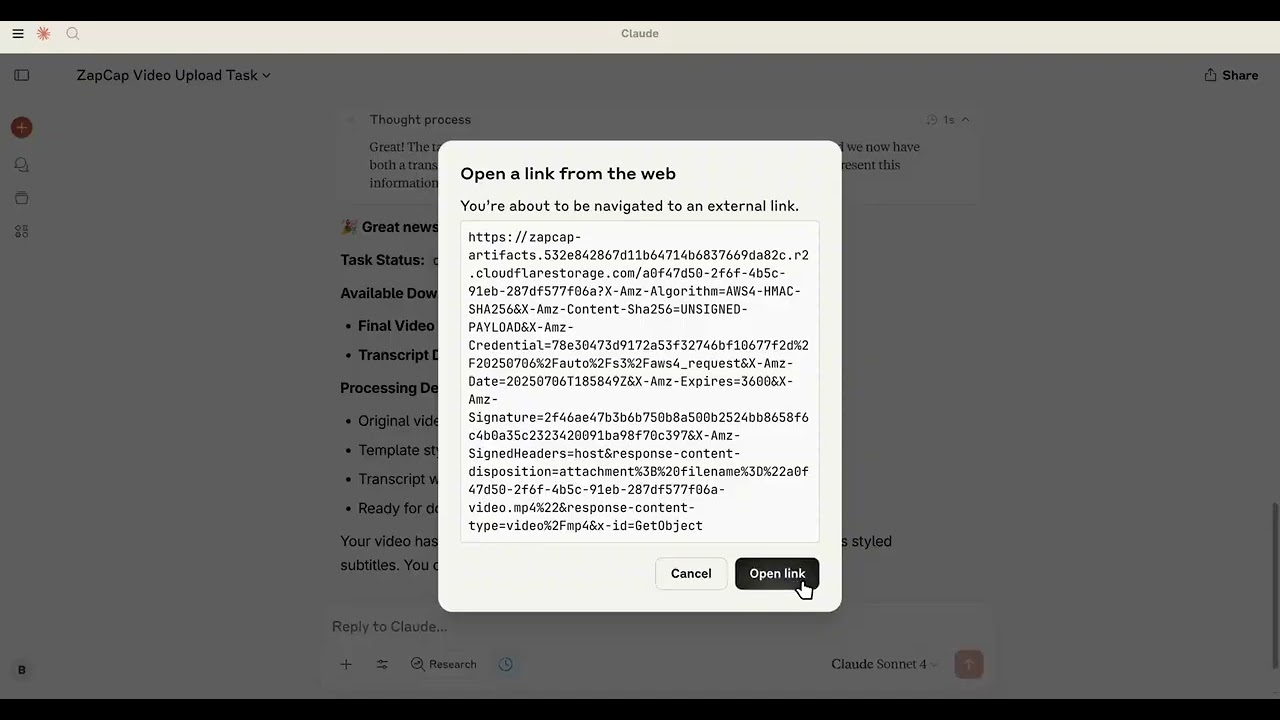
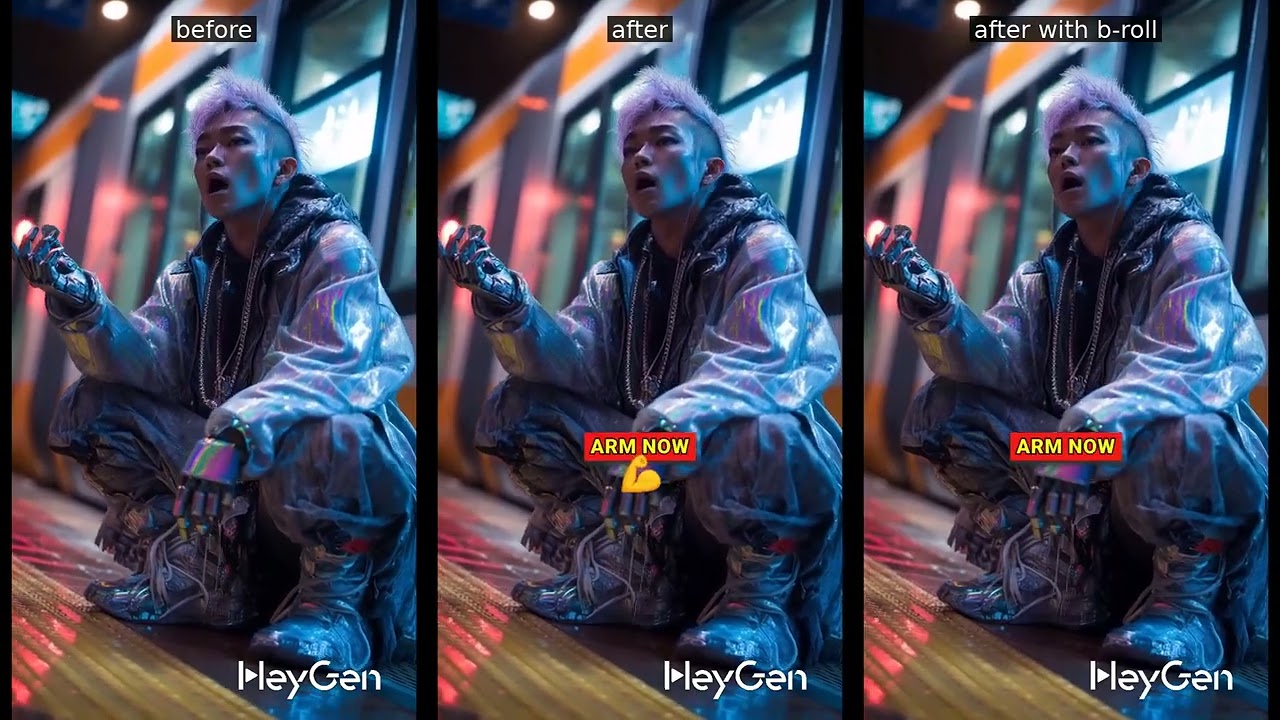
Results:
The server provides the following tools:
Upload a video file to ZapCap.
Parameters:
file_path: Path to the video fileUpload a video by URL to ZapCap.
Parameters:
url: URL to the video fileGet available processing templates from ZapCap.
Create a video processing task with full customization options.
Parameters:
video_id: Video ID from uploadtemplate_id: Template IDauto_approve: Auto approve the task (default: true)language: Language code (default: "en")enable_broll: Enable B-roll (default: false)broll_percent: B-roll percentage 0-100 (default: 30)Subtitle options:
emoji: Enable emoji in subtitles (default: true)emoji_animation: Enable emoji animation (default: true)emphasize_keywords: Emphasize keywords (default: true)animation: Enable subtitle animation (default: true)punctuation: Include punctuation (default: true)display_words: Number of words to display (default: 1)Style options:
position_top: Subtitle position from top (default: 60)font_uppercase: Use uppercase font (default: true)font_size: Font size (default: 30)font_weight: Font weight (default: 900)font_color: Font color (default: "#ffffff")font_shadow: Font shadow s/m/l (default: "l")stroke: Stroke style (default: "s")stroke_color: Stroke color (default: "#000000")highlight_color_1: First highlight color (default: "#2bf82a")highlight_color_2: Second highlight color (default: "#fdfa14")highlight_color_3: Third highlight color (default: "#f01916")Monitor task progress.
Parameters:
video_id: Video IDtask_id: Task IDUnlike using curl or direct API calls where you need to manually include your API key in every request:
# Traditional curl approach - token needed every time
curl -X POST "https://api.zapcap.ai/upload" \
  -H "Authorization: Bearer your_token_here" \
  -F "file=@video.mp4"
With this MCP server, your API key is configured once in the environment and automatically used for all operations:
{
  "env": {
    "ZAPCAP_API_KEY": "your_api_key_here"
  }
}
Instead of constructing complex API requests with parameters, you can describe what you want:
Traditional API:
curl -X POST "https://api.zapcap.ai/tasks" \
  -H "Authorization: Bearer token" \
  -d '{
    "video_id": "abc123",
    "template_id": "viral",
    "font_size": 30,
    "highlight_color_1": "#00ff00",
    "enable_broll": true,
    "broll_percent": 40
  }'
MCP Server:
"Add green highlighted subtitles with 40% B-roll using viral template"
We're planning to add basic testing capabilities:
MIT licence
Claim this server with your GitHub account to request manual ownership verification.
Link to the catalog listing for ZapCap MCP Server from your README. This badge does not certify ownership, compatibility or security.
[](https://awesome-mcp.com/servers/zapcap-mcp-server)Public repository statistics could not be verified. Check the configured source address; unavailable counts are not zero.
Separate sources, scopes and periods. Never combined or treated as installations, active users or security reviews.
No reviewed package or image identity; download statistics are not listed yet.
Alternative and complementary servers in the same category
A Rust CAD application with an MCP server for creating, inspecting and rendering drawings, either headlessly or through a connection to the desktop app.

Liquid Composer is a browser-based Liquid Glass icon design tool that offers a local MCP server for agent-driven icon workflows.

agent-media makes short drama series and other short vertical videos from Claude, ChatGPT or Codex through one MCP connection, with OAuth sign-in and no API keys.