
This is a Model Context Protocol (MCP) server for interacting with AIStor object stores.
Repository stats unavailable
Databases & Storage
Zilliz MCP Server is a Model Context Protocol server for managing Zilliz Cloud resources and interacting with data in Milvus clusters through tools exposed to AI agents.
Zilliz MCP Server is cataloged as an MCP server attributed to zilliztech. Zilliz MCP Server is a Model Context Protocol server for managing Zilliz Cloud resources and interacting with data in Milvus clusters through tools exposed to AI agents. It is categorized under databases storage. See the capability inspector for recorded interfaces and their independent review status; consult upstream documentation for the current interface.
Installation configuration is not reviewed. No executable setup is offered for this entry; inspect the source repository before proceeding.
Catalog license label: Not specified. Check the source repository's current license and terms before using, modifying or distributing this software.
Capability definitions are not reviewed. Unreviewed imports are not exposed as trusted interfaces.
No reviewed records to display. This does not establish that upstream lacks this capability.
No reviewed records to display. This does not establish that upstream lacks this capability.
No reviewed records to display. This does not establish that upstream lacks this capability.
Email delivery is not connected. This page does not collect email addresses or create subscriptions.
Browse the registry for current listings instead.
Reviews for Zilliz MCP Server are not available yet
Review publishing and storage are not connected. This page does not collect or publish ratings or comments, including after sign-in.
Yes. It can provision a free Milvus cluster using Zilliz Cloud, handle authentication and configuration, and return connection details for immediate use.
They support interacting with data inside a Milvus cluster, including creating collections, inserting vector data, and performing semantic searches.
Yes. It performs semantic search across a specified collection and returns relevant results with similarity scores.
README.md · c2a84e1779d8 · Fetched 2026-11-13 08:11:49 UTC
Original upstream text, without AI rewriting. Scripts, forms and unsafe links are filtered for safety.
Showing the last retrieved documentation snapshot; check the source for current changes.
Model Context Protocol (MCP) is a standardized framework that enables AI applications to securely connect to external data sources and tools in real-time. It acts as a universal interface between AI models and various systems, allowing AI assistants to access current information and perform actions beyond text generation.
Zilliz MCP Server enables AI agents to seamlessly interact with Milvus, a popular open-source vector database, and Zilliz Cloud, the fully managed version of Milvus. Through this integration, your AI assistants can create collections, insert vector data, and perform semantic searches directly within their conversations—no manual database management required. Zilliz MCP Server seamlessly integrates with popular AI-powered coding tools like Cursor, Claude, Windsurf, and other MCP-compatible editors, enabling developers to build vector search capabilities directly within their development workflow.
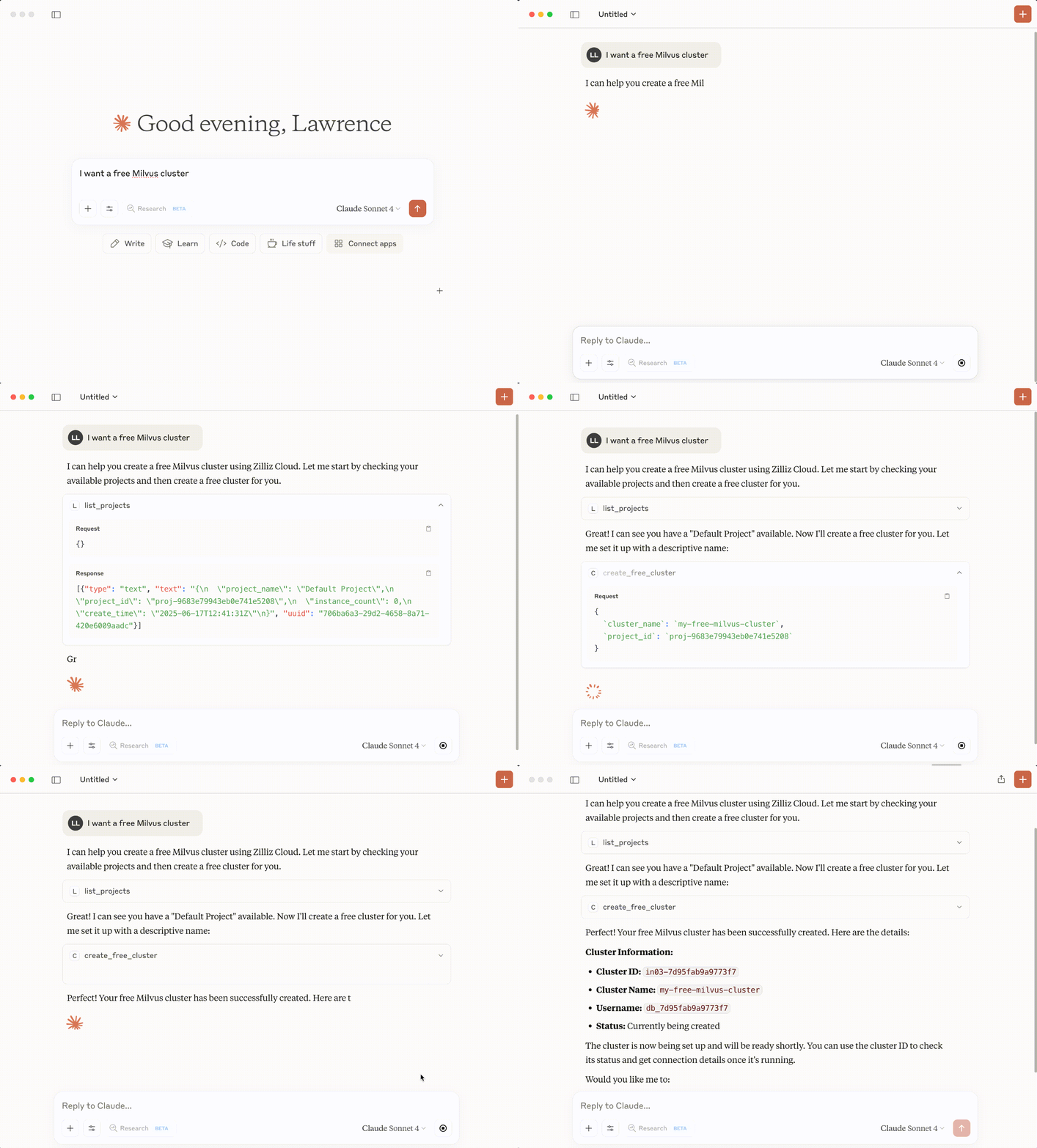 Instead of navigating through web interfaces or complex setup processes, you can get a free, fully functional vector database cluster up and running it directly from Claude, Cursor or any other MCP-compatible AI coding assistants with the Zilliz MCP Server.
The Zilliz MCP server automatically:
No need to leave your AI chat interface or manually set up infrastructure. Just ask in natural language and get a working vector database within seconds. This works in any MCP-enabled environment, including Claude's web interface as shown above.
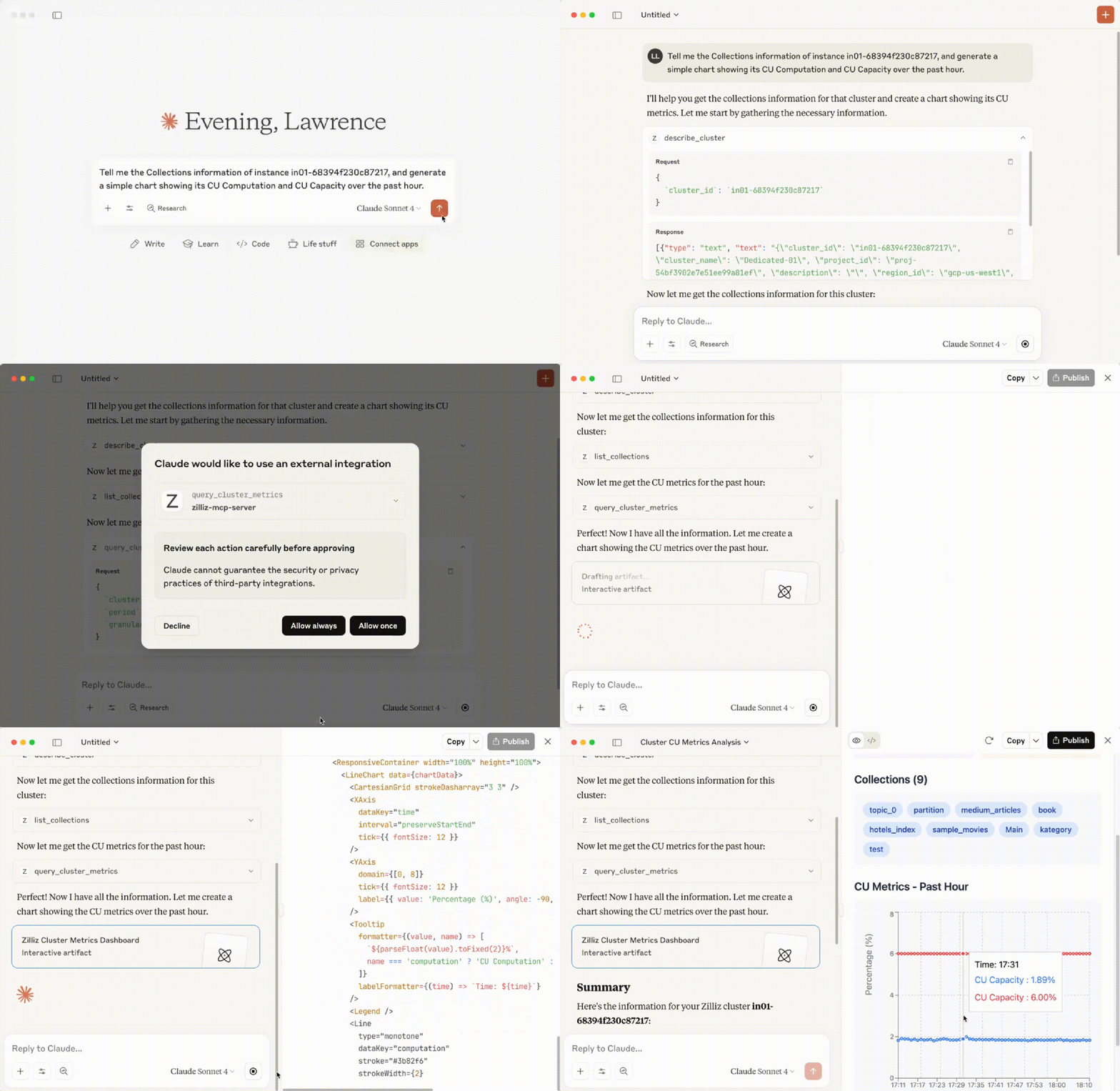 Once you have a cluster running, you can inspect its status and generate visualizations directly through natural language:
The Zilliz MCP server:
This demonstrates how you can monitor and analyze your vector database infrastructure conversationally, making cluster management as simple as asking questions in plain English.
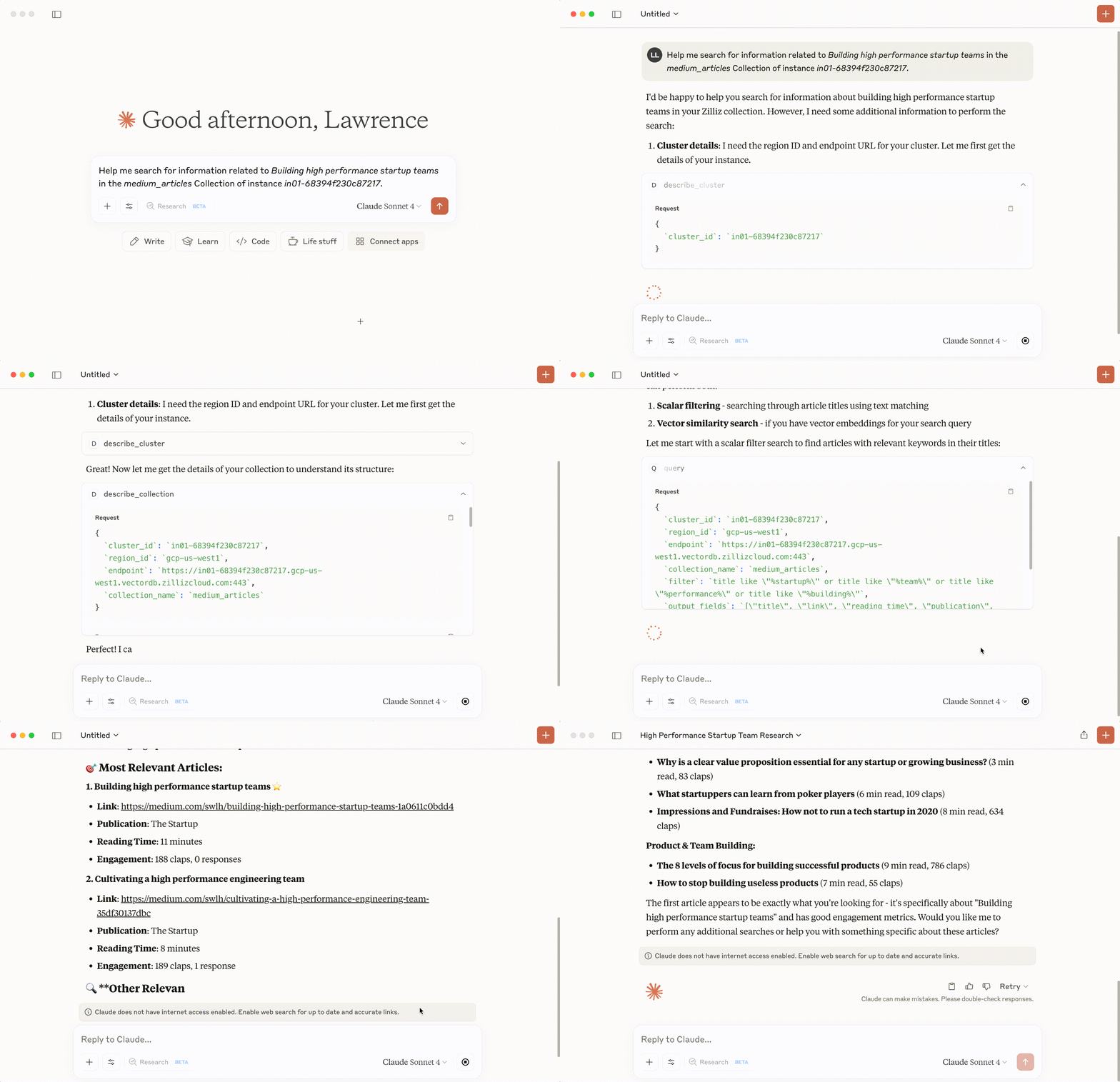 Search your vector collections using natural language without writing any code:
The Zilliz MCP server:
This shows how vector search becomes as simple as describing what you're looking for. Perfect for testing search queries, exploring your data, or building search functionality without leaving your development environment.
brew install uv on OSX, or just run curl -LsSf https://astral.sh/uv/install.sh | sh .You can start the server in two ways:
If you are completely new to MCP and Zilliz, we recommend following our step-by-step guide in Step By Step User Guide which will walk you through the complete setup process.
This method is useful when the agent and the MCP server are running on the same machine and you want the agent to manage the server's lifecycle directly. The agent communicates with the server over its standard input and output streams.
Configure your agent's MCP JSON file like this:
{
  "mcpServers": {
    "zilliz-mcp-server": {
      "command": "uvx",
      "args": ["zilliz-mcp-server"],
      "env": {
          "ZILLIZ_CLOUD_TOKEN": "your-token-here"
      }
    }
  }
}
Note: Make sure to replace /path/to/your/zilliz-mcp-server with the actual absolute path to the project directory.
This method runs the server as a standalone HTTP service. This is useful for development and for agents that can communicate over HTTP.
First, clone or download the project repository.
git clone https://github.com/zilliztech/zilliz-mcp-server.git
cd zilliz-mcp-server
Next, create a .env file from the example and fill in your Zilliz Cloud API key.
cp example.env .env
Now, open .env and add your API key:
ZILLIZ_API_KEY="your_api_key_here"
It 'll start the MCP server as a standalone HTTP service
uv run src/zilliz_mcp_server/server.py --transport streamable-http
After starting the server, you can configure your MCP client to connect to it. If the server is running correctly, the available tools will appear in your client's tool list (e.g., in Cursor or Claude).
You can then configure your agent or MCP client to connect to it using a configuration like this:
{
  "mcpServers": {
    "zilliz-mcp-server": {
      "url": "http://localhost:8000/mcp",
      "transport": "streamable-http",
      "description": "Zilliz Cloud and Milvus MCP Server"
    }
  }
}
The server exposes two categories of tools for your AI agents.
These tools are for managing your Zilliz Cloud resources.
| Tool Name | Description |
|---|---|
list_projects | List all projects in your Zilliz Cloud account. |
list_clusters | List all clusters within your projects. |
create_free_cluster | Create a new, free-tier Milvus cluster. |
describe_cluster | Get detailed information about a specific cluster. |
suspend_cluster | Suspend a running cluster to save costs. |
resume_cluster | Resume a suspended cluster. |
query_cluster_metrics | Query various performance metrics for a cluster. |
These tools are for interacting with the data inside a Milvus cluster.
| Tool Name | Description |
|---|---|
list_databases | List all databases within a specific cluster. |
list_collections | List all collections within a database. |
create_collection | Create a new collection with a specified schema. |
describe_collection | Get detailed information about a collection, including its schema. |
insert_entities | Insert entities (data records with vectors) into a collection. |
delete_entities | Delete entities from a collection based on IDs or a filter expression. |
search | Perform a vector similarity search on a collection. |
query | Query entities based on a scalar filter expression. |
hybrid_search | Perform a hybrid search combining vector similarity and scalar filters. |
Claim this server with your GitHub account to request manual ownership verification.
Link to the catalog listing for Zilliz MCP Server from your README. This badge does not certify ownership, compatibility or security.
[](https://awesome-mcp.com/servers/zilliz-mcp-server)Public repository statistics could not be verified. Check the configured source address; unavailable counts are not zero.
Separate sources, scopes and periods. Never combined or treated as installations, active users or security reviews.
No reviewed package or image identity; download statistics are not listed yet.
Alternative and complementary servers in the same category
This is a Model Context Protocol (MCP) server for interacting with AIStor object stores.

A Model Context Protocol server that lets AI assistants run SQL queries against AWS Athena databases and retrieve results.

A Model Context Protocol (MCP) server that exposes access to an InfluxDB v2 instance using the InfluxDB OSS API v2.