
Oleafly is a live collaborative LaTeX, Typst and Markdown editor for research that offers a local MCP server and an oleafly mcp stdio command so outside AI clients can use its project tools.
Repository stats unavailable
Productivity & Ops
An MCP server that generates mindmaps from Markdown, relationship graphs from Mermaid syntax, and AI-analyzed knowledge graphs, returning or saving them as HTML, SVG, or PNG.
CogniGraph MCP server for generating mindmaps, relationship graphs, and knowledge graphs is cataloged as an MCP server attributed to xsp52hz. An MCP server that generates mindmaps from Markdown, relationship graphs from Mermaid syntax, and AI-analyzed knowledge graphs, returning or saving them as HTML, SVG, or PNG. It is categorized under productivity work. See the capability inspector for recorded interfaces and their independent review status; consult upstream documentation for the current interface.
Installation configuration is not reviewed. No executable setup is offered for this entry; inspect the source repository before proceeding.
Catalog license label: Not specified. Check the source repository's current license and terms before using, modifying or distributing this software.
Capability definitions are not reviewed. Unreviewed imports are not exposed as trusted interfaces.
No reviewed records to display. This does not establish that upstream lacks this capability.
No reviewed records to display. This does not establish that upstream lacks this capability.
No reviewed records to display. This does not establish that upstream lacks this capability.
Email delivery is not connected. This page does not collect email addresses or create subscriptions.
Browse the registry for current listings instead.
Reviews for CogniGraph MCP server for generating mindmaps, relationship graphs, and knowledge graphs are not available yet
Review publishing and storage are not connected. This page does not collect or publish ratings or comments, including after sign-in.
Yes. The generate_knowledge_graph tool requires OPENAI_API_KEY either through the environment variable or the apiKey parameter; without it the tool will fail.
The default save location is set by the MINDMAP_DEFAULT_SAVE_DIR environment variable; if it is not set, files are saved to the user's home directory.
Yes, OPENAI_BASE_URL can point to an OpenAI-compatible API endpoint, and OPENAI_DEFAULT_MODEL sets the default model name.
README.md · 3e2cbc570516 · Fetched 2026-11-13 12:03:27 UTC
Original upstream text, without AI rewriting. Scripts, forms and unsafe links are filtered for safety.
Showing the last retrieved documentation snapshot; check the source for current changes.
markmap-cli 和 @mermaid-js/mermaid-cli) 以及通过兼容 OpenAI 的 API 进行 AI 分析来生成思维导图、关系图谱和知识图谱。此服务器设计为与各种本地 MCP 客户端兼容,包括 Claude Desktop、Cherry Studio、DeepChat 和 HyperChat。
提供可通过 MCP use_mcp_tool 命令访问的多个工具:
generate_mindmap:
markdown (字符串, 必需), outputFormat (枚举: "html" | "svg", 可选, 默认: "html")。generate_and_save_mindmap:
markdown (字符串, 必需), outputFormat (枚举: "html" | "svg", 可选, 默认: "html"), outputDir (字符串, 可选), outputFilename (字符串, 可选)。MINDMAP_DEFAULT_SAVE_DIR 环境变量确定,如果未设置则回退到用户的主目录。generate_relationship_graph:
mermaid_text (字符串, 必需), outputFormat (枚举: "svg" | "png", 可选, 默认: "svg"), outputDir (字符串, 可选), outputFilename (字符串, 可选)。MINDMAP_DEFAULT_SAVE_DIR 环境变量确定,如果未设置则回退到用户的主目录。generate_knowledge_graph:
markdown (字符串, 必需), outputFormat (枚举: "svg" | "png", 可选, 默认: "svg"), outputDir (字符串, 可选), outputFilename (字符串, 可选), prompt (字符串, 可选), model (字符串, 可选), apiKey (字符串, 可选), baseURL (字符串, 可选)。env)服务器依赖 MCP 客户端设置文件(例如 mcp_settings.json)中设置的环境变量来实现某些功能:
MINDMAP_DEFAULT_SAVE_DIR: (可选) 为保存文件的工具(generate_and_save_mindmap, generate_relationship_graph, generate_knowledge_graph)设置默认输出目录(如果参数中未提供 outputDir)。
generate_mindmap 工具(直接返回内容)不受影响。OPENAI_API_KEY: (运行 generate_knowledge_graph 时必需) 用于 OpenAI 或兼容服务的 API 密钥。
apiKey 参数提供): generate_knowledge_graph 工具将失败。其他工具不受影响。OPENAI_BASE_URL: (可选) 兼容 OpenAI 的 API 端点的基础 URL。如果未设置,则默认为 OpenAI 官方 API。仅与 generate_knowledge_graph 相关。OPENAI_DEFAULT_MODEL: (可选) generate_knowledge_graph 使用的默认 AI 模型名称。如果未设置,则默认为 gpt-3.5-turbo。仅与 generate_knowledge_graph 相关。重要配置说明:
generate_mindmap 工具(工具 1)不依赖任何这些环境变量。generate_and_save_mindmap, generate_relationship_graph)仅依赖 MINDMAP_DEFAULT_SAVE_DIR 来确定默认保存位置。如果未设置,它们仍可工作(保存到主目录)。generate_knowledge_graph)必需 OPENAI_API_KEY(通过环境变量或参数)才能运行。它也会使用其他的 OPENAI_* 变量和 MINDMAP_DEFAULT_SAVE_DIR。mcp_settings.json 配置示例:
{
  "mcpServers": {
    "cognigraph-mcp-server": { // 确保服务器名称匹配
      "command": "node",
      "args": [
        "/path/to/cognigraph-mcp-server/build/index.js" // 根据实际情况调整路径
      ],
      "env": {
        "MINDMAP_DEFAULT_SAVE_DIR": "C:\\Users\\YourUser\\Desktop",
        "OPENAI_API_KEY": "sk-...",
        "OPENAI_BASE_URL": "http://localhost:11434/v1", // 本地 Ollama 示例
        "OPENAI_DEFAULT_MODEL": "llama3"
      },
      "disabled": false,
      "alwaysAllow": []
    }
    // ... 其他服务器
  }
}
cognigraph-mcp-server 目录。cognigraph-mcp-server)和 args 中的路径正确。提供必要的环境变量。通过你的 MCP 客户端的 use_mcp_tool 功能来使用这些工具。有关参数,请参阅上面的工具描述。
以下是 Cherry Studio 的配置截图示例:
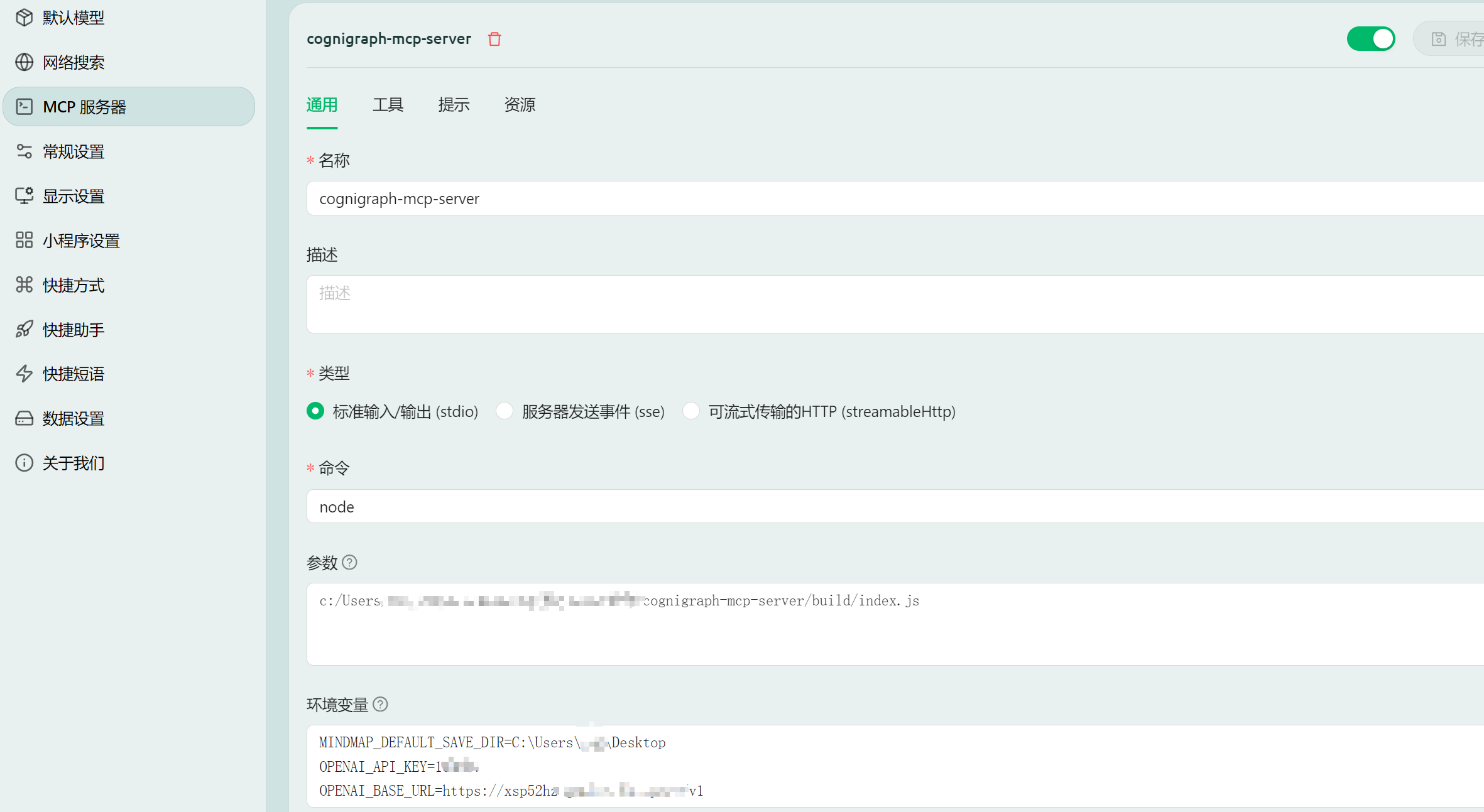
通过 npm 发布后,您可以使用 npx 命令快速启动此 MCP 服务器,无需手动克隆、安装依赖和构建。
确保 Node.js 和 npm 已安装。
更新您的 MCP 客户端设置文件 (mcp_settings.json 或类似文件):
将服务器配置中的 command 设置为 npx,并将 args 设置为 ["cognigraph-mcp-server"]。移除之前指向本地 build/index.js 的路径。
配置示例:
{
  "mcpServers": {
    "cognigraph-mcp-server": { // 服务器名称保持不变
      "command": "npx", // 使用 npx
      "args": [
        "cognigraph-mcp-server" // 包名
      ],
      "env": { // 环境变量保持不变
        "MINDMAP_DEFAULT_SAVE_DIR": "C:\\Users\\YourUser\\Desktop",
        "OPENAI_API_KEY": "sk-...",
        "OPENAI_BASE_URL": "http://localhost:11434/v1",
        "OPENAI_DEFAULT_MODEL": "llama3"
      },
      "disabled": false,
      "alwaysAllow": []
    }
    // ... 其他服务器
  }
}
重启您的 MCP 客户端。 客户端现在将使用 npx 来下载(如果需要)并运行最新发布的 cognigraph-mcp-server。
注意:
OPENAI_API_KEY)仍然需要通过 MCP 客户端的 env 设置来传递。markmap 或 mmdc 命令找不到的问题,您可能需要手动全局安装它们:npm install -g markmap-cli @mermaid-js/mermaid-cli。Claim this server with your GitHub account to request manual ownership verification.
Link to the catalog listing for CogniGraph MCP server for generating mindmaps, relationship graphs, and knowledge graphs from your README. This badge does not certify ownership, compatibility or security.
[](https://awesome-mcp.com/servers/cognigraph-mcp-server)Public repository statistics could not be verified. Check the configured source address; unavailable counts are not zero.
Separate sources, scopes and periods. Never combined or treated as installations, active users or security reviews.
No reviewed package or image identity; download statistics are not listed yet.
Alternative and complementary servers in the same category
Oleafly is a live collaborative LaTeX, Typst and Markdown editor for research that offers a local MCP server and an oleafly mcp stdio command so outside AI clients can use its project tools.
Buddy is an Android app that offers its phone tools through a local MCP server to Claude Code, Codex, OpenCode, Antigravity, and Grok sessions.

Tuqui is a hosted MCP server that connects Odoo with Claude and ChatGPT so users can ask about sales, stock, customers and overdue invoices in plain language.
