
Oleafly is a live collaborative LaTeX, Typst and Markdown editor for research that offers a local MCP server and an oleafly mcp stdio command so outside AI clients can use its project tools.
Repository stats unavailable
Productivity & Ops
A local, self-hosted app that catches links dropped in chats, browsers or the CLI, summarizes and files them in a searchable catalogue, and lets AI agents read and write that catalogue over MCP.
driftnet: self-hosted MCP server that catches, summarizes and files shared links is cataloged as an MCP server attributed to kevinchu1110. A local, self-hosted app that catches links dropped in chats, browsers or the CLI, summarizes and files them in a searchable catalogue, and lets AI agents read and write that catalogue over MCP. It is categorized under productivity work. See the capability inspector for recorded interfaces and their independent review status; consult upstream documentation for the current interface.
Installation configuration is not reviewed. No executable setup is offered for this entry; inspect the source repository before proceeding.
Catalog license label: MIT. Check the source repository's current license and terms before using, modifying or distributing this software.
Capability definitions are not reviewed. Unreviewed imports are not exposed as trusted interfaces.
No reviewed records to display. This does not establish that upstream lacks this capability.
No reviewed records to display. This does not establish that upstream lacks this capability.
No reviewed records to display. This does not establish that upstream lacks this capability.
Email delivery is not connected. This page does not collect email addresses or create subscriptions.
Browse the registry for current listings instead.
Reviews for driftnet: self-hosted MCP server that catches, summarizes and files shared links are not available yet
Review publishing and storage are not connected. This page does not collect or publish ratings or comments, including after sign-in.
The catalogue stays on the user's machine; a digest is sent to the judge and model provider only when those are enabled, and with Ollama and the judge off nothing leaves the machine.
Yes. With no model configured, links are saved and wait unsorted under "Other", and an agent can write the summaries.
README.md · 302c3aa1b23e · Fetched 2026-11-13 14:07:56 UTC
Original upstream text, without AI rewriting. Scripts, forms and unsafe links are filtered for safety.
Showing the last retrieved documentation snapshot; check the source for current changes.

English · 繁體中文
▶ Try the demo · Website · Chrome extension · Docs
🆕 1.2 is out: chat replies link each card with its own signature instead of the share key, LINE answers before its reply token expires, model and embedding endpoints go through the SSRF guard, and yt-dlp gets a cookies file and a stale-version warning. What's new · What stays stable





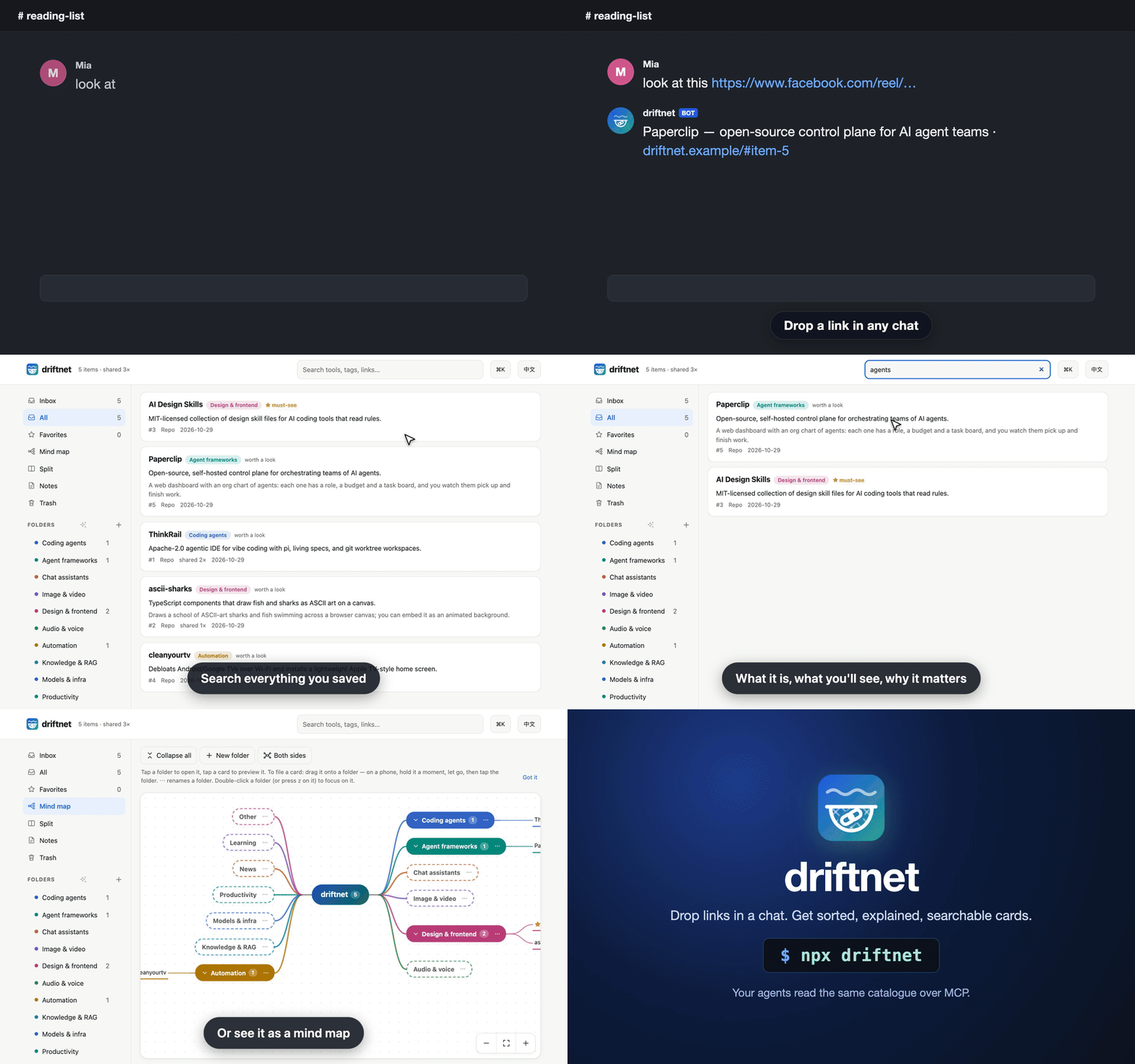
Every day your feed carries great articles, open-source repos and tools past you. You paste them into a chat "for later", and like everything else in the current, they drift out of sight.
driftnet is the net you leave in that current. Drop links in a group chat (LINE, Slack, Discord, Telegram), click the Chrome button, import your old bookmarks or use the command line. driftnet catches each one, follows a post to the project it is really about, boils it down to a short summary in your language, and files it in your own folders, in a local catalogue with full-text search (Chinese included). Your agents haul in the same catalogue over MCP. It runs on your own computer and works with any model, or none.
1. A post becomes the tool. A Facebook reel with no links in it goes into the chat. driftnet reads the caption, finds both repos on GitHub by exact name, and files each as its own card. The chat gets one line; the summary is on the page.
you ▸ this week's AI roundup https://www.facebook.com/share/v/1DfVB2odi3/

bot ▸ 📌 This week in AI (3/11)|News + Paperclip, RealWonder
      https://driftnet.example/#item-1
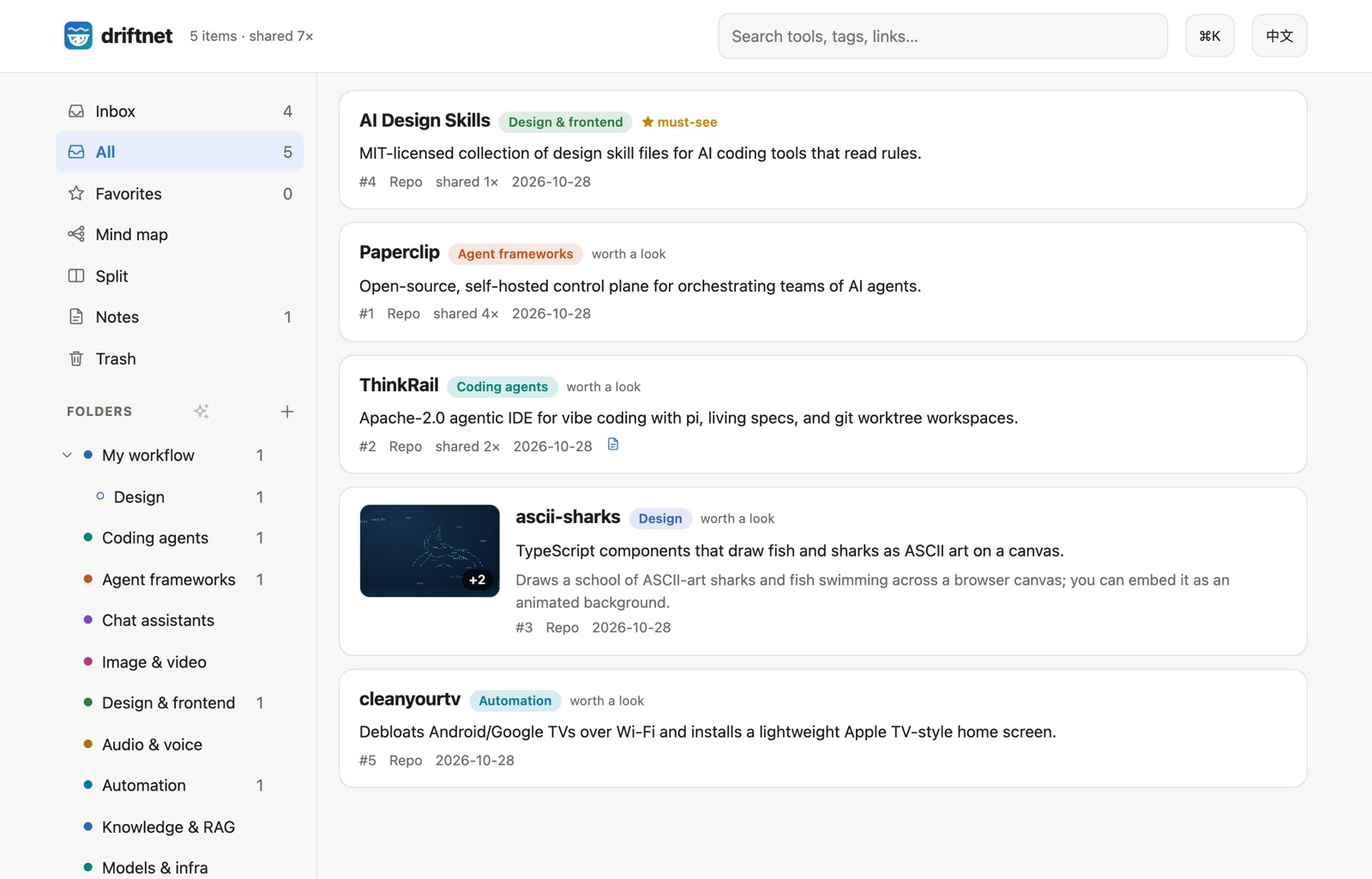
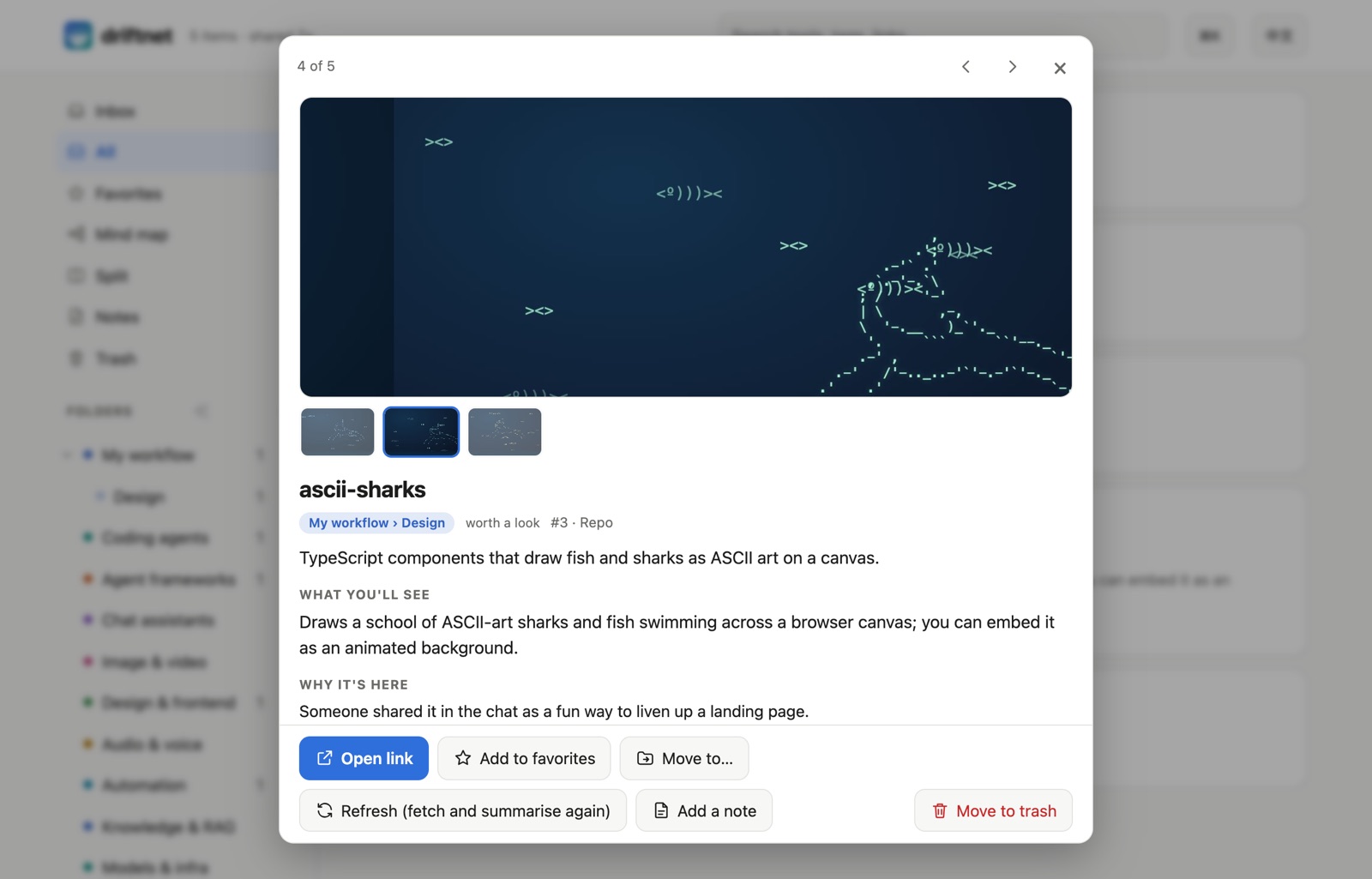
2. Know what it is at a glance. Before: a bare link in a chat. After: a card with pictures from the page, a one-line answer, what you'll see and why it's here, so you can tell in seconds whether to open it.
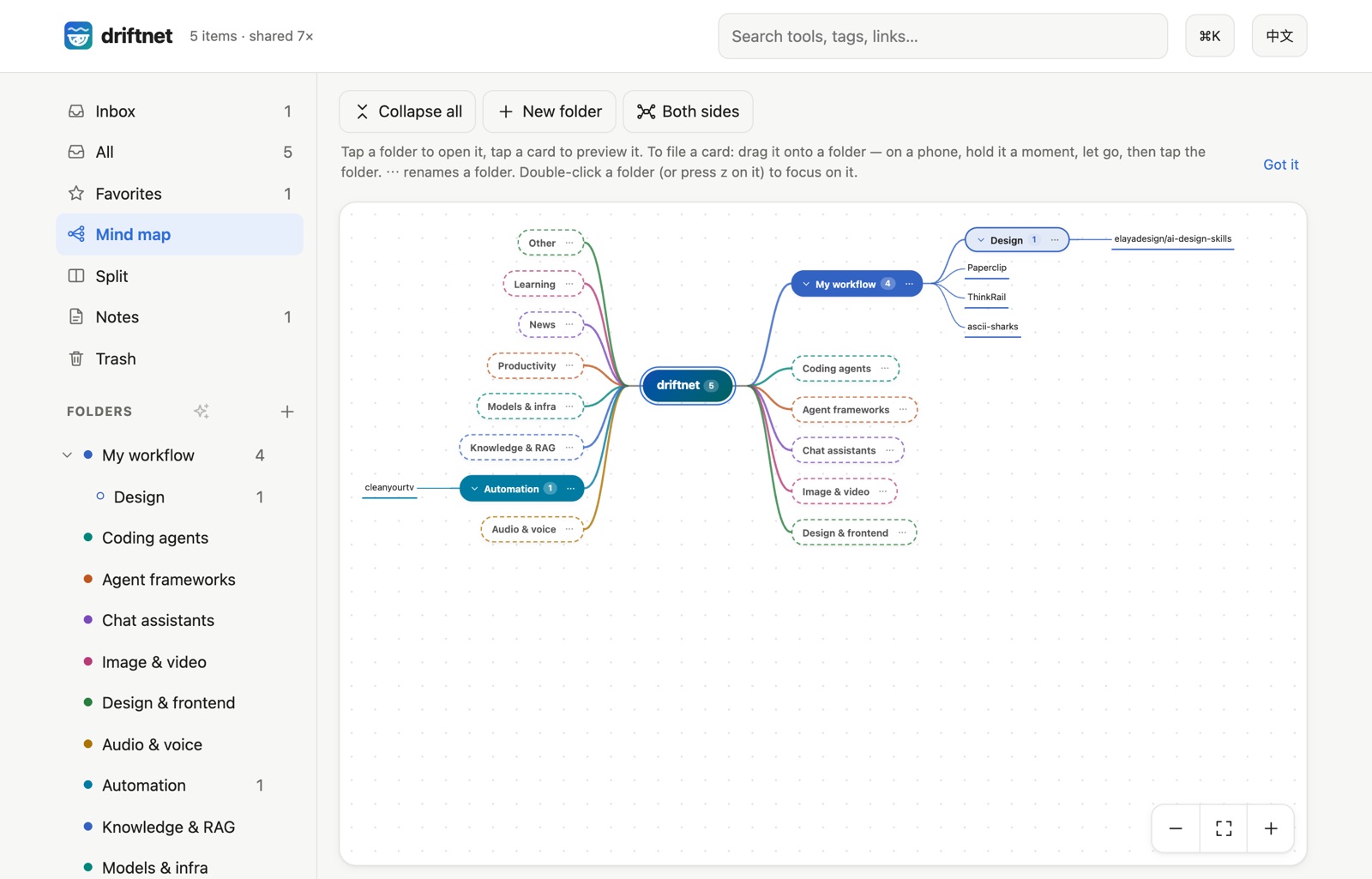
3. Sort with the mind map. New links the AI filed on its own wait in the Inbox with two or three suggested folders. Or drag a card onto a folder on the mind map, which branches out from the root like XMind.
/openapi.json, /llms.txt, /feed.xml and an outgoing webhook; or let them do the reading (Agents).Everything runs on your own computer: no server to rent, no account. Want a look first? Try the demo runs the real page in your browser.
Copy this into Claude Code, Cursor, Codex or any agent that can run commands on your computer:
Read https://raw.githubusercontent.com/KevinChu1110/driftnet/main/docs/llms-install.txt and set up driftnet for me.
It checks Node.js, starts driftnet, connects itself over MCP and tells you when it is done.
You need Node.js 22.13 or newer. Never used a terminal? Step by step for Mac and Windows. Then, in a terminal:
npx driftnet
Your browser opens http://localhost:8787: that is driftnet's page, served by your own computer
(localhost means "this machine"; nobody else can see it). ⚙ Settings → AI: pick a provider and fill
in its key and model. Or skip it: links are still saved and wait unsorted under "Other", and an AI agent
can write the summaries (Agents). To connect the AI apps on this computer (Claude Code,
Claude Desktop, Cursor, Windsurf, Codex) in one go: npx driftnet init.
Closing that terminal window stops driftnet. To have it start at login and run in the background instead (macOS, Linux, Windows), run once:
npx driftnet service install # status: npx driftnet service status · undo: npx driftnet service uninstall
Your settings live in ~/.driftnet/.env and the catalogue in ~/.driftnet/driftnet.db.
Any of these works:
npx driftnet add https://github.com/paperclipai/paperclipA card shows up within 5–30 seconds: what it is, why it might matter to you, and where it was filed.
From source, to hack on it or run it as a login service:
git clone https://github.com/KevinChu1110/driftnet && cd driftnet
pnpm install
pnpm start                                                 # http://localhost:8787
pnpm service:install                                       # optional: start at login (macOS / Linux)
With Docker:
docker build -t driftnet https://github.com/KevinChu1110/driftnet.git
docker run -d -p 127.0.0.1:8787:8787 -v driftnet:/data -e DRIFTNET_HOST=0.0.0.0 driftnet start
Without start, the container is the MCP server over stdio (docker run -i --rm -v driftnet:/data driftnet).
DRIFTNET_HOME moves the settings and the catalogue somewhere else.
PORT=8788.driftnet needs Node 22.13 or newer: install it with nvm install 22 or from nodejs.org.421: without a password driftnet only answers on this machine. Set a password (DRIFTNET_TOKEN), or list the address in DRIFTNET_ALLOWED_HOSTS.| You are | Start with | Model |
|---|---|---|
| Just me, on my computer | The Chrome extension and the web page | A local one through Ollama (see Models), or none |
| A group chat | A Discord, Telegram, Slack or LINE bot, see Ways in | Any |
| My agents | MCP, the Claude Code plugin or the agent queue | None needed: the agent does the reading |
| Install for beginners | Never used a terminal: Mac and Windows, step by step |
| How driftnet handles a link | The eight steps, reels and shorts, link health, search by meaning |
| Ways in | Chrome, Discord, Telegram, Slack, LINE, votes, the weekly digest |
| The web page | Cards, folders, mind map, AI tidy-up, notes, sharing, shortcuts |
| Chrome extension | What it captures on Threads, X and Instagram, install |
| Models | Picking a model (API, subscription, Ollama or none), judges, plugins |
| Agents | MCP tools, the Claude Code plugin, letting your agent do the reading |
| Command line | driftnet add, search, export, backup and the rest |
| Settings | Every setting, backup and restore |
| Putting it online | A password, a public URL, LINE webhooks |
| What stays stable | What 1.x promises not to break: your data, settings, MCP tools, API, CLI |
| Contributing | Layout, tests, releasing, extending |
[!IMPORTANT] The catalogue stays on your machine. To judge and summarise a link, driftnet sends a digest (title, outline, the chat text it was shared with) to TypeSafe if Jev is on and to your model provider if one is set. Chat messages without a link are never processed or stored. With Ollama and
DRIFTNET_JUDGE=off, nothing leaves your machine. Take it all with you any time: export to Markdown or an Obsidian / Notion vault from the sidebar, orGET /api/export. If you turn it on (DRIFTNET_UPDATE_CHECK=1), the only other call driftnet makes on its own is the once-a-day check for a new version (a plain request to the npm registry); it is off unless turned on.
⚙ Settings › General › Backup downloads one zip of your catalogue and settings (passwords and keys left out unless you ask); npx driftnet backup does the same from a terminal. See Settings.
Issues with a link driftnet handled badly are the most useful help: real links people share are how every feature here was found. Code: see CONTRIBUTING.md.
driftnet is free and MIT. If it saves you time, a star helps others find it, and you can buy me a coffee.

Claim this server with your GitHub account to request manual ownership verification.
Link to the catalog listing for driftnet: self-hosted MCP server that catches, summarizes and files shared links from your README. This badge does not certify ownership, compatibility or security.
[](https://awesome-mcp.com/servers/driftnet)Public repository statistics could not be verified. Check the configured source address; unavailable counts are not zero.
Separate sources, scopes and periods. Never combined or treated as installations, active users or security reviews.
No reviewed package or image identity; download statistics are not listed yet.
Alternative and complementary servers in the same category
Oleafly is a live collaborative LaTeX, Typst and Markdown editor for research that offers a local MCP server and an oleafly mcp stdio command so outside AI clients can use its project tools.
Buddy is an Android app that offers its phone tools through a local MCP server to Claude Code, Codex, OpenCode, Antigravity, and Grok sessions.

Tuqui is a hosted MCP server that connects Odoo with Claude and ChatGPT so users can ask about sales, stock, customers and overdue invoices in plain language.
