
Oleafly is a live collaborative LaTeX, Typst and Markdown editor for research that offers a local MCP server and an oleafly mcp stdio command so outside AI clients can use its project tools.
Repository stats unavailable
Productivity & Ops
A local-first MCP server that gives AI agents access to Garmin body battery, training readiness, sleep, HRV and activity data.
Garmin MCP is cataloged as an MCP server attributed to davidmosiah. A local-first MCP server that gives AI agents access to Garmin body battery, training readiness, sleep, HRV and activity data. It is categorized under productivity work. See the capability inspector for recorded interfaces and their independent review status; consult upstream documentation for the current interface.
Installation configuration is not reviewed. No executable setup is offered for this entry; inspect the source repository before proceeding.
Catalog license label: MIT. Check the source repository's current license and terms before using, modifying or distributing this software.
Capability definitions are not reviewed. Unreviewed imports are not exposed as trusted interfaces.
No reviewed records to display. This does not establish that upstream lacks this capability.
No reviewed records to display. This does not establish that upstream lacks this capability.
No reviewed records to display. This does not establish that upstream lacks this capability.
Email delivery is not connected. This page does not collect email addresses or create subscriptions.
Browse the registry for current listings instead.
Reviews for Garmin MCP are not available yet
Review publishing and storage are not connected. This page does not collect or publish ratings or comments, including after sign-in.
README.md · 8376cad114b6 · Fetched 2026-11-13 13:46:46 UTC
Original upstream text, without AI rewriting. Scripts, forms and unsafe links are filtered for safety.
Showing the last retrieved documentation snapshot; check the source for current changes.
Upgrading to 0.8.0: read the migration guide for local-only HTTP, disabled authenticated-response caching, and stricter input/profile limits.









⚡ One-command install with Delx Wellness for Hermes:
npx -y delx-wellness-hermes setup— preconfigures this connector and the full Delx Wellness stack in a dedicated Hermes profile.Or wire it standalone into Claude Desktop / Cursor / ChatGPT Desktop — see the install section below. Runnable examples live in the Delx Wellness hub.
Public proof: Garmin MCP is tracked in the Delx Open Source Growth Snapshot alongside downloads, stars and next-action priorities. If it saves you Garmin Connect and MCP setup time, star this repo so other training-focused agent builders can find it faster.
First useful prompt:
Use garmin_connection_status, then garmin_daily_summary, then give me a 5-line operating brief for today.
Give your AI agent your Garmin Body Battery, training readiness, sleep, HRV and activities — local-first, tokens never leave your machine.
Unofficial project. Not affiliated with, endorsed by or supported by Garmin. This is not official Garmin Health API partnership access — it uses the unofficial Garmin Connect personal-token mode.
npx -y garmin-mcp-unofficial setupPart of Delx Wellness, a registry of local-first wellness MCP connectors.
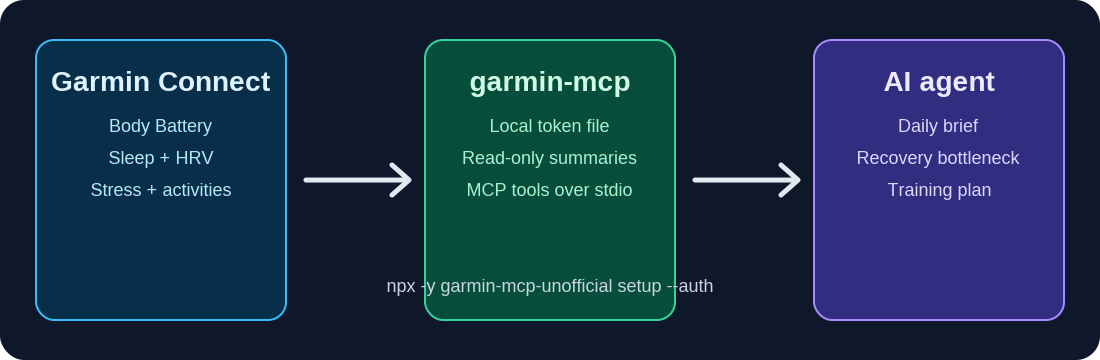
No Garmin developer app is required. setup only writes local MCP configuration; it does not ask for your Garmin password.
npx -y garmin-mcp-unofficial setup            # writes local config
npx -y garmin-mcp-unofficial auth             # built-in login, prompts for credentials locally (no Python needed)
npx -y garmin-mcp-unofficial doctor           # verifies you're ready
Default is stdio. Optional Streamable HTTP — no session id, JSON responses, loopback only:
npx -y garmin-mcp-unofficial --http
# GET  http://127.0.0.1:3000/health
# POST http://127.0.0.1:3000/mcp   (sessionless)
Env: GARMIN_MCP_HOST, GARMIN_MCP_PORT, GARMIN_MCP_TRANSPORT=http.
Or one shot: npx -y garmin-mcp-unofficial setup --auth
auth runs a self-contained Node login and prompts locally for Garmin email, password and MFA when needed. The MCP does not store your Garmin password — only Garmin Connect tokens, saved at ~/.garmin-mcp/garmin_tokens.json with user-only permissions. See the auth quickstart walkthrough for real terminal output, or docs/quickstart.md for the full flow.
If Garmin returns HTTP 429, a Cloudflare challenge, or an auth message that says Garmin SSO omitted responseStatus.type, stop retrying for a while. Repeated headless login attempts can make the private endpoint throttle harder. Use docs/auth.md for the safe recovery path.
Then add this to your MCP client config:
{
  "mcpServers": {
    "garmin": {
      "command": "npx",
      "args": ["-y", "garmin-mcp-unofficial"]
    }
  }
}
Use garmin_connection_status to check setup, then run garmin_daily_summary.
Give me a 5-line operating brief for today.
Call garmin_weekly_summary with response_format=json. Identify my biggest
recovery/sleep/stress bottleneck and give me a next-week plan.
Use the garmin_intraday_investigation prompt for date=today, focus=stress.
Don't claim Garmin can prove anything it can't.
Start with garmin_connection_status, then garmin_daily_summary (daily readiness, sleep, load) or garmin_weekly_summary (scorecard, bottlenecks, next-week plan). The server also exposes per-day signals (sleep, HRV, stress, Body Battery, training readiness, heart rate, SpO2, respiration, intensity minutes, hydration), activities, profile/devices and weight, plus prompts and resources.
See docs/tools.md for the full tool list, prompts, resources, data-availability matrix, configuration, Hermes setup and development notes.
GARMIN_PRIVACY_MODE defaults to summary (more conservative than other Delx Wellness connectors) because the auth model is unofficial.structured mode, normalized aliases are additive: complete upstream Garmin fields and nested DTOs remain available after secret/GPS redaction.~/.garmin-mcp/garmin_tokens.json with user-only permissions and are never returned by tools. Your Garmin password is never stored — only short-lived tokens persist locally.GARMIN_CACHE has no effect.See docs/privacy.md for the full privacy model.
Want to see a connector like this drive a real end-to-end decision? The shared, reproducible proof lives in delx-living-body:
npx -y delx-living-body demo
It answers the anchor question — "Should I train hard today?" — by combining recovery, sleep and training-load signals across the Delx Wellness connectors.
The full Delx Wellness connector library:
| Provider | Package | Repo |
|---|---|---|
| WHOOP | whoop-mcp-unofficial | whoop-mcp |
| Oura | oura-mcp-unofficial | ouramcp |
| Garmin | garmin-mcp-unofficial | garmin-mcp |
| Strava | strava-mcp-unofficial | strava-mcp |
| Fitbit | fitbit-mcp-unofficial | fitbitmcp |
| Withings | withings-mcp-unofficial | withingsmcp |
| Apple Health | apple-health-mcp-unofficial | apple-health-mcp |
| Polar | polar-mcp-unofficial | polarmcp |
| Nourish (nutrition) | wellness-nourish | wellness-nourish |
One-command setup for Hermes — preconfigures every connector above plus wellness skills + onboarding: delx-wellness-hermes.
Peer (not a Delx package): mi-fitness-data-bridge by Kindred / @shkyyy18 — Xiaomi Mi Fitness, local-first, shares the agent-safe-series/v1 dense series envelope (duration-anchored coverage, hard max_points, full-res stats, no GPS in series tools). Design log: #19 · parity notes: docs/agent-safe-series-kindred.md.
MIT — see LICENSE. Code of Conduct.
This software is provided as-is. It is not a medical device, does not provide medical advice, and should not be used for diagnosis or treatment. The unofficial Garmin Connect mode can break if Garmin changes private auth or endpoints. Always consult qualified professionals for medical concerns.
Daily brief demo: docs/daily-brief-demo.md
Same package, two doors. MCP registers tools on stdio/HTTP. The skill can drive the same tools through the CLI when the client has no MCP:
npx -y garmin-mcp-unofficial call garmin_connection_status --json '{}'
Copy skill/SKILL.md into your agent skills dir.
Claim this server with your GitHub account to request manual ownership verification.
Link to the catalog listing for Garmin MCP from your README. This badge does not certify ownership, compatibility or security.
[](https://awesome-mcp.com/servers/garminmcp)Public repository statistics could not be verified. Check the configured source address; unavailable counts are not zero.
Separate sources, scopes and periods. Never combined or treated as installations, active users or security reviews.
No reviewed package or image identity; download statistics are not listed yet.
Alternative and complementary servers in the same category
Oleafly is a live collaborative LaTeX, Typst and Markdown editor for research that offers a local MCP server and an oleafly mcp stdio command so outside AI clients can use its project tools.
Buddy is an Android app that offers its phone tools through a local MCP server to Claude Code, Codex, OpenCode, Antigravity, and Grok sessions.

Tuqui is a hosted MCP server that connects Odoo with Claude and ChatGPT so users can ask about sales, stock, customers and overdue invoices in plain language.
