


Oleafly is a live collaborative LaTeX, Typst and Markdown editor for research that offers a local MCP server and an oleafly mcp stdio command so outside AI clients can use its project tools.
Repository stats unavailable
Productivity & Ops
An MCP server that provides tools to automate LinkedIn job post searching, storing results in a local SQLite database, and managing them through an AI assistant or a React dashboard.
LinkedIn Posts Hunter MCP Server is cataloged as an MCP server attributed to kevin-weitgenant. An MCP server that provides tools to automate LinkedIn job post searching, storing results in a local SQLite database, and managing them through an AI assistant or a React dashboard. It is categorized under productivity work. See the capability inspector for recorded interfaces and their independent review status; consult upstream documentation for the current interface.
Installation configuration is not reviewed. No executable setup is offered for this entry; inspect the source repository before proceeding.
Catalog license label: ISC. Check the source repository's current license and terms before using, modifying or distributing this software.
Capability definitions are not reviewed. Unreviewed imports are not exposed as trusted interfaces.
No reviewed records to display. This does not establish that upstream lacks this capability.
No reviewed records to display. This does not establish that upstream lacks this capability.
No reviewed records to display. This does not establish that upstream lacks this capability.
Email delivery is not connected. This page does not collect email addresses or create subscriptions.
Browse the registry for current listings instead.
Reviews for LinkedIn Posts Hunter MCP Server are not available yet
Review publishing and storage are not connected. This page does not collect or publish ratings or comments, including after sign-in.
Scraped posts, metadata, and tracking data are stored in a local SQLite database on the user's machine.
Yes, posts can be managed through either the React UI or MCP tools, and changes in one are reflected in the other.
README.md · 0a71df6d0e7b · Fetched 2026-11-13 12:05:42 UTC
Original upstream text, without AI rewriting. Scripts, forms and unsafe links are filtered for safety.
Showing the last retrieved documentation snapshot; check the source for current changes.

Automate LinkedIn job post searching and tracking with AI-powered assistance





LinkedIn Posts Hunter MCP is a Model Context Protocol (MCP) server that provides tools for automating LinkedIn job post search and management through your AI assistant (Claude Desktop, Cursor, or other MCP-compatible clients).
Why LinkedIn Posts? Job opportunities often appear in LinkedIn posts first, before they're posted on traditional job boards. By monitoring LinkedIn posts, you can discover opportunities earlier and get a competitive advantage in your job search.
1. Authentication & Scraping
2. Local Data Storage
3. Visual Interface
4. Dual Control
manage_posts and viewer_filtershttps://github.com/user-attachments/assets/93f32db4-9ecf-4438-889f-ebe95b5b17e9
Watch the complete workflow from authentication to post management
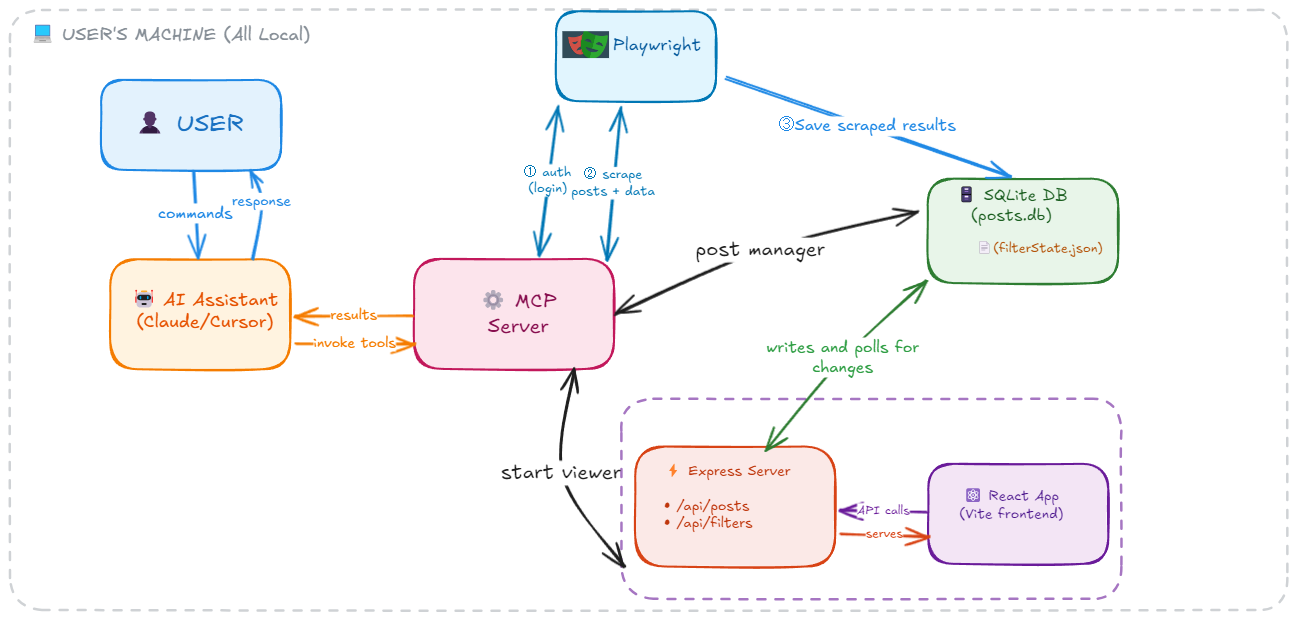
System architecture showing components and their interactions
This MCP server exposes 6 tools that can be called from your AI assistant:
authManage LinkedIn authentication with persistent session storage.
Parameters:
action: "authenticate" | "status" | "clear"force_reauth: boolean (optional)Usage:
"Authenticate my LinkedIn account"
"Check LinkedIn auth status"
"Clear my LinkedIn credentials"
search_postsSearch LinkedIn posts by keywords and save results to the database.
Parameters:
keywords: string (e.g., "Python developer remote")pagination: number (1-10, default: 3)headless: boolean (default: false) - show the browser window (default: false)Usage:
"Search LinkedIn for 'AI engineer' jobs"
"Find posts about 'React developer' with 5 pages"
manage_postsRead, update, or delete posts from the database with advanced filtering.
Parameters:
action: "read" | "update" | "delete"ids: number[] (optional)search_text: string (optional)date_from: string (YYYY-MM-DD, optional)date_to: string (YYYY-MM-DD, optional)applied: boolean (optional)limit: number (1-50, default: 10)new_description: string (for updates)new_keywords: string (for updates)new_applied: boolean (for updates)Usage:
"Show me posts I haven't applied to yet"
"Delete all posts that arent about job opportunities"
"Delete all posts that are only about senior-level positions"
viewer_filtersControl the React UI filters programmatically from the AI conversation.
Parameters:
keyword: string (optional)applied_status: "all" | "applied" | "not-applied" (optional)start_date: string (YYYY-MM-DD, optional)end_date: string (YYYY-MM-DD, optional)ids: string (comma-separated, optional)reset: boolean (optional)Usage:
"Filter to show only unapplied posts"
"Show posts from this week"
"Reset all filters"
start_viewerLaunch the React dashboard in your browser.
Usage:
"Open the LinkedIn post viewer"
"Start the dashboard"
stop_viewerStop the running Vite development server.
Usage:
"Close the viewer"
"Stop the dashboard"
Works for: Cursor IDE and Claude Desktop
This is the most reliable and widely-supported installation method.
Install globally:
npm install -g linkedin-posts-hunter-mcp
Add to your MCP configuration:
For Cursor IDE:
Open or create mcp.json at:
~/.cursor/mcp.json%USERPROFILE%\.cursor\mcp.json (typically C:\Users\YourName\.cursor\mcp.json)Add this configuration:
{
  "mcpServers": {
    "linkedin-posts-hunter-mcp": {
      "command": "linkedin-posts-hunter-mcp"
    }
  }
}
For Claude Desktop:
Open or create claude_desktop_config.json at:
~/Library/Application Support/Claude/claude_desktop_config.json%APPDATA%\Claude\claude_desktop_config.jsonAdd this configuration:
{
  "mcpServers": {
    "linkedin-posts-hunter-mcp": {
      "command": "linkedin-posts-hunter-mcp"
    }
  }
}
Restart your MCP client (Cursor or Claude Desktop)
That's it! No need to clone the repository or manage local builds.
For developers who want to modify the code or contribute:
Clone and install dependencies:
git clone https://github.com/kevin-weitgenant/LinkedIn-Posts-Hunter-MCP-Server.git
cd LinkedIn-Posts-Hunter-MCP-Server
npm run install:all
npm run build
Add to your MCP configuration:
For Cursor IDE (mcp.json):
{
  "mcpServers": {
    "linkedin-posts-hunter-mcp": {
      "command": "node",
      "args": [
        "/absolute/path/to/LinkedIn-Posts-Hunter-MCP-Server/build/index.js"
      ],
      "cwd": "/absolute/path/to/LinkedIn-Posts-Hunter-MCP-Server"
    }
  }
}
For Claude Desktop (claude_desktop_config.json):
{
  "mcpServers": {
    "linkedin-posts-hunter-mcp": {
      "command": "node",
      "args": [
        "/absolute/path/to/LinkedIn-Posts-Hunter-MCP-Server/build/index.js"
      ],
      "cwd": "/absolute/path/to/LinkedIn-Posts-Hunter-MCP-Server"
    }
  }
}
⚠️ Important: Replace /absolute/path/to/LinkedIn-Posts-Hunter-MCP-Server with your actual project path.
Restart your MCP client to load the server.
Authenticate with LinkedIn:
User: "Authenticate my LinkedIn account"
AI: Opens a browser for you to log in, saves credentials
Search for opportunities:
User: "Search LinkedIn for 'Senior TypeScript Developer remote' jobs"
AI: Searches LinkedIn, extracts post details, saves to database
Visual exploration:
User: "Open the post viewer"
AI: Launches React dashboard(where you can see the scraped posts) at http://localhost:5174
Filter and manage:
User: "Remove posts that aren't about job opportunities"
AI: Reads database, filters and displays only job-related posts

User: "Show only senior-level positions"
AI: Queries database for posts containing "senior", "lead", "principal"

User: "Show posts about React or Vue.js positions"
AI: Searches database and displays matching posts
Track applications:
User: "Mark posts 5, 7, and 12 as applied"
AI: Updates the database and confirms
All your LinkedIn data is stored locally on your computer in the following directories:
%APPDATA%\linkedin-mcp\~/.linkedin-mcp/linkedin.db - SQLite database containing all scraped posts, metadata, and your tracking dataauth.json - Your LinkedIn session cookies and authentication tokenssearches/ - Search session data and temporary fileslinkedin-mcp folder to remove all dataThe built-in web viewer (start_viewer) provides:
ISC
Contributions are welcome! Feel free to open issues or submit pull requests.
This is an experimental project, quick and dirty.
The scraping could definitely be optimized to be faster, the UI could be improved as well.
But at its is, is already somewhat useful.
Feel free to contribute.
Claim this server with your GitHub account to request manual ownership verification.
Link to the catalog listing for LinkedIn Posts Hunter MCP Server from your README. This badge does not certify ownership, compatibility or security.
[](https://awesome-mcp.com/servers/linkedin-posts-hunter-mcp-server)Public repository statistics could not be verified. Check the configured source address; unavailable counts are not zero.
Separate sources, scopes and periods. Never combined or treated as installations, active users or security reviews.
No reviewed package or image identity; download statistics are not listed yet.
Alternative and complementary servers in the same category
Oleafly is a live collaborative LaTeX, Typst and Markdown editor for research that offers a local MCP server and an oleafly mcp stdio command so outside AI clients can use its project tools.
Buddy is an Android app that offers its phone tools through a local MCP server to Claude Code, Codex, OpenCode, Antigravity, and Grok sessions.

Tuqui is a hosted MCP server that connects Odoo with Claude and ChatGPT so users can ask about sales, stock, customers and overdue invoices in plain language.
