
Oleafly is a live collaborative LaTeX, Typst and Markdown editor for research that offers a local MCP server and an oleafly mcp stdio command so outside AI clients can use its project tools.
Repository stats unavailable
Productivity & Ops
A Model Context Protocol server that converts Markdown-formatted quiz content into interactive HTML quizzes and Word quiz files with student and answer-key versions.
MCP Quiz Generator server is cataloged as an MCP server attributed to kkjzio. A Model Context Protocol server that converts Markdown-formatted quiz content into interactive HTML quizzes and Word quiz files with student and answer-key versions. It is categorized under productivity work. See the capability inspector for recorded interfaces and their independent review status; consult upstream documentation for the current interface.
Installation configuration is not reviewed. No executable setup is offered for this entry; inspect the source repository before proceeding.
Catalog license label: Not specified. Check the source repository's current license and terms before using, modifying or distributing this software.
Capability definitions are not reviewed. Unreviewed imports are not exposed as trusted interfaces.
No reviewed records to display. This does not establish that upstream lacks this capability.
No reviewed records to display. This does not establish that upstream lacks this capability.
No reviewed records to display. This does not establish that upstream lacks this capability.
Email delivery is not connected. This page does not collect email addresses or create subscriptions.
Browse the registry for current listings instead.
Reviews for MCP Quiz Generator server are not available yet
Review publishing and storage are not connected. This page does not collect or publish ratings or comments, including after sign-in.
It can generate an HTML-only file, a Word-only file, or both, with both being the default.
Files are saved in the data/ directory by default, or in a custom directory specified with the --output-folder parameter.
README.md · 4c4242125628 · Fetched 2026-11-13 13:05:02 UTC
Original upstream text, without AI rewriting. Scripts, forms and unsafe links are filtered for safety.
Showing the last retrieved documentation snapshot; check the source for current changes.
A quiz generator server based on Model Context Protocol (MCP) that generates Markdown questions according to requirements and converts them into HTML and Word format quiz files.
1. Which testing automation frameworks has MaxSoft developed?
    - [x] IntelliAPI  (Correct answer marked with [x])
    - [ ] WebBot      (Incorrect answer marked with [ ])
    - [ ] Gauge
    - [ ] Selenium
2. Which testing automation frameworks has MaxSoft developed?
    - [x] IntelliAPI  (Multiple correct answers all marked with [x])
    - [x] WebBot
    - [ ] Gauge       (Incorrect answer marked with [ ])
    - [ ] Selenium
3. MaxSoft is a software company.
    - (x) True        (Correct answer marked with (x))
    - ( ) False       (Incorrect answer marked with ( ))
4. Who is the co-founder of MaxSoft?
    - R:= Osanda      (Answer marked with R:= followed by correct answer)
Create MCP configuration file:
In Cursor/VSCode, open MCP settings and add the following configuration:
{
  "mcpServers": {
    "mcp-quiz-generator": {
      "command": "uvx",
      "args": ["mcp-quiz-generator" , "--output-folder" , "{output-folder-path}"]
    }
  }
}
Note: Replace {output-folder-path} with the storage path for generated files.
First ensure dependencies are installed:
uv sync
Add to MCP configuration:
{
  "mcpServers": {
    "mcp-quiz-generator": {
      "command": "/path/to/mcp-quiz-generator/.venv/bin/python",
      "args": ["run", "mcp-quiz-generator" , "--output-folder" , "{output-folder-path}"]
    }
  }
}
Note: Replace {output-folder-path} with the storage path for generated files.
markdown_content: Quiz content in Markdown formatformat_type: Output format
"html": Generate HTML file only"word": Generate Word file only"both": Generate both HTML and Word files (default)custom_filename: Custom filename (optional, without extension)If the --output-folder parameter is not used, generated files will be saved in the data/ directory by default:
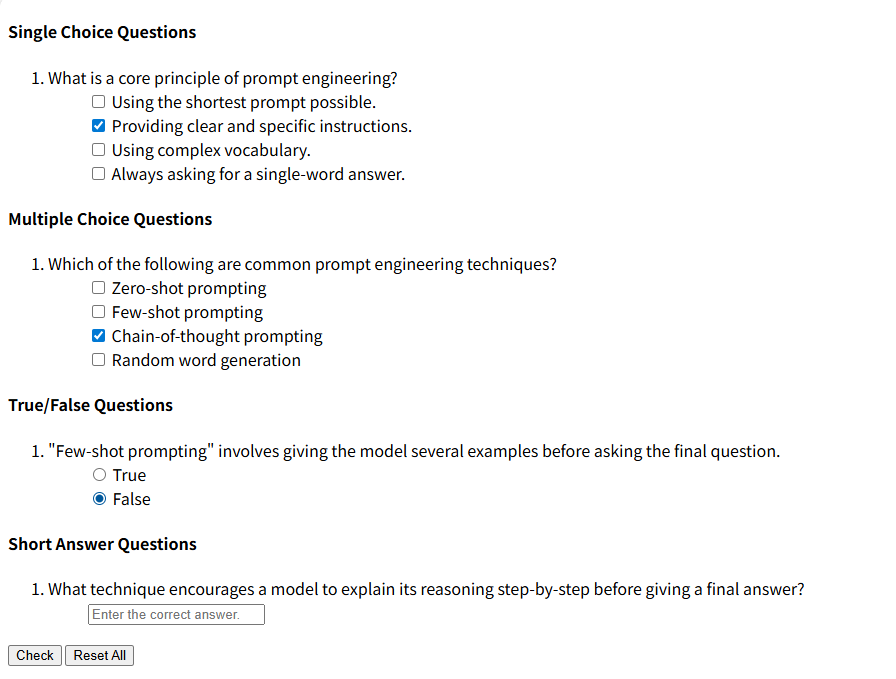
HTML file: Interactive quiz with online answering support
Word files:
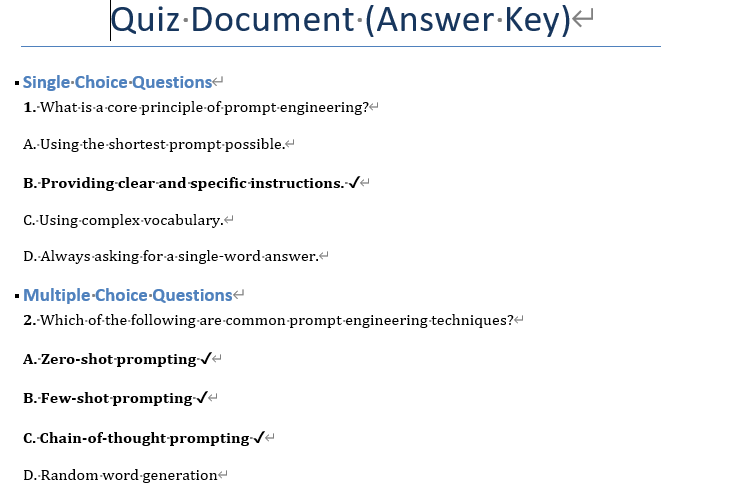
*_quiz.docx: Student version (without answers)
*_answer_key.docx: Teacher version (with answers and markings)
mcp-quiz-generator/
├── src/
│   └── quiz_mcp/
│       ├── __init__.py
│       ├── server.py          # MCP server main file
│       └── app/               # Application module directory
│           ├── extensions/    # Markdown extensions
│           └── static/        # Static resource files
├── data/                      # Output file directory (default)
├── pyproject.toml            # Project configuration
├── uv.lock                   # Dependency lock file
└── README.md                 # Project documentation
uv command not found
MCP server connection failed
uv syncGenerated file format is incorrect
The --output-folder parameter is used to specify the output directory for generated quiz files.
Syntax:
uv run mcp-quiz-generator --output-folder <directory-path>
Parameter Description:
<directory-path>: Specifies the directory path for output filesdata (if this parameter is not specified, files will be saved to data/ directory)Usage Examples:
# Use default output directory (data/)
uv run mcp-quiz-generator

# Specify custom output directory
uv run mcp-quiz-generator --output-folder ./my_quizzes

# Specify absolute path
uv run mcp-quiz-generator --output-folder /home/user/quiz_files

# Specify relative path
uv run mcp-quiz-generator --output-folder ../output
Here's a complete usage example showing how to generate a quiz about Prompt Engineering through an AI assistant:
User Question:
Q: give me some quiz about Prompt Engineering then generate word and html file
AI Assistant Response:
Of course, I can generate a quiz about Prompt Engineering for you. Here are a few questions. I will then use a tool to generate the Word and HTML files.

Here is the quiz content:

#### Single Choice Questions

1. What is a core principle of prompt engineering?
   -  Using the shortest prompt possible.
   -  Providing clear and specific instructions.
   -  Using complex vocabulary.
   -  Always asking for a single-word answer.

#### Multiple Choice Questions

1. Which of the following are common prompt engineering techniques?
   -  Zero-shot prompting
   -  Few-shot prompting
   -  Chain-of-thought prompting
   -  Random word generation

#### True/False Questions

1. "Few-shot prompting" involves giving the model several examples before asking the final question.
   - (x) True
   - ( ) False

#### Short Answer Questions

1. What technique encourages a model to explain its reasoning step-by-step before giving a final answer?
   - R:= Chain-of-thought prompting

Now, let me generate the files for you.

(mcp-quiz-generator : generate_quiz completed)

I have generated the quiz files for you in both Word and HTML formats. Here are the files that have been created:

- **HTML (Interactive Quiz):** `{output-folder-path}\Prompt_Engineering_Quiz.html`
- **Word (Quiz for students):** `{output-folder-path}\Prompt_Engineering_Quiz_quiz.docx`
- **Word (Answer Key):** `{output-folder-path}\Prompt_Engineering_Quiz_answer_key.docx`

Let me know if you need anything else
MIT License
Issues and Pull Requests are welcome!
https://github.com/osandadeshan/markdown-quiz-generator
Claim this server with your GitHub account to request manual ownership verification.
Link to the catalog listing for MCP Quiz Generator server from your README. This badge does not certify ownership, compatibility or security.
[](https://awesome-mcp.com/servers/mcp-quiz-generator)Public repository statistics could not be verified. Check the configured source address; unavailable counts are not zero.
Separate sources, scopes and periods. Never combined or treated as installations, active users or security reviews.
No reviewed package or image identity; download statistics are not listed yet.
Alternative and complementary servers in the same category
Oleafly is a live collaborative LaTeX, Typst and Markdown editor for research that offers a local MCP server and an oleafly mcp stdio command so outside AI clients can use its project tools.
Buddy is an Android app that offers its phone tools through a local MCP server to Claude Code, Codex, OpenCode, Antigravity, and Grok sessions.

Tuqui is a hosted MCP server that connects Odoo with Claude and ChatGPT so users can ask about sales, stock, customers and overdue invoices in plain language.
