
Oleafly is a live collaborative LaTeX, Typst and Markdown editor for research that offers a local MCP server and an oleafly mcp stdio command so outside AI clients can use its project tools.
Repository stats unavailable
Productivity & Ops
An MCP server that bridges MCP Host applications and the mem0 cloud service to support structured project memory management and semantic search.
mem0 MCP Server for Project Management is cataloged as an MCP server attributed to kunihiros. An MCP server that bridges MCP Host applications and the mem0 cloud service to support structured project memory management and semantic search. It is categorized under productivity work. See the capability inspector for recorded interfaces and their independent review status; consult upstream documentation for the current interface.
Installation configuration is not reviewed. No executable setup is offered for this entry; inspect the source repository before proceeding.
Catalog license label: Not specified. Check the source repository's current license and terms before using, modifying or distributing this software.
Capability definitions are not reviewed. Unreviewed imports are not exposed as trusted interfaces.
No reviewed records to display. This does not establish that upstream lacks this capability.
No reviewed records to display. This does not establish that upstream lacks this capability.
No reviewed records to display. This does not establish that upstream lacks this capability.
Email delivery is not connected. This page does not collect email addresses or create subscriptions.
Browse the registry for current listings instead.
Reviews for mem0 MCP Server for Project Management are not available yet
Review publishing and storage are not connected. This page does not collect or publish ratings or comments, including after sign-in.
It expects TOML-formatted strings with fields such as project and timestamp.
Logging defaults to stderr, and can be disabled or written to an absolute file path via command-line arguments.
README.md · 589601a2141c · Fetched 2026-11-13 10:30:07 UTC
Original upstream text, without AI rewriting. Scripts, forms and unsafe links are filtered for safety.
Showing the last retrieved documentation snapshot; check the source for current changes.
Version: 0.3.3
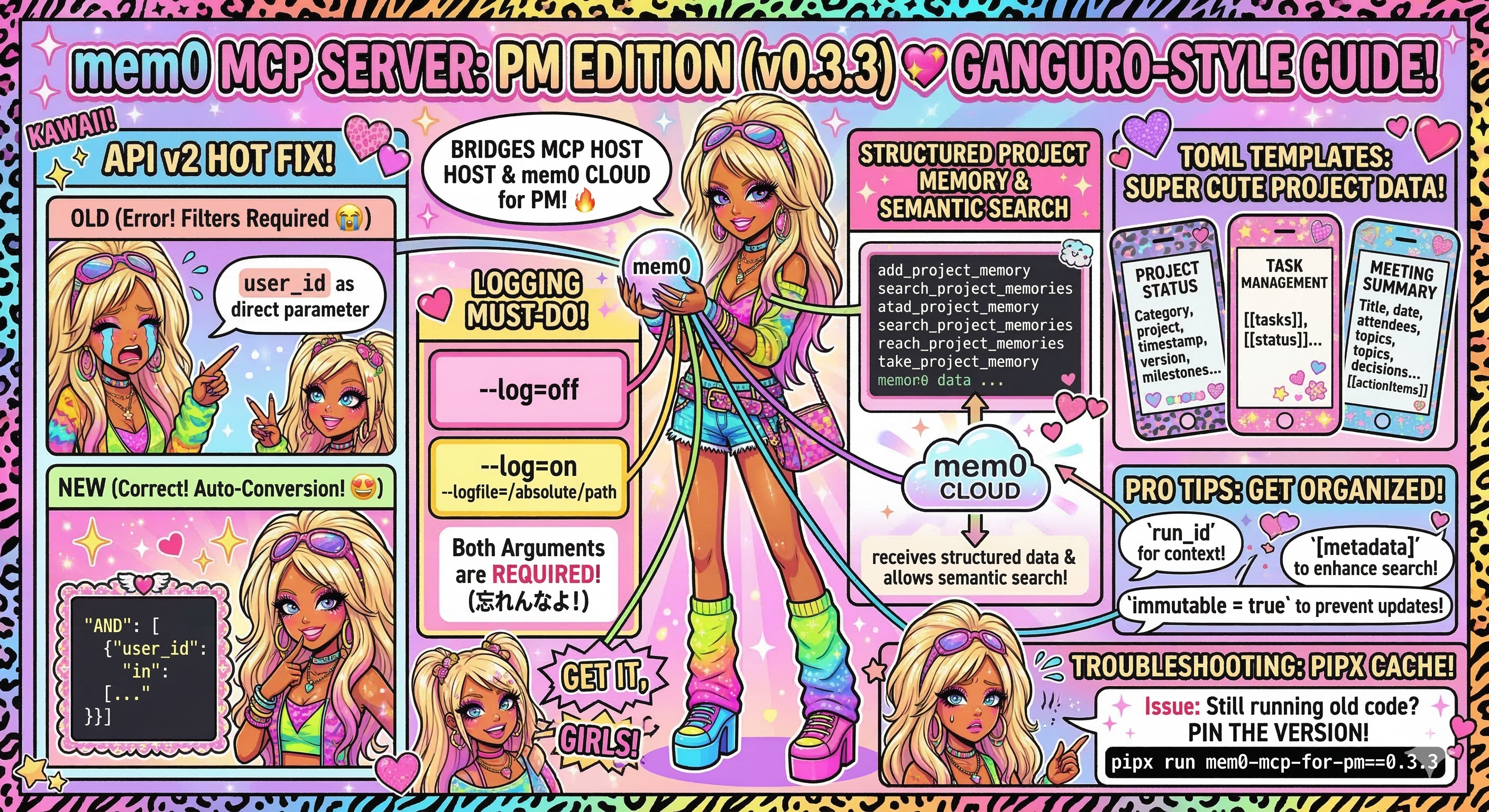
mem0 MCP Server bridges MCP Host applications and the mem0 cloud service, enabling structured project memory management and semantic search for project-related information.
get_all_project_memories and search_project_memories now work correctly with mem0 v2 API.
user_id parameter with a mandatory filters object: {"AND": [{"user_id": {"in": ["..."]}}]}.user_id directly now results in "Filters are required and cannot be empty" error. This release converts the parameter automatically.pyproject.toml script entrypoint--logfileWhen running this MCP Server, you must explicitly specify the log output mode and (if enabled) the absolute log file path via command-line arguments.
--log=off : Disable all logging (no logs are written)--log=on --logfile=/absolute/path/to/logfile.log : Enable logging and write logs to the specified absolute file path"mem0": {
"command": "pipx",
"args": ["run", "mem0-mcp-for-pm", "--log=off"],
"env": {
"MEM0_API_KEY": "{apikey}"
}
}
"mem0": {
  "command": "pipx",
  "args": ["run", "mem0-mcp-for-pm", "--log=on", "--logfile=/workspace/logs/mem0-mcp-server.log"],
  "env": {
    "MEM0_API_KEY": "{apikey}"
  }
}
Note:
- When logging is enabled, logs are written only to the specified absolute file path. Relative paths or omission of
--logfilewill cause an error.- When logging is disabled, no logs are output.
- If the required arguments are missing or invalid, the server will not start and will print an error message.
- The log file must be accessible and writable by the MCP Server process.
- If you have trouble to run this server, it may be due to caching older version of mem0-mcp-for-pm. Please try to run it with the latest version (set
x.y.zto the latest version) of mem0-mcp-for-pm by the below setting.
When installing via pipx, the actual process may run from a cached environment under ~/.cache/pipx/ rather than ~/.local/share/pipx/venvs/. In this case, reinstalling with pipx install --force updates the venvs directory but the running process still uses the old cached code.
pipx install --force . but behavior has not changed.ps aux | grep mem0 shows the process running from ~/.cache/pipx/<hash>/bin/python.Option 1: Specify a pinned version in your MCP Host config (recommended)
Pin the version explicitly so pipx fetches the correct release from PyPI each time:
"mem0": {
  "command": "pipx",
  "args": ["run", "mem0-mcp-for-pm==0.3.3", "--log=off"],
  "env": {
    "MEM0_API_KEY": "{apikey}"
  }
}
Option 2: Clear the pipx cache manually
# Find and remove the stale cache directory
ls ~/.cache/pipx/
rm -rf ~/.cache/pipx/<hash-directory>/

# Then reinstall
pipx install --force mem0-mcp-for-pm
Option 3: Kill the running process
After reinstalling, kill the old process so your MCP Host (e.g., VS Code) restarts it with the new binary:
kill $(ps aux | grep mem0-mcp-for-pm | grep -v grep | awk '{print $2}')
Then reload/restart your MCP Host application.
"mem0": {
  "command": "pipx",
  "args": ["run", "mem0-mcp-for-pm==x.y.z", "--log=off"],
  "env": {
    "MEM0_API_KEY": "{apikey}"
  }
}
add_project_memoryget_all_project_memoriessearch_project_memoriesupdate_project_memorydelete_project_memorydelete_all_project_memoriesAll tools are available via stdio-based MCP protocol.
--logfile /path/to/logfile.logSee LICENSE file.
The uniqueness of this forked is the structured format between MCP Host and mem0 is expected in coding format like TOML. Make sure you set the custom instruction to be able to handle better.
In order to make mem0 working as fitting to project management purpose, this forked has the following instruction for AI.
To register project information in mem0, always use the TOML format for all entries.
Follow these guidelines to ensure optimal AI extraction, searchability, and project management usability:
category (e.g., "Task Management", "Project Status", etc.)project (project name)timestamp (ISO 8601 format, e.g., "2025-04-29T16:00:00+09:00")Below are TOML templates for common project management use cases.
Adapt these as needed, but keep the structure and metadata consistent for better search and extraction.
Project Status Example
category = "Project Status"
project = "project-name"
timestamp = "2025-04-29T16:00:00+09:00"
name = "Project Name"
purpose = "Project Purpose"
version = "1.2.0"
phase = "development"
completionLevel = 0.65
milestones = ["Planning", "Development"]
currentFocus = ["Implementing Feature X", "Optimizing Component Y"]

[metadata]
type = "status"
priority = "high"
tags = ["backend", "release"]
Task Management Example
category = "Task Management"
project = "project-name"
timestamp = "2025-04-29T16:00:00+09:00"

[[tasks]]
description = "Implement Feature X"
status = "in-progress"
deadline = "2025-05-15"
assignee = "Team A"
dependencies = ["Component Y"]

[metadata]
type = "task"
priority = "high"
tags = ["frontend", "authentication"]
run_id parameter to logically group related entries.project:project-name:category:subcategoryrun_id = "project:member-system:feature:authentication"
[metadata] TOML table to enhance search and filtering.[metadata]
type = "task"
priority = "high"
tags = ["frontend"]
immutable = true to prevent updates.expiration_date = "YYYY-MM-DD" to set expiry.project and timestamp.By following these TOML-based guidelines, you will maximize the effectiveness of mem0’s project memory extraction and management.
For more advanced use cases, refer to the source code and server-side custom instructions.
This guide outlines strategies and templates for effectively managing project information using mem0. The aim is to improve searchability and reusability of project data through structured templates and metadata management.
mem0 can effectively manage the following types of information. Using structured templates improves searchability and reusability. Note that the templates provided are examples and should be adapted to fit specific project needs.
Template:
category = "Project Status"
project = "project-name"
timestamp = "2025-04-29T16:00:00+09:00"
name = "Project Name"
purpose = "Project Purpose"
version = "1.2.0"
phase = "development"
completionLevel = 0.65
milestones = ["Planning Phase", "Development Phase"]
currentFocus = ["Implementing Feature X", "Optimizing Component Y"]
risks = ["Concerns about API stability", "Resource shortage"]
Template:
category = "Task Management"
project = "project-name"
timestamp = "2025-04-29T16:00:00+09:00"

[[tasks]]
description = "Implement Feature X"
status = "in-progress"
deadline = "2025-03-15"
assignee = "Team A"
dependencies = ["Component Y"]

[[tasks]]
description = "Setup Development Environment"
status = "completed"
Template:
category = "Meeting Summary"
project = "project-name"
timestamp = "2025-04-29T16:00:00+09:00"
title = "Weekly Progress Meeting"
date = "2025-03-23"
attendees = ["Sato", "Suzuki", "Tanaka"]
topics = ["Progress Report", "Risk Management", "Next Week's Plan"]
decisions = ["Approve additional resource allocation", "Delay release date by one week"]
[[actionItems]]
description = "Procedure for adding resources"
assignee = "Sato"
dueDate = "2025-03-25"
[[actionItems]]
description = "Revise test plan"
assignee = "Suzuki"
dueDate = "2025-03-24"
Using mem0's run_id parameter, you can logically group related information. This helps maintain specific conversation flows or project contexts.
Recommended Format:
project:project-name:category:subcategory
Usage Example:
run_id = "project:member-system:feature:authentication"
Using metadata can enhance the searchability of information. We recommend using the following schema:
[metadata]
type = "meeting|task|decision|status|risk"
priority = "high|medium|low"
tags = ["frontend", "backend", "design"]
status = "pending|in-progress|completed"
Using the immutable and expiration_date parameters, you can manage the lifecycle of information.
Usage Example:
immutable = true
expiration_date = "2025-06-30"
category = "Project Status"
project = "member-system"
timestamp = "2025-05-01T10:00:00+09:00"
sprint = "Sprint-2025-05"
duration = "2 weeks"
goals = ["Implement authentication feature", "Improve UI"]
[[tasks]]
description = "Implement login screen"
assignee = "Tanaka"
estimate = "3 days"
[[tasks]]
description = "API integration"
assignee = "Sato"
estimate = "2 days"
[metadata]
type = "status"
tags = ["sprint-planning"]
category = "Project Status"
project = "member-system"
timestamp = "2025-05-08T15:00:00+09:00"
sprint = "Sprint-2025-05"
completionLevel = 0.4
[[status]]
task = "Implement login screen"
progress = 0.7
status = "in-progress"
[[status]]
task = "API integration"
progress = 0.2
status = "in-progress"
blockers = ["Change in API response specification"]
[metadata]
type = "status"
tags = ["sprint-progress"]
category = "Risk Management"
project = "member-system"
timestamp = "2025-05-03T11:00:00+09:00"
[[risks]]
description = "Concerns about external API stability"
impact = "High"
probability = "Medium"
mitigation = "Implement fallback mechanism"
owner = "Development Lead"
status = "open"
[metadata]
type = "risk"
priority = "high"
category = "Risk Management"
project = "member-system"
timestamp = "2025-05-10T16:30:00+09:00"
[[risks]]
description = "Concerns about external API stability"
status = "Resolved"
resolution = "Fallback mechanism implementation completed"
[metadata]
type = "risk"
priority = "medium"
[metadata] table.run_id hierarchically to maintain information relevance.To implement the above improvements, we recommend the following steps:
Enhance the add_project_memory Method:
Update Custom Instructions:
run_id (introduce hierarchical structure).These improvements will enhance the usability and efficiency of information management while maintaining compatibility with existing APIs.
The proposed improvements provide value in the following ways while maintaining compatibility with existing mem0 MCP server functions:
Claim this server with your GitHub account to request manual ownership verification.
Link to the catalog listing for mem0 MCP Server for Project Management from your README. This badge does not certify ownership, compatibility or security.
[](https://awesome-mcp.com/servers/mem0-mcp-for-pm)Public repository statistics could not be verified. Check the configured source address; unavailable counts are not zero.
Separate sources, scopes and periods. Never combined or treated as installations, active users or security reviews.
No reviewed package or image identity; download statistics are not listed yet.
Alternative and complementary servers in the same category
Oleafly is a live collaborative LaTeX, Typst and Markdown editor for research that offers a local MCP server and an oleafly mcp stdio command so outside AI clients can use its project tools.
Buddy is an Android app that offers its phone tools through a local MCP server to Claude Code, Codex, OpenCode, Antigravity, and Grok sessions.

Tuqui is a hosted MCP server that connects Odoo with Claude and ChatGPT so users can ask about sales, stock, customers and overdue invoices in plain language.
