
Oleafly is a live collaborative LaTeX, Typst and Markdown editor for research that offers a local MCP server and an oleafly mcp stdio command so outside AI clients can use its project tools.
Repository stats unavailable
Productivity & Ops
A set of local and hosted MCP servers providing time awareness, persistent memory, task decomposition, corporate-speak translation, and clinical guardrails for MCP-aware clients.
NeuroDock MCP servers for neurodivergent cognition support is cataloged as an MCP server attributed to tlennon-ie. A set of local and hosted MCP servers providing time awareness, persistent memory, task decomposition, corporate-speak translation, and clinical guardrails for MCP-aware clients. It is categorized under productivity work. See the capability inspector for recorded interfaces and their independent review status; consult upstream documentation for the current interface.
Installation configuration is not reviewed. No executable setup is offered for this entry; inspect the source repository before proceeding.
Catalog license label: AGPL-3.0-or-later. Check the source repository's current license and terms before using, modifying or distributing this software.
Capability definitions are not reviewed. Unreviewed imports are not exposed as trusted interfaces.
No reviewed records to display. This does not establish that upstream lacks this capability.
No reviewed records to display. This does not establish that upstream lacks this capability.
No reviewed records to display. This does not establish that upstream lacks this capability.
Email delivery is not connected. This page does not collect email addresses or create subscriptions.
Browse the registry for current listings instead.
Reviews for NeuroDock MCP servers for neurodivergent cognition support are not available yet
Review publishing and storage are not connected. This page does not collect or publish ratings or comments, including after sign-in.
No by default: local servers read and write the local store, and nothing leaves the machine unless a cloud option is explicitly enabled.
Yes. Stateless translation, guardrail, and decompose tools are served from a hosted OAuth endpoint with no local install required.
No. Self-identification is sufficient with no diagnosis or gatekeeping required.
README.md · 2d9cac6498c9 · Fetched 2026-11-13 11:34:21 UTC
Original upstream text, without AI rewriting. Scripts, forms and unsafe links are filtered for safety.
Showing the last retrieved documentation snapshot; check the source for current changes.

A cognitive substrate that remembers, paces, and refuses. Built with neurodivergent professionals, not for them.








NeuroDock plugs into Claude Desktop / Claude Code / Cursor (any MCP-aware client). Local-first by default. No telemetry. AGPL-3.0-or-later.
You chat with Claude exactly like normal. Under the hood, Claude calls NeuroDock's local MCP servers; they read and write your local store; the result flows back into Claude's reply.
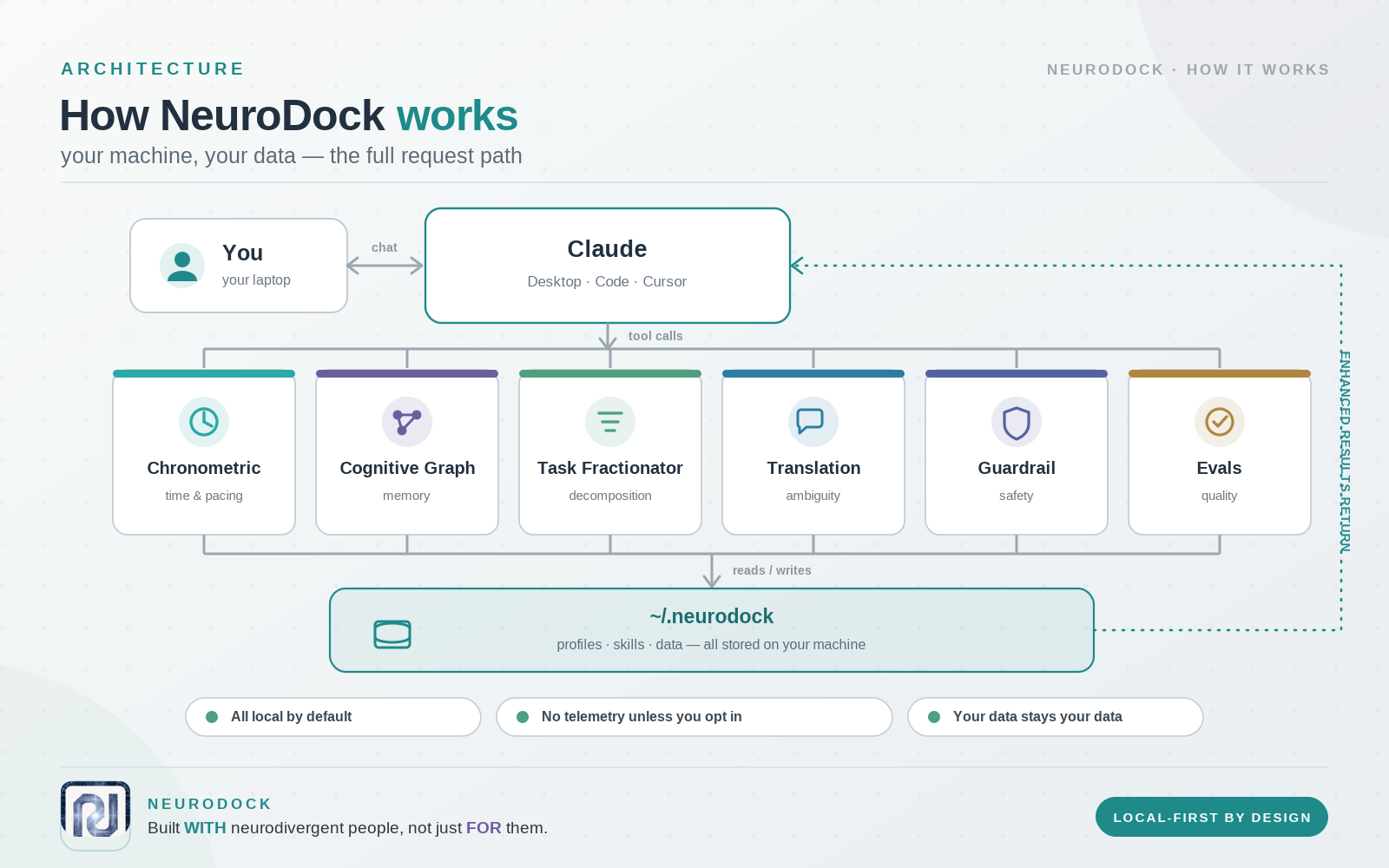
Everything runs on your laptop. Nothing leaves your machine unless you explicitly turn on a cloud option.
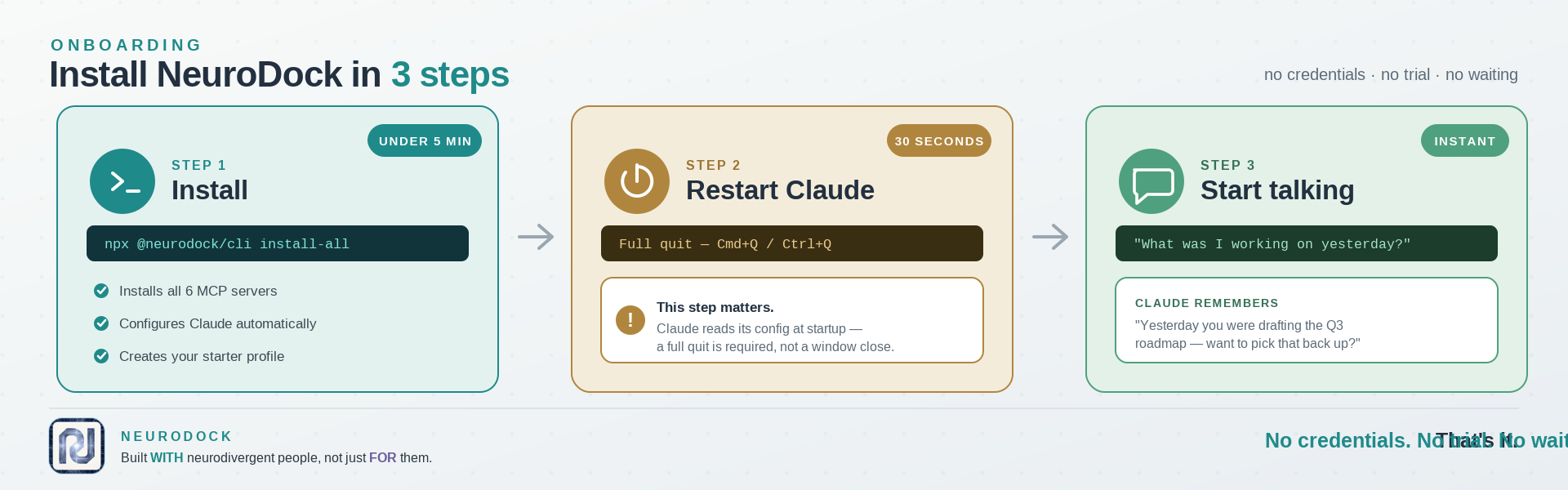
npx --yes @neurodock/cli@latest install-all
One command. It pip-installs the five MCP servers (plus the neurodock-evals
harness), wires Claude Desktop / Claude Code / Cursor, and drops a starter
profile at ~/.neurodock/profile.yaml.
Then, in any conversation, try one of:
What was I working on yesterday?
Plan my morning.
Decompose this goal into atomic tasks.
Claude calls the MCP tools under the hood; you just talk.
🛑 First-time gotcha: full-quit Claude before testing
Claude only reads its MCP config at startup. Closing the window is not enough. This is the #1 silent failure people hit.
- macOS:
Cmd + Q(or Claude menu → Quit Claude).- Windows: right-click the Claude icon in the system tray → Quit.
- Linux: kill the process (
pkill -f Claudeor quit from the tray).Then reopen Claude and try one of the prompts above.
Requires Python 3.11+ and Node 22+. Works on macOS, Linux, Windows.
Why
@latest? If you previously rannpm install -g @neurodock/cli, npx will silently reuse that older global install instead of fetching the current version — and old versions don't haveinstall-all. The@latesttag forces npx to resolve against the npm registry every time. Same reason we use it onupdate.
NeuroDock ships across two registries: the Python MCP servers (MCP = Model Context Protocol — the standard that lets Claude call local tools) on PyPI, and the user-facing CLI on npm. The CLI wraps everything else.
1. Install the six MCP servers
pip install neurodock-mcp-chronometric neurodock-mcp-cognitive-graph neurodock-mcp-task-fractionator neurodock-mcp-translation neurodock-mcp-guardrail neurodock-evals
2. Wire them into your MCP-aware client
npx --yes @neurodock/cli@latest init
Detects Claude Desktop, Claude Code, or Cursor and writes the server entries automatically.
3. Restart Claude (full quit, not close-window — see the callout above).
About the neurodock command — it lives on npm as @neurodock/cli,
not on PyPI. The pip install step gives you the MCP server binaries
that Claude calls over stdio; the CLI is separate. Two ways to run it:
# Option A — run via npx, no install
npx --yes @neurodock/cli@latest doctor

# Option B — install once, call 'neurodock' from anywhere
npm install -g @neurodock/cli
neurodock doctor
@neurodock/cli exposes: init, doctor, validate, update, sync,
uninstall, host install, host uninstall, profile show,
profile validate, install-all, install-hooks, examples,
plugin add/remove/list/enable/disable/validate.
By default NeuroDock waits for you to ask. That's the wrong shape — an ND user in hyperfocus is the one least likely to remember to run a break tool. One command flips it:
neurodock install-hooks --self-test
This wires a small Python script (bundled, stdlib-only — no extra install needed) into Claude Code's hook system. It then runs silently on every tool call and auto-fires the chronometric / rumination / sycophancy heuristics when patterns trip. You get a one-line stderr banner on the next prompt — never blocked, always dismissible.
For host-agnostic coverage (catches you working in the terminal at 02:00 too), add the standalone daemon:
neurodock install-hooks --install-daemon --self-test
That registers a per-user autostart entry (HKCU Run on Windows,
LaunchAgent on macOS, systemd --user on Linux). The daemon polls
every 5 min and surfaces OS-native notifications.
Opt out anytime:
neurodock install-hooks --uninstall          # removes both
export NEURODOCK_GUARDRAILS=off              # disables without removing
The browser extension carries its own equivalent (Phase 2 watchdog) —
it's enabled by default and toggleable from chrome.storage.local via
the popup Settings tab.
See docs/.../proactive-guardrails for the design behind this and the
opt-out matrix.
Want to see it work without installing from PyPI/npm at all?
TESTING_LOCAL.md walks through the from-clone path.
The install-all command above is the recommended path. The same servers are
also distributed through three standard channels — all install the identical
local stdio servers, so you can pick whichever fits your client:
Claude Code plugin — bundles the five MCP servers and a set of ND-aware
skills in one step. Requires uv (the servers
run via uvx).
/plugin marketplace add tlennon-ie/neurodock
/plugin install neurodock@neurodock
Claude Desktop extension (.mcpb) — one-click install, no config editing.
One bundle per server under mcpb/; build with
npx @anthropic-ai/mcpb pack mcpb/neurodock-mcp-translation and drag the
.mcpb onto Claude Desktop → Settings → Extensions. Requires uv.
Official MCP Registry — each server ships a
server.json and is published to
registry.modelcontextprotocol.io
under the io.github.tlennon-ie/* namespace, so MCP-aware clients can discover
them directly.
Hosted remote server (no install) — the stateless tools (translation,
guardrail, and decompose) are also served over OAuth at a hosted HTTPS
endpoint, so you can use them with no local install and no uv:
https://mcp.neurodock.org/mcp
In Claude (claude.ai or Desktop) → Settings → Connectors → Add custom
connector → paste that URL → complete the sign-in prompt. The eight stateless
tools appear immediately. An opt-in memory surface (enable_hosted_storage,
connect_byos_storage, record_fact, recall_entity, …) is also exposed but
does nothing until you explicitly enable storage for your signed-in account. The
personal cognitive graph and neurotype profile are never hosted — they stay
on the local install. Full walkthrough: Hosted server.
The hosted remote server is live at mcp.neurodock.org.
npx --yes @neurodock/cli@latest update
One command. Upgrades all six MCP servers (pip install --upgrade /
uv tool install), refreshes your wired client configs, and
re-registers the optional native-messaging host. Same flags as
install-all (--client, --profile, --installer, --dry-run,
--no-native-host, --yes).
The browser extension auto-updates through the Chrome / Firefox / Edge
store; sideloaded users git pull and rebuild.
Full-quit Claude after updating so it re-reads its MCP config — same as first install.
Just want to re-shape client configs without touching package versions?
Use neurodock sync.
The cognitive substrate in a real session — you talk to Claude normally; under the hood it calls NeuroDock's MCP tools to remember, pace, and decompose.
https://github.com/user-attachments/assets/bcbf65ce-88dd-4f83-8dc1-d56bdde01bed
The browser extension — translating corporate-speak inline on Gmail, Slack, and the rest, right where you read it, without context-switching back to Claude.
https://github.com/user-attachments/assets/5fa25044-923e-4c25-95bd-f1bd63fb3d6e
Prefer a written walkthrough? Try the Claude Desktop walkthrough.
There's also a browser extension that translates corporate-speak inline on Gmail, Slack, Linear, Notion, GitHub, Google Docs, and Outlook. It calls the same translation tools the MCP server exposes, but surfaces them where you'd actually use them — a floating Translate button plus a right-click menu — so you don't have to context-switch back to Claude just to decode "let's circle back on this."
You pick the LLM provider. Five options: Ollama (local, default), LM
Studio (local), OpenRouter (including its auto-router), Anthropic, OpenAI.
The API key, if you need one, stays in chrome.storage.local and never
leaves the device.
Store submission is still pending (the listing prep is done; the developer accounts and screenshots aren't). Until then, load it manually:
pnpm --filter @neurodock/extension-browser run buildchrome://extensions, turn Developer mode on,
click Load unpacked, and pick packages/extension-browser/.output/chrome-mv3/.about:debugging, click This Firefox → Load
Temporary Add-on, and pick manifest.json inside
packages/extension-browser/.output/firefox-mv3/.Full per-provider setup walkthrough lives in
packages/extension-browser/README.md.
NeuroDock is built around three pillars. Each pillar is made of small, independent packages that you can use one at a time or all together.
flowchart TB
  subgraph cognitive[Cognitive substrate]
    chrono[mcp-chronometric<br/>time + sessions]
    cgraph[mcp-cognitive-graph<br/>memory]
    frac[mcp-task-fractionator<br/>decomposition]
  end
  subgraph comms[Communication layer]
    trans[mcp-translation<br/>tone + meetings]
    ext[extension-browser<br/>Gmail, Slack, ...]
  end
  subgraph safety[Clinical guardrails]
    guard[mcp-guardrail<br/>rumination / hyperfocus / sycophancy]
    clin[clinical<br/>heuristic library]
  end
  skills[skills/<br/>six markdown bundles] --> cognitive
  skills --> comms
  skills --> safety
  cli[cli/<br/>install + manage] --> cognitive
  cli --> comms
  cli --> safety
neurodock/
├── packages/
│ ├── mcp-chronometric/      Time + session + break management
│ ├── mcp-cognitive-graph/   Persistent memory + entity recall (SQLite)
│ ├── mcp-task-fractionator/ Decompose vague goals into atomic tasks
│ ├── mcp-translation/       Corporate-speak translator (MCP + browser ext)
│ ├── mcp-guardrail/         Rumination / hyperfocus / sycophancy detectors
│ ├── skills/                Six SKILL.md bundles activating on phrases
│ ├── extension-browser/     WXT-built Chrome / Firefox / Edge extension
│ ├── native-host/           Optional native messaging host (extension <-> profile.yaml)
│ ├── cli/                   `npx neurodock init` and friends
│ ├── core/                  Shared types, profile schema, plugin spec
│ ├── clinical/              Heuristic library for the guardrail server
│ └── evals/                 Eval harness + corpus contribution pipeline
├── docs/                    Astro Starlight site (deploys to docs.neurodock.org)
├── plugins/                 Drop your own plugins here; auto-discovered
└── profiles/                Curated profile presets
Public preview shipped. All three substrate pillars (cognitive,
communication, guardrails) are built, on main, and installable from
npm + PyPI. Latest substrate tag: v0.7.3.
neurodock-mcp-chronometric — 5 tools, 22 tests, mypy --strict.neurodock-mcp-cognitive-graph — 4 tools, SQLite + sqlite-vec
record_fact errors so wrong-shape input
no longer leaks raw Pydantic traces.neurodock-mcp-task-fractionator — 2 tools, 32 tests; ISO 8601
duration spec.neurodock-mcp-translation — 4 tools, 29 tests; deterministic
baseline plus LLM refinement envelope.neurodock-mcp-guardrail — all three detectors live: rumination,
hyperfocus, sycophancy (48 tests, public heuristics).neurodock-evals — air-gapped harness, 10 seed corpus examples,
contribution pipeline.neurodock-clinical — reserved name; importable detector library
(currently a stub).@neurodock/cli — 19 verbs across 7 groups: init, install-all,
examples, doctor, validate, update, sync, uninstall,
host install/uninstall, profile show/validate, install-hooks,
plugin add/remove/list/enable/disable/validate. install-hooks
wires the proactive-guardrail hook into Claude Code and optionally
registers the standalone daemon.@neurodock/core — profile schema and plugin protocol manifests
(JSON Schema 2020-12).@neurodock/native-host — optional Chrome Native Messaging host
for the extension ↔ profile sync.@neurodock/extension-browser — WXT MV3 build for Chrome / Firefox
/ Edge. Seven sites wired. Five real LLM providers: Ollama, LM Studio,
Anthropic, OpenAI, OpenRouter. Includes the Phase 2 proactive watchdog
for hyperfocus / late-night / single-host rumination signals.
Not yet store-published.adhd-daily-planner, audhd-context-recovery,
ocd-decision-finalizer (beta), hyperfocus-formatter, visual-organizer,
asd-meeting-translator.docs.neurodock.org.TESTING_LOCAL.md — step-by-step guide to running this against your
Claude Desktop, today, from a clone. Takes about 5 minutes.
The docs site lives at docs.neurodock.org.
Source is at docs/src/content/docs/. To preview locally:
pnpm --filter @neurodock/docs run dev
# opens http://localhost:4321
The substrate splits into three pillars:
ETHICS.md.All three layers compose via the same MCP protocol the LLM client already speaks. There's no "NeuroDock app" — the surface is your Claude client.
Design rationale lives in docs/decisions/:
CONTRIBUTING.md has the welcome + on-ramp. Pick whichever lane matches
what you want to do:
Smallest first PR (~15 min):
packages/skills/<name>/tests/)packages/evals/corpora/translation/)One-afternoon PR:
packages/skills/<name>/ as a template; see
docs/src/content/docs/contribute/write-a-skill.mdx.mcp-cognitive-graph.Multi-day PR:
docs/src/content/docs/contribute/write-a-plugin.mdx.No code:
packages/evals/ and is the highest-
leverage non-code contribution.All PRs run CI: pnpm turbo run lint typecheck test build + uv run pytest
uv run mypy --strict packages/.... Every published package has its
own CHANGELOG. Use Conventional Commits in PR titles (feat:, fix:,
docs:, test:, chore:, ci:).Full text in MANIFESTO.md. Ethics framework in ETHICS.md. Governance
in GOVERNANCE.md.
AGPL-3.0-or-later. Plugins must declare an AGPL-compatible license to load — the SPDX whitelist is in ADR 0007.
Claim this server with your GitHub account to request manual ownership verification.
Link to the catalog listing for NeuroDock MCP servers for neurodivergent cognition support from your README. This badge does not certify ownership, compatibility or security.
[](https://awesome-mcp.com/servers/neurodock)Public repository statistics could not be verified. Check the configured source address; unavailable counts are not zero.
Separate sources, scopes and periods. Never combined or treated as installations, active users or security reviews.
No reviewed package or image identity; download statistics are not listed yet.
Alternative and complementary servers in the same category
Oleafly is a live collaborative LaTeX, Typst and Markdown editor for research that offers a local MCP server and an oleafly mcp stdio command so outside AI clients can use its project tools.
Buddy is an Android app that offers its phone tools through a local MCP server to Claude Code, Codex, OpenCode, Antigravity, and Grok sessions.

Tuqui is a hosted MCP server that connects Odoo with Claude and ChatGPT so users can ask about sales, stock, customers and overdue invoices in plain language.
