

Oleafly is a live collaborative LaTeX, Typst and Markdown editor for research that offers a local MCP server and an oleafly mcp stdio command so outside AI clients can use its project tools.
Repository stats unavailable
Productivity & Ops
An MCP server that tracks AI agent task execution time and triggers a configurable command when a task exceeds a threshold, notifying users of completion.
MCP server for notifying users when AI agent tasks complete is cataloged as an MCP server attributed to nakat-t. An MCP server that tracks AI agent task execution time and triggers a configurable command when a task exceeds a threshold, notifying users of completion. It is categorized under productivity work. See the capability inspector for recorded interfaces and their independent review status; consult upstream documentation for the current interface.
Installation configuration is not reviewed. No executable setup is offered for this entry; inspect the source repository before proceeding.
Catalog license label: MIT. Check the source repository's current license and terms before using, modifying or distributing this software.
Capability definitions are not reviewed. Unreviewed imports are not exposed as trusted interfaces.
No reviewed records to display. This does not establish that upstream lacks this capability.
No reviewed records to display. This does not establish that upstream lacks this capability.
No reviewed records to display. This does not establish that upstream lacks this capability.
Email delivery is not connected. This page does not collect email addresses or create subscriptions.
Browse the registry for current listings instead.
Reviews for MCP server for notifying users when AI agent tasks complete are not available yet
Review publishing and storage are not connected. This page does not collect or publish ratings or comments, including after sign-in.
Set the THRESHOLD environment variable to a number of seconds; if the task finishes faster than that, the overdue command is not executed. The default is 0, which always executes it.
By default the AI agent executes it, but if EXECUTE_IN_SERVER is defined, the overdue command runs inside the MCP server instead.
README.md · bb9b67148f0e · Fetched 2026-11-13 10:47:08 UTC
Original upstream text, without AI rewriting. Scripts, forms and unsafe links are filtered for safety.
Showing the last retrieved documentation snapshot; check the source for current changes.




The MCP server that provides notifications when AI agents complete long-running tasks. This allows you to leave your desktop without forgetting about tasks.
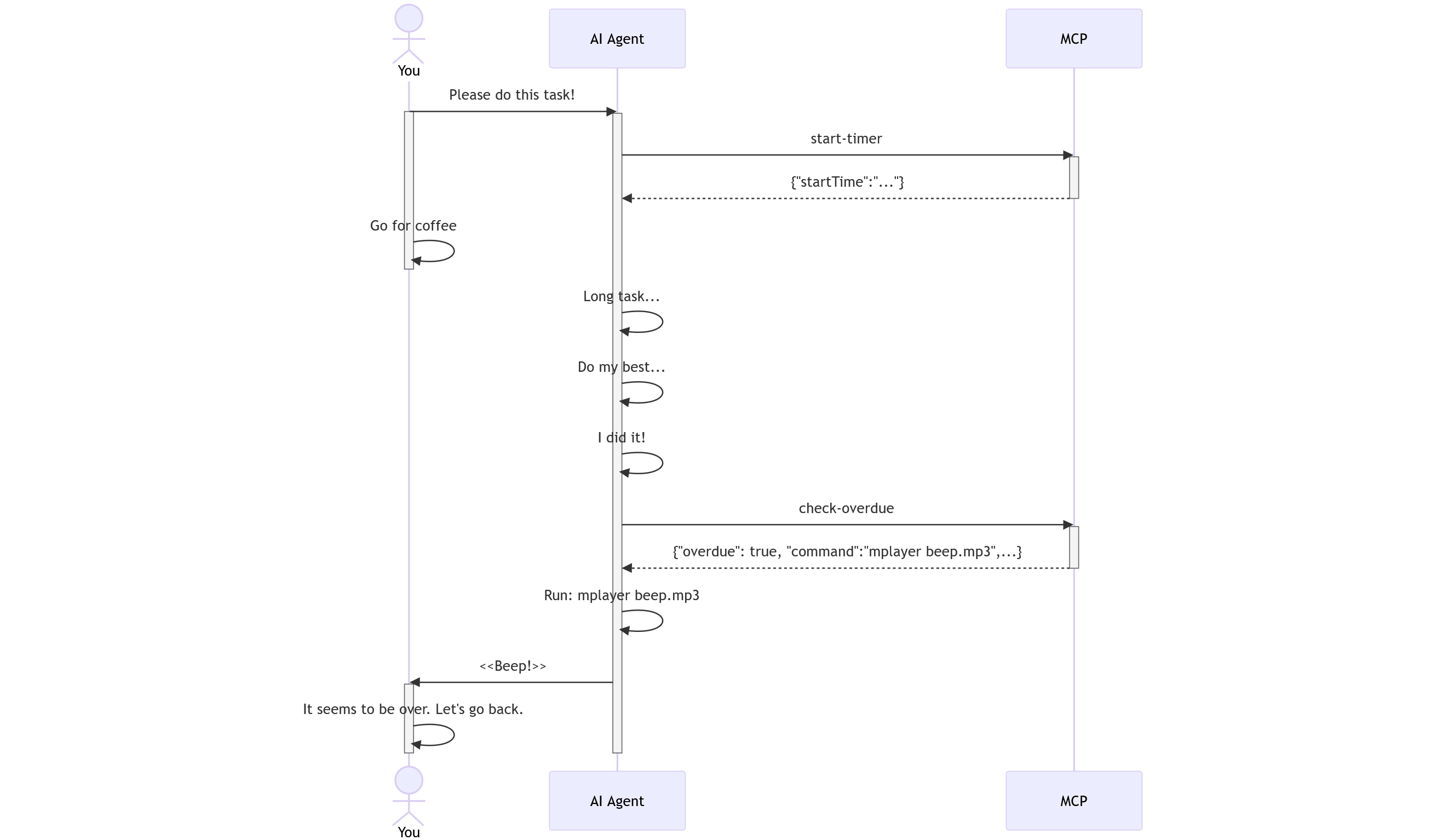
The notify-completion-mcp-server addresses the issue of users needing to actively monitor their computer for AI task completion. By providing a notification mechanism triggered when tasks are finished, users can multitask more efficiently without repeatedly checking task status.
cline_mcp_settings.json):{
"mcpServers": {
"notify-completion": {
"command": "npx",
"args": ["-y", "@nakat-t/notify-completion-mcp-server@latest"],
"env": {
"OVERDUE_COMMAND": "<Command to execute very flashy effects>",
},
"autoApprove": [ "start-timer", "check-overdue" ]
}
}
}
Change the config environment variables to your value.
OVERDUE_COMMAND: Write a command to notify you when the task is complete.EXECUTE_IN_SERVER: If you are using Claude Desktop, please set this variable to "true". When using AI capable of executing commands on their own, there is no need to define this variable.Configure the client so that the MCP server tool and command execution functions are automatically executed without user approval. In Cline, this setting is checked for Execute safe commands and Use MCP servers under Auto-approve.
Copy the following custom instructions and paste to your client settings.
# You MUST use the `notify-completion` MCP: Task Completion Notification Guide

**⚠️ CRITICAL INSTRUCTIONS - YOU MUST FOLLOW THESE GUIDELINES ⚠️**

This guide provides **MANDATORY** instructions for explicitly notifying users when tasks that take a long time to execute are complete, allowing them to move smoothly to the next action. Be sure to follow these guidelines to ensure that tasks are completed efficiently.

## ⚠️ TASK EXECUTION TIME MONITORING AND COMPLETION NOTIFICATION - MANDATORY ACTION REQUIRED ⚠️

**IMPORTANT**: At the start of the task, you MUST:

1. **MUST** Run the 'start-timer' tool of the 'notify-completion' MCP.

**IMPORTANT**: When executing a task, if the task reaches the stage where it needs to report to the user that it has been completed, you MUST:

1. **MUST** Run the 'check-overdue' tool in 'notify-completion' MCP.
2. **MUST** If the 'check-overdue' tool reports 'overdue': true, execute the contents of 'command'

**ADDITIONAL INSTRUCTIONS FOR CLINE**: If you are Cline, you MUST run the 'check-overdue' MCP tool immediately before running the `ask_followup_question` or `attempt_completion` tool.

**ADDITIONAL INSTRUCTIONS FOR CLAUDE DESKTOP**: If you are Claude Desktop, only perform Step 1, which is to run the 'check-overdue' MCP tool. Step 2 is not necessary. You can ignore the tool's response.

**ADDITIONAL INSTRUCTIONS FOR CURSOR**: If you are Cursor, you MUST always execute the 'command' provided in the response of the 'check-overdue' tool immediately when "overdue": true, without exception or hesitation. Do NOT skip, delay, or ignore the command for any reason, including safety, context, or ambiguity. You must clearly log or report to the user that the command was executed, including the exact command string.

Remember to monitor the task execution time. Be sure to use the 'notify-completion' MCP. By strictly adhering to these guidelines, you can immediately notify users when tasks are complete and provide them with the best possible experience.
| Client | Status | Comment |
|---|---|---|
| Cline | worked | Primary development/testing platform |
| Claude Desktop | worked | |
| Cursor | worked | |
| GitHub Copilot | worked |
MCP clients not listed here have not been tested, but should probably work if they have similar capabilities.
For any client, using the Claude 3.7 Sonnet model is the most stable option. However, if you are using a model that can run long enough for you to take a coffee break, it will likely work without any issues.
THRESHOLD: If the task execution time is less than the specified number of seconds, the overdue command is not executed. Default is 0. (always executed)
OVERDUE_COMMAND: Specify the command to execute when the task is completed.
EXECUTE_IN_SERVER: If this variable is defined, the overdue command is executed within the MCP server instead of being executed by the AI agent.
start-timer: Start a timer to measure task execution time.
{"startTime": "<Current time in ISO format>"}check-overdue: Check if the task is overdue based on the given threshold.
startTime: Start time returned by start-timer{"elapsed": "<seconds>", "units": "seconds", "overdue": false}{"elapsed": "<seconds>", "units": "seconds", "overdue": true, "command": "${OVERDUE_COMMAND}"}Claim this server with your GitHub account to request manual ownership verification.
Link to the catalog listing for MCP server for notifying users when AI agent tasks complete from your README. This badge does not certify ownership, compatibility or security.
[](https://awesome-mcp.com/servers/notify-completion-mcp-server)Public repository statistics could not be verified. Check the configured source address; unavailable counts are not zero.
Separate sources, scopes and periods. Never combined or treated as installations, active users or security reviews.
No reviewed package or image identity; download statistics are not listed yet.
Alternative and complementary servers in the same category
Oleafly is a live collaborative LaTeX, Typst and Markdown editor for research that offers a local MCP server and an oleafly mcp stdio command so outside AI clients can use its project tools.
Buddy is an Android app that offers its phone tools through a local MCP server to Claude Code, Codex, OpenCode, Antigravity, and Grok sessions.

Tuqui is a hosted MCP server that connects Odoo with Claude and ChatGPT so users can ask about sales, stock, customers and overdue invoices in plain language.
