
Oleafly is a live collaborative LaTeX, Typst and Markdown editor for research that offers a local MCP server and an oleafly mcp stdio command so outside AI clients can use its project tools.
Repository stats unavailable
Productivity & Ops
A read-only MCP server for the Notion API that focuses on performance and efficiency for AI assistants to query and retrieve Notion content.
Notion ReadOnly MCP Server is cataloged as an MCP server attributed to taewoong1378. A read-only MCP server for the Notion API that focuses on performance and efficiency for AI assistants to query and retrieve Notion content. It is categorized under productivity work. See the capability inspector for recorded interfaces and their independent review status; consult upstream documentation for the current interface.
Installation configuration is not reviewed. No executable setup is offered for this entry; inspect the source repository before proceeding.
Catalog license label: MIT. Check the source repository's current license and terms before using, modifying or distributing this software.
Capability definitions are not reviewed. Unreviewed imports are not exposed as trusted interfaces.
No reviewed records to display. This does not establish that upstream lacks this capability.
No reviewed records to display. This does not establish that upstream lacks this capability.
No reviewed records to display. This does not establish that upstream lacks this capability.
Email delivery is not connected. This page does not collect email addresses or create subscriptions.
Browse the registry for current listings instead.
Reviews for Notion ReadOnly MCP Server are not available yet
Review publishing and storage are not connected. This page does not collect or publish ratings or comments, including after sign-in.
No, it is designed exclusively for data retrieval operations for safe read-only access to Notion content.
It recursively retrieves a full Notion page with all its blocks, databases, and related content in a single call, with customizable recursion depth and optional inclusion of databases, comments, and properties.
README.md · cc761dd3391d · Fetched 2026-11-13 09:10:12 UTC
Original upstream text, without AI rewriting. Scripts, forms and unsafe links are filtered for safety.
Showing the last retrieved documentation snapshot; check the source for current changes.
This project implements an optimized read-only MCP server for the Notion API, focusing on performance and efficiency for AI assistants to query and retrieve Notion content.
This read-only implementation exposes far fewer tools compared to the standard Notion API integration, improving performance and compatibility with AI assistants:

The reduced tool set helps stay within the recommended tool limits for optimal AI assistant performance while still providing all essential functionality.
Go to https://www.notion.so/profile/integrations and create a new internal integration or select an existing one.
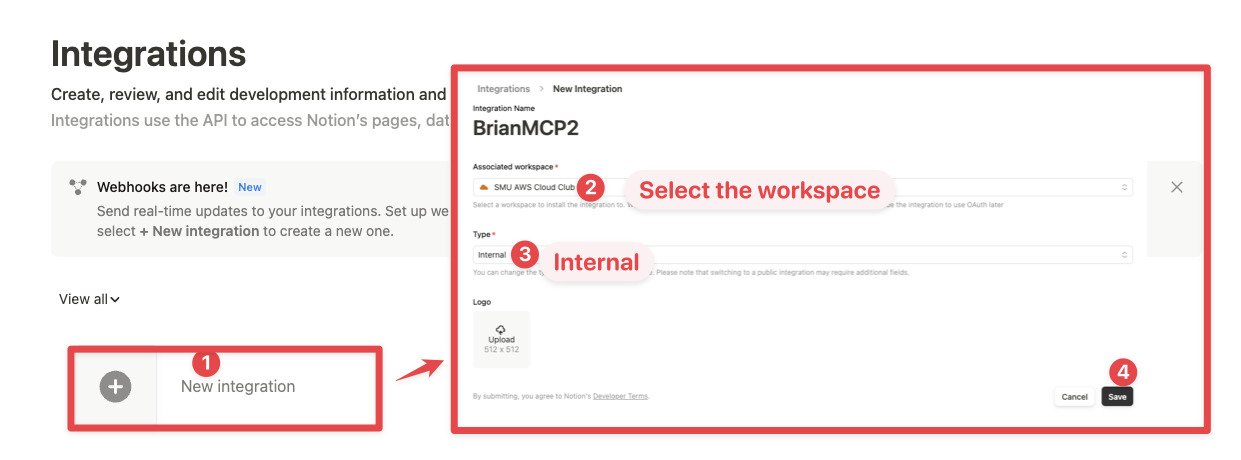
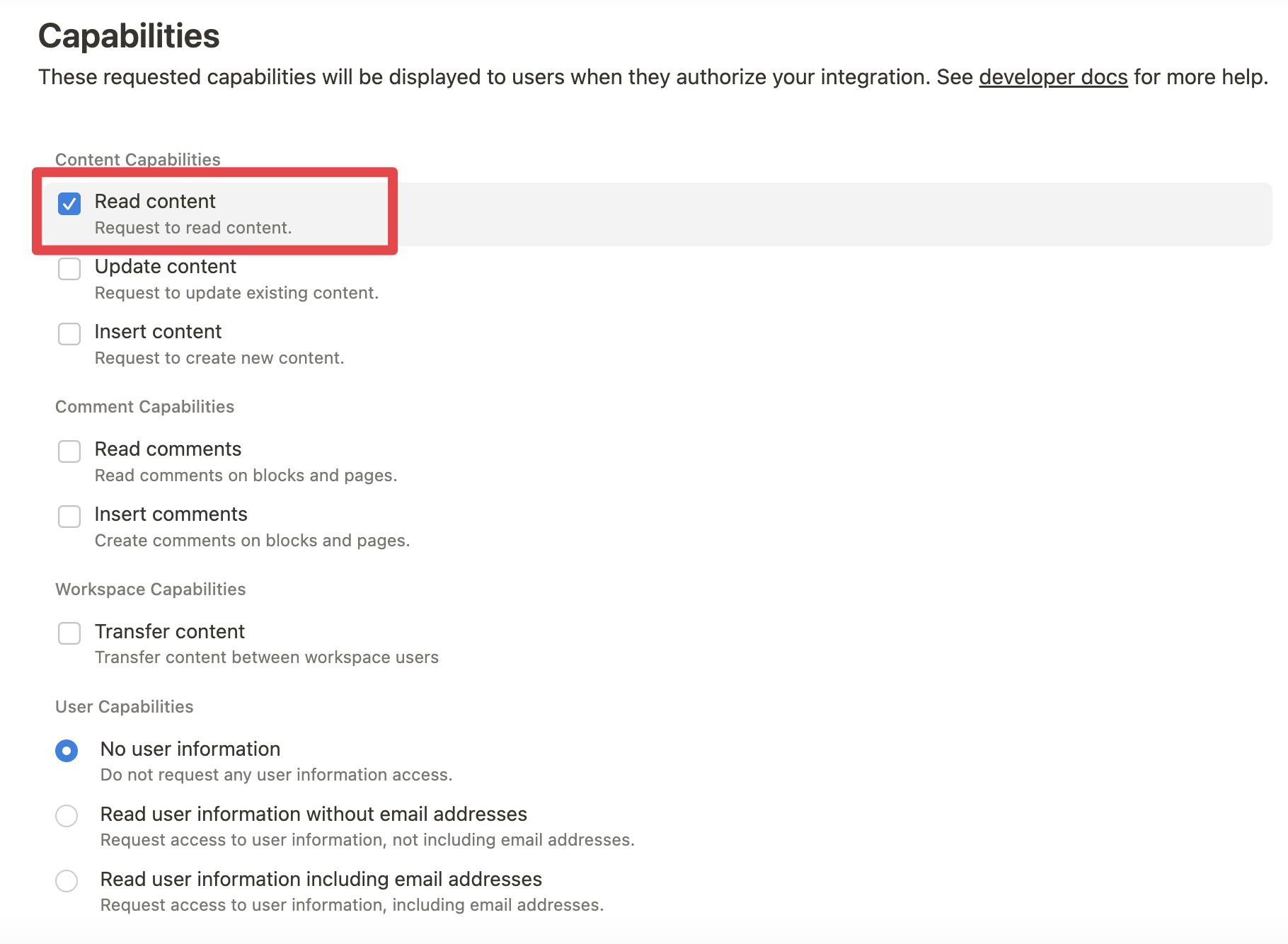
While we limit the scope of Notion API's exposed to read-only operations, there is a non-zero risk to workspace data by exposing it to LLMs. Security-conscious users may want to further configure the Integration's Capabilities.
For example, you can create a read-only integration token by giving only "Read content" access from the "Configuration" tab:
Add the following to your .cursor/mcp.json or claude_desktop_config.json (MacOS: ~/Library/Application\ Support/Claude/claude_desktop_config.json)
{
  "mcpServers": {
    "notionApi": {
      "command": "npx",
      "args": ["-y", "notion-readonly-mcp-server"],
      "env": {
        "OPENAPI_MCP_HEADERS": "{\"Authorization\": \"Bearer ntn_****\", \"Notion-Version\": \"2022-06-28\" }"
      }
    }
  }
}
Add the following to your .cursor/mcp.json or claude_desktop_config.json:
{
  "mcpServers": {
    "notionApi": {
      "command": "docker",
      "args": [
        "run",
        "--rm",
        "-i",
        "-e", "OPENAPI_MCP_HEADERS",
        "taewoong1378/notion-readonly-mcp-server"
      ],
      "env": {
        "OPENAPI_MCP_HEADERS": "{\"Authorization\":\"Bearer ntn_****\",\"Notion-Version\":\"2022-06-28\"}"
      }
    }
  }
}
Don't forget to replace ntn_**** with your integration secret. Find it from your integration configuration tab.
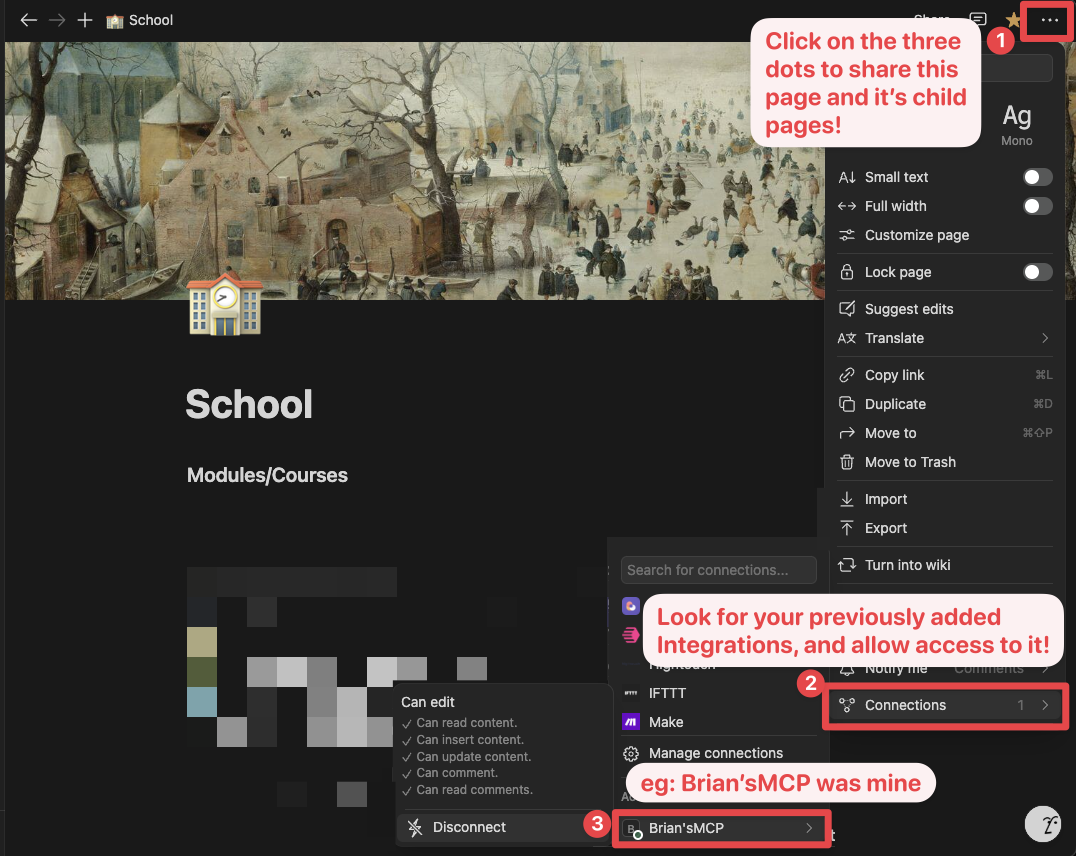
Ensure relevant pages and databases are connected to your integration.
To do this, visit the page, click on the 3 dots, and select "Connect to integration".
This optimized server exposes only essential read-only Notion API tools:
API-retrieve-a-page: Get page informationAPI-get-block-children: Get page content blocks (with parallel processing)API-retrieve-a-block: Get details about a specific blockAPI-retrieve-a-database: Get database informationAPI-retrieve-a-comment: Get comments on a page or blockAPI-retrieve-a-page-property: Get specific property information from a pageAPI-get-one-pager: NEW! Recursively retrieve a full Notion page with all its blocks, databases, and related content in a single callBy limiting to these 7 essential tools (compared to 15+ in the standard implementation), we ensure:
The new API-get-one-pager tool provides a powerful way to explore Notion pages without requiring multiple API calls:
{
  "page_id": "YOUR_PAGE_ID",
  "maxDepth": 5,               // Optional: Maximum recursion depth (default: 5)
  "includeDatabases": true,    // Optional: Include linked databases (default: true)
  "includeComments": true,     // Optional: Include comments (default: true)
  "includeProperties": true    // Optional: Include detailed page properties (default: true)
}
This automatic exploration capability is especially useful for AI assistants that need to understand the entire content of a Notion page without making dozens of separate API calls, resulting in much faster and more efficient responses.
The server implements advanced parallel processing techniques for handling large Notion documents:
Get the content of page 1a6b35e6e67f802fa7e1d27686f017f2
The AI will retrieve the page details efficiently with parallel processing of block content.
Get the structure of database 8a6b35e6e67f802fa7e1d27686f017f2
Build:
pnpm build
Execute:
pnpm dev
MIT
Modern AI assistants like Cursor and Claude have limitations on the number of tools they can effectively handle:
This read-only implementation deliberately reduces the Notion API surface to address these limitations while preserving all essential functionality. The result is:
Claim this server with your GitHub account to request manual ownership verification.
Link to the catalog listing for Notion ReadOnly MCP Server from your README. This badge does not certify ownership, compatibility or security.
[](https://awesome-mcp.com/servers/notion-readonly)Public repository statistics could not be verified. Check the configured source address; unavailable counts are not zero.
Separate sources, scopes and periods. Never combined or treated as installations, active users or security reviews.
No reviewed package or image identity; download statistics are not listed yet.
Alternative and complementary servers in the same category
Oleafly is a live collaborative LaTeX, Typst and Markdown editor for research that offers a local MCP server and an oleafly mcp stdio command so outside AI clients can use its project tools.
Buddy is an Android app that offers its phone tools through a local MCP server to Claude Code, Codex, OpenCode, Antigravity, and Grok sessions.

Tuqui is a hosted MCP server that connects Odoo with Claude and ChatGPT so users can ask about sales, stock, customers and overdue invoices in plain language.
