

Oleafly is a live collaborative LaTeX, Typst and Markdown editor for research that offers a local MCP server and an oleafly mcp stdio command so outside AI clients can use its project tools.
Repository stats unavailable
Productivity & Ops
PAPI offers an MCP server that gives AI assistants structured plan, build, review and release cycles plus a decision trail, connected through a hosted endpoint or the supported local runtime.
PAPI hosted MCP server for project cycles is cataloged as an MCP server attributed to getpapi. PAPI offers an MCP server that gives AI assistants structured plan, build, review and release cycles plus a decision trail, connected through a hosted endpoint or the supported local runtime. It is categorized under productivity work. See the capability inspector for recorded interfaces and their independent review status; consult upstream documentation for the current interface.
Installation configuration is not reviewed. No executable setup is offered for this entry; inspect the source repository before proceeding.
Catalog license label: Not specified. Check the source repository's current license and terms before using, modifying or distributing this software.
Capability definitions are not reviewed. Unreviewed imports are not exposed as trusted interfaces.
No reviewed records to display. This does not establish that upstream lacks this capability.
No reviewed records to display. This does not establish that upstream lacks this capability.
No reviewed records to display. This does not establish that upstream lacks this capability.
Email delivery is not connected. This page does not collect email addresses or create subscriptions.
Browse the registry for current listings instead.
Reviews for PAPI hosted MCP server for project cycles are not available yet
Review publishing and storage are not connected. This page does not collect or publish ratings or comments, including after sign-in.
Yes, PAPI adds state that lives outside the repo and persists across tools, including cycles, build reports, review verdicts, and Active Decisions.
No. The engine is closed source and hosted; this repository holds documentation, install guides, manifests, skills, and the issue tracker.
It can use a connection token from the Connect panel, or browser sign-in where you approve the server.
README.md · 46a4d10b9540 · Fetched 2026-11-13 11:38:32 UTC
Original upstream text, without AI rewriting. Scripts, forms and unsafe links are filtered for safety.
Showing the last retrieved documentation snapshot; check the source for current changes.




End-to-end project management for AI builders.
Your AI starts every session from zero. Your project stays on course.
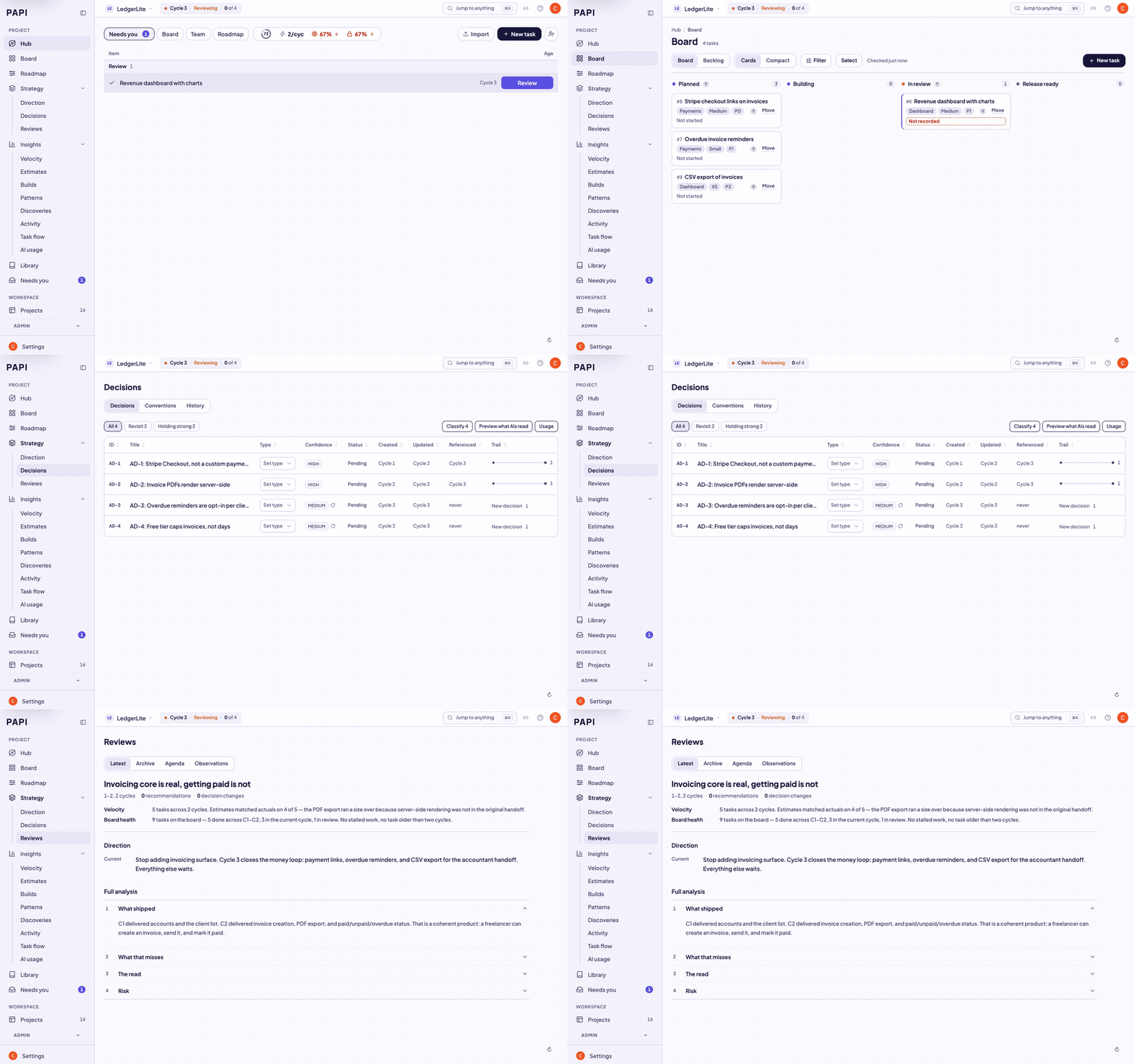
AI coding tools are great at writing code and terrible at holding a direction. Scope grows, plans change, and the decisions behind them get made in a chat window and lost there. PAPI keeps the project on course. It gives your assistant structured plan, build, review and release cycles, plus a decision trail recording what was chosen, what was dropped, and why. Your assistant writes and reads it while it works, so it stays current without anyone maintaining it.
You connect it once. From then on, your assistant starts every session knowing which cycle you're on, what's in flight, and what to do next.
If PAPI is useful, star the repo. It's how other people building with AI assistants find it.
Free to start. The whole plan → build → review → release loop, on up to three projects, no card. Free runs a real project start to finish; it isn't a trial. Pricing.
What this repo is. Documentation, install guides, plugin and extension manifests, the PAPI agent skills, and the issue tracker. PAPI's engine is closed source and hosted — you connect to it, you don't build it from here. The
@papi-ai/serverpackage on npm is the supported local runtime. The contents of this repo are MIT.
Let your AI install it. Paste this to your assistant — Cursor, Claude Code, Windsurf, Codex, VS Code, or any other MCP client:
Read https://getpapi.ai/llms.txt and set up PAPI
Your assistant reads the runbook and walks you through the whole first run: checking it's in the right project folder, connecting, setting up your project, planning your first cycle, and building your first task. It works in coding tools and in chat apps like claude.ai and ChatGPT, and you don't need to be a developer. (The same runbook lives in this repo as llms.txt and llms-install.md if your assistant can't fetch URLs.)
The one thing only you can do. You need a free account at getpapi.ai. After that there are two ways to connect:
Needs authentication.Most tools only load a new connection when a conversation starts, so open a fresh conversation after connecting and ask your assistant to run orient.
In Claude Code, the shortest path is the plugin — two lines, nothing to copy or edit:
/plugin marketplace add getpapi/papi
/plugin install papi@papi
The plugin carries the server config and the PAPI skills for each phase of the cycle: planning, building, reviewing and releasing. It also includes check-mcp, which diagnoses a connection that isn't working, and papi-verify, which health-checks the current cycle.
Every tool also takes the same streamable-HTTP endpoint directly, https://mcp.getpapi.ai/mcp. In Claude Code that's:
claude mcp add --transport http papi https://mcp.getpapi.ai/mcp
Either way, finish with /mcp → papi → Authenticate. Or skip the browser step entirely with the connection token from the Connect panel:
claude mcp add --transport http papi https://mcp.getpapi.ai/mcp --header "Authorization: Bearer YOUR_CONNECTION_TOKEN" --header "x-papi-project-id: YOUR_PROJECT_ID"
The DeepSeek Harness bundle is in this repo but is not yet published to npm, so the command below won't resolve until it is. After creating a PAPI connection token, it will install with:
dsh plugin --profile web add @papi-ai/deepseek-harness
See PAPI for DeepSeek Harness for token handling, verification, compatibility, and removal.
Per-tool config for Cursor, VS Code, Windsurf, Codex, and any generic MCP client is in docs/install.md.
The methodology is the product: a plan, build, review, release loop your assistant runs with you, where each cycle's learnings feed the next plan. PAPI has been built with PAPI for every cycle in the badge above.
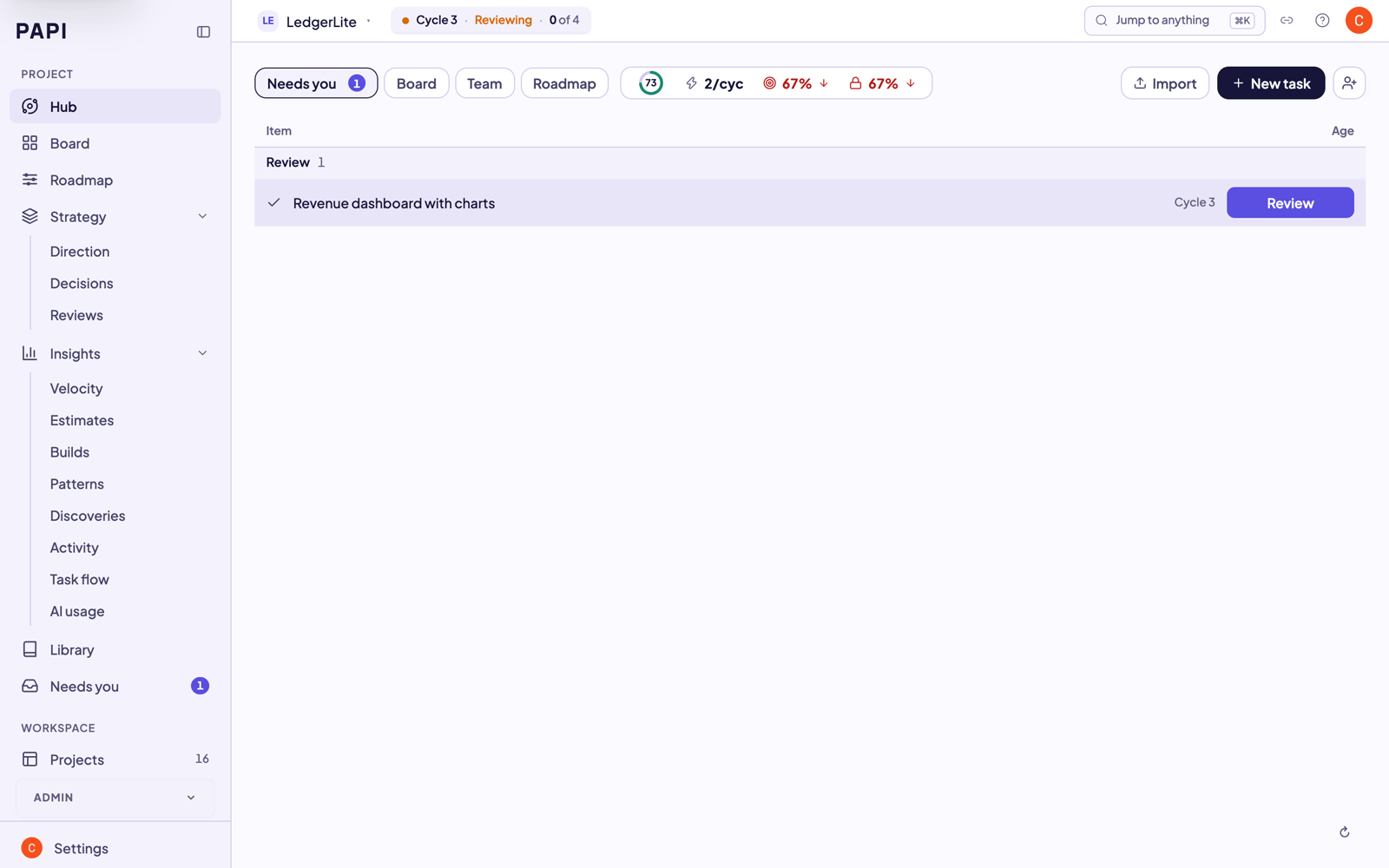
The hub opens on one question — what happens next. The cycle's progress through plan, build, review and release sits under it.
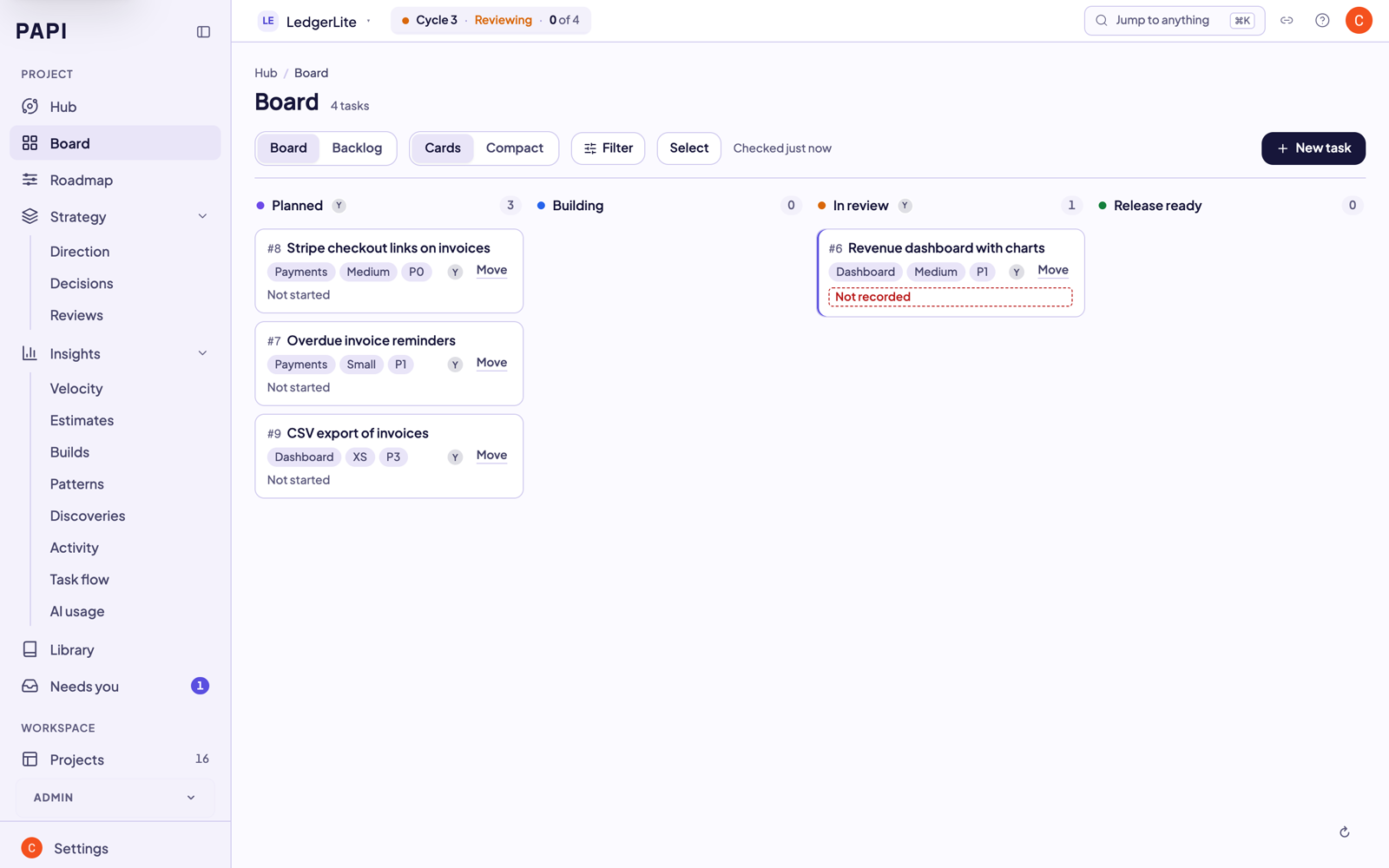
The board is the full picture. Your assistant writes to it as a side effect of working, so it is current without anyone maintaining it.
Linear, Jira, Asana and Notion are built for people to write tickets and other people to read them. They suit that job well, and plenty of teams keep using them.
PAPI's board is written and read by your assistant as it works. Starting a build opens the task, finishing it files the report, and releasing closes the cycle. You approve the plan and sign off the review.
Taskmaster is a good way to break work into tasks inside a repo. PAPI adds state that lives outside the repo and persists across tools: cycles, build reports, review verdicts, and Active Decisions whose confidence changes as evidence arrives. The same project is available from Claude Code, Cursor, VS Code, Codex and the others, so switching tools doesn't reset it. Moving from Taskmaster? See PAPI vs Taskmaster.
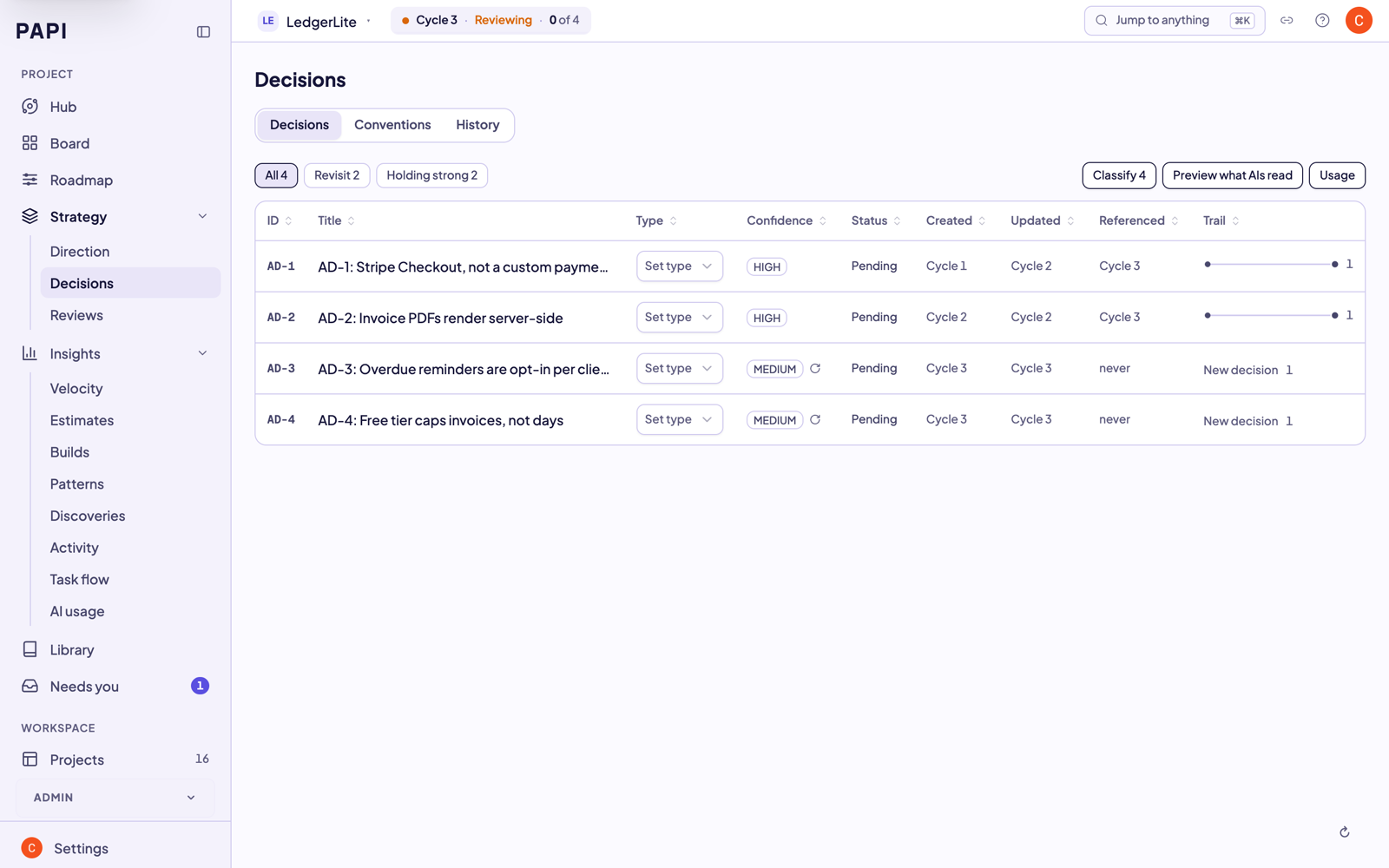
Active Decisions are the part a task tracker has no field for: what was decided, why, what was rejected, and when to revisit it. Confidence moves as evidence arrives.
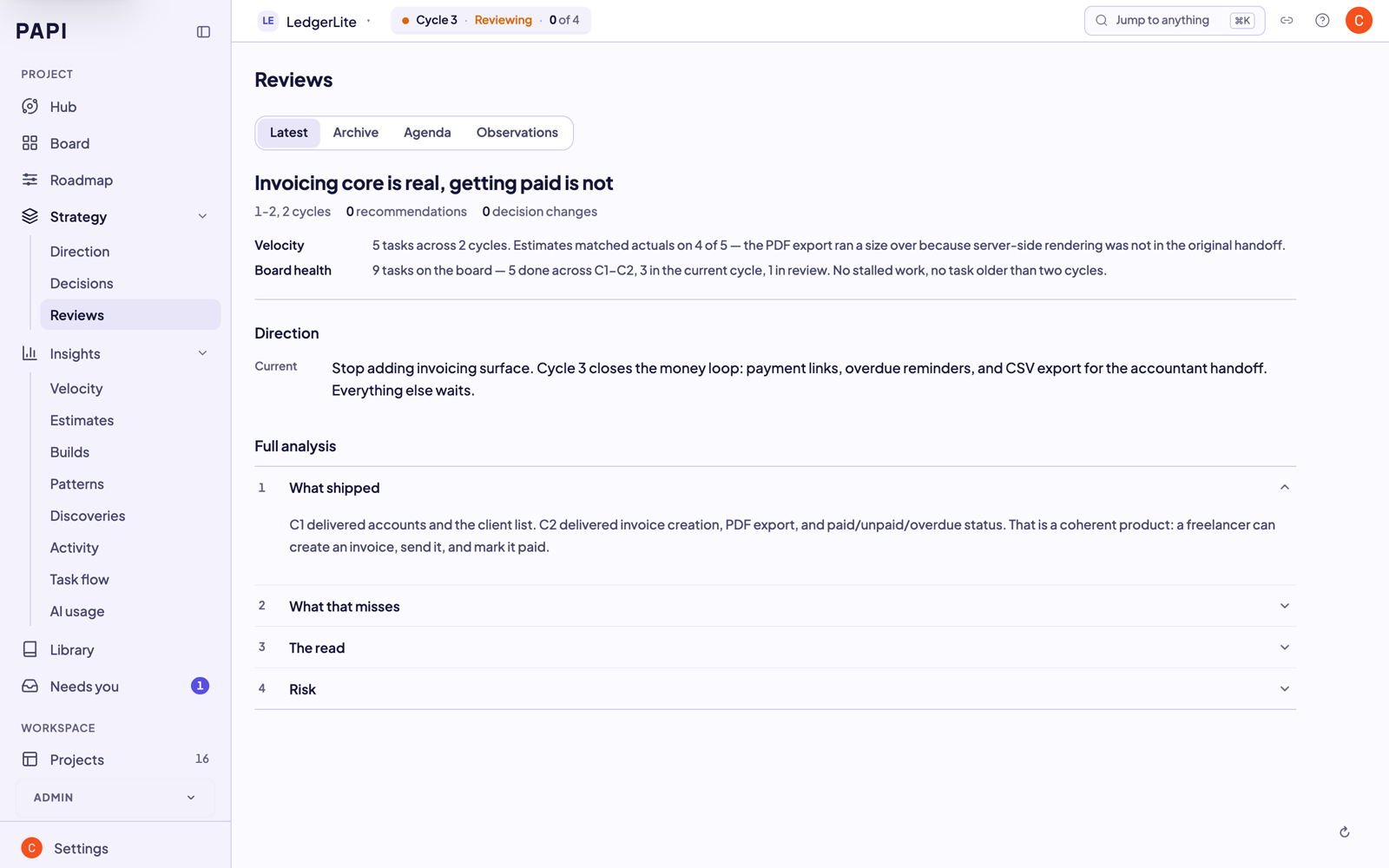
Every review leaves a trail, so the reasoning behind the project is still there months later, including for the assistant reading it back.
PAPI exposes these MCP tools to your assistant. The whole loop is a handful of calls. The server exposes more than these, including claims and sessions for teammates, conventions, document registration and project export. The Tool Reference lists all of them.
Core loop
release) or without one (close_cycle).Board and backlog
Strategy and intelligence
Docs and projects
Teams
In this repo:
| Doc | What it covers |
|---|---|
| llms.txt | The agent runbook — point your AI at this (live version: getpapi.ai/llms.txt) |
| llms-install.md | Per-tool install instructions for AI assistants |
| docs/install.md | Install paths for every supported tool |
| docs/how-it-works.md | Cycles, handoffs, decisions, and how the pieces fit |
| docs/troubleshooting.md | Connection problems, project routing, common fixes |
Full documentation on the website — no account needed:
| Page | What it covers |
|---|---|
| Quick Start | Zero to your first cycle plan in under 5 minutes |
| Workflow | The full plan → build → review → release loop |
| Concepts | Cycles, handoffs, Active Decisions — the vocabulary |
| Cheat Sheet | Every command on one page |
| Tool Reference | Every PAPI MCP tool with parameters and use cases |
| Troubleshooting | Connection and auth first aid |
| Handbook | For teams: reading dashboards, cycle reports, review flow |
Stuck, or something's broken? Open an issue — there are templates for each case, and the connection problem one is the one to reach for if PAPI won't connect or won't authenticate, which is where people get stuck most:
Claim this server with your GitHub account to request manual ownership verification.
Link to the catalog listing for PAPI hosted MCP server for project cycles from your README. This badge does not certify ownership, compatibility or security.
[](https://awesome-mcp.com/servers/papi)Public repository statistics could not be verified. Check the configured source address; unavailable counts are not zero.
Separate sources, scopes and periods. Never combined or treated as installations, active users or security reviews.
No reviewed package or image identity; download statistics are not listed yet.
Alternative and complementary servers in the same category
Oleafly is a live collaborative LaTeX, Typst and Markdown editor for research that offers a local MCP server and an oleafly mcp stdio command so outside AI clients can use its project tools.
Buddy is an Android app that offers its phone tools through a local MCP server to Claude Code, Codex, OpenCode, Antigravity, and Grok sessions.

Tuqui is a hosted MCP server that connects Odoo with Claude and ChatGPT so users can ask about sales, stock, customers and overdue invoices in plain language.
