

Oleafly is a live collaborative LaTeX, Typst and Markdown editor for research that offers a local MCP server and an oleafly mcp stdio command so outside AI clients can use its project tools.
Repository stats unavailable
Productivity & Ops
A read-only MCP server that connects MCP clients to Substack's official Publisher API for reading posts, post analytics, subscriber counts, and subscriber lookups.
MCP server for Substack's Publisher API is cataloged as an MCP server attributed to dkships. A read-only MCP server that connects MCP clients to Substack's official Publisher API for reading posts, post analytics, subscriber counts, and subscriber lookups. It is categorized under productivity work. See the capability inspector for recorded interfaces and their independent review status; consult upstream documentation for the current interface.
Installation configuration is not reviewed. No executable setup is offered for this entry; inspect the source repository before proceeding.
Catalog license label: MIT License. Check the source repository's current license and terms before using, modifying or distributing this software.
Capability definitions are not reviewed. Unreviewed imports are not exposed as trusted interfaces.
No reviewed records to display. This does not establish that upstream lacks this capability.
No reviewed records to display. This does not establish that upstream lacks this capability.
No reviewed records to display. This does not establish that upstream lacks this capability.
Email delivery is not connected. This page does not collect email addresses or create subscriptions.
Browse the registry for current listings instead.
Reviews for MCP server for Substack's Publisher API are not available yet
Review publishing and storage are not connected. This page does not collect or publish ratings or comments, including after sign-in.
Yes, all tools provided by the server are read-only.
Yes, a separate API key can be configured for each publication and queries can specify which publication to use.
README.md · e0725653294f · Fetched 2026-11-13 10:30:34 UTC
Original upstream text, without AI rewriting. Scripts, forms and unsafe links are filtered for safety.
Showing the last retrieved documentation snapshot; check the source for current changes.
MCP server for Substack's official Publisher API


Note: This is an unofficial, community-developed tool and is not affiliated with, endorsed by, or supported by Substack, Inc.
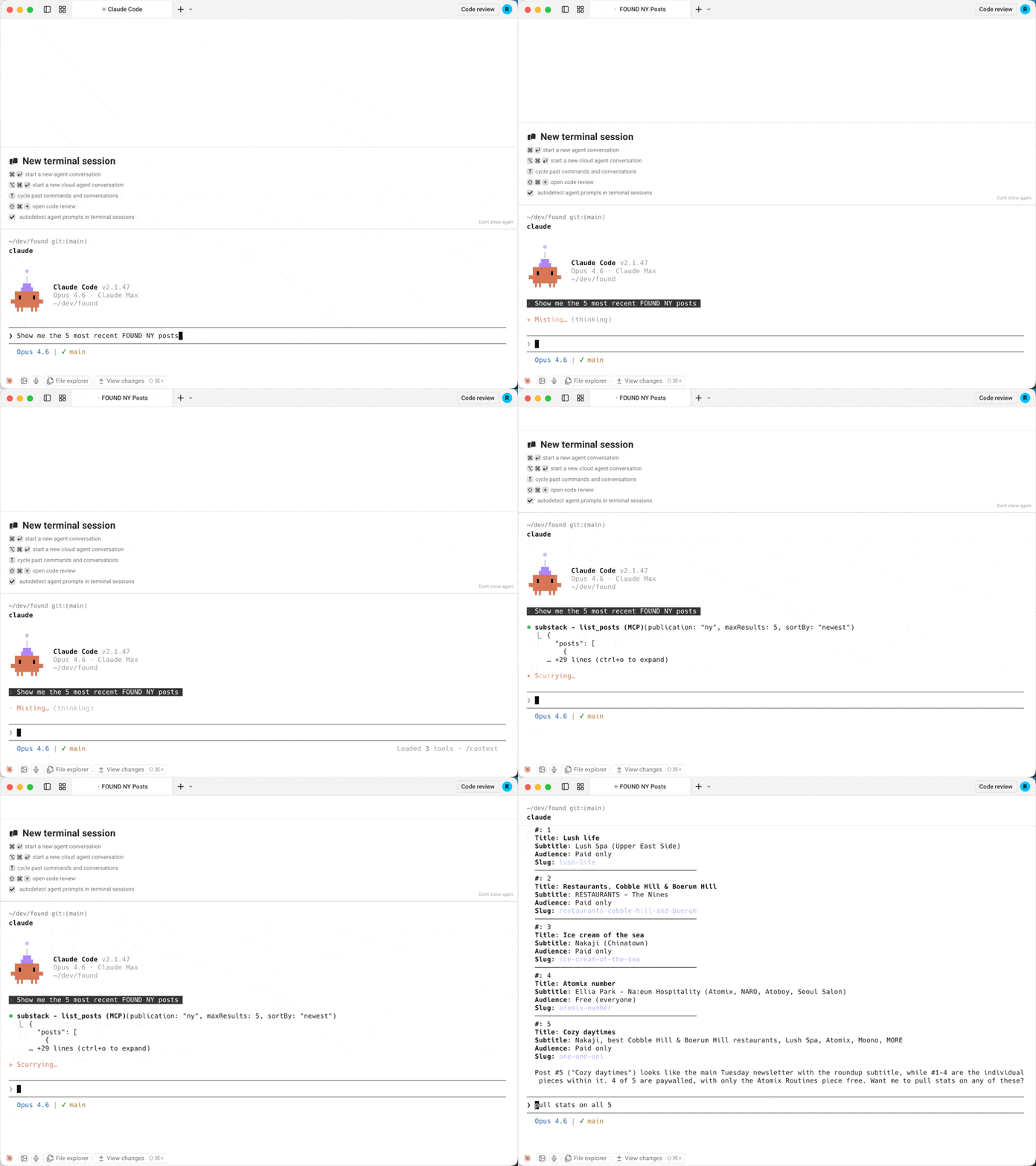
An MCP server for Substack's official Publisher API. Search and read posts, pull post analytics and subscriber counts, and look up subscribers from Claude, Cursor, or any MCP client. All tools are read-only.
| substack-publisher-mcp | Other Substack MCP servers | |
|---|---|---|
| API | Official Publisher API | Unofficial internal API |
| Auth | API key (stable) | Browser cookies (fragile) |
| Stability | Official, documented API | Breaks when Substack changes internals |
| Multi-publication | Built-in support | Not available |
node --version; install from nodejs.org if missing.git clone https://github.com/dkships/substack-publisher-mcp.git
cd substack-publisher-mcp
npm install && npm run build
Add to your client's MCP config file (create the file if it doesn't exist):
| Client | Config file |
|---|---|
| Claude Desktop (macOS) | ~/Library/Application Support/Claude/claude_desktop_config.json |
| Claude Desktop (Windows) | %APPDATA%\Claude\claude_desktop_config.json |
| Claude Code | .mcp.json in your project directory |
| Cursor | .cursor/mcp.json |
{
  "mcpServers": {
    "substack": {
      "command": "node",
      "args": ["/path/to/substack-publisher-mcp/dist/index.js"],
      "env": {
        "SUBSTACK_API_KEY": "your-api-key-here"
      }
    }
  }
}
Claude Code users: Add
"type": "stdio"to the server config.
Restart your MCP client after editing the config — servers load at startup.
Ask Claude (or your MCP client):
Installing through an AI agent or registry? See llms-install.md for a condensed, machine-readable setup guide.
| Tool | Description | Key Parameters |
|---|---|---|
list_publications | List configured publications | None |
list_posts | List published posts | startDate, endDate, sortBy, type, maxResults, next |
search_posts | Full-text search across published posts | query (required), maxResults (1-100) |
get_post | Get a post and its body by URL slug | urlSlug (required), bodyFormat |
get_post_stats | Get engagement stats for a post | urlSlug (required) |
get_subscriber_counts | Get daily subscriber counts by type | startDate, endDate |
get_subscriber | Look up a subscriber by email | email (required) |
All tools except list_publications accept an optional publication parameter when multiple publications are configured.
get_post returns the post body as Markdown by default. Substack sends it as a JSON-encoded ProseMirror document, typically about twice the size. Pass bodyFormat: "prosemirror" for the raw document or "none" for metadata only.
Date filters take YYYY-MM-DD. In list_posts, endDate is exclusive; in get_subscriber_counts, it is inclusive.
get_subscriber_counts[
{
"date": "2025-01-15",
"total_email_subscribers": 25000,
"paid_subscribers": 500,
"free_trial_subscribers": 10,
"comp_subscribers": 50,
"gift_subscribers": 15,
"lifetime_subscribers": 0,
"founding_subscribers": 25
}
]
get_post_stats{
"clicks": 320,
"opens": 5400,
"post_id": 12345678,
"recipients": 10000,
"views": 6100,
"new_free_subscriptions": 80,
"new_paid_subscriptions": 5,
"estimated_revenue_increase": 400
}
list_posts{
"posts": [
{
"post_id": 12345678,
"title": "My Latest Post",
"audience": "only_paid",
"subtitle": "A deep dive into the topic",
"postDate": "2025-01-15T12:00:00.000Z",
"urlSlug": "my-latest-post",
"coverImage": "https://substackcdn.com/image/..."
}
],
"next": "abc123cursor"
}
next is null on the last page.
If you manage multiple Substack publications, configure a separate API key for each using the SUBSTACK_API_KEY_<NAME> pattern:
{
  "mcpServers": {
    "substack": {
      "command": "node",
      "args": ["/path/to/substack-publisher-mcp/dist/index.js"],
      "env": {
        "SUBSTACK_API_KEY_MAIN": "your-main-blog-key",
        "SUBSTACK_API_KEY_TECH": "your-tech-newsletter-key",
        "SUBSTACK_API_KEY_COMPANY": "your-company-updates-key"
      }
    }
  }
}
Then specify which publication to query:
"Show me subscriber counts for main" "List recent posts from the tech publication"
Use list_publications to see all configured publication names.
| Issue | Solution |
|---|---|
Unauthorized error | Verify your API key is correct. The key goes directly in the authorization header with no Bearer prefix. |
... duplicates publication ... or ... ignoring it on startup | Two env vars map to the same publication name (names are case-insensitive, and SUBSTACK_API_KEY is default), or a key is malformed. Rename or remove the extra variable. |
| Server won't start | Make sure you ran npm run build after cloning. The server runs from dist/, not src/. |
No API keys configured | Set SUBSTACK_API_KEY or SUBSTACK_API_KEY_<NAME> in your MCP client config. |
| Server doesn't appear in your client | Check the config file is valid JSON (no trailing commas), then restart the client. |
command not found / spawn node ENOENT | Node.js isn't installed or isn't on your PATH. Check node --version. |
| Still stuck | Check your client's MCP logs. Claude Desktop on macOS: ~/Library/Logs/Claude/mcp*.log. |
This server wraps the Substack Publisher API. See Substack's documentation for details on available data and rate limits.
See CONTRIBUTING.md for guidelines.
MIT License. See LICENSE for details.
Substack is a trademark of Substack, Inc. This project is not affiliated with Substack, Inc. Use of the Substack name is for descriptive purposes only.
Claim this server with your GitHub account to request manual ownership verification.
Link to the catalog listing for MCP server for Substack's Publisher API from your README. This badge does not certify ownership, compatibility or security.
[](https://awesome-mcp.com/servers/substack-publisher-mcp)Public repository statistics could not be verified. Check the configured source address; unavailable counts are not zero.
Separate sources, scopes and periods. Never combined or treated as installations, active users or security reviews.
No reviewed package or image identity; download statistics are not listed yet.
Alternative and complementary servers in the same category
Oleafly is a live collaborative LaTeX, Typst and Markdown editor for research that offers a local MCP server and an oleafly mcp stdio command so outside AI clients can use its project tools.
Buddy is an Android app that offers its phone tools through a local MCP server to Claude Code, Codex, OpenCode, Antigravity, and Grok sessions.

Tuqui is a hosted MCP server that connects Odoo with Claude and ChatGPT so users can ask about sales, stock, customers and overdue invoices in plain language.
