
Oleafly is a live collaborative LaTeX, Typst and Markdown editor for research that offers a local MCP server and an oleafly mcp stdio command so outside AI clients can use its project tools.
Repository stats unavailable
Productivity & Ops
A Model Context Protocol server that integrates with Zendesk to manage tickets and comments, draft and analyze ticket content, and access Help Center articles.
Zendesk MCP Server is cataloged as an MCP server attributed to reminia. A Model Context Protocol server that integrates with Zendesk to manage tickets and comments, draft and analyze ticket content, and access Help Center articles. It is categorized under productivity work. See the capability inspector for recorded interfaces and their independent review status; consult upstream documentation for the current interface.
Installation configuration is not reviewed. No executable setup is offered for this entry; inspect the source repository before proceeding.
Catalog license label: Not specified. Check the source repository's current license and terms before using, modifying or distributing this software.
Capability definitions are not reviewed. Unreviewed imports are not exposed as trusted interfaces.
No reviewed records to display. This does not establish that upstream lacks this capability.
No reviewed records to display. This does not establish that upstream lacks this capability.
No reviewed records to display. This does not establish that upstream lacks this capability.
Email delivery is not connected. This page does not collect email addresses or create subscriptions.
Browse the registry for current listings instead.
Reviews for Zendesk MCP Server are not available yet
Review publishing and storage are not connected. This page does not collect or publish ratings or comments, including after sign-in.
It uses OAuth where each operator authorizes with their own Zendesk login, so permissions and comment authorship match their identity. API token authentication still works but is deprecated.
Scopes act as a ceiling, not a grant: a token can never do more than the authorizing operator is allowed to do.
Yes, Zendesk access tokens are short-lived, and the server refreshes them before expiry and retries once on an invalid_token rejection.
README.md · 806d1ca734b4 · Fetched 2026-11-13 11:14:05 UTC
Original upstream text, without AI rewriting. Scripts, forms and unsafe links are filtered for safety.
Showing the last retrieved documentation snapshot; check the source for current changes.


A Model Context Protocol server for Zendesk.
This server provides a comprehensive integration with Zendesk. It offers:
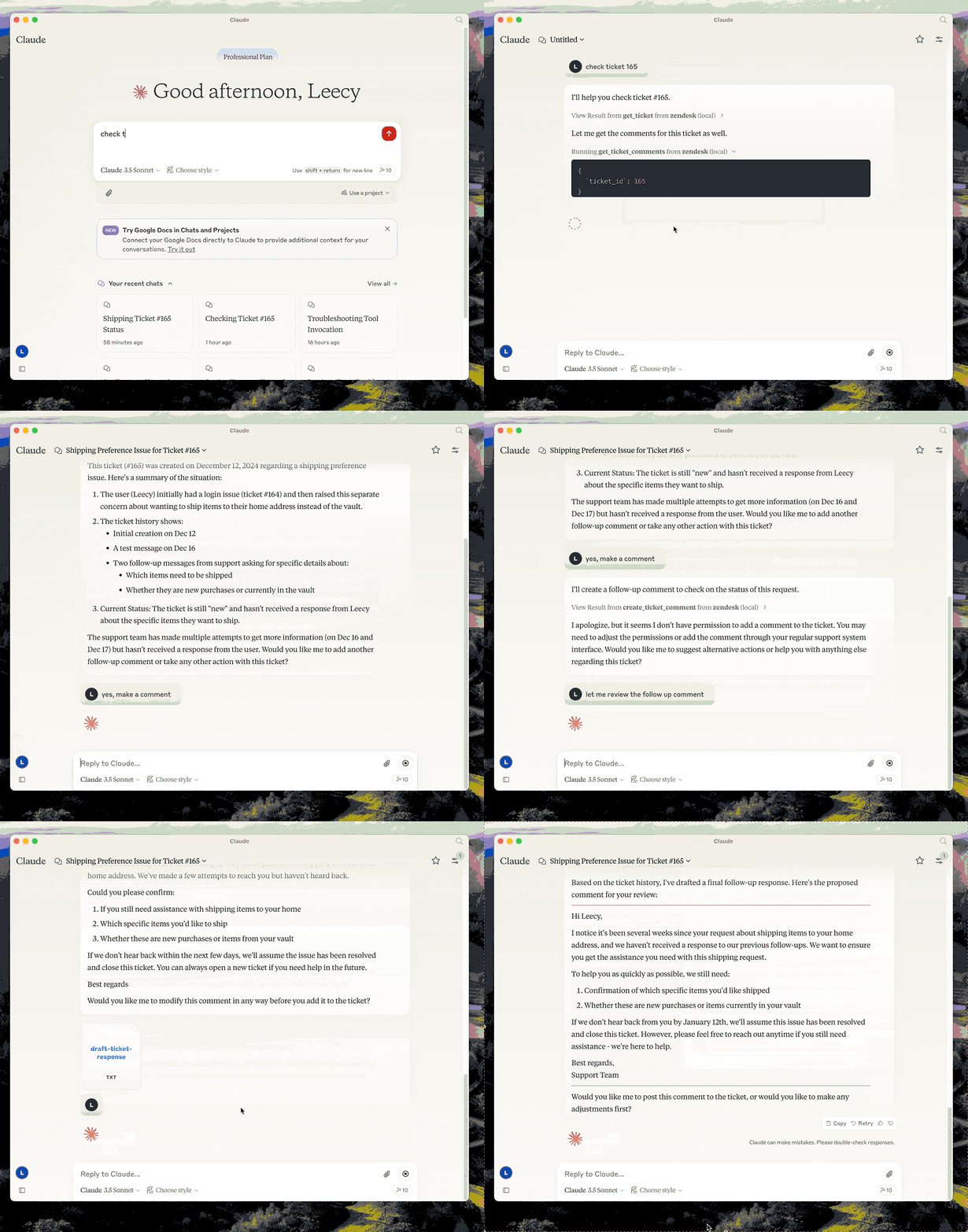
uv venv && uv pip install -e . or uv build in short.{
"mcpServers": {
"zendesk": {
"command": "uv",
"args": [
"--directory",
"/path/to/zendesk-mcp-server",
"run",
"zendesk"
]
}
}
}
This server authenticates with OAuth. Each operator authorizes with their own Zendesk login, so API calls carry their identity and Zendesk applies exactly the permissions it applies in the UI — their role, their group restrictions, their ticket access. Comments they post are authored by them.
API token authentication still works but is deprecated. See Migrating from an API token.
In Admin Center, go to Apps and integrations > APIs > OAuth clients and create a client:
| Field | Value |
|---|---|
| Client kind | Public — this server runs on each operator's machine, so there is no secret it could keep. PKCE is used instead. |
| Redirect URLs | http://localhost:4567/callback |
| Allowed scopes | tickets:read tickets:write ticket_attachments:read users:read hc:read |
Setting Allowed scopes is optional but recommended: it caps what any token from this client can ever request, even if the code changes.
Note the client's Identifier — that is the ZENDESK_CLIENT_ID below.
If Zendesk rejects http://localhost:4567/callback, register https://localhost
instead and use zendesk-auth --manual in step 3.
Copy .env.example to .env and set:
ZENDESK_SUBDOMAIN=acme        # for https://acme.zendesk.com
ZENDESK_CLIENT_ID=your-client-identifier
Keep .env out of version control.
Two optional settings, both of which must agree with the OAuth client:
| Variable | Default | When to change it |
|---|---|---|
ZENDESK_OAUTH_REDIRECT_URI | http://localhost:4567/callback | Port 4567 is in use, or the client is registered with a different redirect URL. Must match a redirect URL on the client exactly. |
ZENDESK_TOKEN_FILE | $XDG_CONFIG_HOME/zendesk-mcp/tokens.json | Storing tokens elsewhere, for example a Docker volume. |
uv run zendesk-auth
This opens a browser, asks the operator to approve access, and stores the resulting tokens locally. From then on the server renews access on its own; the operator never repeats this unless the tokens are revoked or left unused past the refresh token's lifetime (90 days as requested by this server).
If the browser cannot reach this machine — a remote shell, or an OAuth client
registered with https://localhost — use the paste-based flow instead:
uv run zendesk-auth --manual
Tokens are written to $XDG_CONFIG_HOME/zendesk-mcp/tokens.json
(~/.config/zendesk-mcp/tokens.json by default), created 0600 inside a 0700
directory. Override the location with ZENDESK_TOKEN_FILE. The file holds live
credentials: treat it like a password and never commit it.
Zendesk access tokens are short-lived — 30 minutes by default, 48 hours at most — so the server refreshes them for you:
401 with {"error": "invalid_token"},
in which case the request is retried once with a fresh token.Only invalid_token triggers a retry. A 401 or 403 from insufficient scope or
from the operator's own Zendesk permissions is passed through unchanged, so
permission problems stay visible instead of looking like auth flakiness.
Each refresh rotates the refresh token and invalidates the previous one immediately, so the new pair is written to disk before it is used. Writes are atomic and guarded by a lock file, which matters if you run the server from more than one MCP client at the same time.
When the refresh token itself is expired or revoked, tools fail with a message
telling the operator to re-run zendesk-auth.
The default scopes cover every tool this server exposes:
| Scope | Needed for |
|---|---|
tickets:read | get_ticket, get_tickets, get_ticket_comments |
tickets:write | create_ticket, update_ticket, create_ticket_comment |
ticket_attachments:read | get_ticket_attachment |
users:read | requester and assignee details on tickets |
hc:read | the zendesk://knowledge-base resource |
Narrow them with ZENDESK_OAUTH_SCOPES if you do not need every tool — for
read-only access, tickets:read users:read hc:read.
Scopes are a ceiling, not a grant: a token can never do more than the
authorizing operator is allowed to do. Note that Zendesk accepts unrecognised
scope names when issuing a token but then rejects every request with 403, so
zendesk-auth prints the scope Zendesk actually granted for comparison.
Zendesk is retiring API tokens on this schedule:
| Date | Change |
|---|---|
| 2026-07-28 | Tokens unused for 30 days are deactivated automatically; new accounts cannot create tokens. |
| 2026-10-27 | No account can create new API tokens. |
| 2027-04-30 | All API tokens stop working permanently. |
Until then ZENDESK_EMAIL + ZENDESK_API_KEY continue to work, and the server
logs a deprecation warning the first time it authenticates. Set
ZENDESK_CLIENT_ID and OAuth takes precedence, so you can migrate without
removing the old variables.
Beyond the deadline, there is a reason to move sooner: a Zendesk API token is account-level and unscoped. Whoever holds it gets the full access of the user it is paired with, which for most installations is an admin. That is what per-operator OAuth fixes.
Why not the client credentials flow? It is simpler — no browser step, no refresh tokens — but its tokens are attributed to the Zendesk user who created the OAuth client. Every operator would act as that one user, usually an admin, and audit logs and comment authorship would all point at them. Since the goal is for operators to have exactly their own Zendesk permissions, the authorization code flow is the only one that fits.
You can containerize the server if you prefer an isolated runtime:
Copy .env.example to .env and fill in your Zendesk configuration. Keep this file outside version control.
Build the image:
docker build -t zendesk-mcp-server .
Authorize on the host, not in the container. zendesk-auth needs a
browser and a local callback port, so run it once outside Docker:
uv run zendesk-auth
Run the server, passing the environment file and mounting the token store:
docker run --rm \
  --env-file /path/to/.env \
  --user "$(id -u):$(id -g)" \
  -e ZENDESK_TOKEN_FILE=/tokens/tokens.json \
  -v "$HOME/.config/zendesk-mcp:/tokens" \
  zendesk-mcp-server
The mount must be writable: the server rewrites the file every time it
rotates the refresh token, and a read-only mount will strand it on an expired
token. --user makes the container run as you, so it can read the 0600
token file created on the host.
Add -i when wiring the container to MCP clients over STDIN/STDOUT (Claude Code uses this mode). For daemonized runs, add -d --name zendesk-mcp.
The image installs dependencies from requirements.lock and drops privileges to a non-root user. With API token authentication no volume is needed, since configuration comes entirely from environment variables.
To use the Dockerized server from Claude Code/Desktop, add an entry to Claude Code's settings.json similar to:
{
  "mcpServers": {
    "zendesk": {
      "command": "/usr/local/bin/docker",
      "args": [
        "run",
        "--rm",
        "-i",
        "--env-file",
        "/path/to/zendesk-mcp-server/.env",
        "zendesk-mcp-server"
      ]
    }
  }
}
Adjust the paths to match your environment. After saving the file, restart Claude for the new MCP server to be detected.
Run the test suite:
uv pip install -e '.[test]'
pytest
The tests use mocked HTTP and never contact Zendesk. They cover the API-token and OAuth paths, PKCE derivation, token storage and rotation, and each of the four ways this server calls Zendesk.
Analyze a Zendesk ticket and provide a detailed analysis of the ticket.
Draft a response to a Zendesk ticket.
Fetch the latest tickets with pagination support
Input:
page (integer, optional): Page number (defaults to 1)per_page (integer, optional): Number of tickets per page, max 100 (defaults to 25)sort_by (string, optional): Field to sort by - created_at, updated_at, priority, or status (defaults to created_at)sort_order (string, optional): Sort order - asc or desc (defaults to desc)Output: Returns a list of tickets with essential fields including id, subject, status, priority, description, timestamps, and assignee information, along with pagination metadata
Retrieve a Zendesk ticket by its ID
ticket_id (integer): The ID of the ticket to retrieveRetrieve all comments for a Zendesk ticket by its ID
ticket_id (integer): The ID of the ticket to get comments forCreate a new comment on an existing Zendesk ticket
ticket_id (integer): The ID of the ticket to comment oncomment (string): The comment text/content to addpublic (boolean, optional): Whether the comment should be public (defaults to true)Create a new Zendesk ticket
subject (string): Ticket subjectdescription (string): Ticket descriptionrequester_id (integer, optional)assignee_id (integer, optional)priority (string, optional): one of low, normal, high, urgenttype (string, optional): one of problem, incident, question, tasktags (array[string], optional)custom_fields (array[object], optional)Update fields on an existing Zendesk ticket (e.g., status, priority, assignee)
ticket_id (integer): The ID of the ticket to updatesubject (string, optional)status (string, optional): one of new, open, pending, on-hold, solved, closedpriority (string, optional): one of low, normal, high, urgenttype (string, optional)assignee_id (integer, optional)requester_id (integer, optional)tags (array[string], optional)custom_fields (array[object], optional)due_at (string, optional): ISO8601 datetimeClaim this server with your GitHub account to request manual ownership verification.
Link to the catalog listing for Zendesk MCP Server from your README. This badge does not certify ownership, compatibility or security.
[](https://awesome-mcp.com/servers/zendesk-mcp-server-kon)Public repository statistics could not be verified. Check the configured source address; unavailable counts are not zero.
Separate sources, scopes and periods. Never combined or treated as installations, active users or security reviews.
No reviewed package or image identity; download statistics are not listed yet.
Alternative and complementary servers in the same category
Oleafly is a live collaborative LaTeX, Typst and Markdown editor for research that offers a local MCP server and an oleafly mcp stdio command so outside AI clients can use its project tools.
Buddy is an Android app that offers its phone tools through a local MCP server to Claude Code, Codex, OpenCode, Antigravity, and Grok sessions.

Tuqui is a hosted MCP server that connects Odoo with Claude and ChatGPT so users can ask about sales, stock, customers and overdue invoices in plain language.
