
Oleafly is a live collaborative LaTeX, Typst and Markdown editor for research that offers a local MCP server and an oleafly mcp stdio command so outside AI clients can use its project tools.
Repository stats unavailable
Productivity & Ops
A hosted MCP server that lets AI agents parse documents and extract structured fields from invoices, orders, cards, certificates and other business files within chat sessions.
Laiye ADP MCP Server is cataloged as an MCP server attributed to laiye-adp. A hosted MCP server that lets AI agents parse documents and extract structured fields from invoices, orders, cards, certificates and other business files within chat sessions. It is categorized under productivity work. See the capability inspector for recorded interfaces and their independent review status; consult upstream documentation for the current interface.
Installation configuration is not reviewed. No executable setup is offered for this entry; inspect the source repository before proceeding.
Catalog license label: Not specified. Check the source repository's current license and terms before using, modifying or distributing this software.
能力定义尚未审核。未核验的采集内容不会作为可信接口展示。
暂无可展示的已审核记录。这不表示上游不支持此能力。
暂无可展示的已审核记录。这不表示上游不支持此能力。
暂无可展示的已审核记录。这不表示上游不支持此能力。
Email delivery is not connected. This page does not collect email addresses or create subscriptions.
Browse the registry for current listings instead.
Reviews for Laiye ADP MCP Server are not available yet
Review publishing and storage are not connected. This page does not collect or publish ratings or comments, including after sign-in.
The tool list is dynamically generated based on initialized apps, and all out-of-the-box apps are initialized on first connection; refreshing the tool list after initialization completes shows all available tools.
The default timeout is 300 seconds and can be adjusted up to 900 seconds; for large or complex documents, async mode with wait=false can be used and results retrieved later via the task_id.
README.md · 47ce713538d6 · 采集于 2026-11-13 11:37:19 UTC
保留上游原文,不做 AI 改写。为安全起见过滤脚本、表单和不安全链接。
当前显示最后一次成功采集的文档快照,请以来源页面为准。
Enable AI Agents to natively process business documents. It extracts structured data from invoices, purchase orders, contracts, logistics documents, financial statements and other files, supporting file upload, parsing, data extraction and result query directly within chat sessions.
Laiye Agentic Document Processing (ADP) MCP Server
The ADP MCP Server converts enterprise documents into callable data for AI Agents. Users can directly upload invoices, purchase orders, contracts, bills, images, spreadsheets and other files within chat conversations. ADP automatically executes content recognition, field extraction, and structured data output, cutting manual data entry, copy-pasting operations, and cross-system processing overheads.
Optimized for real-world business scenarios featuring complex layouts, tabular line items, scanned copies, multilingual receipts and lengthy documents, the ADP MCP Server delivers higher accuracy and more consistent structured outputs. It underpins downstream workflows including document review, account reconciliation, data entry, file export, and end-to-end business process automation.
Sign up at https://adp-global.laiye.com/ and retrieve your API Key from My MCP in personal settings.
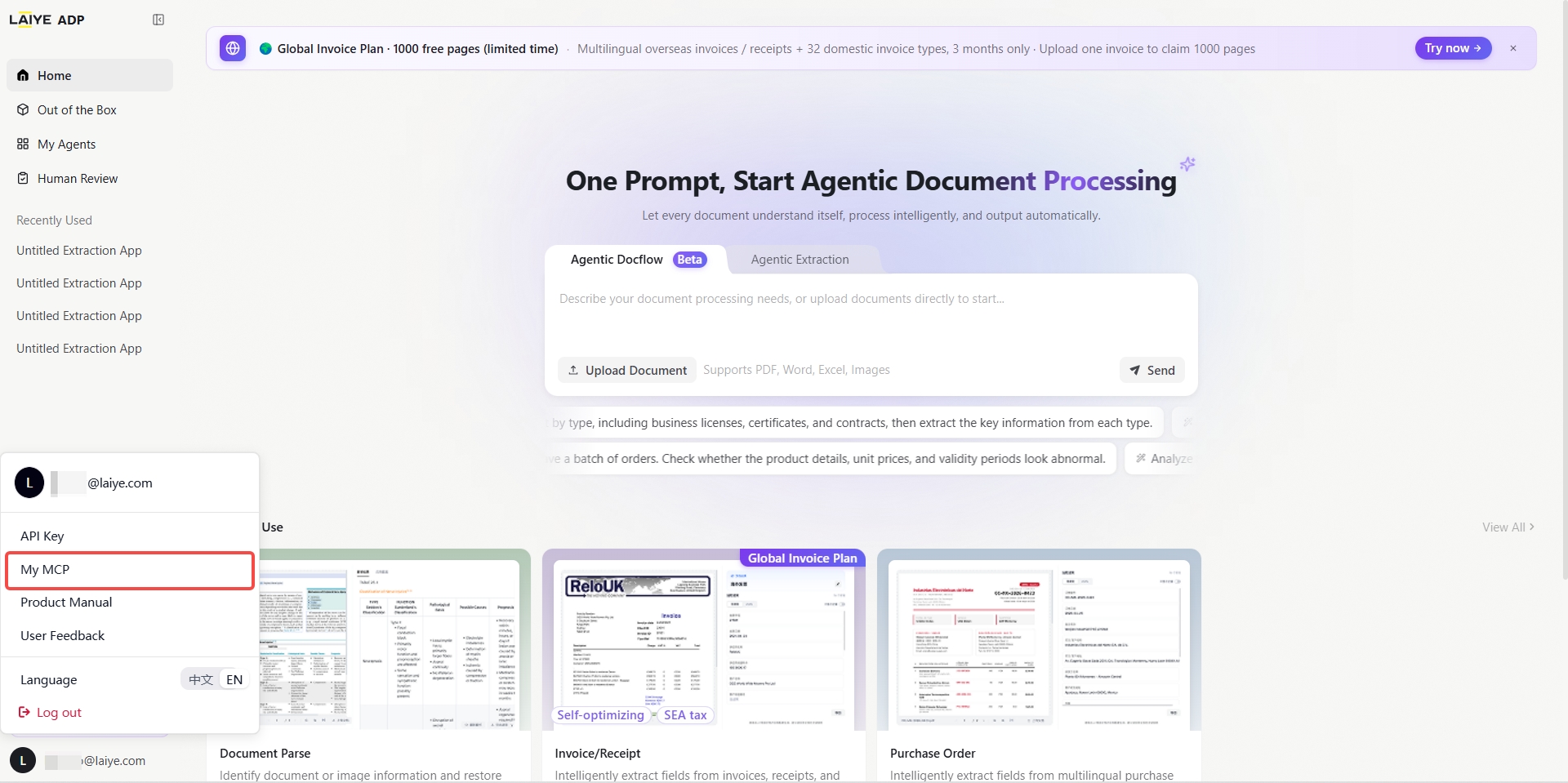
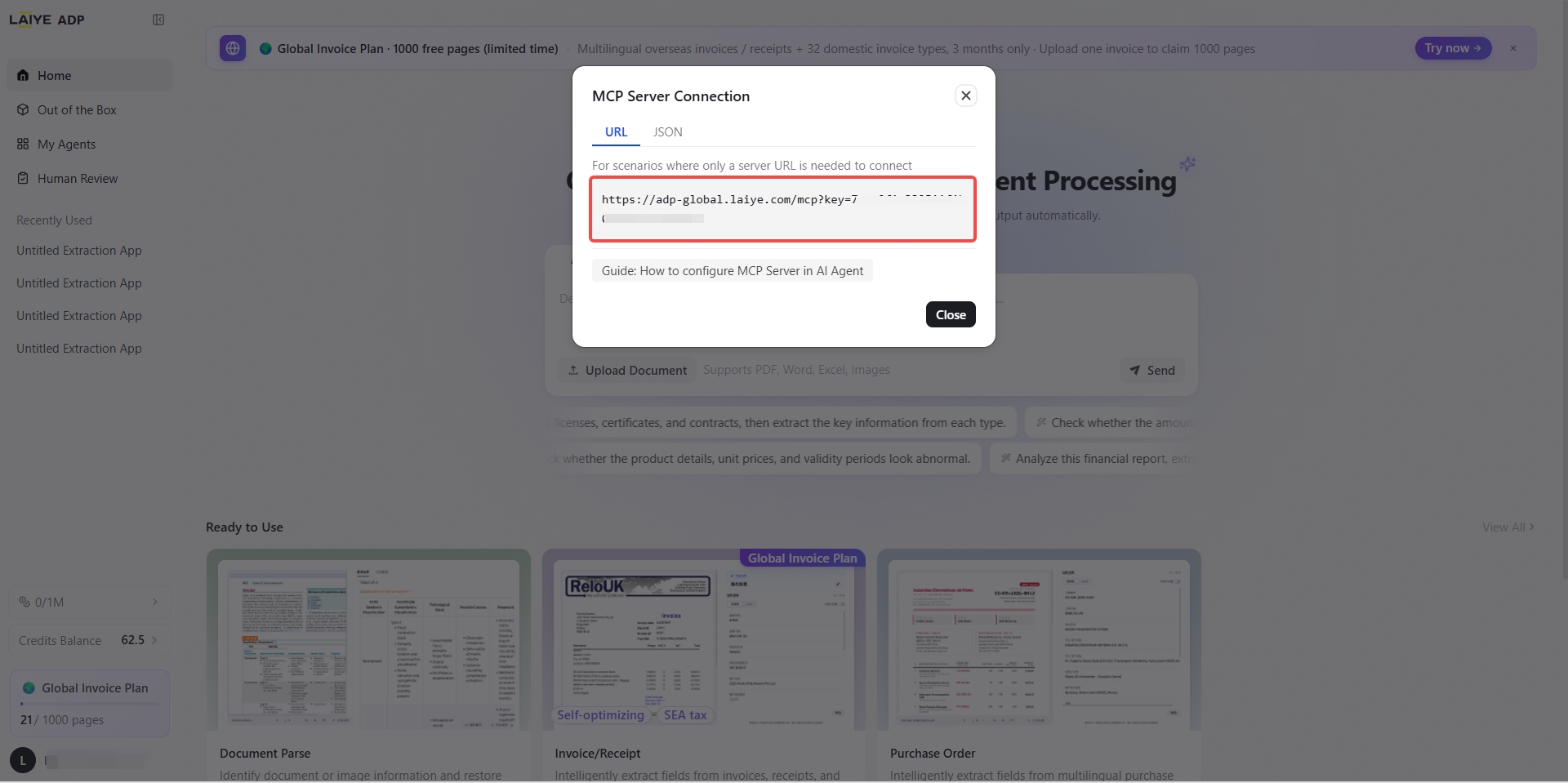
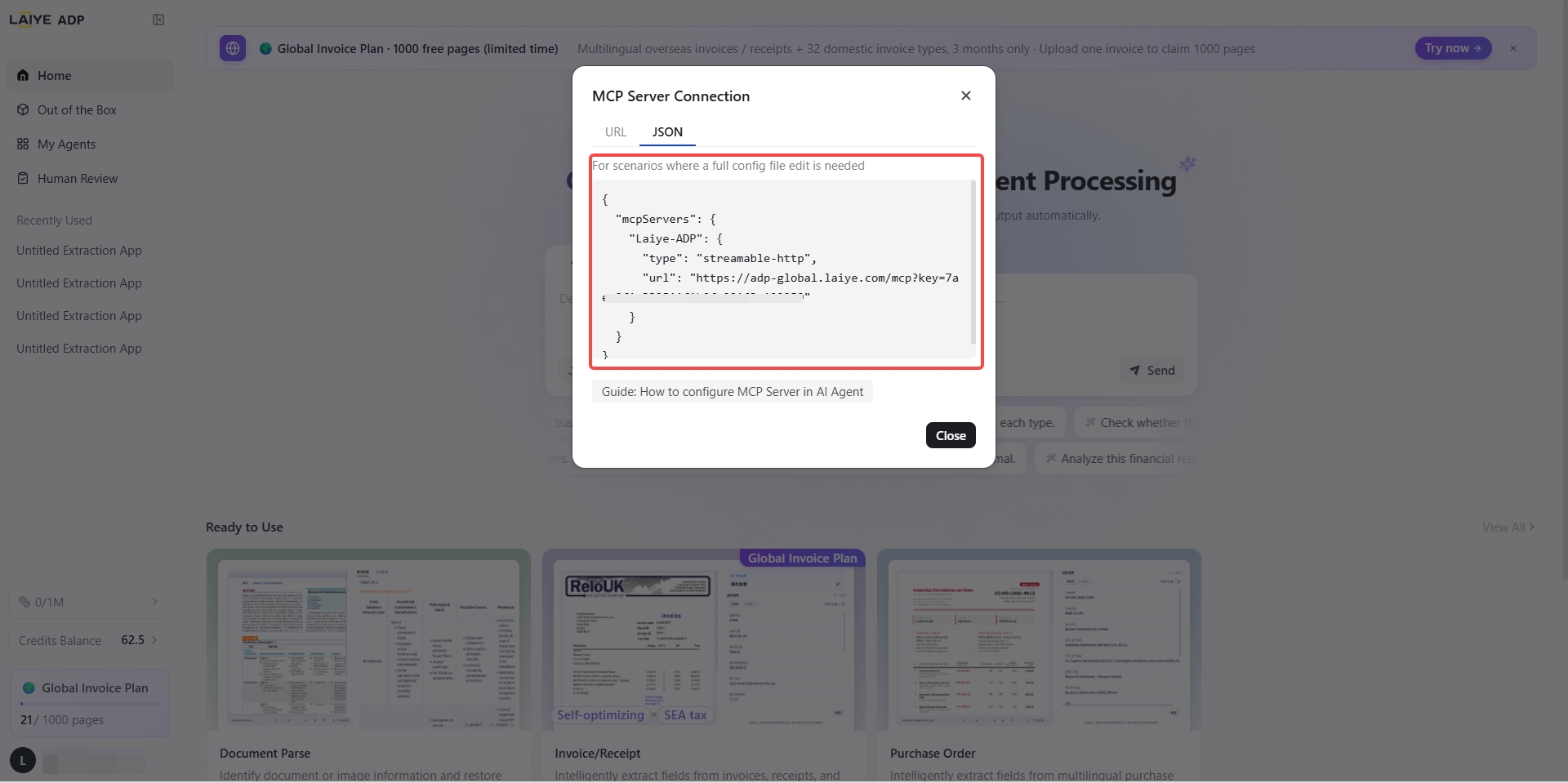
Most MCP clients (Cursor, Tongyi Lingma, Coze, etc.) let you add MCP servers directly from their settings panel. Using Cursor as an example:
ADP (any name you like)streamable-httphttps://adp.laiye.com/mcp?key=<YOUR-ADP-API-Key>For Claude Desktop, add the following to claude_desktop_config.json. Both connection methods are supported:
Remote connection (Streamable HTTP)
{
  "mcpServers": {
    "adp": {
      "url": "https://adp.laiye.com/mcp?key=<YOUR-ADP-API-Key>",
      "transport": "streamable-http"
    }
  }
}
Local command (npx, stdio)
{
  "mcpServers": {
    "adp": {
      "command": "npx",
      "args": ["-y", "@laiye-adp/mcp"],
      "env": {
        "ADP_API_KEY": "<YOUR-ADP-API-Key>"
      }
    }
  }
}
The same parameters apply to any MCP client:
| Parameter | Value |
|---|---|
| Endpoint | https://adp.laiye.com/mcp |
| Transport | Streamable HTTP |
| Authentication | URL query param ?key=<YOUR-ADP-API-Key> |
For private deployments, replace the domain with your actual server address.
Once connected, your AI client will automatically discover all available ADP tools. Just describe what you need in natural language:
| Tool Name | Title | Description |
|---|---|---|
parse_document | General Document Parsing | Parse PDF, image, Word, Excel, PPT and other documents for layout analysis, returning structured text blocks, tables, reading order and page coordinates. Use when the document type is unknown and you need raw structure for further processing; for invoices, ID cards or other specific types, prefer the dedicated extraction tool. |
| Tool Name | Title | Description |
|---|---|---|
extract_china_invoice | China Invoice / Bill | Covers 30+ common Chinese bill types: fully-digitalized e-invoices, general VAT invoices, special VAT invoices, taxi receipts, train tickets, air itineraries, fiscal invoices, etc. Extracts invoice number, date, amount, buyer, seller and other key fields; also supports invoice authenticity verification. |
extract_global_invoice | Global Invoice / Receipt | Extract key fields (invoice number, date, amount, tax, currency, line items, etc.) from overseas invoices, receipts or bills in PDF or image format. Ideal for cross-border trade, reimbursement and accounts-payable automation; for Chinese VAT invoices, use the dedicated China invoice tool. |
extract_purchase_order | Purchase / Sales Order | Extract key fields (order number, buyer/seller info, order date, item details, quantity, unit price, total amount, shipping address, etc.) from purchase or sales orders in PDF or image format. Suitable for e-commerce order entry, supply-chain reconciliation and warehouse management automation. |
| Tool Name | Title | Description |
|---|---|---|
extract_id_card | China ID Card | Extract key fields (name, gender, ethnicity, date of birth, ID number, address, issuing authority, validity period, etc.) from Chinese mainland resident ID card images. Supports both front and back sides. For HK/Macao/Taiwan permits or passports, use the corresponding tool. |
extract_bank_card | Bank Card | Extract key fields (card number, issuing bank, card type, expiration date, etc.) from the front side of a bank card image. Only public card-face information is recognized; sensitive fields such as CVV are not extracted. |
extract_vehicle_cert | Vehicle Certificate | Extract key fields (certificate number, vehicle brand, model, VIN, engine number, manufacturing date, etc.) from vehicle certificate of conformity images. Suitable for vehicle registration, used-car transactions and fleet management. |
extract_account_permit | Bank Account Permit | Extract key fields (company name, basic account number, bank name, approval number, issue date, etc.) from corporate bank-account opening permit images. |
extract_driver_license | China Driver License | Extract key fields (name, gender, nationality, date of birth, license number, permitted vehicle class, first issue date, validity period, etc.) from Chinese motor-vehicle driver license images. Supports both main and supplementary pages. |
extract_business_license | Business License | Extract key fields (company name, unified social credit code, legal representative, registered capital, establishment date, business scope, registered address, etc.) from Chinese business license images. |
extract_passport_cn | China Passport | Extract key fields (Chinese name, romanized name, gender, date of birth, passport number, nationality, issue date, validity period, issuing authority, etc.) from PRC passport images. Foreign passports are not supported. |
extract_vehicle_license | Vehicle License | Extract key fields (plate number, vehicle type, owner, VIN, engine number, registration date, issue date, etc.) from Chinese motor-vehicle license images. Supports both main and supplementary pages. |
extract_org_code_cert | Organization Code Certificate | Extract key fields (organization name, organization code, legal representative, address, issue date, validity period, etc.) from organization code certificate images. For newly registered enterprises, use the Business License tool instead. |
extract_household_book | Household Register | Extract key fields (household number, household type, address, family member list including name, ID number and relationship to head of household, etc.) from Chinese household register (Hukou) images. Supports both index and individual pages. |
extract_hk_macao_permit | HK/Macao Travel Permit | Extract key fields (name, gender, date of birth, permit number, issue date, validity period, issuing authority, etc.) from Exit-Entry Permit for Travelling to and from Hong Kong and Macao images. |
In addition to the out-of-the-box tools above, MCP provides two fixed tools for working with custom extraction apps you create on the ADP platform:
| Tool Name | Title | Description |
|---|---|---|
list_custom_extract_apps | List Custom Extraction Apps | List all custom document extraction apps created by the current user, returning each app's ID, name, description, labels and output field definitions. Use this to find the app_id needed by execute_custom_extract_app. |
execute_custom_extract_app | Execute Custom Extraction App | Process a file using a specified custom document extraction app. Use list_custom_extract_apps first to obtain the app_id. |
Workflow: Call list_custom_extract_apps to browse available apps and get the target app_id, then call execute_custom_extract_app with the app_id and file to perform extraction.
All out-of-the-box tools share a unified input schema:
| Parameter | Type | Required | Description |
|---|---|---|---|
file | string | Yes | File URL or Base64-encoded content |
file_name | string | No | File name (with extension) |
with_rec_result | boolean | No | Whether to include OCR intermediate results, default true |
wait | boolean | No | Whether to wait synchronously for the result, default true |
timeout_seconds | integer | No | Synchronous wait timeout in seconds, default 300, range 1–900 |
In addition to the parameters above:
| Parameter | Type | Required | Description |
|---|---|---|---|
app_id | string | Yes | Custom extraction app ID (obtained from list_custom_extract_apps) |
No input parameters required.
File input methods:
http://, https://, or file:// as filefile (auto-detected when not a URL)Sync vs Async:
wait=true (default): blocks until processing completes, returns the result directlywait=false: returns immediately with a task_id for later status queries{
"task_id": "fabd7f0a4e7211f1bbc4d85ed35661fd",
"status": 4,
"message": "",
"doc_recognize_result": [
{
"page_num": 1,
"document_content": "Full text content of this page...",
"document_details": [
{
"type": "Text",
"text": "Paragraph content...",
"position": [{"points": [{"x": 311, "y": 50}, {"x": 500, "y": 50}, {"x": 500, "y": 80}, {"x": 311, "y": 80}]}],
"ocr_confidence": {
"ocr_mean_confidence": 0.999,
"ocr_min_confidence": 0.998,
"is_overall_confidence": 1
}
},
{
"type": "Table",
"text": "Column A\tColumn B\nValue 1\tValue 2",
"position": [{"points": [...]}],
"ocr_confidence": {...}
},
{
"type": "Picture",
"text": "https://adp.laiye.com/web/.../file/abc123",
"position": [{"points": [...]}],
"ocr_confidence": {...}
}
]
}
]
}
| Field | Type | Description |
|---|---|---|
task_id | string | Task ID |
status | integer | Task status code |
message | string | Status message |
doc_recognize_result | array | Per-page recognition results |
doc_recognize_result[].page_num | integer | Page number (1-indexed) |
doc_recognize_result[].document_content | string | Full text of the page in reading order |
doc_recognize_result[].document_details | array | Element-level details |
document_details[].type | string | Element type: Text, Table, or Picture |
document_details[].text | string | Text content; image URL for Picture type |
document_details[].position | array | Bounding box coordinates (4 corner points) |
document_details[].ocr_confidence.ocr_mean_confidence | float | Average OCR confidence (0–1) |
document_details[].ocr_confidence.ocr_min_confidence | float | Minimum OCR confidence (0–1) |
{
  "task_id": "91283e544e7111f18cd6d85ed35661fd",
  "status": 4,
  "message": "",
  "extraction_result": [
    {
      "field_key": "invoice_number",
      "field_name": "Invoice Number",
      "field_values": [
        {
          "field_value": "24VLT0591617",
          "field_confidence": 1.0,
          "references": []
        }
      ]
    },
    {
      "field_key": "line_items",
      "field_name": "Product Details",
      "references": [],
      "field_confidence": 1.0,
      "table_values": [
        [
          {
            "field_name": "Description",
            "field_key": "line_items_description",
            "field_values": [
              {
                "field_value": "TESLA MODEL 3",
                "field_confidence": 1.0,
                "references": "Description: TESLA MODEL 3"
              }
            ]
          }
        ]
      ]
    }
  ]
}
Regular field (no table_values):
| Field | Type | Description |
|---|---|---|
field_key | string | Machine-readable field identifier |
field_name | string | Human-readable field name |
field_values | array | Extracted values |
field_values[].field_value | string | The extracted value |
field_values[].field_confidence | float | Confidence score (0–1) |
Table field (has table_values):
| Field | Type | Description |
|---|---|---|
field_key | string | Table identifier |
field_name | string | Table name |
table_values | array[array] | 2D array: rows of cells, each cell has field_name, field_key, field_values |
How to distinguish: Field object contains table_values → table field; only field_values → regular field.
wait=false){
"task_id": "fabd7f0a4e7211f1bbc4d85ed35661fd",
"status": "running"
}
| Status Code | MCP Status | Description |
|---|---|---|
| 0 | running | Unknown |
| 1 | running | Ready / Queued |
| 2 | running | Processing |
| 4 | success | Success |
| 5 | failed | Failed |
| 6 | failed | Cancelled |
| Format | Extensions | Notes |
|---|---|---|
.pdf | Supports both scanned and electronic | |
| Image | .jpg .jpeg .png .bmp .tiff .webp | Supports camera photos |
| Word | .doc .docx | - |
| Excel | .xls .xlsx | - |
| PPT | .ppt .pptx | - |
ADP MCP Server uses API Key authentication, passed via URL query parameter:
https://adp.laiye.com/mcp?key=<YOUR-ADP-API-Key>
Q: Some card/certificate tools don't appear after connecting?
A: The tool list is dynamically generated based on your initialized apps. On first connection, the system automatically initializes all out-of-the-box apps. Refresh the tool list once initialization completes to see all available tools.
Q: A card tool returns "extraction failed"?
A: Make sure the uploaded file matches the tool type (e.g., use extract_id_card for ID card images, not extract_vehicle_cert). The file must be in a supported image or PDF format.
Q: How to handle timeouts?
A: The default timeout is 300 seconds (5 minutes). You can adjust it via the timeout_seconds parameter (max 900). For large files or complex documents, use wait=false for async mode and query results later using the task_id.
Q: How does MCP compare to ADP CLI / OpenAPI?
A: All three provide equivalent functionality — the difference is in the integration method:
| Method | Best For |
|---|---|
| MCP Server | AI clients (Claude Desktop, Cursor, etc.) — no code required |
| ADP CLI | Terminal, scripting, AI Skill integration |
| OpenAPI | Business system integration, backend service calls |
Free tier: new users receive 100 free credits per month upon registration
Build the Future of Agentic AI with ❤️ Copyright © 2026 [Laiye Technology (Beijing) Co., Ltd.] All rights reserved.
Claim this server with your GitHub account to request manual ownership verification.
Link to the catalog listing for Laiye ADP MCP Server from your README. This badge does not certify ownership, compatibility or security.
[](https://awesome-mcp.com/servers/adp-mcp)Public repository statistics could not be verified. Check the configured source address; unavailable counts are not zero.
来源、范围和时段分别列出;不相加,不代表安装人数、活跃用户或安全审核。
尚无已审核的包 / 镜像标识,暂不展示下载统计。
Alternative and complementary servers in the same category
Oleafly is a live collaborative LaTeX, Typst and Markdown editor for research that offers a local MCP server and an oleafly mcp stdio command so outside AI clients can use its project tools.
Buddy is an Android app that offers its phone tools through a local MCP server to Claude Code, Codex, OpenCode, Antigravity, and Grok sessions.

Tuqui is a hosted MCP server that connects Odoo with Claude and ChatGPT so users can ask about sales, stock, customers and overdue invoices in plain language.
