
A directory listing describing a cancellation-letter and mailing-address service. The configured public GitHub repository returned 404 during source verification.
Repository stats unavailable
Developer Tools
A built-in Model Context Protocol server that exposes Agent Config's skills, rules and commands as prompts and resources to any MCP client.
Agent Config MCP server is cataloged as an MCP server attributed to event4u-app. A built-in Model Context Protocol server that exposes Agent Config's skills, rules and commands as prompts and resources to any MCP client. It is categorized under developer tools. See the capability inspector for recorded interfaces and their independent review status; consult upstream documentation for the current interface.
Installation configuration is not reviewed. No executable setup is offered for this entry; inspect the source repository before proceeding.
Catalog license label: MIT. Check the source repository's current license and terms before using, modifying or distributing this software.
能力定义尚未审核。未核验的采集内容不会作为可信接口展示。
暂无可展示的已审核记录。这不表示上游不支持此能力。
暂无可展示的已审核记录。这不表示上游不支持此能力。
暂无可展示的已审核记录。这不表示上游不支持此能力。
Email delivery is not connected. This page does not collect email addresses or create subscriptions.
Browse the registry for current listings instead.
Reviews for Agent Config MCP server are not available yet
Review publishing and storage are not connected. This page does not collect or publish ratings or comments, including after sign-in.
Yes. It ships a built-in MCP server started with the mcp-server command, which makes skills, rules and commands available to any MCP client as prompts and resources.
Yes, it is described as free and MIT-licensed with no paid tier or dual licensing.
README.md · dd53c1bb3f6d · 采集于 2026-11-13 12:35:55 UTC
保留上游原文,不做 AI 改写。为安全起见过滤脚本、表单和不安全链接。
当前显示最后一次成功采集的文档快照,请以来源页面为准。
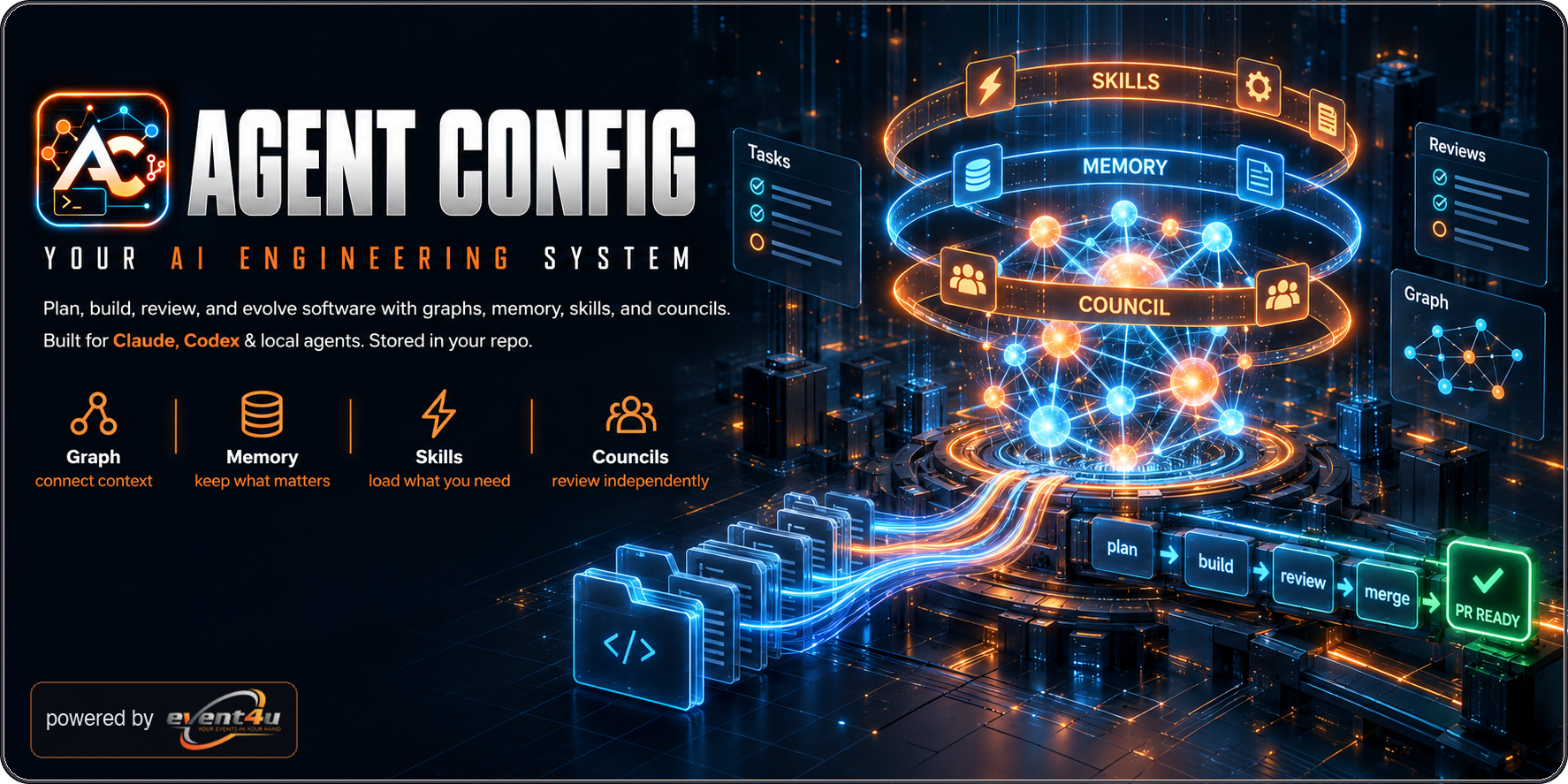
Installs into your user-level AI tool configuration; your repository only gets an agents/overrides/ folder for your own changes. Works with 20 AI coding tools.










Install once. Your AI coding tools are told to plan, test and verify before they say done; on Claude Code a turn that changed files without checking them can be stopped.
npx -y @event4u/agent-config init
Free and MIT-licensed. Node 22.6 or newer on macOS, Linux or WSL2. Costs more tokens: 7.8× a run with no rules on Claude Haiku as installed, 2.9× with only the core rules. What it costs →
On a desktop this opens a browser wizard: pick your role and your tools, click Finish. Nothing is written before you do.
Not ready to install anything? Drop one read-only checker into your repo and ask it whether your branch is really done:
mkdir -p .claude/agents
curl -fsSL https://raw.githubusercontent.com/event4u-app/agent-config/main/docs/wedge/production-validator/production-validator.md \
  -o .claude/agents/production-validator.md
# then in Claude Code:  @production-validator check this branch is actually done
production-validator reads the code that would ship, hunts mocks and placeholders on that path and asks for proof that it ran. It changes nothing. What it checks →
Before. You ask your agent to add a CSV export. It writes a handler that returns a hard-coded placeholder, the existing tests stay green and it replies "Done — export implemented." Nothing ever ran the new code.
After. In Claude Code you ask @production-validator whether the branch is
really done. It reads the code that would ship, finds the placeholder and
answers NOT READY with the exact file and line. On a branch that is really
finished it answers READY and reports nothing. We tested this on two cases:
one with a placeholder left in, one finished.
On Claude Code the package can also refuse to let a turn end on "done" when the agent changed files and ran nothing to check them. On every other tool that is an instruction the agent is asked to follow, not a block.
| Default behavior | With agent-config |
|---|---|
| Guess and edit blindly | Analyze code before changing it |
| Drift from project conventions | Follow detected stack conventions |
| Skip or invent tests | Write tests in the project's framework |
| Generic commit messages | Conventional Commits with scope + ticket links |
| Skip quality checks | Run the project's quality pipeline and fix reported errors |
| Open PRs without context | Structured PR descriptions from Jira / Linear / GitHub |
| Claim "done" without proof | Verify with real execution before claiming done |
It changes what the agent is told to do, not how smart the model is. Re-measured in November 2026 after a scorer repair, the full install's discipline gain on Claude Haiku was not significant and Claude Sonnet showed no gain; only the small core rule set kept a significant gain on Haiku. We publish results like that one instead of hiding them. The whole story →
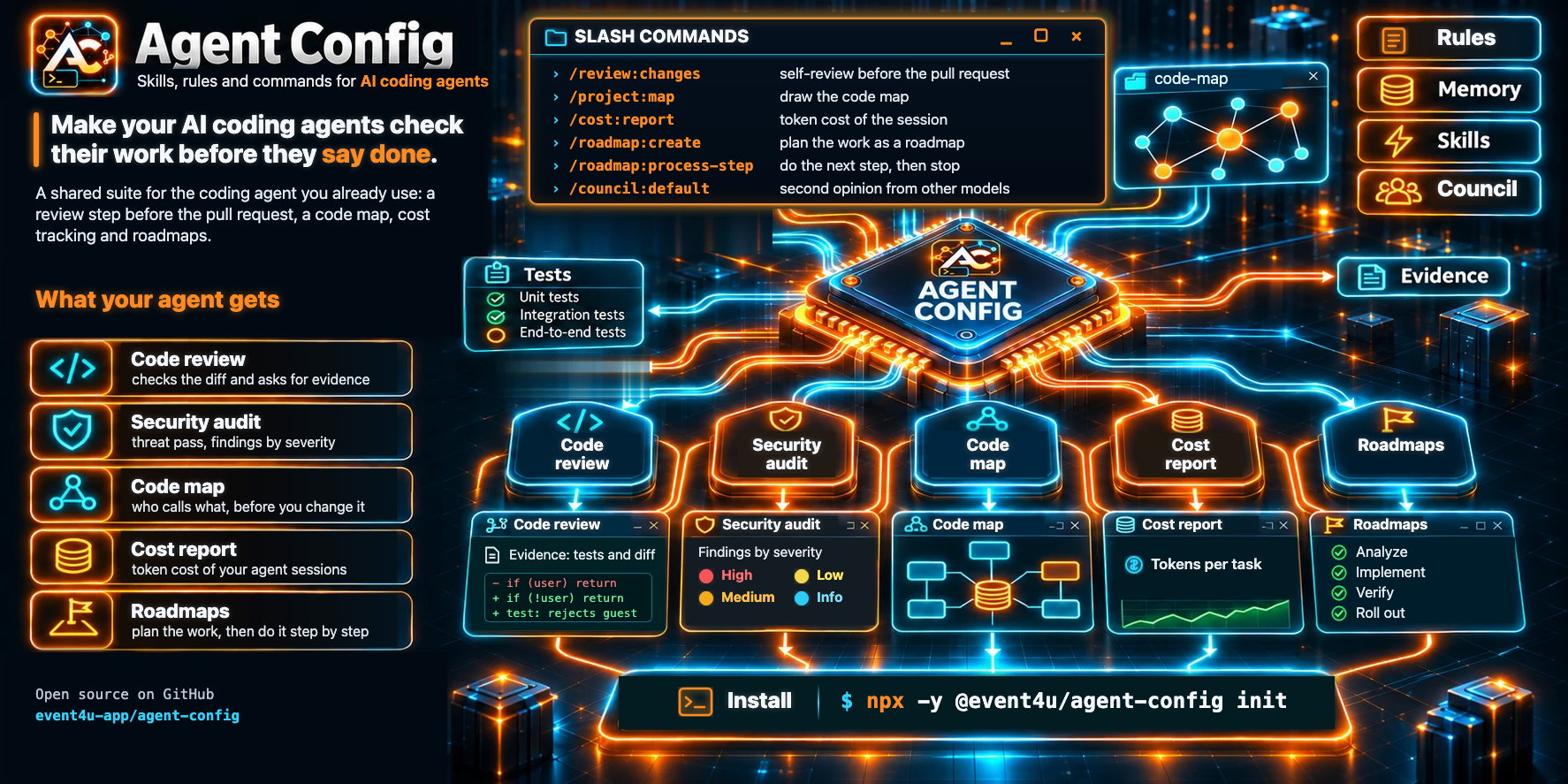
One install gives the agent you already use a set of skills, agent rules and slash commands. Rules that matter on every task are always on; the narrower ones load when a task needs them. See every slash command →
downstream-changes) cost 2.9×. The discipline_profile setting does not yet change what a Claude install loads. agent-config doctor neighbours lists installed mods. Elsewhere the rules are instructions: they cut violations but do not remove them. gh login, whether a pull request you pushed has merged. The update check is off in CI, without a terminal or with AGENT_CONFIG_NO_UPDATE_CHECK=1. Telemetry is off. The second-opinion feature is off until you set it up; then it sends work to other AI providers with your own API keys, which bill you. What leaves your machine →agent-config uninstall --global removes only its own entries and leaves other tools' config untouched. Benchmark and cost, explained →
agent-config code-graph map --open draws a local map of your repository: who calls what, which tests cover it, data, interfaces and delivery. Pick a file and every area it reaches lights up. It runs offline and keeps file:line for every fact.
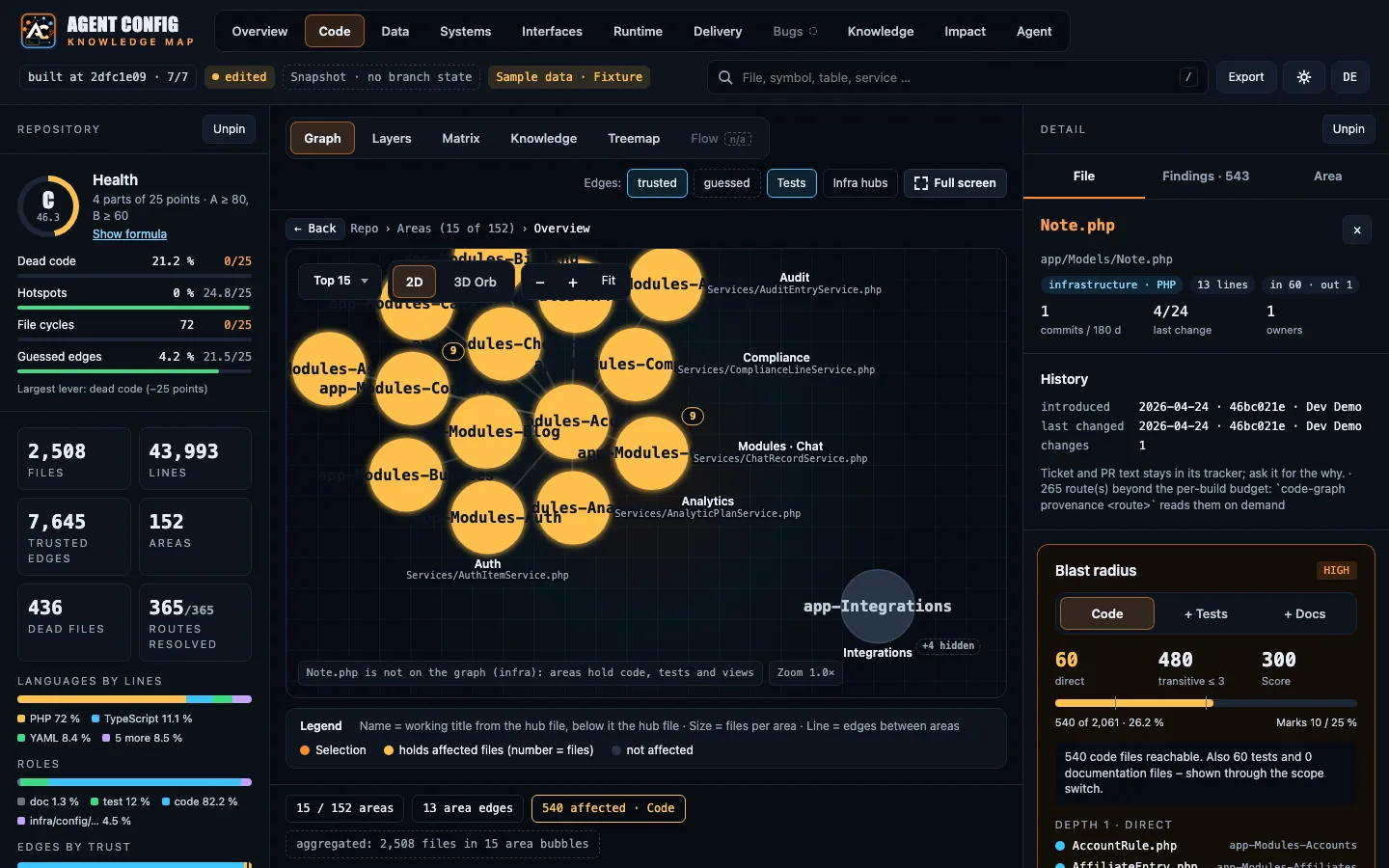
Open the demo map → (sample project, not your code) · Code map →
The wizard asks for your role and installs a focused set for it instead of the whole catalog. Most of them are not engineering roles.
| Profile | For | Starts you with |
|---|---|---|
developer (default) | Engineers who ship code | /work, /implement-ticket, /review:changes, /commit |
founder | Solo and early-stage founders | /work, /feature, /challenge-me; skills for vision, prioritisation and runway |
content_creator | Writers, ghostwriters, marketers | /work, /ghostwriter, /post-as, cinematic AI video storyboards |
agency | Shops delivering for several clients | /work, /implement-ticket, /refine-ticket, /roadmap |
finance | CFOs, fractional finance, FP&A | /work, /challenge-me; skills for forecasting and unit economics |
ops | RevOps, support, SRE-adjacent work | /work, /threat-model, /review:changes; skills for incidents and logging |
You start a piece of work, not a list of commands. These cover most days:
| Command | What it does for you |
|---|---|
/work "<what you want>" | Takes a free-form request through refine, plan, implement, test and verify, and reports back; it never commits for you. |
/implement-ticket <ticket> | The same loop for a ticket: it refines the ticket first and stops to ask when something is ambiguous. |
/review:changes | Reviews your local diff before the PR with focused reviewers (bugs, security, tests, quality, architecture, spec, overbuild) and merges their verdicts. |
/commit | Stages your changes and commits them as logical Conventional Commits, after showing you the split. |
agent-config doctor | Checks the install and reports anything missing or changed on disk, with the next command to fix it. |
When a request is unclear the agent stops and asks with numbered options instead of guessing. Implement a change →
Start with the Quickstart below; the full walk-through is on the site. Install →
Every measured figure in this README carries a marker that points at a recorded, re-runnable piece of evidence. The build fails when one stops resolving. The proof page lists each claim with its evidence, including the runs where the package changed nothing, plus commands you run yourself on a fresh checkout. Verify it yourself →
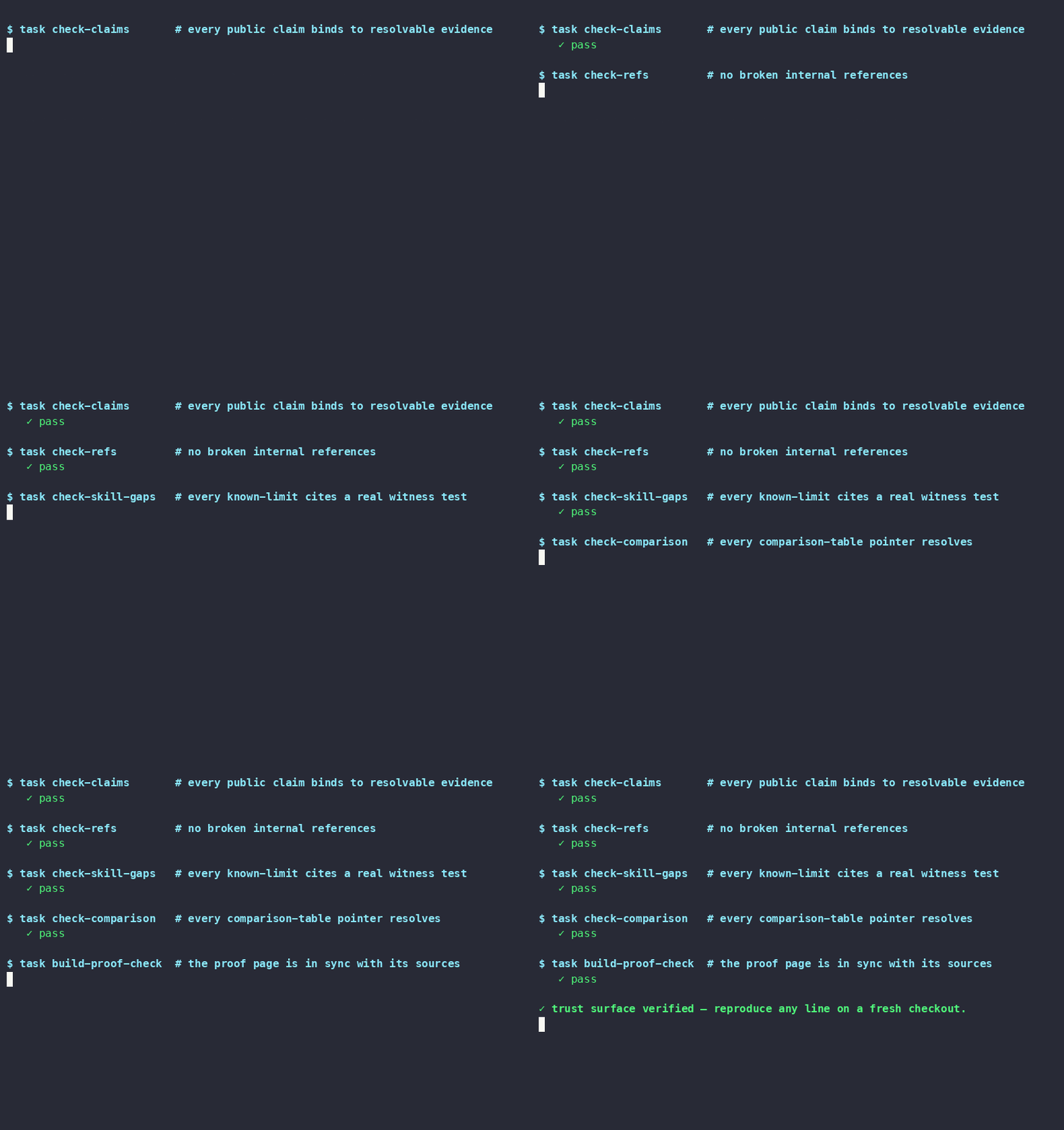
Skills, rules and commands are plain Markdown under src/; one command rebuilds every tool's copy and runs the checks. Development has the loop. Contributing guide →
npx -y @event4u/agent-config init                              # browser wizard on a desktop
npx -y @event4u/agent-config init --tools=claude-code,cursor    # no wizard: CI, scripts, servers
init finds the AI tools you have installed and selects them for you. In CI, without a terminal or with --yes or --tools=<ids> it installs without the wizard; both paths run the same installer. install is the same wizard under another name.
Installer default: user-global. agent-config init installs into your home directory — the package under
~/.event4u/agent-config/ and each AI tool's user-level folder such as
~/.claude/ or ~/.cursor/ — and writes no skills, rules or commands into
your repository, which only gets an agents/overrides/ folder for your own
changes plus a few gitignored bookkeeping files and a block each in
.gitignore and .gitattributes; agent-config init --project creates just
those in a repository and nothing else.
Then, in your AI tool:
/work "your first real task"
| Later | Command |
|---|---|
| Change role, profile or tools | agent-config setup |
| Open the settings screen | agent-config config |
| Update to the latest release | agent-config upgrade |
| Check the install | agent-config doctor |
| Remove it | agent-config uninstall --global (--purge also deletes the files it recorded writing ) |
Agent Config is a set of skills, agent rules, slash commands and guidelines that it writes into each AI tool's own format. Skills use the open Agent Skills SKILL.md format with a few package-specific frontmatter keys.
It is not an agent. Your AI agent still runs the loop, calls the LLM and uses its own tools; the package changes what that agent is told to do. It does not lock you to a model or a vendor.
How the counts in the badges at the top are counted — one counter, update_counts --check, re-derives all six from the tree and fails the build when one is off by one. Commands 214 counts every command file, including the ones in subfolders; all 213 are listed in the Commands section of the catalog page. Rules 122 counts the source rules, while the linked folder holds 121 because one rule is switched off and not shipped. Personas 29 leaves out the directory README. These are counts of files: none of them measures quality or adoption.
You do not get all of it at once. On tools without a way to hide skills, a new install ships a smaller set chosen for your role; Claude Code and Codex get every skill and show them as needed. Browse the catalog →
--profile minimal | balanced | full at install sets the rule level: how many rules load on every task. It is separate from the role profile above; balanced is the default and full costs the most tokens.agents/overrides/ in your repository instead of editing the installed files.agent-config config opens the settings screen with search and reset.init detects 23 AI coding tools and works with 20 of them. What a tool gets depends on its tier:
| Tool | Rules | Skills | Commands | How it works |
|---|---|---|---|---|
| Claude Code | ✅ | ✅ | ✅ | Reads .claude/ |
| Cursor | ✅ | — | ☑️ | Reads .cursor/rules/ + commands via AGENTS.md |
| Cline | ✅ | — | ☑️ | Reads .clinerules/ + commands via AGENTS.md |
| Windsurf | ✅ | — | ☑️ | Reads .windsurfrules + commands via AGENTS.md |
| Gemini CLI | ✅ | — | ☑️ | Reads GEMINI.md |
| GitHub Copilot | ✅ | — | ☑️ | Discovery plugin (read-only MCP server, no hooks); project rules via agent-config export --tool=copilot-instructions into .github/copilot-instructions.md |
| Roo Code | ✅ | — | ☑️ | Auto-discovers .roo/rules/*.md + AGENTS.md |
| Codex CLI | — | ✅ | — | Reads skills from ~/.codex/skills/; rules and commands are delivered but not read, and no AGENTS.md is written (your project's own AGENTS.md is still read) |
| Continue.dev | ✅ | — | ☑️ | Auto-discovers .continue/rules/*.md + AGENTS.md |
| Aider | 📌 | — | — | Export-only: add the file to read: in .aider.conf.yml |
| Augment (VSCode/IntelliJ) | 📌 | — | — | Global-only; project writes marker |
| Claude Desktop | — | 📦 | 📦 | Skill ZIPs (commands bundled as skills) that you upload yourself under Settings → Customize → Skills |
✅ native ☑️ text reference (in AGENTS.md, not a native slash command) 📌 marker or export only 📦 ZIP you upload yourself — not available
Plugins. Augment CLI can also install it as a plugin with rules, skills and commands. GitHub Copilot gets a discovery-only plugin: a read-only MCP server and a skill that points to the install, with no hooks. For per-project Copilot instructions run agent-config export --tool=copilot-instructions --output=.github/copilot-instructions.md. The Claude Code marketplace plugin is deprecated because the npm install already carries the content and the hooks; agent-config doctor flags a leftover plugin.
Teams. Every tool you install is recorded in agents/installed-tools.lock; a new team member runs npx @event4u/agent-config sync after cloning.
Cloud sessions. A Claude Code cloud session (claude.ai/code, claude --cloud) starts on a fresh clone and does not see the home-directory install, so it runs without agent-config skills, rules and hooks. See cloud sessions.
agent-switch runs several agent accounts on one machine, each in its own profile. The two compose: agent-switch keeps the accounts apart and agent-config shapes what the agents do inside them. Its settings stay scoped to the active profile. How they work together →
Anyone whose AI coding agent says "done" too early. The habits — analyse first, test, verify, commit cleanly — work in any stack. The deepest skill sets are for Laravel and modern PHP (Pest, PHPStan, Rector, Eloquent, Livewire), then Symfony, Next.js and React. Cross-stack skills cover API design, testing, security, databases, Docker, Git, CI, review, threat modeling and prompt engineering.
The skills come from production work on TypeScript and PHP codebases. Treat coverage on other stacks as promising, not proven. Tell us where it falls short. Discussions →
Legal pack — not legal advice. The EU/DE legal skill set (contract, NDA and DPA review) is a research and drafting aid only. It does not replace a qualified lawyer and must not be relied on for a concrete matter. Read the legal notice (LEGAL_NOTICE.md) before use.
Security reports: SECURITY.md. Security features →
| Page | What you find there |
|---|---|
| Install | Every install path, flags and what gets written where |
| Your first task | From install to a finished change |
| Update and Uninstall | Keeping current and leaving cleanly |
| Workflows | Implement, review, plan, commit and open a PR |
| Features | Code map, security, cost, second opinion, memory |
| CLI reference | Every agent-config command |
| Check our claims | The evidence behind every number |
Machine-readable index for AI tools: llms.txt.
Start with agent-config doctor: it flags a binary missing from PATH, version mismatches and leftovers, each with a one-line fix. If a rule or hook did not fire, agent-config routing:doctor reports which checks are active and why. Upgrade problems such as a missing command or a skill listed twice: troubleshooting.
Working on the package itself? Edit src/ only and rebuild the generated trees:
task sync             # regenerate dist/agent-src/ and .augment/
task generate-tools   # regenerate .claude/, .cursor/, .clinerules/, .windsurfrules
task ci               # full pipeline — green before PR
task test             # unit + integration tests
task dev:setup        # boot the onboarding wizard against the working tree
From a source checkout, run the CLI as ./agent-config <command>; npx @event4u/agent-config does not resolve there without npm link. Build it with npm run build:cli if dist/cli/agent-config.js is missing. The whole stack is TypeScript.
Development guide · Quality and CI · CONTRIBUTING.md · CHANGELOG · Breaking changes
npx -y @event4u/agent-config init is the install path; nothing else is needed.Windows. Native PowerShell and cmd are not supported for the file install; use WSL2. Without WSL2, point any MCP client at the built-in MCP server and the skills, rules and commands are available as prompts and resources:
npx -y @event4u/agent-config mcp-server
The package is free, MIT and stays that way — no paid tier, no dual licensing. If it saves you time and you want to chip in, the GitHub Sponsor button at the top of the repo is the whole mechanism. If you would rather not, use it anyway; nothing here is gated on it.
MIT.
mcp-name: io.github.event4u-app/agent-config
Claim this server with your GitHub account to request manual ownership verification.
Link to the catalog listing for Agent Config MCP server from your README. This badge does not certify ownership, compatibility or security.
[](https://awesome-mcp.com/servers/agent-config)Public repository statistics could not be verified. Check the configured source address; unavailable counts are not zero.
来源、范围和时段分别列出;不相加,不代表安装人数、活跃用户或安全审核。
尚无已审核的包 / 镜像标识,暂不展示下载统计。
Alternative and complementary servers in the same category
A directory listing describing a cancellation-letter and mailing-address service. The configured public GitHub repository returned 404 during source verification.

A hosted MCP service for browsing and searching through Singapore mobile-network proxies.

A directory listing describing a Markdown-to-PDF service. The configured public GitHub repository returned 404 during source verification.