
A directory listing describing a cancellation-letter and mailing-address service. The configured public GitHub repository returned 404 during source verification.
Repository stats unavailable
Developer Tools
A local MCP server and CLI that keep a repository's task state in files, so connected AI coding agents can record decisions and checkpoints and later sessions can continue the task.
Agentpack is cataloged as an MCP server attributed to ihorponom. A local MCP server and CLI that keep a repository's task state in files, so connected AI coding agents can record decisions and checkpoints and later sessions can continue the task. It is categorized under developer tools. See the capability inspector for recorded interfaces and their independent review status; consult upstream documentation for the current interface.
Installation configuration is not reviewed. No executable setup is offered for this entry; inspect the source repository before proceeding.
Catalog license label: Not specified. Check the source repository's current license and terms before using, modifying or distributing this software.
能力定义尚未审核。未核验的采集内容不会作为可信接口展示。
暂无可展示的已审核记录。这不表示上游不支持此能力。
暂无可展示的已审核记录。这不表示上游不支持此能力。
暂无可展示的已审核记录。这不表示上游不支持此能力。
Email delivery is not connected. This page does not collect email addresses or create subscriptions.
Browse the registry for current listings instead.
Reviews for Agentpack are not available yet
Review publishing and storage are not connected. This page does not collect or publish ratings or comments, including after sign-in.
Yes. Agentpack keeps task state as plain files in the repository, with no cloud, telemetry, or network calls.
Yes. A task can be exported to one JSON file and imported in a fresh clone or on another machine.
By default the gate only warns; setting gateMode to block stops edits outside the write scope or outside an active task.
README.md · 4faf87da7e2f · 采集于 2026-11-13 11:26:23 UTC
保留上游原文,不做 AI 改写。为安全起见过滤脚本、表单和不安全链接。
当前显示最后一次成功采集的文档快照,请以来源页面为准。


Repo-native task continuity for AI coding agents.
Agent memory remembers how you work. Agentpack remembers where the task stands.
Your agent spent an hour on a task. It found the cause, rejected two approaches, and wrote down the next step. Then the context was compacted, or the chat closed. The next session starts from zero and does the same investigation again.
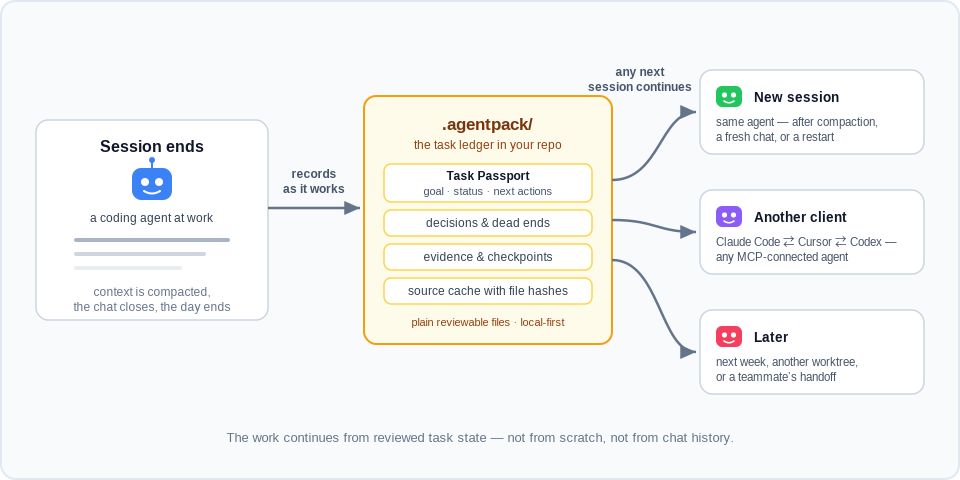
Agentpack keeps the task state in your repo. Connected agents record the goal, decisions, dead ends, verification evidence, and checkpoints in .agentpack/ while they work. Then the next session loads that state and continues: the same agent after compaction, a different client, or you next week.
Here it is in action. In session 1, an agent works on a flaky test and records a decision, a dead end, and a checkpoint through the Agentpack MCP tools. In session 2, the next day with an empty context, one load_context call brings the task back:
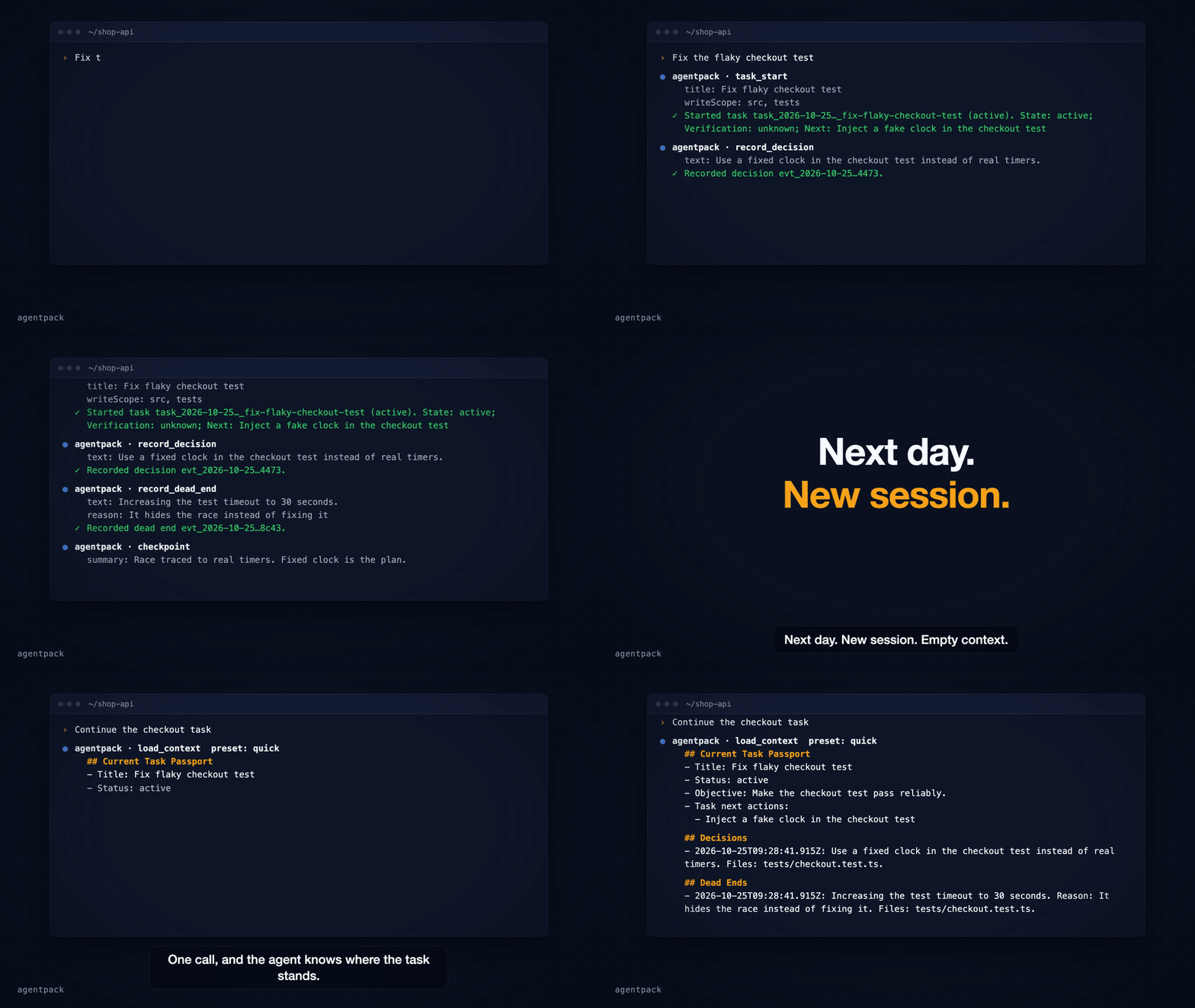
▶ Watch the 80-second explainer, with sound
To try the same flow by hand from the CLI, see docs/DEMOS.md.
AGENTS.md, CLAUDE.md, Cursor rules) tell agents when to load and record state.Claude Code memory, Codex memories, and CLAUDE.md or AGENTS.md keep how to work: your preferences, project conventions, and facts that stay true. Agentpack keeps where the work is: the goal of the current task, its constraints, decisions, dead ends, next actions, and verification result.
| Agent memory | Agentpack | |
|---|---|---|
| Holds | Preferences, conventions, long-lived facts | The state of one task |
| Lives in | The profile or account of one client | .agentpack/ in the repo, local by default, portable with task bundles |
| Read by | That client only | Any MCP client: Claude Code, Codex, Cursor, Claude Desktop |
| Shape | Free-form notes, recalled by relevance | A Task Passport per task: goal, lifecycle, the paths it may change, and verification bound to a commit |
| Staleness | Not tied to file changes | Notes about files store the file hash, so Agentpack flags a note when its file changes |
Use both. Memory keeps how you like to work. Agentpack keeps what the task needs next.
Agentpack needs Node.js 20 or later.
npm install -g agentpack-cli

cd path/to/your/repo
agentpack init                     # once per repo
agentpack install claude --write   # per client: codex | claude | cursor | claude-desktop
agentpack install git-hooks --write  # optional: task gate check before each commit
Restart or reconnect your coding agent, and approve the Agentpack server or hooks when the client asks. From then on, the agent loads the task state when a session starts, records decisions and evidence while it works, and creates checkpoints at meaningful points.
To check the setup, run agentpack doctor. To see the task state yourself, run agentpack resume --preset agent --query "<topic>".
In a Git repository, init adds the local Agentpack files to .git/info/exclude. The list includes .agentpack/, .mcp.json, .claude, .codex, .cursor, AGENTS.md, and CLAUDE.md. Agentpack does not change your .gitignore. Files that Git already tracks stay tracked.
For each client, docs/INTEGRATIONS.md shows what the installer writes and why.
Each task has a Task Passport: the goal, status, constraints, write scope (the paths the task may change), next actions, and verification. You can start, park, switch, and finalize tasks, so each handoff is explicit.
The task gate checks edits against the current Passport. The client installers add native hooks for Claude Code, Codex, and Cursor. install git-hooks adds a pre-commit check. By default, the gate only warns. Set "gateMode" in .agentpack/config.json to "block" to stop edits outside the write scope or outside an active task, or to "off" to turn the gate off. Hooks are a guardrail, not a sandbox. See docs/CLI.md.
The summary stays inside a token budget. The agent gets the useful state back, not the full history.
api/, frontend/, cron/) short tasks with their own write scope. The task gate warns when the agent leaves that part.agentpack usage report reads local Claude Code and Codex transcripts and shows the token use of a task, including the Agentpack share. Nothing leaves your machine.agentpack tui shows tasks, evidence, and checkpoints in the terminal. See docs/TUI.md.Agentpack context also uses tokens. The compact output keeps the task state available without the full ledger history.
ignore-scripts=true.npm audit signatures.See SECURITY.md for the full policy, including what Agentpack reads outside the repo.
Clone the repo and use Node.js 20 or later:
npm ci --ignore-scripts
npm test
npm run mcp:smoke
node dist/src/agentpack.js --help
See docs/SETUP.md for the development setup and docs/RELEASING.md for the release steps.
Mirror: Codeberg. Issues, releases, and npm provenance stay on GitHub.
Claim this server with your GitHub account to request manual ownership verification.
Link to the catalog listing for Agentpack from your README. This badge does not certify ownership, compatibility or security.
[](https://awesome-mcp.com/servers/agentpack)Public repository statistics could not be verified. Check the configured source address; unavailable counts are not zero.
来源、范围和时段分别列出;不相加,不代表安装人数、活跃用户或安全审核。
尚无已审核的包 / 镜像标识,暂不展示下载统计。
Alternative and complementary servers in the same category
A directory listing describing a cancellation-letter and mailing-address service. The configured public GitHub repository returned 404 during source verification.

A hosted MCP service for browsing and searching through Singapore mobile-network proxies.

A directory listing describing a Markdown-to-PDF service. The configured public GitHub repository returned 404 during source verification.