
A directory listing describing a cancellation-letter and mailing-address service. The configured public GitHub repository returned 404 during source verification.
Repository stats unavailable
Developer Tools
A demonstration repository pairing LLM agent framework examples with locally implemented Python MCP servers, including a basic example server and a Mermaid diagram validation server.
Demo MCP servers for agent frameworks is cataloged as an MCP server attributed to andrewginns. A demonstration repository pairing LLM agent framework examples with locally implemented Python MCP servers, including a basic example server and a Mermaid diagram validation server. It is categorized under developer tools. See the capability inspector for recorded interfaces and their independent review status; consult upstream documentation for the current interface.
Installation configuration is not reviewed. No executable setup is offered for this entry; inspect the source repository before proceeding.
Catalog license label: Not specified. Check the source repository's current license and terms before using, modifying or distributing this software.
能力定义尚未审核。未核验的采集内容不会作为可信接口展示。
暂无可展示的已审核记录。这不表示上游不支持此能力。
暂无可展示的已审核记录。这不表示上游不支持此能力。
暂无可展示的已审核记录。这不表示上游不支持此能力。
Email delivery is not connected. This page does not collect email addresses or create subscriptions.
Browse the registry for current listings instead.
Reviews for Demo MCP servers for agent frameworks are not available yet
Review publishing and storage are not connected. This page does not collect or publish ratings or comments, including after sign-in.
It includes examples for Google Agent Development Kit, LangGraph, OpenAI Agents and Pydantic-AI.
README.md · 7c44b53b1e4a · 采集于 2026-11-13 10:29:41 UTC
保留上游原文,不做 AI 改写。为安全起见过滤脚本、表单和不安全链接。
当前显示最后一次成功采集的文档快照,请以来源页面为准。
This repository demonstrates LLM Agents using tools from Model Context Protocol (MCP) servers with several frameworks:
The repo also includes Python MCP Servers:
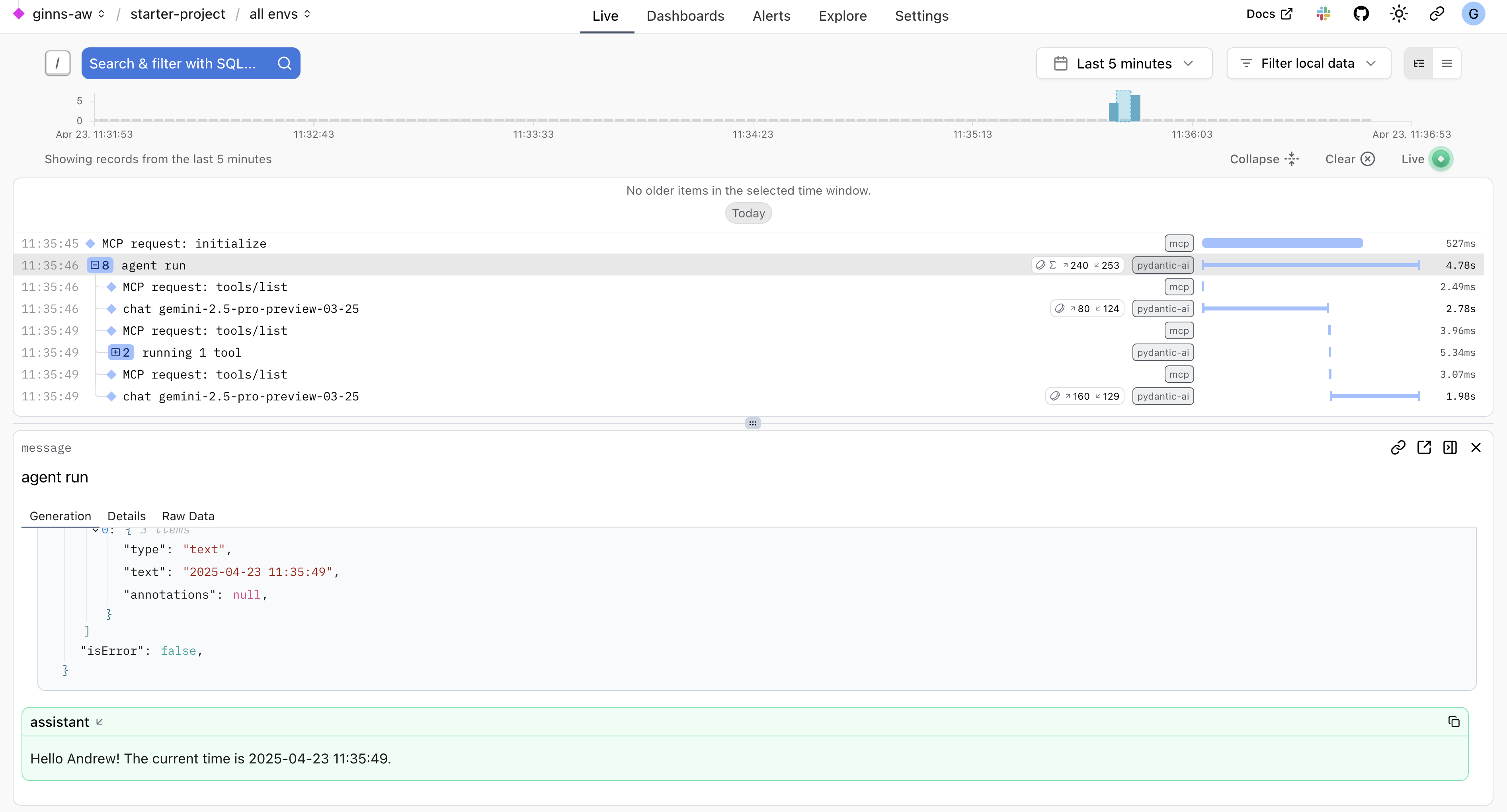
example_server.py based on MCP Python SDK Quickstart - Modified to include a datetime tool and run as a server invoked by Agentsmermaid_validator.py - Mermaid diagram validation server using mermaid-cliTracing is done through Pydantic Logfire.
cp .env.example .envGEMINI_API_KEY and/or OPENAI_API_KEY
LOGFIRE_TOKEN to visualise evaluations in Logfire web uiuv run agents_mcp_usage/basic_mcp/basic_mcp_use/pydantic_mcp.py
GEMINI_API_KEY by defaultuv run agents_mcp_usage/basic_mcp/basic_mcp_use/oai-agent_mcp.py
OPENAI_API_KEY by defaultmake benchmark MODEL="openai:gpt-5.2 (none)" RUNS=5 PARALLEL=1Check console, Logfire, or the ADK web UI for output
This project aims to teach:
agents_mcp_usage/basic_mcp/ - Single MCP server integration examples
adk_mcp.py - Example of using MCP with Google's Agent Development Kit (ADK 1.3.0)langgraph_mcp.py - Example of using MCP with LangGraphoai-agent_mcp.py - Example of using MCP with OpenAI Agentspydantic_mcp.py - Example of using MCP with Pydantic-AIpydantic_mcp_factory.py - Example demonstrating the model factory pattern for multi-provider supportagents_mcp_usage/multi_mcp/ - Advanced multi-MCP server integration examples
pydantic_mcp.py - Example of using multiple MCP servers with Pydantic-AI Agentagents_mcp_usage/evaluations/ - Evaluation modules for benchmarking
evals_pydantic_mcp.py - Core evaluation module for single-model testingrun_multi_evals.py - Multi-model benchmarking with parallel executionmerbench_ui.py - Interactive dashboard for result visualizationDemo Python MCP Servers
mcp_servers/example_server.py - Simple MCP server that runs locally, implemented in Pythonmcp_servers/mermaid_validator.py - Mermaid diagram validation MCP server, implemented in PythonThe basic_mcp directory demonstrates how to integrate a single MCP server with different agent frameworks. Each example follows a similar pattern:
The MCP server in these examples provides:
add(a, b))get_current_time())greeting://{name})graph LR
User((User)) --> |"Run script<br>(e.g., pydantic_mcp.py)"| Agent
subgraph "Agent Frameworks"
Agent[Agent]
ADK["Google ADK<br>(adk_mcp.py)"]
LG["LangGraph<br>(langgraph_mcp.py)"]
OAI["OpenAI Agents<br>(oai-agent_mcp.py)"]
PYD["Pydantic-AI<br>(pydantic_mcp.py)"]
Agent --> ADK
Agent --> LG
Agent --> OAI
Agent --> PYD
end
subgraph "Python MCP Server"
MCP["Model Context Protocol Server<br>(mcp_servers/example_server.py)"]
Tools["Tools<br>- add(a, b)<br>- get_current_time()"]
Resources["Resources<br>- greeting://{name}"]
MCP --- Tools
MCP --- Resources
end
subgraph "LLM Providers"
OAI_LLM["OpenAI Models"]
GEM["Google Gemini Models"]
OTHER["Other LLM Providers..."]
end
Logfire[("Logfire<br>Tracing")]
ADK --> MCP
LG --> MCP
OAI --> MCP
PYD --> MCP
MCP --> OAI_LLM
MCP --> GEM
MCP --> OTHER
ADK --> Logfire
LG --> Logfire
OAI --> Logfire
PYD --> Logfire
LLM_Response[("Response")] --> User
OAI_LLM --> LLM_Response
GEM --> LLM_Response
OTHER --> LLM_Response
# Google ADK example
uv run agents_mcp_usage/basic_mcp/basic_mcp_use/adk_mcp.py

# LangGraph example
uv run agents_mcp_usage/basic_mcp/basic_mcp_use/langgraph_mcp.py

# OpenAI Agents example
uv run agents_mcp_usage/basic_mcp/basic_mcp_use/oai-agent_mcp.py

# Pydantic-AI example
uv run agents_mcp_usage/basic_mcp/basic_mcp_use/pydantic_mcp.py

# Launch ADK web UI for visual interaction
make adk_basic_ui
More details on basic MCP implementation can be found in the basic_mcp README.
The multi_mcp directory demonstrates advanced techniques for connecting to and coordinating between multiple specialised MCP servers simultaneously. This approach offers several advantages:
graph LR
    User((User)) --> |"Run script<br>(e.g., pydantic_mcp.py)"| Agent

    subgraph "Agent Framework"
        Agent["Pydantic-AI Agent<br>(pydantic_mcp.py)"]
    end

    subgraph "MCP Servers"
        PythonMCP["Python MCP Server<br>(mcp_servers/example_server.py)"]
        MermaidMCP["Python Mermaid MCP Server<br>(mcp_servers/mermaid_validator.py)"]

        Tools["Tools<br>- add(a, b)<br>- get_current_time()"]
        Resources["Resources<br>- greeting://{name}"]
        MermaidValidator["Mermaid Diagram<br>Validation Tools"]

        PythonMCP --- Tools
        PythonMCP --- Resources
        MermaidMCP --- MermaidValidator
    end

    subgraph "LLM Providers"
        LLMs["PydanticAI LLM call"]
    end

    Logfire[("Logfire<br>Tracing")]

    Agent --> PythonMCP
    Agent --> MermaidMCP

    PythonMCP --> LLMs
    MermaidMCP --> LLMs

    Agent --> Logfire

    LLM_Response[("Response")] --> User
    LLMs --> LLM_Response
# Run the Pydantic-AI multi-MCP example
uv run agents_mcp_usage/multi_mcp/multi_mcp_use/pydantic_mcp.py

# Run the multi-MCP evaluation
uv run agents_mcp_usage/evaluations/mermaid_evals/evals_pydantic_mcp.py

# Run multi-model benchmarking
uv run agents_mcp_usage/evaluations/mermaid_evals/run_multi_evals.py --models "gemini-2.5-pro-preview-06-05,gemini-2.0-flash" --runs 5 --parallel

# Dockerized benchmark for a single model (builds the image automatically)
make benchmark MODEL="openai:gpt-5.1 (none)" RUNS=5 PARALLEL=1

# Dockerized dry run (no API calls; useful for smoke tests)
make benchmark-dry-run MODEL="openai:gpt-5.1 (none)"

# Note: the Docker image installs benchmark-only dependencies.
# Run other demos/dashboards from your local environment.

# Launch the evaluation dashboard
uv run streamlit run agents_mcp_usage/evaluations/mermaid_evals/merbench_ui.py
More details on multi-MCP implementation can be found in the multi_mcp README.
This repository includes a comprehensive evaluation system for benchmarking LLM agent performance across multiple frameworks and models. The evaluation suite tests agents on mermaid diagram correction tasks using multiple MCP servers, providing rich metrics and analysis capabilities.
The included Streamlit dashboard (merbench_ui.py) provides:
# Single model evaluation
uv run agents_mcp_usage/evaluations/mermaid_evals/evals_pydantic_mcp.py

# Dockerized single-model benchmark (isolated dependencies)
make benchmark MODEL="openai:gpt-5.1 (none)" RUNS=5 PARALLEL=1

# Multi-model parallel benchmarking
uv run agents_mcp_usage/evaluations/mermaid_evals/run_multi_evals.py \
  --models "gemini-2.5-pro-preview-06-05,gemini-2.0-flash,gemini-2.5-flash" \
  --runs 5 \
  --parallel \
  --output-dir ./results

# Launch interactive dashboard
uv run streamlit run agents_mcp_usage/evaluations/mermaid_evals/merbench_ui.py
The evaluation system enables robust, repeatable benchmarking across LLM models and agent frameworks, supporting both research and production model selection decisions.
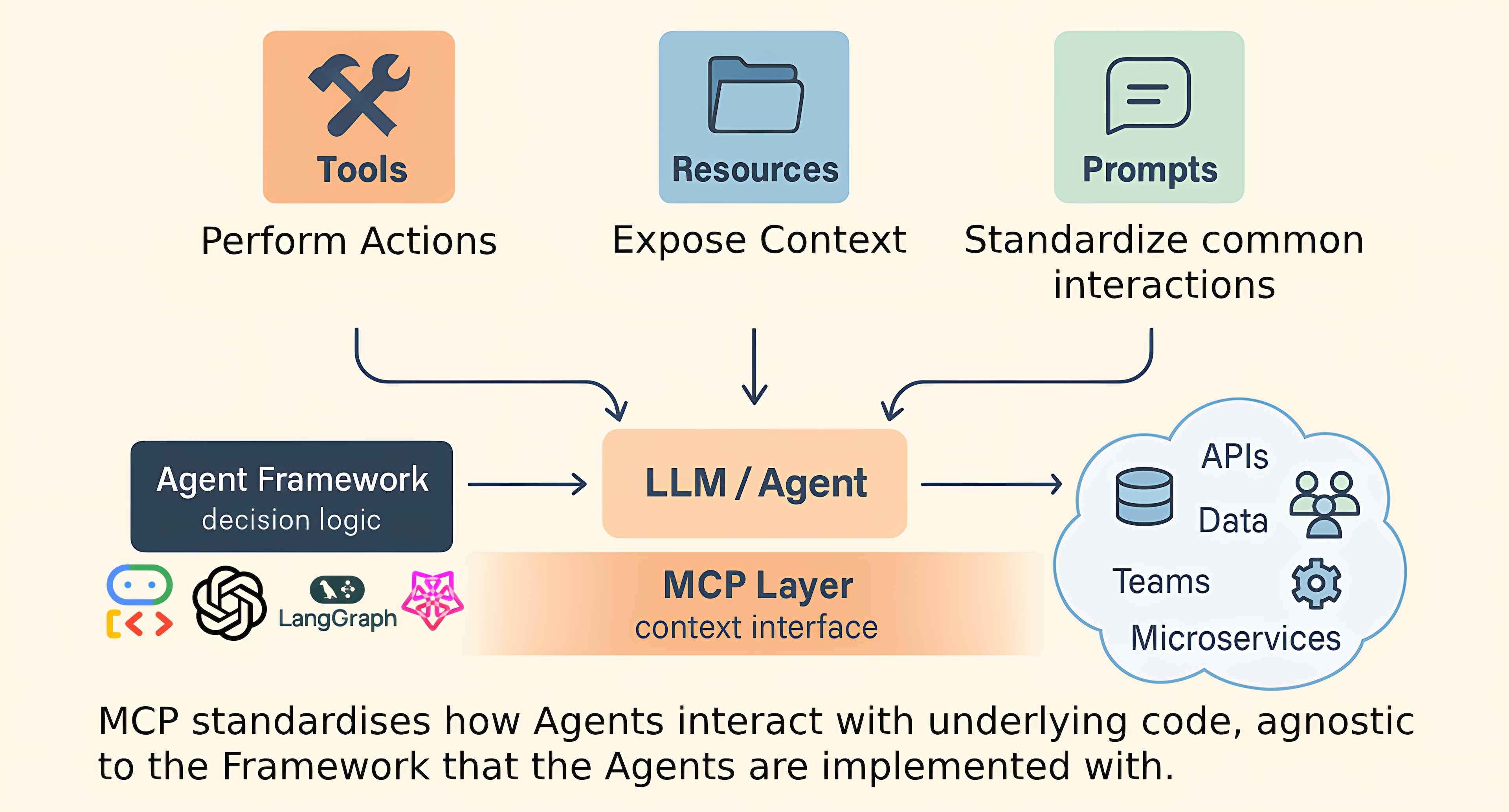
The Model Context Protocol allows applications to provide context for LLMs in a standardised way, separating the concerns of providing context from the actual LLM interaction.
Learn more: https://modelcontextprotocol.io/introduction
By defining clear specifications for components like resources (data exposure), prompts (reusable templates), tools (actions), and sampling (completions), MCP simplifies the development process and fosters consistency.
A key advantage highlighted is flexibility; MCP allows developers to more easily switch between different LLM providers without needing to completely overhaul their tool and data integrations. It provides a structured approach, potentially reducing the complexity often associated with custom tool implementations for different models. While frameworks like Google Agent Development Kit, LangGraph, OpenAI Agents, or libraries like PydanticAI facilitate agent building, MCP focuses specifically on standardising the interface between the agent's reasoning (the LLM) and its capabilities (tools and data), aiming to create a more interoperable ecosystem.
Clone this repository
Install required packages:
make install
To use the ADK web UI, run:
make adk_basic_ui
Set up your environment variables in a .env file:
LOGFIRE_TOKEN=your_logfire_token
GEMINI_API_KEY=your_gemini_api_key
OPENAI_API_KEY=your_openai_api_key
Run any of the sample scripts as shown in the examples above
Logfire is an observability platform from the team behind Pydantic that makes monitoring AI applications straightforward. Features include:
Logfire gives you visibility into how your code is running, which is especially valuable for LLM applications where understanding model behaviour is critical.
Claim this server with your GitHub account to request manual ownership verification.
Link to the catalog listing for Demo MCP servers for agent frameworks from your README. This badge does not certify ownership, compatibility or security.
[](https://awesome-mcp.com/servers/agents-mcp-usage)Public repository statistics could not be verified. Check the configured source address; unavailable counts are not zero.
来源、范围和时段分别列出;不相加,不代表安装人数、活跃用户或安全审核。
尚无已审核的包 / 镜像标识,暂不展示下载统计。
Alternative and complementary servers in the same category
A directory listing describing a cancellation-letter and mailing-address service. The configured public GitHub repository returned 404 during source verification.

A hosted MCP service for browsing and searching through Singapore mobile-network proxies.

A directory listing describing a Markdown-to-PDF service. The configured public GitHub repository returned 404 during source verification.