

A directory listing describing a cancellation-letter and mailing-address service. The configured public GitHub repository returned 404 during source verification.
Repository stats unavailable
Developer Tools
A Model Context Protocol server that gives Claude persistent codebase understanding, filesystem access, task management, and security analysis capabilities.
AI Librarian Server (AI Dev Toolkit) is cataloged as an MCP server attributed to readyplayersix. A Model Context Protocol server that gives Claude persistent codebase understanding, filesystem access, task management, and security analysis capabilities. It is categorized under developer tools. See the capability inspector for recorded interfaces and their independent review status; consult upstream documentation for the current interface.
Installation configuration is not reviewed. No executable setup is offered for this entry; inspect the source repository before proceeding.
Catalog license label: MIT License. Check the source repository's current license and terms before using, modifying or distributing this software.
能力定义尚未审核。未核验的采集内容不会作为可信接口展示。
暂无可展示的已审核记录。这不表示上游不支持此能力。
暂无可展示的已审核记录。这不表示上游不支持此能力。
暂无可展示的已审核记录。这不表示上游不支持此能力。
Email delivery is not connected. This page does not collect email addresses or create subscriptions.
Browse the registry for current listings instead.
Reviews for AI Librarian Server (AI Dev Toolkit) are not available yet
Review publishing and storage are not connected. This page does not collect or publish ratings or comments, including after sign-in.
No; the README states that after initialization the system handles everything behind the scenes and Claude handles internal implementation automatically.
It is in an alpha/pre-beta testing phase, with some features more stable in Claude Code than Claude Desktop.
README.md · 587e5b6e4bc7 · 采集于 2026-11-13 13:17:17 UTC
保留上游原文,不做 AI 改写。为安全起见过滤脚本、表单和不安全链接。
当前显示最后一次成功采集的文档快照,请以来源页面为准。






⚠️ Alpha Testing Phase: This toolkit is currently in Pre-Beta. If you're testing this version, please disable all tools except the 17 recommended tools to ensure optimal performance during our active testing phase for reducing tool count. See the installation section for more details.
A powerful, extensible toolkit that dramatically enhances Claude's capabilities with persistent context, filesystem access, development tools, and AI-optimized task management.
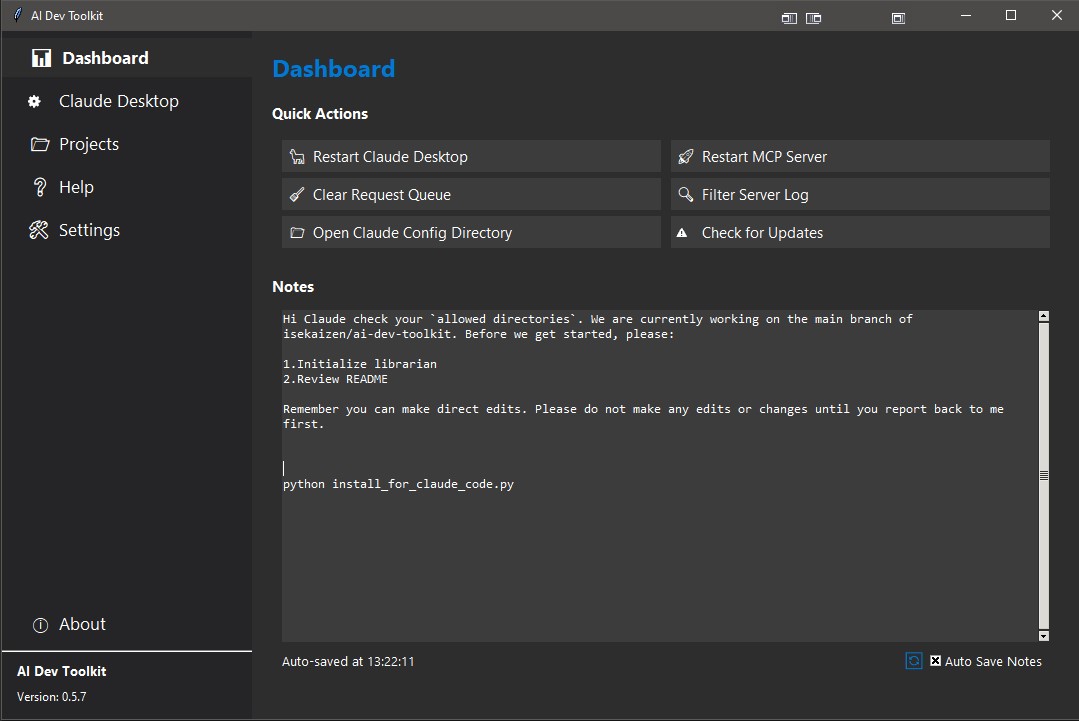
AI Dev Toolkit elevates Claude beyond a conversational assistant to a comprehensive development partner. The toolkit creates a bidirectional bridge between your projects and Claude, enabling it to:
With this toolkit, Claude becomes a true development partner - remembering your project structure, understanding component relationships, connecting code to relevant tools, tracking tasks, and assisting with development activities.
All this happens automatically - just initialize once and the system handles everything behind the scenes, continuously updating its understanding of your codebase as it evolves. You don't need to manually call any functions or understand the internal implementation - Claude handles all of this for you.
This toolkit was developed with Claude's assistance, demonstrating the power of human-AI collaboration in creating developer tools. The project itself serves as an example of enhancing AI capabilities through specialized extensions.
Key AI-assisted development techniques used in this project:
The AI Dev Toolkit uses a modular architecture built around the Model Context Protocol (MCP) to integrate with Claude:
┌───────────────────┐      ┌───────────────┐      ┌───────────┐
│                   │      │               │      │           │
│   Claude Desktop  │◄────►│   AI Librarian│◄────►│Your Project│
│                   │      │     Server    │      │  Filesystem│
└───────────────────┘      └───────────────┘      └───────────┘
                                  ▲
                                  │
                                  ▼
                        ┌─────────────────────┐
                        │                     │
                        │  Unified Context System│
                        │                     │
                        └─────────────────────┘
                                  ▲
                                  │
                                  ▼
                  ┌────────────────┐     ┌────────────────┐
                  │                │     │                │
                  │ AI Librarian   │◄───►│  Tool Reference│
                  │ Persistent     │     │  System        │
                  │ Context        │     │                │
                  └────────────────┘     └────────────────┘
┌───────────────────┐      ┌───────────────┐      ┌───────────┐
│                   │      │ Built-in Tools│      │           │
│   Claude Code     │◄────►│ + AI Librarian│◄────►│Your Project│
│                   │      │   Components  │      │  Filesystem│
└───────────────────┘      └───────────────┘      └───────────┘
                                  ▲
                                  │
                                  ▼
                        ┌─────────────────────┐
                        │                     │
                        │ .ai_reference/      │
                        │ Mini-Librarians     │
                        └─────────────────────┘
                                  ▲
                                  │
                                  ▼
                  ┌────────────────┐     ┌────────────────┐
                  │                │     │                │
                  │ AI Librarian   │◄───►│  Tool Reference│
                  │ Persistent     │     │  System        │
                  │ Context        │     │                │
                  └────────────────┘     └────────────────┘
The AI Librarian components provide a seamless interface between Claude and your project. The Unified Context System automatically bridges the AI Librarian's code understanding with the Tool Reference System, enabling intelligent navigation between components and tools without any manual configuration.
Claude Code can directly access Mini-Librarians through its file system tools, while Claude Desktop requires the MCP server to access these components.
Note: The GUI components are currently under development. Claude Desktop features are in pre-beta phase, while Claude Code features have more streamlined implementation. Feature stability is indicated for each component.
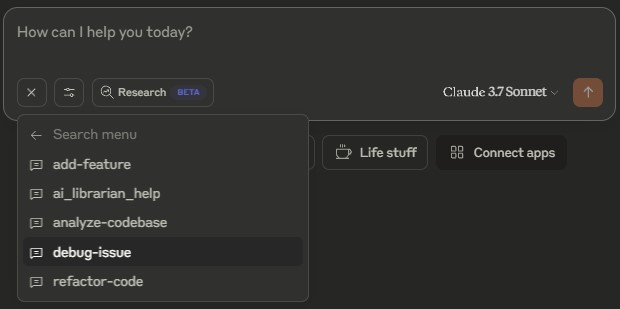
security_analyze() function (Stable)analyze-codebase: Comprehensive project analysisdebug-issue: Debugging assistance workflowrefactor-code: Code refactoring guidanceadd-feature: Feature implementation workflowlibrarian://projects/*: Project metadata and AI Librarian datalibrarian://bookmarks/*: Edit bookmark informationlibrarian://diagnostics/*: Diagnostic informationget_debugging_guide: Context-aware debugging assistanceget_refactoring_guide: Type-specific refactoring strategiesget_feature_implementation_guide: Feature development workflowget_analysis_guide: Codebase analysis approaches | 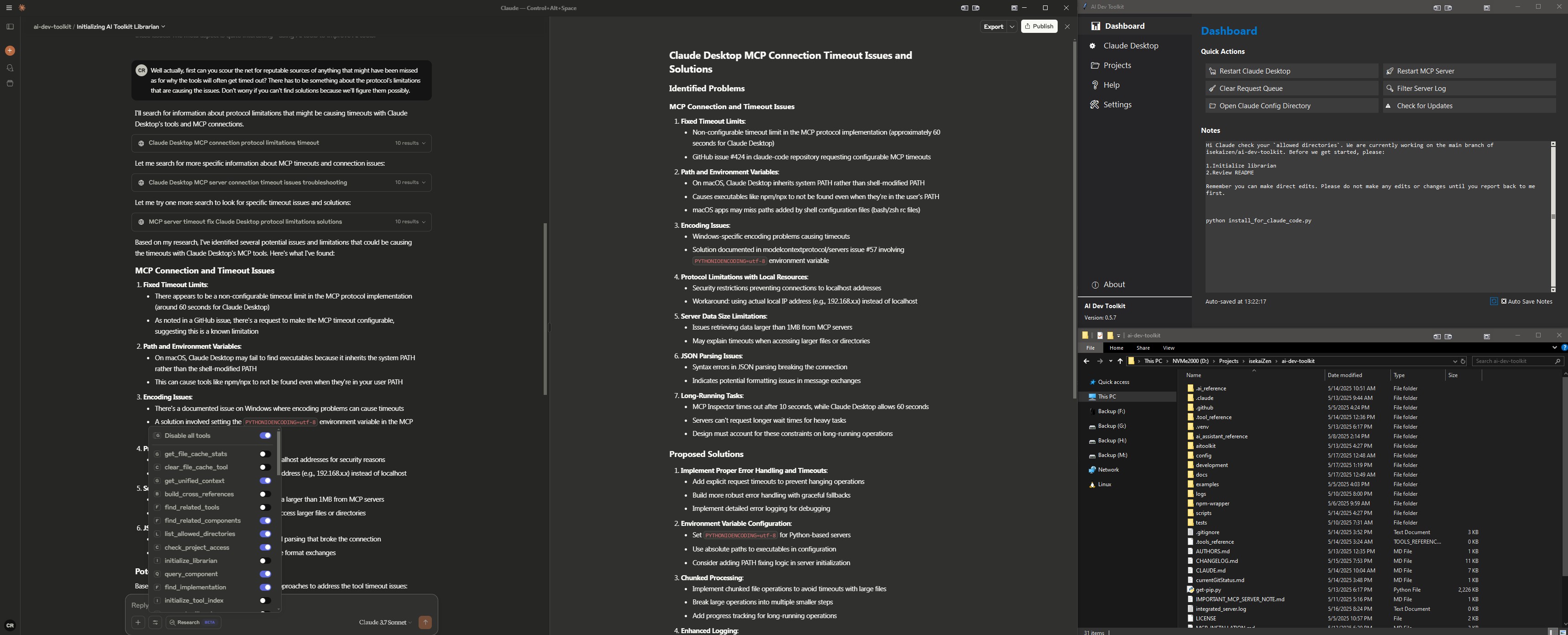 |
 |  |
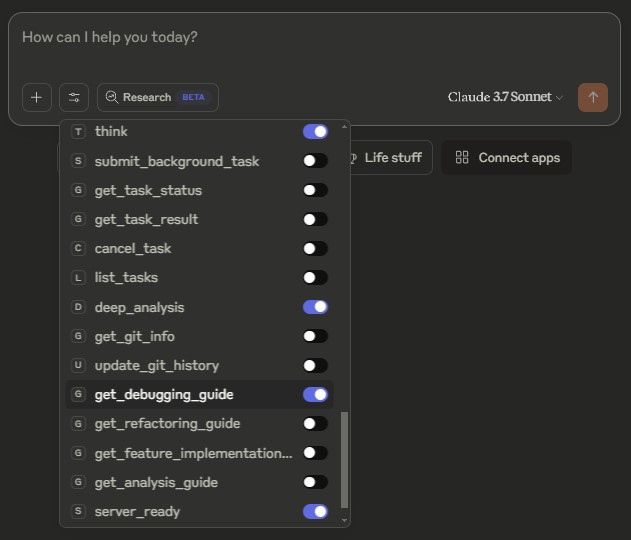 | 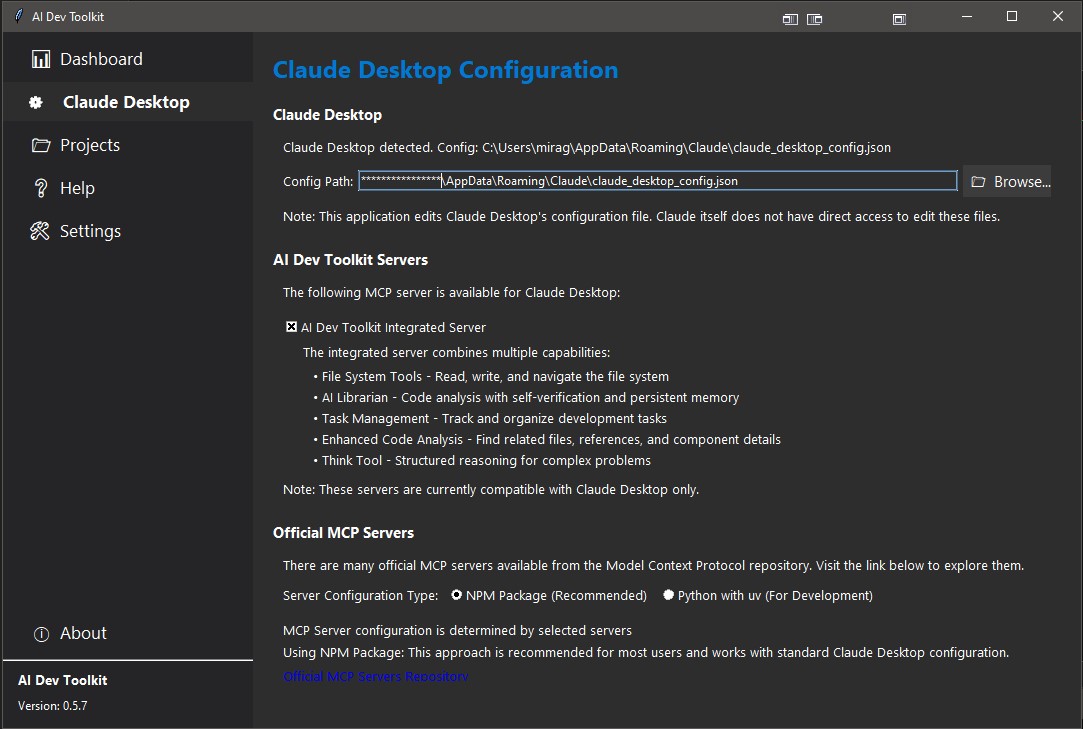 |
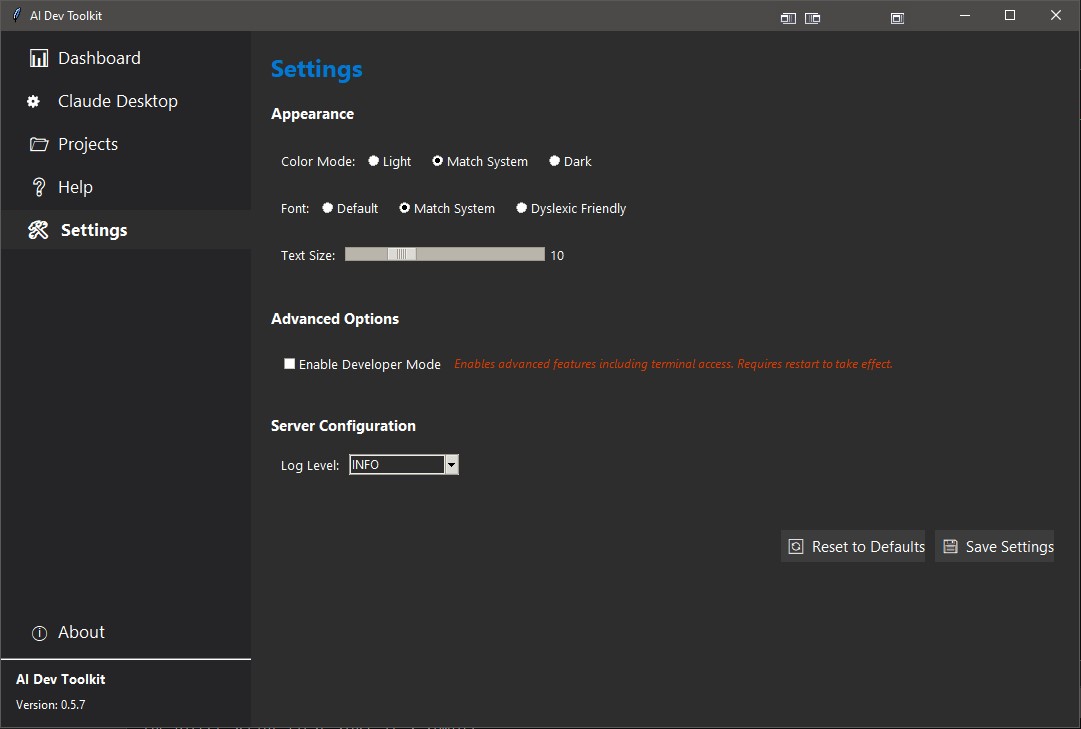
Note: The GUI components are currently under development. Command-line and code-based interactions are fully functional, while the graphical interface for directory selection and configuration is in beta phase.
⚠️ Important for Alpha/Pre-Beta Testers: During this testing phase, please configure Claude Desktop to use only the 17 recommended tools for optimal performance. This is part of our ongoing efforts to streamline and optimize the tool count. You can disable other tools in the Claude Desktop settings or through the GUI configuration tool.
# Clone the repository
git clone https://github.com/isekaizen/ai-dev-toolkit.git
cd ai-dev-toolkit

# Install dependencies (IMPORTANT: includes MCP package required for Claude Desktop)
pip install -r requirements.txt

# Alternative: Install MCP specifically if above command fails
pip install mcp[cli]

# Install to Claude Desktop
python development/install_to_claude.py
IMPORTANT: The MCP (Model Context Protocol) package is required for Claude Desktop integration. Without it, the server will run in limited functionality mode with no connection to Claude Desktop. See MCP_INSTALLATION.md for details.
# Using Claude Code's terminal:

# Get the installer script
wget https://raw.githubusercontent.com/isekaizen/ai-dev-toolkit/main/scripts/install_for_claude_code.py
# Or with curl:
# curl -O https://raw.githubusercontent.com/isekaizen/ai-dev-toolkit/main/scripts/install_for_claude_code.py

# Run the installer
python install_for_claude_code.py

# Follow the prompts to complete installation
The Claude Code installer will:
If you're using Claude Code in WSL, there are some special considerations:
# First ensure Python and pip are properly installed in your WSL environment
sudo apt update
sudo apt install python3 python3-pip python3-venv

# Navigate to your Windows project directory (typically mounted under /mnt/)
cd /mnt/c/Users/YourUsername/YourProjects
# or
cd /mnt/d/Projects

# Get the installer
wget https://raw.githubusercontent.com/isekaizen/ai-dev-toolkit/main/scripts/install_for_claude_code.py

# Run the installer with your Windows project paths
# Make sure to specify the installation directory and allowed directories explicitly
python3 install_for_claude_code.py --install-dir "/mnt/d/YourProjects/ai-dev-toolkit" --allowed-dirs "/mnt/d/YourProjects" "/mnt/c/Users/YourUsername/OtherProjects"
Important WSL Notes:
pip3 install -r requirements.txt🚀 Getting Started After Installation: Once installation is complete, the AI Dev Toolkit will enhance Claude's capabilities automatically. You don't need to execute any additional commands - just start talking to Claude about your project!
# This option is primarily for toolkit contributors and developers
# It launches the toolkit in development mode with debugging enabled
python development/launch.py
Once installed, the AI Dev Toolkit works automatically in the background. Claude handles all the technical implementation details for you!
Simply start a conversation with Claude and ask about your codebase. Here are some examples of what you can ask Claude to do:
The toolkit is designed to enhance Claude's capabilities without requiring you to learn or execute any Python code.
Important: All code examples below demonstrate how Claude uses these tools internally. These are NOT commands that you need to execute - Claude handles everything automatically!
To ensure the best performance and prevent timeouts, Claude follows these hierarchical tool selection guidelines:
Claude prioritizes tools in this order:
.ai_reference/component_registry.json before filesystem operations.ai_reference/script_index.json to find specific files# PREFERRED: Query component registry directly (fastest)
registry_path = f"{project_path}/.ai_reference/component_registry.json"
with open(registry_path, 'r') as f:
registry = json.load(f)
component = registry["components"].get(component_name)
# If found, do targeted file reading
if component:
file_path = component["primary_file"]
# Now read just this specific file
# PREFERRED: Use script index to identify exact files to check
index_path = f"{project_path}/.ai_reference/script_index.json"
with open(index_path, 'r') as f:
    script_index = json.load(f)

# Find files containing target class/function
matches = []
for file_path, info in script_index["files"].items():
    if target_name in info["classes"] or target_name in info["functions"]:
        matches.append(file_path)

# Read only those specific files
# Use TaskBoard for operations that might time out
task_id = submit_background_task(
    task_type="search",
    target_path=project_path,
    pattern=search_pattern
)
# Check status and get results when ready
task_result = get_task_result(task_id)
When you ask Claude to understand, analyze, or navigate your codebase, it's using these functions behind the scenes:
# Initialize AI Librarian for a project
# This one command sets up everything - AI Librarian, Unified Context, and Tool References
initialize_enhanced_librarian("path/to/your/project")

# Search for code implementations
find_implementation("path/to/your/project", "login function")

# Query components
query_component("path/to/your/project", "MyClass")

# Find tools related to a specific component
find_related_tools("path/to/your/project", "AuthenticationManager")

# Find components related to a specific tool
find_related_components("path/to/your/project", "edit_file")

# Get a unified view of your project
get_unified_context("path/to/your/project")
For larger codebases, Claude uses mini-librarians to provide efficient navigation and understanding:
# Access mini-librarians directly (Claude Code)
read_file(".ai_reference/scripts/___aitoolkit_librarian_ai_dev_toolkit_py.json")

# Get component information from mini-librarians
get_component_details("path/to/project", "ComponentName")

# Search across mini-librarians
search_mini_librarians("path/to/project", "function_name")
When you ask Claude to track tasks, it uses these functions internally:
# Add a task
add_todo("path/to/project", "Implement login feature", priority="high")

# List tasks
list_todos("path/to/project")

# Update task status
update_todo_status("path/to/project", "todo-123", "completed")
For more sophisticated task tracking, Claude uses these advanced functions:
# Create an AI-optimized task
add_ai_task("path/to/project", "Authentication system refactoring", "Improve security and performance", "refactor", 2)

# List AI tasks
list_ai_tasks("path/to/project", status="active", priority=1)

# Add detailed code context to a task
add_task_context(task_id, "code_snippet", "Task relates to authentication system")
When handling complex reasoning tasks, Claude uses the Think Tool as a private scratchpad:
# Use the think tool as a scratchpad for reflection
think("""
User wants to implement a new authentication feature.
- Required information:
  * User roles and permissions structure
  * Current authentication flow
  * Security requirements
- Implementation approach options:
  * Extend existing AuthManager
  * Create new specialized AuthProvider
  * Use third-party authentication library
- Considerations:
  * Performance impact
  * Security implications
  * Maintenance complexity
- Decision:
  * Extending existing AuthManager seems most appropriate
  * Need to add role validation logic
  * Will require unit tests for new functionality
""")

# For deeper, time-consuming analysis, use deep_analysis from the TaskBoard system
task_id = deep_analysis(project_path, "I need to understand how the authentication system works and its dependencies")
get_task_status(project_path, task_id)
get_task_result(project_path, task_id)
Claude uses these functions to work with your project files:
# Read a file
read_file("path/to/your/file.py")

# Write to a file
write_file("path/to/your/file.py", "file content")

# Edit bookmarks for complex code changes
bookmark_id = create_edit_bookmark("path/to/project", "path/to/file.py", 10, 25)
update_bookmark("path/to/project", bookmark_id, "new content for lines 10-25")
apply_bookmark("path/to/project", bookmark_id)

# List directory contents
list_directory("path/to/your/directory")

# Search for files
search_files("path/to/your/project", "pattern")

# Git repository tracking
git_info = get_git_info("path/to/your/project")
update_git_history("path/to/your/project", ".git_history")

# Project upgrading and analysis
from aitoolkit.utils.upgrade_manager import UpgradeManager

# Check if a project needs an upgrade
needs_upgrade, current, latest = UpgradeManager.needs_upgrade("path/to/project")

# Analyze a project structure and get recommendations
analysis = UpgradeManager.analyze_project("path/to/project")
recommendations = analysis["recommendations"]["recommendations"]

# Upgrade a project to the latest version
results = UpgradeManager.upgrade("path/to/project", backup=True)

# Or use the command-line tool
# python scripts/upgrade_ai_toolkit.py --analyze /path/to/project
# python scripts/upgrade_ai_toolkit.py /path/to/project
Claude Code can simulate toolkit functionality through mini-librarians and adapter patterns:
| Feature | Claude Code | Claude Desktop |
|---|---|---|
| File Operations | Native tools + Simulated toolkit via adapters | MCP Server with direct toolkit access |
| Mini-Librarians | Direct JSON access and interpretation | Server API access |
| Task Management | Simulated through adapter patterns | Direct function calls |
| GUI Configuration | Command-line installer | Visual interface (Beta) |
| Large Codebase Handling | Native tools with mini-librarian guidance | Server-based processing (Beta) |
| Installation | One-command direct install | Requires Desktop config |
| Toolkit Functions | Simulated via adapter patterns in .ai_reference | Direct function calls |
Claude Code simulates toolkit functionality through adapter patterns stored in the .ai_reference directory:
# Example: Instead of direct toolkit call like:
result = create_edit_bookmark("path/to/project", "path/to/file.py", 10, 25)

# Claude Code reads the adapter pattern and executes:
file_content = read_file("path/to/file.py")
content_to_edit = file_content.splitlines()[10:25]
# Store in memory for later application
session_bookmarks["bookmark1"] = {"file": "path/to/file.py", "start": 10, "end": 25, "content": content_to_edit}
For security analysis tasks, Claude uses these functions internally:
# Run a comprehensive security analysis on your project
security_report = security_analyze("path/to/your/project")

# Enhanced sanity check with security analysis included
check_report = enhanced_sanity_check("path/to/your/project", include_security=True)
Claude automatically implements these optimization strategies:
# Initialize with robustness features automatically applied
# This is the recommended all-in-one initialization method
initialize_ai_dev_toolkit("path/to/your/project")

# For other long-running operations, robustness decorators are used
from aitoolkit.utils.tool_wrappers import make_robust

@make_robust(timeout=60.0, max_retries=2)
def my_search_function(query):
    # Implementation here
Common issues and solutions:
⚠️ MCP Missing - Claude Desktop Cannot Connect: If you see "Running in limited functionality mode without Claude Desktop connection" or similar, the MCP package is not installed. Fix with:
pip install mcp[cli]
Then restart the server. See MCP_INSTALLATION.md for detailed instructions.
Server Runs But No Claude Desktop Connection: Verify that:
pip list | grep mcp)Toolkit Not Appearing in Claude: Ensure configuration was saved correctly and Claude Desktop was restarted
Permission Errors: Check allowed directories in the configuration
Connection Issues: Verify Claude Desktop is properly configured and restart the server
Import Errors: Make sure all dependencies are installed
File Access Problems: Verify the server has appropriate permissions to access your files
Sanity Check Issues: If experiencing problems with the sanity_check tool, use individual diagnostic tools like find_implementation() and query_component() as alternatives
Legacy Files: Use git clean -fd after a git reset --hard to ensure all untracked files are removed when reverting to a previous version
Duplicate Files: During our cleanup process, you may encounter duplicate files with extensions like .old, .backup, .fixed - these will be addressed in an upcoming release
find_related_files Tool Errors: This tool has a known issue that will be fixed in an upcoming release
Timeout Errors: We've improved timeout handling in version 0.5.4 with a more reliable threading-based mechanism and longer timeouts for search and write operations. We've also extended the MCP protocol timeout from 30s to 120s to prevent server disconnections. If you're still experiencing timeouts, try running python install_for_claude_code.py to upgrade your projects to the latest version.
Old .ai_reference Format: For projects with older format .ai_reference directories, run the installer with python install_for_claude_code.py which will automatically detect and offer to upgrade these directories
Tool Timeout Performance Issues: If tools are taking too long and timing out, use the hierarchical tool selection approach described in the "Optimized Tool Usage" section above. Always query the component registry and script index before doing direct filesystem operations.
Additional documentation is available in the docs directory:
Tool Index Improvements: Recently implemented the Simple Tool Index system with dramatic performance improvements:
Sanity Check & Security Analysis: The sanity_check tool has been significantly improved:
Directory Structure Cleanup: Ongoing consolidation of overlapping functionality:
librarian directory:
gui directory:
Filesystem Operations: Enhanced file editing and manipulation capabilities
Robustness Improvements: Enhanced timeout and retry handling:
This project is licensed under the MIT License - see the LICENSE file for details.
You're welcome to fork this repository and create your own version to suit your specific needs. This toolkit was created to enhance productivity when working with Claude, and you're encouraged to adapt it to your workflow.
Claim this server with your GitHub account to request manual ownership verification.
Link to the catalog listing for AI Librarian Server (AI Dev Toolkit) from your README. This badge does not certify ownership, compatibility or security.
[](https://awesome-mcp.com/servers/ai-dev-toolkit)Public repository statistics could not be verified. Check the configured source address; unavailable counts are not zero.
来源、范围和时段分别列出;不相加,不代表安装人数、活跃用户或安全审核。
尚无已审核的包 / 镜像标识,暂不展示下载统计。
Alternative and complementary servers in the same category
A directory listing describing a cancellation-letter and mailing-address service. The configured public GitHub repository returned 404 during source verification.

A hosted MCP service for browsing and searching through Singapore mobile-network proxies.

A directory listing describing a Markdown-to-PDF service. The configured public GitHub repository returned 404 during source verification.