
A directory listing describing a cancellation-letter and mailing-address service. The configured public GitHub repository returned 404 during source verification.
Repository stats unavailable
Developer Tools
A local memory and code search layer for AI coding agents that offers a stdio MCP server with built-in tools.
AIKD is cataloged as an MCP server attributed to gelutjari. A local memory and code search layer for AI coding agents that offers a stdio MCP server with built-in tools. It is categorized under developer tools. See the capability inspector for recorded interfaces and their independent review status; consult upstream documentation for the current interface.
Installation configuration is not reviewed. No executable setup is offered for this entry; inspect the source repository before proceeding.
Catalog license label: MIT License. Check the source repository's current license and terms before using, modifying or distributing this software.
能力定义尚未审核。未核验的采集内容不会作为可信接口展示。
暂无可展示的已审核记录。这不表示上游不支持此能力。
暂无可展示的已审核记录。这不表示上游不支持此能力。
暂无可展示的已审核记录。这不表示上游不支持此能力。
Email delivery is not connected. This page does not collect email addresses or create subscriptions.
Browse the registry for current listings instead.
Reviews for AIKD are not available yet
Review publishing and storage are not connected. This page does not collect or publish ratings or comments, including after sign-in.
No. It is described as 100% local with zero cloud dependency, storing data in a local SQLite database.
README.md · a9e2495618fe · 采集于 2026-11-13 12:39:32 UTC
保留上游原文,不做 AI 改写。为安全起见过滤脚本、表单和不安全链接。
当前显示最后一次成功采集的文档快照,请以来源页面为准。





Give Claude, Cursor, and Cline instant memory of your entire codebase. Written in Rust. Zero cloud dependency. Search 10,000 chunks in 0.21ms.
Install • Quick Start • Demo • Docs
The Problem: AI coding agents are powerful but forgetful. Every new conversation starts from zero — no memory of your codebase, your patterns, your architecture.
| Pain Point | Without AIKD | With AIKD |
|---|---|---|
| 😵 Context Amnesia | Agent asks "what does this file do?" every session | Instant recall of entire codebase |
| 🐌 Slow Search | Python-based RAG takes 500ms+ per query | Rust-powered BM25+Vector in 0.21ms |
| ☁️ Cloud Dependency | Your code sent to external servers | 100% local, zero data leaves your machine |
| 🔧 Complex Setup | Install Python, pip, CUDA, models... | Single binary, one command install |
| Feature | grep | LlamaIndex | ai-devkit | AIKD |
|---|---|---|---|---|
| Speed | Fast | Slow | Medium | ⚡ 0.21ms |
| Semantic Search | ❌ | ✅ | ✅ | ✅ Hybrid |
| Local Only | ✅ | ❌ | ❌ | ✅ 100% |
| MCP Native | ❌ | ❌ | ❌ | ✅ Built-in |
| Memory Usage | Low | High (Python) | High | 📊 27% RAM |
| Setup Time | 0s | ~10min | ~5min | ⏱️ 30s |
scan, query, embed, stats, remember, recall, status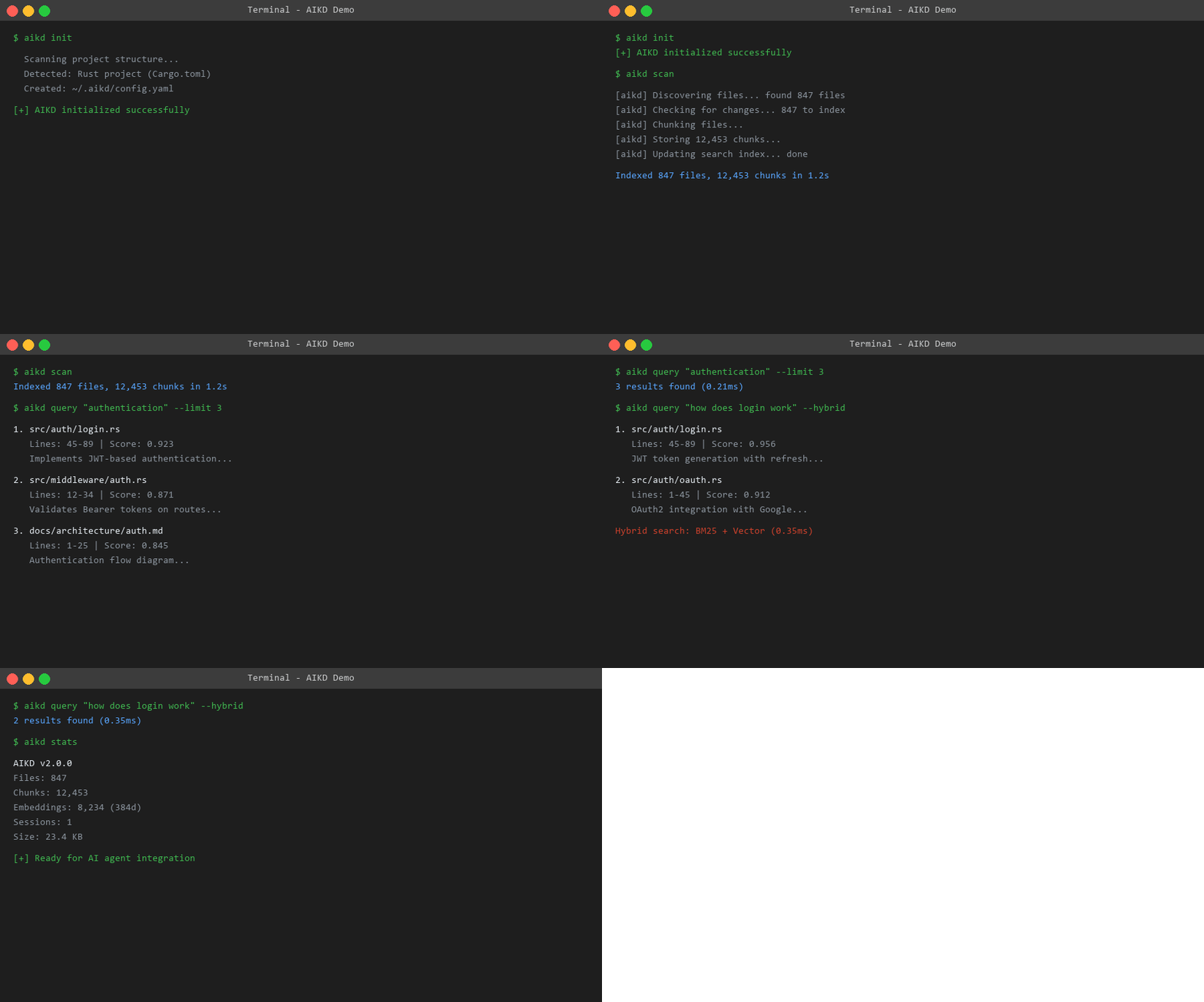
$ aikd init
✅ AIKD initialized for project

$ aikd scan
📊 Indexed 847 files, 12,453 chunks in 1.2s

$ aikd query "authentication flow"
1. src/auth/login.rs (Lines 45-89, Score: 0.923)
   Implements JWT-based authentication with refresh tokens...

2. src/middleware/auth.rs (Lines 12-34, Score: 0.871)
   Validates Bearer tokens on protected routes...

3. docs/architecture/auth.md (Lines 1-25, Score: 0.845)
   Authentication flow diagram and security considerations...
Linux / macOS:
curl -sSf https://raw.githubusercontent.com/gelutjari/aikd/main/install.sh | bash
Windows (PowerShell):
irm https://raw.githubusercontent.com/gelutjari/aikd/main/install.ps1 | iex
cargo install aikd
brew install gelutjari/tap/aikd
git clone https://github.com/gelutjari/aikd.git
cd aikd
cargo build --release
cp target/release/aikd ~/.local/bin/
docker run -v $(pwd):/workspace -p 9090:9090 ghcr.io/gelutjari/aikd:latest
cd your-project
aikd init
aikd init do?Creates ~/.aikd/config.yaml with smart defaults based on your project type (Rust, Node, Python, Go). It detects .git, Cargo.toml, package.json, etc. and sets appropriate file filters.
aikd scan
node_modules, .git, target, etc.)# Keyword search (fast)
aikd query "error handling"
# Semantic search (smart)
aikd query "how does login work" --hybrid
# Get JSON output for scripting
aikd query "database connection" --json
AIKD auto-registers via MCP. Just restart your AI agent after running aikd scan.
The MCP config is at ~/.aikd/mcp.json:
{
  "mcpServers": {
    "aikd": {
      "command": "aikd",
      "args": ["serve"]
    }
  }
}
# Start the daemon
aikd daemon

# Query via HTTP
curl "http://localhost:9090/api/query?q=authentication&limit=5"
                    ┌─────────────────┐
                    │   How to use    │
                    │     AIKD?       │
                    └────────┬────────┘
                             │
            ┌────────────────┼────────────────┐
            ▼                ▼                ▼
     ┌──────────┐     ┌──────────┐     ┌──────────┐
     │   CLI    │     │   MCP    │     │ REST API │
     │  Mode    │     │  Server  │     │  Daemon  │
     └──────────┘     └──────────┘     └──────────┘
     Best for:        Best for:        Best for:
     • Quick search   • AI agents      • Web apps
     • Scripts        • Claude Code    • Custom UIs
     • CI/CD          • Cursor         • Team shared
CLI Mode (default):
aikd query "rust error handling" --limit 5
aikd stats
aikd status
MCP Server (for AI agents):
aikd serve # Starts stdio MCP server
REST Daemon (background service):
aikd daemon              # Start in background
aikd daemon foreground   # Start in foreground
aikd daemon-stop         # Stop daemon
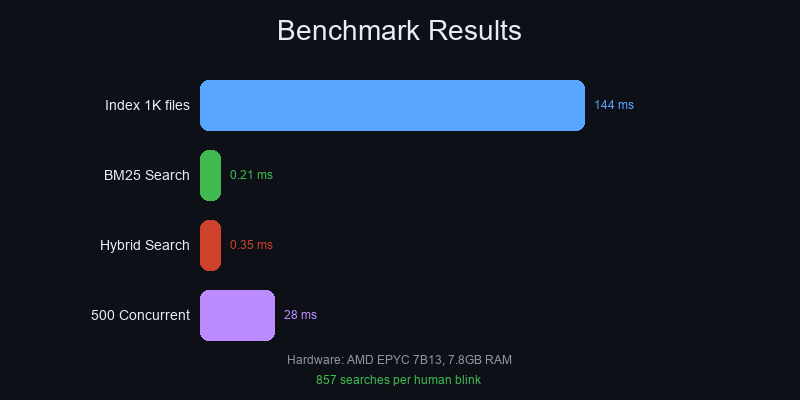
Hardware: AMD EPYC 7B13, 7.8GB RAM, NVMe SSD
| Operation | Time | Throughput |
|---|---|---|
| Index 1,000 files | 144ms | 6,934 files/s |
| BM25 Search | 0.21ms | 4,762 queries/s |
| Hybrid Search | 0.35ms | 2,857 queries/s |
| Concurrent (500) | 28ms | 17,669 queries/s |
| Embedding (batch) | 12ms/batch | ~800 chunks/s |
Resource Usage:
CPU: ████████░░░░░░░░░░░░ 22.9%
RAM: █████░░░░░░░░░░░░░░░ 27.4%
💡 Real-world context: A human eye blink takes ~300ms. In that time, AIKD can complete 857 hybrid searches across your entire codebase.
Default config (~/.aikd/config.yaml):
version: 2.0.0
scan:
  include_paths: ["."]
  exclude_paths: ["node_modules", ".git", "target"]
  include_extensions: ["rs", "ts", "py", "md", "json"]
  follow_symlinks: false
chunk:
  max_tokens: 1000
  min_tokens: 100
embedding:
  enabled: true
  model: all-MiniLM-L6-v2
  batch_size: auto
server:
  rest_port: 9090
  auth_token: null
  cors_origins: ["*"]
embedding:
  enabled: true
  batch_size: 8
  device: cpu
resource:
  mode: Low
embedding:
  enabled: true
  batch_size: 64
  device: gpu
resource:
  mode: Max
scan:
  include_extensions: ["md", "txt", "rst"]
  exclude_paths: [".git"]
filter:
  max_file_size: 524288  # 512KB
server:
  rest_port: 9090
  auth_token: "your-secret-token"
  cors_origins:
    - "https://your-team-app.com"
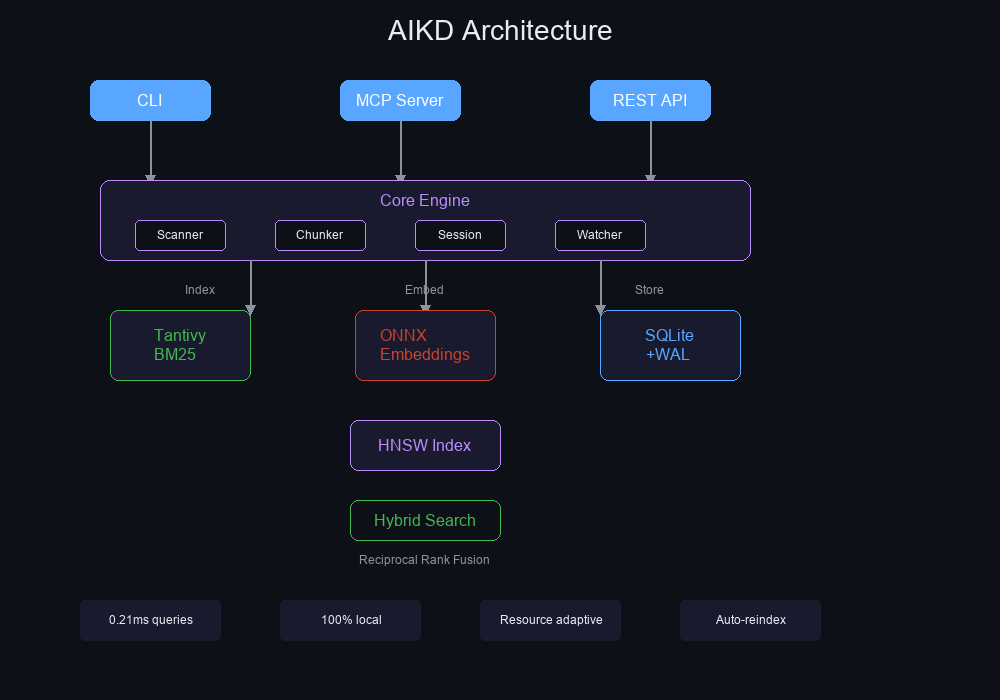
┌─────────────────────────────────────────────────────────────┐
│                        AIKD v2.0.0                          │
├─────────────────────────────────────────────────────────────┤
│                                                             │
│  ┌─────────┐  ┌─────────┐  ┌─────────┐  ┌─────────────┐  │
│  │  CLI    │  │  MCP    │  │  REST   │  │ File Watcher│  │
│  │ (clap)  │  │ (rmcp)  │  │ (axum)  │  │  (notify)   │  │
│  └────┬────┘  └────┬────┘  └────┬────┘  └──────┬──────┘  │
│       │            │            │               │          │
│       └────────────┴────────────┴───────────────┘          │
│                            │                                │
│  ┌─────────────────────────┴──────────────────────────┐    │
│  │                   Core Engine                       │    │
│  ├─────────────┬─────────────┬─────────────────────────┤    │
│  │  Scanner    │   Chunker   │      Session Manager    │    │
│  │ (walkdir)   │(pulldown-   │    (conversation DB)    │    │
│  │             │  cmark)     │                         │    │
│  └──────┬──────┴──────┬──────┴─────────────────────────┘    │
│         │             │                                      │
│  ┌──────┴──────┐ ┌────┴─────┐ ┌──────────────────────┐     │
│  │  Indexer    │ │ Embedder │ │     Storage           │     │
│  │  (Tantivy)  │ │ (ONNX)   │ │   (SQLite + WAL)     │     │
│  │  BM25 +     │ │ 384d     │ │   + r2d2 pool        │     │
│  │  HNSW ANN   │ │ MiniLM   │ │   + blake3 hashing   │     │
│  └─────────────┘ └──────────┘ └──────────────────────┘     │
│                                                             │
└─────────────────────────────────────────────────────────────┘
See docs/ARCHITECTURE.md for detailed breakdown.
Diagnostic Commands:
aikd status --json     # System info
aikd stats             # Index statistics
aikd daemon-pid        # Check if daemon running
aikd scan firstaikd stats to verify files indexedinclude_extensions in configaikd model download
This downloads ~90MB ONNX model to ~/.local/share/aikd/model/.
# Change port in config
# ~/.aikd/config.yaml
server:
  rest_port: 9091
Or stop existing process: aikd daemon-stop
Set resource mode to Low:
resource:
  mode: Low
  max_memory_mb: 512
~/.aikd/mcp.json existsaikd serve works: echo '{"jsonrpc":"2.0","method":"initialize","id":1}' | aikd serveInstall Visual C++ Redistributable.
Get Help:
Contributors:
| Contribution | Who |
|---|---|
| 🏗️ Architecture & Core | @gelutjari |
| 🔒 Security Audit | AI-assisted (MiMo) |
| ⚡ Performance Optimization | Community |
| 📖 Documentation | Community |
See CONTRIBUTING.md for how to contribute.
MIT License — see LICENSE for details.
⭐ Star this repo if AIKD helps your AI agents remember!
Claim this server with your GitHub account to request manual ownership verification.
Link to the catalog listing for AIKD from your README. This badge does not certify ownership, compatibility or security.
[](https://awesome-mcp.com/servers/aikd)Public repository statistics could not be verified. Check the configured source address; unavailable counts are not zero.
来源、范围和时段分别列出;不相加,不代表安装人数、活跃用户或安全审核。
尚无已审核的包 / 镜像标识,暂不展示下载统计。
Alternative and complementary servers in the same category
A directory listing describing a cancellation-letter and mailing-address service. The configured public GitHub repository returned 404 during source verification.

A hosted MCP service for browsing and searching through Singapore mobile-network proxies.

A directory listing describing a Markdown-to-PDF service. The configured public GitHub repository returned 404 during source verification.