

A directory listing describing a cancellation-letter and mailing-address service. The configured public GitHub repository returned 404 during source verification.
Repository stats unavailable
Developer Tools
A local MCP server that captures web pages, windows or images, finds the target elements, draws numbered steps, arrows, boxes and labels, and redacts sensitive data before returning annotated screenshots to the agent.
AInotate MCP server for annotated screenshots is cataloged as an MCP server attributed to dontpayfull. A local MCP server that captures web pages, windows or images, finds the target elements, draws numbered steps, arrows, boxes and labels, and redacts sensitive data before returning annotated screenshots to the agent. It is categorized under developer tools. See the capability inspector for recorded interfaces and their independent review status; consult upstream documentation for the current interface.
Installation configuration is not reviewed. No executable setup is offered for this entry; inspect the source repository before proceeding.
Catalog license label: GNU Affero General Public License v3.0 or later. Check the source repository's current license and terms before using, modifying or distributing this software.
能力定义尚未审核。未核验的采集内容不会作为可信接口展示。
暂无可展示的已审核记录。这不表示上游不支持此能力。
暂无可展示的已审核记录。这不表示上游不支持此能力。
暂无可展示的已审核记录。这不表示上游不支持此能力。
Email delivery is not connected. This page does not collect email addresses or create subscriptions.
Browse the registry for current listings instead.
Reviews for AInotate MCP server for annotated screenshots are not available yet
Review publishing and storage are not connected. This page does not collect or publish ratings or comments, including after sign-in.
No; capture, OCR and rendering run locally on the user's machine, and AInotate makes no network requests of its own beyond loading the pages requested for capture.
The ainotate guide command turns one image per step into a Markdown, HTML or PDF guide.
No; blur and pixelation can be reversed, so redaction paints an opaque block, and marks flagged sensitive are refused those methods.
README.md · c20b586de470 · 采集于 2026-11-13 10:29:59 UTC
保留上游原文,不做 AI 改写。为安全起见过滤脚本、表单和不安全链接。
当前显示最后一次成功采集的文档快照,请以来源页面为准。

Annotated screenshots for AI agents: the agent shows you the button instead of describing where it is.
Website · Get started · Privacy




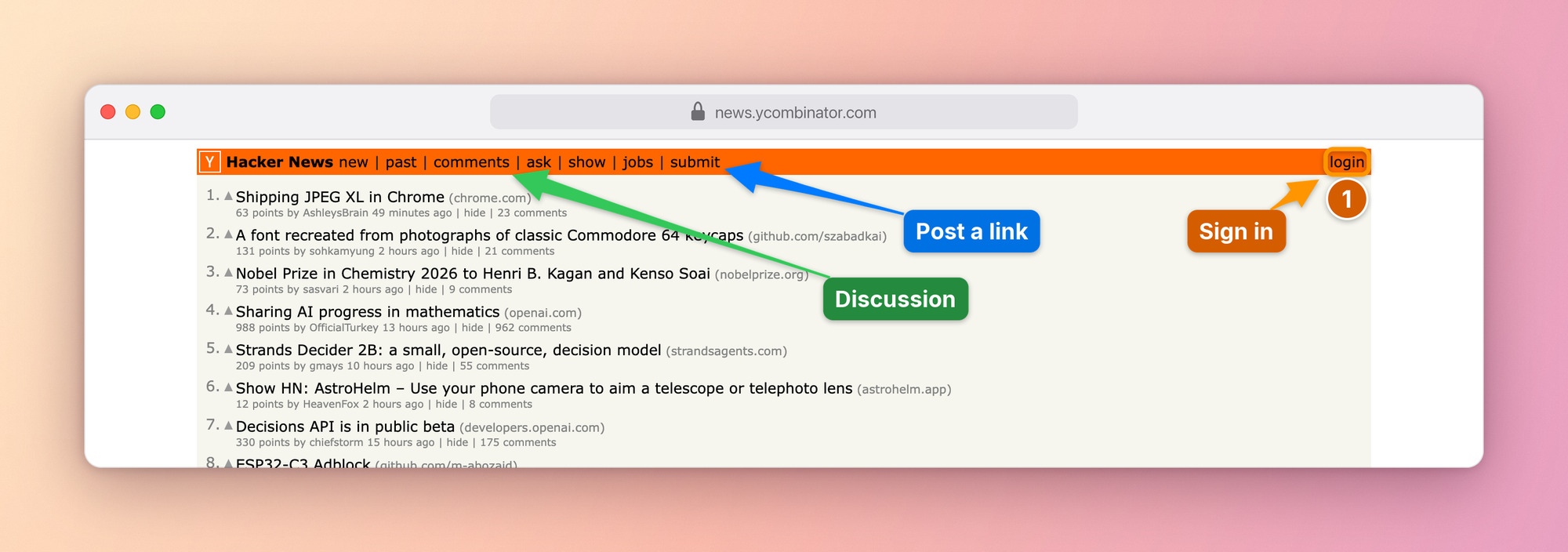
Ask an agent how to post a link on Hacker News and you usually get directions: the orange bar at the top, the last link after jobs. With AInotate it sends the picture above instead and says "click submit, where the blue arrow points".
It captures a web page, a window or a screenshot you already have, finds the elements you mean, draws numbered steps, arrows, boxes and labels where they hide the least, blacks out emails and tokens, and looks at the result before sending it. It works in Claude Code, Cowork, Claude Desktop, Codex, Gemini CLI, Cursor and any other MCP client, and from the command line or Python.
We built it at DontPayFull because our own agents kept answering "where is it?" with a paragraph. A picture with a number on the right button settles the question in a second, in a chat, a ticket or a guide.
ainotate guide turns them into a Markdown, HTML or PDF guide.1. Install, one of:
| With | Command |
|---|---|
| Homebrew (macOS) | brew install dontpayfull/tap/ainotate |
| pipx or uv (Python 3.10+) | pipx install "ainotate[all]" or uv tool install "ainotate[all]" |
| Claude plugin | only uv: step 2 brings AInotate along |
| Claude Desktop extension | nothing to install first |
Then ainotate doctor checks the machine and prints the exact fix for
anything missing, including the one command that downloads Chromium for
web capture. To update later: brew upgrade ainotate, pipx upgrade ainotate or uv tool upgrade ainotate; the plugin with /plugin marketplace update ainotate; the Desktop extension by opening the newer
.mcpb from Releases.
2. Connect it to the agent you use:
| Agent | How |
|---|---|
| Claude Code | /plugin marketplace add dontpayfull/AInotate, then /plugin install ainotate@ainotate: skill and MCP server in one step |
| Cowork | Customize > Plugins > Add marketplace > dontpayfull/AInotate, then install AInotate |
| Claude Desktop | download ainotate-<version>.mcpb from Releases and open it: a one-click extension |
| Codex | codex plugin marketplace add dontpayfull/AInotate, then codex plugin add ainotate@ainotate: skill and MCP server |
| Gemini CLI | gemini extensions install https://github.com/dontpayfull/AInotate: skill and MCP server |
| Cursor |  (needs uv), plus the skill below |
| VS Code, Cline, other MCP clients | command ainotate, arguments mcp (stdio); also listed in the MCP Registry as io.github.dontpayfull/ainotate; agents can follow llms-install.md |
{"mcpServers": {"ainotate": {"command": "ainotate", "args": ["mcp"]}}}
AInotate runs on your own computer: Cowork reaches it through the Claude
desktop app, so keep the app open while a task uses it. The plugin runs
AInotate with uvx, pinned to its release, so it needs
uv.
The skill teaches an agent when and how to annotate: pick a source, find exact positions, annotate, read the image to verify, deliver. The plugin brings it along; without the plugin it ships with the package:
ainotate install-skill             # Claude Code and Codex (~/.claude/skills, ~/.agents/skills)
ainotate install-skill --zip ~/Desktop   # a ZIP for Claude Desktop, Cowork, claude.ai:
                                         # Customize > Skills > Upload a skill
npx skills add dontpayfull/AInotate      # any agent the skills CLI knows (Cursor, Windsurf, ...)
Config paths for every OS, permissions and the tool list: skills/ainotate/references/mcp.md.
3. Ask. "Show me where to switch Wikipedia to dark mode." The agent captures the page, annotates it, checks it and sends the image. With the skill it also does this on its own whenever an answer depends on where something is on the screen: a "how do I" question, a visual bug, a before/after of a change.
Every image below was made in one shoot call against a public site:
open the page, find the elements, place the labels, draw, frame. The specs
are in docs/images/specs.
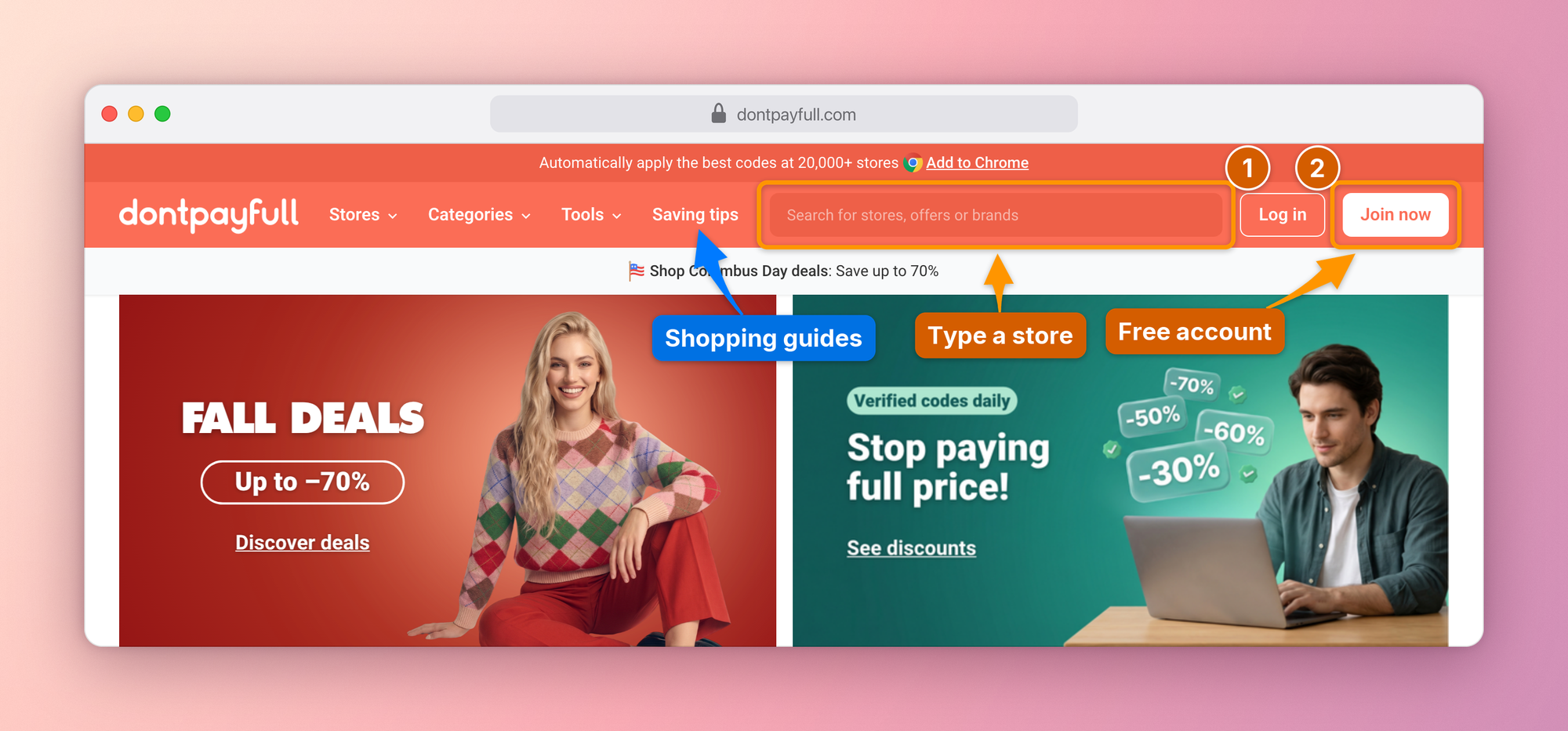 | 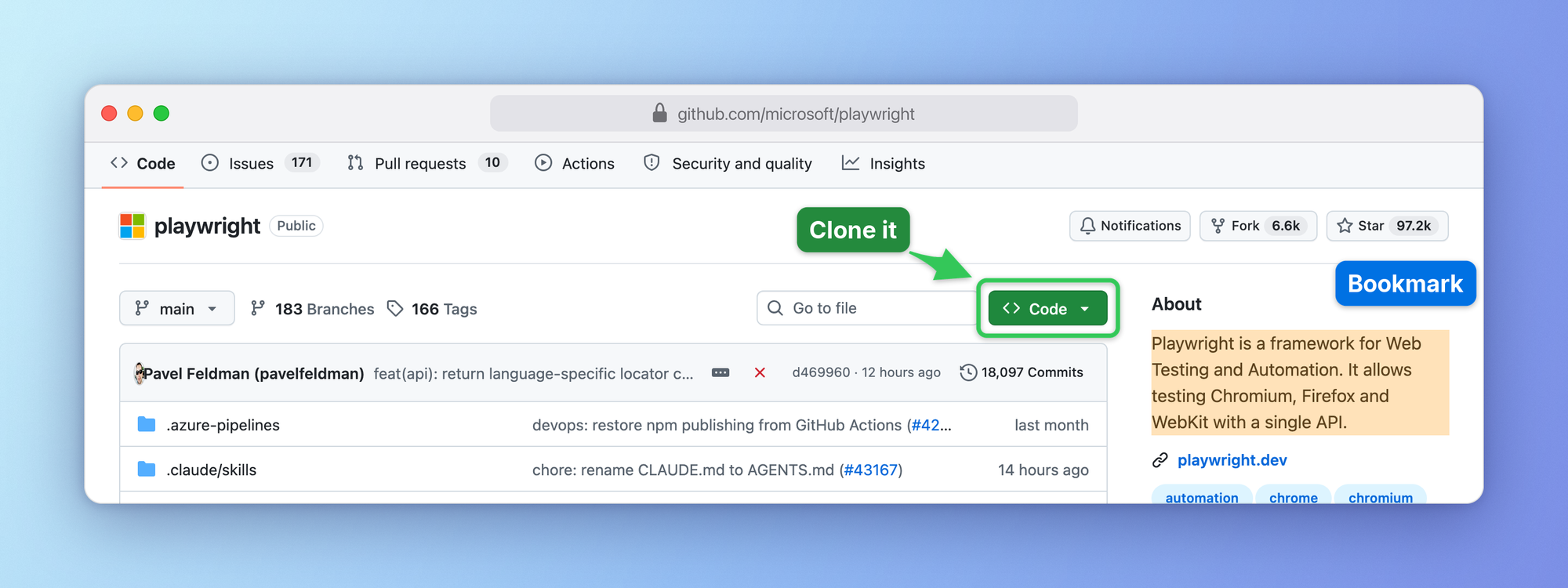 |
| Numbered steps on the busy header of DontPayFull, coupons for 20,000+ stores | Box, arrow and highlight on GitHub |
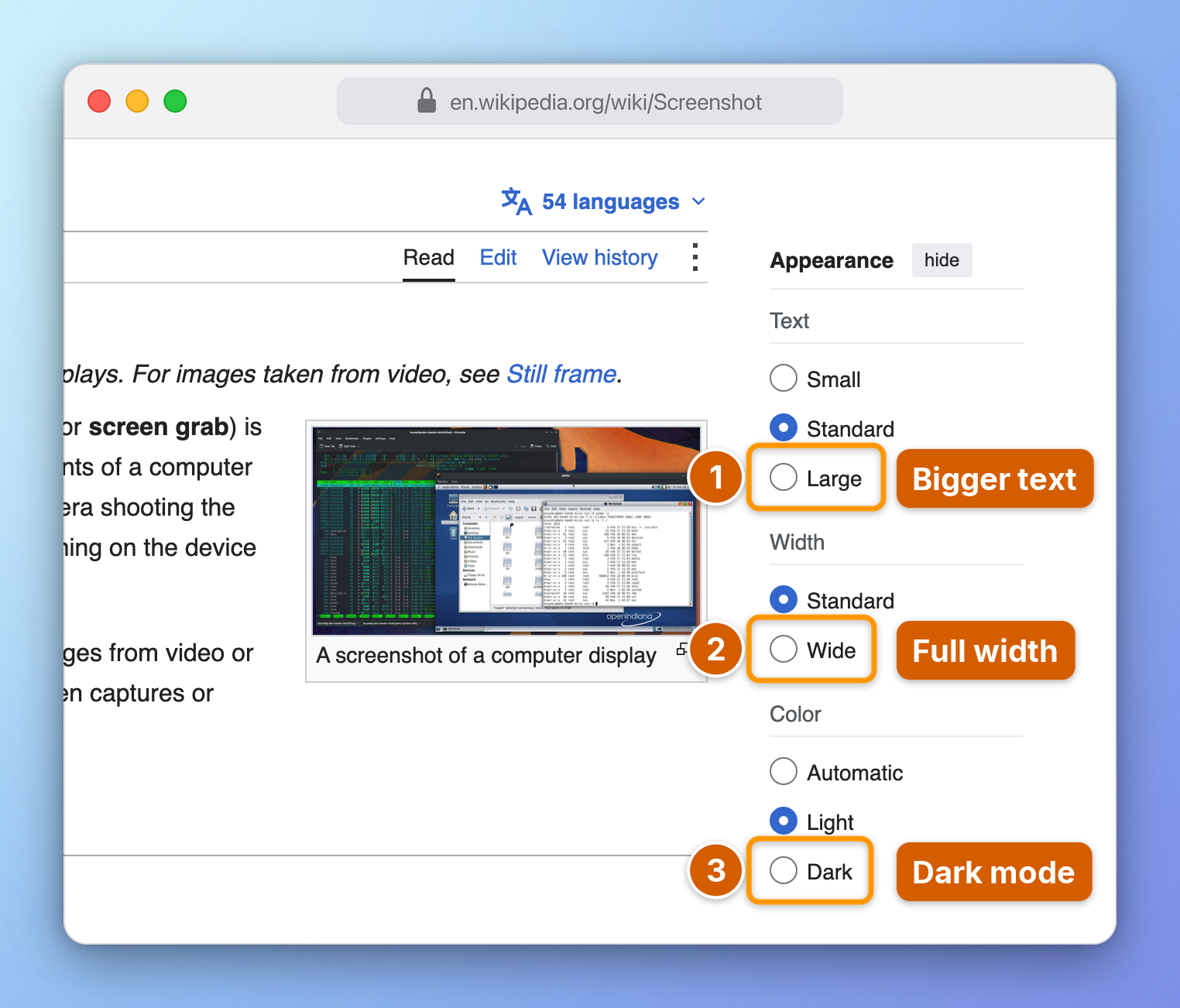 | 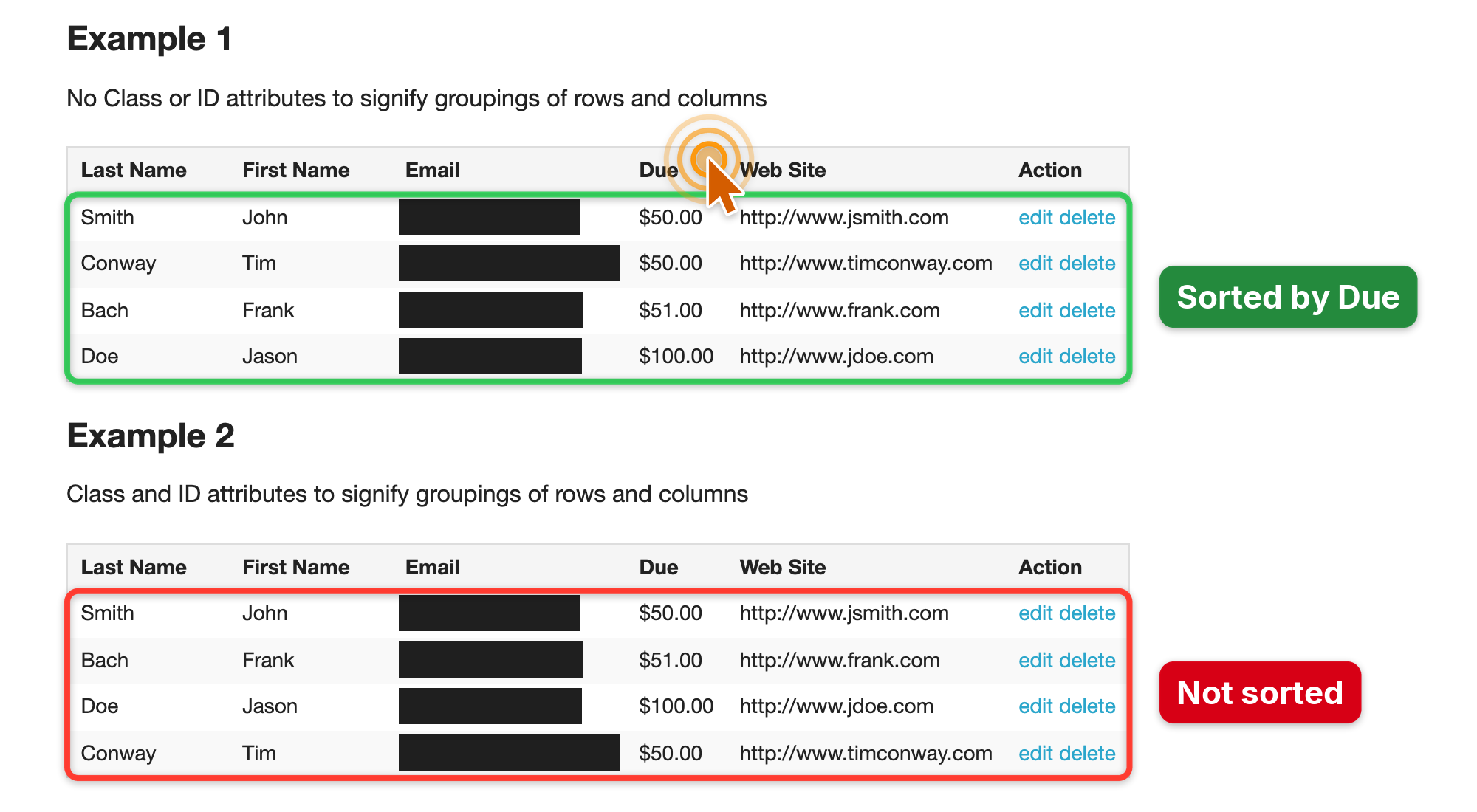 |
| Step-by-step guide with browser chrome and a gradient frame | Bug report, emails redacted automatically by the privacy scan |
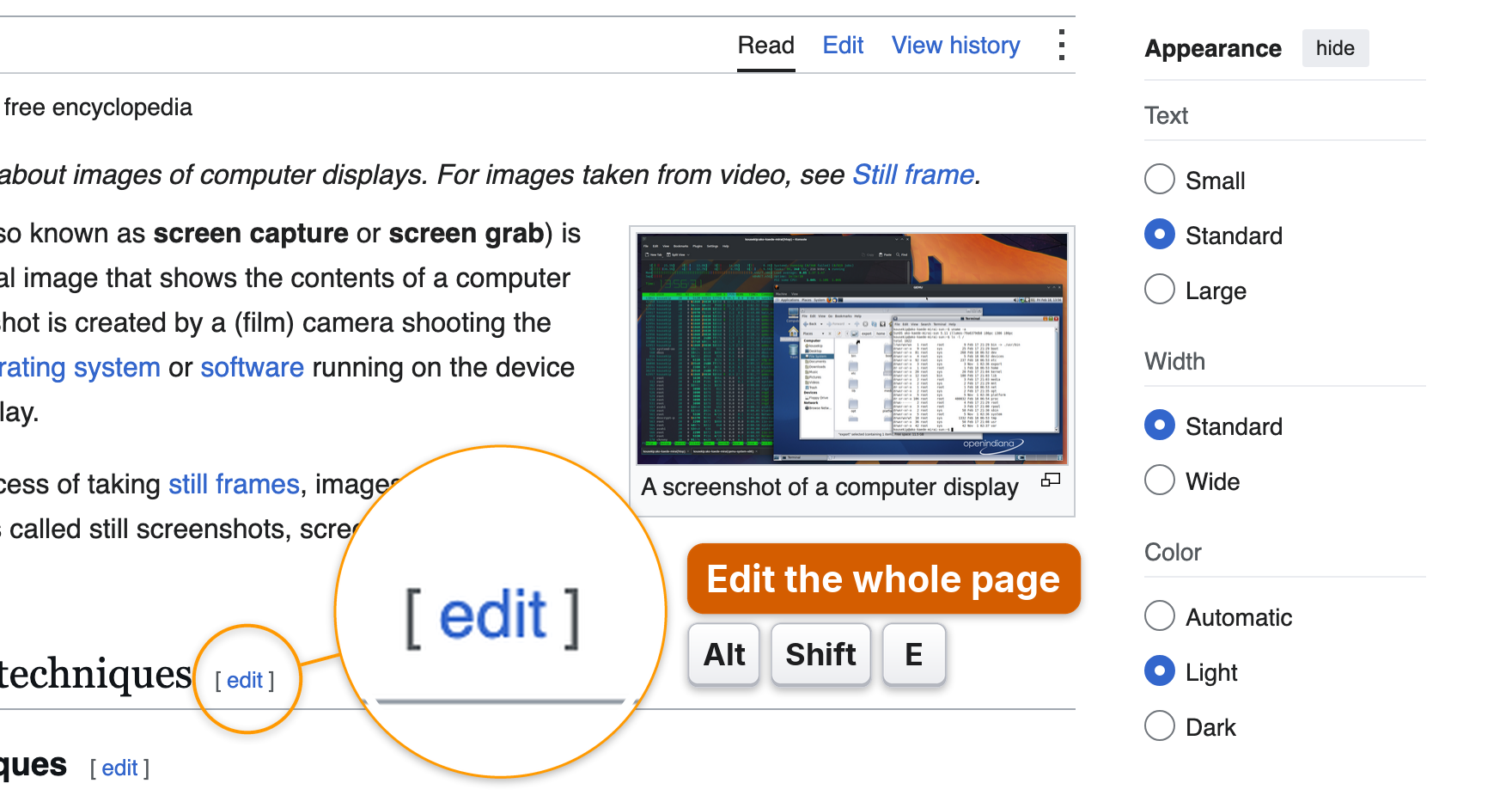 | 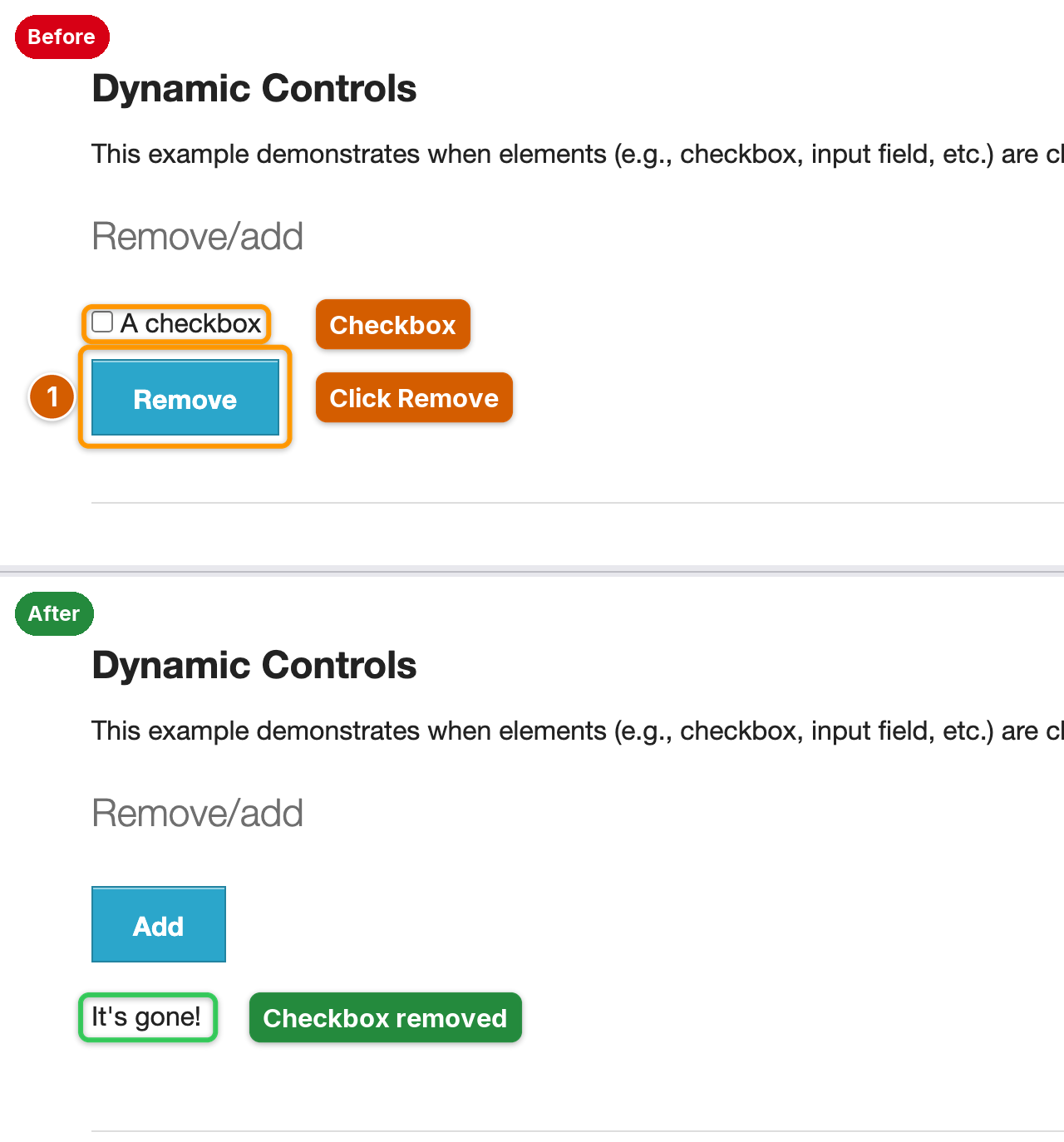 |
| Magnifier and keycaps for tiny controls and shortcuts | Before / after plate from two shots |
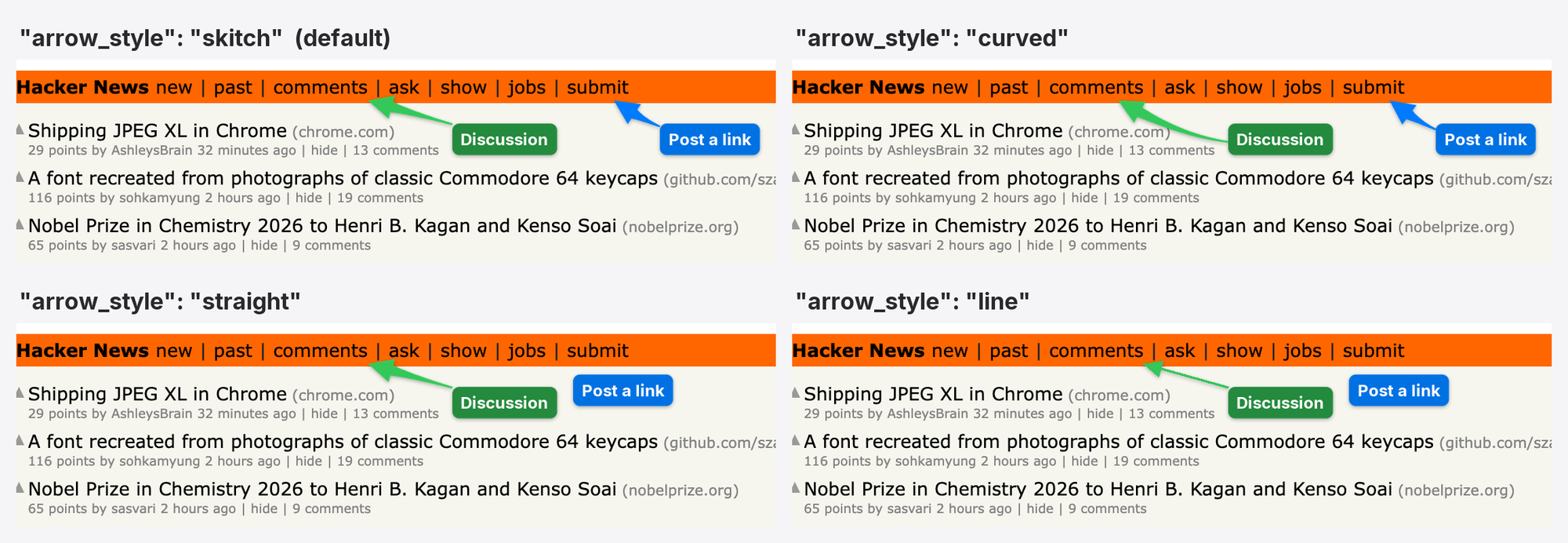
Four arrow styles: skitch (default: straight when the way is clear, a gentle bend when it is long and diagonal, a curve around text), curved, straight, line
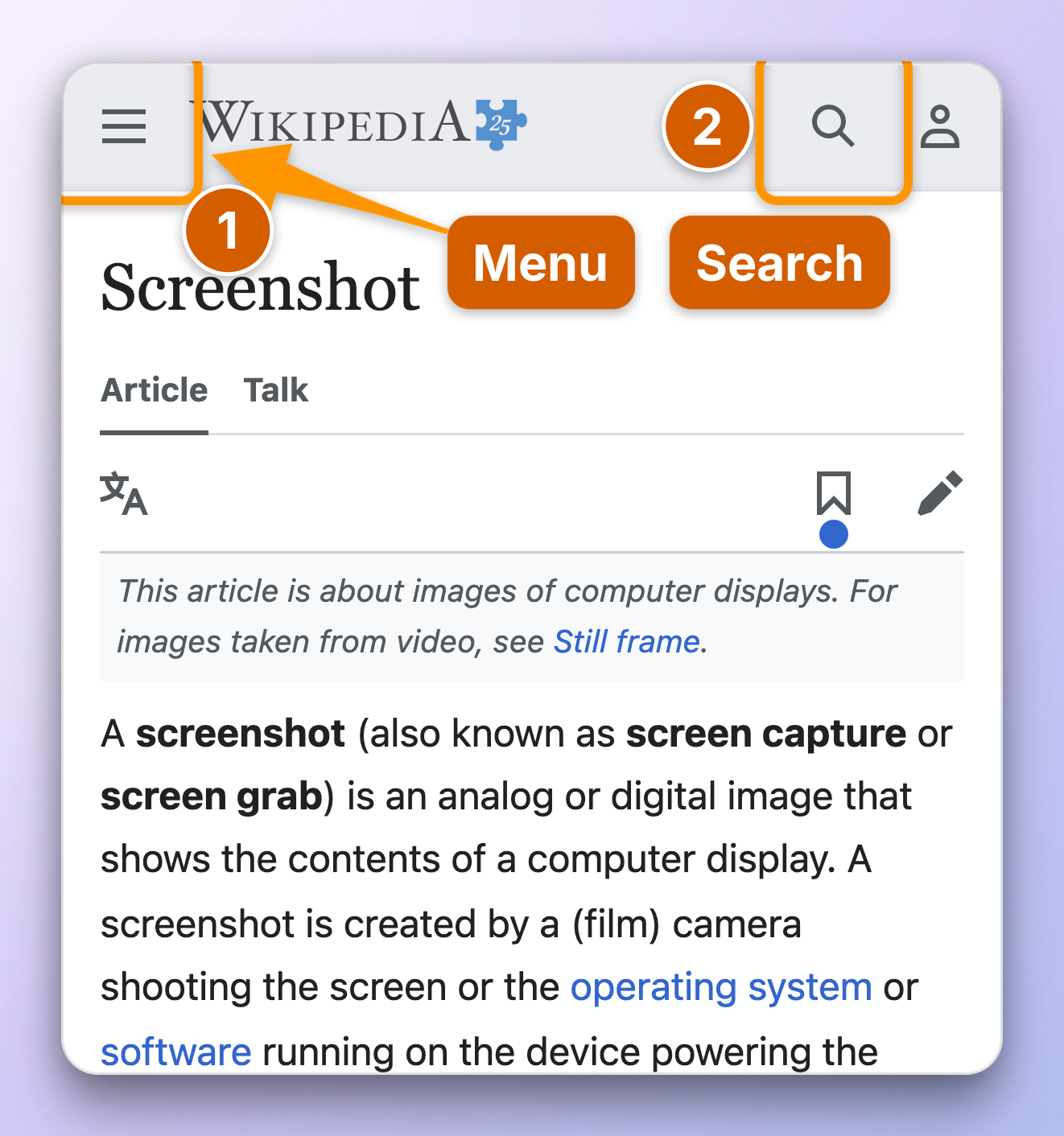
Phone preset: mobile viewport, touch and user agent

A label dropped at a fixed spot next to its target usually lands on the text the reader needs. AInotate places every label itself:
The image is never enlarged to make room. If a label still has to cover
something, AInotate says so in a warning, and label_at pins a label
exactly where you want it.
Save this as hn.json:
{"url": "https://news.ycombinator.com",
 "frame": {"chrome": "browser"},
 "marks": [
  {"type": "step", "n": 1, "target": {"text": "new", "exact": true},
   "label": "Newest"},
  {"type": "step", "n": 2, "target": {"text": "login"},
   "label": "Sign in"}]}
ainotate shoot hn.json --draft # temp file; drop --draft to save
The output path is printed on stdout. Images are saved to
~/Pictures/AInotate unless you configure another folder. ainotate --help
lists every command (capture, annotate, locate by OCR, grid, zoom, window
capture with UI element targets, elements, guide, compare, animate, copy,
install-skill); the full spec is in
skills/ainotate/references/spec.md. Exit codes: 0 ok,
1 cannot save, 2 invalid spec, 3 cannot draw, 4 capture failed or an
optional dependency is missing, 5 ambiguous text target, 6 target not
found.
Python. The same pipeline is importable:
from ainotate.shoot import shoot
res = shoot({"url": "https://en.wikipedia.org/wiki/Screenshot",
             "marks": [{"type": "box",
                        "target": {"text": "View history"},
                        "label": "Past edits"}]}, draft=True)
print(res.paths[0], res.redactions)
step, box, arrow, click ripple, keys
(keycaps), magnify (loupe), highlight, spotlight, text, solid
redact, and decorative blur / pixelate.ainotate shoot opens a page (laptop, wide
or phone preset), runs actions (click, fill, wait, scroll), measures
each target, redacts, annotates and saves.locate finds text by OCR (Apple Vision, Windows OCR or
Tesseract); grid and zoom locate icons at full resolution. Screen,
window and clipboard capture are built in.ainotate window ID --target measures
buttons, switches and fields through the Accessibility API, so marks sit
exactly on the control, icons included; ainotate elements --app NAME
lists what it can find.redact paints an opaque block. AInotate never
uses blur to hide data: blur and pixelation can be reversed. blur and
pixelate exist only to de-emphasize clutter, and a mark flagged
"sensitive": true is refused for them.shoot scans the live
page (text and input values) for emails, phone numbers, card numbers,
IBANs, API keys, tokens, JWTs, password and personal-data fields, and
blacks them out. On images it runs on OCR when you pass
--privacy auto. You can allow-list your own addresses or add regexes.| macOS | Windows | Linux | |
|---|---|---|---|
| Annotate, frames, export | verified | experimental | experimental |
| Web capture (Playwright, CDP) | verified | experimental | experimental |
| Screen and window capture | verified | experimental | experimental (X11) |
UI elements (window --target, elements) | verified (Accessibility) | not yet | not yet |
OCR (locate, text targets) | verified (Vision) | experimental (Windows OCR) | experimental (Tesseract) |
| Clipboard | verified | experimental | experimental |
| MCP server | verified | experimental | experimental |
Experimental means implemented and unit-tested with mocks, not yet verified on real Windows or Linux machines. Reports are welcome.
Copyright © 2026 DontPayFull. AInotate is free software under the GNU Affero General Public License v3.0 or later. If you run a modified AInotate as a network service, the AGPL requires you to offer its source to the users of that service.
Bundled and derived third-party work (the Inter font, arrow proportions from Arrowshot, a label-placement idea from github/awesome-copilot) and dependency licenses are listed in NOTICE.
Made with ❤️ by the DontPayFull team
Coupons & discount codes for 20,000+ stores
Claim this server with your GitHub account to request manual ownership verification.
Link to the catalog listing for AInotate MCP server for annotated screenshots from your README. This badge does not certify ownership, compatibility or security.
[](https://awesome-mcp.com/servers/ainotate)Public repository statistics could not be verified. Check the configured source address; unavailable counts are not zero.
来源、范围和时段分别列出;不相加,不代表安装人数、活跃用户或安全审核。
尚无已审核的包 / 镜像标识,暂不展示下载统计。
Alternative and complementary servers in the same category
A directory listing describing a cancellation-letter and mailing-address service. The configured public GitHub repository returned 404 during source verification.

A hosted MCP service for browsing and searching through Singapore mobile-network proxies.

A directory listing describing a Markdown-to-PDF service. The configured public GitHub repository returned 404 during source verification.