
Oleafly is a live collaborative LaTeX, Typst and Markdown editor for research that offers a local MCP server and an oleafly mcp stdio command so outside AI clients can use its project tools.
Repository stats unavailable
Productivity & Ops
An MCP server exposing a user's own plain-text key-value index so an agent can recall, find, browse tags and timeline, and check due items, with optional read-write saving.
ais MCP server for a plain-text personal index is cataloged as an MCP server attributed to anode1. An MCP server exposing a user's own plain-text key-value index so an agent can recall, find, browse tags and timeline, and check due items, with optional read-write saving. It is categorized under productivity work. See the capability inspector for recorded interfaces and their independent review status; consult upstream documentation for the current interface.
Installation configuration is not reviewed. No executable setup is offered for this entry; inspect the source repository before proceeding.
Catalog license label: Not specified. Check the source repository's current license and terms before using, modifying or distributing this software.
能力定义尚未审核。未核验的采集内容不会作为可信接口展示。
暂无可展示的已审核记录。这不表示上游不支持此能力。
暂无可展示的已审核记录。这不表示上游不支持此能力。
暂无可展示的已审核记录。这不表示上游不支持此能力。
Email delivery is not connected. This page does not collect email addresses or create subscriptions.
Browse the registry for current listings instead.
Reviews for ais MCP server for a plain-text personal index are not available yet
Review publishing and storage are not connected. This page does not collect or publish ratings or comments, including after sign-in.
No. It is read-only by default, and `ais --mcp rw` adds saving, but there is no delete or edit at any setting.
No; encrypted values stay opaque, so the agent sees an opaque marker rather than the secret.
It refuses a .ais/ found by walking up; a project index is served by naming it with -f.
README.md · 6a6e627360b3 · 采集于 2026-11-13 10:27:07 UTC
保留上游原文,不做 AI 改写。为安全起见过滤脚本、表单和不安全链接。
当前显示最后一次成功采集的文档快照,请以来源页面为准。
Save anything under your own keys, recall it by those keys.
An index in plain text on your own disk, with apps for the phone, the browser and the terminal over it. You save anything (a link, a file, a note, a password) under one or more keys, and recall it by those keys: ais venice italy gives back what you saved under both, the way your mind does, by association. It stores only a reference, so your documents stay where you keep them; the index is a view, and your data is never touched. Not a search engine over everyone's web, and not a tagger that guesses: an index of your own things under your own words. Why that matters is below.
One engine, thin front-ends. The CLI is the contract; the web GUI (ais --serve), the Flutter mobile app and a native Win32 wrapper sit over it, and the engine depends on none of them. C, no database, no runtime to install.
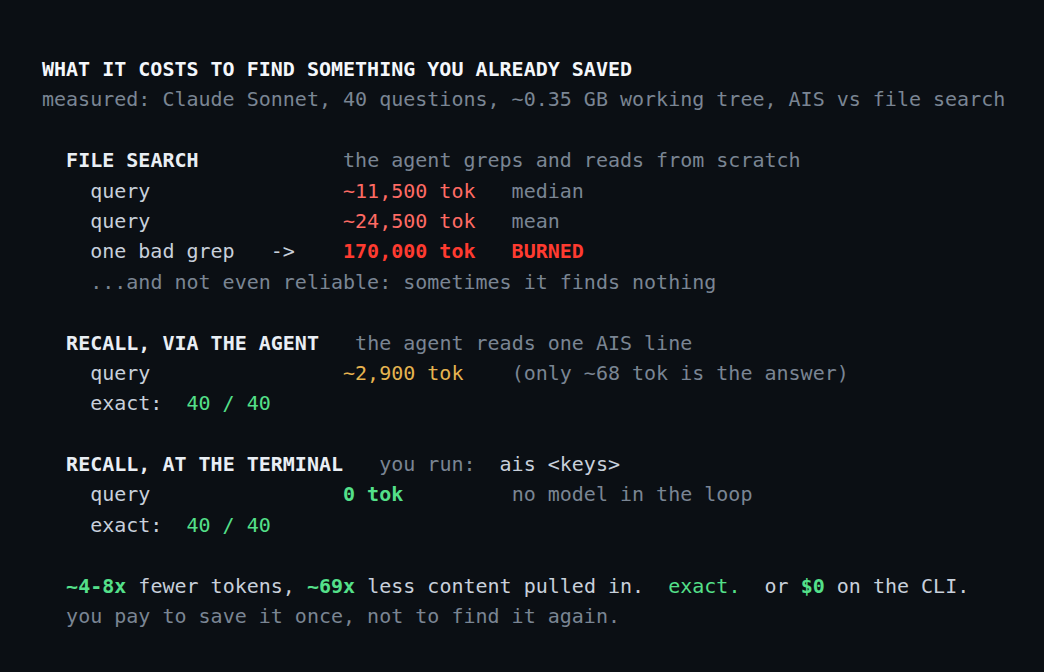
A coding agent can call ais the way it calls grep, except that it recalls what you filed instead of searching for it again: one line of config, 2,900 tokens a question against 24,500, and 40 of 40 answers exact. The measurement, and how to reproduce it.
Because it is plain text, it outlives its own tools: your index still opens in fifty years and exports into anything. Keeping data readable that long is computing's unsolved digital dark age, where file formats and the apps that open them die faster than the data. Plain text, readable since the 1960s on any machine with no special program, is the oldest answer.
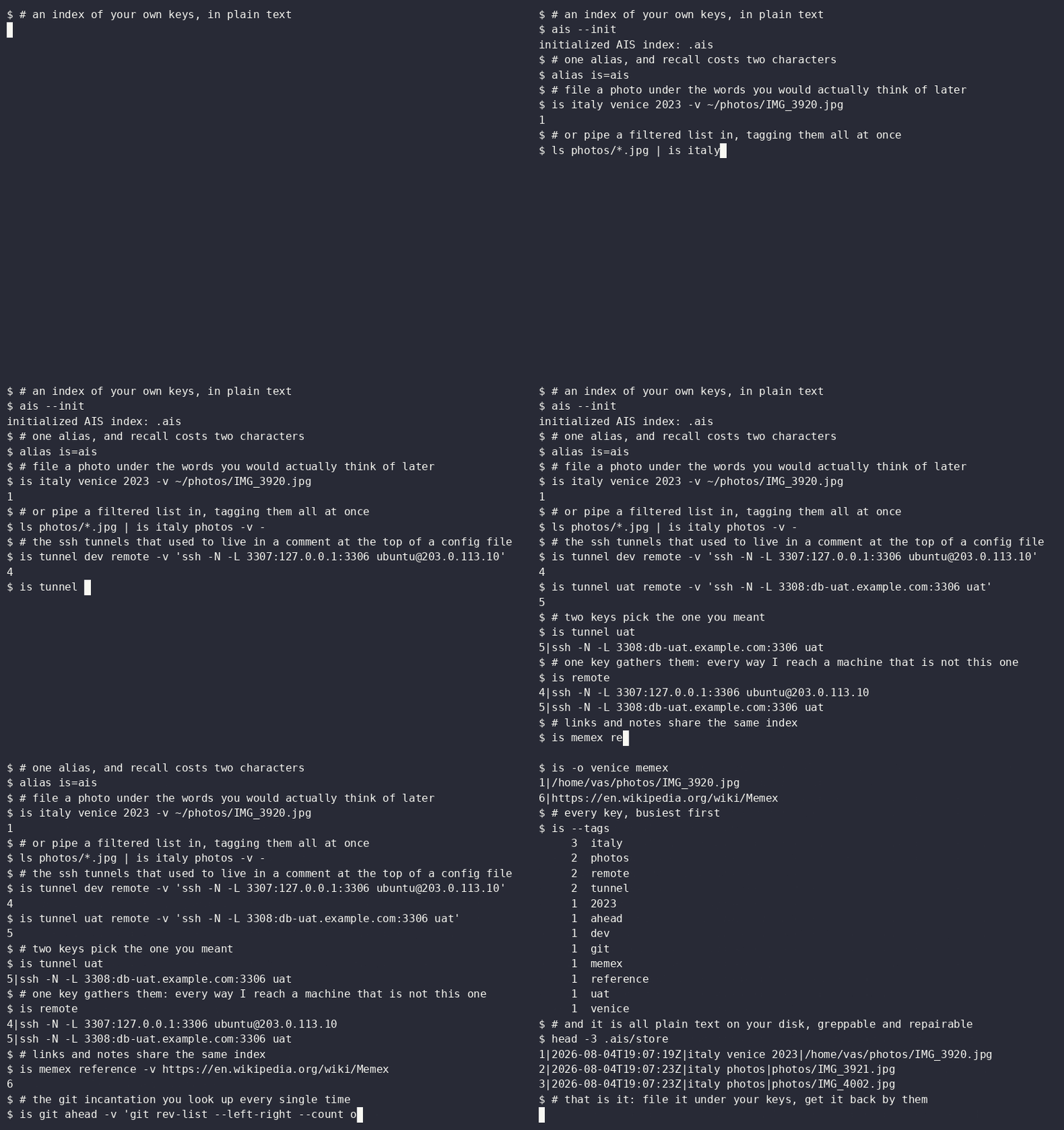
The command line version, which is the base: save a path, the ssh tunnel you always look up, a link, each under the words you would think of later. Then ask by those words.
There are GUIs over the same index: a web GUI in the browser, a Windows app, and the phone app. Android:
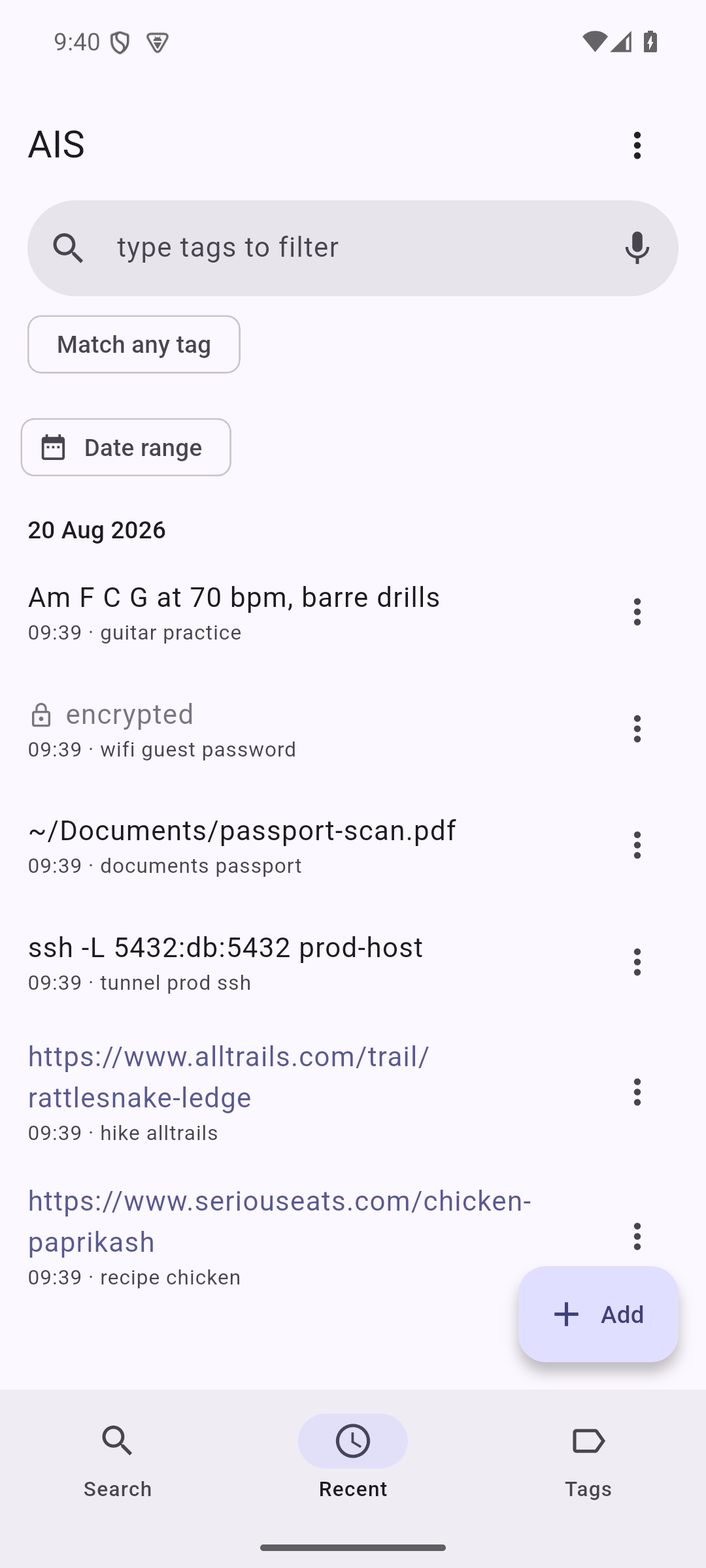
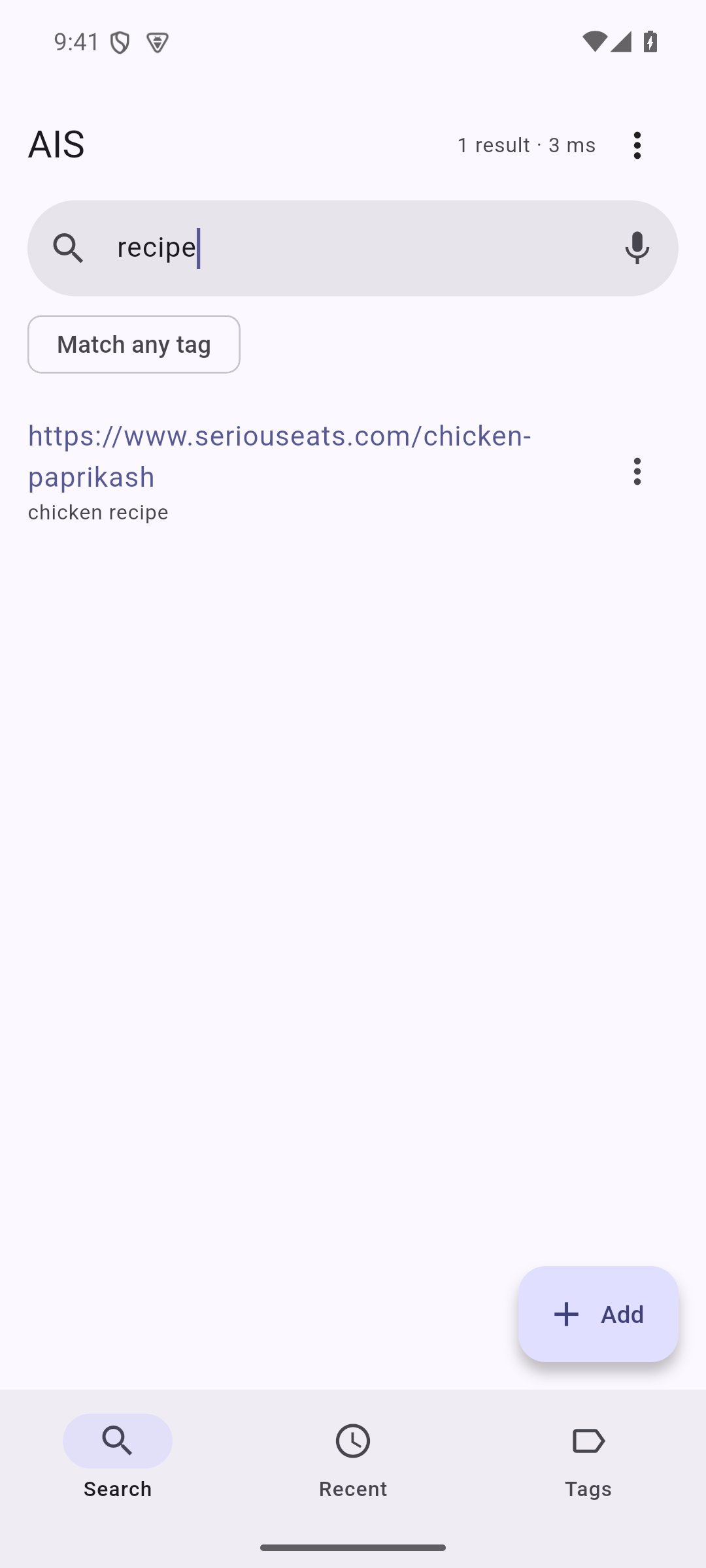
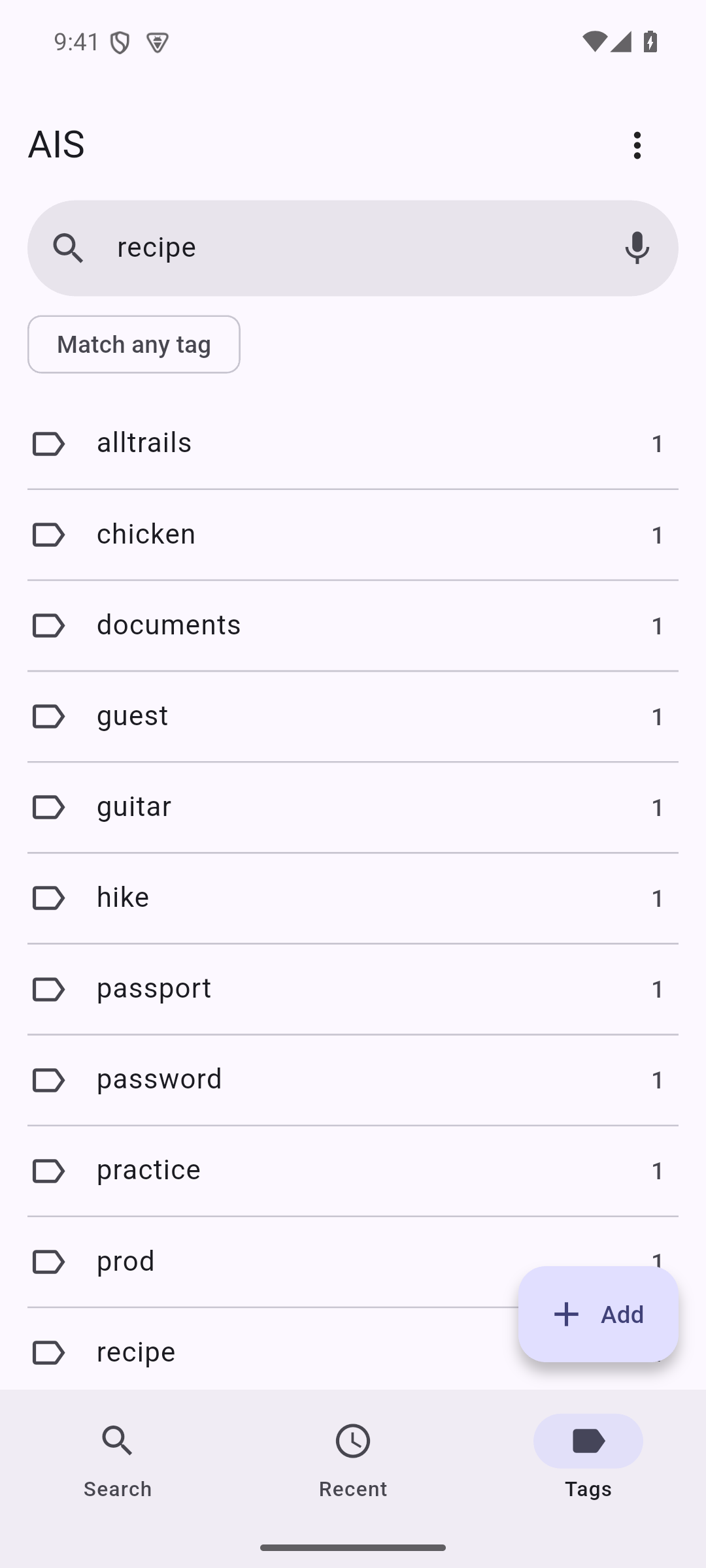
Save links, file paths and notes, recall them by tag; passwords stay encrypted (🔒).
The same app on an iPhone, synced with the Android above over Wi-Fi:
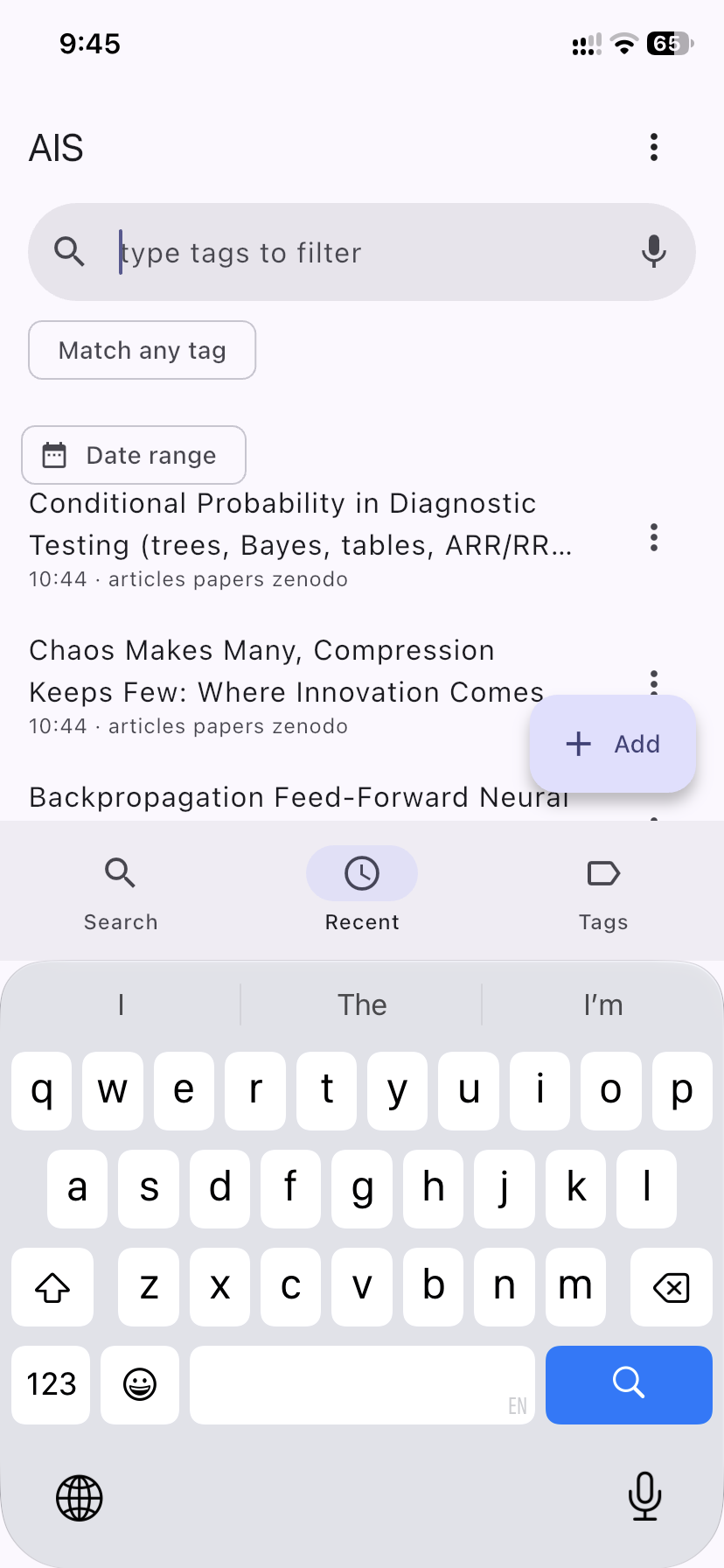
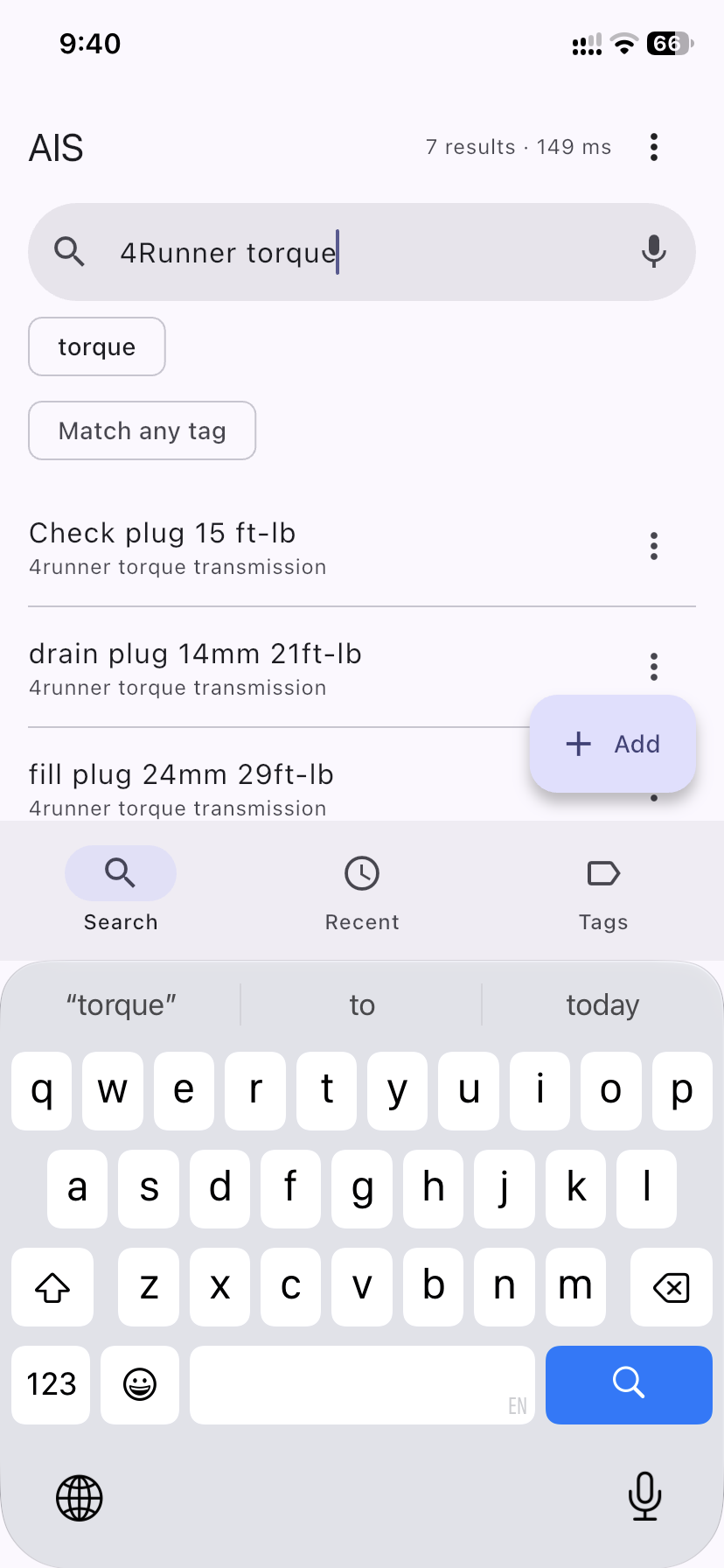
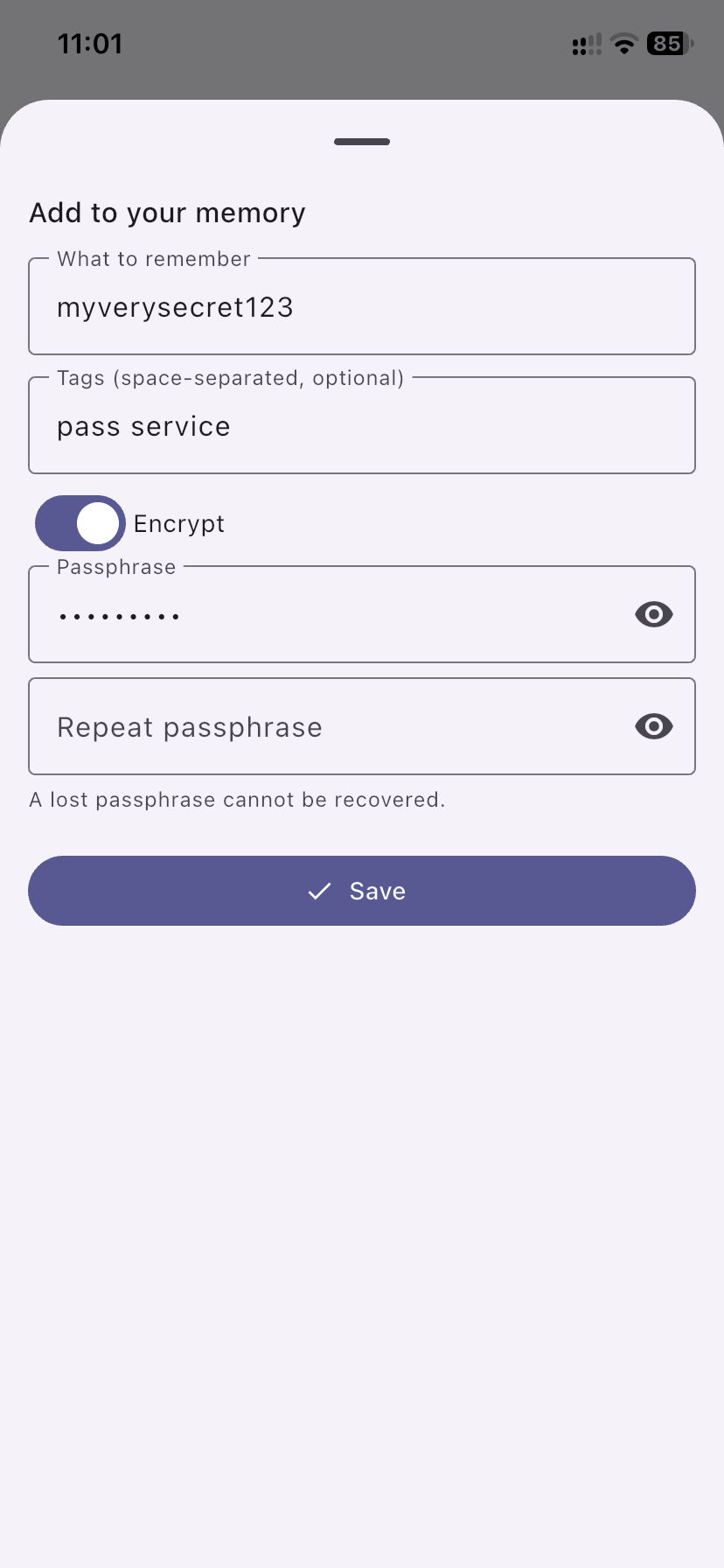
Your memory, yours to keep.
A search engine and an automatic tagger both answer with the mean: what these words mean to most people, what the model saw most often. That is the right answer when you are looking for something everyone knows, and the wrong one when you are looking for something only you saved.
Your keys are the deviation from that mean. "venice" is a week in 2023 for one person, a glass factory for another, a chapter of a thesis for a third. Nothing but you records which one it is, and no amount of training data recovers it, because averaging is precisely what removes it.
So ais does not guess and does not tag for you. It saves what you give it under the words you chose, and hands it back when you say them again. That is the whole trade: you do the small work of naming a thing once, and in exchange the index is yours rather than an average of everyone's.
See about.txt for the pitch and the memex origin, and foundation.md for the prior/compression argument behind it.
Why not SQLite, or a database?
SQLite is a binary file one program understands; ais is line-oriented plain text you can read, grep, diff, and recover by hand. You trade query power you do not need for the durability and transparency of plain text (see about.txt).
Why not an embedded engine (BerkeleyDB, LMDB, gdbm)? Because a bundled engine is a dependency you do not control. An early ais version ran on BerkeleyDB (both the Java and the C editions) right as it was acquired and relicensed; this plain-text design is that lesson. A format only one library version can open is a bet that the library, its license, and its on-disk layout outlive your data; they rarely do. ais has no engine to depend on: any future ais, any unix tool, or any format you migrate to can read the store.
Is keys-only search not limiting?
On purpose. The keys you assign are your prior, your ordering of the world. (ais --find still searches values and paths.) To search a document's contents, keep it as a file and index its path.
Is the built-in web server not a toy?
ais --serve is one thin wrapper over the CLI, a single-user loop that binds 127.0.0.1 only. The full front-end map is in dev/DISTRIBUTION.md.
Is this not just a bookmark manager / recoll / org-mode? Not a bookmark manager: it saves anything under any keys, not URLs in a browser. Not full-text (recoll): it indexes the keys you choose, not document bodies. Not org-mode: no single tree, no app lock-in, no markup to learn, keys with set algebra (AND / OR) over plain files.
Why not embeddings or a vector database? An embedding places your note near the average meaning of its words, which is the averaging this index exists to avoid. Recall here is exact: the keys you chose, intersected. A wrong key returns nothing instead of the three nearest neighbours, so an agent gets an answer it can trust or no answer at all, with no index to rebuild, no model to pin, and no similarity threshold to tune. Embedding search is the better tool when you do not know what you filed; keys are the better tool when you do.
Does it replace my photo library or files? No, it points into them: a photo stays in Immich, a file on disk, a page at its URL, and the index holds the reference under your own keys. (Secrets are the one exception: those it stores inline, encrypted, see below.)
Can it hold passwords? Is it a password manager?
Yes. A secret is stored encrypted inline (-e), so a login lives right next to the context it belongs to, and two things set it apart from a built-in manager. It is cross-platform: Apple Keychain and Google Password Manager are locked to one ecosystem, while ais is the same plain-text index on Windows, macOS, Linux, Android, iPhone and the CLI, so your secrets travel with you. And it is agent-safe: decryption is interactive (a passphrase you supply at a terminal or in the app), so an agent reading your index sees an opaque aisc: marker, not the secret, with no master key or unlocked vault to drain. For hundreds of site logins a dedicated manager is still more convenient: there is no autofill, no generation, no shared vault here (about.txt).
For an agent the index works like a cache of earlier extraction: a thing is found once and filed, and a later recall costs one line, where grep repeats the whole search on every question.
One line wires it into a client:
claude mcp add ais -- ais --mcp # or: {"mcpServers":{"ais":{"command":"ais","args":["--mcp"]}}}
That serves recall, find, tags, timeline and due over stdin/stdout. It is read-only, ais --mcp rw adds saving, and there is no delete or edit at any setting. Encrypted values stay opaque. It refuses a .ais/ it merely found by walking up, because a clone can ship one; a project index is served by naming it with -f. Which index it opens, what it refuses and what a model never sees: doc/MCP.md.
The same index is memory shared between sessions, between you and an agent, and between agents of different models. On your home index the agent asks you for keys. On a project's or a group's index, named with -f, it chooses them from the keys already in use, so the next session, or another model, recalls what was saved by the group's words. An agent saves when asked; left alone it rarely does (measured). Details, and what the plain-text file does not show: locking, crash-safe rewrites, recall in milliseconds at a million records, and a merge that survives edits and deletes on devices that were apart.
A skill is the other door, for an agent that already has a shell: .claude/skills/ais/SKILL.md, copied into your own project's .claude/skills/. It drives the CLI, so it can edit and delete records, which the server cannot at any setting.
The measurement: eight questions, five repeats each, claude-sonnet-4-6 run both ways over the same corpus, the recall arm answering from the recalled row alone. The questions were written by the person who filed the records, so every question matched a key: the table is the cost of a hit, and a miss costs the usual search. The index reached the agent as CLI tools, which is the same lookup ais --mcp serves over a pipe.
| file search (grep + read) | recall by key | |
|---|---|---|
| answered correctly | 31 of 40 | 40 of 40 |
| tokens per question, mean | 24,500 | 2,900 |
| of that, the retrieval payload | 4,744 | 68 |
Four times fewer tokens at the median and nine at the mean, and 69x less content dragged into the context window. Run ais yourself at the terminal and the cost is zero, because no model is involved.
The measurement is the paper Key Lookup versus File Search for a Coding Agent, doi.org/10.5281/zenodo.20764255. Its harness, the deposited run and a public photo-library stand-in are beside the paper, in ais/experiment/ of the articles repository; the deposited run reproduces there with no API key. The headline numbers come from the same method over a private 100k-line code project.
Android: the app is on Google Play:
https://play.google.com/store/apps/details?id=com.aisindex.ais
iPhone: the same app, built for iOS and in TestFlight; the App Store link lands here once the listing is approved.
macOS and Linux: one line installs or updates:
curl -fsSL https://raw.githubusercontent.com/Anode1/ais/main/scripts/install.sh | sh
It downloads the build for your OS and CPU, checks it against the published .sha256, and installs into ~/.local (PREFIX=/usr/local to put it elsewhere). It compiles nothing and needs no root. If ~/.local/bin is not on your PATH, it prints the line to add. Read scripts/install.sh first if you would rather not pipe a script to a shell. ais --serve opens the GUI in your browser.
Or take the files by hand. The link below always points at the current release:
.apk on the release page, or add https://github.com/Anode1/ais in Obtainium, which installs each release as it appears; when it asks which APK, the …-arm64-v8a.apk fits a modern phone.…-<os>-<arch>.zip and run the ais inside it from there, or copy it onto your PATH.…-windows-x86_64-setup.exe. It installs for your user only (no admin prompt), puts AIS in the Start menu and on the Desktop, and the ais command on your PATH. AIS opens in your browser (if nothing opens, go to http://127.0.0.1:8765) and sits in the notification area by the clock: right-click it to quit. Syncing a phone by QR code works as on Linux. Without installing: unzip the …-windows-x86_64.zip and double-click ais-gui.exe; the ais.exe beside it is the CLI. No runtime either way.The desktop binaries are not code-signed, so the first run is flagged as an unrecognized download (macOS Gatekeeper "could not verify", Windows SmartScreen "Windows protected your PC"). That is a new-and-unsigned notice, not a malware finding: on Windows click More info, then Run anyway, once for the setup exe (what it installs is not flagged again); on macOS run xattr -dr com.apple.quarantine . in the unzipped folder. A copy you build yourself is never flagged. The Android package is signed, with the project's own upload key.
Each release file ships beside a matching …zip.sha256. Download both, then check the hash (prints OK on a match):
shasum -a 256 -c ais-*-*.zip.sha256 # macOS / Linux
Releases are built by GitHub Actions (.github/workflows/release.yml).
make                 # build ./ais
./ais --init           # create an index here (a .ais/ directory, git-style)
./ais --serve          # open the web GUI in your browser
ais --help lists every command; doc/USING.txt has the everyday CLI cheat-sheet (recall, add, edit) and where your data lives.
Tip: alias is='ais' gives you two-character recall: is venice italy reads like the question it answers.
| Read | For |
|---|---|
doc/USING.txt | How to use it, GUI on every OS (plain steps, no jargon). |
doc/about.txt | What ais is, and what it is not. |
doc/command_line.txt | Every command and option, the full ais --help. |
doc/MCP.md | The ais --mcp agent tool: wiring it into a client, which index it opens, what it refuses. |
doc/dev/HTTP_API.md | The /api/... routes ais --serve answers, for curl or any program: the other agent door. |
doc/NOTES.md | The shape of a note an agent writes: plain-text bullets filed with ais --doc, one fact in one place. |
doc/SYNC.md | Sync your index between devices: encrypted LAN sync (--sync), or through a shared folder a tool like Syncthing keeps in sync (--sync-folder). |
doc/OVERVIEW.md | Why it is built this way, and where it came from. |
doc/ROADMAP.md | What's planned, what is knowingly unfixed, and where to help. |
doc/dev/LAYOUT.md | On-disk format and module map. |
AGENTS.md | How to develop it: the contract, the build, the test loop. |
doc/dev/README.md | Every other developer note, indexed: sync, front ends, packaging, releases. |
man ais | Full command reference. |
agent-recipes: short prompts for working with coding agents; ais is one of them (store and recall procedures instead of re-deriving them).
New code: dual licensed, your choice of GNU GPL v2 or later (COPYING) or MIT (LICENSE-MIT). Legacy material (legacy/) under its original Apache License 2.0. Author: Vasili Gavrilov (GitHub Anode1).
Claim this server with your GitHub account to request manual ownership verification.
Link to the catalog listing for ais MCP server for a plain-text personal index from your README. This badge does not certify ownership, compatibility or security.
[](https://awesome-mcp.com/servers/ais)Public repository statistics could not be verified. Check the configured source address; unavailable counts are not zero.
来源、范围和时段分别列出;不相加,不代表安装人数、活跃用户或安全审核。
尚无已审核的包 / 镜像标识,暂不展示下载统计。
Alternative and complementary servers in the same category
Oleafly is a live collaborative LaTeX, Typst and Markdown editor for research that offers a local MCP server and an oleafly mcp stdio command so outside AI clients can use its project tools.
Buddy is an Android app that offers its phone tools through a local MCP server to Claude Code, Codex, OpenCode, Antigravity, and Grok sessions.

Tuqui is a hosted MCP server that connects Odoo with Claude and ChatGPT so users can ask about sales, stock, customers and overdue invoices in plain language.
