
Store and retrieve entities, relations and observations in a persistent local knowledge graph.
create_entitiescreate_relationsadd_observations+6 more
92K
AI & Multi-Agent
A local-first, file-based memory server that stores notes as markdown and syncs them across your own machines over git, exposed to Claude Code through an MCP server.
Anamnesis MCP memory server is cataloged as an MCP server attributed to oscardvs. A local-first, file-based memory server that stores notes as markdown and syncs them across your own machines over git, exposed to Claude Code through an MCP server. It is categorized under ai agents-models. See the capability inspector for recorded interfaces and their independent review status; consult upstream documentation for the current interface.
Installation configuration is not reviewed. No executable setup is offered for this entry; inspect the source repository before proceeding.
Catalog license label: Apache License 2.0. Check the source repository's current license and terms before using, modifying or distributing this software.
能力定义尚未审核。未核验的采集内容不会作为可信接口展示。
暂无可展示的已审核记录。这不表示上游不支持此能力。
暂无可展示的已审核记录。这不表示上游不支持此能力。
暂无可展示的已审核记录。这不表示上游不支持此能力。
Email delivery is not connected. This page does not collect email addresses or create subscriptions.
Browse the registry for current listings instead.
Reviews for Anamnesis MCP memory server are not available yet
Review publishing and storage are not connected. This page does not collect or publish ratings or comments, including after sign-in.
No. The README states that no cloud account is required and memory stays on your machines, version-controlled and human-readable.
Yes. The import command copies Claude Code's own per-project memory into the store so existing notes are included.
README.md · 65efe411fcc7 · 采集于 2026-11-13 12:39:55 UTC
保留上游原文,不做 AI 改写。为安全起见过滤脚本、表单和不安全链接。
当前显示最后一次成功采集的文档快照,请以来源页面为准。
Cross-machine memory for Claude Code




Website · Docs · Benchmark · Dashboard
uv tool install anamnesis-memory && anamnesis init
ἀνάμνησις (anamnesis): Greek for recollection, the act of calling knowledge back to mind.
Anamnesis is a local-first, file-based memory layer for Claude Code that syncs across your own machines. What Claude learns about your projects (conventions, architecture decisions, fixes that worked, what you did yesterday) is stored as plain markdown, indexed locally for search, and kept in sync over your private network.
Claude Code's own memory stays on the machine where it was written. Copying a SQLite index through a cloud folder such as Dropbox or iCloud corrupts it. Anamnesis syncs the markdown with git instead and rebuilds the index on each machine, so a note written on your desktop is searchable from your laptop.
No cloud account is required. The memory stays on your machines, version-controlled and human-readable.
  ┌─────────────┐        git over your private mesh        ┌─────────────┐
  │  desktop    │  ◄────────────  (Tailscale)  ────────►   │  laptop     │
  │             │                                          │             │
  │  Claude Code│                                          │  Claude Code│
  │     ▼       │                                          │     ▼       │
  │  MCP server │   markdown (source of truth)             │  MCP server │
  │     ▼       │   + SQLite FTS index (rebuilt locally)   │     ▼       │
  │ ~/.anamnesis│                                          │ ~/.anamnesis│
  └─────────────┘                                          └─────────────┘
~/.anamnesis/memory/, readable and git diff-able.
The markdown is the source of truth; everything else is derived from it.anamnesis merge consolidates near-duplicates. Generated
notes carry provenance and confidence in their front-matter. merge --apply is gated on your eval set so
it does not lower recall, and anamnesis eval measures reflection before and after on a sandbox copy.Prereqs: Claude Code, uv, and git.
uv tool install anamnesis-memory && anamnesis init
anamnesis init registers the MCP server with Claude Code at user scope, installs the SessionStart,
SessionEnd, and PreCompact hooks, configures the store at ~/.anamnesis, and runs a first sync. It is
idempotent: it backs up settings.json and does not duplicate hooks. --print shows the full plan without
writing anything, and --local-only skips the remote until you want one.
Claude Code gets five tools: memory_search, memory_list, and memory_status (read-only, safe to
auto-approve), plus memory_write and memory_sync. Full reference:
CLI ·
MCP tools ·
configuration.
git clone https://github.com/oscardvs/anamnesis && cd anamnesis/server
uv venv --python 3.12
uv pip install -e ".[mcp,dev]"
uv run anamnesis init --print
The repo also ships a project-scoped .mcp.json. Claude Code launches MCP servers with a filtered
environment, so ANAMNESIS_HOME / ANAMNESIS_MACHINE_ID / ANAMNESIS_GIT_REMOTE belong in its "env"
block, not your shell. Server internals: server/README.md.
Memory is a git repo (~/.anamnesis/memory/) synced over your private
Tailscale mesh, or any git remote you control. Set it up once:
Put every machine on the same tailnet (install Tailscale,
tailscale up). Pick one always-on machine to host the shared repo; tailscale status prints its
MagicDNS name (for example host.your-tailnet.ts.net).
Create one shared bare repo on the host:
git init --bare -b main ~/anamnesis-memory.git
Point each machine at it:
anamnesis init --remote 'you@host.your-tailnet.ts.net:anamnesis-memory.git'
The host itself uses the local path: --remote "$HOME/anamnesis-memory.git".
Sync runs commit -> pull --rebase -> push and rebuilds the local index after pulling, so a note written on
one machine is searchable on the others within a sync cycle. If you started with --local-only, re-run
init --remote ... later; the store attaches to the remote and pushes its history.
anamnesis init installs three Claude Code hooks:
Two more commands build on them:
anamnesis config set reflection.provider ... at an OpenAI-compatible
model and anamnesis reflect distills accumulated session notes into durable conventions. With
reflection.auto set, it runs at session end once a project has enough unreflected notes.
anamnesis merge consolidates near-duplicates and only applies if recall on your eval set holds.anamnesis import copies Claude Code's own per-project memory into the store, so notes you
already wrote for it are included.To set the hooks up by hand instead of with init, copy
examples/hooks.settings.json into ~/.claude/settings.json and point it
at your install.
bench/cross-machine-tokens/ runs one scripted task on a fresh machine
twice: once without Anamnesis, where the agent explores the project to learn its conventions, and once with
the real SessionStart memory block injected. It drives the Claude Code CLI headlessly on a synthetic project,
so a Pro/Max subscription is enough and no API key is needed.
The committed result.json (3 runs per arm on claude-opus-4-8) shows about 8% fewer total input tokens
with memory, 366k versus 336k on average, with output tokens and turn count about the same. The conventions
were known from the first turn instead of being rediscovered. An earlier version of the scenario used a
5-file project and showed no difference; that null result is documented in the same README.
A web GUI for the memory store: browse and full-text search every note, edit markdown with per-note history, see every machine (which one wrote what and when it last synced), and run reflection from the browser. Provenance badges show where each note came from: you, a session capture, reflection, or import.
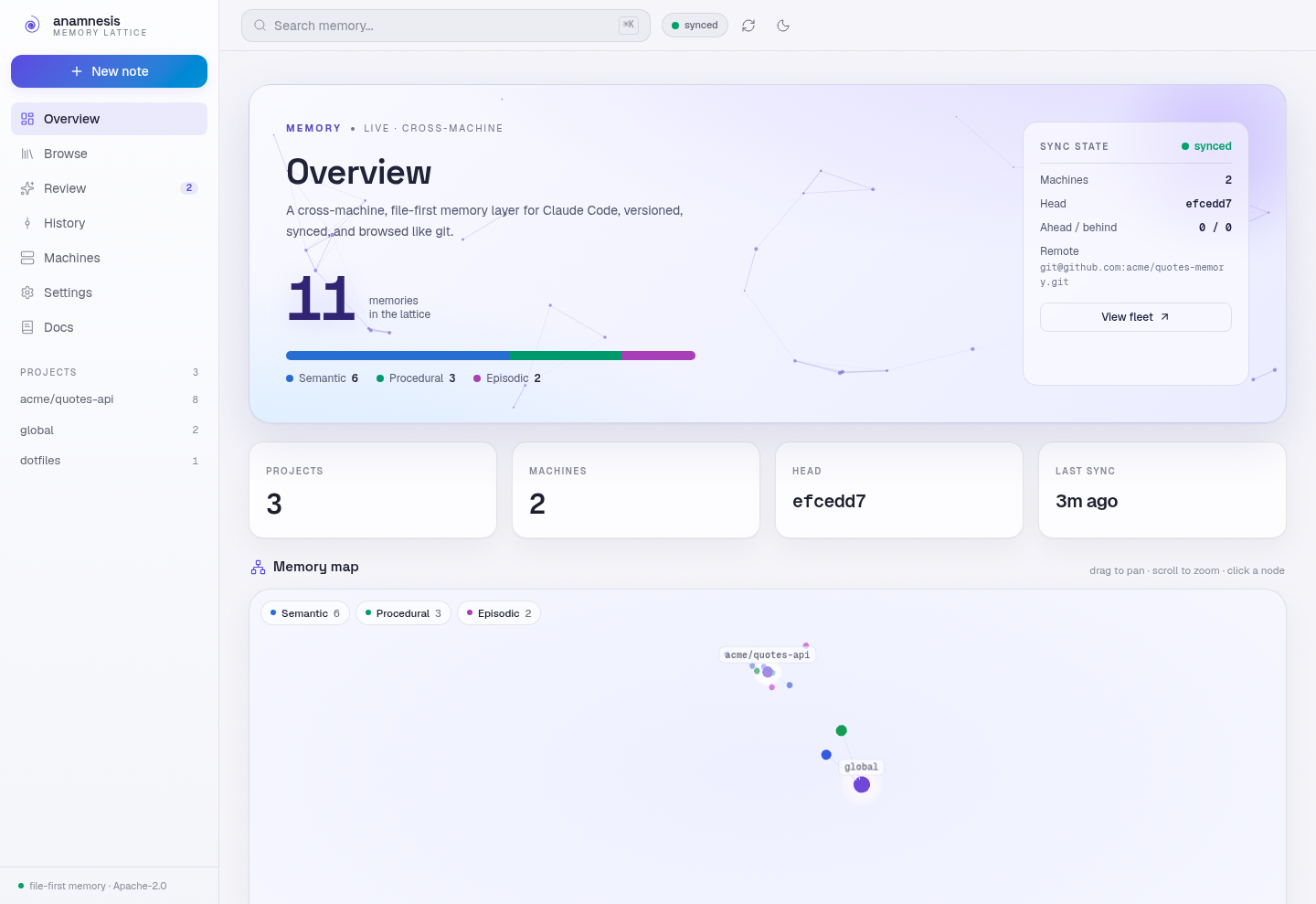
npx anamnesis-dashboard # http://localhost:3000
or, from the CLI you already have:
anamnesis dashboard
Needs Node 20 or newer. From a repo clone, cd dashboard && npm run dev works for development.
It is a thin read/write client over the same local store the MCP server uses: it reads the SQLite index
directly and shells out to the anamnesis CLI for writes and sync. Use --port, --store, and
--no-open to adjust how it serves. See dashboard/README.md for configuration
and design notes.
September 2026: v0.1.3 is on PyPI. The local-first core is done and has been used across a real multi-machine setup: the store, the MCP server, the hooks, git sync, the one-command install, the reflection and merge passes with their eval harness, and the dashboard. APIs may still change between releases.
Next: a hosted relay for people without their own mesh (the server already ships anamnesis relay commands
behind a [relay] extra, but they are not documented yet) and team memory.
| Path | What |
|---|---|
server/ | The MCP memory server and CLI (Python, FastMCP). |
dashboard/ | The memory GUI (Next.js). |
site/ | The public website and docs (live). |
bench/ | The cross-machine token benchmark and the demo recording pipeline. |
examples/ | A hand-written hooks.settings.json for manual hook setup. |
Issues and discussion are welcome. If the install is rough on your machine, open an issue with the exact command you ran and its output.
Apache License 2.0. See NOTICE.
Claim this server with your GitHub account to request manual ownership verification.
Link to the catalog listing for Anamnesis MCP memory server from your README. This badge does not certify ownership, compatibility or security.
[](https://awesome-mcp.com/servers/anamnesis)Public repository statistics could not be verified. Check the configured source address; unavailable counts are not zero.
来源、范围和时段分别列出;不相加,不代表安装人数、活跃用户或安全审核。
尚无已审核的包 / 镜像标识,暂不展示下载统计。
Alternative and complementary servers in the same category
Store and retrieve entities, relations and observations in a persistent local knowledge graph.
Organize problem solving into revisable, branching thought steps through an MCP tool.

Query-aware context compression with an MCP plugin for coding agents, plus Python and HTTP interfaces for reducing the context sent to a language model.