

A directory listing describing a cancellation-letter and mailing-address service. The configured public GitHub repository returned 404 during source verification.
Repository stats unavailable
Developer Tools
An MCP server providing AI assistants with structured access to the Arch Wiki, AUR, official repositories, and local Arch system information.
Arch Linux MCP Server is cataloged as an MCP server attributed to nihalxkumar. An MCP server providing AI assistants with structured access to the Arch Wiki, AUR, official repositories, and local Arch system information. It is categorized under developer tools. See the capability inspector for recorded interfaces and their independent review status; consult upstream documentation for the current interface.
Installation configuration is not reviewed. No executable setup is offered for this entry; inspect the source repository before proceeding.
Catalog license label: Not specified. Check the source repository's current license and terms before using, modifying or distributing this software.
能力定义尚未审核。未核验的采集内容不会作为可信接口展示。
暂无可展示的已审核记录。这不表示上游不支持此能力。
暂无可展示的已审核记录。这不表示上游不支持此能力。
暂无可展示的已审核记录。这不表示上游不支持此能力。
Email delivery is not connected. This page does not collect email addresses or create subscriptions.
Browse the registry for current listings instead.
Reviews for Arch Linux MCP Server are not available yet
Review publishing and storage are not connected. This page does not collect or publish ratings or comments, including after sign-in.
Yes, several tools and resources are marked as available on any platform, though some package management features are Arch only.
README.md · d637138557ff · 采集于 2026-11-13 08:11:27 UTC
保留上游原文,不做 AI 改写。为安全起见过滤脚本、表单和不安全链接。
当前显示最后一次成功采集的文档快照,请以来源页面为准。
Disclaimer: Unofficial community project, not affiliated with Arch Linux.
A Model Context Protocol (MCP) server that bridges AI assistants with the Arch Linux ecosystem. Enables intelligent, safe, and efficient access to the Arch Wiki, AUR, and official repositories for AI-assisted Arch Linux usage on Arch and non-Arch systems.
Leverage AI to get digestible, structured results that are ready for follow up questions and actions.
📖 Complete Documentation with Comfy Guides
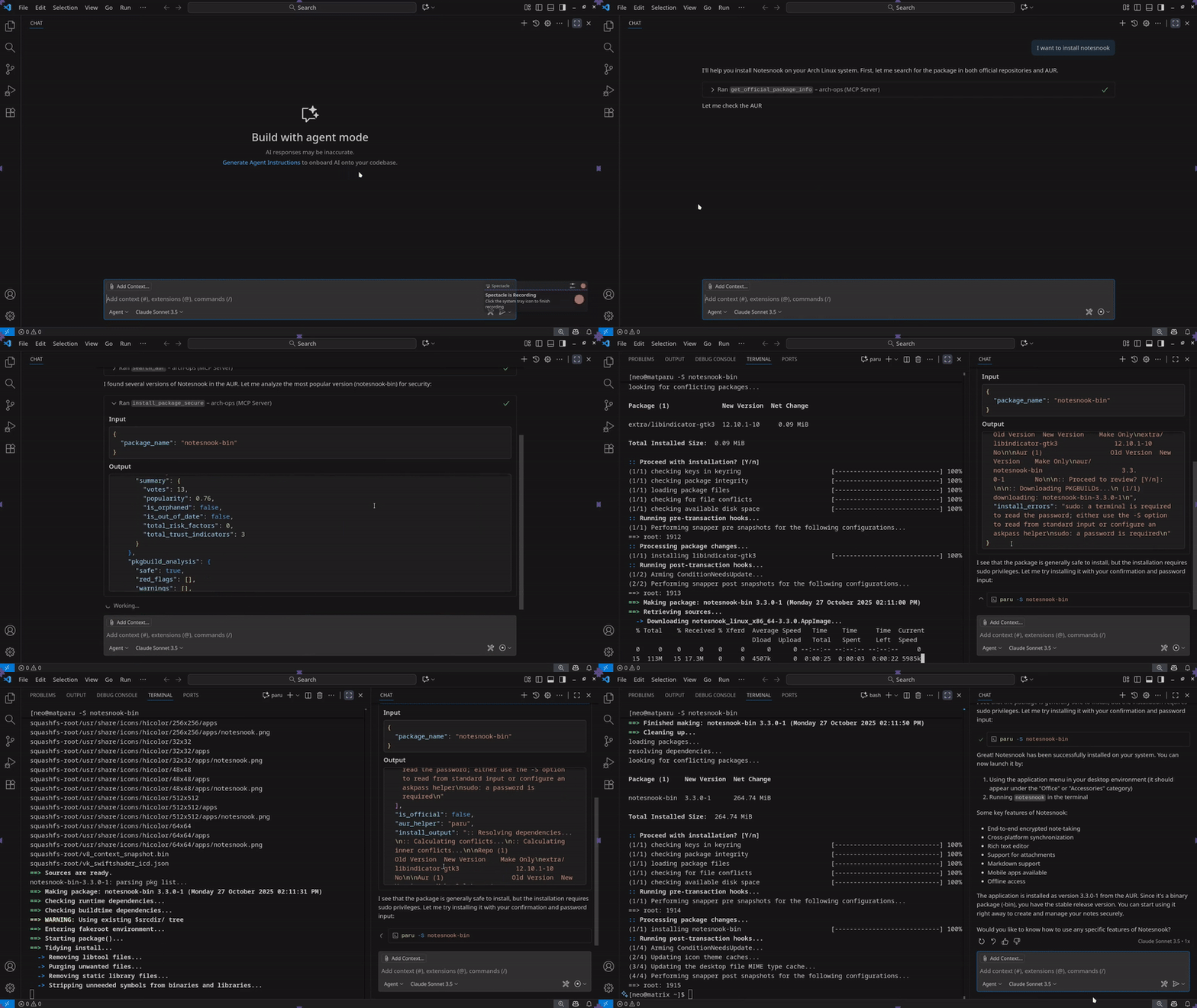

Direct access to Arch ecosystem data via custom URI schemes:
| URI Scheme | Example | Returns |
|---|---|---|
archwiki:// | archwiki://Installation_guide | Markdown-formatted Wiki page |
| URI Scheme | Example | Returns |
|---|---|---|
archrepo:// | archrepo://vim | Official repository package details |
aur://*/info | aur://yay/info | AUR package metadata (votes, maintainer, dates) |
aur://*/pkgbuild | aur://yay/pkgbuild | Raw PKGBUILD with safety analysis |
| URI Scheme | Example | Returns |
|---|---|---|
pacman://installed | pacman://installed | System installed packages list |
pacman://orphans | pacman://orphans | Orphaned packages |
pacman://explicit | pacman://explicit | Explicitly installed packages |
pacman://groups | pacman://groups | All package groups |
pacman://group/* | pacman://group/base-devel | Packages in specific group |
pacman://database/freshness | pacman://database/freshness | Package database sync status |
| URI Scheme | Example | Returns |
|---|---|---|
system://info | system://info | System information (kernel, memory, uptime) |
system://disk | system://disk | Disk space usage statistics |
system://services/failed | system://services/failed | Failed systemd services |
system://logs/boot | system://logs/boot | Recent boot logs |
pacman://log/recent | pacman://log/recent | Recent package transactions |
pacman://log/failed | pacman://log/failed | Failed package transactions |
| URI Scheme | Example | Returns |
|---|---|---|
archnews://latest | archnews://latest | Latest Arch Linux news |
archnews://critical | archnews://critical | Critical news requiring manual intervention |
archnews://since-update | archnews://since-update | News since last system update |
| URI Scheme | Example | Returns |
|---|---|---|
config://pacman | config://pacman | Parsed pacman.conf configuration |
config://makepkg | config://makepkg | Parsed makepkg.conf configuration |
mirrors://active | mirrors://active | Currently configured mirrors |
mirrors://health | mirrors://health | Mirror configuration health status |
| Tool | Description | Platform |
|---|---|---|
search_archwiki | Query Arch Wiki with ranked results | Any |
search_aur | Search AUR (relevance/votes/popularity/modified) | Any |
get_official_package_info | Get official package details (hybrid local/remote) | Any |
| Tool | Description | Platform |
|---|---|---|
check_updates_dry_run | Check for available updates | Arch only |
install_package_secure | Install with security checks (blocks malicious packages) | Arch only |
remove_packages | Remove packages - accepts single package name or list (with deps, forced) | Arch only |
| Tool | Description | Platform |
|---|---|---|
manage_orphans | Manage orphaned packages (2 actions: list orphaned packages, remove orphans). Always runs in dry-run mode first for safety. | Arch only |
verify_package_integrity | Check file integrity (modified/missing files) | Arch only |
manage_install_reason | Manage install reasons (3 actions: list explicit packages, mark as explicit/dependency) | Arch only |
| Tool | Description | Platform |
|---|---|---|
query_file_ownership | Unified file-package ownership queries (3 modes: file→package, package→files, filename search) | Arch only |
list_package_groups | List all groups (base, base-devel, etc.) | Arch only |
list_group_packages | Show packages in specific group | Arch only |
| Tool | Description | Platform |
|---|---|---|
get_system_info | System info (kernel, memory, uptime) | Any |
check_disk_space | Disk usage with warnings | Any |
get_pacman_cache_stats | Package cache size and age | Arch only |
check_failed_services | Find failed systemd services | systemd |
get_boot_logs | Retrieve journalctl boot logs | systemd |
check_database_freshness | Check package database sync status | Arch only |
| Tool | Description | Platform |
|---|---|---|
query_package_history | Unified tool for querying package history from pacman logs (4 query types). Examples: query_type='all' shows recent transactions; query_type='package', package_name='docker' shows when docker was installed/upgraded; query_type='failures' shows failed operations; query_type='sync' shows database sync history. | Arch only |
| Tool | Description | Platform |
|---|---|---|
get_latest_news | Fetch Arch Linux news from RSS | Any |
check_critical_news | Find critical news (manual intervention required) | Any |
get_news_since_last_update | News posted since last system update | Arch only |
| Tool | Description | Platform |
|---|---|---|
optimize_mirrors | Smart mirror management (4 actions: status, test, suggest, health). Examples: optimize_mirrors(action='status', auto_test=True) lists and tests all mirrors; optimize_mirrors(action='suggest', country='US', limit=5) suggests top 5 US mirrors; optimize_mirrors(action='health') checks for issues and gives recommendations. | Arch/Any |
| Tool | Description | Platform |
|---|---|---|
analyze_pacman_conf | Parse pacman.conf settings with optional focus. Examples: focus='full' (default) returns all settings; focus='ignored_packages' returns only ignored packages with warnings for critical ones; focus='parallel_downloads' returns only parallel downloads setting with optimization recommendations. | Arch only |
analyze_makepkg_conf | Parse makepkg.conf settings (CFLAGS, MAKEFLAGS, build configuration) | Arch only |
| Tool | Description | Platform |
|---|---|---|
analyze_pkgbuild_safety | Comprehensive PKGBUILD analysis (50+ red flags) | Any |
analyze_package_metadata_risk | Package trust scoring (votes, maintainer, age) | Any |
| Prompt | Purpose | Workflow |
|---|---|---|
troubleshoot_issue | Diagnose system errors | Extract keywords → Search Wiki → Context-aware suggestions |
audit_aur_package | Pre-installation safety audit | Fetch metadata → Analyze PKGBUILD → Security recommendations |
analyze_dependencies | Installation planning | Check repos → Map dependencies → Suggest install order |
safe_system_update | Safe update workflow | Check critical news → Verify disk space → List updates → Check services → Recommendations |
uvxuvx arch-ops-server
Claude / Cursor / Any MCP client that supports STDIO transport
{
  "mcpServers": {
    "arch-linux": {
      "command": "uvx",
      "args": ["arch-ops-server"]
    }
  }
}
Opencode:
{
  "$schema": "https://opencode.ai/config.json",
  "mcp": {
    "arch-linux": {
      "type": "local",
      "command": ["uvx", "arch-ops-server"]
    }
  }
}
Contributions are greatly appreciated. Please feel free to submit a pull request or open an issue and help make things better for everyone.
This project is dual-licensed under your choice of:
You may use this software under the terms of either license. When redistributing or modifying this software, you may choose which license to apply.
By contributing to this project, you agree that your contributions will be licensed under both licenses.
Claim this server with your GitHub account to request manual ownership verification.
Link to the catalog listing for Arch Linux MCP Server from your README. This badge does not certify ownership, compatibility or security.
[](https://awesome-mcp.com/servers/arch-linux-mcp)Public repository statistics could not be verified. Check the configured source address; unavailable counts are not zero.
来源、范围和时段分别列出;不相加,不代表安装人数、活跃用户或安全审核。
尚无已审核的包 / 镜像标识,暂不展示下载统计。
Alternative and complementary servers in the same category
A directory listing describing a cancellation-letter and mailing-address service. The configured public GitHub repository returned 404 during source verification.

A hosted MCP service for browsing and searching through Singapore mobile-network proxies.

A directory listing describing a Markdown-to-PDF service. The configured public GitHub repository returned 404 during source verification.