Assisted Service MCP Server
MCP server for interacting with the OpenShift assisted installer API.
Diagnose cluster failures and find out how to fix them.
Try it out:
- Clone the repo:
git clone git@github.com:carbonin/assisted-service-mcp.git
-
Get your OpenShift API token from https://cloud.redhat.com/openshift/token
-
The server is started and configured differently depending on what transport you want to use
For STDIO:
In VSCode for example:
   "mcp": {
        "servers": {
            "AssistedService": {
                "command": "uv",
                "args": [
                    "--directory",
                    "/path/to/assisted-service-mcp",
                    "run",
                    "mcp",
                    "run",
                    "/path/to/assisted-service-mcp/server.py"
                ],
                "env": {
                    "OFFLINE_TOKEN": <your token>
                }
            }
        }
    }
For SSE (recommended):
Start the server in a terminal:
OFFLINE_TOKEN=<your token> uv run server.py
Configure the server in the client:
    "assisted-sse": {
      "transport": "sse",
      "url": "http://localhost:8000/sse"
    }
If you do not set the OFFLINE_TOKEN environment variable, you can provide the token as a request header.
When configuring your MCP client, add the OCM-Offline-Token header:
    "assisted-sse": {
      "transport": "sse",
      "url": "http://localhost:8000/sse",
      "headers": {
        "OCM-Offline-Token": "<your token>"
      }
    }
- Ask about your clusters:
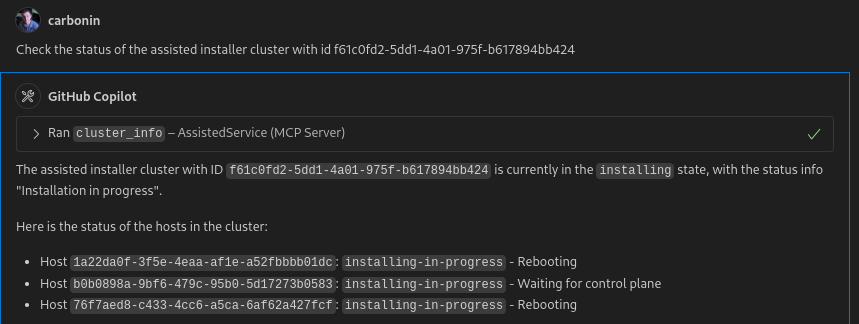
The MCP server provides the following tools for interacting with the OpenShift Assisted Installer:
Cluster Management
-
list_clusters - Lists all current user assisted installer clusters. Returns minimal cluster information.
-
cluster_info - Get detailed information about the assisted installer cluster with the given ID
cluster_id: Cluster ID (string, required)
-
create_cluster - Create a new assisted installer cluster and infraenv. Set single_node to true only for single node clusters or when high availability is not needed. Returns cluster ID and infraenv ID as JSON.
name: Cluster name (string, required)version: OpenShift version (string, required)base_domain: Base domain for the cluster (string, required)single_node: Whether to create a single node cluster (boolean, required)
-
install_cluster - Trigger installation for the assisted installer cluster with the given ID
cluster_id: Cluster ID (string, required)
-
set_cluster_vips - Set the API and ingress virtual IP addresses (VIPs) for the cluster
cluster_id: Cluster ID (string, required)api_vip: API virtual IP address (string, required)ingress_vip: Ingress virtual IP address (string, required)
Events and Monitoring
Infrastructure Environment
- infraenv_info - Get detailed information about the assisted installer infra env with the given ID. Contains data like ISO download URL and infra env metadata.
infraenv_id: Infrastructure environment ID (string, required)
Host Management
- set_host_role - Update a host to a specific role. Role options are: 'auto-assign', 'master', 'arbiter', 'worker'
host_id: Host ID (string, required)infraenv_id: Infrastructure environment ID (string, required)role: Host role (string, required)
OpenShift Versions and Operators
-
list_versions - Lists the available OpenShift versions for installation with the assisted installer
-
list_operator_bundles - Lists the operator bundles that can be optionally added to a cluster during installation
-
add_operator_bundle_to_cluster - Request an operator bundle to be installed with the given cluster
cluster_id: Cluster ID (string, required)bundle_name: Operator bundle name (string, required)
Usage Examples
- List all clusters: "Show me all my clusters"
- Get cluster details: "Give me detailed information about cluster abc123"
- Create a cluster: "Create a new cluster named 'my-cluster' with OpenShift 4.14 and base domain 'example.com'"
- Check cluster events: "What events happened on cluster abc123?"
- Install a cluster: "Start the installation for cluster abc123"


