🧠 Azure Self Help MCP Server
Welcome to the Azure Troubleshooter MCP Server – a hands-on implementation of Model Context Protocol (MCP), designed to enable intelligent agents (like Claude or Semantic Kernel) to troubleshoot Azure resources step-by-step using the Azure Self Help API.
In short: it lets your AI app talk to Azure’s Guided Troubleshooter, automating common diagnostic workflows.
💡 What Is This?
This project implements an MCP Server that exposes Azure's Self Help API as a toolset. Once connected to an MCP Host (like Claude Desktop or an SK App), you can ask the agent to:
- Create a troubleshooter session
- View its current step
- Continue the flow with your response
- End or restart the session
Think of this as your interactive AI assistant for Azure diagnostics.
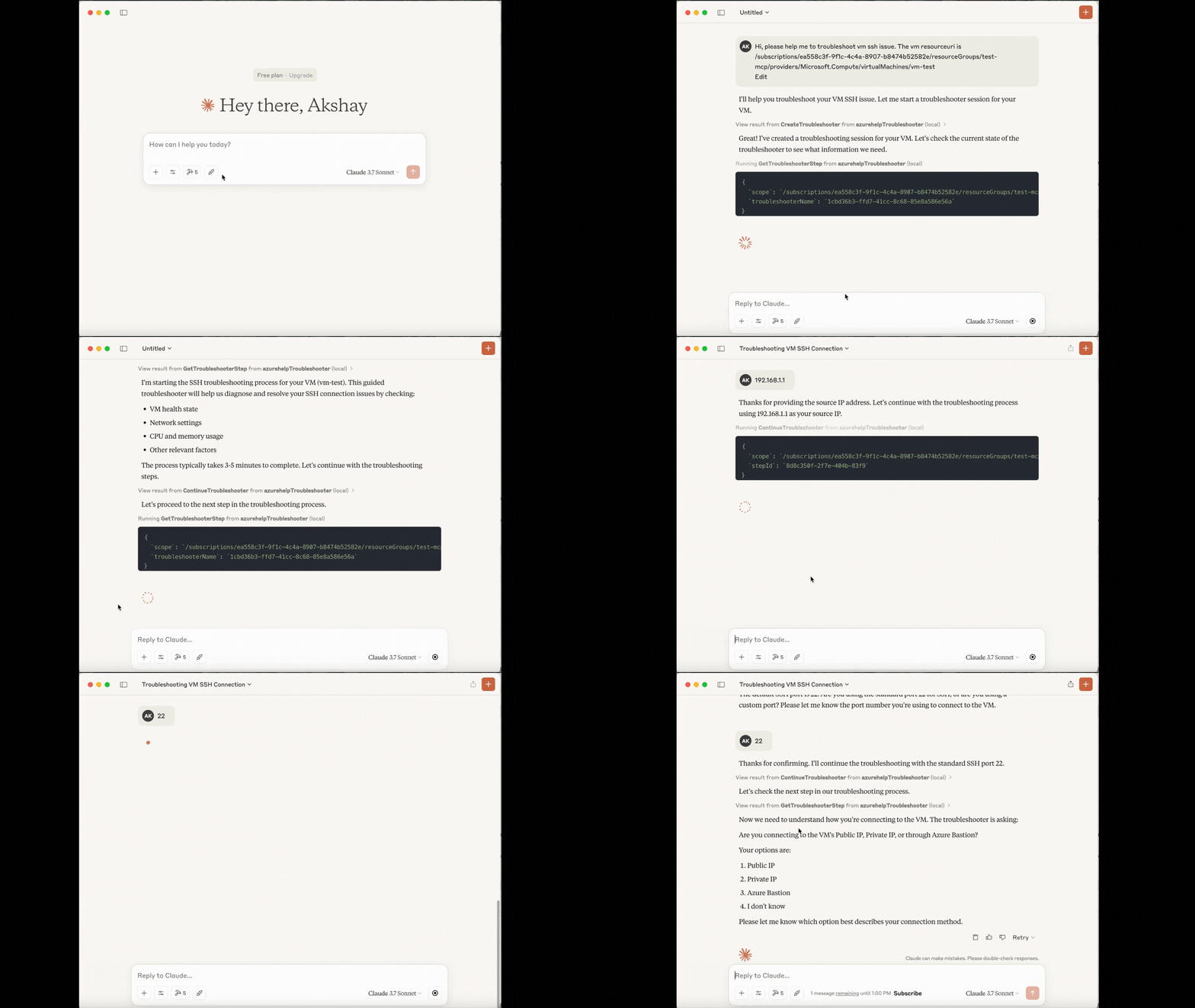
✨ Live Demo Use Case
❓ “I can’t SSH into my Azure VM.”
This tool lets an LLM walk you through possible causes and fixes interactively using Microsoft’s Guided Troubleshooter API.
🧰 Prerequisites
- .NET 8 SDK
- Azure CLI (logged in)
- Claude App or any MCP Host
- IDE / Terminal
📦 Setup
Step 1: Install Packages
dotnet add package ModelContextProtocol --prerelease
dotnet add package Microsoft.Extensions.Hosting
dotnet add package Azure.ResourceManager.SelfHelp
dotnet add package Azure.Identity
Step 2: Create Your MCP Server
In Program.cs:
var builder = Host.CreateEmptyApplicationBuilder(settings: null);

builder.Services.AddMcpServer()
    .WithStdioServerTransport()
    .WithToolsFromAssembly(); // Registers [McpServerTool] methods

var app = builder.Build();
await app.RunAsync();
In AzureTroubleshooterTools.cs:
[McpServerToolType]
public static class AzureTroubleshooterTools
{
    [McpServerTool, Description("Create a troubleshooter session")]
    public static async Task<string> CreateTroubleshooter([Description("Resource Uri of the azure resource")]string scope)
    {
        string solutionId = "e104dbdf-9e14-4c9f-bc78-21ac90382231"; // this is solutionId for vm ssh issue. This id can be found using Discovery API of Azure Help, which will also be part of this MCP Server
        string troubleshooterName = Guid.NewGuid().ToString();
        var client = new ArmClient(new DefaultAzureCredential());

        var troubleshooterId = SelfHelpTroubleshooterResource.CreateResourceIdentifier(scope, troubleshooterName);
        var troubleshooter = client.GetSelfHelpTroubleshooterResource(troubleshooterId);

        var data = new SelfHelpTroubleshooterData
        {
            SolutionId = solutionId,
            Parameters = { ["ResourceURI"] = scope }
        };

        ArmOperation<SelfHelpTroubleshooterResource> lro = await troubleshooter.UpdateAsync(WaitUntil.Completed, data);
        return $"Troubleshooter created with ID: {lro.Value.Data.Id}";
    }

    // Tools: Get, Continue, End, Restart...
}
🤖 MCP Config for Claude or Other Hosts
To connect your MCP Server with an MCP-compatible app like Claude, update your config file (in Claude Desktop: Settings > Developer):
{
  "mcpServers": {
    "azurehelpTroubleshooter": {
      "command": "dotnet",
      "args": [
        "run",
        "--project",
        "/Users/yourname/Projects/AzureTroubleshooterServer",
        "--no-build"
      ]
    }
  }
}
Once saved and restarted, Claude will detect your tools — ready to assist with Azure diagnostics! ✅
🛡 Authentication
Uses DefaultAzureCredential, so it works out-of-the-box with:
- Azure CLI
- Environment variables
- Managed Identity
🧠 Why This Matters
Model Context Protocol (MCP) is revolutionizing how LLMs communicate with tools. By building an MCP Server for Azure Help APIs, you can:
- Make Azure debugging agent-native
- Empower AI apps with cloud intelligence
- Extend to other Microsoft APIs with the same structure
📎 Related Blogs
🙌 Acknowledgements
Thanks to the amazing Azure SDK team and the creators of MCP for making this kind of developer magic possible. ✨


