
Oleafly is a live collaborative LaTeX, Typst and Markdown editor for research that offers a local MCP server and an oleafly mcp stdio command so outside AI clients can use its project tools.
Repository stats unavailable
Productivity & Ops
An MCP server that exposes Mealie's API endpoints, letting AI assistants manage recipes, meal plans, shopping lists, households and more in natural language.
Better Mealie MCP server is cataloged as an MCP server attributed to djwmarcx. An MCP server that exposes Mealie's API endpoints, letting AI assistants manage recipes, meal plans, shopping lists, households and more in natural language. It is categorized under productivity work. See the capability inspector for recorded interfaces and their independent review status; consult upstream documentation for the current interface.
Installation configuration is not reviewed. No executable setup is offered for this entry; inspect the source repository before proceeding.
Catalog license label: MIT. Check the source repository's current license and terms before using, modifying or distributing this software.
能力定义尚未审核。未核验的采集内容不会作为可信接口展示。
暂无可展示的已审核记录。这不表示上游不支持此能力。
暂无可展示的已审核记录。这不表示上游不支持此能力。
暂无可展示的已审核记录。这不表示上游不支持此能力。
Email delivery is not connected. This page does not collect email addresses or create subscriptions.
Browse the registry for current listings instead.
Reviews for Better Mealie MCP server are not available yet
Review publishing and storage are not connected. This page does not collect or publish ratings or comments, including after sign-in.
Yes, the README says it exposes all 250+ operations with none excluded, generated from Mealie's OpenAPI spec.
Yes, environment variables allow exposing only certain API groups or excluding others.
The server supports stdio and streamable HTTP transports.
README.md · 2542fa9f6799 · 采集于 2026-11-13 10:46:12 UTC
保留上游原文,不做 AI 改写。为安全起见过滤脚本、表单和不安全链接。
当前显示最后一次成功采集的文档快照,请以来源页面为准。








An MCP server exposing every Mealie API endpoint —
all 250+ operations, none excluded. Manage recipes, meal plans, shopping lists,
households and more from any AI assistant, in natural language.
Built with FastMCP from_openapi: tools are
generated straight from Mealie's OpenAPI spec, so the server stays in sync with
Mealie and nothing is hand-maintained. See TOOLS.md for the full
tool list.
| You say | What happens |
|---|---|
| "Add a chicken tikka masala recipe from this URL" | Scrapes and imports the recipe |
| "What can I cook with what's in my pantry?" | Searches recipes by your ingredients |
| "Plan my dinners for next week" | Creates meal-plan entries |
| "Build a shopping list for those meals" | Generates a consolidated shopping list |
| "Tag all my soups as 'winter'" | Bulk-updates recipe tags |
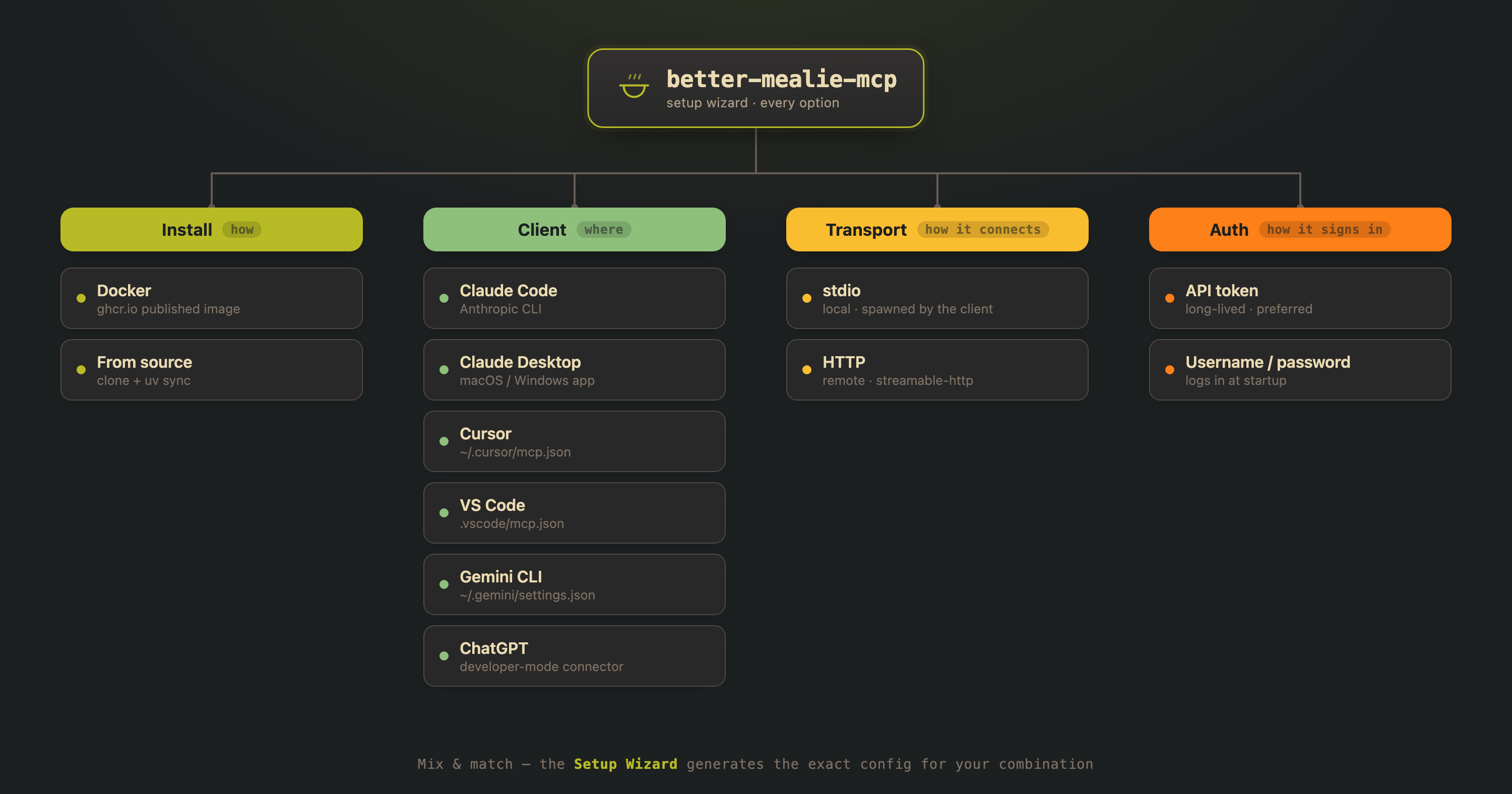
Don't hand-write JSON. The wizard walks you through every choice and emits a ready-to-paste config for your combination:
MEALIE_INCLUDE_TAGS.Docker (GHCR image):
docker pull ghcr.io/djwmarcx/better-mealie-mcp
docker run -i --rm \
  -e MEALIE_BASE_URL=http://host.docker.internal:9925 \
  -e MEALIE_API_TOKEN=... \
  ghcr.io/djwmarcx/better-mealie-mcp            # stdio; add `--http 8000` for HTTP
Images are published on each release, tagged <mealie-version> and latest.
Inside a container, localhost is the container — point MEALIE_BASE_URL at
host.docker.internal (macOS/Windows) or your host's LAN IP (Linux).
From source:
git clone https://github.com/djwmarcx/better-mealie-mcp
cd better-mealie-mcp
uv sync                     # install deps
cp .env.example .env        # then edit .env with your Mealie URL + token
Auth (set in .env or the environment):
| Var | Meaning |
|---|---|
MEALIE_BASE_URL | Mealie base URL (default http://localhost:9925) |
MEALIE_API_TOKEN | Long-lived API token (preferred) — Mealie → Profile → Manage API Tokens |
MEALIE_USERNAME / MEALIE_PASSWORD | Alternative: logs in at startup to fetch a token |
MEALIE_TIMEOUT | Per-request timeout, seconds (default 60) |
MEALIE_VERIFY_SSL | Verify TLS cert; false to accept self-signed (default true) |
MCP_SERVER_NAME | MCP name advertised to clients (default Mealie) |
MEALIE_INCLUDE_TAGS | Expose only these API groups, comma-separated (e.g. recipes,organizers,foods). Fewer tools = leaner context / fits clients that cap tool counts |
MEALIE_EXCLUDE_TAGS | Expose everything except these groups (e.g. admin,households) |
MEALIE_SLIM_SCHEMAS | Trim redundant schema noise — default true (see modes below) |
MEALIE_SLIM_AGGRESSIVE | Also collapse nullable anyOf unions — default false |
MEALIE_VALIDATE_OUTPUT | Emit per-tool output schemas + validate results — default false |
Groups are the first path segment of the API (recipes, households, admin,
organizers, users, explore, foods, units, …). Unset = every tool.
INCLUDE wins if both are set. See TOOLS.md for the current
groups and what's in each, or let the
Setup Wizard pick them — its
group picker (with one-click packs like Cooking or Meal planning) fills
MEALIE_INCLUDE_TAGS for you.
Every tool this server exposes ships its JSON schema to the model on every request — that "idle context" is pure overhead until a tool is actually called. With all 259 tools the full schemas are ~240k tokens, so the server trims them. Three preset modes (all endpoints stay callable — only the schema detail the model sees changes):
| Mode | Env | Idle context | What it does |
|---|---|---|---|
| Lean (default) | (none — the default) | ~61k tok | Drops redundant titles (FastAPI auto-generates them from field names) and echoed defaults, and omits output/response schemas. No loss of callable capability. |
| Leanest | MEALIE_SLIM_AGGRESSIVE=true | ~51k tok | Everything Lean does, plus collapses nullable anyOf:[{X},{null}] unions to X (drops the explicit "null allowed" hint). |
| Full | MEALIE_SLIM_SCHEMAS=falseMEALIE_VALIDATE_OUTPUT=true | ~240k tok | Complete, untrimmed input and output schemas, with client-side result validation. Use only if your client relies on structured-output schemas. |
Everything the model needs to make a correct call (format, real
descriptions, required fields) is kept in every mode. Combine with tag
filtering above to shrink further — the
Setup Wizard shows a live token
estimate for your exact combination.
uv run better-mealie-mcp             # stdio transport (for MCP clients)
uv run better-mealie-mcp --http 8000 # streamable-http on 127.0.0.1:8000
uv run server.py                     # same server, back-compat entry
fastmcp run fastmcp.json             # via FastMCP project config (stdio)
fastmcp run fastmcp-http.json        # via FastMCP project config (http)
In --http mode the bind address comes from MCP_HOST (default 127.0.0.1;
the Docker image sets 0.0.0.0 so -p port mapping works).
docker run -d --name mealie -p 9925:9000 \
  -e ALLOW_SIGNUP=true -e BASE_URL=http://localhost:9925 -e TZ=UTC \
  ghcr.io/mealie-recipes/mealie:latest
Default admin login: changeme@example.com / MyPassword.
MEALIE_INCLUDE_TAGS / MEALIE_EXCLUDE_TAGS
(see Setup) or the wizard's group picker.This MCP's version mirrors the Mealie version its spec targets — MCP
3.20.1 ⇒ Mealie v3.20.1. The server advertises it to clients, and
VERSIONS.md maps every release to its Mealie version and date.
MCP-only changes (features/fixes with no Mealie version change) ship as a
revision of the same Mealie version: the REVISION counter
bumps and the release/image tag gains a -r<n> suffix — e.g. v3.20.1-r2
(-r1 is the base and carries no suffix). A new Mealie version resets the
counter. :latest always points at the newest build.
openapi.json is a vendored copy of Mealie's spec. The
update-spec workflow runs daily and
auto-tracks the latest stable Mealie release (mealie:latest): it boots that
image, reads its real version from /api/app/about
(MEALIE_VERSION), pulls /openapi.json, regenerates
TOOLS.md + counts, and — only when the spec actually changed —
bumps the version and opens a pull request (main is protected, so every
change lands via PR). When that PR merges,
release-on-spec cuts a
release (spec attached,
notes listing added/removed tools). Volatile server-clock defaults are stripped
so an unchanged run is a true no-op.
To freeze on one release instead of tracking latest, set MEALIE_TAG_DEFAULT in
the workflow to a specific tag (e.g. v3.20.1), or run it manually with a
mealie_tag input (latest, nightly, or any tag).
list_auth_oauth*) return 500 unless OIDC is configured on
the Mealie side — that's Mealie behavior, not the server.Claim this server with your GitHub account to request manual ownership verification.
Link to the catalog listing for Better Mealie MCP server from your README. This badge does not certify ownership, compatibility or security.
[](https://awesome-mcp.com/servers/better-mealie-mcp)Public repository statistics could not be verified. Check the configured source address; unavailable counts are not zero.
来源、范围和时段分别列出;不相加,不代表安装人数、活跃用户或安全审核。
尚无已审核的包 / 镜像标识,暂不展示下载统计。
Alternative and complementary servers in the same category
Oleafly is a live collaborative LaTeX, Typst and Markdown editor for research that offers a local MCP server and an oleafly mcp stdio command so outside AI clients can use its project tools.
Buddy is an Android app that offers its phone tools through a local MCP server to Claude Code, Codex, OpenCode, Antigravity, and Grok sessions.

Tuqui is a hosted MCP server that connects Odoo with Claude and ChatGPT so users can ask about sales, stock, customers and overdue invoices in plain language.
