An MCP server that gives AI assistants access to BoardGameGeek: game details, collections, prices, recommendations and rules answers.





BGG MCP provides access to the BoardGameGeek API through the Model Context Protocol, enabling retrieval and filtering of board game data, user collections, and profiles. The server is implemented in Go, using the GoGeek library, which helps ensure robust API interactions.
Price data is provided by BoardGamePrices.co.uk, offering real-time pricing from multiple retailers.
Game recommendations are powered by Recommend.Games, which provides algorithmic similarity recommendations based on BoardGameGeek data.
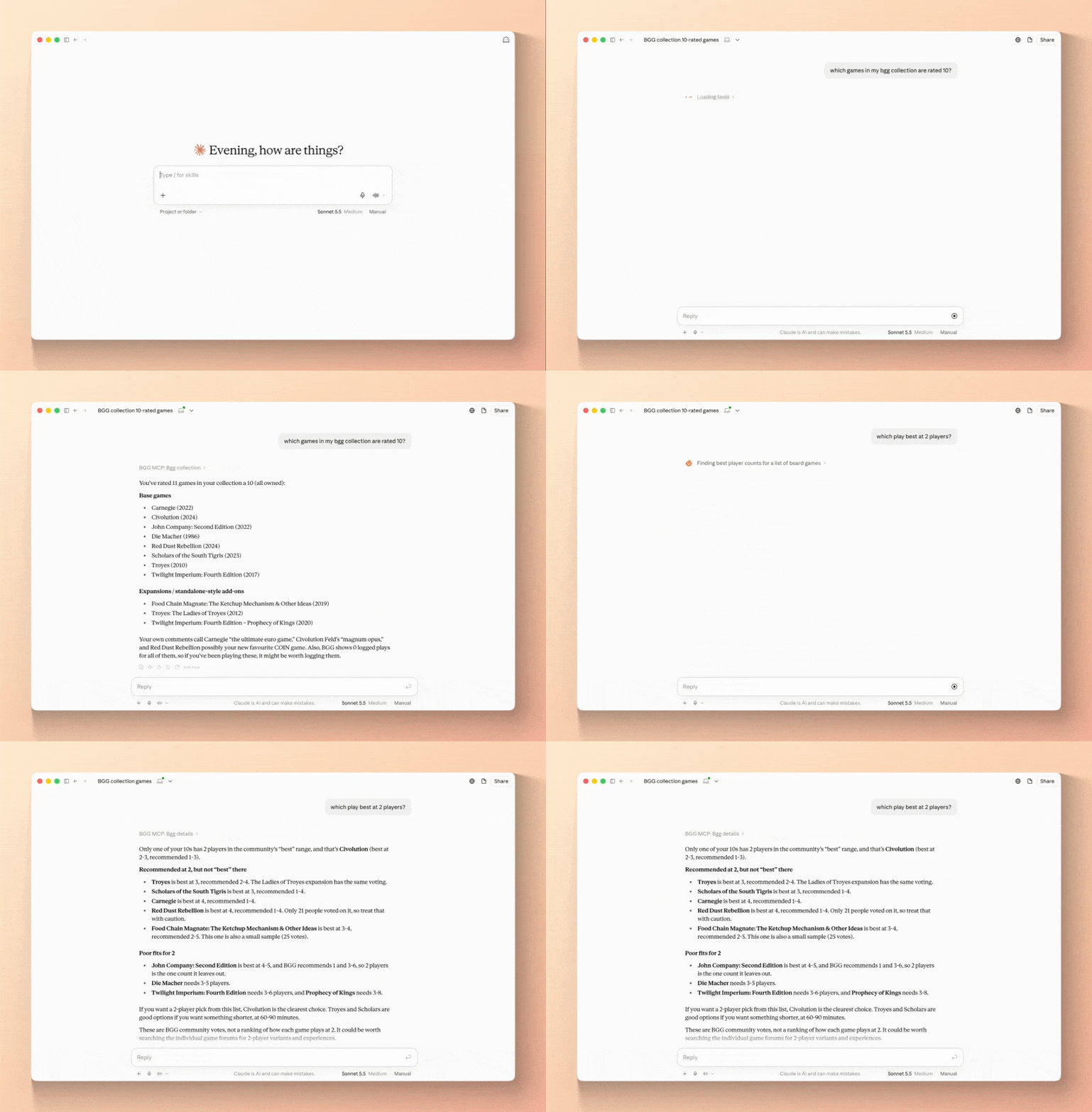
Demo
[!NOTE]
Results link back to their pages on boardgamegeek.com, and the assistant is asked to include those links in its answers.
Resources
BGG MCP exposes resources that AI assistants can access directly for contextual information:
Prompts
BGG MCP includes pre-configured prompts for common workflows:
username is optional on both prompts when BGG_USERNAME is set.
Example Prompts
Here are some example prompts you can use to interact with the BGG MCP tools:
🔍 Search
"Search for Wingspan on BGG"
"How many expansions does Grand Austria Hotel have?"
"Search for Wingspan expansions only"
📊 Game Details
"Get details for Azul"
"Show me information about game ID 224517"
"What's the BGG rating for Gloomhaven?"
"What is Ark Nova selling for on the BGG marketplace?"
"What expansions does Wingspan have?"
📚 Collection
"Show me ZeeGarcia's game collection"
"Show games rated 9+ in kkjdaniel's collection"
"List unplayed games in rahdo's collection"
"Find games for 6 players in kkjdaniel's collection"
"Show me all the games rated 3 and below in my collection"
"What games in my collection does rahdo want?"
"What games does kkjdaniel have that I want?"
"Which games in my collection play best at 2 players?"
🔥 Hotness
"Show me the current BGG hotness list"
"What's trending on BGG?"
👤 User Profile
"Show me details about BGG user rahdo"
"When did user ZeeGarcia join BGG?"
"How many buddies do I have on bgg?"
💰 Prices
"Get the best price for Wingspan in GBP"
"Show me the best UK price for Ark Nova"
"Compare prices for: Wingspan & Ark Nova"
🎯 Recommendations
"Recommend games similar to Wingspan"
"What games are like Azul but with at least 1000 ratings?"
"Find 5 games similar to Troyes"
📖 Rules
[!TIP]
Assistants often answer rules questions from memory. Mention BGG and make it clear you mean a board game so the rules forum gets searched, or use the rules-question prompt.
"Check BGG, in Wingspan do pink powers trigger on my own turn?"
"What does the BGG rules forum say about trading with the bank during another player's turn in Catan?"
"In the board game Root, can the Vagabond attack a player it is allied with? Check BGG"
"Search BGG for how line of sight works in Gloomhaven"
Installation
Authentication Required: Most BGG MCP tools require authentication to access BoardGameGeek's API. See the Configuration section below for setup instructions.
A) Claude Desktop Extension (macOS / Windows) (Recommended)
Download bgg-mcp.mcpb from the latest release and double-click it. Claude Desktop opens an install dialog where you can enter your BGG API key and username, with no Docker or Go needed.
B) Smithery (macOS / Windows)
BGG MCP is also on Smithery, which distributes the same bundle, so the server runs locally on your machine. Open the server page, choose your client and follow its install steps, entering your BGG API key and username in the configuration form.
C) Docker
BGG MCP is published to Docker Hub and listed on the MCP Registry. Add the following to your claude_desktop_config.json (Claude Desktop) or settings.json (VS Code / Cursor):
"bgg": {
    "command": "docker",
    "args": ["run", "-i", "--rm", "--pull=always",
        "-e", "BGG_API_KEY",
        "-e", "BGG_USERNAME",
        "kdaniel/bgg-mcp"
    ],
    "env": {
        "BGG_API_KEY": "your_api_key_here",
        "BGG_USERNAME": "your_bgg_username"
    }
}
See Configuration below for details on obtaining a BGG API key and setting up your username.
--pull=always fetches the newest image each time the server starts, so you stay up to date automatically. Remove it if you need to start the server offline.
For more details on connecting MCP servers to your client, see the official MCP guide.
D) Manual Setup
1. Install Go
You will need to have Go installed on your system to build binary. This can be easily downloaded and setup here, or you can use the package manager that you prefer such as Brew.
2. Build
The project includes a Makefile to simplify building and managing the binary.
# Build the application (output goes to build/bgg-mcp)
make build

# Clean build artifacts
make clean

# Both clean and build
make all
Or you can simply build it directly with Go...
go build -o build/bgg-mcp
3. Add MCP Config
In the settings.json (VS Code / Cursor) or claude_desktop_config.json add the following to your list of servers, pointing it to the binary you created earlier, once you load up your AI tool you should see the tools provided by the server connected:
"bgg": {
    "command": "path/to/build/bgg-mcp",
    "args": ["-mode", "stdio"]
}
More details for configuring Claude can be found here.
Configuration
Authentication
BGG MCP uses the GoGeek v3 library, which requires authentication for access to BoardGameGeek's API.
You can configure authentication using either BGG_API_KEY (recommended) or BGG_COOKIE:
Authentication Setup
Option 1: API Key (Recommended)
Get an API key from BoardGameGeek's API application form and add it to your configuration:
"bgg": {
    "env": {
        "BGG_API_KEY": "your_api_key_here"
    }
}
Option 2: Cookie Authentication
Alternatively, you can use cookie-based authentication:
"bgg": {
    "env": {
        "BGG_COOKIE": "bggusername=user; bggpassword=pass; SessionID=xyz"
    }
}
Note: If both are provided, BGG_API_KEY will be used by default.
Username Configuration
You can optionally set your BGG username to enable "me" and "my" references in queries without needing to explicitly state your username.
If you installed the Claude Desktop Extension, enter your username in the extension's settings in Claude Desktop (Settings > Extensions > BGG MCP), where you also set your API key. There is no config file to edit. If you installed through Smithery, its configuration form asks for both.
For Docker or a manual setup, set the BGG_USERNAME environment variable:
"bgg": {
    "env": {
        "BGG_USERNAME": "your_bgg_username",
        "BGG_API_KEY": "your_api_key_here"
    }
}
This enables:
- Collection queries: "Show my collection" instead of specifying your username
- User queries: "Show my BGG profile"
- AI assistance: The AI can automatically use your username for comparisons and analysis
Note: When you use self-references (me, my, I) without setting your username, you'll get a clear error message.
Update Notifications
When it runs on your machine, BGG MCP checks GitHub once a day for a newer release. If there is one, the assistant mentions it once per conversation with a link to the release. Set BGG_DISABLE_UPDATE_CHECK to true to turn this off. The server never checks when it runs in HTTP mode.