
A directory listing describing a cancellation-letter and mailing-address service. The configured public GitHub repository returned 404 during source verification.
Repository stats unavailable
Developer Tools
A Binary Ninja plugin that serves MCP endpoints over HTTP, letting MCP clients interact with open binaries for reverse engineering.
Binary Ninja MCP server plugin is cataloged as an MCP server attributed to fosdickio. A Binary Ninja plugin that serves MCP endpoints over HTTP, letting MCP clients interact with open binaries for reverse engineering. It is categorized under developer tools. See the capability inspector for recorded interfaces and their independent review status; consult upstream documentation for the current interface.
Installation configuration is not reviewed. No executable setup is offered for this entry; inspect the source repository before proceeding.
Catalog license label: Not specified. Check the source repository's current license and terms before using, modifying or distributing this software.
能力定义尚未审核。未核验的采集内容不会作为可信接口展示。
暂无可展示的已审核记录。这不表示上游不支持此能力。
暂无可展示的已审核记录。这不表示上游不支持此能力。
暂无可展示的已审核记录。这不表示上游不支持此能力。
Email delivery is not connected. This page does not collect email addresses or create subscriptions.
Browse the registry for current listings instead.
Reviews for Binary Ninja MCP server plugin are not available yet
Review publishing and storage are not connected. This page does not collect or publish ratings or comments, including after sign-in.
Yes, the server supports listing managed/open binaries with ids and an active flag, and selecting the active binary by id or filename.
README.md · 8c5134ee46e2 · 采集于 2026-11-13 09:37:13 UTC
保留上游原文,不做 AI 改写。为安全起见过滤脚本、表单和不安全链接。
当前显示最后一次成功采集的文档快照,请以来源页面为准。
This repository contains a Binary Ninja plugin, MCP server, and bridge that enables seamless integration of Binary Ninja's capabilities with your favorite LLM client.

Check out this demo video on YouTube that uses the extension to solve a CTF challenge.
This repository contains two separate components:
Please install the MCP client before you install Binary Ninja MCP so that the MCP clients can be auto-setup. We currently support auto-setup for these MCP clients:
1. Cline (recommended)
2. Roo Code
3. Claude Desktop (recommended)
4. Cursor
5. Windsurf
6. Claude Code
7. LM Studio
After the MCP client is installed, you can install the MCP server using the Binary Ninja Plugin Manager or manually. Both methods support auto-setup of MCP clients.
If your MCP client is not set, you should install it first then try to reinstall the extension.
You may install the extension through Binary Ninja's Plugin Manager (Plugins > Manage Plugins).
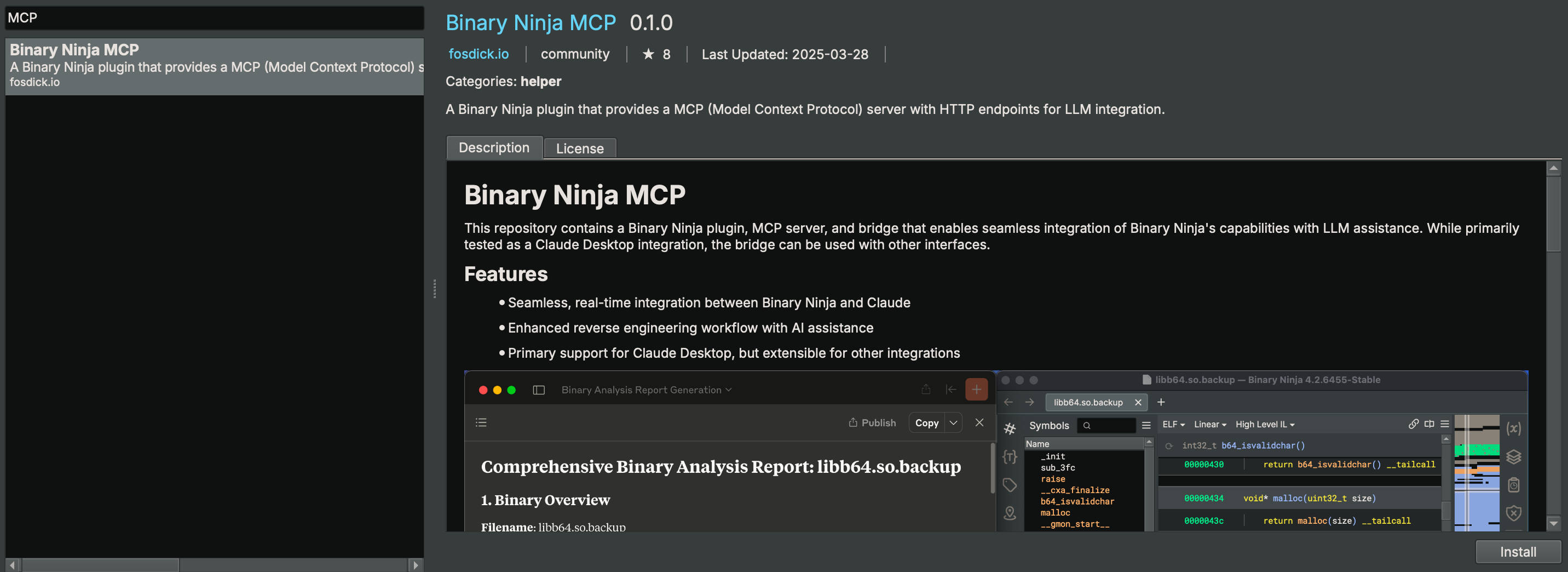
To manually install the extension, this repository can be copied into the Binary Ninja plugins folder.
You do NOT need to set this up manually if you use a supported MCP client and follow the installation steps before.
You can also manage MCP client entries from the command line:
python scripts/mcp_client_installer.py --install    # auto setup supported MCP clients
python scripts/mcp_client_installer.py --uninstall  # remove entries and delete `.mcp_auto_setup_done`
python scripts/mcp_client_installer.py --config     # print a generic JSON config snippet
The recommended way to set up the MCP client is using the official npm package:
npx -y binary-ninja-mcp
For MCP clients, use this configuration:
{
  "mcpServers": {
    "binary-ninja-mcp": {
      "command": "npx",
      "args": ["-y", "binary-ninja-mcp", "--host", "localhost", "--port", "9009"]
    }
  }
}
Or if installed globally:
{
  "mcpServers": {
    "binary-ninja-mcp": {
      "command": "binary-ninja-mcp",
      "args": ["--host", "localhost", "--port", "9009"]
    }
  }
}
For other MCP clients, use the Python bridge directly:
{
    "mcpServers": {
        "binary_ninja_mcp": {
            "command": "/ABSOLUTE/PATH/TO/Binary Ninja/plugins/repositories/community/plugins/fosdickio_binary_ninja_mcp/.venv/bin/python",
            "args": [
                "/ABSOLUTE/PATH/TO/Binary Ninja/plugins/repositories/community/plugins/fosdickio_binary_ninja_mcp/bridge/binja_mcp_bridge.py"
            ]
        }
    }
}
Note: Replace /ABSOLUTE/PATH/TO with the actual absolute path to your project directory. The virtual environment's Python interpreter must be used to access the installed dependencies.
You may now start prompting LLMs about the currently open binary (or binaries). Example prompts:
You're the best CTF player in the world. Please solve this reversing CTF challenge in the <folder_name> folder using Binary Ninja. Rename ALL the function and the variables during your analyzation process (except for main function) so I can better read the code. Write a python solve script if you need. Also, if you need to create struct or anything, please go ahead. Reverse the code like a human reverser so that I can read the decompiled code that analyzed by you.
Your task is to analyze an unknown file which is currently open in Binary Ninja. You can use the existing MCP server called "binary_ninja_mcp" to interact with the Binary Ninja instance and retrieve information, using the tools made available by this server. In general use the following strategy:

- Start from the entry point of the code
- If this function call others, make sure to follow through the calls and analyze these functions as well to understand their context
- If more details are necessary, disassemble or decompile the function and add comments with your findings
- Inspect the decompilation and add comments with your findings to important areas of code
- Add a comment to each function with a brief summary of what it does
- Rename variables and function parameters to more sensible names
- Change the variable and argument types if necessary (especially pointer and array types)
- Change function names to be more descriptive, using mcp_ as prefix.
- NEVER convert number bases yourself. Use the convert_number MCP tool if needed!
- When you finish your analysis, report how long the analysis took
- At the end, create a report with your findings.
- Based only on these findings, make an assessment on whether the file is malicious or not.
The following table lists the available MCP functions for use:
| Function | Description |
|---|---|
decompile_function | Decompile a specific function by name and return HLIL-like code with addresses. |
get_il(name_or_address, view, ssa) | Get IL for a function in hlil, mlil, or llil (SSA supported for MLIL/LLIL). |
define_types | Add type definitions from a C string type definition. |
delete_comment | Delete the comment at a specific address. |
delete_function_comment | Delete the comment for a function. |
declare_c_type(c_declaration) | Create/update a local type from a single C declaration. |
format_value(address, text, size) | Convert a value and annotate it at an address in BN (adds a comment). |
function_at | Retrieve the name of the function the address belongs to. |
fetch_disassembly | Get the assembly representation of a function by name or address. |
get_entry_points() | List entry point(s) of the loaded binary. |
get_binary_status | Get the current status of the loaded binary. |
get_comment | Get the comment at a specific address. |
get_function_comment | Get the comment for a function. |
get_user_defined_type | Retrieve definition of a user-defined type (struct, enumeration, typedef, union). |
get_xrefs_to(address) | Get all cross references (code and data) to an address. |
get_data_decl(name_or_address, length) | Return a C-like declaration and a hexdump for a data symbol or address. |
hexdump_address(address, length) | Text hexdump at address. length < 0 reads exact defined size if available. |
hexdump_data(name_or_address, length) | Hexdump by data symbol name or address. length < 0 reads exact defined size if available. |
get_xrefs_to_enum(enum_name) | Get usages related to an enum (matches member constants in code). |
get_xrefs_to_field(struct_name, field_name) | Get all cross references to a named struct field. |
get_xrefs_to_struct(struct_name) | Get xrefs/usages related to a struct (members, globals, code refs). |
get_xrefs_to_type(type_name) | Get xrefs/usages related to a struct/type (globals, refs, HLIL matches). |
get_xrefs_to_union(union_name) | Get xrefs/usages related to a union (members, globals, code refs). |
get_stack_frame_vars(function_identifier) | Get stack frame variable information for a function (names, offsets, sizes, types). |
get_type_info(type_name) | Resolve a type and return declaration, kind, and members. |
get_callers(identifiers) | List callers plus call sites for one or more function identifiers. |
get_callees(identifiers) | List callees plus call sites for one or more function identifiers. |
make_function_at(address, platform) | Create a function at an address. platform optional; use default to pick the BinaryView/platform default. |
list_platforms() | List all available platform names. |
list_binaries() | List managed/open binaries with ids and active flag. |
select_binary(view) | Select active binary by id or filename. |
list_all_strings() | List all strings (no pagination; aggregates all pages). |
list_classes | List all namespace/class names in the program. |
list_data_items | List defined data labels and their values. |
list_exports | List exported functions/symbols. |
list_imports | List imported symbols in the program. |
list_local_types(offset, count) | List local Types in the current database (name/kind/decl). |
list_methods | List all function names in the program. |
list_namespaces | List all non-global namespaces in the program. |
list_segments | List all memory segments in the program. |
list_strings(offset, count) | List all strings in the database (paginated). |
list_strings_filter(offset, count, filter) | List matching strings (paginated, filtered by substring). |
rename_data | Rename a data label at the specified address. |
rename_function | Rename a function by its current name to a new user-defined name. |
rename_single_variable | Rename a single local variable inside a function. |
rename_multi_variables | Batch rename multiple local variables in a function (mapping or pairs). |
set_local_variable_type(function_address, variable_name, new_type) | Set a local variable's type. |
retype_variable | Retype variable inside a given function. |
search_functions_by_name | Search for functions whose name contains the given substring. |
search_types(query, offset, count) | Search local Types by substring (name/decl). |
set_comment | Set a comment at a specific address. |
set_function_comment | Set a comment for a function. |
set_function_prototype(name_or_address, prototype) | Set a function's prototype by name or address. |
patch_bytes(address, data, save_to_file) | Patch raw bytes at an address (byte-level, not assembly). Can patch entire instructions by providing their bytecode. Address: hex (e.g., "0x401000") or decimal. Data: hex string (e.g., "90 90"). save_to_file (default True) saves to disk and re-signs on macOS. |
These are the list of HTTP endpoints that can be called:
/allStrings: All strings in one response./formatValue?address=<addr>&text=<value>&size=<n>: Convert and set a comment at an address./getXrefsTo?address=<addr>: Xrefs to address (code+data)./getDataDecl?name=<symbol>|address=<addr>&length=<n>: JSON with declaration-style string and a hexdump for a data symbol or address. Keys: address, name, size, type, decl, hexdump. length < 0 reads exact defined size if available./hexdump?address=<addr>&length=<n>: Text hexdump aligned at address; length < 0 reads exact defined size if available./hexdumpByName?name=<symbol>&length=<n>: Text hexdump by symbol name. Recognizes BN auto-labels like data_<hex>, byte_<hex>, word_<hex>, dword_<hex>, qword_<hex>, off_<hex>, unk_<hex>, and plain hex addresses./makeFunctionAt?address=<addr>&platform=<name|default>: Create a function at an address (idempotent if already exists). platform=default uses the BinaryView/platform default./platforms: List all available platform names./binaries or /views: List managed/open binaries with ids and active flag./selectBinary?view=<id|filename>: Select active binary for subsequent operations./data?offset=<n>&limit=<m>&length=<n>: Defined data items with previews. length controls bytes read per item (capped at defined size). Default behavior reads exact defined size when available; length=-1 forces exact-size./getXrefsToEnum?name=<enum>: Enum usages by matching member constants./getXrefsToField?struct=<name>&field=<name>: Xrefs to struct field./getXrefsToType?name=<type>: Xrefs/usages related to a struct/type name./getTypeInfo?name=<type>: Resolve a type and return declaration and details./getXrefsToUnion?name=<union>: Union xrefs/usages (members, globals, refs)./getStackFrameVars?name=<function>|address=<addr>: Get stack frame variable information for a function./getCallers?identifiers=<name|addr>[,...]: Return caller summaries (functions, call sites, HLIL/IL snippets) for one or more identifiers. Accepts identifiers, identifier, names, or addresses query params./getCallees?identifiers=<name|addr>[,...]: Return callee summaries with the same schema as /getCallers, detailing every outgoing call target per request identifier./localTypes?offset=<n>&limit=<m>: List local types./strings?offset=<n>&limit=<m>: Paginated strings./strings/filter?offset=<n>&limit=<m>&filter=<substr>: Filtered strings./searchTypes?query=<substr>&offset=<n>&limit=<m>: Search local types by substring./patch or /patchBytes?address=<addr>&data=<hex>&save_to_file=<bool>: Patch raw bytes at an address (byte-level, not assembly). Can patch entire instructions by providing their bytecode. Address: hex (e.g., "0x401000") or decimal. Data: hex string (e.g., "90 90"). save_to_file (default True) saves to disk and re-signs on macOS./renameVariables: Batch rename locals in a function. Parameters:
functionAddress, address, function, functionName, or name.renames: JSON array of {old, new} objectsmapping: JSON object of old->newpairs: compact string old1:new1,old2:new2
Returns per-item results plus totals. Order is respected; later pairs can refer to earlier new names.This project uses Ruff for linting and formatting. Configuration is in ruff.toml.
Check for issues:
ruff check .
Auto-fix issues:
ruff check --fix .
Check formatting issues:
ruff format --check .
Format code:
ruff format .
A GitHub Action workflow (.github/workflows/lint-format.yml) automatically runs Ruff on:
main branchmain branchThe workflow will fail if there are linting errors or formatting issues, ensuring code quality in CI.
Contributions are welcome. Please feel free to submit a pull request.
Claim this server with your GitHub account to request manual ownership verification.
Link to the catalog listing for Binary Ninja MCP server plugin from your README. This badge does not certify ownership, compatibility or security.
[](https://awesome-mcp.com/servers/binary_ninja_mcp)Public repository statistics could not be verified. Check the configured source address; unavailable counts are not zero.
来源、范围和时段分别列出;不相加,不代表安装人数、活跃用户或安全审核。
尚无已审核的包 / 镜像标识,暂不展示下载统计。
Alternative and complementary servers in the same category
A directory listing describing a cancellation-letter and mailing-address service. The configured public GitHub repository returned 404 during source verification.

A hosted MCP service for browsing and searching through Singapore mobile-network proxies.

A directory listing describing a Markdown-to-PDF service. The configured public GitHub repository returned 404 during source verification.