

A directory listing describing a cancellation-letter and mailing-address service. The configured public GitHub repository returned 404 during source verification.
Repository stats unavailable
Developer Tools
An MCP server for Binary Ninja that exposes analysis tools and per-binary resources to MCP clients.
Another™ MCP Server for Binary Ninja is cataloged as an MCP server attributed to mcpphalanx. An MCP server for Binary Ninja that exposes analysis tools and per-binary resources to MCP clients. It is categorized under developer tools. See the capability inspector for recorded interfaces and their independent review status; consult upstream documentation for the current interface.
Installation configuration is not reviewed. No executable setup is offered for this entry; inspect the source repository before proceeding.
Catalog license label: Apache 2.0. Check the source repository's current license and terms before using, modifying or distributing this software.
能力定义尚未审核。未核验的采集内容不会作为可信接口展示。
暂无可展示的已审核记录。这不表示上游不支持此能力。
暂无可展示的已审核记录。这不表示上游不支持此能力。
暂无可展示的已审核记录。这不表示上游不支持此能力。
Email delivery is not connected. This page does not collect email addresses or create subscriptions.
Browse the registry for current listings instead.
Reviews for Another™ MCP Server for Binary Ninja are not available yet
Review publishing and storage are not connected. This page does not collect or publish ratings or comments, including after sign-in.
The server exposes tools for symbol renaming, pseudo C and Rust code, high-level and medium-level IL, disassembly, triage summaries, imports, exports, segments, sections, strings, functions, and data variables.
Loaded binaries are exposed as MCP resources with resource types such as triage summary, imports, exports, segments, sections, strings, functions, and data variables.
Yes. The server can run in Binary Ninja headless mode, where binary files or BNDB files are made available to the MCP client.
README.md · 8a3b5d8da208 · 采集于 2026-11-13 07:08:42 UTC
保留上游原文,不做 AI 改写。为安全起见过滤脚本、表单和不安全链接。
当前显示最后一次成功采集的文档快照,请以来源页面为准。
The MCP (Model Context Protocol) Server for Binary Ninja


English | 中文
The tests/binary/beleaf.elf is taken from CSAW'19: Beleaf - Nightmare. You can also find the complete writeup from the link above!
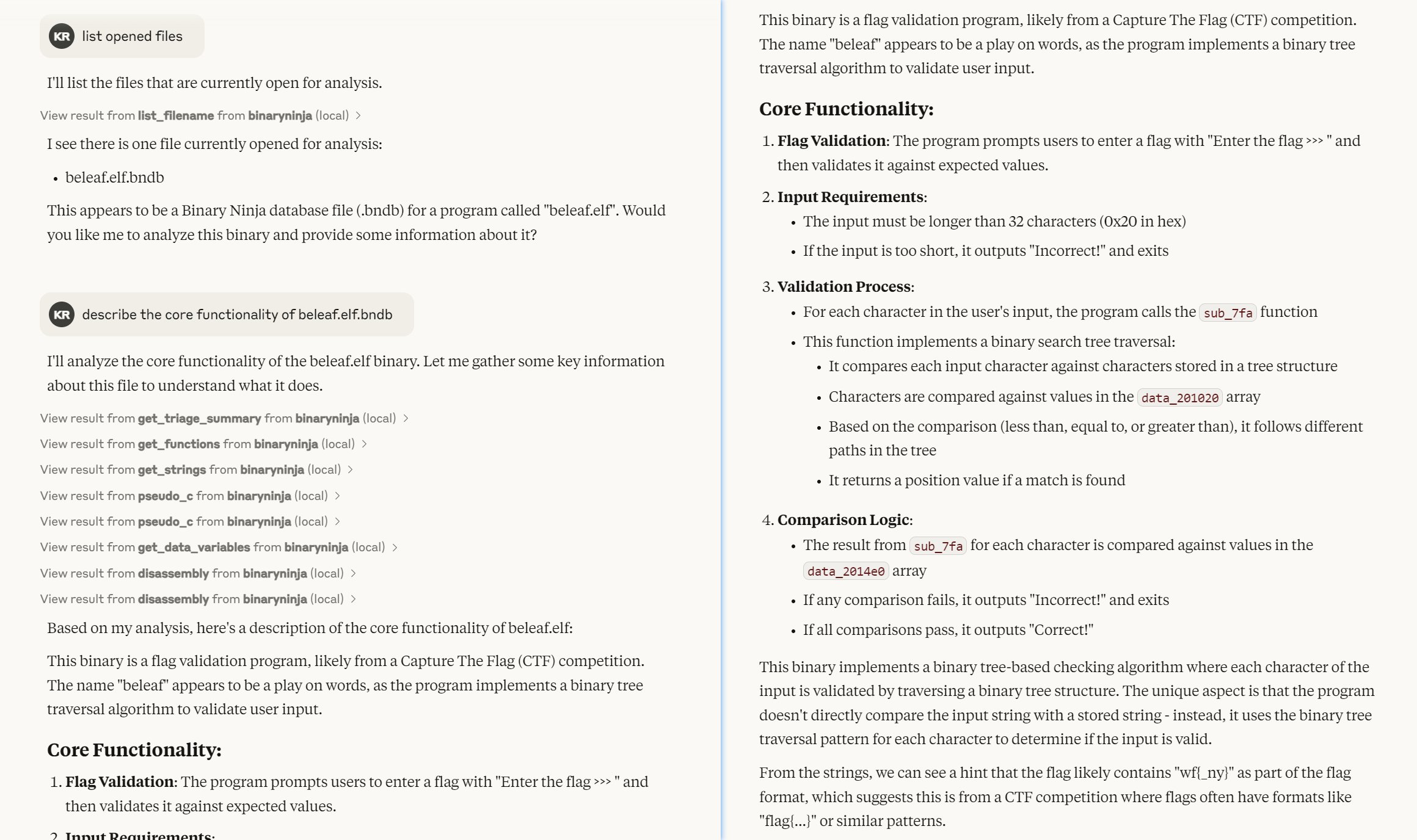
See: Key Differences from the Existing Plugin
There are two ways to run the MCP server:
Binary Ninja UI Plugin:
Settings - MCP Server - Auto StartSettings - MCP Server - Server port numberBinary Ninja Headless Mode:
uvx binaryninja-mcp install-api  # only run once
uvx binaryninja-mcp server <filename> [filename]...
filename could be any binary files or BNDB, like in UI mode, all opened
files are available to the MCP client.--port flag to specify a different portClaude Desktop (stdio relay client): Configure the client to connect via stdio transport using built-in relay.
{
  "mcpServers": {
    "binaryninja": {
      "command": "uvx",
      "args": ["binaryninja-mcp", "client"]
    }
  }
}
Cherry Studio:
http://localhost:7000/sseuvxbinaryninja-mcp
client
Add --port 12345 to both server and client command line if you prefer to run
MCP server on port other than default.
The MCP server provides the following tools:
rename_symbol: Rename a function or a data variablepseudo_c: Get pseudo C code of a specified functionpseudo_rust: Get pseudo Rust code of a specified functionhigh_level_il: Get high level IL of a specified functionmedium_level_il: Get medium level IL of a specified functiondisassembly: Get disassembly of a function or specified rangeupdate_analysis_and_wait: Update analysis for the binary and wait for
completionget_triage_summary: Get basic information from BinaryNinja Triage viewget_imports: Get dictionary of imported symbolsget_exports: Get dictionary of exported symbolsget_segments: Get list of memory segmentsget_sections: Get list of binary sectionsget_strings: Get list of strings found in the binaryget_functions: Get list of functionsget_data_variables: Get list of data variablesMCP Resources can be accessed via URIs in the format:
binaryninja://{filename}/{resource_type}
The server provides these resource types for each binary:
triage_summary: Basic information from BinaryNinja Triage viewimports: Dictionary of imported symbols/functionsexports: Dictionary of exported symbols/functionssegments: List of memory segmentssections: List of binary sectionsstrings: List of strings found in the binaryfunctions: List of functionsdata_variables: List of data variablesuv is the recommanded package management tool for this project.
git clone https://github.com/MCPPhalanx/binaryninja-mcp.git "${env:APPDATA}\Binary Ninja\plugins\MCPPhalanx_binaryninja_mcp"
Binary Ninja API must be installed into virtualenv manually.
uv venv
uv sync --dev
# install binaryninja API
binaryninja-mcp install-api
# check API is correctly installed
uv run python -c 'import binaryninja as bn; assert bn._init_plugins() is None; assert bn.core_ui_enabled() is not None; print("BN API check PASSED!!")'
For MCP clients with stdio transport like Claude Desktop, change working directory to development folder.
{
  "mcpServers": {
    "binaryninja": {
      "command": "uv",
      "args": [
        "--directory",
        "C:/path/to/binaryninja-mcp",
        "run",
        "binaryninja-mcp",
        "client"
      ]
    }
  }
}
SSE-enabled MCP clients can connect using: http://localhost:7000/sse
uv build
pytest
# To update test snapshots:
pytest --snapshot-update
The PyPI package version is automatically derived from Binary Ninja's
plugin.json (using package.json format), maintaining version consistency
between the BN plugin and PyPI package.
# bump alpha version
uvx hatch version a

# bump release version
uvx hatch version minor,rc
uvx hatch version release
See: Versioning - Hatch
uv publish
Claim this server with your GitHub account to request manual ownership verification.
Link to the catalog listing for Another™ MCP Server for Binary Ninja from your README. This badge does not certify ownership, compatibility or security.
[](https://awesome-mcp.com/servers/binaryninja-mcp)Public repository statistics could not be verified. Check the configured source address; unavailable counts are not zero.
来源、范围和时段分别列出;不相加,不代表安装人数、活跃用户或安全审核。
尚无已审核的包 / 镜像标识,暂不展示下载统计。
Alternative and complementary servers in the same category
A directory listing describing a cancellation-letter and mailing-address service. The configured public GitHub repository returned 404 during source verification.

A hosted MCP service for browsing and searching through Singapore mobile-network proxies.

A directory listing describing a Markdown-to-PDF service. The configured public GitHub repository returned 404 during source verification.