Bio-OS MCP Server
A Model Context Protocol (MCP) based tool and prompt server for Bio-OS that provides workflow management and Docker image building capabilities.
Usage
We recommend using the CLINE extension for VSCode to interact with this MCP tool. There are two deployment options available: standalone installation on your local machine or using Code Server in a Miracle Cloud IES instance. Choose the option that best suits your needs.
Local Installation (Using MCP through local VSCode)
Prerequisites
Bio-OS MCP Server requires the following dependencies:
- Install uv (Python package manager):
pip install uv
- Install Cromwell (Workflow execution engine):
brew install cromwell
Installation
Clone the Bio-OS MCP Server repository:
git clone https://github.com/GBA-BI/bioos-mcp-server.git
Configuration
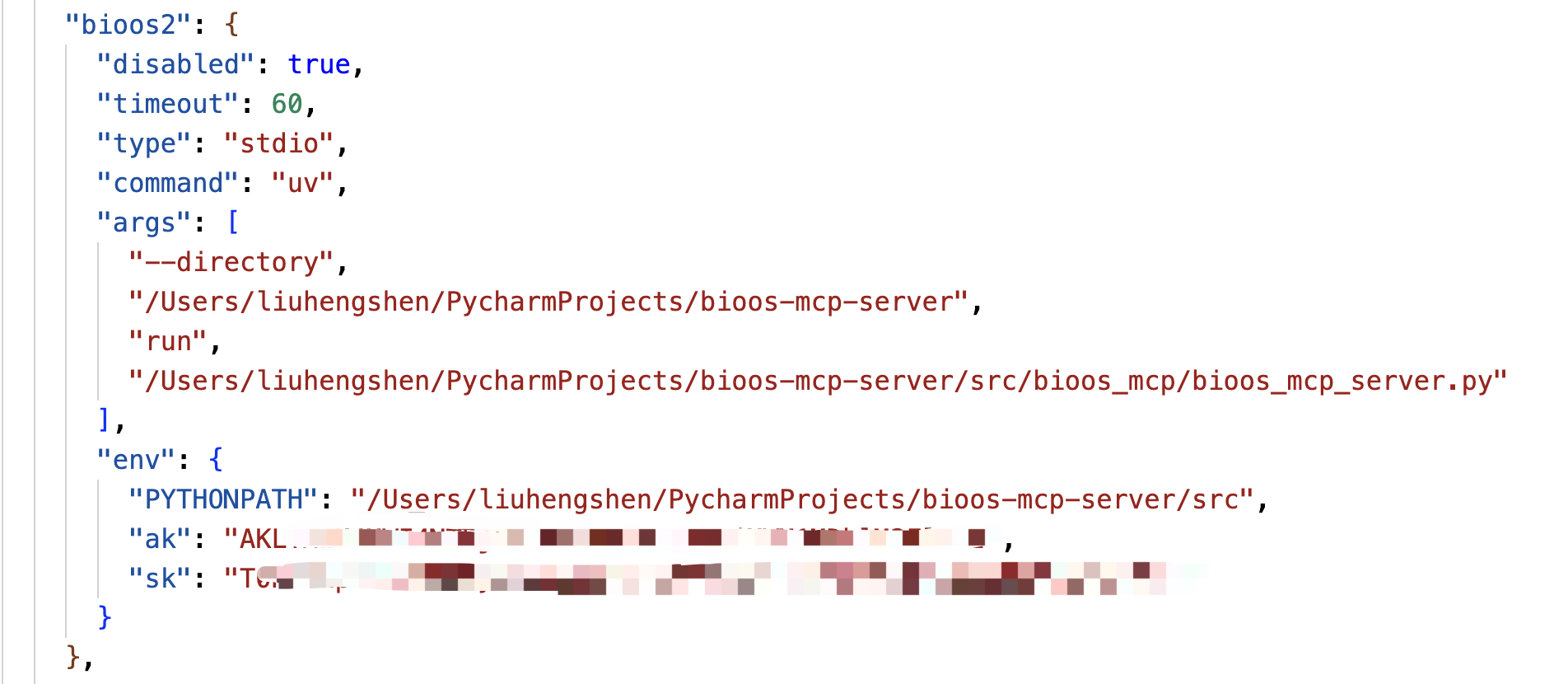
Configure the Bio-OS MCP Server script path in CLINE's MCP settings. Replace the placeholders with absolute paths to your installation:
{
  "mcpServers": {
    "bioos": {
      "command": "path/to/uv",
      "args": [
        "--directory",
        "path/to/bioos-mcp-server",
        "run",
        "path/to/bioos-mcp-server/src/bioos_mcp/bioos_mcp_server.py"
      ],
      "env": {
        "PYTHONPATH": "path/to/bioos-mcp-server/src",
        "MIRACLE_ACCESS_KEY": "xxxxxxxxxxxx",
        "MIRACLE_SECRET_KEY": "xxxxxxxxxxxx"
      }
    }
  }
}
Follow the configuration process shown below. The Bio-OS MCP Server is ready to use when the status turns green. If the connection is unstable, click "Retry Connection":
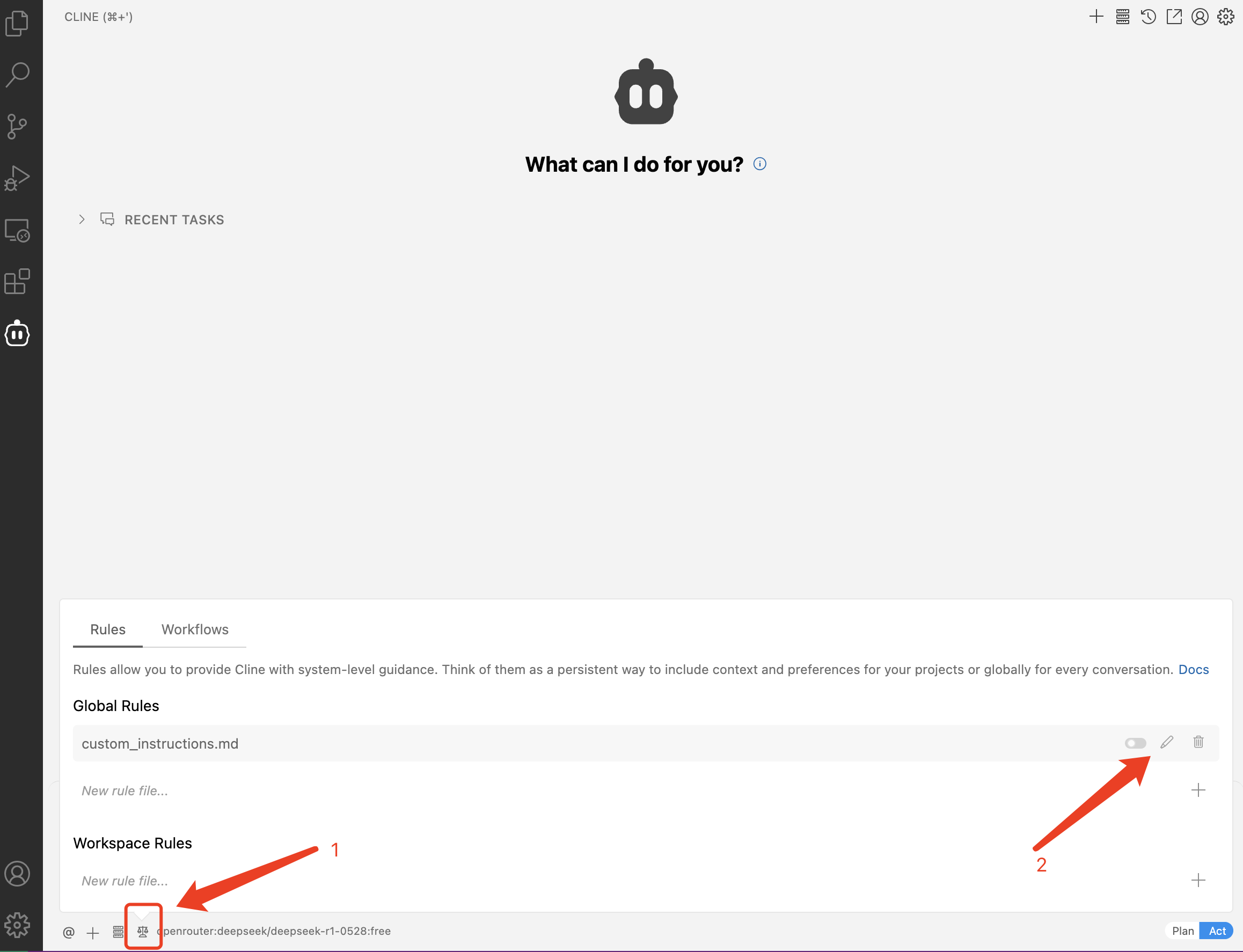
Since CLINE does not yet support MCP Prompts, copy the contents of bioos-mcp-prompt.md into CLINE's Custom Instructions for optimal experience:
After completing the configuration, you can begin using the Bio-OS MCP Server for development.
Cloud Installation (Using MCP through Code Server in Miracle Cloud)
For Miracle Cloud users, we provide a pre-configured Docker image with all Bio-OS MCP Server dependencies. Follow these steps:
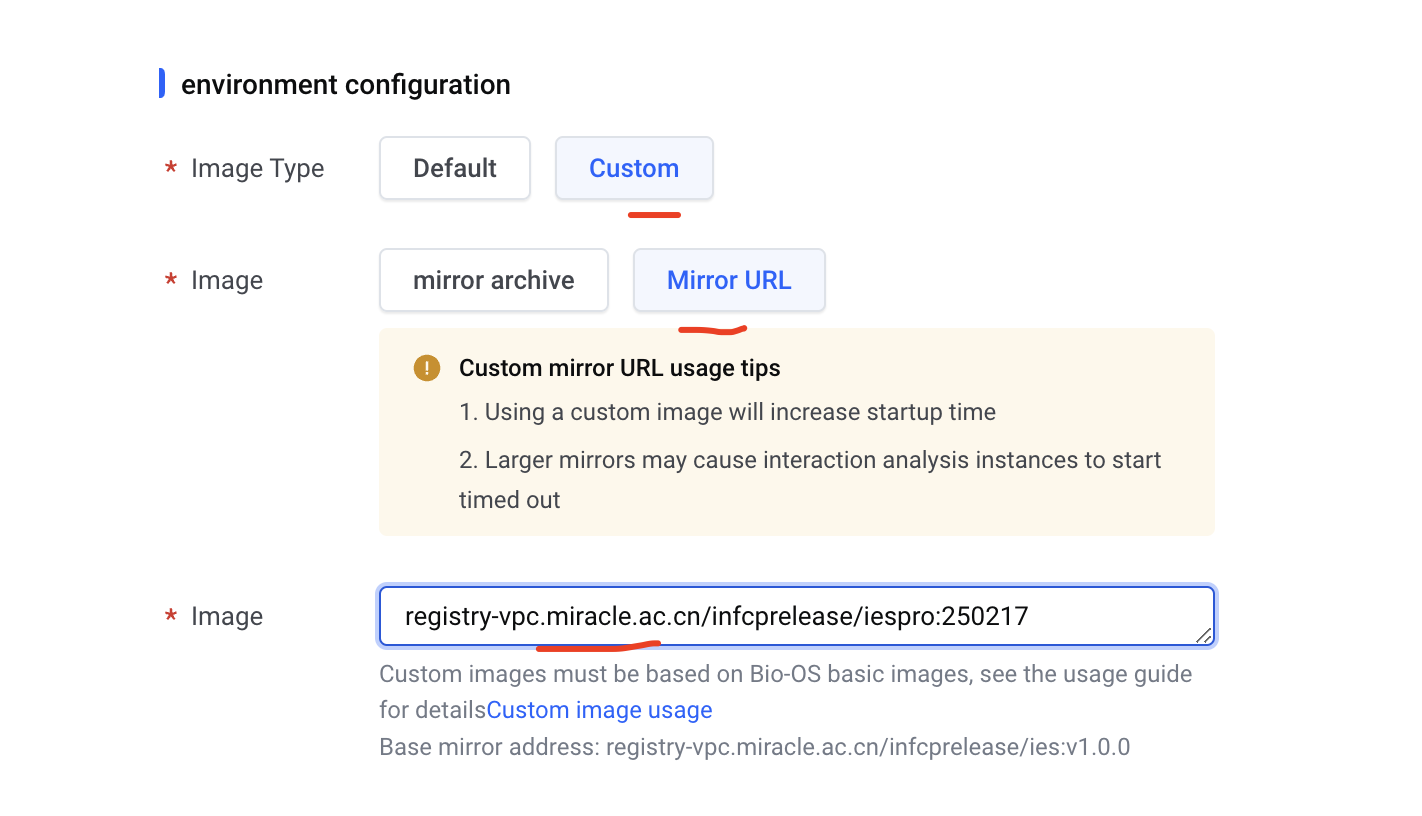
- Launch an IES instance using the image:
registry-vpc.miracle.ac.cn/infcprelease/iespro:250217
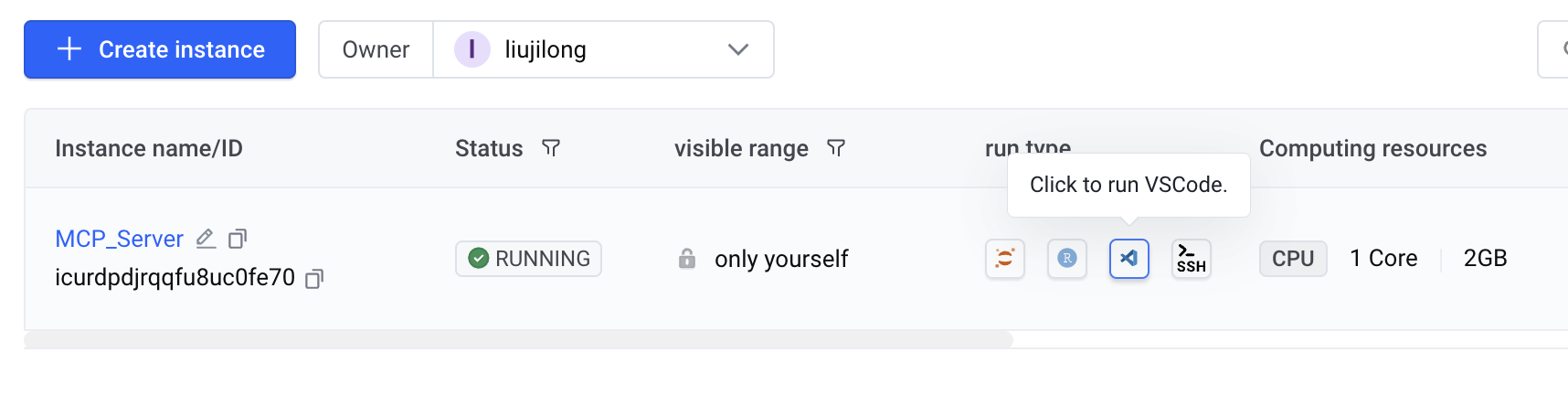
- Select "Open with VSCode" to access the development environment:
Configuration in Code Server
-
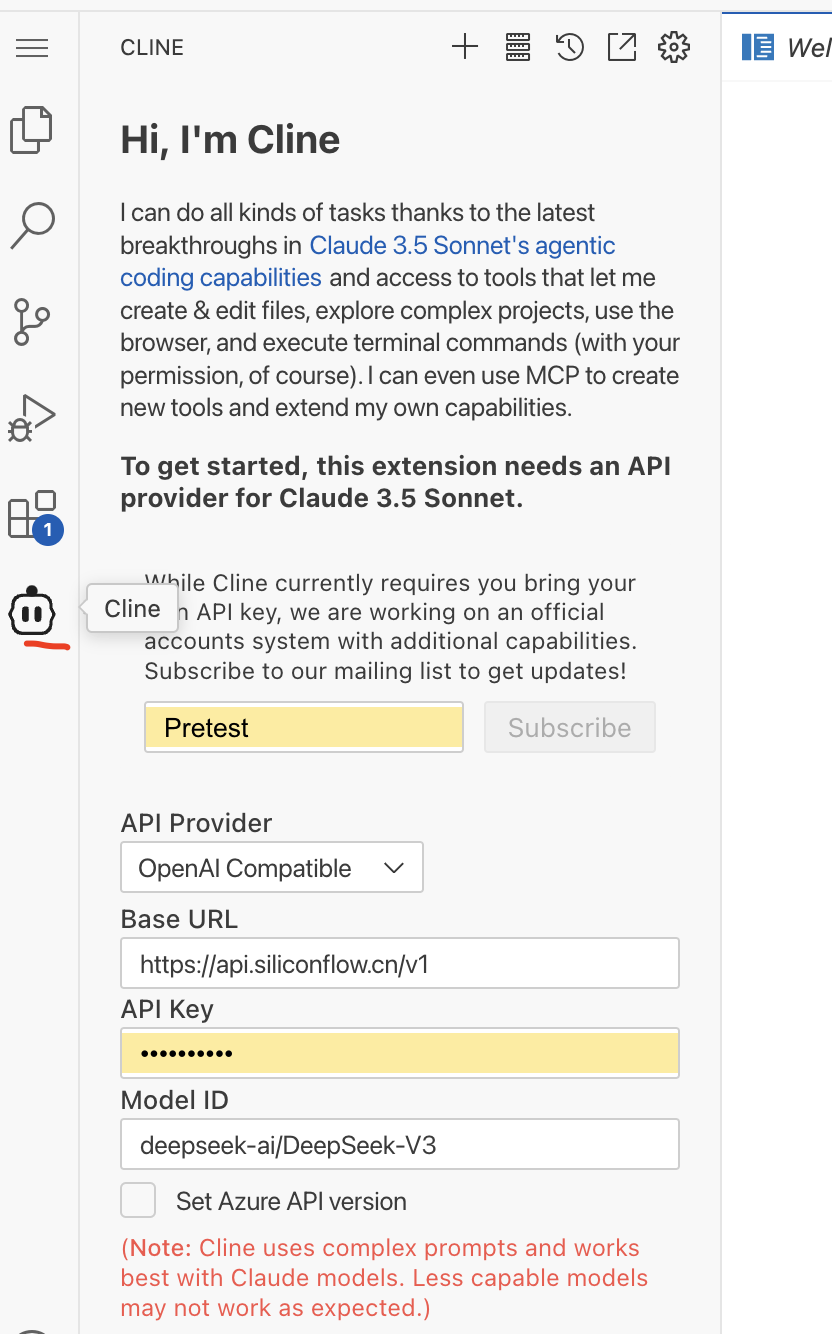
Click the CLINE icon in the left sidebar and configure your LLM model credentials:
-
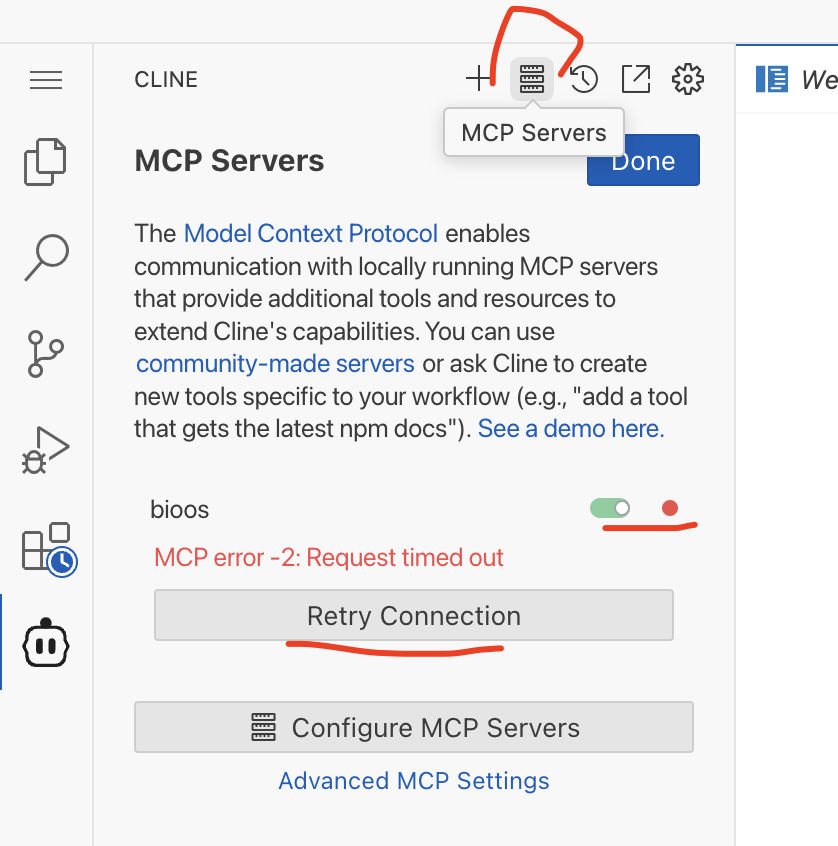
Navigate to CLINE's MCP configuration page and verify that Bio-OS MCP Server is properly connected. Use "Retry Connection" if needed:
Once configured, you can begin development with Bio-OS MCP Server.
Features
1. Workflow Management
- Submit and monitor workflows
- Upload WDL workflows
- Validate WDL scripts
- Generate input file templates
2. Docker Image Management
- Build Docker images
- Check build status
- Monitor build progress
- Retrieve build logs
API Reference
-
submit_workflow
- Function: Submit Bio-OS workflow
- Parameters:
- ak: Access Key
- sk: Secret Key
- workspace_name: Workspace name
- workflow_name: Workflow name
- input_json: Input JSON file path
-
import_workflow
- Function: Upload WDL workflow to Bio-OS system
- Parameters:
- ak: Access Key
- sk: Secret Key
- workspace_name: Workspace name
- workflow_name: Workflow name
- workflow_source: WDL file path
- workflow_desc: Workflow description
-
validate_wdl
- Function: Validate WDL workflow script
- Parameters:
-
generate_inputs
- Function: Generate WDL input file template
- Parameters:
-
build_docker_image
- Function: Build Docker image
- Parameters:
- registry: Image registry address
- namespace_name: Namespace
- repo_name: Repository name
- tag: Version tag
- source_path: Dockerfile or archive path
-
check_build_status
- Function: Check Docker image build status
- Parameters:
Prompts (Not supported in Cline yet)
-
wdl_development_workflow_prompt
- Function: Generate complete guidance for WDL workflow development
- Content:
- WDL script development steps
- Task structure guidelines
- Runtime configuration requirements
- Docker image preparation guide
-
wdl_runtime_prompt
- Function: Generate WDL runtime configuration template
- Content:
- Required docker image configuration
- Memory settings (default: 8 GB)
- Disk settings (default: 20 GB)
- CPU settings (default: 4)
-
workflow_input_prompt
- Function: Generate workflow input preparation guide
- Content:
- Input file preparation steps
- Parameter validation guidelines
- File path requirements
-
workflow_submission_prompt
- Function: Generate workflow submission template
- Content:
- Required credentials (ak/sk)
- Workspace configuration
- Input file requirements
-
docker_build_prompt
- Function: Generate Docker build process guide
- Content:
- Dockerfile generation steps
- Build configuration requirements
- Image registry settings
- Build status monitoring guide
Note: Prompts are currently not supported in Cline environment. These prompts are only available when using the MCP server directly or through Claude Desktop.
✅ Certified by MCPHub

This server is officially certified by MCPHub. Verify certification status on our MCPHub profile page.
Contributing
Issues and Pull Requests are welcome.
License
MIT License


