
Store and retrieve entities, relations and observations in a persistent local knowledge graph.
create_entitiescreate_relationsadd_observations+6 more
92K
AI & Multi-Agent
An MCP server that exposes tools for querying and accessing biomedical data from BioThings sources including mygene.info, myvariant.info, and mychem.info.
MCP server for BioThings biomedical data sources is cataloged as an MCP server attributed to longevity-genie. An MCP server that exposes tools for querying and accessing biomedical data from BioThings sources including mygene.info, myvariant.info, and mychem.info. It is categorized under ai agents-models. See the capability inspector for recorded interfaces and their independent review status; consult upstream documentation for the current interface.
Installation configuration is not reviewed. No executable setup is offered for this entry; inspect the source repository before proceeding.
Catalog license label: MIT License. Check the source repository's current license and terms before using, modifying or distributing this software.
能力定义尚未审核。未核验的采集内容不会作为可信接口展示。
暂无可展示的已审核记录。这不表示上游不支持此能力。
暂无可展示的已审核记录。这不表示上游不支持此能力。
暂无可展示的已审核记录。这不表示上游不支持此能力。
Email delivery is not connected. This page does not collect email addresses or create subscriptions.
Browse the registry for current listings instead.
Reviews for MCP server for BioThings biomedical data sources are not available yet
Review publishing and storage are not connected. This page does not collect or publish ratings or comments, including after sign-in.
It supports mygene.info for gene annotation, myvariant.info for variant annotation, and mychem.info for chemical compound annotation.
It can run in STDIO, streamable HTTP, and SSE modes.
Files are saved to a biothings_output/ directory in the current working directory unless a custom output directory is specified.
README.md · bbfb870f55ee · 采集于 2026-11-13 09:45:27 UTC
保留上游原文,不做 AI 改写。为安全起见过滤脚本、表单和不安全链接。
当前显示最后一次成功采集的文档快照,请以来源页面为准。



MCP (Model Context Protocol) server for Biothings.io
This server implements the Model Context Protocol (MCP) for BioThings, providing a standardized interface for accessing and manipulating biomedical data. MCP enables AI assistants and agents to access specialized biomedical knowledge through structured interfaces to authoritative data sources. Supported BioThings data sources include:
If you want to understand more what is Model Context Protocol and how to use it more efficiently you can take DeepLearning AI Course or just search for MCP videos on YouTube.
MCP is a protocol that bridges the gap between AI systems and specialized domain knowledge. It enables:
This server provides dedicated API interfaces for different BioThings data types, leveraging the biothings-typed-client library. These interfaces are implemented using the following tool handlers:
GeneTools (wraps GeneClientAsync)VariantTools (wraps VariantClientAsync)ChemTools (wraps ChemClientAsync)TaxonTools (wraps TaxonClientAsync)DownloadTools (provides file download and sequence analysis capabilities)The server includes local file saving capabilities through the DownloadTools interface, which provides:
download_entrez_data: Download data from NCBI Entrez databases (returns content as string)download_entrez_data_local: Download data from NCBI Entrez databases and save to local filebiothings_output/ directory in the current working directory--output-dir parameter to specify a custom output directory.fasta extension for sequence data.gb extension for GenBank format data.aln extension for alignment results.json extension for structured data.txt extension for general text data# Download and install uv
curl -LsSf https://astral.sh/uv/install.sh | sh
# Verify installation
uv --version
uvx --version
uvx is a very nice tool that can run a python package installing it if needed.
You can run the biothings-mcp server directly using uvx without cloning the repository:
# Run the server in STDIO mode (default mode)
uvx biothings-mcp

# Or explicitly specify stdio mode
uvx --from biothings-mcp stdio

# With custom output directory
uvx --from biothings-mcp stdio --output-dir ./my_data
# Run the server in streamable HTTP mode on default port (3001)
uvx --from biothings-mcp server run

# Run on a custom port
uvx --from biothings-mcp server run --port 8000

# Run on custom host and port
uvx --from biothings-mcp server run --host 0.0.0.0 --port 8000

# With custom output directory
uvx --from biothings-mcp server run --output-dir ./my_data
# Run the server in SSE mode on default port (3001)
uvx --from biothings-mcp sse

# Run on a custom port
uvx --from biothings-mcp sse --port 8000
The HTTP streamable mode will start a web server that you can access at http://localhost:3001/mcp (with documentation at http://localhost:3001/docs). The STDIO mode is designed for MCP clients that communicate via standard input/output, while SSE mode uses Server-Sent Events for real-time communication.
We provide stdio configuration using the proxy (might need npx to run):
If you want to inspect the methods provided by the MCP use npx (you may need to install nodejs and npm)
Test your MCP setup with the MCP Inspector.
If you want to inspect local streamable-http server you use:
npx @modelcontextprotocol/inspector --config mcp-config.json --server biothings-mcp
Add -remote suffix for the remote server.
If you want to inspect stdio local server you should use
npx @modelcontextprotocol/inspector --config mcp-config-stdio.json --server biothings-mcp
You can also run inspector manually and put server parameters in the interface:
npx @modelcontextprotocol/inspector
After that you can explore its methods with MCP Inspector at http://127.0.0.1:6274
# Clone the repository
git clone https://github.com/longevity-genie/biothings-mcp.git
cd biothings-mcp
uv sync
If you already cloned the repo you can run the server with uv
# Start the MCP server in HTTP streamable mode (default port 3001)
uv run server run

# Run in STDIO mode
uv run stdio

# Run in SSE mode
uv run sse

# Run with custom port
uv run server run --port 8000

# Run with custom output directory
uv run server run --output-dir ./my_data
To integrate this server with your MCP-compatible AI client, you can use one of the preconfigured JSON files provided in this repository:
mcp-config.json. Ensure the server is running first, either via uv run server (see Running the MCP Server) or docker-compose up (see Docker Deployment).mcp-config-remote.json. This connects to https://biothings.longevity-genie.info/mcp and doesn't require you to run anything locally.Simply point your AI client (like Cursor, Windserve, ClaudeDesktop, VS Code with Copilot, or others) to use the appropriate configuration file.
Here's an example of how the tools might appear in an MCP client like Cursor after configuration:
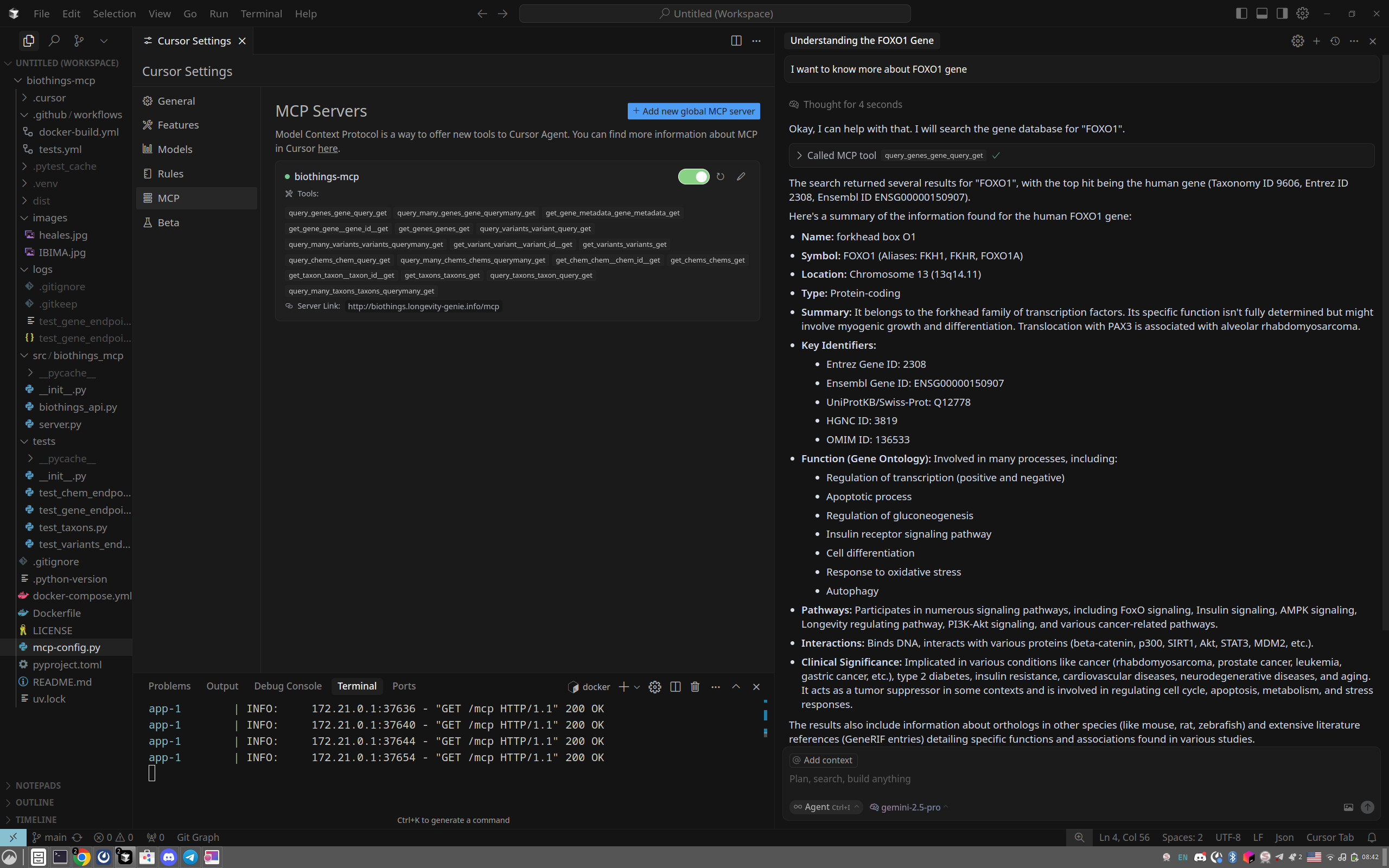
The library is beta-quality. The major problem right now is that LLM-s are often stupid and do not know how to put valid gene and gene variant symbols. We plan to mitigrate it by extending comments and providing additional method for entity resolution.
Run tests for the API endpoint:
uv run pytest -vvv -s
You can use MCP inspector with locally build MCP server same way as with uvx
Note: Using the MCP Inspector is optional. Most MCP clients (like Cursor, Windsurv, etc.) will automatically display the available tools from this server once configured. However, the Inspector can be useful for detailed testing and exploration.
If you choose to use the Inspector via npx, ensure you have Node.js and npm installed. Using nvm (Node Version Manager) is recommended for managing Node.js versions.
This opens a web interface where you can explore and test all available tools.
For detailed documentation about the MCP protocol and its implementation, refer to:
This project is licensed under the MIT License.
BioThings for the REST API and original client library
MCP Protocol for the protocol specification
Pydantic for the data validation framework
FastAPI-MCP for the MCP server implementation
This project is part of the Longevity Genie organization, which develops open-source AI assistants and libraries for health, genetics, and longevity research.
We are supported by:

HEALES - Healthy Life Extension Society
and

IBIMA - Institute for Biostatistics and Informatics in Medicine and Ageing Research
Claim this server with your GitHub account to request manual ownership verification.
Link to the catalog listing for MCP server for BioThings biomedical data sources from your README. This badge does not certify ownership, compatibility or security.
[](https://awesome-mcp.com/servers/biothings-mcp)Public repository statistics could not be verified. Check the configured source address; unavailable counts are not zero.
来源、范围和时段分别列出;不相加,不代表安装人数、活跃用户或安全审核。
尚无已审核的包 / 镜像标识,暂不展示下载统计。
Alternative and complementary servers in the same category
Store and retrieve entities, relations and observations in a persistent local knowledge graph.
Organize problem solving into revisable, branching thought steps through an MCP tool.

Query-aware context compression with an MCP plugin for coding agents, plus Python and HTTP interfaces for reducing the context sent to a language model.