
A directory listing describing a cancellation-letter and mailing-address service. The configured public GitHub repository returned 404 during source verification.
Repository stats unavailable
Developer Tools
A read-only Model Context Protocol server that lets AI assistants access a student's D2L Brightspace courses, including grades, assignments, announcements, content, and calendar.
Brightspace MCP Server is cataloged as an MCP server attributed to rohanmuppa. A read-only Model Context Protocol server that lets AI assistants access a student's D2L Brightspace courses, including grades, assignments, announcements, content, and calendar. It is categorized under developer tools. See the capability inspector for recorded interfaces and their independent review status; consult upstream documentation for the current interface.
Installation configuration is not reviewed. No executable setup is offered for this entry; inspect the source repository before proceeding.
Catalog license label: MIT. Check the source repository's current license and terms before using, modifying or distributing this software.
能力定义尚未审核。未核验的采集内容不会作为可信接口展示。
暂无可展示的已审核记录。这不表示上游不支持此能力。
暂无可展示的已审核记录。这不表示上游不支持此能力。
暂无可展示的已审核记录。这不表示上游不支持此能力。
Email delivery is not connected. This page does not collect email addresses or create subscriptions.
Browse the registry for current listings instead.
Reviews for Brightspace MCP Server are not available yet
Review publishing and storage are not connected. This page does not collect or publish ratings or comments, including after sign-in.
No. It only reads course data and never submits, edits, or deletes anything.
The password is kept in your computer's password store, not in a plaintext file, and saved session state is encrypted with AES-256-GCM.
Any school using D2L Brightspace; several schools have automatic sign-in built in, and other D2L schools can paste their Brightspace address at setup.
README.md · a808f59020a4 · 采集于 2026-11-13 14:05:23 UTC
保留上游原文,不做 AI 改写。为安全起见过滤脚本、表单和不安全链接。
当前显示最后一次成功采集的文档快照,请以来源页面为准。





By Rohan Muppa, ECE @ Purdue
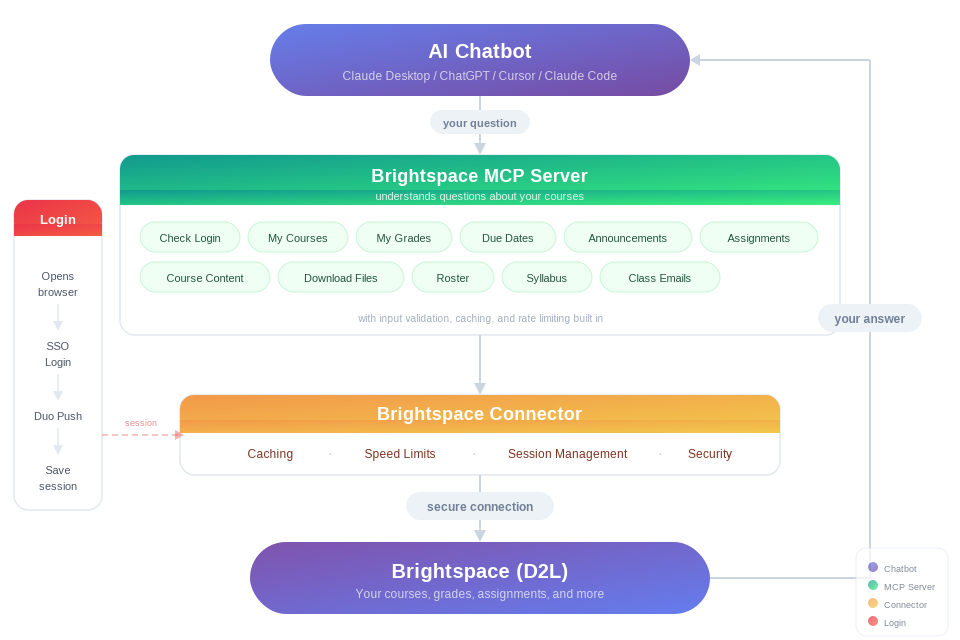
Lets your AI see your Brightspace classes, so you can just ask:
"What's due this week?" · "Am I passing all my classes?" · "Summarize today's announcements" · "Turn my lecture slides into flashcards"
Works with Claude Desktop, Claude Code, Cursor, ChatGPT Desktop, Windsurf, and any other app that supports MCP. It only reads your courses. It never submits, edits, or deletes anything.
Install Node.js version 22 or newer.
Run the setup in a terminal:
npx -y brightspace-mcp-server@latest setup
It asks for your school's Brightspace address, your username and password, and how you confirm it's you (a phone app, or another way such as a text message). Your password goes into your computer's password store (Keychain on Mac, Credential Manager on Windows), never into a file. Setup also connects the server to Claude Desktop, Cursor, Antigravity, Codex, or Claude Code if you have them. If one already has a brightspace entry pointing somewhere else, setup asks before replacing it.
If your school is in the table below, add its flag (such as --purdue) to skip typing the address.
On a Mac: when Keychain asks whether node may use the saved Brightspace password, choose Always Allow, not just Allow.
Restart your AI app and ask it something. The first question signs you in. If your phone asks you to approve a sign-in, approve it and ask again.
Rather have the AI install it? Paste this into Claude Code, Cursor, Windsurf, Copilot, or Codex:
Install the Brightspace MCP server for me. Follow the steps at
https://raw.githubusercontent.com/RohanMuppa/brightspace-mcp-server/main/LLMs.md
The AI asks which school you attend and your username, does everything it can by itself, then gives you one terminal command. That command asks for your password and waits for you to approve the sign-in on your phone. That's the only part that needs you. Afterwards the AI checks that it can see your courses.
Using a different AI app? Add the command npx -y brightspace-mcp-server@latest to its MCP settings (on Windows: cmd /c npx -y brightspace-mcp-server@latest). Codex and Claude Code commands, and general steps, are in docs/troubleshooting.md.
If your school uses D2L Brightspace, yes. These have automatic sign-in built in:
| School | Sign-in | Flag |
|---|---|---|
| Purdue | Microsoft (phone approval, authenticator code, or browser) | --purdue |
| SUNY | Shared site with a campus picker | --suny |
| Western University | Microsoft | --western |
| TU Delft | NetID (no two-factor) | --tudelft |
| CUNY | CUNY Login, authenticator code each time | --cuny |
| Leiden University | SURFconext → Microsoft | --leiden |
| McGill University | Microsoft Entra | --mcgill |
| Memorial University of Newfoundland | MUN Login (CAS, no two-factor when tested) | --mun |
| Javeriana Cali | OneGate (password + authenticator code) | --javeriana |
| Ngee Ann Polytechnic | Microsoft Entra | --ngeeann |
| Any other D2L school | Paste your Brightspace address at setup. If the sign-in page isn't recognized, answer 2 to setup's sign-in question to finish it by hand | none |
School-specific quirks are in docs/sign-in.md.
| About | Try |
|---|---|
| Grades | "Am I passing all my classes?" · "Compare my grades across courses" · "Is there feedback on my midterm?" (quiz feedback often can't be read through the API, so the answer links to the quiz instead) |
| Due dates | "What's due in the next 48 hours?" · "Build me a study schedule for the week" |
| Assignments and rubrics | "What does the lab 4 spec actually ask for?" · "Why did I lose points on the analysis criterion?" · "Did I turn in HW 3?" |
| Quizzes and exams | "Which quizzes close this week?" · "Is there a midterm in the gradebook that isn't on my assignments list?" |
| Announcements | "Did any professor post something important today?" · "Read the file attached to today's announcement" |
| Course content | "Find the midterm review slides" · "Download every PDF from Module 5" · "Save this whole course to a folder on my computer" · "Search this course for office hours" · or read a file inline instead of saving it |
| Syllabus | "What's the late policy in ECE 264's syllabus?" (if the syllabus lives in an external tool, you get the link to open instead) |
| People | "Who are the TAs for ECE 264?" · "Who is in my project group?" |
| Discussions | "Summarize the latest posts in the final project thread" |
| Lecture videos | "What did the professor say about pinch-off in Tuesday's recording?" (Kaltura and YouTube. If YouTube asks for a sign-in or "not a bot" check, the answer gives the link: open it, choose "Show transcript", and paste that text here) |
| Calendar | "When is my midterm?" · "Is lab cancelled on Thursday?" |
| Instructors and TAs | "Which students haven't submitted Lab 4 yet?" (students see "Instructor or TA access required" for these) |
If Brightspace hides part of the data, such as a submission, quiz attempts, or part of the quiz list, the answer says "unknown" or "incomplete" rather than "missing" or "complete". Full tool reference: docs/reference/tools.md.
Ask your assistant to save a course, or run it yourself from a terminal:
npx -y brightspace-mcp-server@latest sync --course 123456 --dest ~/Courses/ECE-264
Every file in the course's Content area is saved into folders named after its modules. Running it again fetches only what is new.
| Option | What it does |
|---|---|
--existing skip|replace|keep_both | A file already there: skip (default) leaves it, replace re-downloads only files the sync saved and you haven't edited, keep_both saves a different copy as name (1).ext |
--module <id> | Only that module and the modules inside it |
--dry-run | List what would be downloaded, and download nothing |
--max-files <n> | Most files per run (default 300). Run it again to continue |
--json | Print the result as JSON on stdout, for scripts |
.brightspace-sync.json manifest in the folder, which is how it knows which files are its own. Only one sync runs in a folder at a time. If a crashed run left its .brightspace-sync.lock behind, the next run takes it over..zshrc in your folder.Some folders are refused. Downloads can't go to your home folder itself, a drive root, a hidden (dot) folder such as ~/.ssh, ~/Library (except cloud-drive and iCloud folders), system folders such as /etc or /System, or on Windows Windows, Program Files, ProgramData and AppData. Anything else is fine, including /tmp, external drives and ~/Documents. Choose a folder like ~/Documents/Brightspace; the refusal names the rule. The same rule applies to download_file, get_syllabus and every other tool that saves to disk. The person running the server can allow a folder anyway with D2L_DOWNLOAD_ROOTS (see Settings). Full rules: docs/internals/downloads.md.
Every tool the server registers. Each tool's arguments and response fields are in docs/reference/tools.md.
get_my_courses, get_my_grades, get_upcoming_due_dates, get_calendar_eventsget_assignments, get_assignment_rubric, get_assignment_files, get_rubrics_for_objectget_announcements, get_announcement_files, get_discussionsget_course_content, search_course, get_syllabus, get_video_transcript, download_file, download_course_filesget_roster, get_classlist_emails, get_my_groups, get_available_groupsget_dropbox_folders, get_dropbox_submissions, get_dropbox_user_submissions, get_dropbox_feedback, download_dropbox_submission_filesign_in, sign_out, get_server_infoApps with a prompt picker (like Claude Desktop) also offer four one-click prompts:
weekly_briefing: a 7-day rollup of what's due, what's new, and what changed in your gradesgrade_audit (optional courseId): flags missing or low-scoring itemsstudy_planner (optional daysAhead, default 7): plans study time from due dates and calendar eventscourse_summary (required courseId): syllabus, outline, assignments and grades for one courseThere's no separate login. Asking a question signs you in, and it stays signed in on its own most days. When your school wants two-factor again, the number to approve shows up in the answer. Approve it on your phone, and the assistant keeps checking, so the original question completes as soon as sign-in does. If it gets stuck, run this in a terminal:
npx -y brightspace-mcp-server@latest auth
How often your school asks for two-factor is up to the school, not this tool.
On a Mac, a one-time Allow at the Keychain prompt can make later sign-ins from your AI app or another terminal fail or hang. Pick Always Allow instead. That permission only lets the local Brightspace server read its own saved sign-in password, nothing else in your Keychain.
Want fewer 2FA prompts? setup asks How often do you want to approve sign-ins on your phone? Pick 1 every time (the default), 2 to remember this computer, or 3 to let it answer Microsoft's code requests (needs an authenticator setup key). Options 2 and 3 are not for shared computers. Steps and tradeoffs: docs/sign-in.md.
To sign in from a chat, ask your AI app to sign you in to Brightspace. It can start the sign-in itself, and opens a window for you when no password is saved.
To sign out early (on a shared computer, say), ask your AI app to sign you out of Brightspace, or run npx -y brightspace-mcp-server@latest auth --logout. This deletes this computer's saved session, so the next question does a full sign-in. Your password and authenticator key are kept. It doesn't sign you out of Microsoft or Brightspace elsewhere. On a shared computer, also delete the saved brightspace-mcp-server entries from Keychain Access (Mac) or Credential Manager (Windows). Details: docs/sign-in.md.
Duo, authenticator codes, visible-browser mode, and running without a browser at all (Docker, WSL, hardware keys) are covered in docs/sign-in.md.
What a sign-in message means, including Microsoft's "having trouble verifying your account" hold and what to do about each one, is in docs/troubleshooting.md. Numbers that expire, and signing in on more than one computer, are in docs/sign-in.md.
All optional. Set them in your AI app's MCP env config or in your shell. The full list is in docs/reference/settings.md.
| Setting | What it does |
|---|---|
D2L_REMEMBER_MFA=true | Tick Microsoft's "Don't ask again" box so later sign-ins skip the second factor. Off by default, and not for shared computers. setup option 2 saves the same choice |
D2L_TOTP_SECRET | An authenticator setup key, so a Microsoft code challenge is answered on this computer. Prefer setup option 3, which keeps the key in your OS keychain. Environment only for CI and containers: anything that can read the environment gets your second factor (details) |
D2L_HEADLESS=false | Show the browser window during sign-in, for MFA methods that need a click |
D2L_DUO_PASSCODE=1 | On Duo, type a passcode instead of waiting for a push |
D2L_SESSION_COOKIE / D2L_ACCESS_TOKEN | Skip the browser entirely with a pasted cookie or token. See docs/sign-in.md |
D2L_INCLUDE_COURSES / D2L_EXCLUDE_COURSES | Comma-separated course ids to show or hide |
D2L_ACTIVE_ONLY=false | Include courses whose enrollment has ended |
D2L_CURRENT_ONLY=true | Only show courses in their current enrollment window (Brightspace's "Current Courses" widget) |
D2L_DOWNLOAD_ROOTS=/data:/srv/courses | Folders downloads may always use, even where the refusals above say no. Separate paths with : on macOS and Linux, ; on Windows. Only the person running the server can set it |
D2L_NO_UPDATE_CHECK=1 | Turn off the new-version notice |
D2L_DEV_MODE=true | Write a local, content-free log of tool calls and sign-in events, for debugging (how) |
Every chat shares one Brightspace server automatically, with one sign-in, one session and one cache. Closing a chat never interrupts another. Codex users, or anyone who wants to run one server themselves, can follow docs/shared-server.md.
Your password is stored in your computer's password store, never in a plaintext file. Saved session state is encrypted with AES-256-GCM. Approvals (the tap or number) stay on your phone, and the server never sees them. A code you type, or one generated from a saved authenticator key, goes only to the sign-in page. None of the tools submit, edit or delete anything in your courses. More detail: docs/sign-in.md.
npx -y brightspace-mcp-server@latest doctor first. It checks the whole setup and tells you what to fix. For a global install, use brightspace-mcp-server doctor.npx -y brightspace-mcp-server@latest repair. It doesn't sign in or change your AI apps.npx fails with EPERM on a Mac: run it from your home folder. macOS blocks npx from Documents, Desktop and Downloads unless you grant Files and Folders access.Authentication failed: The native credential store is locked or unavailable. Unlock your password store (on a Mac, log in or unlock Keychain Access), run npx -y brightspace-mcp-server@latest auth again (or setup if that still fails), and choose Always Allow when Keychain asks.MIT. See LICENSE.
Claim this server with your GitHub account to request manual ownership verification.
Link to the catalog listing for Brightspace MCP Server from your README. This badge does not certify ownership, compatibility or security.
[](https://awesome-mcp.com/servers/brightspace-mcp-server)Public repository statistics could not be verified. Check the configured source address; unavailable counts are not zero.
来源、范围和时段分别列出;不相加,不代表安装人数、活跃用户或安全审核。
尚无已审核的包 / 镜像标识,暂不展示下载统计。
Alternative and complementary servers in the same category
A directory listing describing a cancellation-letter and mailing-address service. The configured public GitHub repository returned 404 during source verification.

A hosted MCP service for browsing and searching through Singapore mobile-network proxies.

A directory listing describing a Markdown-to-PDF service. The configured public GitHub repository returned 404 during source verification.