
A Model Context Protocol (MCP) server for controlling Chrome with debugging capabilities, userscript injection, and extension support.
Repository stats unavailable
Browser & Scraping
An MCP server that gives an agent a visible browser, returning annotated screenshots with numbered marks over interactive elements that the agent acts on by number.
BrowserControl is cataloged as an MCP server attributed to adityasasidhar. An MCP server that gives an agent a visible browser, returning annotated screenshots with numbered marks over interactive elements that the agent acts on by number. It is categorized under browser automation. See the capability inspector for recorded interfaces and their independent review status; consult upstream documentation for the current interface.
Installation configuration is not reviewed. No executable setup is offered for this entry; inspect the source repository before proceeding.
Catalog license label: MIT. Check the source repository's current license and terms before using, modifying or distributing this software.
能力定义尚未审核。未核验的采集内容不会作为可信接口展示。
暂无可展示的已审核记录。这不表示上游不支持此能力。
暂无可展示的已审核记录。这不表示上游不支持此能力。
暂无可展示的已审核记录。这不表示上游不支持此能力。
Email delivery is not connected. This page does not collect email addresses or create subscriptions.
Browse the registry for current listings instead.
Reviews for BrowserControl are not available yet
Review publishing and storage are not connected. This page does not collect or publish ratings or comments, including after sign-in.
No. The element map is rebuilt from scratch after every action, so an agent should act, read the new screenshot, then act again.
Only what is in the viewport gets marked, and cross-origin iframes are never marked, though open shadow roots and same-origin frames are traversed.
Recordings are Playwright traces that can be opened with the Playwright trace viewer.
README.md · 95a4182e6df8 · 采集于 2026-11-13 13:41:27 UTC
保留上游原文,不做 AI 改写。为安全起见过滤脚本、表单和不安全链接。
当前显示最后一次成功采集的文档快照,请以来源页面为准。

An MCP server that gives your agent a browser it can see.





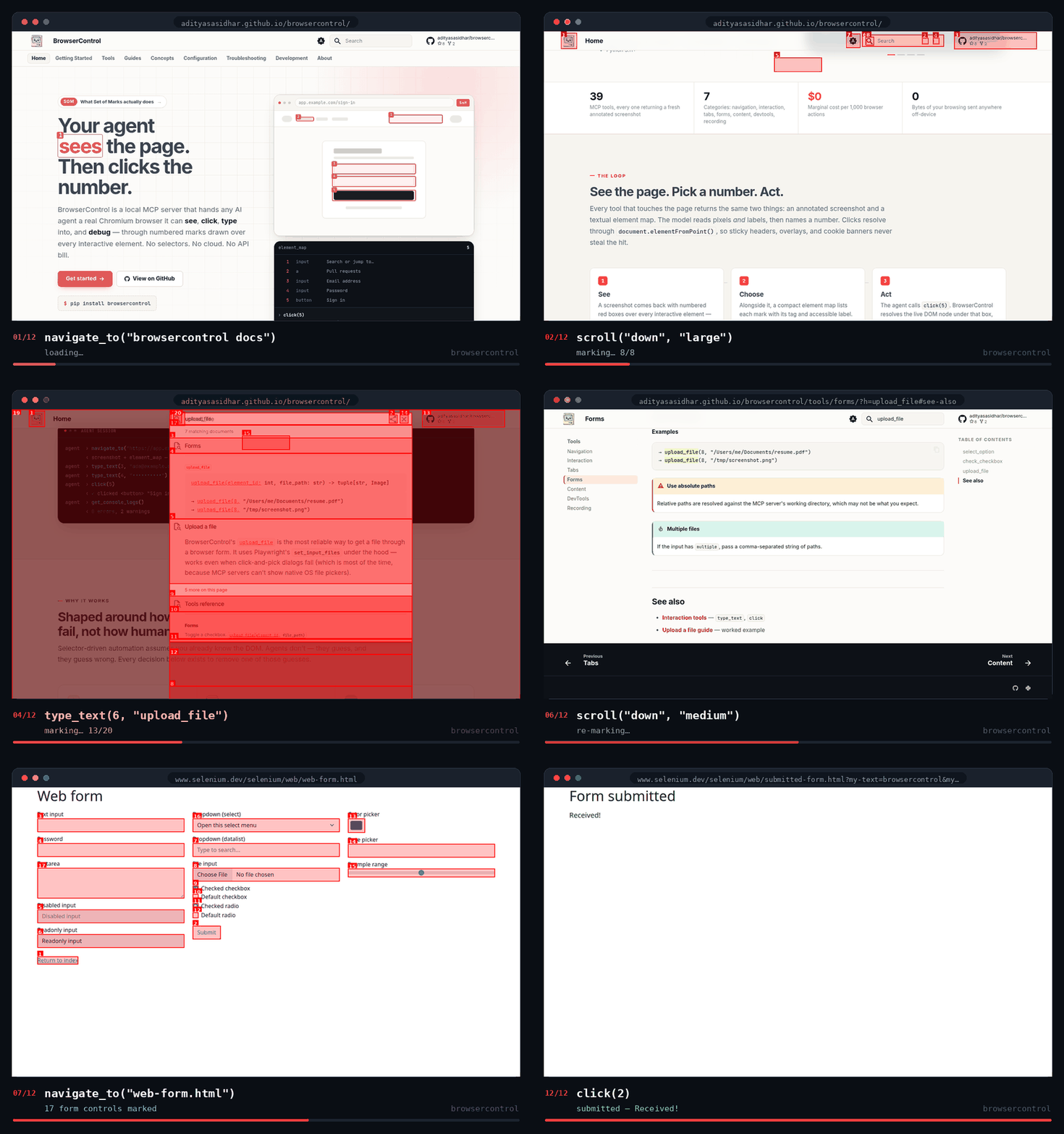
One real session, twelve actions, nothing staged — navigate, scroll, type, select, check, click. Watch the numbers: they are rebuilt from scratch after every action, which is why the agent re-reads them each time.
Most browser tools hand a model a DOM tree and hope it writes a working selector. BrowserControl hands it a picture.
Every action returns a fresh screenshot with numbered red boxes drawn over the interactive elements, plus the same list as text. The agent acts by number:
click(5)
type_text(3, "hello world")
upload_file(7, "/path/to/resume.pdf")
No selectors to guess, none to break on the next redesign. This is the Set of Marks pattern, used as the primary interface rather than a fallback.
uv add browsercontrol # or: pip install browsercontrol
Chromium installs itself on first run. If that fails, run
python -m playwright install chromium once.
Point your client at the browsercontrol command:
{
  "mcpServers": {
    "browsercontrol": {
      "command": "browsercontrol"
    }
  }
}
| Client | Location |
|---|---|
| Claude Desktop | ~/Library/Application Support/Claude/claude_desktop_config.json (macOS) · ~/.config/Claude/claude_desktop_config.json (Linux) · %APPDATA%\Claude\claude_desktop_config.json (Windows) |
| Claude Code | claude mcp add browsercontrol -- browsercontrol |
| Cursor | Settings → Model Context Protocol |
| Cline | Settings → MCP Servers |
| Continue.dev | ~/.continue/config.json, under mcpServers |
| Zed | ~/.config/zed/settings.json, under context_servers as {"command": {"path": "browsercontrol"}} |
No install at all, if you prefer: "command": "uvx", "args": ["browsercontrol"].
Restart the client and ask it for something:
"Open Hacker News and tell me the top story."
Full walkthrough: Getting started.
Element numbers expire after every action. The map is rebuilt from scratch on
every click, type, scroll, navigation, and screenshot — element 7 before a
click is rarely element 7 after it.
So an agent should never plan two clicks from one screenshot. It acts, reads the new screenshot, finds the target again, then acts again. Almost every failure worth debugging traces back to this.
Two corollaries:
39 tools across seven categories. Everything that touches the page returns an annotated screenshot plus the element map.
| Category | Tools | |
|---|---|---|
| Navigation | 5 | navigate_to go_back go_forward refresh_page scroll |
| Interaction | 7 | click click_at type_text press_key hover scroll_to_element wait |
| Forms | 3 | select_option check_checkbox upload_file |
| Content | 5 | get_page_content get_text get_page_info run_javascript screenshot |
| Tabs | 4 | create_tab switch_tab close_tab list_tabs |
| DevTools | 11 | get_console_logs get_network_requests get_page_errors run_in_console inspect_element get_page_performance get_cookies set_cookie delete_cookie clear_cookies set_viewport |
| Recording | 4 | start_recording stop_recording take_snapshot list_recordings |
A few behaviours that aren't obvious from the names:
type_text uses Playwright's fill() — it replaces the field, it doesn't append.click resolves the topmost element at the mark's centre, so a cookie banner
overlapping your target will eat the click. Dismiss overlays first.upload_file goes through set_input_files, which works on sites where
driving the file picker doesn't.screenshot(annotate=True, full_page=True) returns a clean image —
full-page captures can't be marked.get_page_content returns Markdown, capped at 30 KB.npx playwright show-trace ~/.browsercontrol/recordings/<name>.zip.Connecting the server tells an agent which tools exist. The bundled agent skill tells it how to use them well — that numbers expire, that a banner will swallow a click, that a missing number means scroll.
mkdir -p ~/.claude/skills/browsercontrol
curl -fsSL https://raw.githubusercontent.com/adityasasidhar/browsercontrol/main/skills/browsercontrol/SKILL.md \
  -o ~/.claude/skills/browsercontrol/SKILL.md
It loads only when a task actually involves a browser, so it costs one line of
context the rest of the time. Agents that would rather read the docs directly can
start at llms.txt.
Environment variables, read once at startup.
| Variable | Default | |
|---|---|---|
BROWSER_HEADLESS | true | false to watch the browser work |
BROWSER_VIEWPORT_WIDTH | 1280 | |
BROWSER_VIEWPORT_HEIGHT | 720 | |
BROWSER_TIMEOUT | 30000 | Navigation timeout, ms |
BROWSER_USER_DATA_DIR | ~/.browsercontrol/user_data | Profile directory |
BROWSER_EXTENSION_PATH | — | Unpacked extension to load at launch |
BROWSER_EXECUTABLE_PATH | — | Chromium binary to drive, when Playwright ships no build for your platform |
BROWSER_RECORDINGS_DIR | next to the profile | Where traces are saved |
BROWSER_SNAPSHOTS_DIR | next to the profile | Where snapshots are saved |
LOG_LEVEL | INFO |
BROWSER_HEADLESS=false BROWSER_VIEWPORT_WIDTH=390 BROWSER_VIEWPORT_HEIGHT=844 browsercontrol
The session is a real Chromium profile (launch_persistent_context), so cookies,
localStorage and logins survive restarts — log in once and your agent stays
logged in. DevTools are first-class: console, network timing, uncaught
exceptions, performance and computed styles are tools, not an afterthought. And
it runs entirely on your machine — no LLM API key, no cloud round-trip, no
per-action cost, nothing leaving the box.
Honest positioning: if you're happy driving the accessibility tree, Playwright MCP is excellent. If you want an LLM planning the interactions for you, look at Stagehand or Browser-Use. BrowserControl's niche is vision-first, fully local browser control with devtools built in. Longer comparison in the docs.
git clone https://github.com/adityasasidhar/browsercontrol
cd browsercontrol
uv sync
uv run playwright install chromium --with-deps

uv run pytest                                  # tests (Playwright is mocked — no real browser)
uv run ruff check . && uv run ruff format .    # lint + format
uv run fastmcp dev browsercontrol/server.py    # dev server with the MCP inspector
browsercontrol/
├── server.py     # FastMCP instance, lifespan, tool registration
├── browser.py    # BrowserManager: Playwright lifecycle, element detection, SoM rendering
├── config.py     # env-var config
└── tools/        # one module per category, each exporting register_*_tools(mcp)
CI runs the suite on Ubuntu, Windows and macOS with ruff, mypy --strict,
bandit and pytest.
Issues and PRs welcome — see CONTRIBUTING.md. New tools should
come with a test for the happy path and the error path; the existing
tests/test_*.py files show the pattern.
On the list, if you're looking for somewhere to start: Firefox and WebKit support, mobile device presets, network mocking, DOM diffing between snapshots, and accessibility auditing.
MIT. Built on FastMCP and Playwright.
Claim this server with your GitHub account to request manual ownership verification.
Link to the catalog listing for BrowserControl from your README. This badge does not certify ownership, compatibility or security.
[](https://awesome-mcp.com/servers/browsercontrol)Public repository statistics could not be verified. Check the configured source address; unavailable counts are not zero.
来源、范围和时段分别列出;不相加,不代表安装人数、活跃用户或安全审核。
尚无已审核的包 / 镜像标识,暂不展示下载统计。
Alternative and complementary servers in the same category
A Model Context Protocol (MCP) server for controlling Chrome with debugging capabilities, userscript injection, and extension support.

An MCP server that lets AI assistants browse websites and extract content using optional CSS selectors.

An MCP server that reads pages, fills forms, takes screenshots, and hands the browser to a person for logins or CAPTCHAs.