
Your Private App Platform - Deploy microservices anywhere, any language, one CLI
Deploy Node.js, Go, Python, Java, PHP, Ruby, or any containerizable application to CapRover, AWS, GCP, or Kubernetes with the same simple commands. Zero vendor lock-in.
bruvtools transforms any cloud server into your private app platform - like having your own Heroku, Vercel, or Railway. Combined with CapRover, you get:
Step 1: Create Your CapRover Server (2 minutes)
The easiest way to get started is with DigitalOcean's one-click CapRover deployment:

What this gives you:
- ✅ $5/month server with CapRover pre-installed
- ✅ $100 free credit for new DigitalOcean users (2 months free!)
- ✅ Docker & firewall configured automatically
- ✅ Ready to deploy in minutes
Alternative setup: Follow the CapRover Getting Started Guide for manual installation on any cloud provider.
npm install -g bruvtools
bruvtools --version  # Should show: 0.2.16
# Clone and test the working example
git clone https://github.com/fcavalcantirj/bruvtools.git
cd bruvtools/examples/hello-world

# Setup bruvtools (one time)
bruvtools init
# This creates:
# - bruvtools.yml (configuration: machine names, domains, projects)
# - .env (secrets: passwords, API keys)
# ⚠️  IMPORTANT: Never commit bruvtools.yml or .env to version control!

# Deploy with smart auto-creation and collision detection
bruvtools deploy my-app
# ✅ Checks if app exists
# ✅ Auto-creates app if needed
# ✅ Handles name collisions (my-app-1, my-app-2, etc.)
# ✅ Deploys with clear step-by-step progress
# ✅ Your app is live with HTTPS!
🎯 That's it! Your private app platform is ready. Your app is now live at https://my-app.yourdomain.com with automatic SSL.
With Model Context Protocol (MCP) support, you get a revolutionary development experience - deploy directly from Cursor.com without ever leaving your editor:
🤯 The Experience:
You: "Deploy this Node.js app to my-api-v2"
Claude: ✅ Deploying to CapRover...
        ✅ App created with collision detection
        ✅ Building Docker image...
        ✅ Live at https://my-api-v2.yourdomain.com
        ✅ SSL certificate auto-configured

You: "Show me the logs"
Claude: [Real-time logs streaming in your editor]

You: "Scale this to 3 replicas"
Claude: ✅ Scaled to 3 replicas, load balanced automatically
This is the future of development - your AI pair programmer that can actually deploy and manage your infrastructure. No context switching, no separate terminals, no deployment dashboards. Just code, ask, and it's live.
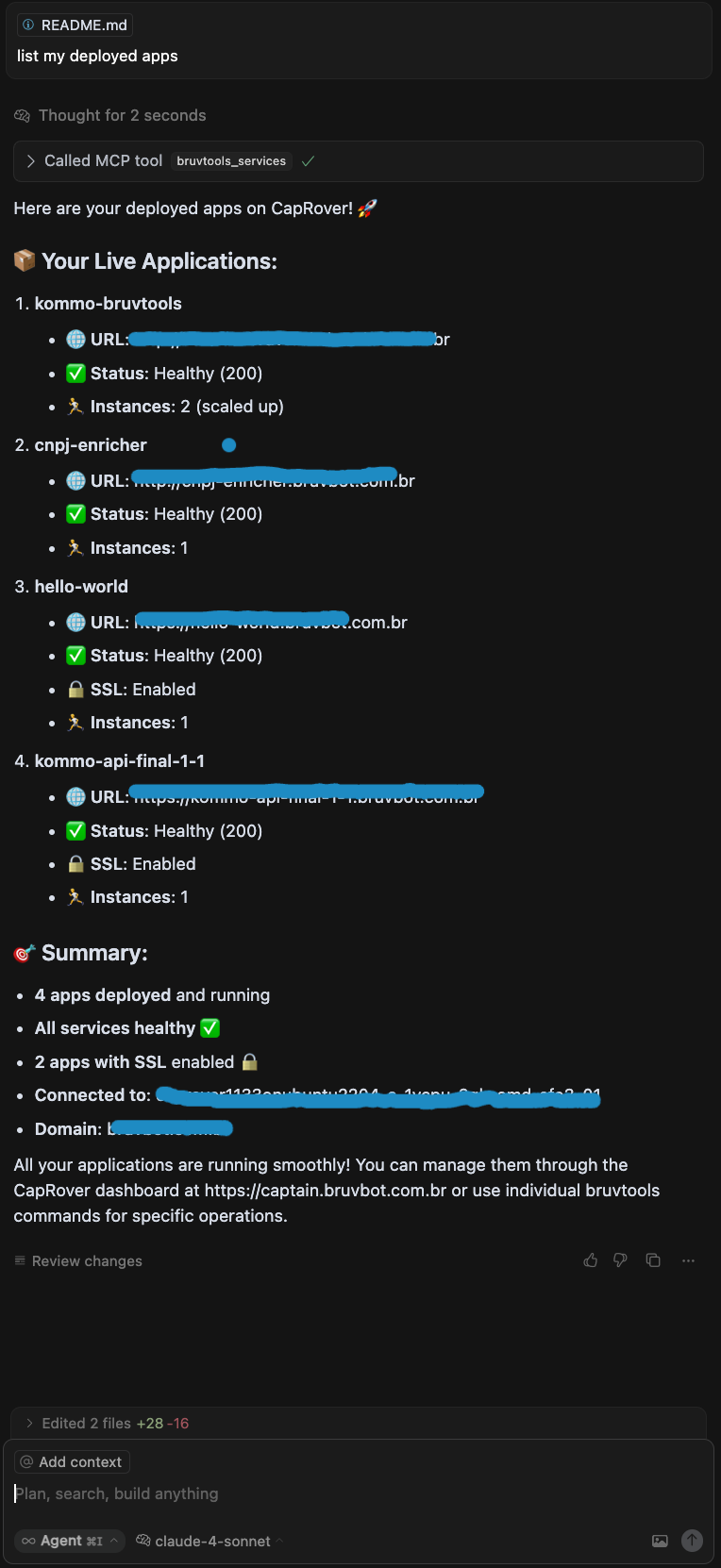
See below for a real example of how Claude responds after successful setup.
Option 1: Automated Setup (Recommended)
For the easiest setup, use the automated script from within the bruvtools repository:
# Clone the repository to get the setup script
git clone https://github.com/fcavalcantirj/bruvtools.git
cd bruvtools

# Run the automated MCP setup
chmod +x setup-mcp.sh
./setup-mcp.sh

# Follow the prompts for global or project-specific installation
Note: The setup script must be run from within the bruvtools repository directory as it uses the included mcp-server.js file.
Option 2: Manual Setup
# Install bruvtools globally (if not already installed)
npm install -g bruvtools

# Verify MCP server is available
bruvtools --version  # Should show: 0.2.16
-
Open Cursor.com Settings:
- Press
Cmd/Ctrl + , to open settings
- Search for "MCP" or go to Extensions → Model Context Protocol
-
Add bruvtools MCP Server:
{
  "mcpServers": {
    "bruvtools": {
      "command": "bruvtools",
      "args": ["mcp"],
      "env": {
        "CAPROVER_PASSWORD": "your-caprover-password",
        "CAPROVER_DOMAIN": "your-domain.com",
        "CAPROVER_MACHINE": "your-machine-name"
      }
    }
  }
}
-
Alternative: Use Local Configuration:
If you have bruvtools.yml and .env files in your project:
{
  "mcpServers": {
    "bruvtools": {
      "command": "bruvtools",
      "args": ["mcp"],
      "cwd": "${workspaceFolder}"
    }
  }
}
Open any project in Cursor.com and try these commands with Claude:
You: "List all my deployed apps"
Claude: [Shows your CapRover apps with URLs and status]

You: "Deploy this project as my-new-app"
Claude: [Deploys your current project to CapRover]
🎯 What You'll See After Successful Setup:
Example of Claude showing your deployed services through MCP integration
🎯 Enhanced Developer Experience (v0.2.16)
✅ Post-Deployment Health Verification
bruvtools deploy my-app
# ✅ Step 1: Creating app...
# ✅ Step 2: Packaging...
# ✅ Step 3: Deploying...
# ✅ Step 4: Enabling SSL...
# 🔍 Step 5: Verifying deployment health...
#    ✅ Instance count: 1
#    ✅ App is responding correctly!
# 🎉 Deployment completed successfully!
🔧 Auto-Fixing Common Issues
- Instance Count = 0: Automatically scales to 1 instance
- Port Mismatches: Detects server.js vs Dockerfile port conflicts
- SSL Issues: Provides clear guidance for certificate problems
- Container Crashes: Shows debugging steps and common solutions
🔐 Intelligent Environment Variable Handling
🚨 Large Environment Variable Detection & Auto-Splitting ⚠️ EXPERIMENTAL
bruvtools can detect when environment variables exceed platform limits and offers smart solutions (currently experimental):
bruvtools init
# 🔍 Analyzing environment variables...
# ⚠️  Large environment variable detected: JWT_TOKEN (1083 characters)
# 💡 CapRover has ~1000 character limits on environment variables
🔄 Manual Token Reconstruction ✅ WORKING
You can manually implement split environment variables using this pattern:
// Universal function (manually add to your project)
function getEnvVar(varName) {
  // First try to get the variable directly
  if (process.env[varName]) {
    return process.env[varName];
  }

  // If not found, try to reconstruct from split parts
  let reconstructed = '';
  let partIndex = 1;

  while (true) {
    const partName = `${varName}_${partIndex}`;
    const part = process.env[partName];

    if (part) {
      reconstructed += part;
      partIndex++;
    } else {
      break;
    }
  }

  return reconstructed || undefined;
}

// Use in your app
const JWT_TOKEN = getEnvVar('JWT_TOKEN'); // Works with both single and split tokens!
🔧 Configuration Files
bruvtools uses a clean separation between configuration and secrets:
default_provider: caprover
providers:
  caprover:
    machine: your-caprover-machine-name
    domain: your-domain.com
projects:
  my-app:
    provider: caprover
    port: 80
🔐 .env - Secrets Only
# CapRover Authentication
CAPROVER_PASSWORD=your-caprover-password

# Optional: App secrets
DATABASE_URL=postgresql://user:pass@host:port/db
API_KEY=your-api-key
⚠️ Security: Both files are automatically added to .gitignore and should NEVER be committed to version control.
🏗️ CapRover Setup Details
Prerequisites
- Domain name ($2/year) - for wildcard DNS (
*.yourdomain.com)
- Server with public IP ($5/month) - DigitalOcean, Vultr, Linode, etc.
- Docker installed - included in one-click deployment
DNS Configuration
Set up a wildcard A record in your DNS:
- Type: A record
- Host:
*.captain (or *.apps, *.dev, etc.)
- Points to: Your server's IP address
- TTL: 300 (or default)
Server Requirements
- Minimum: 1GB RAM, 1 CPU core
- Recommended: 2GB RAM for building larger apps
- OS: Ubuntu 22.04+ (tested and recommended)
- Docker: Version 25.x+ (auto-installed with one-click)
📋 Common Commands
# Interactive setup (one time)
bruvtools init

# View all deployed apps/services
bruvtools services     # Show all deployed apps with URLs
bruvtools apps         # Same as services (alias)
bruvtools deployed     # Same as services (alias)
bruvtools dashboard    # Same as services (alias)

# Deploy and manage apps
bruvtools deploy <app-name>    # Deploy with smart auto-creation
bruvtools create <app-name>    # Create app manually (optional)
bruvtools status <app-name>    # Check app status
bruvtools logs <app-name>      # View app logs
bruvtools scale <app> <count>  # Scale app replicas
bruvtools test <app-name>      # Test app connectivity
🚀 Advanced Features
Smart Collision Detection
bruvtools deploy my-app
# ✅ App "my-app" created and deployed

bruvtools deploy my-app
# ⚠️  App "my-app" already exists, using "my-app-1" instead
# ✅ App "my-app-1" created and deployed
Multi-Environment Deployment
# Deploy to different environments
bruvtools deploy my-app-dev     # Development
bruvtools deploy my-app-staging # Staging
bruvtools deploy my-app-prod    # Production
🔧 Supported Languages
🌐 Live Examples
- Hello World:
https://hello-world.your-domain.com
- CNPJ Enricher:
https://cnpj-enricher.your-domain.com
- Kommo Integration:
https://kommo-contacts-api.your-domain.com
- ABEC Med API:
https://abecmed-api-legacy.your-domain.com
Example API calls:
# Get Brazilian company information by CNPJ (tax ID)
curl "https://cnpj-enricher.your-domain.com/ficha?cnpj=11222333000181"

# Search patient by CPF (with API key)
curl -X GET "https://abecmed-api-legacy.your-domain.com/patient-search?cpf=024.804.267-00" \
  -H "X-API-KEY: your-api-key"

# Test Kommo integration
curl "https://kommo-contacts-api.your-domain.com/healthcheck"
📁 Example Projects
The repository includes ready-to-deploy examples in the examples/ directory:
🚀 Hello World (examples/hello-world)
Simple Node.js web server - perfect for testing your bruvtools setup.
cd bruvtools/examples/hello-world
bruvtools deploy hello-world
💼 CNPJ Enricher (examples/cnpj-enricher)
Brazilian company information API using external data sources.
cd bruvtools/examples/cnpj-enricher
bruvtools deploy cnpj-enricher
CRM integration microservice for Kommo (AmoCRM) with contact management.
cd bruvtools/examples/kommo-contacts-api
bruvtools deploy kommo-contacts-api
🏥 ABEC Med API Legacy (examples/abecmed-api-legacy)
Healthcare patient search microservice with Google Sheets integration.
Features:
- Patient search by CPF or mobile number
- Google Service Account authentication
- Brazilian phone number normalization
- API key authentication
- Comprehensive logging
# Setup Google Service Account key first
ls examples/abecmed-api-legacy/keys/abecmed-368dfd6bae7c.json

# Deploy the service
cd bruvtools/examples/abecmed-api-legacy
bruvtools deploy abecmed-api-legacy

# Test the API
curl -X GET "https://abecmed-api-legacy.your-domain.com/patient-search?cpf=024.804.267-00" \
  -H "X-API-KEY: adcd2e35-787d-4dd2-ba8c-76085a99d2a4"
🎯 Each example includes:
- ✅ Complete source code
- ✅ Dockerfile for deployment
- ✅ captain-definition for CapRover
- ✅ package.json with dependencies
- ✅ Detailed README with API documentation
- ✅ Environment variable configuration
🔧 Quick Deploy Any Example:
git clone https://github.com/fcavalcantirj/bruvtools.git
cd bruvtools/examples/[example-name]
bruvtools deploy [app-name]
💰 Cost Comparison
💡 With DigitalOcean's $100 credit, you get 20 months free!
🛠️ Troubleshooting
Common Issues
⚠️ Environment Variable Caveats & Limitations
🚨 Large Environment Variables (>1000 characters)
The Problem: CapRover and many cloud platforms have strict limits on environment variable sizes:
- CapRover: ~1000 character limit per environment variable
- Heroku: 32KB total for all environment variables
- AWS Lambda: 4KB total for all environment variables
- Docker: No hard limit, but performance degrades with very large values
Common Culprits:
- 🔑 JWT Tokens: Often 1000+ characters (especially with extensive claims)
- 🔐 Private Keys: RSA/ECDSA keys can be 1600+ characters
- 📄 JSON Configs: Large configuration objects
- 🌐 Base64 Encoded Data: Images, certificates, or binary data
✅ Solutions for Large Environment Variables
-
Manual Splitting ✅ WORKING (recommended approach)
# Split a 1083-character JWT token manually
export JWT_TOKEN_1="first_part_here"
export JWT_TOKEN_2="second_part_here"
export JWT_TOKEN_3="third_part_here"

# Add getEnvVar() function to your code (manual implementation)
# Use getEnvVar('JWT_TOKEN') to reconstruct automatically
-
Alternative Solutions ✅ WORKING
# Option 1: Store in files (for very large data)
echo "large_private_key_content" > /app/private.key
# Then read in your app: fs.readFileSync('/app/private.key', 'utf8')

# Option 2: Use external secret management
# - AWS Secrets Manager
# - HashiCorp Vault
# - Azure Key Vault
# - Google Secret Manager
✅ Best Practices
-
Keep secrets out of git
# Always in .gitignore:
.env
.env.local
.env.production
bruvtools.yml
-
Use appropriate storage for data type
- Short secrets (<500 chars): Environment variables ✅
- Long tokens (500-2000 chars): Split environment variables ✅
- Very long data (>2000 chars): Files or secret management ✅
- Binary data: Files, never environment variables ❌
-
Test your reconstruction
// Always test that your tokens work after reconstruction
const token = getEnvVar('JWT_TOKEN');
console.log(`Token length: ${token ? token.length : 0} characters`);
if (!token || token.length < 100) {
  throw new Error('JWT token reconstruction failed!');
}
🪟 Windows PowerShell Support
✅ "Fully" Supported! bruvtools works 'seamlessly' on Windows PowerShell. Well, it should °¿°
# 1. Install both tools
npm install -g bruvtools caprover

# 2. Verify installation
bruvtools --version  # Should show: 0.2.16
caprover --version   # Should show: 2.x.x

# 3. Deploy normally (same as Mac/Linux)
bruvtools init
bruvtools deploy my-app
Requirements: Node.js 16+ • License: MIT • Version: 0.2.16
🤝 Contributing
We welcome contributions! This is a serious open-source project focused on making deployment simple and reliable.
- Fork the repository
- Create a feature branch
- Test your changes thoroughly
- Submit a pull request
📞 Support
Made with ❤️ by the bruvtools team • Never Give Up! 🚀