Cisco NSO MCP Server

Cisco NSO MCP Server

cisco-nso-mcp-server•bydbono711

A Model Context Protocol server that exposes Cisco NSO network data and operations as MCP tools and resources for AI-powered network automation.

License: MIT License•Runtime: Awaiting documentation review•Category: cloud devops

WHAT IT DOES

  • •Provides tools to retrieve NSO device information including NED IDs, device groups, platform information, configuration, and state.
  • •Offers tools to check device sync status, sync from a device, and list service types and services.
  • •Exposes an environment resource summarizing NSO device counts, OS and model distributions, and device groups.
  • •Supports stdio and HTTP transports, asynchronous operations, and structured responses.

BEST FOR

  • •Network engineers wanting to query and inspect Cisco NSO devices through natural language AI clients.
  • •Teams managing NSO device synchronization and service listing from MCP-compatible clients.

ABOUT CISCO-NSO-MCP-SERVER

Cisco NSO MCP Server is cataloged as an MCP server attributed to dbono711. A Model Context Protocol server that exposes Cisco NSO network data and operations as MCP tools and resources for AI-powered network automation. It is categorized under cloud devops. See the capability inspector for recorded interfaces and their independent review status; consult upstream documentation for the current interface.

HOW TO INSTALL

Installation configuration is not reviewed. No executable setup is offered for this entry; inspect the source repository before proceeding.

LICENSE

Catalog license label: MIT License. Check the source repository's current license and terms before using, modifying or distributing this software.

能力检查器

能力定义尚未审核。未核验的采集内容不会作为可信接口展示。

Tools (0)

暂无可展示的已审核记录。这不表示上游不支持此能力。

Resources (0)

暂无可展示的已审核记录。这不表示上游不支持此能力。

Prompts (0)

暂无可展示的已审核记录。这不表示上游不支持此能力。

NEWSLETTER - COMING LATER

Newsletter subscriptions are not open yet

Email delivery is not connected. This page does not collect email addresses or create subscriptions.

Browse the registry for current listings instead.

Community Reviews

Coming later

Reviews for Cisco NSO MCP Server are not available yet

Review publishing and storage are not connected. This page does not collect or publish ratings or comments, including after sign-in.

FREQUENTLY ASKED QUESTIONS

What transports does the server support?

It supports stdio transport by default and an optional HTTP transport.

How does the server connect to Cisco NSO?

It uses the cisco-nso-restconf library for a Pythonic interface to NSO's RESTCONF API, with connection parameters configurable via arguments or environment variables.

上游原版 README

在 GitHub 查看同一版本原文

README.md · cea88ca1affd · 采集于 2026-11-13 13:06:55 UTC

保留上游原文,不做 AI 改写。为安全起见过滤脚本、表单和不安全链接。

当前显示最后一次成功采集的文档快照,请以来源页面为准。

Cisco NSO MCP Server

A Model Context Protocol (MCP) server implementation for Cisco NSO (Network Services Orchestrator) that exposes NSO data and operations as MCP primitives (Tools, Resources, etc.) that can be consumed by an MCP-compatible client, enabling AI-powered network automation through natural language interactions.

Sample Custom Client
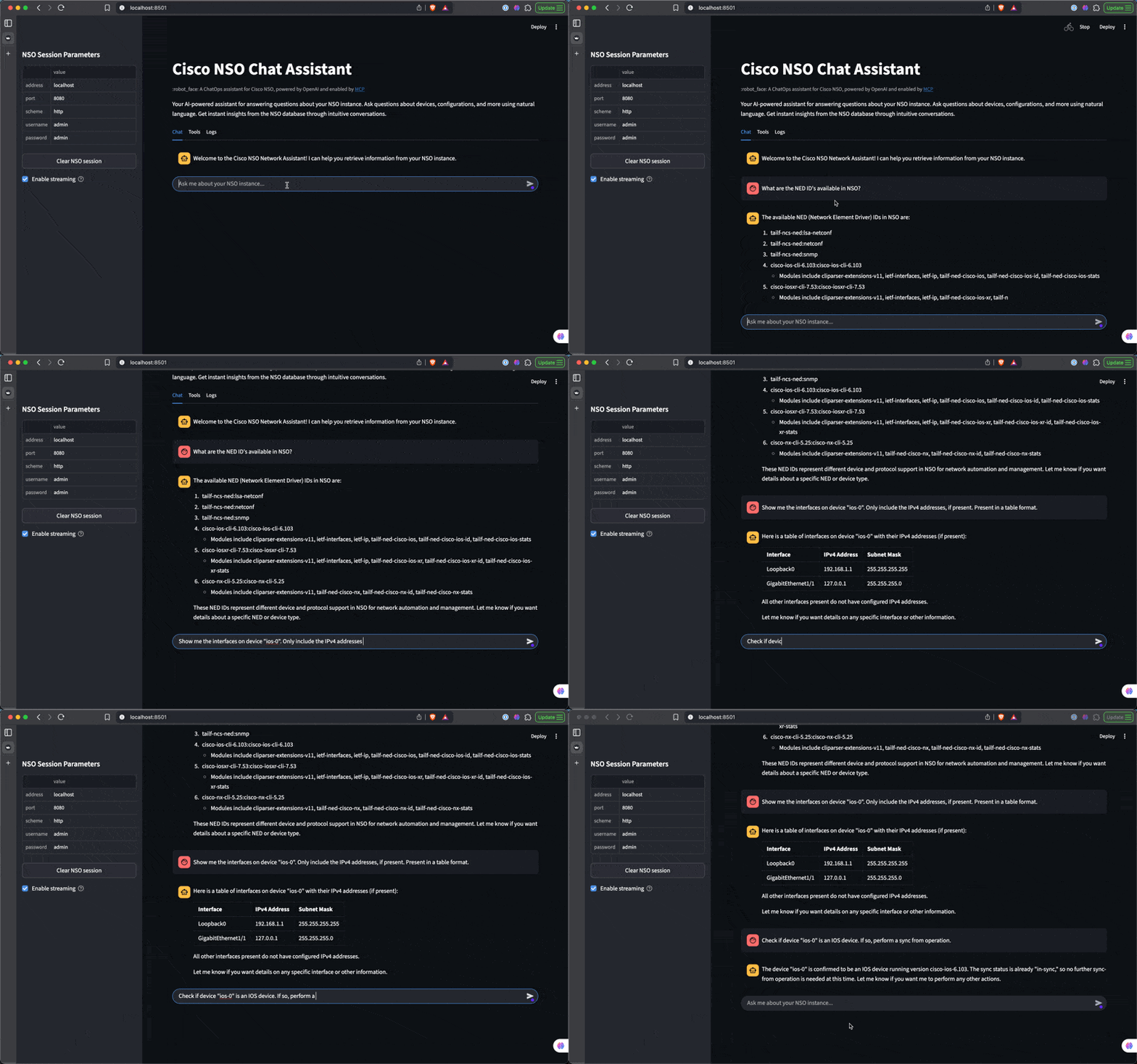
demo

What is MCP?

Model Context Protocol (MCP) is an open protocol that standardizes how AI models interact with external tools and services. MCP enables:

  • Tool Definition: Structured way to define tools that AI models can use
  • Tool Discovery: Mechanism for models to discover available tools
  • Tool Execution: Standardized method for models to call tools and receive results
  • Context Management: Efficient passing of context between tools and models
  • Framework Agnostic: Works across multiple AI frameworks including OpenAI, Anthropic, Google Gemini, and others
  • Interoperability: Provides a common language for AI systems to communicate with external tools

Features

  • Stdio Transport: By default, this MCP server uses stdio transport for process-bound communication
  • Tool-First Design: Network operations are defined as discrete tools with clear interfaces
  • Asynchronous Processing: All network operations are implemented asynchronously for better performance
  • Structured Responses: Consistent response format with status, data, and metadata sections
  • Environment Resources: Provides contextual information about the NSO environment
  • NSO Integration: Uses cisco-nso-restconf library for a clean, Pythonic interface to NSO's RESTCONF API
  • Flexible Logging: Configurable logging to stdout and/or file via environment variables. When the LOG_FILE environment variable is set, logs are sent to both stdout and the specified file. If the log file cannot be created or written to, the server falls back to stdout-only logging with an error message
  • Multiple Client Support: Works with any MCP-compatible client including Windsurf Cascade and custom Python applications

Available Tools and Resources

Tools

Tool NameDescriptionInputsReturns
get_device_ned_idsRetrieves Network Element Driver (NED) IDs from Cisco NSOA dictionary with a list of NED IDs
get_device_groupsRetrieves device groups from Cisco NSOA dictionary with a list of device groups
get_device_platformGets platform information for a specific device in Cisco NSO'device_name' (string)A dictionary with platform information for the specified device
get_device_configGets full configuration for a specific device in Cisco NSO'device_name' (string)A dictionary with configuration for the specified device
get_device_stateGets state for a specific device in Cisco NSO'device_name' (string)A dictionary with state for the specified device
check_device_syncChecks sync status for a specific device in Cisco NSO'device_name' (string)A dictionary with sync status for the specified device
sync_from_deviceSyncs from a specific device in Cisco NSO'device_name' (string)A dictionary with sync status for the specified device
get_service_typesGets service types in Cisco NSOA dictionary with service types
get_servicesGets services for a specific service type in Cisco NSO'service_type' (string)A dictionary with services for the specified service type

Resources

  • https://resources.cisco-nso-mcp.io/environment: Provides a curated summary of the NSO environment:
    • Device count, Operating System Distribution, Unique Operating System Count, Unique Model Count, Model Distribution, Device Series Distribution, Device Groups and Members

Requirements

  • Python 3.12+
  • Cisco NSO with RESTCONF API enabled
  • Network connectivity to NSO RESTCONF API

Configuration Options

You can configure the server using command-line arguments or environment variables:

NSO Connection Parameters

Command-line ArgumentEnvironment VariableDefaultDescription
--nso-schemeNSO_SCHEMEhttpNSO connection scheme (http/https)
--nso-addressNSO_ADDRESSlocalhostNSO server address
--nso-portNSO_PORT8080NSO server port
--nso-timeoutNSO_TIMEOUT10Connection timeout in seconds
--nso-usernameNSO_USERNAMEadminNSO username
--nso-passwordNSO_PASSWORDadminNSO password
--nso-verifyNSO_VERIFYTrueVerify NSO HTTPS certificate (default: True). Use --no-nso-verify for self-signed certs (dev only).
--nso-ca-bundleNSO_CA_BUNDLENonePath to a CA bundle file to trust for NSO HTTPS. Applicable when -nso-verify is True.

MCP Server Parameters

Command-line ArgumentEnvironment VariableDefaultDescription
--transportMCP_TRANSPORTstdioMCP transport type (stdio/http)

HTTP Transport Options (only used when --transport=http)

FastMCP HTTP Server reference: https://gofastmcp.com/deployment/http#http-deployment

Command-line ArgumentEnvironment VariableDefaultDescription
--hostMCP_HOST0.0.0.0Host to bind to when using HTTP transport
--portMCP_PORT8000Port to bind to when using HTTP transport

Logging Configuration

Environment VariableDefaultDescription
LOG_FILENonePath to log file. If not set, logs will be sent to stdout only

Environment variables take precedence over default values but are overridden by command-line arguments.

Connecting to the Server with MCP Clients

You can connect to the server using any MCP client that supports the selected transport type. A few options are:

Windsurf Cascade

Windsurf Cascade supports MCP servers through a configuration file. To use the Cisco NSO MCP server with Windsurf, add it to your mcp_config.json file.

When using uv, no specific installation is needed. You can use uvx to directly run the package:

{
  "mcpServers": {
    "nso": {
      "command": "uvx",
      "args": [
        "cisco-nso-mcp-server",
        "--nso-address=127.0.0.1",
        "--nso-port=8080",
        "--nso-username=admin",
        "--nso-password=admin"
      ],
      "env": {
        "LOG_FILE": "/path/to/your/logs/nso-mcp.log"
      }
    }
  }
}

Using with pip installation

Alternatively, you can install cisco-nso-mcp-server via pip:

pip install cisco-nso-mcp-server

Now you can use the direct path to the executable:

{
  "mcpServers": {
    "nso": {
      "command": "/path/to/your/env/bin/cisco-nso-mcp-server",
      "args": [
        "--nso-address=127.0.0.1",
        "--nso-port=8080",
        "--nso-username=admin",
        "--nso-password=admin"
      ],
      "env": {
        "LOG_FILE": "/path/to/your/logs/nso-mcp.log"
      }
    }
  }
}

Replace /path/to/your/env/bin/cisco-nso-mcp-server with the actual path where you installed the package with pip. You can find this by running which cisco-nso-mcp-server if you installed it in your main environment, or by locating it in your virtual environment's bin directory.

In either case, the env section is optional. If you include it, you can specify the LOG_FILE environment variable to enable file logging.

Using in a custom MCP client Python application with stdio transport

A sample Python application is provided in sample_stdio_client.py that demonstrates how to connect to the MCP server locally and execute a tool.

Running the Server as Standalone

While the server is typically used with an MCP client, you can also run it directly as a standalone process:

# Run with default NSO connection and MCP settings (see Configuration Options above for details)
cisco-nso-mcp-server

# Run with custom NSO connection parameters
cisco-nso-mcp-server --nso-scheme=http --nso-address=127.0.0.1 --nso-port=8080 --nso-username=admin --nso-password=admin

When running as a standalone process with stdio transport, you'll need to pipe input/output to the process or use it with an MCP client that supports stdio transport.

License

This project is licensed under the MIT License. This means you can use, modify, and distribute the code, subject to the terms and conditions of the MIT License.

Install configuration

Are you the maintainer?

Claim this server with your GitHub account to request manual ownership verification.

README Embed Badge
Markdown

Link to the catalog listing for Cisco NSO MCP Server from your README. This badge does not certify ownership, compatibility or security.

[![MCP catalog listing](https://img.shields.io/badge/MCP-awesome--mcp-orange?style=flat-square)](https://awesome-mcp.com/servers/cisco-nso-mcp-server)

REPOSITORY STATS

GitHub StarsUnavailable
ForksUnavailable

Public repository statistics could not be verified. Check the configured source address; unavailable counts are not zero.

下载与拉取统计

来源、范围和时段分别列出;不相加,不代表安装人数、活跃用户或安全审核。

尚无已审核的包 / 镜像标识,暂不展示下载统计。

Related cloud devops MCP Servers

Alternative and complementary servers in the same category

View all in cloud devops →
Huawei MCP Server
mcp-server-huaweiclouddeveloper•huaweiclouddeveloper

A Model Context Protocol server built on Huawei Cloud services that enables AI assistants to operate Huawei Cloud resources within conversational workflows, supporting ECS, OBS, GaussDB, and other cloud products.

Repository stats unavailable
Cloud & DevOps
Coolify MCP Server
coolify-mcp-server•wrediam

An MCP server that exposes the Coolify v4.3.1 REST API so AI clients can manage applications, databases, services, servers, deployments, and more.

Repository stats unavailable
Cloud & DevOps

A deprecated Model Context Protocol server for interacting with Kong Konnect APIs, enabling AI assistants to query and analyze Kong Gateway configurations, traffic, and analytics.

Repository stats unavailable
Cloud & DevOps