

A directory listing describing a cancellation-letter and mailing-address service. The configured public GitHub repository returned 404 during source verification.
Repository stats unavailable
Developer Tools
A Windows automation server for the Model Context Protocol offering 52 consolidated tools for desktop, browser, and system management.
WinWright is cataloged as an MCP server attributed to civyk-official. A Windows automation server for the Model Context Protocol offering 52 consolidated tools for desktop, browser, and system management. It is categorized under developer tools. See the capability inspector for recorded interfaces and their independent review status; consult upstream documentation for the current interface.
Installation configuration is not reviewed. No executable setup is offered for this entry; inspect the source repository before proceeding.
Catalog license label: Not specified. Check the source repository's current license and terms before using, modifying or distributing this software.
能力定义尚未审核。未核验的采集内容不会作为可信接口展示。
暂无可展示的已审核记录。这不表示上游不支持此能力。
暂无可展示的已审核记录。这不表示上游不支持此能力。
暂无可展示的已审核记录。这不表示上游不支持此能力。
Email delivery is not connected. This page does not collect email addresses or create subscriptions.
Browse the registry for current listings instead.
Reviews for WinWright are not available yet
Review publishing and storage are not connected. This page does not collect or publish ratings or comments, including after sign-in.
README.md · 8f89cf875a85 · 采集于 2026-11-13 12:06:41 UTC
保留上游原文,不做 AI 改写。为安全起见过滤脚本、表单和不安全链接。
当前显示最后一次成功采集的文档快照,请以来源页面为准。



Windows automation server for the Model Context Protocol.
52 consolidated tools for desktop (WPF, WinForms, Win32), browser (Chrome/Edge via CDP),
and system management — accessible to AI agents over MCP, or driven directly from the
command line (winwright call …) when MCP is blocked.
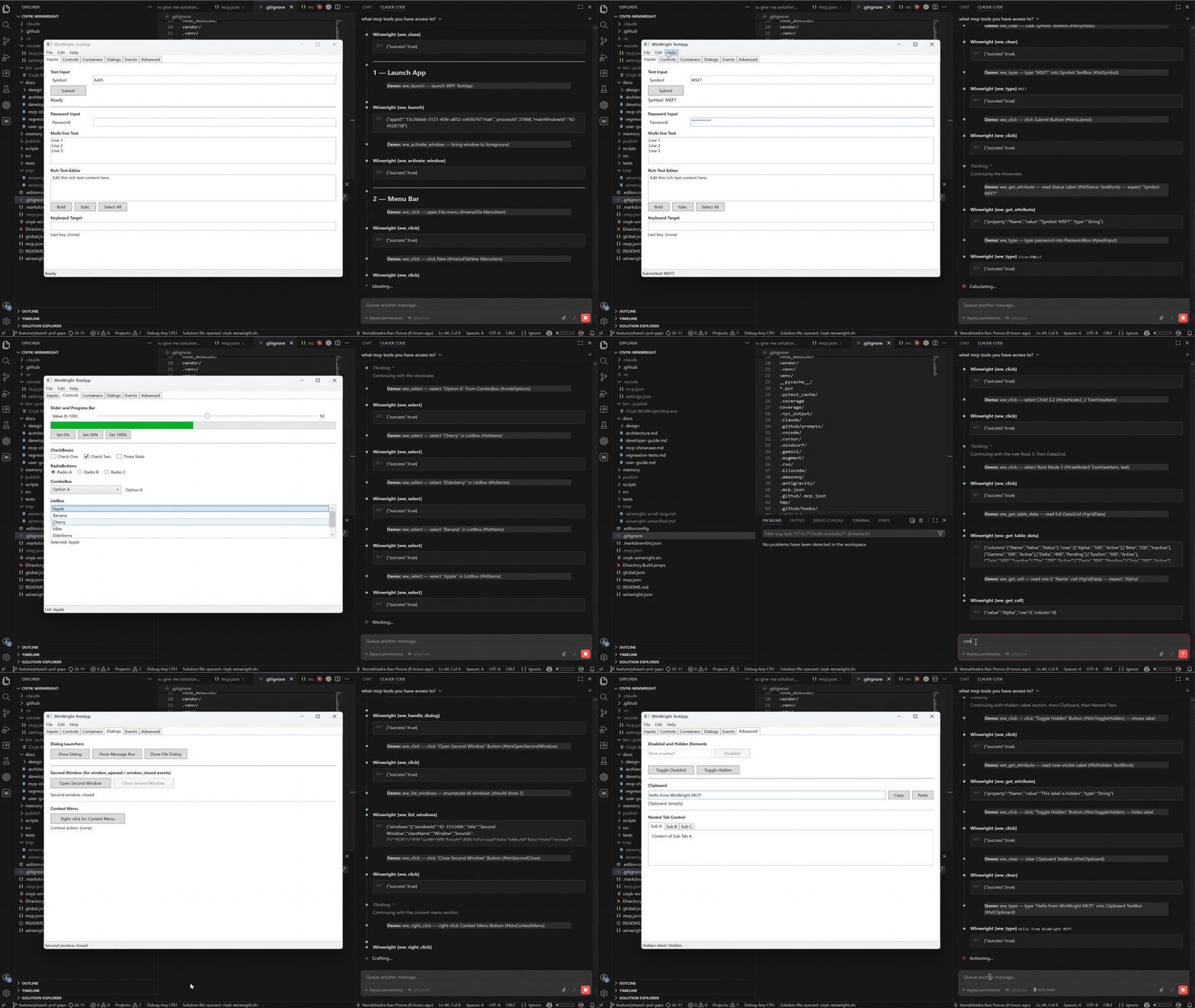
You write test cases in plain English. The AI agent uses WinWright's MCP tools to discover UI controls, perform actions, and record everything as a portable JSON script.
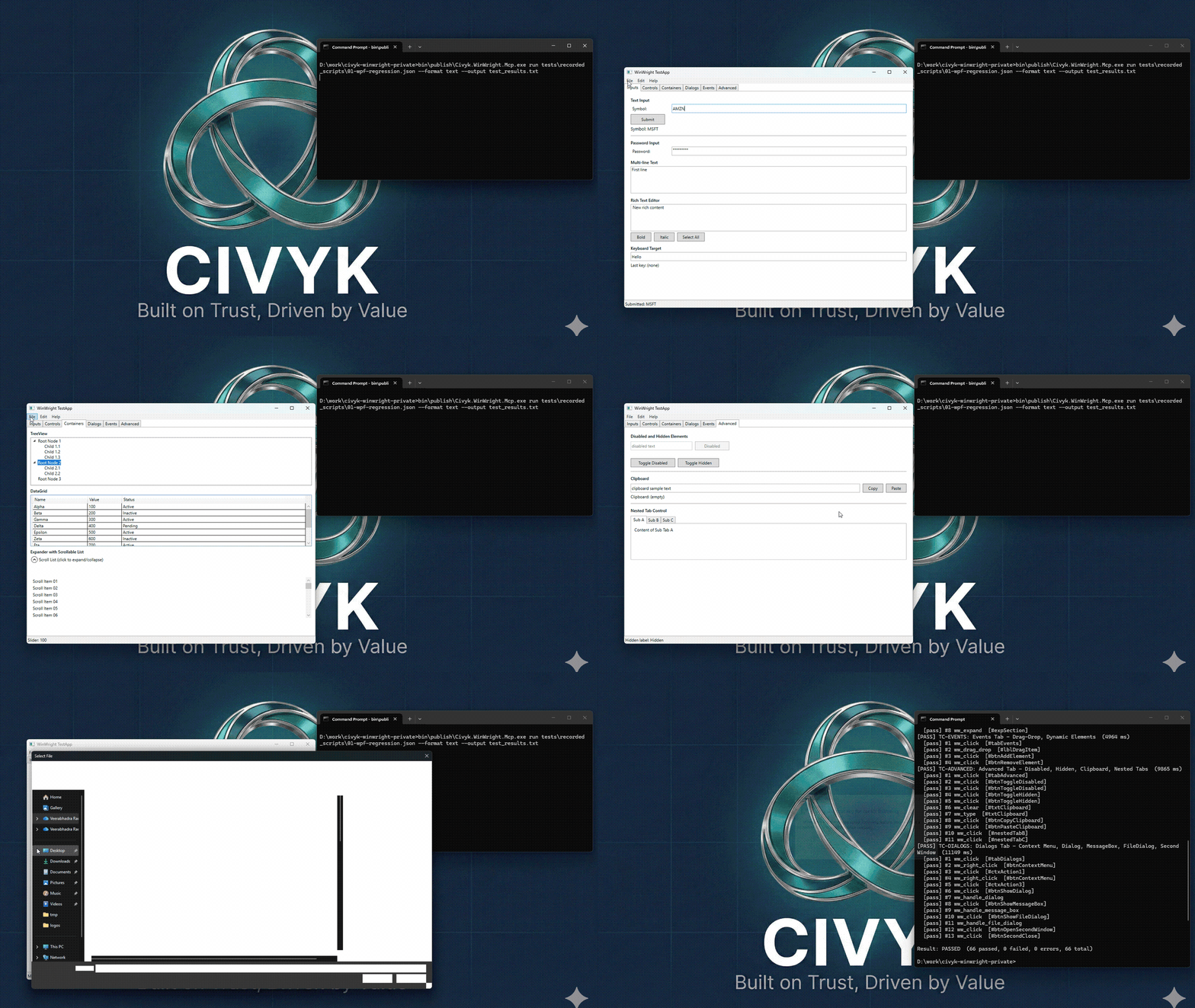
Once recorded, scripts run deterministically with winwright run — no AI agent,
no LLM calls, no token costs. Results are the same every time.
If the UI layout changes, WinWright can self-heal broken selectors automatically
(winwright heal). For larger UI redesigns, ask the AI agent to update the script —
still faster than rewriting tests from scratch.
Why this matters:
Install, configure your MCP client, then ask the agent to do something:
"Launch Notepad, type 'Hello from WinWright', then read back what you typed."
The agent calls WinWright tools and returns results:
ww_launch    → { "processId": 12840, "mainWindowTitle": "Untitled - Notepad" }
ww_type      → { "success": true }
ww_get_value → { "value": "Hello from WinWright" }
Every tool returns structured JSON. The agent decides which tools to call and in what order — you describe the goal in plain language.
Download from GitHub Releases:
| Asset | Architecture |
|---|---|
winwright-*-win-x64.zip | Intel/AMD 64-bit |
winwright-*-win-arm64.zip | ARM64 (Surface Pro, etc.) |
{
  "servers": {
    "winwright": {
      "type": "stdio",
      "command": "C:/path/to/Civyk.WinWright.Mcp.exe",
      "args": ["mcp"]
    }
  }
}
Start the server first: Civyk.WinWright.Mcp.exe serve --port 8765
{
  "servers": {
    "winwright": {
      "type": "http",
      "url": "http://localhost:8765/mcp"
    }
  }
}
{
  "mcpServers": {
    "winwright": {
      "command": "C:/path/to/Civyk.WinWright.Mcp.exe",
      "args": ["mcp"]
    }
  }
}
Many corporate environments block MCP. WinWright can be driven entirely from the command line
instead — the same tools, the same automation, with no MCP client between the agent and the
tool. A background daemon (a loopback serve instance) owns the live sessions, so the appId
returned by ww_launch stays valid across separate commands.
winwright tools                          # discover the tool surface (replaces MCP advertisement)
winwright call ww_launch --exePath "C:\Apps\MyApp.exe"   # -> {"appId":"app-1", ...}
winwright call ww_click  --appId app-1 --selector "#submit"
winwright call ww_get_value --appId app-1 --selector "#status"
winwright call ww_close  --appId app-1
JSON results go to stdout (safe to pipe to jq); diagnostics go to stderr. The daemon auto-starts
on the first call, binds to loopback only, and self-exits when idle.
Because the CLI doesn't advertise its capabilities the way MCP does, install the bundled Claude Code skill so an agent knows how to use it — embedded in the binary, so it installs offline:
winwright skills install --scope user      # -> %USERPROFILE%\.claude\skills\winwright\
winwright skills install --scope project   # -> <cwd>\.claude\skills\winwright\
Each card links to a detailed walkthrough with real prompts, tool call parameters, and example output. Browse all guides in docs/use-cases/.
Record an AI session once — the agent discovers the UI, performs actions, embeds assertions — then export a portable JSON script that replays in CI without an AI agent. Describe your app or paste your existing manual test suite; the agent scripts it automatically.
Give an AI agent access to your desktop. It launches apps, moves data between them, fills forms, and takes screenshots for verification — no scripts to write or maintain.
Many enterprise apps have no API. If Windows UI Automation can see a control, WinWright can read its value. Extract data from apps that were never built for integration.
Record a repetitive daily workflow once. Export as an RPA script and replay on demand — no AI agent required after the recording. Ideal for report exports, data imports, and any multi-step task that runs the same way every time.
An AI agent explores your WinForms or WPF app, finds elements, and asserts state. No brittle XPath selectors to maintain — the agent adapts when UI changes.
Drive an app through 50+ records automatically. Compare each displayed value against a reference table and get a structured pass/fail report with discrepancy details.
Automate workflows that span desktop apps and browser — read from an accounting app, submit to a web portal, screenshot the confirmation.
Verify a running app is alive and responsive — process running, connection status showing 'Connected', service healthy. Pair with Windows Task Scheduler for scheduled checks.
Manage processes, services, registry, and scheduled tasks on remote machines over HTTP. Five-layer security: IP allowlist, Windows Negotiate auth, AD group authorization, rate limiting, and per-user session limits.
Traverse the full UIA element tree. Check that controls have names, buttons have labels, and keyboard paths exist. The AI agent generates a compliance report.
Detect unexpected confirmation dialogs, file-save prompts, and Win32 MessageBox popups after every click. Handle or dismiss them without breaking the automation flow.
52 consolidated tools across four categories, plus a cross-cutting security layer (merged from 110+ via action/mode parameters):
| Category | Tools | What it does |
|---|---|---|
| Desktop Automation | 33 | Launch/attach/close apps, click, type, read values, screenshots, tree navigation and queries, waits, grids (ww_grid), dialogs (ww_dialog), windows (ww_window), clipboard, session handles (UIA3) |
| System | 8 | Processes, registry, environment variables, file system, network, services, scheduled tasks, machine control |
| AI Agent | 7 | Semantic snapshots & state diffing (ww_snapshot), element inspection (ww_inspect), event watching, test case recording, selector healing (ww_heal_script), ww_get_schema for tool discovery |
| Browser | 4 | Chrome/Edge via CDP — sessions, pages, elements, advanced (eval/forms/dialogs). No Selenium dependency |
| Security | — | Cross-cutting: runtime permission guards with AD group overrides, JSONL audit logging |
Each tool supports multiple actions via an action parameter (e.g., ww_service(action="list"), ww_snapshot(action="get")), reducing the total tool count while maintaining full functionality. Discover the live surface anytime with winwright tools.
Create winwright.json next to the binary (or %APPDATA%\WinWright\winwright.json).
All settings live under a top-level WinWright section:
{
  "WinWright": {
    "Permissions": {
      "AllowShell": false,
      "AllowProcessKill": false,
      "AllowRegistryWrite": false,
      "AllowFileWrite": false,
      "AllowServiceControl": false,
      "AllowTaskScheduler": false,
      "AllowPower": false,
      "AllowLockScreen": false,
      "AllowMachineEnv": false,
      "AllowBrowserEval": false,
      "AllowNetworkProbe": true,
      "AllowFileRead": true
    },
    "Audit": {
      "Enabled": true,
      "RetentionDays": 30
    }
  }
}
All destructive operations are disabled by default — enable only what you need.
AllowNetworkProbe (ping/DNS) and AllowFileRead (ww_file read/list) are the only
default-true permissions; both are read-only, and worth setting to false when serving
over HTTP to remote clients. Gated calls are audit-logged to daily-rotated
audit-YYYY-MM-DD.jsonl files.
winwright mcp                                    Start MCP server (stdio)
winwright serve --port N                         Start MCP server (HTTP, default 8765)
winwright tools [--json|<name>]                  List the tool surface (CLI discovery; no MCP client needed)
winwright call <tool> [--param value …]          Invoke one tool via the local daemon (CLI automation)
winwright daemon <start|stop|status>             Control the background host that owns CLI sessions
winwright skills <install|list|uninstall>        Install the bundled Claude Code skill (offline)
winwright run <script.json> [--format text|junit] [--output <file>] [--screenshots [--screenshots-dir <dir>]]
                                                 Replay a recorded automation script
winwright heal <script.json> [--output <file>] [--min-confidence <0-1>]
                                                 Probe broken selectors against a live UI and repair them
                                                 (launches/attaches using the script's own metadata)
winwright inspect <pid>                          Dump UIA element tree for a process
winwright doctor                                 Verify environment prerequisites
Good fit:
Not a good fit:
| WinWright | UiPath | Power Automate Desktop | Playwright | |
|---|---|---|---|---|
| What it automates | Desktop + browser + system | Desktop + browser + system | Desktop + browser + cloud | Browser only |
| How you use it | AI agent via MCP (natural language) | Visual workflow designer | Visual workflow designer | Code (JS/Python/C#) |
| Desktop support | WPF, WinForms, Win32 (UIA3) | WPF, WinForms, Win32, Java, SAP | WPF, WinForms, Win32 | None |
| Browser support | Chrome/Edge via CDP | Chrome, Edge, Firefox | Chrome, Edge, Firefox | Chrome, Edge, Firefox, Safari |
| Selector model | AI picks elements by name/type | Visual selector recorder | Visual selector recorder | CSS/XPath selectors |
| Cost | Free | Licensed (per-user/bot) | Free (desktop), licensed (cloud) | Free |
| Setup | Single binary, no runtime | Full install + studio | Windows store app | npm install |
| Designed for | AI agents and MCP clients | Enterprise RPA | Business user automation | Developer testing |
WinWright is not an RPA platform. It's a tool server that gives AI agents access to Windows. If you need a visual workflow builder or enterprise orchestration, UiPath or Power Automate are better choices. If you need browser-only testing, Playwright is more mature.
WinWright fits where those tools don't — when an AI agent needs to see and operate the Windows desktop, or when you need desktop + browser in one MCP session.
Help keep this project alive and growing!
If WinWright has helped your development workflow, consider supporting its continued development. Your contribution helps with:
50% of all donations go directly to children's charities helping those in need. The remaining funds support project maintenance and feature upgrades.


Every contribution, no matter the size, makes a difference.
Free to use for any purpose — personal, academic, commercial. See LICENSE for full terms. Attribution required when redistributing.
Built on Trust, Driven by Value — Civyk
Claim this server with your GitHub account to request manual ownership verification.
Link to the catalog listing for WinWright from your README. This badge does not certify ownership, compatibility or security.
[](https://awesome-mcp.com/servers/civyk-winwright)Public repository statistics could not be verified. Check the configured source address; unavailable counts are not zero.
来源、范围和时段分别列出;不相加,不代表安装人数、活跃用户或安全审核。
尚无已审核的包 / 镜像标识,暂不展示下载统计。
Alternative and complementary servers in the same category
A directory listing describing a cancellation-letter and mailing-address service. The configured public GitHub repository returned 404 during source verification.

A hosted MCP service for browsing and searching through Singapore mobile-network proxies.

A directory listing describing a Markdown-to-PDF service. The configured public GitHub repository returned 404 during source verification.