
A directory listing describing a cancellation-letter and mailing-address service. The configured public GitHub repository returned 404 during source verification.
Repository stats unavailable
Developer Tools
A portable workflow layer exposed as an MCP server that provides versioned prompt templates, composable chains, validation gates, reasoning frameworks and output styles to AI coding clients.
Claude Prompts MCP server is cataloged as an MCP server attributed to minipuft. A portable workflow layer exposed as an MCP server that provides versioned prompt templates, composable chains, validation gates, reasoning frameworks and output styles to AI coding clients. It is categorized under developer tools. See the capability inspector for recorded interfaces and their independent review status; consult upstream documentation for the current interface.
Installation configuration is not reviewed. No executable setup is offered for this entry; inspect the source repository before proceeding.
Catalog license label: Not specified. Check the source repository's current license and terms before using, modifying or distributing this software.
能力定义尚未审核。未核验的采集内容不会作为可信接口展示。
暂无可展示的已审核记录。这不表示上游不支持此能力。
暂无可展示的已审核记录。这不表示上游不支持此能力。
暂无可展示的已审核记录。这不表示上游不支持此能力。
Email delivery is not connected. This page does not collect email addresses or create subscriptions.
Browse the registry for current listings instead.
Reviews for Claude Prompts MCP server are not available yet
Review publishing and storage are not connected. This page does not collect or publish ratings or comments, including after sign-in.
Yes; without hooks the client calls the three MCP tools explicitly, while hooks make the shorthand operators work in conversation.
The bundled set ships 52 prompts across 9 categories, and users can add their own via resource_manager.
README.md · 98225789dd51 · 采集于 2026-11-13 09:33:24 UTC
保留上游原文,不做 AI 改写。为安全起见过滤脚本、表单和不安全链接。
当前显示最后一次成功采集的文档快照,请以来源页面为准。

The portable workflow layer beside your AI coding harness.
Your client executes with its own tools, agents, and context.
Claude Prompts adds reusable prompt resources, composable chains, validation gates, and client-native skill export.




Quick Start · What You Get · Compose Workflows · Run Anywhere · Docs
| Your client already does | This server adds |
|---|---|
| Run a prompt | Compose prompts with validation, reasoning guidance, and formatting in one expression |
| Single-shot skills | Multi-step workflows that thread context between steps |
| Execute subagents | Hand off mid-chain steps to agents with full workflow context |
| Client-native skill format | Author once as YAML, export to any client with skills:export |
| Manual prompt writing | Versioned templates with hot-reload, rollback, and history |
| Trust the output | Validate output between steps: self-evaluation and shell commands |
/commands already handle what you need, or you're looking for a no-code prompt library./plugin marketplace add minipuft/minipuft-plugins # first time only
/plugin install claude-prompts@minipuft
>>tech_evaluation_chain library:'zod' context:'API validation'
Turn on hooks in ~/.codex/config.toml, then install the plugin:
[features]
hooks = true
codex plugin marketplace add https://github.com/minipuft/minipuft-plugins.git
codex plugin add codex-prompts@minipuft
Restart Codex, run /hooks to review and trust the plugin hooks, then try the same >>tech_evaluation_chain command. Needs Codex CLI 0.117 or later; not available on Windows (requirements).
Hooks are what make >>, -->, and :: work in conversation; "MCP tools only" means the three MCP tools without them. See With Hooks. Config locations and --client presets: Client Capabilities Reference.

npm install -g opencode-prompts && opencode-prompts install
For MCP tools without hooks, use the manual config in the Client Integration Guide.

Steps in Quick Start. Hooks are off by default and need a one-time /hooks trust review.

gemini extensions install https://github.com/minipuft/gemini-prompts
For MCP tools without hooks, use the manual config in the Client Integration Guide.

Option A: GitHub Release (recommended): download claude-prompts-{version}.mcpb from Releases and drag it into Claude Desktop Settings → MCP Servers. The .mcpb bundle is self-contained (~5MB); no npm required.
Option B: NPX (auto-updates): add this to your config file (macOS: ~/Library/Application Support/Claude/claude_desktop_config.json, Windows: %APPDATA%\Claude\claude_desktop_config.json):
{
  "mcpServers": {
    "claude-prompts": {
      "command": "npx",
      "args": ["-y", "claude-prompts@latest", "--client", "claude-code"]
    }
  }
}
Restart Claude Desktop and test: >>research_chain topic:'remote team policies'
Cursor and Windsurf (now Devin Desktop) use the same block. Add it to ~/.cursor/mcp.json for Cursor, or to ~/.config/devin/mcp_config.json for Windsurf (Windows: %APPDATA%\devin\mcp_config.json):
{
  "mcpServers": {
    "claude-prompts": {
      "command": "npx",
      "args": ["-y", "claude-prompts@latest", "--client=cursor"]
    }
  }
}
VS Code uses a different shape. Add this to .vscode/mcp.json in your project, or to your user profile's mcp.json:
{
  "servers": {
    "claude-prompts": {
      "type": "stdio",
      "command": "npx",
      "args": ["-y", "claude-prompts@latest", "--client=unknown"]
    }
  }
}
Restart the client after saving. Presets and verification: Client Integration Guide.
Four primitives you author, version, and compose. The bundled set ships 52 prompts across 9 categories — a starting library, not the ceiling: your AI writes new prompts and chains through resource_manager as it works, so the set grows around what you actually do. All hot-reloadable, all versioned with rollback.
| Primitive | Symbol | What it is | Example |
|---|---|---|---|
| Prompt template | >> | Versioned YAML with named arguments; hot-reload on save | >>review target:'src/auth/' |
| Gate | :: | Validation criterion the AI checks its own output against; blocking or advisory; can shell-verify | :: 'cite sources' · :: verify:"npm test" |
| Framework | ^ | Reasoning framework that shapes how the AI works through the problem; plug in your own or use built-ins like ^ReACT, ^5W1H, or the project's own ^CAGEERF scaffold (Frameworks Guide) | ^ReACT · ^your_framework |
| Style | # | Output formatting and tone | #analytical · #procedural |
Prompts, gates, and frameworks are managed through the resource_manager tool. Your AI creates, edits, versions, and rolls them back through MCP, no file editing required. Styles are managed with the bundled cpm CLI. Failed gate checks can retry automatically or pause for your decision (Gates Guide). Build your first primitive: Prompt Authoring Tutorial.
Your own prompts, gates and frameworks live in a workspace you choose. --init=~/my-prompts scaffolds a starter workspace: three example prompts plus config.jsonc. Edit them (YAML schema), or have your AI author new prompts, gates, and frameworks via resource_manager. Point MCP_RESOURCES_PATH at an existing workspace if you already have one in the right shape. Resources that belong to one repository go in .claude-prompts/ at its root (cpm init --project scaffolds it) and load above your workspace over STDIO. See Custom Resources Guide.
Everything above reaches your client through three MCP tools:
| Tool | Purpose |
|---|---|
prompt_engine | Execute prompts with frameworks and validation |
resource_manager | Create, update, version, and roll back resources |
system_control | Status, analytics, framework switching |
Most users invoke these via >> syntax in conversation; hooks construct the actual calls. For programmatic MCP clients calling tools directly, see MCP Tools Reference.
>>review target:'src/auth/' ^ReACT :: 'cite sources'
  --> security_scan :: verify:"npm test"
  ==> implementation
Read top-to-bottom:
>>review target:'src/auth/' runs the review prompt against your auth folder.^ReACT overlays the ReACT reasoning framework on this step.:: 'cite sources' adds a gate the AI must satisfy (cite sources, or retry).--> security_scan :: verify:"npm test" chains to step 2, which must pass npm test before producing output.==> implementation hands the final step off to a client-native agent (a subagent in Claude Code).review ships with the server; security_scan and implementation stand in for prompts you write.
Validation runs between steps, not only at the end. For the full operator grammar and examples, see MCP Tools Reference.
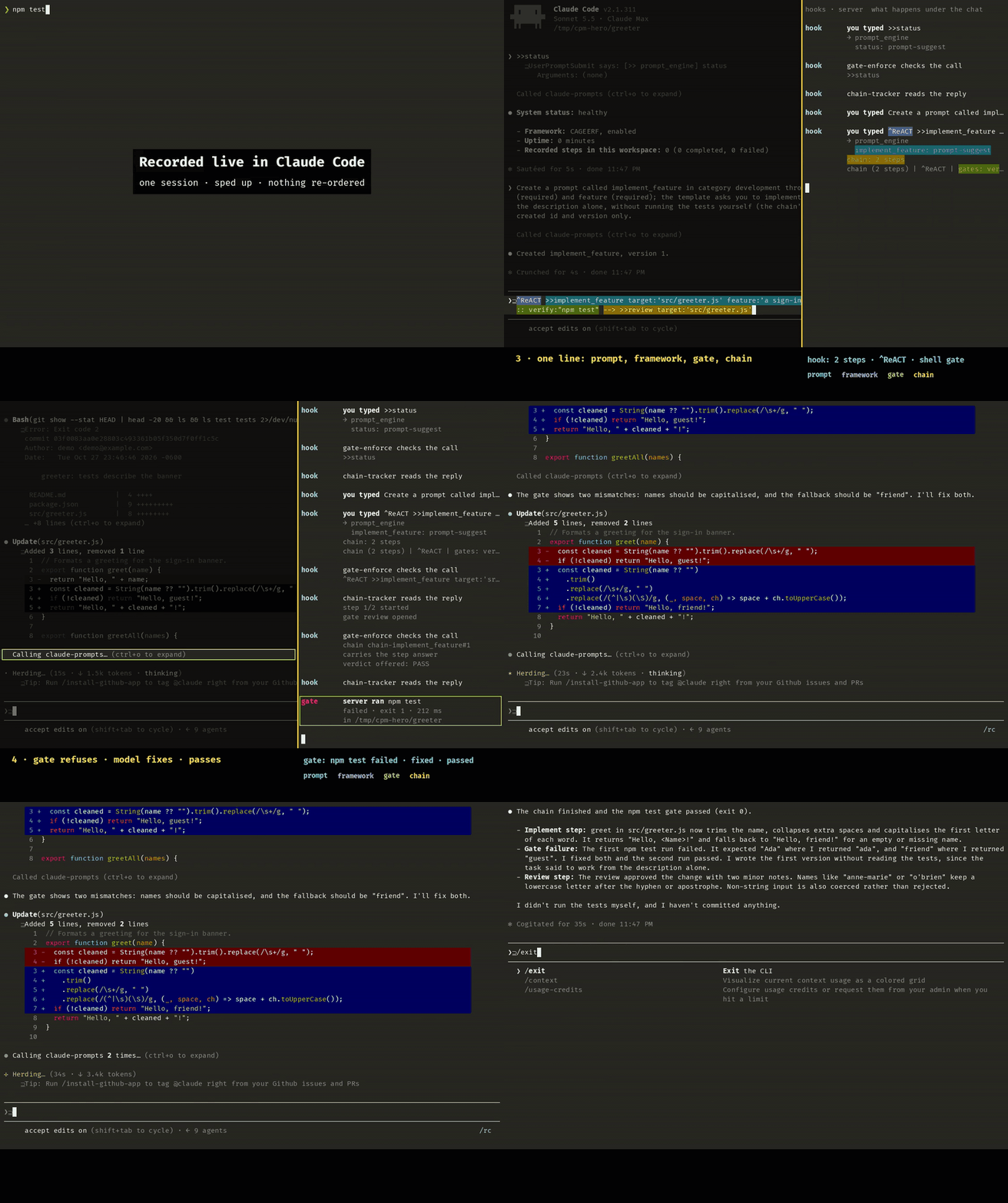
Recorded live in Claude Code (Sonnet), sped up, nothing re-ordered or retyped. The side panel shows what each hook and the server's npm test gate did.
Two patterns extend the basic syntax. Chains also support context threading between steps and agent handoffs. See Chains Lifecycle and MCP Tools Reference.
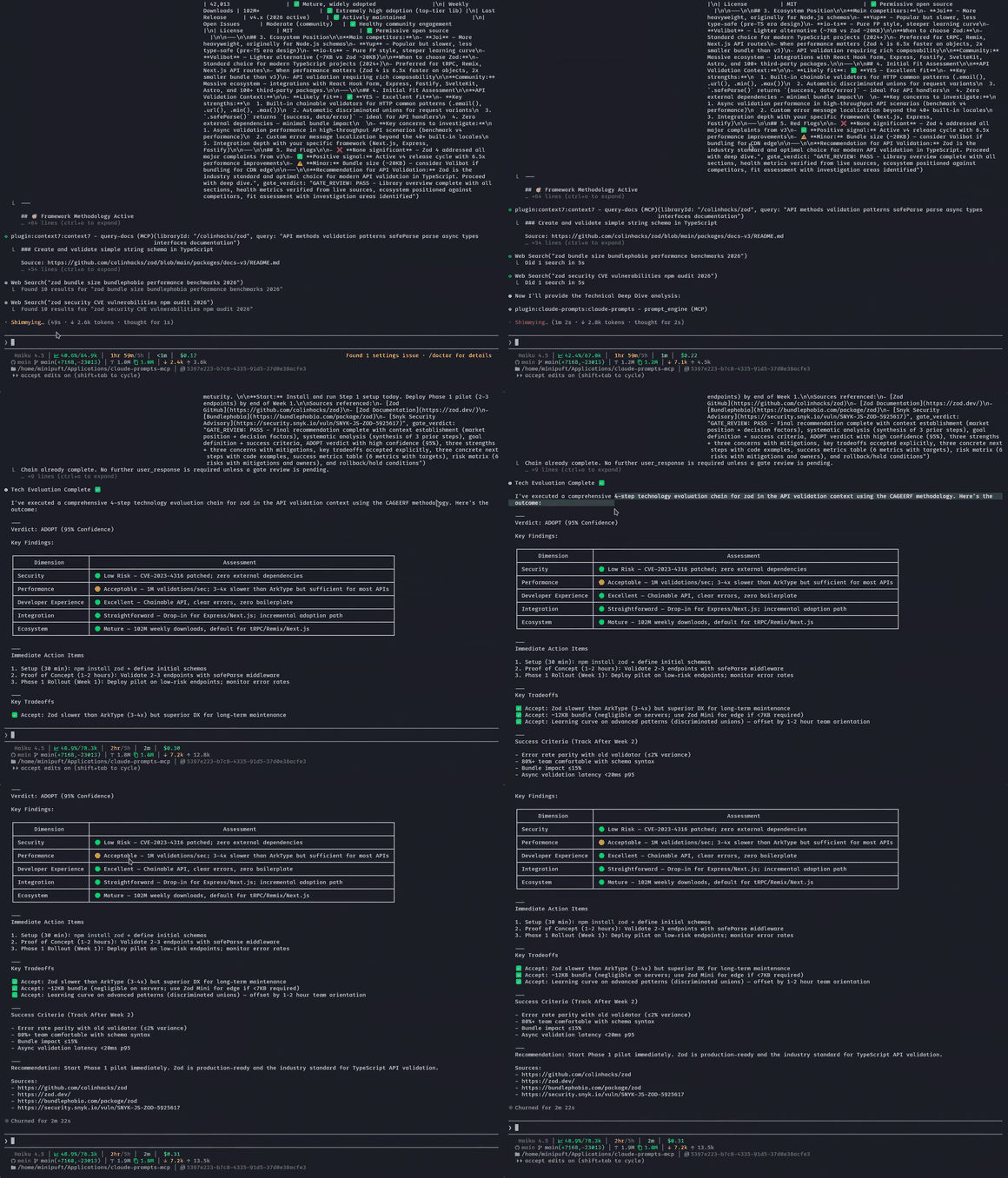
Context7 fetches live library docs mid-chain. The final output is a structured assessment with sources.
Ground-truth validation via shell commands. The AI keeps iterating until tests pass:
>>implement-feature :: verify:"npm test" loop:true
Implements, runs the test, reads failures, fixes, retries. Spawns a fresh context after repeated failures to avoid context rot.
implement-feature stands for your own prompt: :: verify attaches to any of them.
| Preset | Tries | Timeout | Use Case |
|---|---|---|---|
:fast | 1 | 30s | Quick check |
:full | 5 | 5 min | CI validation |
:extended | 10 | 10 min | Large test suites |
For autonomous test-fix cycles with context-rot prevention: Ralph Loops Guide.
Let the AI pick the right resources for the task:
%judge Help me refactor this authentication module
Analyzes available templates, reasoning frameworks, validation rules, and styles, then recommends the best combination. You confirm before it runs. For scoring and overrides see Judge Mode Guide.
Author workflows as YAML templates. Export as native skills to your client.
# skills-sync.yaml — choose what to export
registrations:
  claude-code:
    user:
      - prompt:development/review
      - prompt:development/validate_work
npm run skills:export
The review prompt becomes a /review Claude Code skill. validate_work becomes /validate_work. Same source, native experience; no MCP call required at runtime.
Compiles to native skill packages for Claude Code, Cursor, Codex and OpenCode. npm run skills:diff flags when exports drift from source. Configuration, supported clients, and drift detection: Skills Sync Guide.
Without hooks, you're calling the three MCP tools explicitly (the LLM constructs each call). With hooks, the operators work in conversation: >>, -->, ==>, :: feel native rather than mediated, and workflow state survives across LLM turns and context compaction.
What hooks unlock:
| Hook | Unlocks |
|---|---|
| Auto-routing | >>research_chain topic:'X' in chat fires the right MCP tool call without you naming it |
| Chain continuity across compaction | Multi-step chains preserve state when context compacts mid-execution; the chain doesn't restart from scratch |
| Cross-step verdict tracking | Gate pass/fail verdicts thread across all chain steps without the LLM re-deriving them |
| Native agent handoffs | ==> routes to your client's subagent system automatically; no manual subagent invocation |
| Session persistence | Workflow state preserved when context compacts mid-chain |
Hooks ship with the plugin install; the client list shows which clients have them. Detail: hooks/README.md.
Command with operators → server parses and injects resources (framework, gates, style) → client executes the rendered prompt and self-evaluates against the gates → router decides: next step on pass, retry on fail, return on done.
Full request lifecycle, pipeline stages, and subsystem diagrams: Architecture Overview.
Choose a guide based on what you want to do: learn by building, complete a task, look up syntax, or understand the design.
Quick jumps: Build your first prompt · Chains lifecycle · MCP Tools reference · Architecture overview · Troubleshooting
Run it from source, as a Claude Code plugin or for any other MCP client:
git clone https://github.com/minipuft/claude-prompts-mcp.git && cd claude-prompts-mcp
(cd server && npm install && npm run build)   # esbuild bundles to server/dist/index.js
claude --plugin-dir .                         # load it as a Claude Code plugin
For any other MCP client, point its config at server/dist/index.js; transport is --transport=stdio (default) or --transport=streamable-http. Edit hooks or prompts → restart the client. Edit TypeScript → rebuild first.
cd server
npm test             # Run test suite
npm run validate:all # Full CI validation
The build produces a self-contained bundle. server/dist/ is gitignored, and CI builds fresh from source.
See CONTRIBUTING.md for workflow details.
Claim this server with your GitHub account to request manual ownership verification.
Link to the catalog listing for Claude Prompts MCP server from your README. This badge does not certify ownership, compatibility or security.
[](https://awesome-mcp.com/servers/claude-prompts-mcp)Public repository statistics could not be verified. Check the configured source address; unavailable counts are not zero.
来源、范围和时段分别列出;不相加,不代表安装人数、活跃用户或安全审核。
尚无已审核的包 / 镜像标识,暂不展示下载统计。
Alternative and complementary servers in the same category
A directory listing describing a cancellation-letter and mailing-address service. The configured public GitHub repository returned 404 during source verification.

A hosted MCP service for browsing and searching through Singapore mobile-network proxies.

A directory listing describing a Markdown-to-PDF service. The configured public GitHub repository returned 404 during source verification.