

A directory listing describing a cancellation-letter and mailing-address service. The configured public GitHub repository returned 404 during source verification.
Repository stats unavailable
Developer Tools
An MCP server that lets Claude query its own usage statistics, such as quota status, session cost, top tools, and context window usage.
claudestat MCP server is cataloged as an MCP server attributed to deibygs. An MCP server that lets Claude query its own usage statistics, such as quota status, session cost, top tools, and context window usage. It is categorized under developer tools. See the capability inspector for recorded interfaces and their independent review status; consult upstream documentation for the current interface.
Installation configuration is not reviewed. No executable setup is offered for this entry; inspect the source repository before proceeding.
Catalog license label: MIT. Check the source repository's current license and terms before using, modifying or distributing this software.
能力定义尚未审核。未核验的采集内容不会作为可信接口展示。
暂无可展示的已审核记录。这不表示上游不支持此能力。
暂无可展示的已审核记录。这不表示上游不支持此能力。
暂无可展示的已审核记录。这不表示上游不支持此能力。
Email delivery is not connected. This page does not collect email addresses or create subscriptions.
Browse the registry for current listings instead.
Reviews for claudestat MCP server are not available yet
Review publishing and storage are not connected. This page does not collect or publish ratings or comments, including after sign-in.
A standalone npm package containing only the MCP server — no CLI, no dashboard, no daemon — for querying Claude's own stats via MCP.
No; all data is stored locally in SQLite with zero cloud dependencies.
README.md · a4acc5d1bc8b · 采集于 2026-11-13 12:00:19 UTC
保留上游原文,不做 AI 改写。为安全起见过滤脚本、表单和不安全链接。
当前显示最后一次成功采集的文档快照,请以来源页面为准。
Real-time observability for AI coding agents — Claude Code & OpenCode
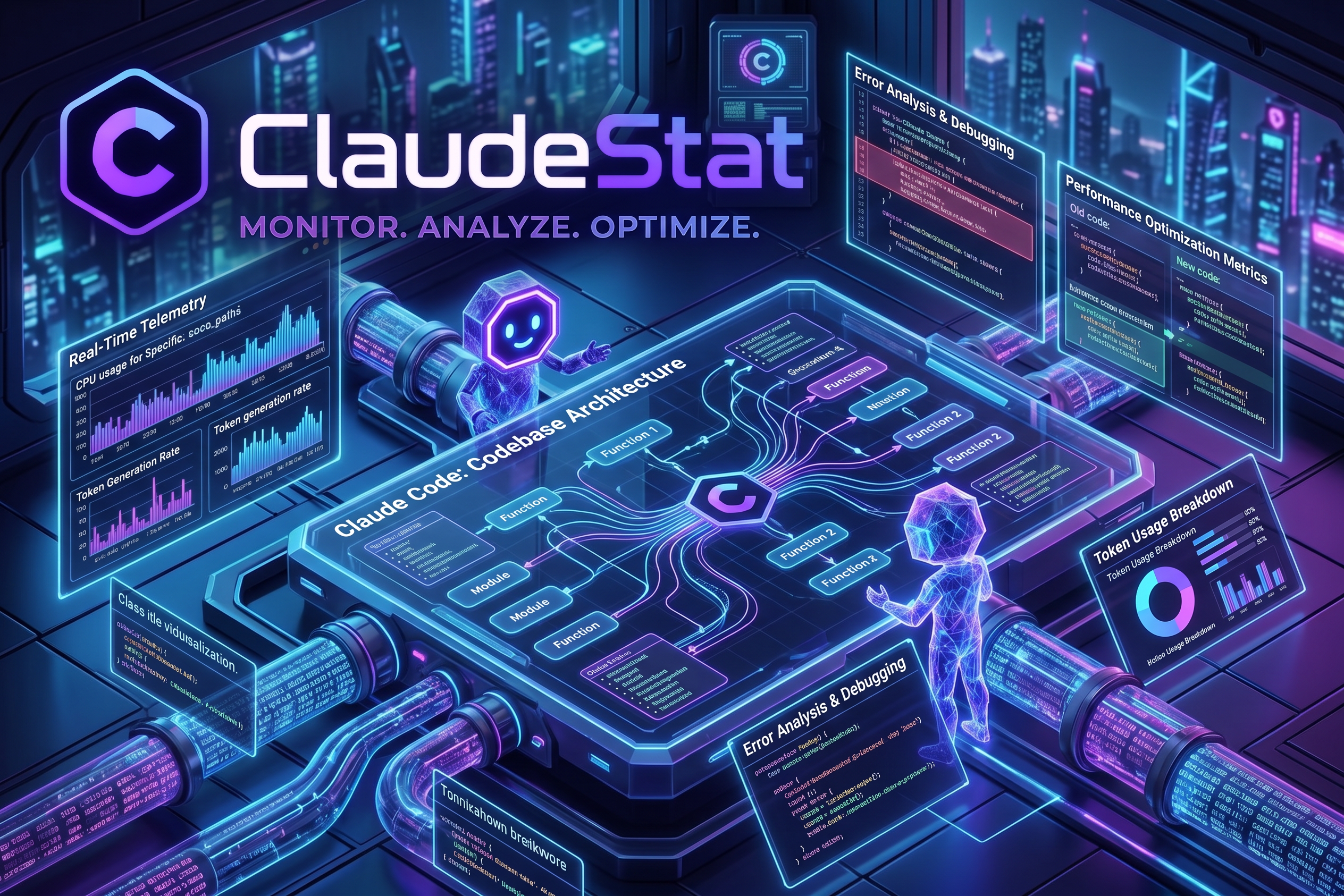
Monitor tokens, costs, tool calls, agents, MCP, sessions, quotas and multi-agent orchestration locally. Most tools read your logs after a session ends. claudestat hooks into every event as it fires. See what your AI is spending right now, get alerted before you hit your quota, and ask Claude about its own usage — from inside the terminal.
Works with Claude Code and OpenCode. Zero cloud dependencies. Pure Node.js. Runs on macOS, Linux, and Windows.









Installation • Quick Start • Commands • Dashboard • Library API • FAQ • Discussions • Contributing
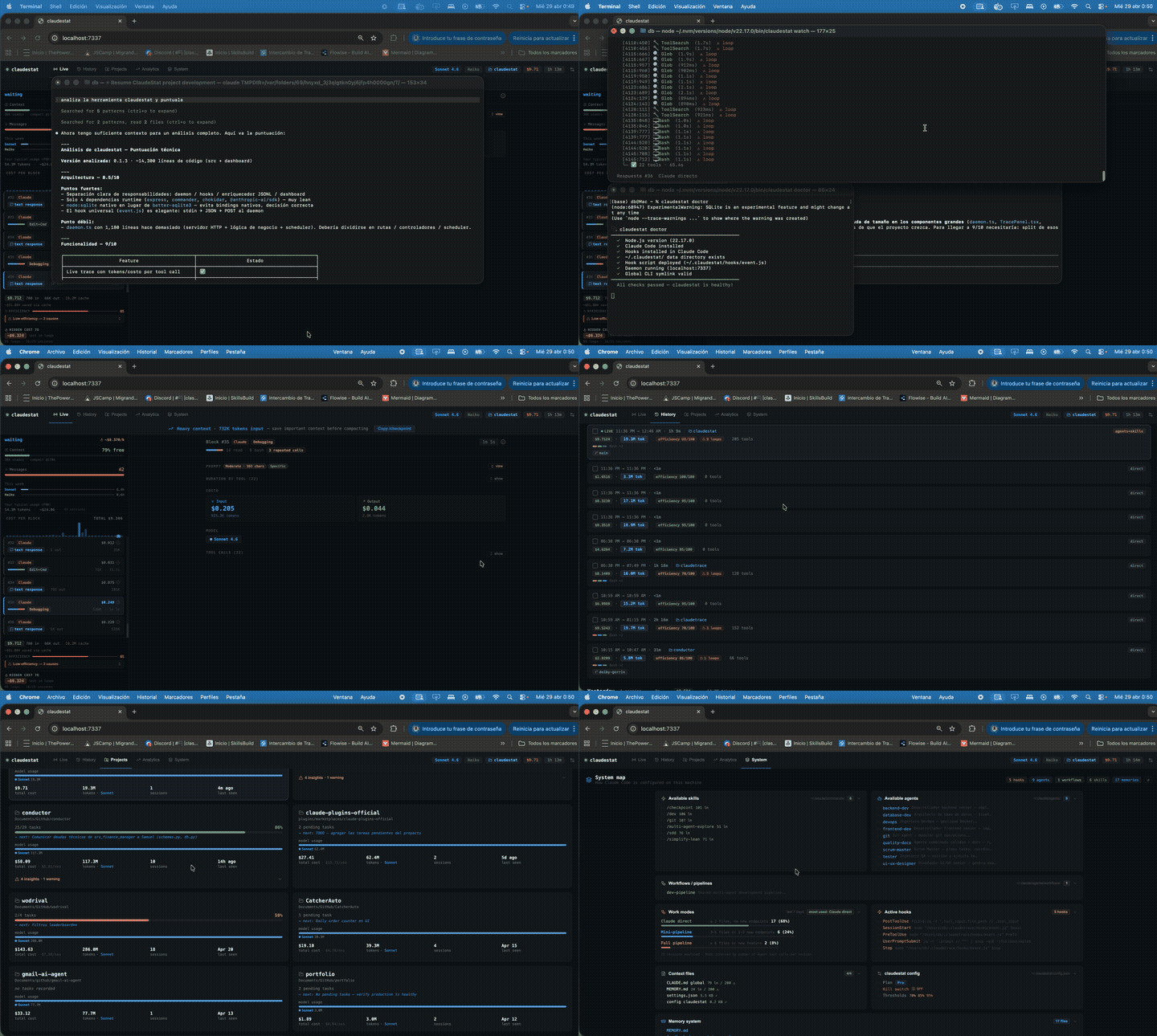
Live dashboard · terminal trace · quota guard — all running in real time
Two different jobs exist in the coding-agent space:
claudestat hooks Claude Code's events the moment they fire, keeps everything local in SQLite, and surfaces a live web dashboard, quota alerts, and an MCP server.
| claudestat | ccusage | OpenUsage | Langfuse | Agent Trail | |
|---|---|---|---|---|---|
| Real-time event stream | ✅ | partial | ✅ | ✅ | ✅ |
Live terminal trace (watch) | ✅ | — | — | — | — |
| Web dashboard | ✅ | — | TUI | ✅ | ✅ |
| Quota alerts + kill switch | ✅ | — | quota only | — | — |
| Loop / thrash detector | ✅ | — | — | — | — |
| MCP server (ask Claude about itself) | ✅ | — | — | — | — |
| Claude Code support | ✅ | ✅ | ✅ | ✅ | ✅ |
| OpenCode support | ✅ | ✅ | ✅ | — | — |
| Tool tracing | ✅ | limited | — | ✅ | ✅ |
| Agents / subagents | ✅ | — | — | ✅ | ✅ |
| Orchestration view | ✅ | — | — | ✅ | ✅ |
| Historical reports | ✅ | ✅ | partial | ✅ | ✅ |
| Local-first / SQLite (no cloud) | ✅ | ✅ | ✅ | configurable | ✅ |
The main difference is the moment: ccusage answers what did I spend yesterday; claudestat shows what's happening while you code. Langfuse and Agent Trail offer observability but are cloud-first or require infrastructure setup.
If claudestat is useful, give it a ⭐ — it helps other developers find it.
ClaudeStat is for developers who use AI coding agents and want to understand what those agents are doing, how much they cost, and when they become inefficient.
Especially useful if you:
Use ClaudeStat when you want to:
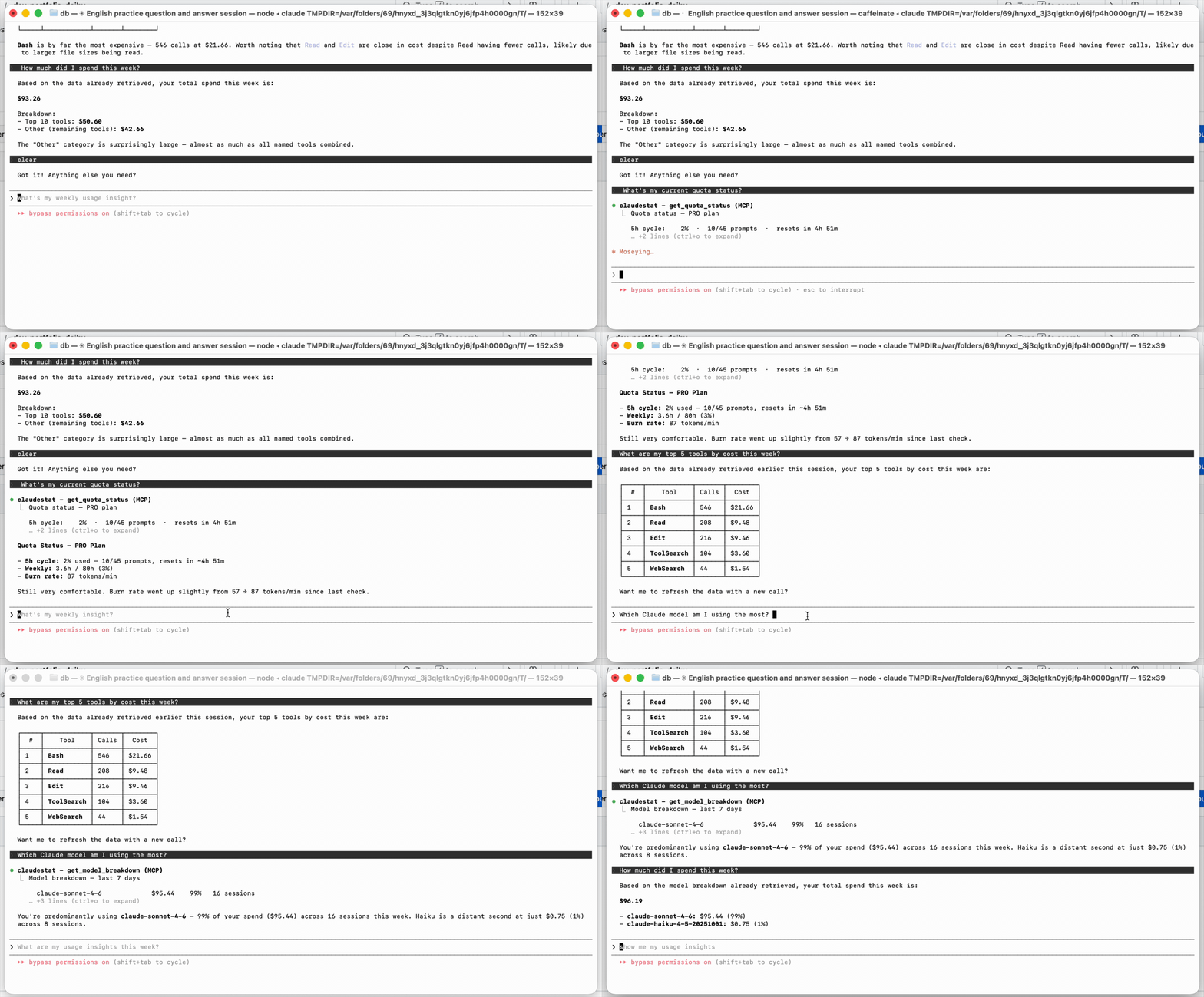
claudestat ships an MCP server. Once registered, you can ask Claude Code questions about its own usage — without leaving the terminal.
claude mcp add claudestat -s user -- claudestat-mcp
Then just ask:
> How much did I spend this week?
> What are my top 5 tools by cost?
> Break down my usage by model
> What's my cost projection for next month?
cost-state totalclaudestat blocks)claudestat share)@statforge/claudestat-mcp-bundledbOps, pricing, and intelligence functions directly from your own tools (v1.13.0+, @experimental)npm install -g @statforge/claudestat && claudestat setup
open http://localhost:7337
Start a Claude Code session and watch the events flow in. That's it.
node:sqlite)npm install -g @anthropic-ai/claude-code)npm install -g @statforge/claudestat && claudestat setup
claudestat setup installs the Claude Code hooks and registers the daemon as a system service — no sudo required. The daemon starts automatically whenever you log in (launchd on macOS, systemd on Linux, Scheduled Task on Windows).
Using NVM? Make sure you're on your default Node version:
nvm use default && npm install -g @statforge/claudestat && claudestat setupRestart Claude Code after setup so the hooks take effect.
npm install -g @statforge/claudestat
claudestat install   # installs hooks into Claude Code
claudestat start     # start the daemon manually
| Command | Description |
|---|---|
claudestat setup | One-command setup: install hooks + register daemon as system service |
claudestat setup --uninstall | Remove hooks and system service |
claudestat start / stop / restart | Manage the background daemon |
claudestat install / uninstall | Install or remove Claude Code hooks |
claudestat watch | Live terminal trace view |
claudestat status | Show quota, cost, and burn rate |
claudestat top | Rank tools by cost, call count, or duration |
claudestat weekly | Weekly usage summary |
claudestat insights | Deep usage insights: cost, cache, efficiency, models |
claudestat project | Cost projection with linear regression |
claudestat config | View or edit configuration |
claudestat doctor | Check installation health and diagnose issues |
claudestat blocks | Show 5-hour billing block history |
claudestat share [session-id] | Export session summary as ASCII or JSON (use --copy to copy to clipboard) |
claudestat export [format] | Export session data to JSON or CSV |
claudestat roast | Sarcastic usage analysis |
claudestat resume | Resume a paused session |
claudestat loops | List sessions with detected loops (context thrashing) |
claudestat logs | Show daemon logs (use -n, --follow, --level) |
claudestat update | Check for updates and install the latest version from npm |
claudestat version | Show version and check for updates |
Full command reference with output examples →
The dashboard lives at http://localhost:7337 and has seven tabs: Live, History, Projects, Analytics, Top, System, and Orchestrate.
claudestat was engineered by a human developer working with AI as a pair programming partner. The AI accelerated implementation — architecture, design, and engineering decisions stayed human. Fittingly, claudestat measures itself: every metric below comes from its own event database.
| Human-owned | AI implemented, always human-reviewed |
|---|---|
| Product vision & feature design | TypeScript service generation |
| MCP server protocol & design | Tool scaffolding, dashboard components |
| Data model (SQLite schema) | Refactoring, test scaffolding |
| Architecture decisions | Config parsing, CLI commands |
| Code review & final acceptance | Documentation, auxiliary scripts |
Workflow: Idea → Spec → AI implementation → Human review → Test → Refine → Merge
Development was iterative, never a single prompt: requirements → prepare context → generate → review → fix → validate → repeat. Code and tests shipped together; nothing merged without human review. PRs stayed within budget and were split with /chained-pr when needed.
| Metric | Value |
|---|---|
| AI sessions | 116 logged |
| Measured development time | ~344 h |
| Avg session efficiency | 77/100 |
| Primary model | Claude Sonnet 4.6 (48 CC sessions) |
| Secondary | OpenCode: DeepSeek V4 Flash/Pro, GLM-5, Mimo v2.5 (68 sessions) |
Measured with ClaudeStat — this project's own tracking tool. Approximate values.
When you run OpenCode alongside Claude Code, claudestat automatically detects both sessions and shows a source switcher in the Live tab.
Click between Claude Code and OpenCode to see each session's real-time view — tool calls, prompts, model name, intent badges, and timing — without leaving the dashboard.
| Feature | Claude Code | OpenCode |
|---|---|---|
| Tool calls (Read, Write, Bash, Edit…) | ✅ | ✅ |
| Prompts per block | ✅ | ✅ |
| Model name | ✅ | ✅ |
| Intent detection (Exploring / Implementing…) | ✅ | ✅ |
| Session cost | ✅ | ✅ |
| Weekly usage chart | ✅ | ✅ |
| Per-block cost breakdown | ✅ | ✅ |
| Quota / context window | ✅ | — |
OpenCode data is read directly from its local SQLite database — no configuration required. Both the v1 and v2 (OpenCode ≥ 2.0) schemas are read, so sessions keep appearing after an OpenCode upgrade.
claudestat includes an MCP server with 9 tools for querying usage stats. Register once:
claude mcp add claudestat -s user -- claudestat-mcp
Then ask Claude: "What's my quota status?", "Show me my latest session", "Top 5 tools by cost", "How's my context window doing?", "What's my daily summary?".
The server also sends push notifications for context saturation (50/75/90%), weekly quota thresholds, and 5h billing cycle limits — Claude will proactively warn you without you asking.
Since v1.16.0, the MCP server runs on the official @modelcontextprotocol/sdk (v1.30.0) instead of a hand-rolled JSON-RPC engine. That means standards-compliant handshakes, protocol-version negotiation with modern MCP clients, reliable startup/shutdown on stdin EOF, and proper input validation for tool arguments. The public API is unchanged, so existing registrations keep working as-is.
| Tool | Description |
|---|---|
get_quota_status | 5h cycle %, weekly hours per model, burn rate, plan detection |
get_current_session | Latest session cost, tokens, efficiency, loops |
get_session_stats | Aggregated stats for the last N days |
get_top_tools | Top 10 tools by cost, count, or duration |
get_usage_insights | Cost per project, cache savings, output/input ratio, peak hours |
get_model_breakdown | Cost and sessions broken down by Claude model |
get_weekly_insight | Weekly summary with actionable tip |
get_context_status | Current context window usage with saturation bar |
get_daily_summary | Today vs yesterday vs 7d average |
Prefer a lighter dependency? Install the MCP server as a standalone package — no CLI, no daemon, just the stdio MCP server and its SQLite reader:
npm install -g @statforge/claudestat-mcp-bundle
claude mcp add claudestat -s user -- npx @statforge/claudestat-mcp-bundle
Same 9 tools, same context notifications, zero extra footprint.
@experimental(v1.13.0+) — the programmatic surface may change in any minor/patch release until v2.0.0. Pin to exact versions when integrating.
claudestat ships a TypeScript library entry alongside the CLI. Build exporters, alerters, and integrations that read session data directly — no spawn, no output parsing.
import { dbOps, analyzeSession, computeProjection, configure } from '@statforge/claudestat'

// Opt out of the daemon-required guard (CI / batch jobs):
configure({ throwOnNoDaemon: false })

const sessions = dbOps.getAllSessions(20)
const report   = analyzeSession(events, costUsd)
const forecast = computeProjection(30)
By default the first dbOps.* call probes http://127.0.0.1:7337/health and throws DaemonNotRunningError if the daemon is down. Pure functions (findPricing, analyzeSession, computeProjection, …) never probe.
| What | Stability |
|---|---|
dbOps (50+ read-only query functions) | @experimental — lazy daemon-guarded |
Pricing tables (MODEL_PRICING, KNOWN_CONTEXT_WINDOWS, PRICING) | @experimental |
Intelligence (analyzeSession, detectLoops, predictSaturation, …) | @experimental |
Forecasting + quota (computeProjection, computeQuota, …) | @experimental |
configure({throwOnNoDaemon}) | @experimental |
Full library reference + 3 worked examples →
Config is stored at ~/.claudestat/config.json. View it with claudestat config or edit the file directly.
claudestat config --kill-switch true --threshold 90
claudestat config --plan max5
claudestat config --alerts false
Full configuration reference →
Claude Code / OpenCode event
      │
      ▼
  Hook script  (~/.claudestat/hooks/event.js)
       │  POST JSON → daemon
       ▼
  Daemon  (localhost:7337)
       │  stores events in SQLite
       │  enriches with JSONL token data
       │  runs pattern analyzer
       │  context/quota push notifications
       ▼
  ┌──────────────────────────────────┐
  │  Dashboard (React + Vite)        │
  │  Terminal (claudestat watch)     │
  │  MCP Server (9 tools)            │
  │  Library API (dbOps, pricing)    │
  └──────────────────────────────────┘
              │
              ▼
  You see everything — live
claudestat start hangs for ~5 seconds
Normal — require('express') takes a few seconds on first load. The daemon is running; wait for the "Daemon started" confirmation.
Hooks are not firing / dashboard shows no events
Run claudestat doctor — it checks every component and prints the exact fix command.
claudestat command not found after install
If using NVM, the binary may point to the wrong Node version:
nvm use default && npm install -g @statforge/claudestat && hash -r claudestat
Kill switch is blocking new sessions
Disable with claudestat config --kill-switch false, or wait for the 5h quota window to reset.
Approaching rate limit
The daemon polls quota every 60s and logs warnings at 70%, 85%, and 95%. Check anytime with claudestat status.
Working with multiple projects claudestat tracks every project automatically. The Projects tab groups sessions by working directory.
Dashboard shows 0 cost / $0.00 for all sessions
Token data comes from Claude Code's JSONL files, not from hook events. Make sure Claude Code is writing JSONL logs — check ~/.claude/projects/ for .jsonl files. If the directory is empty, Claude Code may not have logging enabled.
Daemon stops after terminal closes
The daemon must be started with nohup to persist beyond the shell session:
nohup claudestat start &
Or use claudestat setup which installs a system service (launchd on macOS, systemd on Linux, Scheduled Task on Windows).
claudestat export produces empty output
If no sessions appear, the daemon may not have been running during your Claude Code sessions. Check claudestat status and restart with claudestat start. For historical data only (without a running daemon), export still reads from the local SQLite database — so past sessions captured while the daemon was running are always available.
Loop detector fires too often / not enough Adjust the threshold and window:
claudestat config --loop-threshold 5   # default: 8 calls
claudestat config --loop-window 90     # default: 120 seconds
MCP server not responding
Restart the daemon (claudestat restart) and verify it's registered:
claude mcp list
If not listed, re-run: claude mcp add claudestat -s user -- claudestat-mcp
OpenCode sessions not appearing
claudestat reads OpenCode data from ~/.local/share/opencode/opencode.db. If the file does not exist, OpenCode has not run yet or uses a different data path on your system. Run opencode at least once to initialize it.
Node.js experimental SQLite warning on startup
Expected — node:sqlite is experimental in Node 22. The warning is suppressed automatically. If you see it repeatedly, ensure you are running Node.js 22 or later (node --version).
What is claudestat? How is it different from ccusage? claudestat is a real-time monitor for Claude Code — not a log reader. It hooks into every tool call as it fires, tracks token usage and cost live, guards your quota with configurable alerts, and exposes an MCP server. ccusage reads JSONL history after sessions end; claudestat runs while you code.
How do I track Claude Code costs?
Install with npm install -g @statforge/claudestat && claudestat setup, then open http://localhost:7337 for the live dashboard. Use claudestat status for a quick summary or claudestat export for full data export.
Does claudestat work with Claude Pro, Max 5, and Max 20?
Yes. claudestat auto-detects your plan. You can also force it with claudestat config --plan max5.
Is my data sent to any server?
No. All data is stored locally in SQLite at ~/.claudestat/. Zero cloud dependencies.
Does claudestat work on Windows?
Yes — macOS, Linux, and Windows are all supported. On Windows, claudestat setup registers a Scheduled Task for auto-start, clipboard uses clip, and the daemon health check uses Node's built-in HTTP client.
What is the MCP bundle?
@statforge/claudestat-mcp-bundle is a standalone npm package containing only the MCP server — no CLI, no dashboard, no daemon. Install it if you want Claude to query its own stats via MCP without running the full claudestat daemon.
Can I use claudestat programmatically?
Yes. Import dbOps, computeProjection, analyzeSession, createMcpServer and other functions directly from @statforge/claudestat. See the Library API section.
claudestat setup --uninstall                          # remove hooks + system service
rm -rf ~/.claudestat                                  # macOS / Linux
Remove-Item -Recurse -Force "$env:USERPROFILE\.claudestat"  # Windows (PowerShell)
If you installed manually, use
claudestat uninstallto remove only the hooks. On Windows,claudestat setup --uninstallalso removes the Scheduled Task.
PRs are welcome! See CONTRIBUTING.md for full guidelines.
git clone https://github.com/DeibyGS/claudestat
cd claudestat
npm install
node --require tsx/cjs tests/index.ts   # run all tests
Good first areas: pattern analyzer (src/pattern-analyzer.ts), dashboard components (dashboard/src/components/), new commands.
MIT — use it, fork it, ship it.
Claim this server with your GitHub account to request manual ownership verification.
Link to the catalog listing for claudestat MCP server from your README. This badge does not certify ownership, compatibility or security.
[](https://awesome-mcp.com/servers/claudestat)Public repository statistics could not be verified. Check the configured source address; unavailable counts are not zero.
来源、范围和时段分别列出;不相加,不代表安装人数、活跃用户或安全审核。
尚无已审核的包 / 镜像标识,暂不展示下载统计。
Alternative and complementary servers in the same category
A directory listing describing a cancellation-letter and mailing-address service. The configured public GitHub repository returned 404 during source verification.

A hosted MCP service for browsing and searching through Singapore mobile-network proxies.

A directory listing describing a Markdown-to-PDF service. The configured public GitHub repository returned 404 during source verification.