
Store and retrieve entities, relations and observations in a persistent local knowledge graph.
create_entitiescreate_relationsadd_observations+6 more
92K
AI & Multi-Agent
An MCP server that runs the Clef-Flash model locally and returns strict JSON probability distributions for choices, scores and yes/no questions asked by AI agents.
clef-mcp: a local MCP server for structured agent decisions is cataloged as an MCP server attributed to highlyloadedego. An MCP server that runs the Clef-Flash model locally and returns strict JSON probability distributions for choices, scores and yes/no questions asked by AI agents. It is categorized under ai agents-models. See the capability inspector for recorded interfaces and their independent review status; consult upstream documentation for the current interface.
Installation configuration is not reviewed. No executable setup is offered for this entry; inspect the source repository before proceeding.
Catalog license label: Not specified. Check the source repository's current license and terms before using, modifying or distributing this software.
能力定义尚未审核。未核验的采集内容不会作为可信接口展示。
暂无可展示的已审核记录。这不表示上游不支持此能力。
暂无可展示的已审核记录。这不表示上游不支持此能力。
暂无可展示的已审核记录。这不表示上游不支持此能力。
Email delivery is not connected. This page does not collect email addresses or create subscriptions.
Browse the registry for current listings instead.
Reviews for clef-mcp: a local MCP server for structured agent decisions are not available yet
Review publishing and storage are not connected. This page does not collect or publish ratings or comments, including after sign-in.
No; inference is local over loopback HTTP with no telemetry or accounts, and the server uses stdio for MCP.
The state content is passed to the model as data and is never executed or interpreted as server instructions.
A llama.cpp runtime that works on macOS, Linux and Windows, and an MLX runtime for Apple Silicon, both behind the same interface.
README.md · b14e31c10346 · 采集于 2026-11-13 10:26:19 UTC
保留上游原文,不做 AI 改写。为安全起见过滤脚本、表单和不安全链接。
当前显示最后一次成功采集的文档快照,请以来源页面为准。
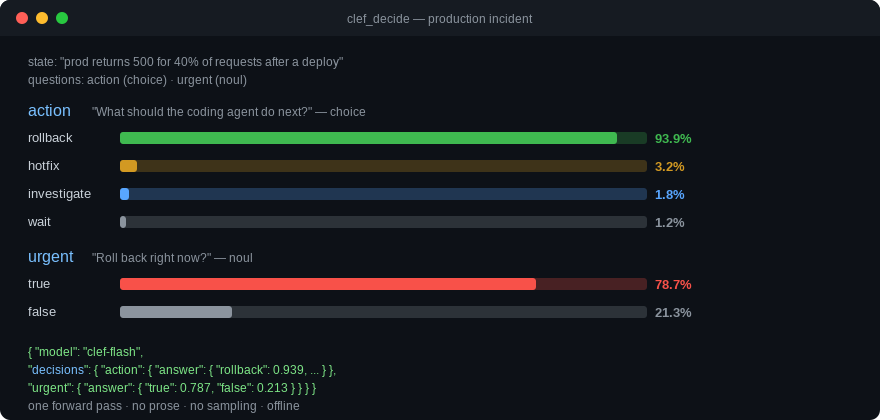





Local decisions for AI agents. Reusable classification for your datasets.
Run Clef-Flash (9B, Apache-2.0 by Cloudflare) locally. Give coding agents a structured MCP decision tool, or classify JSONL/CSV datasets with YAML profiles. Get probabilities and explicit review results instead of generated prose. Inference stays on your machine.
Requires Node.js 20+ and enough memory for the selected model (16 GB recommended for Q4_K_M). The default model download is approximately 6 GB; subsequent inference runs offline.
npm install -g clef-mcp
clef-mcp install
Choose your workflow:
| Workflow | Start here |
|---|---|
| Decisions inside Claude Code, Codex, Cursor or ZCode | clef-mcp setup, then restart your client; client configuration |
| Classify tickets, documents or other records | YAML profiles and dataset classification |
| Hooks, CI or shell scripts | clef-mcp decide |
The MCP server starts with clef-mcp (stdio). Only install downloads model/runtime files. You can also use npx -y clef-mcp instead of a global install; npx -y clef-mcp install --setup combines model installation and client registration.
Define a task once, then apply it to separate records. The model loads once for the whole batch; a separate daemon is not required.
Save this as support-routing.yaml:
schema_version: 1
name: support-routing
instructions: Classify the current support request into exactly one department.
labels:
  billing: Payments, refunds, invoices and subscription charges
  technical: Errors, outages, installation and integration problems
  other: Requests outside billing and technical support
input:
  id_field: id
  fields: [subject, body]
policy:
  min_probability: 0.80
  min_margin: 0.15
Save tickets.jsonl (one object per line):
{"id":"001","subject":"Duplicate charge","body":"Please refund my duplicate subscription payment."}
{"id":"002","subject":"Checkout crashes","body":"The payment page returns an error."}
Or use tickets.csv with a header row:
id,subject,body
001,Duplicate charge,Please refund my duplicate subscription payment.
002,Checkout crashes,The payment page returns an error.
clef-mcp classify tickets.jsonl --profile support-routing.yaml --output results.jsonl
clef-mcp classify tickets.csv --profile support-routing.yaml --output csv-results.jsonl
# stdout carries JSONL; summaries and diagnostics go to stderr
cat tickets.jsonl | clef-mcp classify - --profile support-routing.yaml
# Extension override, including CSV on stdin
cat tickets.csv | clef-mcp classify - --format csv --profile support-routing.yaml
Runnable files also ship in examples/classify/.
| Field | Meaning |
|---|---|
schema_version | Required; currently 1 |
name | Required profile ID, up to 64 letters/digits/underscores/hyphens, starting with a letter or digit |
instructions | Required classification question |
labels | Required map of 2–100 mutually exclusive label IDs to descriptions; include a fallback category where appropriate |
model | Optional model ID; priority is CLI --model → profile → CLEF_MODEL → clef-flash |
input.fields | Optional exact top-level field names to send to the model; otherwise use the full record |
input.id_field | Optional string/numeric ID to copy to the result; missing or invalid IDs become row errors |
policy.min_probability | Minimum winning probability, default 0.80 |
policy.min_margin | Minimum difference between the two highest probabilities, default 0.15 |
policy.min_confidence | Optional minimum runtime-reported confidence; missing confidence then requires review |
examples | Optional list of up to 20 {input: {...}, label: configured_label} references |
Examples are data supplied alongside the current record; they do not train or modify model weights. Unknown fields, duplicate YAML keys, aliases, merge keys, unsupported tags and non-JSON values are rejected. Label IDs use the same character rules as profile names, with a 128-character limit; prototype-shaped reserved keys are rejected. Missing selected fields produce row errors.
needs_reviewIllustrative results (actual probabilities depend on your data and runtime):
{"row":1,"id":"001","profile":"support-routing","model":"clef-flash","status":"classified","label":"billing","suggested_label":"billing","probability":0.92,"margin":0.87,"probabilities":{"billing":0.92,"technical":0.05,"other":0.03},"review_reasons":[]}
{"row":2,"id":"002","profile":"support-routing","model":"clef-flash","status":"needs_review","label":null,"suggested_label":"technical","probability":0.48,"margin":0.06,"probabilities":{"billing":0.42,"technical":0.48,"other":0.10},"review_reasons":["low_probability","low_margin"]}
classified means all configured thresholds passed. needs_review keeps the suggestion and full distribution but sets label: null. Reasons are low_probability, low_margin, tie, low_confidence or missing_confidence. Exact ties always require review, including when thresholds are zero. Comparisons are inclusive at the threshold. Results may include model confidence and token usage when available.
Winning probability, probability margin and model-reported confidence are different quantities. These thresholds are routing policy, not a calibrated accuracy guarantee. Check them on representative labeled data before automating decisions. Classification does not grant authorization or execute actions.
Invalid JSONL objects and missing fields produce status: "error" rows and processing continues. Runtime failures stop the run; they are never converted to review decisions. Output includes identifiers and results, not a copy of the original record.
clef-mcp classify tickets.jsonl --profile support-routing.yaml --output results.jsonl --resume
File output creates private results.jsonl and results.jsonl.meta.json files. The sidecar fingerprints the full input, validated profile, effective model, runtime and format. Resume requires all of these to match. Use a new output path after changing data or thresholds; existing files are never silently overwritten. Input must stay unchanged while a run is active.
Resume skips the contiguous committed prefix, including committed error rows; it does not retry those errors. An incomplete final write is discarded, while corruption in a complete row is rejected. Resume requires regular file input and --output; stdin/stdout resume is unsupported. A local lock prevents simultaneous writers. Dead local writer locks can be reclaimed; active, foreign-host or unverifiable locks are preserved. A crash during lock acquisition may leave .lock.claim, which requires inspection before manual removal.
JSONL accepts objects, ignores blank lines and supports UTF-8 BOM/CRLF. CSV supports quoted commas, escaped quotes and multiline fields; headers must be nonempty and unique, with consistent column counts. CSV cells remain strings, preserving IDs such as 001. Format defaults to .jsonl/.csv, or JSONL for stdin; other extensions need --format.
Profiles and logical records are limited to 1 MiB, YAML nesting to 64 levels, selected/CSV fields to 1000, and examples to 20. Existing instruction/criteria/state limits and the model's 16k-token context also apply; selected fields and examples share that context. Oversized JSONL rows are reported as row errors. Broken/oversized CSV syntax stops the run because record boundaries cannot be recovered reliably.
| Exit code | Meaning |
|---|---|
0 | Completed; review results are allowed |
1 | Row errors occurred in this invocation, or inference/output failed |
2 | Invalid options/profile/input structure or incompatible checkpoint |
3 / 4 | Model not installed / runtime missing |
130 | Interrupted; committed file output can be resumed |
npm install -g clef-mcp@latest
Restart MCP clients and any existing daemon after updating. An already installed model does not need another download.
| Chat LLM | clef_decide | |
|---|---|---|
| Output | prose, you parse it | strict JSON: probability per option |
| Determinism | varies per run | single forward pass, no sampling |
| Latency (1 decision) | seconds of generation | ~0.5 s local |
| Context cost | grows with every decision | fixed, small schema |
| Privacy | depends on provider | 100% on-device, works offline |
| Calibration | vibes | softmax over trained option scores |
Sweet spot: decision points inside agent loops — next action, routing, classification, severity, yes/no judgment — asked dozens of times per task.
clef_decide tool{
"state": {
"task": "Fix failing tests",
"error": "TypeError: Cannot read properties of undefined"
},
"questions": {
"next_action": {
"type": "choice",
"instructions": "What should the coding agent do next?",
"criteria": {
"inspect": "Inspect the code and gather more information",
"modify": "Modify the code",
"test": "Run additional tests",
"ask_user": "Ask the user for clarification"
}
},
"confidence": {
"type": "score",
"instructions": "How confident are you in this decision?",
"criteria": ["very_low", "low", "medium", "high", "very_high"]
},
"is_outage": { "type": "noul", "instructions": "Is a service down?" }
}
}
| Type | Criteria | Answer |
|---|---|---|
choice | map option id → description, or a plain list | probability per option |
score | ordered list (index = score) | probability per level |
noul | optional {"true": "...", "false": "..."} | {"true": p, "false": 1-p} |
Response — strictly structured, never prose. Each decision carries the model-reported confidence (when the runtime sends it), plus token usage for the call:
{
  "model": "clef-flash",
  "decisions": {
    "next_action": { "answer": { "inspect": 0.72, "modify": 0.12, "test": 0.14, "ask_user": 0.02 }, "confidence": 0.83 },
    "confidence":  { "answer": { "very_low": 0.01, "low": 0.04, "medium": 0.18, "high": 0.61, "very_high": 0.16 }, "confidence": 0.61 },
    "is_outage":   { "answer": { "true": 0.9, "false": 0.1 } }
  },
  "usage": { "input_tokens": 228, "output_tokens": 0, "latency_ms": 512 }
}
Act on the argmax only when the distribution is decisive — top p ≥ 0.8 and high confidence for destructive or security-adjacent calls.
Batch up to 64 questions per call — they are scored in one forward pass. state is treated strictly as data: never executed, never interpreted as instructions for the server.
The server ships four MCP prompts (canned, decision-shaped asks — your client lists them via prompts/list):
| Prompt | Purpose |
|---|---|
incident-triage | action + severity + user-impact questions for a production incident |
next-action | what the coding agent should do next + confidence |
ticket-routing | classify a message into a team + urgency |
security-review | vulnerability yes/no, risk scale, first mitigation |
And three resources (read-only, no model needed):
| URI | Contents |
|---|---|
clef-mcp://capabilities | live JSON: model, runtime, limits, error codes |
clef-mcp://evals/schema | how to write eval cases |
clef-mcp://evals/dataset | the bundled 30-case dataset |
Apple M4 Pro, Clef-Flash Q4_K_M (6 GB), single request through the full MCP stdio path:
| Scenario | Latency |
|---|---|
| Cold start (incl. model load, once per session) | ~4.4 s |
| 1 question | ~0.5 s |
| 10 questions, one call | ~2.9 s |
| 64 questions, one call | ~18.6 s |
Quality gate: a 30-case evaluation dataset (coding / security / classification / routing / yes-no) — 86.7% pass on the live model. Run it yourself: clef-mcp evals.
claude mcp add clef-mcp -- clef-mcp
# or, without a global install:
claude mcp add clef-mcp -- npx -y clef-mcp
~/.codex/config.toml[mcp_servers.clef-mcp]
command = "clef-mcp"
args = []
.cursor/mcp.json{
"mcpServers": {
"clef-mcp": { "command": "clef-mcp", "args": [] }
}
}
~/.zcode/cli/config.json (user scope, auto-connect){
"mcp": {
"servers": {
"clef-mcp": { "command": "clef-mcp", "args": [], "type": "stdio" }
}
}
}
Ready-made snippets: examples/.
No MCP client required — hooks, CI jobs and shell scripts call the same model one-shot:
# Full document on stdin
echo '{"state": "checkout 500s after deploy", "questions": {"is_outage": {"type": "noul", "instructions": "Is a service down?"}}}' \
  | clef-mcp decide

# Or split across files
clef-mcp decide --questions questions.json --state state.json
stdout carries the strict JSON result (same shape as the MCP tool, including confidence and usage); errors go to stderr as structured JSON with exit codes: 2 invalid input, 3 model not installed, 4 runtime missing. decide never downloads anything.
Model selection: --model <id> overrides the input document's model, which overrides CLEF_MODEL (default: clef-flash). The same precedence applies with --daemon.
Each plain decide invocation is a cold start (model load included, a few seconds) — fine for gates and triage. For repeated calls, start clef-mcp daemon once: it keeps the model warm on an owner-only (0600) unix socket in CLEF_HOME (no TCP port, unloads after CLEF_DAEMON_IDLE seconds of inactivity following the last completed decision, default 600). Active and queued requests prevent idle unloading. clef-mcp decide --daemon answers in well under a second, falling back to a cold run when no daemon is running. See examples/hooks/ for a PreToolUse guard and a GitHub Action recipe.
The PreToolUse guard blocks a command when the model judges it destructive (p ≥ 0.9) and tells the agent to ask the user — a block is a pause plus escalation, not a wall; the gate is advisory by design and says so. First real firing on day one: caught a history-rewrite force push (p=0.94) and surfaced its own bypass vector, which is now fixed and documented in the recipe.
The schema tells the client what clef_decide accepts; agents also need to know when to reach for it and how to frame decisions. The bundled clef-decisions skill covers decision patterns, batching, criteria writing, distribution interpretation and error recovery:
clef-mcp setup                                                    # automatic
cp -r skills/clef-decisions ~/.agents/skills/                     # manual, from repo
cp -r "$(npm root -g)/clef-mcp/skills/clef-decisions" ~/.agents/skills/  # from npm package
flowchart LR
    subgraph clients [MCP clients]
        CC[Claude Code]
        CX[Codex]
        CU[Cursor]
        ZC[ZCode]
    end
    clients -- MCP stdio --> S[clef-mcp<br/>validation · limits · structured errors]
    S -- SystemOne adapter --> R[ClefRuntime<br/>llama.cpp subprocess<br/>127.0.0.1]
    R -- single forward pass --> M[("Clef-Flash<br/>9B · GGUF · local")]
    M -. probabilities .-> S -. strict JSON .-> clients
The ClefRuntime interface (load / decide / unload / health) isolates the engine: MLX or remote runtimes plug in without changing the MCP API. The wire format is POST /v1/systemone — the same contract across llama.cpp and other Clef runtimes.
clef-mcp              # run the MCP server on stdio (default command)
clef-mcp decide       # one-shot decision (no MCP session): JSON in, JSON out — for hooks, CI, scripts
clef-mcp classify     # apply a YAML profile to JSONL/CSV records; review uncertain results
clef-mcp daemon       # keep the model warm on a local unix socket; `decide --daemon` uses it
clef-mcp install      # detect hardware → download model + runtime → verify checksum → verify inference
clef-mcp setup        # register the MCP server + agent skill in zcode / claude-code / codex / cursor
clef-mcp models       # list models/quantizations and install status
clef-mcp status       # runtime, model, memory summary
clef-mcp doctor       # full diagnosis (platform, RAM, GPU, binary, model, checksum*, inference, MCP config)
clef-mcp uninstall    # remove the model (and optionally the managed runtime)
clef-mcp evals        # run the evaluation dataset against the installed model
Flags: install --quant Q8_0 --yes --skip-probe, install --setup, setup --clients zcode,cursor --no-skill, doctor --deep (re-hash the model file), uninstall --runtime --yes.
Two local runtimes behind the same ClefRuntime interface:
llama-cpp (default) | mlx | |
|---|---|---|
| Platforms | macOS, Linux, Windows | macOS / Apple Silicon only |
| Model | GGUF from ggml-org/Clef-Flash-GGUF | MLX 4-bit from mlx-community/clef-flash-4bit |
| Extras | none | uv on PATH (managed Python env) |
| Install | clef-mcp install | clef-mcp install --runtime mlx |
Switch at runtime with CLEF_RUNTIME=mlx (must be set for the MCP server process — e.g. in the client's env block). Both speak the same POST /v1/systemone contract. The MLX snapshot is fetched into CLEF_HOME via a uv-managed huggingface_hub (no global Python state) at a pinned revision.
| Variable | Default | Meaning |
|---|---|---|
CLEF_MODEL | clef-flash | Model id (per-call model also accepted) |
CLEF_HOME | ~/.cache/clef-mcp | Cache/model home |
CLEF_RUNTIME | llama-cpp | llama-cpp | mlx |
CLEF_LOG_LEVEL | error | error | warn | info | debug (stderr only) |
CLEF_LLAMA_BIN | – | Explicit llama-server binary path (llama-cpp runtime) |
CLEF_LLAMA_RELEASE_TAG | latest nightly | Pin the managed llama.cpp build |
CLEF_LLAMA_BATCH | 8192 | llama.cpp physical batch (multi-question requests) |
CLEF_MLX_UV | uv on PATH | Explicit uv binary (MLX runtime) |
CLEF_DAEMON_IDLE | 600 | Seconds of idle before the daemon unloads the model (0 = never) |
CLEF_MAX_QUESTIONS | 64 | Max questions per call |
CLEF_MAX_STATE_BYTES | 1048576 | Max serialized state size |
CLEF_MAX_INSTRUCTION_CHARS | 10000 | Max chars per question instructions |
Runtime resolution: CLEF_LLAMA_BIN → managed binary in CLEF_HOME/runtime → llama-server on PATH.
Storage: CLEF_HOME/models/<model>/<quant>/ (model + manifest.json with repo/revision/sha256/license) and CLEF_HOME/runtime/llama.cpp/.
The model is downloaded from the pinned official GGUF conversion (ggml-org/Clef-Flash-GGUF) and sha256-verified against Hugging Face's content hash. It is never repackaged by clef-mcp. Also listed in the official MCP Registry as io.github.HighlyLoadedEgo/clef-mcp.
{
  "error": {
    "code": "MODEL_NOT_INSTALLED",
    "message": "Clef model \"clef-flash\" is not installed.",
    "hint": "Run `clef-mcp install`."
  }
}
Codes: MODEL_NOT_INSTALLED, MODEL_LOAD_FAILED, RUNTIME_NOT_FOUND, RUNTIME_INIT_FAILED, RUNTIME_NOT_SUPPORTED, INVALID_INPUT, CLEF_INFERENCE_FAILED, UNSUPPORTED_PLATFORM, OUT_OF_MEMORY, CHECKSUM_MISMATCH, DOWNLOAD_FAILED. Input exceeding the 16k-token model context is rejected with a hint to reduce the state.
install, over HTTPS, checksum-verified.state content is passed to the model as data; the server never executes or instruction-interprets it.CLEF_HOME. Classification also reads the input/profile paths you supply and writes explicit output/checkpoint paths; setup/doctor inspect or update supported client configuration.CLEF_LLAMA_RELEASE_TAG.See SECURITY.md for the full policy.
npm install
npm run build
npm test          # unit + integration (fake llama-server, no model needed)
npm run evals     # needs an installed model; exit code reflects pass rate
See CONTRIBUTING.md and tests/evals/dataset.jsonl.
Claim this server with your GitHub account to request manual ownership verification.
Link to the catalog listing for clef-mcp: a local MCP server for structured agent decisions from your README. This badge does not certify ownership, compatibility or security.
[](https://awesome-mcp.com/servers/clefmcp)Public repository statistics could not be verified. Check the configured source address; unavailable counts are not zero.
来源、范围和时段分别列出;不相加,不代表安装人数、活跃用户或安全审核。
尚无已审核的包 / 镜像标识,暂不展示下载统计。
Alternative and complementary servers in the same category
Store and retrieve entities, relations and observations in a persistent local knowledge graph.
Organize problem solving into revisable, branching thought steps through an MCP tool.

Query-aware context compression with an MCP plugin for coding agents, plus Python and HTTP interfaces for reducing the context sent to a language model.