

A directory listing describing a cancellation-letter and mailing-address service. The configured public GitHub repository returned 404 during source verification.
Repository stats unavailable
Developer Tools
An MCP server that provides access to the Codacy API for repositories, code quality, coverage, security, and pull requests.
Codacy MCP Server is cataloged as an MCP server attributed to codacy. An MCP server that provides access to the Codacy API for repositories, code quality, coverage, security, and pull requests. It is categorized under developer tools. See the capability inspector for recorded interfaces and their independent review status; consult upstream documentation for the current interface.
Installation configuration is not reviewed. No executable setup is offered for this entry; inspect the source repository before proceeding.
Catalog license label: MIT License. Check the source repository's current license and terms before using, modifying or distributing this software.
能力定义尚未审核。未核验的采集内容不会作为可信接口展示。
暂无可展示的已审核记录。这不表示上游不支持此能力。
暂无可展示的已审核记录。这不表示上游不支持此能力。
暂无可展示的已审核记录。这不表示上游不支持此能力。
Email delivery is not connected. This page does not collect email addresses or create subscriptions.
Browse the registry for current listings instead.
Reviews for Codacy MCP Server are not available yet
Review publishing and storage are not connected. This page does not collect or publish ratings or comments, including after sign-in.
Yes, local analysis requires the Codacy CLI; if it is not installed, the MCP Server attempts to install it.
README.md · 31558c4dfba7 · 采集于 2026-11-13 09:00:51 UTC
保留上游原文,不做 AI 改写。为安全起见过滤脚本、表单和不安全链接。
当前显示最后一次成功采集的文档快照,请以来源页面为准。
MCP Server for the Codacy API, enabling access to repositories, files, quality, coverage, security and more.
The following tools are available through the Codacy MCP Server:
codacy_setup_repository: Add or follow a repository in Codacy if not already present. This tool ensures the repository is registered with Codacy, allowing further analysis and management.codacy_list_organizations: List organizations with pagination support.codacy_list_organization_repositories: List repositories in an organization with pagination support.codacy_get_repository_with_analysis: Get repository with analysis information, including metrics for Grade, Issues, Duplication, Complexity, and Coverage.codacy_list_repository_issues: Lists and filters code quality issues in a repository. This is the primary tool for investigating general code quality concerns (e.g. best practices, performance, complexity, style) but NOT security issues. For security-related issues, use the SRM items tool instead. Features include:
Common use cases:
codacy_list_files: List files in a repository with pagination support.codacy_get_file_issues: Get the issue list for a file in a repository.codacy_get_file_coverage: Get coverage information for a file in the head commit of a repository branch.codacy_get_file_clones: Get the list of duplication clones (identical or very similar code segments) for a file in a repository.codacy_get_file_with_analysis: Get detailed analysis information for a file, including metrics for Grade, Issues, Duplication, Complexity, and Coverage.codacy_search_organization_srm_items: Primary tool to list security items/issues/vulnerabilities/findings across an organization. Results are related to the organization's security and risk management (SRM) dashboard on Codacy.codacy_search_repository_srm_items: List security items/issues/vulnerabilities/findings for a specific repository.Both tools provide comprehensive security analysis including:
codacy_list_repository_pull_requests: List pull requests from a repository that the user has access to.codacy_get_repository_pull_request: Get detailed information about a specific pull request.codacy_list_pull_request_issues: Returns a list of issues found in a pull request (new or fixed issues).codacy_get_pull_request_files_coverage: Get diff coverage information for all files in a pull request.codacy_get_pull_request_git_diff: Returns the human-readable Git diff of a pull request.codacy_list_tools: List all code analysis tools available in Codacy.codacy_list_repository_tools: Get analysis tools settings and available tools for a repository.codacy_get_pattern: Get the definition of a specific pattern.codacy_list_repository_tool_patterns: List the patterns of a tool available for a repository.codacy_get_issue: Get detailed information about a specific issue.codacy_cli_analyze: Run quality analysis locally using Codacy CLI. Features include:
Ensure your machine has the following tools installed:
npx command runs without issues.For local analysis, the MCP Server requires the Codacy CLI to be installed. If it is not available, the MCP Server will attempt to install it for you. Codacy CLI v2 runs on macOS, Linux, and Windows (only with WSL).
Get your Codacy's Account API Token from your Codacy Account.
You'll need it later in the setup.
In supported IDEs like VS Code, Cursor, and Windsurf, the easiest way to install Codacy's MCP Server is to do it from the Codacy extension. If you haven't yet, install the extension from within your IDE, or from any of the available marketplaces (Microsoft, OpenVSX). From the extension panel, just click on Add Codacy MCP Server. Restart your IDE afterwards.
Without the extension, you can still use and install the MCP Server:
You can use the one-click install for Cursor:

Otherwise, depending on what you are connecting the MCP Server to, you can use the following methods:
.cursor/mcp.json file to add the following.codeium/windsurf/mcp_config.json file to add the followingclaude_desktop_config.json file to add the following{
"mcpServers": {
"codacy": {
"command": "npx",
"args": ["-y", "@codacy/codacy-mcp"],
"env": {
"CODACY_ACCOUNT_TOKEN": "<YOUR_TOKEN>"
}
}
}
}
You can use the one-click install for VS Code:

Otherwise, if you wish to set it up manually:
{
  "mcp": {
    "inputs": [],
    "servers": {
      "codacy": {
        "command": "npx",
        "args": ["-y", "@codacy/codacy-mcp"],
        "env": {
          "CODACY_ACCOUNT_TOKEN": "<YOUR_TOKEN>"
        }
      }
    }
  }
}
You can open the user settings.json file in:
View > Command Palette > Preferences: Open User Settings (JSON)
Or open the general settings.json file directly, which according to your OS should be located in:
~/Library/Application Support/Code/User/settings.json%APPDATA%\Code\User\settings.json~/.config/Code/User/settings.jsonDon't forget to update the value of CODACY_ACCOUNT_TOKEN with your token.
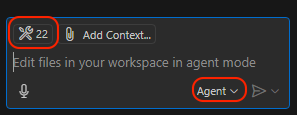
Make sure you have Agent mode enabled: vscode://settings/chat.agent.enabled
Open the Copilot chat and switch the mode to Agent. You can check that the MCP server was enabled correctly by clicking on the Select tools icon, which should list all the available Codacy tools.
When using NVM with Claude Desktop, NPX may not work. You should first install the MCP Server globally, and then use Node directly:
npm install -g @codacy/codacy-mcp
{
  "mcpServers": {
    "codacy": {
      "command": "/Users/yourusername/.nvm/versions/node/vXX.X.X/bin/node",
      "args": ["/path-to/codacy-mcp/dist/index.js"],
      "env": {
        "CODACY_ACCOUNT_TOKEN": "<YOUR_TOKEN>"
      }
    }
  }
}
To work locally on the MCP Server code, run:
npm install
npm run update-api
npm run build
You can test the MCP server using the inspector tool. You can either set a CODACY_ACCOUNT_TOKEN environment variable or pass it inline:
CODACY_ACCOUNT_TOKEN=your_token_here npm run inspect
This will build the project and launch the MCP inspector with your Codacy token.
You can test your local instance configuring the MCP Server as follows:
"codacy": {
  "command": "/path/to/bin/node",
  "args": [
    "/path/to/codacy-mcp-server/dist/index.js"
  ],
  "env": {
    "CODACY_ACCOUNT_TOKEN": "<YOUR_TOKEN>"
  }
}
In order to use the Codacy-CLI, it needs to be installed. Whenever the MCP Server will receive a request to analyze, it will try to install the CLI and initialize it.
In case you want to use a specific version of our CLI, send a CODACY_CLI_VERSION env variable in the MCP Server configuration.
This MCP server is licensed under the MIT License. This means you are free to use, modify, and distribute the software, subject to the terms and conditions of the MIT License. For more details, please see the LICENSE file in the project repository.
Claim this server with your GitHub account to request manual ownership verification.
Link to the catalog listing for Codacy MCP Server from your README. This badge does not certify ownership, compatibility or security.
[](https://awesome-mcp.com/servers/codacy-mcp-server)Public repository statistics could not be verified. Check the configured source address; unavailable counts are not zero.
来源、范围和时段分别列出;不相加,不代表安装人数、活跃用户或安全审核。
尚无已审核的包 / 镜像标识,暂不展示下载统计。
Alternative and complementary servers in the same category
A directory listing describing a cancellation-letter and mailing-address service. The configured public GitHub repository returned 404 during source verification.

A hosted MCP service for browsing and searching through Singapore mobile-network proxies.

A directory listing describing a Markdown-to-PDF service. The configured public GitHub repository returned 404 during source verification.