

A directory listing describing a cancellation-letter and mailing-address service. The configured public GitHub repository returned 404 during source verification.
Repository stats unavailable
Developer Tools
An MCP server that keeps a CODESYS V3.5 session open in the background so an MCP client can read, edit, compile and simulate Structured Text project code.
CODESYS MCP Toolkit is cataloged as an MCP server attributed to johannespettersson80. An MCP server that keeps a CODESYS V3.5 session open in the background so an MCP client can read, edit, compile and simulate Structured Text project code. It is categorized under developer tools. See the capability inspector for recorded interfaces and their independent review status; consult upstream documentation for the current interface.
Installation configuration is not reviewed. No executable setup is offered for this entry; inspect the source repository before proceeding.
Catalog license label: MIT. Check the source repository's current license and terms before using, modifying or distributing this software.
能力定义尚未审核。未核验的采集内容不会作为可信接口展示。
暂无可展示的已审核记录。这不表示上游不支持此能力。
暂无可展示的已审核记录。这不表示上游不支持此能力。
暂无可展示的已审核记录。这不表示上游不支持此能力。
Email delivery is not connected. This page does not collect email addresses or create subscriptions.
Browse the registry for current listings instead.
Reviews for CODESYS MCP Toolkit are not available yet
Review publishing and storage are not connected. This page does not collect or publish ratings or comments, including after sign-in.
No. The README states the toolkit does not log in or download to a controller and goes online only to CODESYS's own simulation, checking simulation mode before every online call.
Yes. A checkpoint is taken when a project is opened, and revert_object restores an object to it, including its methods and properties.
Version 2 edits Structured Text only; objects with graphical bodies such as SFC, CFC, LD and FBD can be read as PLCopenXML but not edited.
README.md · 18dd23fdf872 · 采集于 2026-11-13 09:29:44 UTC
保留上游原文,不做 AI 改写。为安全起见过滤脚本、表单和不安全链接。
当前显示最后一次成功采集的文档快照,请以来源页面为准。
Let Claude read, write, compile and simulate Structured Text in your CODESYS V3.5 projects.



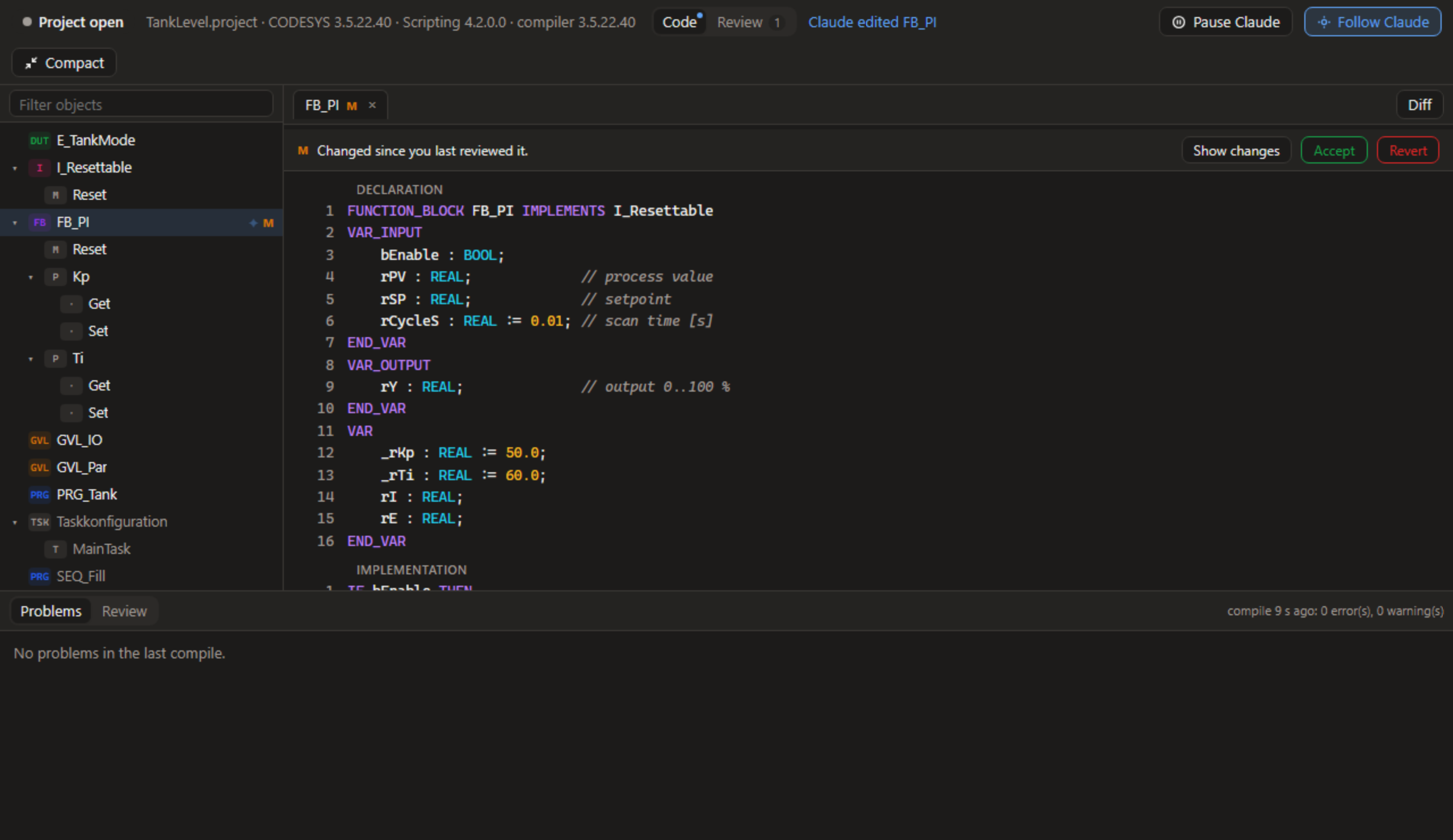
An MCP server that keeps one CODESYS session open in the background and gives Claude, or any MCP client, direct access to it. Claude works on your real project with the real CODESYS compiler, and you can watch the code change as it happens.
Schneider EcoStruxure Machine Expert isn't supported yet. If you have it, the testing notes help find out what works.
npm install -g @codesys/mcp-toolkit
Coming from version 1? The tools have changed: see Migrating from v1.
Add the server to %APPDATA%\Claude\claude_desktop_config.json, then restart
Claude Desktop:
{
  "mcpServers": {
    "codesys": {
      "command": "codesys-mcp-tool",
      "args": [
        "--codesys-path", "C:\\Program Files\\CODESYS 3.5.21.0\\CODESYS\\Common\\CODESYS.exe",
        "--codesys-profile", "CODESYS V3.5 SP21",
        "--workspace", "C:\\PLC\\Projects"
      ]
    }
  }
}
--codesys-path and --codesys-profile are optional. Without them the server
uses the newest CODESYS install under Program Files and its newest profile.
Create a project called
BlinkDemo.project. Add a function block that toggles an output once per second, call it fromPLC_PRG, compile it, and prove in simulation that the output toggles.
CODESYS starts in the background when the server launches. A cold start takes 1 to 3 minutes; later starts take about 10 seconds.
Claude Desktop asks for approval per tool. Choose Always allow the first
time it asks about codesys, and once more for open_sim_panel. After that it
doesn't ask again.
Everything goes through one MCP tool, codesys, with an action for each
operation. The reference describes each one.
| Area | Actions |
|---|---|
| Projects | open_project create_project save_project close_project codesys_status |
| Read code | get_project_tree read_objects search_code get_outline |
| Change code | write_object create_object delete_object rename_object |
| Build | compile |
| Libraries | list_libraries add_library remove_library get_library_api |
| Tasks and I/O | list_tasks configure_task get_io_list get_devices |
| Change tracking | checkpoint get_changes revert_object |
| Simulation | codesys_sim_start codesys_sim_stop codesys_sim_status codesys_sim_control codesys_sim_cycle codesys_sim_read codesys_sim_write codesys_sim_force codesys_sim_unforce |
| Helpers | batch wait help open_workspace |
batch runs up to 50 actions in one call, which is much faster than separate
calls.
Version 2 edits Structured Text only. Objects with graphical bodies (SFC, CFC, LD, FBD) appear in the tree and can be read as PLCopenXML, but not edited.
Right after opening or creating a project, Claude opens the panel as a card in the chat. It shows the status, the object Claude is working on and how many objects changed. Open workspace expands it into a CODESYS-style view with the project tree, editor tabs, compile problems and a review list.
From the panel you can Accept or Revert each change, compare it with the version you last reviewed, and Pause Claude while you look around.
The card needs a client that supports MCP Apps. In our testing Claude Desktop draws it in the Code tab but not in a normal chat (anthropics/claude-ai-mcp#1243). Ask Claude to open the workspace in your browser if you'd rather have it there; the browser never opens by itself.
revert_object puts an object back to it, including its methods and
properties.--no-autosave to save only on request.| Option | Meaning |
|---|---|
--codesys-path <exe> | CODESYS.exe to run |
--codesys-profile <name> | Profile, e.g. "CODESYS V3.5 SP21" (file name in CODESYS\Profiles, without .profile.xml). A name that isn't installed is refused at start, with the installed ones listed |
--codesys-additional-folder <dir> | CODESYS's add-on folder, passed as --additionalfolder. SP22 installs add-ons such as Scripting there; the toolkit finds CODESYS\AdditionalFolders\Default by itself |
--workspace <dir> | Base folder for relative project paths (default: the working directory). Created if missing |
--project <file> | Open this project as soon as CODESYS is up |
--session-dir <dir> | Where session folders go (default: %TEMP%\codesys-mcp-toolkit) |
--no-autostart | Start CODESYS on the first tool call instead of at launch |
--no-autosave | Don't save after every change; use save_project |
--viewer-port <port> | Port of the browser workspace on 127.0.0.1 (default 5180, or the next free one) |
--no-viewer | Don't serve the browser workspace |
--no-shared | Run CODESYS in this process instead of the shared session |
To keep SP21 and SP22 side by side, add one server entry per version, each with
its own --codesys-path and --codesys-profile.
The toolkit never updates a project's compiler or library versions, and
open_project says when they differ from the running CODESYS. A project that
needs a newer compiler opens, but can't compile until you open it in that
version. Each version keeps its own devices and libraries, so a project from an
older CODESYS may report missing libraries until you update it in the CODESYS
window.
Claude Desktop may start the server more than once. All processes started with
the same options share one background session, so only one CODESYS runs and the
panel shows the project Claude is working on. The session stops two minutes
after the last client disconnects. Its log is daemon-<id>.log in
%LOCALAPPDATA%\codesys-mcp-toolkit.
MCP client ── stdio ──▶ codesys-mcp-tool (Node.js)
                            │   requests/<id>.json  ▶  operation name + JSON arguments
                            │   ◀  results/<id>.json
                            │   ◀  heartbeat.json      idle or busy, with a deadline
                            ▼
                        CODESYS.exe --noUI --runscript=watcher.py
                            └─ fixed operation handlers (IronPython 2.7)
watcher/mcp_ops.py.busy with a deadline. If CODESYS
blocks past it, the server kills it and starts a fresh one on the next call.Taskkonfiguration works.| Message | What to do |
|---|---|
| CODESYS is still starting | The first start after boot can take minutes. Check codesys_status, then try again. |
startup_failed or startup_timeout | Check the profile name and that CODESYS starts by hand. The error includes the last lines of watcher.log. |
Library errors after create_project (#4) | The default template is brought up to the running CODESYS, so its libraries should resolve. A template you pass yourself is used as it is. If libraries are still missing, install them with the CODESYS Library Repository. |
hung or timeout | CODESYS was restarted. Re-open the project. |
dialog | CODESYS opened a dialog, named in the error, that a session without a window can't answer. CODESYS was stopped and restarts on the next call. Do the same step once in the CODESYS window, answer the dialog there, and try again. |
Each session folder keeps a watcher.log.
npm install
npm test                                    # unit, bridge and tool tests (no CODESYS needed)
CODESYS_LIVE=1 npx vitest run test/live     # end-to-end against your CODESYS
npm run build                               # server and the single-file panel
The normal tests run the real watcher under CPython 3 against a fake
scriptengine (test/fake/). Watcher code must stay valid IronPython 2.7:
ASCII-only, no f-strings.
To work on the panel without Claude Desktop, run the dev host, then open http://localhost:5199:
npm run build:panel && node scripts/dev-host/run.mjs 5199
See CONTRIBUTING.md to get involved.
codesys tool.projectFilePath. Call open_project once.create_pou, create_method and create_property are now create_object
with a kind.set_pou_code is now write_object.compile_project is now compile, and it returns the errors.read_objects, get_project_tree) instead of
resources, so it works in Claude Desktop
(#6).The persistent-watcher design borrows ideas from zbest1000/mcptoolkit-for-codesys (op-handler registry, heartbeat, prompt handling) and phobicdotno/Codesys-MCP-Master (file-queue IPC, version-safe opening). Both are MIT-licensed.
CODESYS is a trademark of CODESYS GmbH. This project is independent and isn't affiliated with or endorsed by CODESYS GmbH.
Claim this server with your GitHub account to request manual ownership verification.
Link to the catalog listing for CODESYS MCP Toolkit from your README. This badge does not certify ownership, compatibility or security.
[](https://awesome-mcp.com/servers/codesys-mcp-toolkit)Public repository statistics could not be verified. Check the configured source address; unavailable counts are not zero.
来源、范围和时段分别列出;不相加,不代表安装人数、活跃用户或安全审核。
尚无已审核的包 / 镜像标识,暂不展示下载统计。
Alternative and complementary servers in the same category
A directory listing describing a cancellation-letter and mailing-address service. The configured public GitHub repository returned 404 during source verification.

A hosted MCP service for browsing and searching through Singapore mobile-network proxies.

A directory listing describing a Markdown-to-PDF service. The configured public GitHub repository returned 404 during source verification.