
A directory listing describing a cancellation-letter and mailing-address service. The configured public GitHub repository returned 404 during source verification.
Repository stats unavailable
Developer Tools
A local-first code retrieval layer that indexes a codebase and exposes MCP tools, letting AI coding agents fetch ranked files, symbols, and dependency chains.
ContextBridge is cataloged as an MCP server attributed to tijuthomas5. A local-first code retrieval layer that indexes a codebase and exposes MCP tools, letting AI coding agents fetch ranked files, symbols, and dependency chains. It is categorized under developer tools. See the capability inspector for recorded interfaces and their independent review status; consult upstream documentation for the current interface.
Installation configuration is not reviewed. No executable setup is offered for this entry; inspect the source repository before proceeding.
Catalog license label: Apache License, Version 2.0. Check the source repository's current license and terms before using, modifying or distributing this software.
能力定义尚未审核。未核验的采集内容不会作为可信接口展示。
暂无可展示的已审核记录。这不表示上游不支持此能力。
暂无可展示的已审核记录。这不表示上游不支持此能力。
暂无可展示的已审核记录。这不表示上游不支持此能力。
Email delivery is not connected. This page does not collect email addresses or create subscriptions.
Browse the registry for current listings instead.
Reviews for ContextBridge are not available yet
Review publishing and storage are not connected. This page does not collect or publish ratings or comments, including after sign-in.
No. It indexes Graphify output and behavior docs rather than raw source; you generate Graphify for your project, point the discovery settings at those folders, and re-run setup after each Graphify update.
No. It is described as a codebase routing and retrieval tool, not a reasoning engine: it finds files, symbols, and connections but does not prove causality or choose the fix.
README.md · d8349f270e14 · 采集于 2026-11-13 13:24:00 UTC
保留上游原文,不做 AI 改写。为安全起见过滤脚本、表单和不安全链接。
当前显示最后一次成功采集的文档快照,请以来源页面为准。
Without CB, an AI coding agent either guesses which files are relevant, or you paste entire source files into the chat — burning thousands of input tokens on code that isn't needed.
With CB, the AI calls a single MCP tool and gets back a compact, ranked result: the owner file, related files, key symbols, and a dependency summary — typically a few hundred tokens instead of tens of thousands of lines of raw source.
This isn't limited to bug investigations — the same tool answers general questions about how an existing feature or workflow is implemented.
| Without CB | With CB |
|---|---|
| Paste 10–50 raw files into context | CB returns the 3–5 files that actually matter |
| AI guesses which code is relevant | Result is grounded in your real codebase structure |
| High token cost, noisy context | Low token cost, focused context |
| Hallucinated file paths and method names | Exact file paths, symbols, and line hints |
The optional local AI analysis stage further compresses the result before it reaches your cloud AI — so you pay even less.
Scope note: ContextBridge is a codebase routing and retrieval tool, not a reasoning engine — it finds the right files, symbols, and connections, but does not prove causality or choose the fix for you. See Intended Scope for the full boundary.
💡 New here? Don't want to read everything? Ask your AI assistant (Claude, ChatGPT, Gemini, etc.) to read the
docs/folder and guide you through setup for your OS and project.
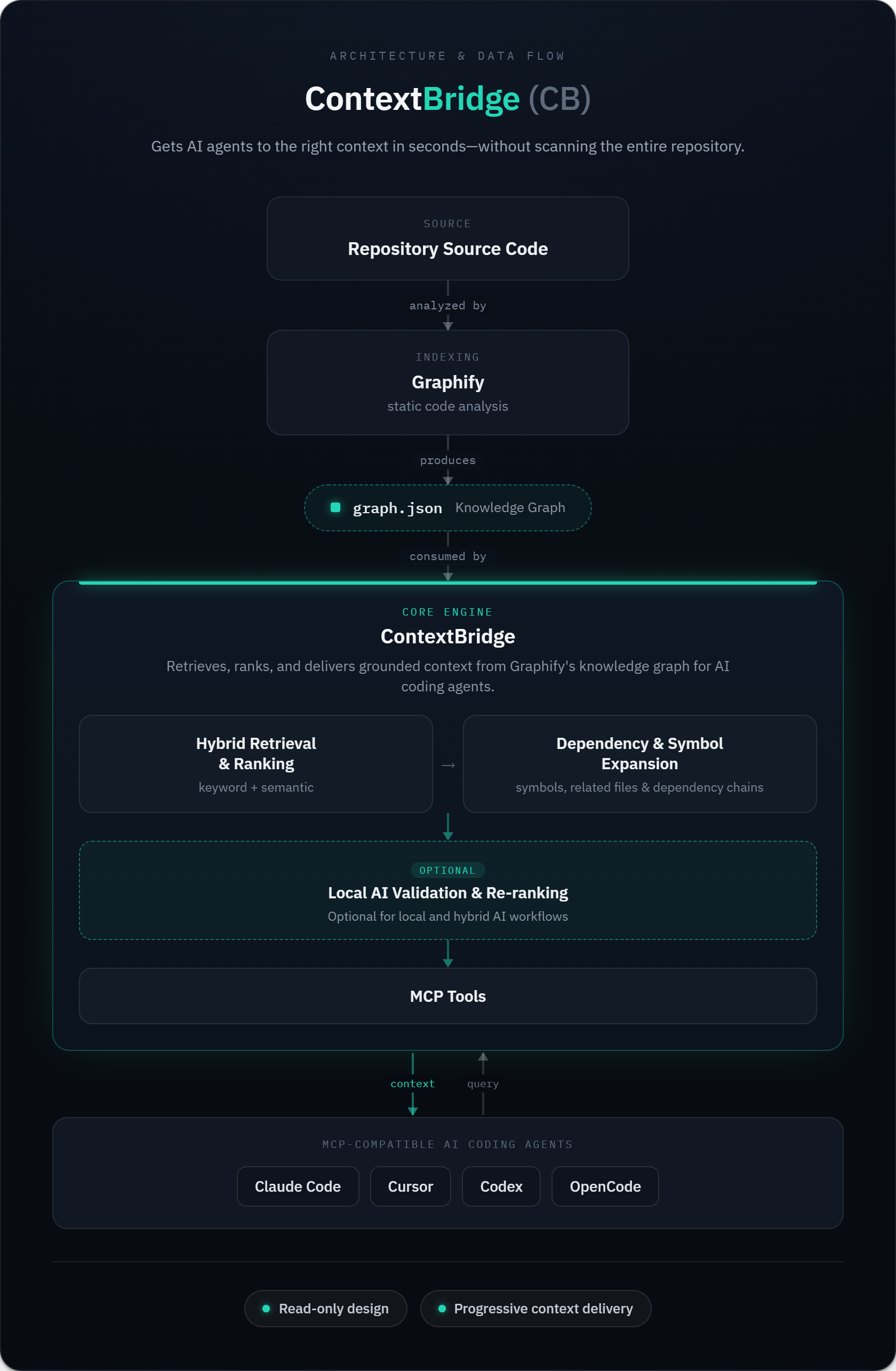
A local-first code retrieval layer for AI coding agents. ContextBridge indexes your codebase (via Graphify output), then exposes MCP tools that any AI client (Claude Code, Codex, Cursor, Antigravity, …) can call to get ranked files, symbols, and dependency chains — optionally validated and re-ranked by a local LLM before the answer reaches your cloud AI.
Your prompt ─► ContextBridge (keyword + vector retrieval)
            ─► Local AI (optional: validates, re-ranks, fills gaps)
            ─► Your AI agent (implements, grounded in real files)
The engine is generic. All project-specific ranking lives in a swappable profile plugin, so the same tool works for any codebase.
How your code flows through ContextBridge to your AI agent:
ContextBridge ships with a local dashboard for monitoring retrieval quality, index health, and config — no cloud dependency.
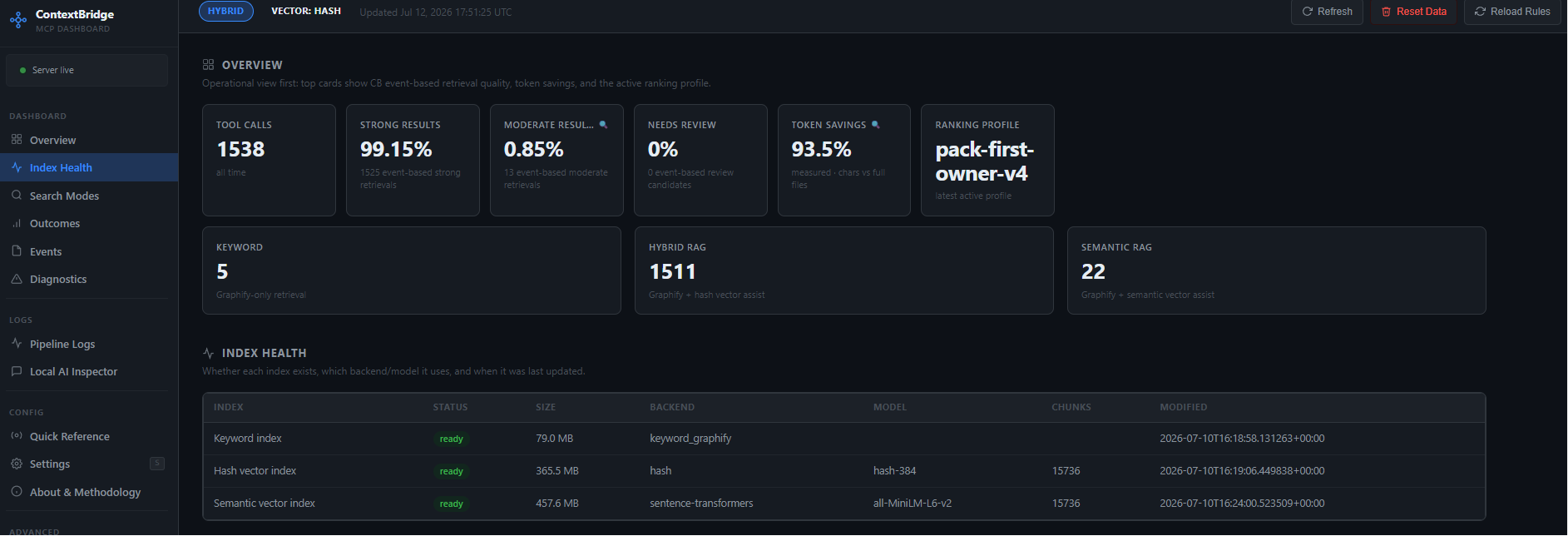
Overview — retrieval quality, token savings, and search-mode breakdown
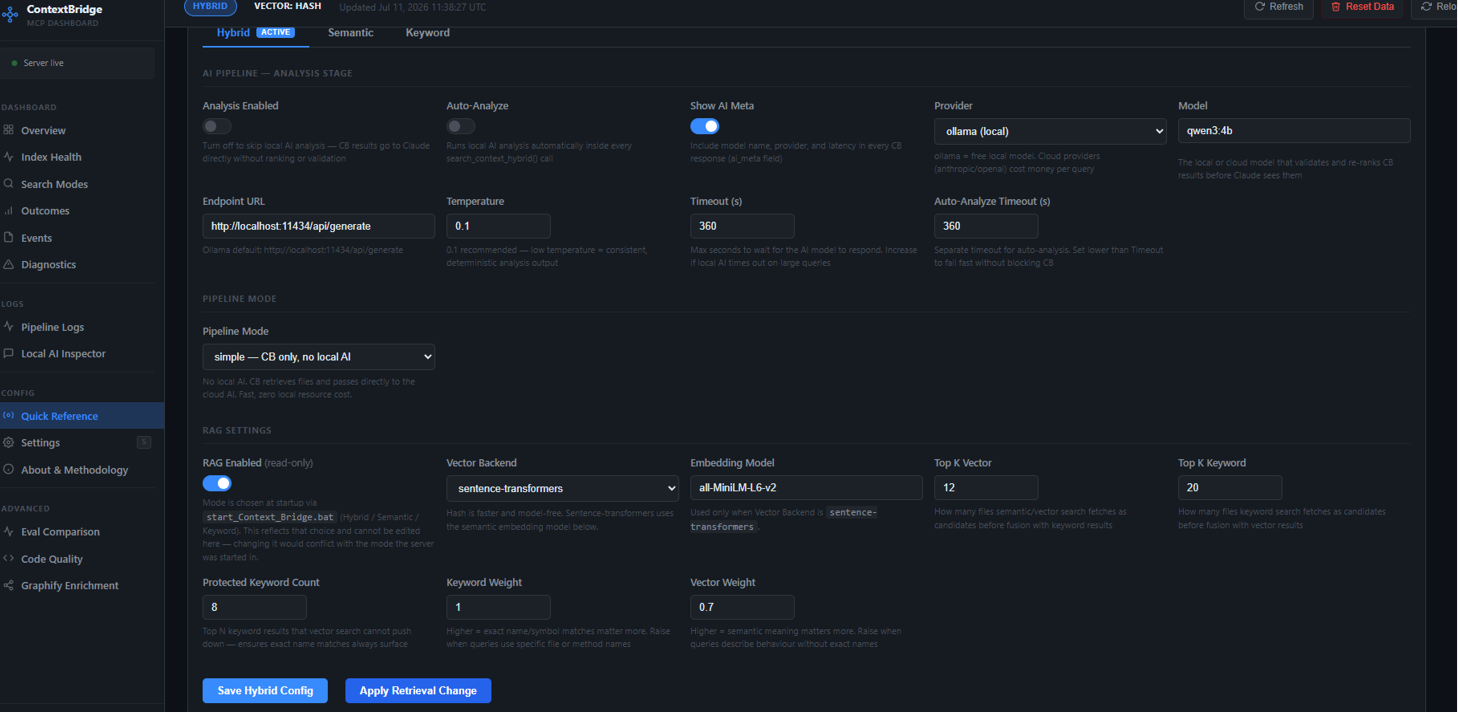
Settings — tune pipeline mode, RAG weights, and model config live
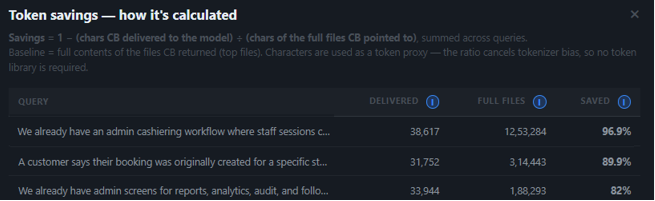
Token savings — per-query breakdown of what CB delivered vs. full-file cost
📖 Before you start — read the docs. The
docs/folder contains everything you need for full setup, configuration, pipeline, and profile creation. Start withdocs/0. README.mdfor a guided index of all documentation.
:: 1. Install deps + build the index + scaffold config files
context_bridge\setup\windows\setup_context_bridge.bat

:: 2. Point the config at YOUR source folders
::    edit config.hybrid.json  ->  settings.discovery.*  (replace your_backend / your_frontend)

:: 3. Re-run setup to index your code
context_bridge\setup\windows\setup_context_bridge.bat

:: 4. Start the server + dashboard (pick Hybrid / Semantic / Keyword)
context_bridge\setup\windows\1.  start_Context_Bridge.bat
Mac/Linux: use context_bridge/setup/mac/ or context_bridge/setup/linux/ equivalents.
Setup is rerunnable and safe: it creates config/start files from the *.example
templates only if missing (never overwrites your edits), and rebuilds the index each run.
Run setup_context_bridge.bat --force to reset configs back to the templates.
The MCP server runs SSE by default at http://127.0.0.1:8755/sse — point your AI client
there. Stdio transport is also supported (set CONTEXT_BRIDGE_TRANSPORT=stdio before
starting) for clients that don't support SSE; SSE is recommended since it lets multiple
AI clients share one running server instead of each spawning its own process.
Dashboard: http://127.0.0.1:8795. Live stats can lag up to ~15 seconds behind the
latest activity, and history lists (recent events, missed files, failed queries)
show the most recent 1000 entries rather than the full lifetime log — both are
intentional performance tradeoffs, not data loss.
Chosen at startup (the start script picks the matching config file):
| Mode | Config | What it does |
|---|---|---|
| Hybrid | config.hybrid.json | Keyword-first + guarded vector assist (recommended) |
| Semantic | config.semantic.json | Vector-only (needs sentence-transformers) |
| Keyword | config.json | Pure keyword, no vectors |
| Tool | Use |
|---|---|
search_context_hybrid() | Primary — broad file + context discovery (runs analysis automatically) |
find_code_locations() | Exact owner file / symbol / line for a method or class |
get_module_summary() | Overview of a module/service |
get_graphify_pack() | All files in a feature pack |
record_outcome() | Log whether a result helped |
health_check(), get_usage_summary(), search_context(), find_related_files() | Utility |
Which tools appear is controlled by config — if a tool is registered, it is safe to call.
The generic engine asks a profile for project-specific ranking at every step.
With no profile (project_profile: "default") you get pure generic scoring.
rules/projects/example_profile.py → rules/projects/<yourapp>_profile.pyCONTEXT_BRIDGE_PROFILE=<yourapp> in your start script,
or project_profile: "<yourapp>" in your config| Hook | Purpose |
|---|---|
expand_query_tokens(query, tokens) | Add extra search tokens |
module_intent_tokens() | Map module name → vocabulary |
pinned_owner_files(query_tokens) | Force specific files to the top |
adjust_document_score(...) | Boost/penalize a candidate document |
adjust_owner_score(...) | Boost/penalize an owner file by name |
adjust_primary_owner_score(...) | Nudge the single primary owner |
adjust_scoped_score(...) | Prefer files under the dominant module/pack |
extra_owner_file_patterns() | Extra high-priority filename patterns |
infer_module_from_path(path) | Path → module name (fusion scoping) |
low_signal_terms() | Module/domain words to treat as low-signal |
noise_files() | Filenames to de-prioritize (ui/support/root) |
gap_queries() | Trigger words → clean re-search query |
analysis_prompt_override() | Full system prompt for the local AI |
pack_files_for_intents(...) | Map intents → Graphify pack files (advanced) |
See docs/ for extended guides on setup, pipeline, profile creation, and debug commands.
ContextBridge indexes Graphify output (graph.json, GRAPH_REPORT.md,
source-files.txt, scope-summary.md, manifest.json) plus /behavior/ docs — not raw
source. Generate Graphify for your project, point settings.discovery.* at those folders,
and run setup. Re-run setup after each Graphify update to refresh the index.
Configure a local model under pipeline.analysis_stage (provider ollama by default,
or anthropic/openai/openrouter). When enabled, it validates and re-ranks CB results,
decomposes multi-topic prompts, and triggers gap re-searches — then passes a compact,
grounded result to your cloud AI. Swap models by changing model only; the prompts are
model-agnostic.
Copyright 2026 Tiju Thomas
Licensed under the Apache License, Version 2.0.
Claim this server with your GitHub account to request manual ownership verification.
Link to the catalog listing for ContextBridge from your README. This badge does not certify ownership, compatibility or security.
[](https://awesome-mcp.com/servers/context-bridge-mcp)Public repository statistics could not be verified. Check the configured source address; unavailable counts are not zero.
来源、范围和时段分别列出;不相加,不代表安装人数、活跃用户或安全审核。
尚无已审核的包 / 镜像标识,暂不展示下载统计。
Alternative and complementary servers in the same category
A directory listing describing a cancellation-letter and mailing-address service. The configured public GitHub repository returned 404 during source verification.

A hosted MCP service for browsing and searching through Singapore mobile-network proxies.

A directory listing describing a Markdown-to-PDF service. The configured public GitHub repository returned 404 during source verification.