腾讯云 COS MCP Server

腾讯云 COS MCP Server

cos-mcp•bytencent

An MCP server that lets large models access Tencent Cloud COS storage and Data万象 (CI) capabilities without coding.

License: BSD3•Runtime: Awaiting documentation review•Category: cloud devops

WHAT IT DOES

  • •Uploads, downloads, and lists files in Tencent Cloud COS storage.
  • •Provides cloud image processing abilities such as image info, super-resolution, cropping, QR code recognition, quality assessment, and text watermarking.
  • •Supports metadata/natural language retrieval, document-to-PDF conversion, and video cover extraction.
  • •Can run in local stdio or remote SSE connection mode.

BEST FOR

  • •Uploading text, images, video, or audio obtained through other MCP capabilities directly to COS cloud storage.
  • •Quickly transferring local data to COS cloud storage or backup through a large model.
  • •Batch archiving web media and text to COS, and processing data in the cloud.

ABOUT COS-MCP

腾讯云 COS MCP Server is cataloged as an MCP server attributed to tencent. An MCP server that lets large models access Tencent Cloud COS storage and Data万象 (CI) capabilities without coding. It is categorized under cloud devops. See the capability inspector for recorded interfaces and their independent review status; consult upstream documentation for the current interface.

HOW TO INSTALL

Installation configuration is not reviewed. No executable setup is offered for this entry; inspect the source repository before proceeding.

LICENSE

Catalog license label: BSD3. Check the source repository's current license and terms before using, modifying or distributing this software.

能力检查器

能力定义尚未审核。未核验的采集内容不会作为可信接口展示。

Tools (0)

暂无可展示的已审核记录。这不表示上游不支持此能力。

Resources (0)

暂无可展示的已审核记录。这不表示上游不支持此能力。

Prompts (0)

暂无可展示的已审核记录。这不表示上游不支持此能力。

NEWSLETTER - COMING LATER

Newsletter subscriptions are not open yet

Email delivery is not connected. This page does not collect email addresses or create subscriptions.

Browse the registry for current listings instead.

Community Reviews

Coming later

Reviews for 腾讯云 COS MCP Server are not available yet

Review publishing and storage are not connected. This page does not collect or publish ratings or comments, including after sign-in.

FREQUENTLY ASKED QUESTIONS

Which connection modes does the COS MCP Server support?

It supports stdio (local) and sse (remote), with stdio as the default.

Is a DatasetName required to use the server?

No, DatasetName is optional and is only needed for data intelligent retrieval operations.

上游原版 README

在 GitHub 查看同一版本原文

README.md · f5d501d0407e · 采集于 2026-11-13 09:44:42 UTC

保留上游原文,不做 AI 改写。为安全起见过滤脚本、表单和不安全链接。

当前显示最后一次成功采集的文档快照,请以来源页面为准。

中文 | English

腾讯云 COS MCP Server 🚀🚀🚀

npm Version

logo

基于 MCP 协议的腾讯云 COS MCP Server,无需编码即可让大模型快速接入腾讯云存储 (COS) 和数据万象 (CI) 能力。


✨ 核心功能

云端存储能力

  • ⬆️ 文件上传到云端
  • ⬇️ 文件从云端下载
  • 📋 获取云端文件列表

云端处理能力

  • 🖼️ 获取图片信息
  • 🔍 图片超分辨率
  • ✂️ 图片裁剪
  • 📲 二维码识别
  • 🏆 图片质量评估
  • 🅰️ 文字水印
  • 🎬 元数据/自然语言检索 (MateInsight)
  • 📄 文档转 PDF
  • 🎥 视频封面

💡 典型应用场景

  • 使用其他 MCP 能力获取的文本/图片/视频/音频等数据,可直接上传到 COS 云端存储。
  • 本地数据快速通过大模型转存到 COS 云端存储/备份。
  • 通过大模型实现自动化:将网页里的视频/图片/音频/文本等数据批量转存到 COS 云端存储。
  • 自动化将视频/图片/音频/文本等数据在云端处理,并转存到 COS 云端存储。

🌟 功能示例

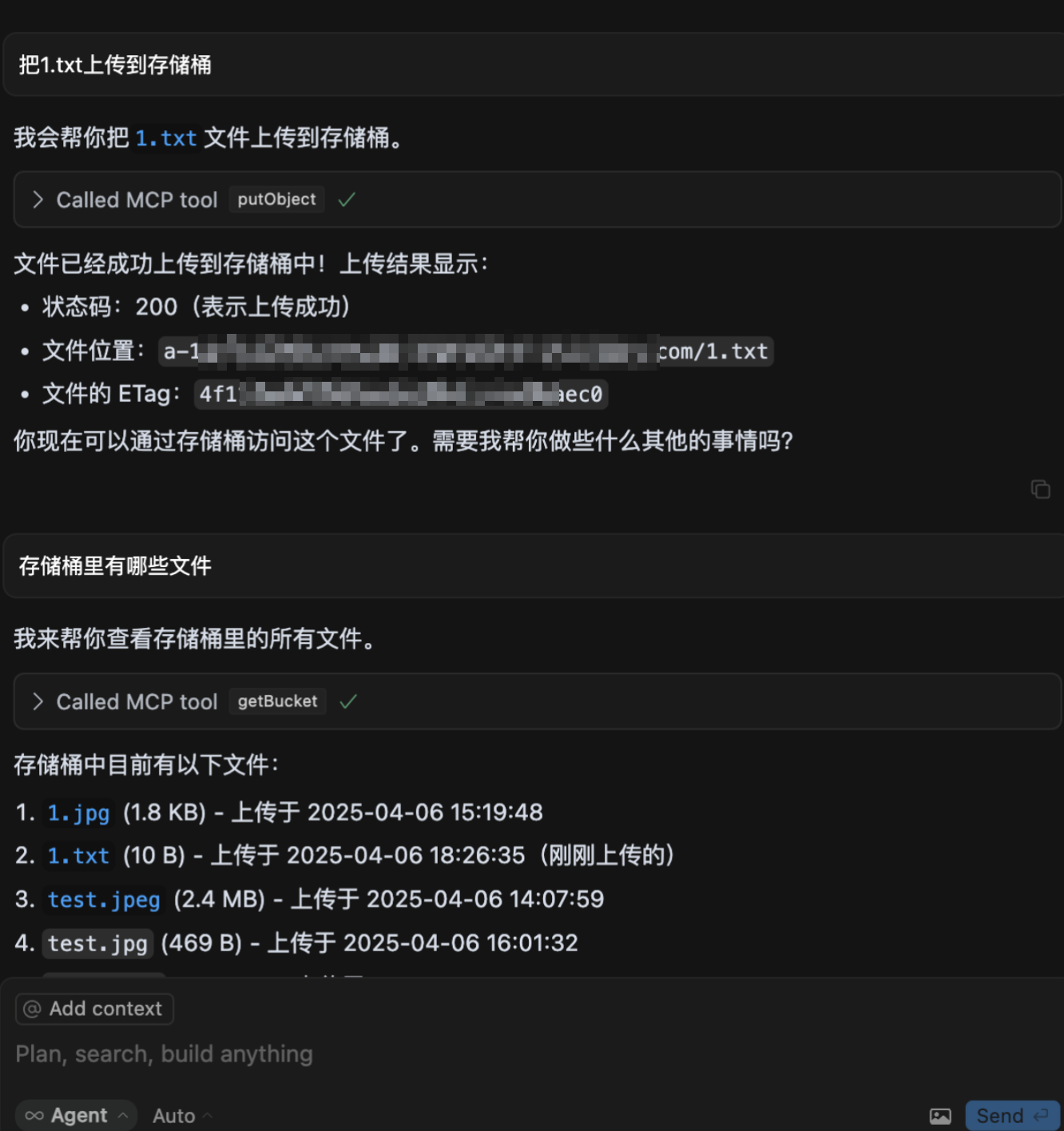
  1. 上传文件到 COS
    eg1
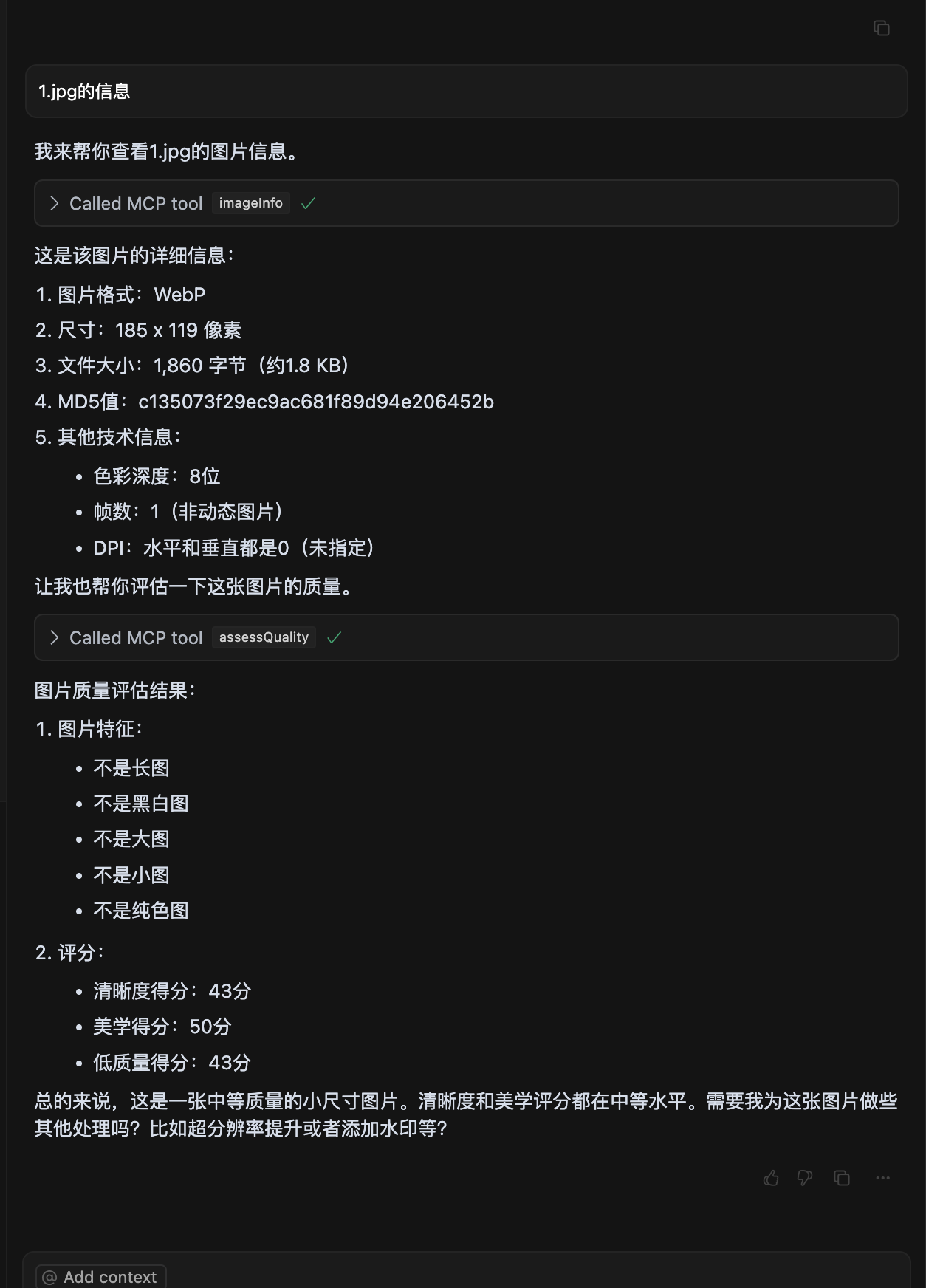
  2. 图片质量评估
    eg3
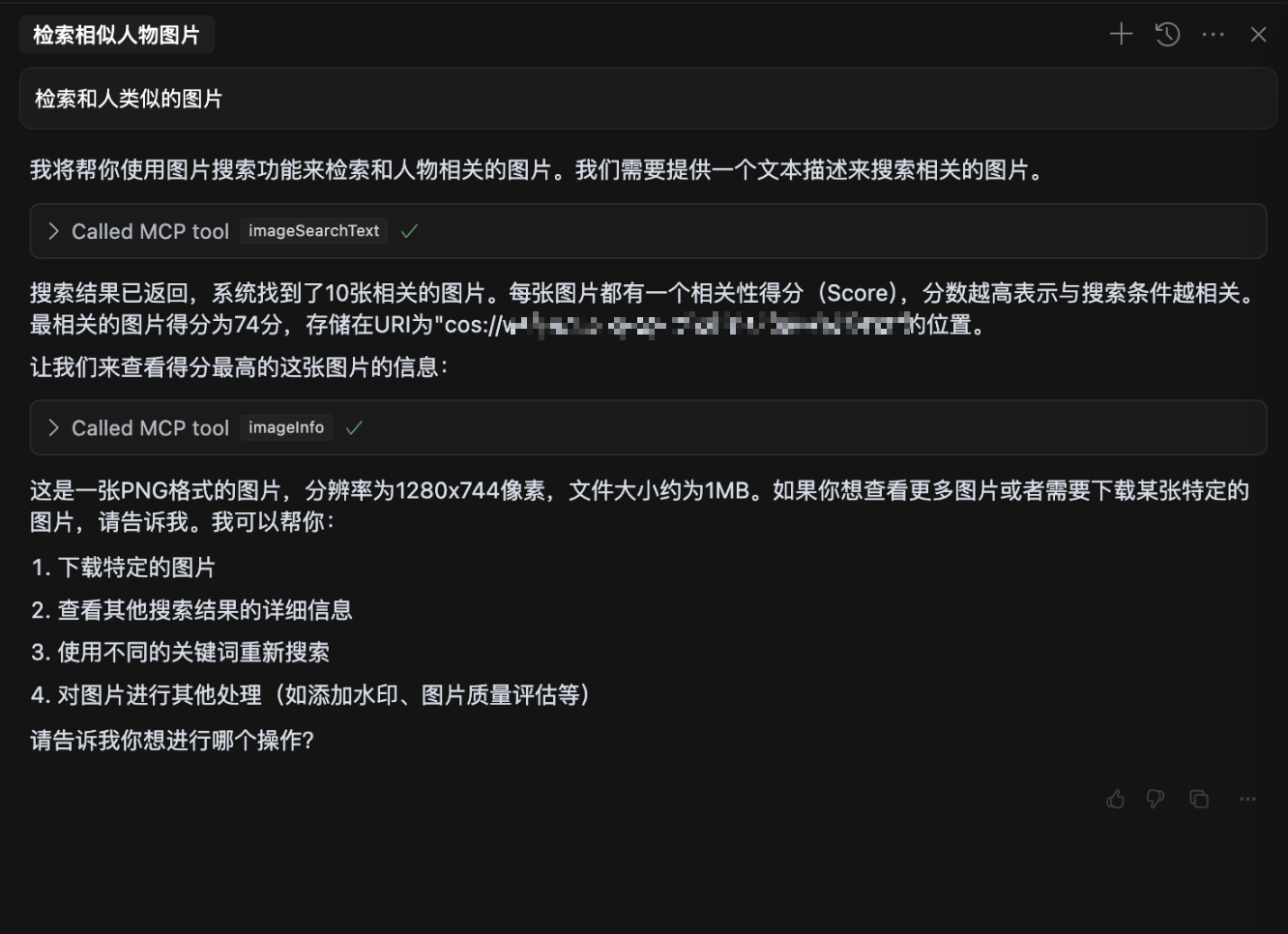
  3. 自然语言检索图片
    eg2
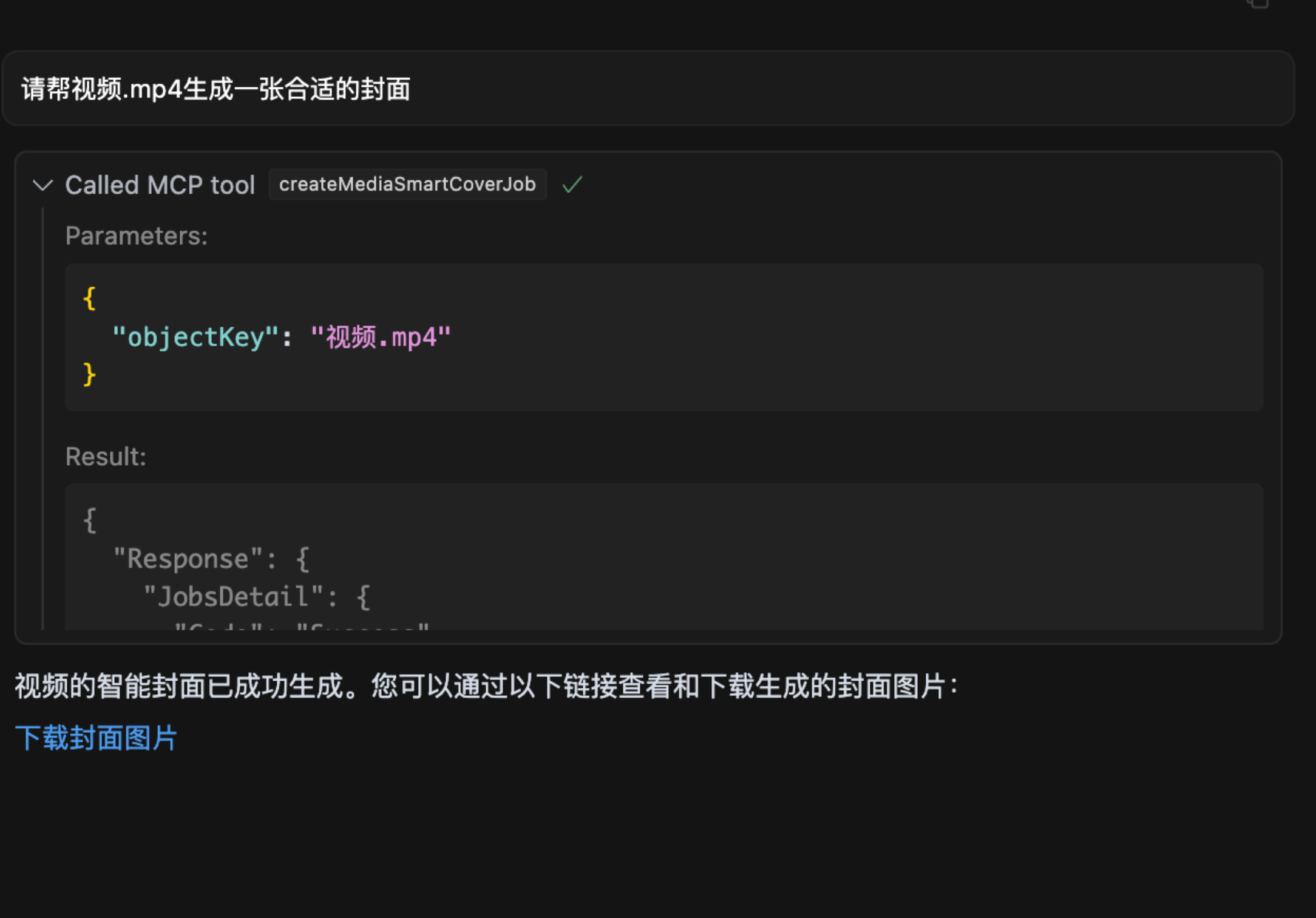
  4. 视频截帧
    eg15

🔧 安装使用

参数说明

为了保护您的数据私密性,请准备以下参数:

1. SecretId / SecretKey

  • 说明: 腾讯云 COS 的密钥,用于身份认证,请妥善保管,切勿泄露。
  • 获取方式:
    1. 访问 腾讯云密钥管理。
    2. 新建密钥并复制生成的 SecretId 和 SecretKey。

2. Bucket

  • 示例: mybucket-123456
  • 说明: 存储桶名称,用于存放数据,相当于您的个人存储空间。
  • 获取方式:
    1. 访问 存储桶列表。
    2. 复制存储桶名称。如果没有存储桶,可点击“创建存储桶”,一般选择默认配置即可快速完成创建。

3. Region

  • 示例: ap-beijing
  • 说明: 存储桶所在的地域。
  • 获取方式:
    1. 在 存储桶列表 中找到存储桶。
    2. 在存储桶名称一行查看所属地域并复制,例如:ap-beijing。

4. DatasetName

  • 说明: 非必填参数,数据智能检索操作需要此参数。
  • 获取方式:
    1. 访问 数据集管理。
    2. 创建数据集并等待索引建立完成后,复制数据集名称。

5. connectType

  • 说明: 非必填参数,指定连接方式,可选值为 stdio(本地)或 sse(远程)。
  • 默认值: stdio

6. port

  • 说明: 非必填参数,当连接方式为 sse 时,可自由设置端口。
  • 默认值: 3001

从 npx 启动

在大模型内使用时(例如: cursor),需要在 mcp.json 中配置:

{
  "mcpServers": {
    "cos-mcp": {
      "command": "npx",
      "args": [
        "cos-mcp",
        "--Region=yourRegion",
        "--Bucket=yourBucket",
        "--SecretId=yourSecretId",
        "--SecretKey=yourSecretKey",
        "--DatasetName=yourDatasetname"
      ]
    }
  }
}

也可以通过 JSON 配置:

{
  "mcpServers": {
    "cos-mcp": {
      "command": "npx",
      "args": [
        "cos-mcp",
        "--cos-config='{\"Region\":\"yourRegion\",\"Bucket\":\"yourBucket\",\"SecretId\":\"yourSecretId\",\"SecretKey\":\"yourSecretKey\",\"DatasetName\":\"yourDatasetname\"}'"
      ]
    }
  }
}

使用 npm 安装

# 安装
npm install -g cos-mcp@latest

# 运行开启 SSE 模式
cos-mcp --Region=yourRegion --Bucket=yourBucket --SecretId=yourSecretId --SecretKey=yourSecretKey --DatasetName=yourDatasetname --port=3001 --connectType=sse

# 或通过 JSON 配置
cos-mcp --cos-config='{"Region":"yourRegion","Bucket":"BucketName-APPID","SecretId":"yourSecretId","SecretKey":"yourSecretKey","DatasetName":"datasetName"}' --port=3001 --connectType=sse

在大模型内使用 SSE 模式时(例如: cursor),需要在 mcp.json 中配置:

{
  "mcpServers": {
    "cos-mcp": {
      "url": "http://localhost:3001/sse"
    }
  }
}

使用源码安装

步骤 1: 克隆项目代码

git clone https://github.com/Tencent/cos-mcp.git
cd cos-mcp

步骤 2: 安装依赖

npm install

步骤 3: 启动服务

3.1 配置本地环境变量

创建 .env 文件,并配置以下环境变量:

Region='yourRegion'
Bucket='yourBucket'
SecretId='yourSecretId'
SecretKey='yourSecretKey'
DatasetName="yourDatasetName"

3.2 本地 SSE 模式启动(方式一)

npm run start:sse

3.3 本地构建后使用 STDIO 模式(方式二)

npm run build

构建产物位于 dist/index.js。


步骤 4: 在大模型内使用

SSE 模式配置

{
  "mcpServers": {
    "cos-mcp": {
      "url": "http://localhost:3001/sse"
    }
  }
}

STDIO 模式配置

{
  "mcpServers": {
    "cos-mcp": {
      "command": "node",
      "args": [
        "${your work space}/dist/index.js"
      ]
    }
  }
}

完成以上步骤后,即可通过源码运行 COS MCP Server。


⚠️ 注意事项

  1. 如果安装了旧版本的包,可以将上述内容内 cos-mcp 改为 cos-mcp@latest 安装最新版包。
  2. 如果全局安装后直接使用 cos-mcp 不行,可能是全局变量有问题,可以使用拆分变量或 npx 的方式启动:
    npm install -g cos-mcp@latest
    cos-mcp --cos-config=xxx --port=3001 --connectType=sse
    
    上述命令效果等同于:
    npx cos-mcp@latest --cos-config=xxx --port=3001 --connectType=sse
    
  3. 如果出现解析问题,可能是终端对双引号敏感,可以将配置参数改为以下格式再尝试:
    --cos-config='{\"Region\":\"yourRegion\",\"Bucket\":\"BucketName-APPID\",\"SecretId\":\"yourSecretId\",\"SecretKey\":\"yourSecretKey\",\"DatasetName\":\"datasetName\"}' --port=3001 --connectType=sse
    

Install configuration

Are you the maintainer?

Claim this server with your GitHub account to request manual ownership verification.

README Embed Badge
Markdown

Link to the catalog listing for 腾讯云 COS MCP Server from your README. This badge does not certify ownership, compatibility or security.

[![MCP catalog listing](https://img.shields.io/badge/MCP-awesome--mcp-orange?style=flat-square)](https://awesome-mcp.com/servers/cos-mcp)

REPOSITORY STATS

GitHub StarsUnavailable
ForksUnavailable
Site views (30 UTC days)1

Approximate reported site interactions from 2026-10-27 through 2026-11-25 UTC; not unique visitors or installations.

Public repository statistics could not be verified. Check the configured source address; unavailable counts are not zero.

下载与拉取统计

来源、范围和时段分别列出;不相加,不代表安装人数、活跃用户或安全审核。

尚无已审核的包 / 镜像标识,暂不展示下载统计。

Related cloud devops MCP Servers

Alternative and complementary servers in the same category

View all in cloud devops →
Huawei MCP Server
mcp-server-huaweiclouddeveloper•huaweiclouddeveloper

A Model Context Protocol server built on Huawei Cloud services that enables AI assistants to operate Huawei Cloud resources within conversational workflows, supporting ECS, OBS, GaussDB, and other cloud products.

Repository stats unavailable
Cloud & DevOps
Coolify MCP Server
coolify-mcp-server•wrediam

An MCP server that exposes the Coolify v4.3.1 REST API so AI clients can manage applications, databases, services, servers, deployments, and more.

Repository stats unavailable
Cloud & DevOps

A deprecated Model Context Protocol server for interacting with Kong Konnect APIs, enabling AI assistants to query and analyze Kong Gateway configurations, traffic, and analytics.

Repository stats unavailable
Cloud & DevOps