
A directory listing describing a cancellation-letter and mailing-address service. The configured public GitHub repository returned 404 during source verification.
Repository stats unavailable
Developer Tools
A stdio MCP server that lets AI clients detect the system, install MCP servers, and validate them via a real MCP handshake.
MCP Installer: an MCP server that installs and configures other MCP servers. is cataloged as an MCP server attributed to matthewdcage. A stdio MCP server that lets AI clients detect the system, install MCP servers, and validate them via a real MCP handshake. It is categorized under developer tools. See the capability inspector for recorded interfaces and their independent review status; consult upstream documentation for the current interface.
Installation configuration is not reviewed. No executable setup is offered for this entry; inspect the source repository before proceeding.
Catalog license label: MIT. Check the source repository's current license and terms before using, modifying or distributing this software.
能力定义尚未审核。未核验的采集内容不会作为可信接口展示。
暂无可展示的已审核记录。这不表示上游不支持此能力。
暂无可展示的已审核记录。这不表示上游不支持此能力。
暂无可展示的已审核记录。这不表示上游不支持此能力。
Email delivery is not connected. This page does not collect email addresses or create subscriptions.
Browse the registry for current listings instead.
Reviews for MCP Installer: an MCP server that installs and configures other MCP servers. are not available yet
Review publishing and storage are not connected. This page does not collect or publish ratings or comments, including after sign-in.
It spawns the server, sends initialize and initialized, and calls tools/list.
Yes, the install command accepts a clients option with a comma-separated list of client IDs.
README.md · b903f0bc6ef5 · 采集于 2026-11-13 09:26:17 UTC
保留上游原文,不做 AI 改写。为安全起见过滤脚本、表单和不安全链接。
当前显示最后一次成功采集的文档快照,请以来源页面为准。
             _   _ _   _ _____     _______ ____  ____    _    _
            | | | | \ | |_ _\ \   / / ____|  _ \/ ___|  / \  | |
            | | | |  \| || | \ \ / /|  _| | |_) \___ \ / _ \ | |
            | |_| | |\  || |  \ V / | |___|  _ < ___) / ___ \| |___
             \___/|_| \_|___|  \_/  |_____|_| \_\____/_/   \_\_____|

      __  __  ____ ____    ___ _   _ ____ _____  _    _     _     _____ ____
     |  \/  |/ ___|  _ \  |_ _| \ | / ___|_   _|/ \  | |   | |   | ____|  _ \
     | |\/| | |   | |_) |  | ||  \| \___ \ | | / _ \ | |   | |   |  _| | |_) |
     | |  | | |___|  __/   | || |\  |___) || |/ ___ \| |___| |___| |___|  _ <
     |_|  |_|\____|_|     |___|_| \_|____/ |_/_/   \_\_____|_____|_____|_| \_\
Install and configure MCP servers across all major AI clients with one command.




🚀 NEW: Universal MCP Installer v1.0.0 — Complete rewrite of
cursor-mcp-installer. Now supports 6 AI clients (Claude Desktop, Cursor, VS Code, OpenClaw, Claude Code, ChatGPT), cross-platform (macOS, Windows, Linux), real MCP handshake validation, and a branded web dashboard. Upgraded to MCP SDK 1.29.0.
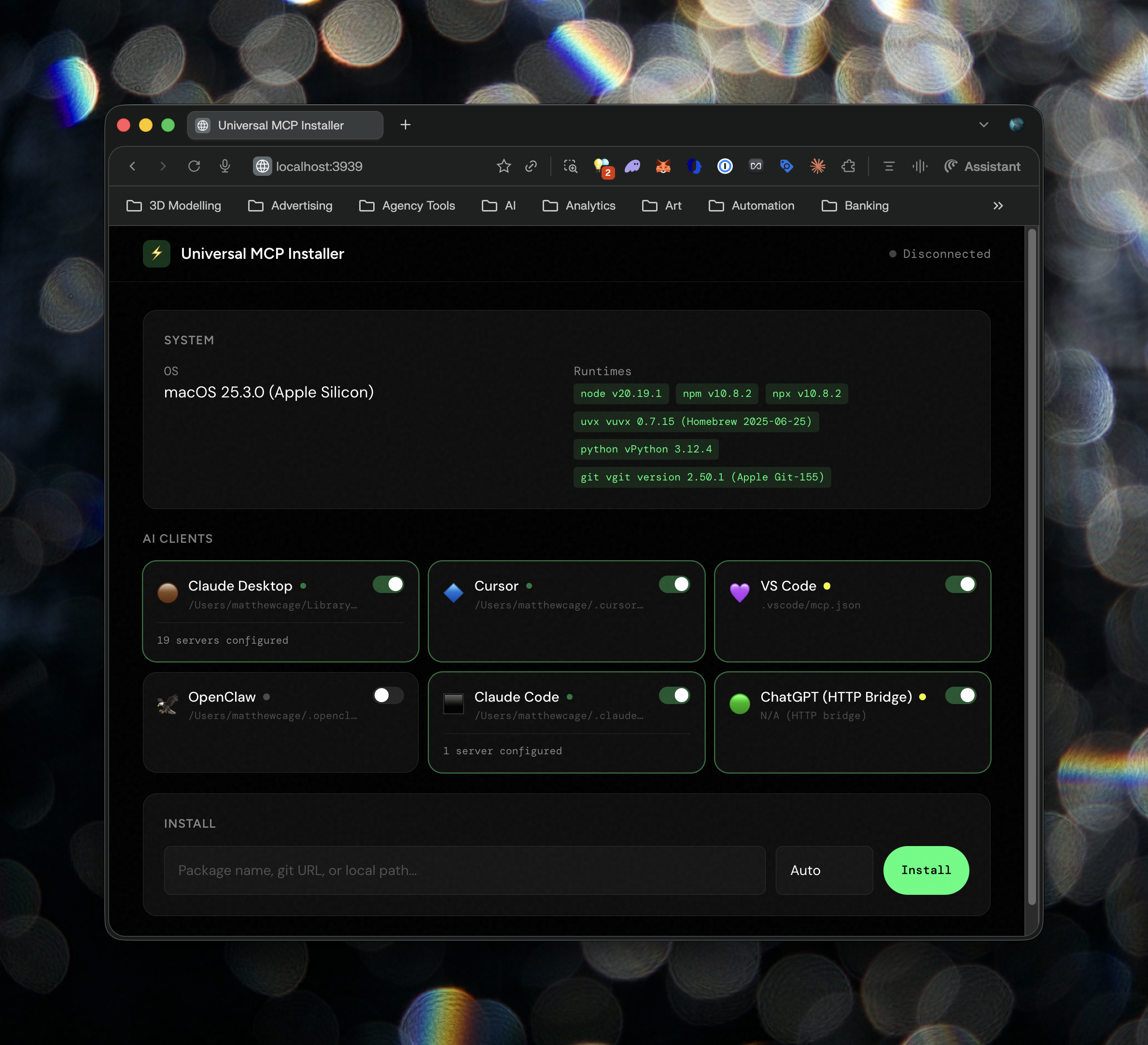
🖥️ Web Dashboard Available! Launch with
npx universal-mcp-installer --uito manage everything from a visual interface. See Using the Dashboard below.
npx universal-mcp-installer install @modelcontextprotocol/server-memory
That's it. The installer detects which AI clients you have installed and writes the correct config for each one.
Add this to your AI client's MCP configuration:
~/.cursor/mcp.json){
"mcpServers": {
"MCP Installer": {
"command": "npx",
"type": "stdio",
"args": ["-y", "universal-mcp-installer"]
}
}
}
claude_desktop_config.json){
"mcpServers": {
"MCP Installer": {
"command": "npx",
"args": ["-y", "universal-mcp-installer"]
}
}
}
.vscode/mcp.json){
"servers": {
"mcpInstaller": {
"type": "stdio",
"command": "npx",
"args": ["-y", "universal-mcp-installer"]
}
}
}
Close and reopen your AI client to apply the configuration changes.
Install the filesystem MCP server
or
Install the web search MCP server
The installer exposes three tools your AI can call:
| Tool | Description |
|---|---|
detect_system | Returns OS, architecture, available runtimes, and detected AI clients |
install_mcp_server | Installs a server by package name, git URL, or local path to selected clients |
validate_mcp_server | Validates a server via MCP handshake and returns the result |
Launch the visual interface:
npx universal-mcp-installer --ui
This opens web interface in your browser at http://localhost:3939:
1. System Panel — The top section automatically detects your OS and all available runtimes (Node, npm, uvx, Python, git) so you can see at a glance what's available on your machine.
2. AI Clients — Each detected client gets a card showing its name, config file path, and how many MCP servers are already configured. Use the toggle switch on each card to include or exclude it from the next installation. Uninstalled clients appear dimmed.
3. Install — Type a package name (npm package, git URL, or local path), pick a method from the dropdown (Auto / npm / uvx / git / local), and hit the green Install button. The installer resolves the package, writes config to every toggled client, and validates via MCP handshake.
4. Progress & Results — A real-time timeline shows each step (resolving, writing config, validating) with live status updates via WebSocket. Once complete, a health report grid shows pass/fail per client with tool counts, latency, and recovery hints for any failures.
| Client | Config Key | Platforms |
|---|---|---|
| Claude Desktop | mcpServers | macOS, Windows, Linux |
| Cursor | mcpServers | macOS, Windows, Linux |
| VS Code (Copilot) | servers | All (workspace-level) |
| OpenClaw / NemoClaw | mcp.servers | macOS, Linux |
| Claude Code | mcpServers | macOS, Windows, Linux |
| ChatGPT Desktop | HTTP Bridge | All (via local HTTP proxy) |
| Client | macOS | Windows | Linux |
|---|---|---|---|
| Claude Desktop | ~/Library/Application Support/Claude/claude_desktop_config.json | %APPDATA%\Claude\claude_desktop_config.json | ~/.config/Claude/claude_desktop_config.json |
| Cursor | ~/.cursor/mcp.json | %USERPROFILE%\.cursor\mcp.json | ~/.cursor/mcp.json |
| VS Code | .vscode/mcp.json (workspace) | .vscode/mcp.json (workspace) | .vscode/mcp.json (workspace) |
| OpenClaw | ~/.openclaw/openclaw.json | - | ~/.openclaw/openclaw.json |
| Claude Code | .mcp.json (project root) | .mcp.json (project root) | .mcp.json (project root) |
initialize/initialized, calls tools/listcmd /c npx wrapping, Linux XDG paths, macOS launchd supportOptional:
# Detect your system, runtimes, and installed AI clients
npx universal-mcp-installer detect

# Install an MCP server to all detected clients
npx universal-mcp-installer install @modelcontextprotocol/server-memory

# Install to specific clients only
npx universal-mcp-installer install my-server --clients cursor,claude-desktop

# Install with environment variables
npx universal-mcp-installer install my-server --env API_KEY=sk-123

# Install from a git repository
npx universal-mcp-installer install https://github.com/user/mcp-server.git

# Install from a local directory
npx universal-mcp-installer install ./my-local-server --method local

# Validate an MCP server by running the handshake
npx universal-mcp-installer validate npx -y @modelcontextprotocol/server-memory

# Launch the web dashboard
npx universal-mcp-installer --ui
| Option | Description |
|---|---|
--clients <ids> | Comma-separated client IDs: cursor, claude-desktop, vscode, openclaw, claude-code, chatgpt |
--method <method> | Install method: auto, npm, uvx, git, local |
--env KEY=value | Environment variable (repeatable) |
--args <arg> | Server argument (repeatable) |
--no-validate | Skip MCP handshake validation after install |
--port <number> | Dashboard port (default: 3939) |
When running with --ui, a local API is available:
| Endpoint | Method | Description |
|---|---|---|
/api/system | GET | System info, runtimes, detected clients |
/api/clients | GET | Client detection details |
/api/install | POST | Trigger installation |
/api/validate | POST | Trigger MCP handshake validation |
/ws | WebSocket | Real-time progress events |
# Clone and install
git clone https://github.com/matthewdcage/cursor-mcp-installer.git
cd cursor-mcp-installer
npm install

# Build the server
npm run build

# Build the dashboard
cd dashboard && npm install && npm run build && cd ..

# Run tests (real MCP handshake, no mocks)
npm test

# Watch mode
npm run dev
src/
  index.ts               MCP server entry (stdio)
  cli.ts                 CLI entry (npx)
  detect/                OS, runtime, client detection
  clients/               Config writers per AI client
  install/               Package resolution (npm, uvx, git, local)
  validate/              MCP handshake + health reports
  api/                   HTTP/WebSocket API for dashboard
  utils/                 Config I/O, logging, errors, platform utils
dashboard/               React + Vite + Tailwind web UI
tests/                   Unit, integration, E2E tests
docs/                    Localized official MCP docs
cursor-mcp-installer (v0.1.3) to universal-mcp-installer^1.0.1 to ^1.29.0 (28 minor versions)detect, install, validate commandsecho "No tests specified")rimraf/spawn-rx with Node built-insrequire.resolve in ESM contextconsole.error/console.warn corrupting stdio JSON-RPC streamClaim this server with your GitHub account to request manual ownership verification.
Link to the catalog listing for MCP Installer: an MCP server that installs and configures other MCP servers. from your README. This badge does not certify ownership, compatibility or security.
[](https://awesome-mcp.com/servers/cursor-mcp-installer)Public repository statistics could not be verified. Check the configured source address; unavailable counts are not zero.
来源、范围和时段分别列出;不相加,不代表安装人数、活跃用户或安全审核。
尚无已审核的包 / 镜像标识,暂不展示下载统计。
Alternative and complementary servers in the same category
A directory listing describing a cancellation-letter and mailing-address service. The configured public GitHub repository returned 404 during source verification.

A hosted MCP service for browsing and searching through Singapore mobile-network proxies.

A directory listing describing a Markdown-to-PDF service. The configured public GitHub repository returned 404 during source verification.