
Oleafly is a live collaborative LaTeX, Typst and Markdown editor for research that offers a local MCP server and an oleafly mcp stdio command so outside AI clients can use its project tools.
Repository stats unavailable
Productivity & Ops
A native Mac app that keeps a local timeline of your apps, windows and Chrome pages, and offers an MCP server so AI apps can query your own work history.
DayDream is cataloged as an MCP server attributed to getnorthlight. A native Mac app that keeps a local timeline of your apps, windows and Chrome pages, and offers an MCP server so AI apps can query your own work history. It is categorized under productivity work. See the capability inspector for recorded interfaces and their independent review status; consult upstream documentation for the current interface.
Installation configuration is not reviewed. No executable setup is offered for this entry; inspect the source repository before proceeding.
Catalog license label: MIT. Check the source repository's current license and terms before using, modifying or distributing this software.
能力定义尚未审核。未核验的采集内容不会作为可信接口展示。
暂无可展示的已审核记录。这不表示上游不支持此能力。
暂无可展示的已审核记录。这不表示上游不支持此能力。
暂无可展示的已审核记录。这不表示上游不支持此能力。
Email delivery is not connected. This page does not collect email addresses or create subscriptions.
Browse the registry for current listings instead.
Reviews for DayDream are not available yet
Review publishing and storage are not connected. This page does not collect or publish ratings or comments, including after sign-in.
It records the front app, window titles, click events, Chrome page titles and sites, and typing in allowed apps; it never records screenshots, screen, audio or camera, and skips password fields and secure input.
Typed words reach an AI app only while Let AI apps see your typed words is on and DayDream is open, handed over through a private local socket after checking that AI app's key.
History is a SQLite database, memory.sqlite, in DayDream's folder under ~/Library/Application Support/DayDream/, which only your macOS account can open.
README.md · 66d454282b7b · 采集于 2026-11-13 10:15:46 UTC
保留上游原文,不做 AI 改写。为安全起见过滤脚本、表单和不安全链接。
当前显示最后一次成功采集的文档快照,请以来源页面为准。
Never lose your place again.
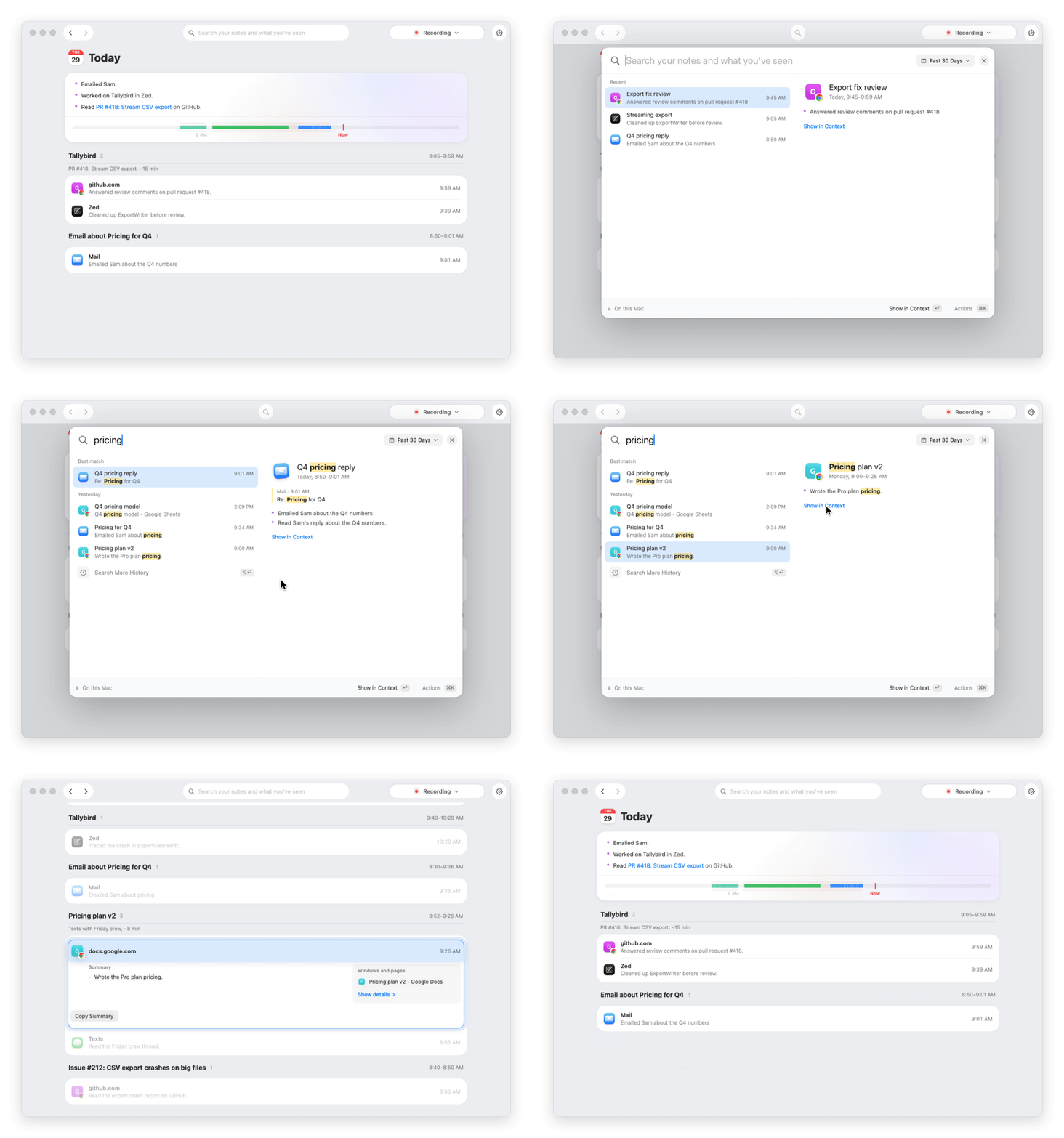
DayDream keeps a timeline of your Mac: the apps, windows and Chrome pages you used, and what you typed. It stays on your Mac, so you can find anything again, and AI apps you connect can check it when you ask about your own work.
[!IMPORTANT] DayDream is beta software. Expect bugs.
You need an Apple silicon Mac with macOS 15 or later.
Updates download quietly and install the next time DayDream quits. Step by step: install guide.
In Settings › Connections, one click connects ChatGPT, Claude Desktop, Claude Code, Cursor or Windsurf. Then ask things like "where did I leave off yesterday?" or "write my standup".
In Lost Thread, an open benchmark of questions about three made-up work weeks, Claude's helpful answers went from 3.7% to 66.7% with DayDream.
| Recorded | Never recorded |
|---|---|
| The app in front, its window title, and when | Screenshots, the screen, audio or the camera |
| That you clicked (not where, or on what) | Password fields, or anything while macOS secure input is on |
| Page titles and sites in Google Chrome | Incognito and Guest windows, Safari and the other browsers DayDream knows |
| What you type in the apps and sites you allow | Common password managers, and any app or site you exclude |
Typing and Chrome pages start on in setup, and one click turns either off. The full list, app by app: what DayDream records.
DayDream is a native Swift app. Everything it records goes into one folder on your Mac,
~/Library/Application Support/DayDream/, which only your macOS account can open.
| macOS permission | What DayDream uses it for |
|---|---|
| Accessibility | The app in front and its window title. It also checks that a text field is safe before any typing is saved. |
| Input Monitoring | Clicks, and what you type while typing is on. Password fields are skipped. DayDream only listens: it can't change or block a key or a click. |
| Automation: Google Chrome (optional) | Apple Events ask Chrome for the front tab's title and address, and whether any window is Incognito. No scripts run inside Chrome. |
DayDream doesn't use Screen Recording, the microphone or the camera. It reads nothing from Chrome until it has checked that the Chrome in front is signed by Google, and nothing at all while an Incognito or Guest window is open.
memory.sqlite, in DayDream's folder.127.0.0.1 only, with search and access logging off. Typed words never go into its
index: DayDream searches them itself, on your Mac. If the index isn't ready, search reads SQLite directly.The AI app starts mac-mem mcp and talks to it over standard input and output. The server opens no network port and
connects to nothing outside your Mac: it only asks DayDream's own search server on 127.0.0.1. It has four read-only
tools:
| Tool | What it returns |
|---|---|
timeline | What you did in a period, like today or this week, ending with where you left off |
search | One thing across your history: a doc, site, person or project |
details | One item in full: its visits, its notes, and the words you typed in it if you allow that |
status | Whether DayDream is set up and recording, and whether this connection works |
The tools can't start or stop recording, change settings, delete or send anything. Typed words reach an AI app only while Let AI apps see your typed words is on and DayDream is open. The DayDream app hands them over through a private local socket after it checks that AI app's key. Disconnect removes DayDream's entry from the AI app and turns its key off. What an AI app reads goes to its AI provider as part of that chat.
How notes are written and checked: docs/summaries.md.
The app is signed with DayDream's Apple Developer ID and notarized by Apple. Updates come through Sparkle and are signed with an EdDSA key. DayDream checks once a day and refuses an update whose signature doesn't match. You can turn automatic updates off in Settings › Advanced › App updates.
About once an hour, DayDream sends a few counts to PostHog (us.i.posthog.com) with a random ID made for your copy:
that it was installed, setup steps finished, a daily check of which features are on and about how long it recorded,
how many summaries were written or failed, how often AI apps use each tool,
how often you open and search DayDream, and the version after an update. Never your history, typed words, titles,
sites or searches. Turn them off with Share anonymous usage counts in Settings › Advanced, where See what's
sent shows the last counts exactly as they go. The full list.
Every network connection DayDream makes is listed in Network connections. Privacy policy · Security details · FAQ
You need an Apple silicon Mac with Xcode or the Xcode Command Line Tools.
git clone https://github.com/getnorthlight/daydream.git
cd daydream
scripts/bootstrap.sh   # fetches Sparkle 2.9.6 and checks its SHA-256
swift build
| Product | What it is |
|---|---|
MacMem | The app: menu bar, windows, recorder and summaries |
mac-mem | The command-line tool and MCP server. It also starts and watches the search server |
mac-mem-backup | The backup and restore helper |
typesense-server | Not built here: the release app carries the official Typesense build, and its GPL source kit is attached to every release |
Try the command-line tool on made-up data:
demo="$(mktemp -d)/daydream-demo"
.build/debug/mac-mem --home "$demo" demo
.build/debug/mac-mem --home "$demo" --local search SQLite
Release flags, project layout and checks: Build from source, project layout and CONTRIBUTING.md.
Choose Report a Problem… in DayDream's menu. It opens an email for you to read and send, with app details and no history. Please don't paste your history into a public issue.
MIT. The DayDream name and icon aren't covered; see TRADEMARKS.md. DayDream builds on open-codex-computer-history, Sparkle, llama.cpp, Qwen and Typesense (GPL-3.0); see credits.
Claim this server with your GitHub account to request manual ownership verification.
Link to the catalog listing for DayDream from your README. This badge does not certify ownership, compatibility or security.
[](https://awesome-mcp.com/servers/daydream-getnorthlight)Public repository statistics could not be verified. Check the configured source address; unavailable counts are not zero.
来源、范围和时段分别列出;不相加,不代表安装人数、活跃用户或安全审核。
尚无已审核的包 / 镜像标识,暂不展示下载统计。
Alternative and complementary servers in the same category
Oleafly is a live collaborative LaTeX, Typst and Markdown editor for research that offers a local MCP server and an oleafly mcp stdio command so outside AI clients can use its project tools.
Buddy is an Android app that offers its phone tools through a local MCP server to Claude Code, Codex, OpenCode, Antigravity, and Grok sessions.

Tuqui is a hosted MCP server that connects Odoo with Claude and ChatGPT so users can ask about sales, stock, customers and overdue invoices in plain language.
