
This is a Model Context Protocol (MCP) server for interacting with AIStor object stores.
Repository stats unavailable
Databases & Storage
An MCP server that exposes DreamFactory's governed API data access to Claude Desktop and other MCP clients.
DreamFactory MCP server is cataloged as an MCP server attributed to dreamfactorysoftware. An MCP server that exposes DreamFactory's governed API data access to Claude Desktop and other MCP clients. It is categorized under databases storage. See the capability inspector for recorded interfaces and their independent review status; consult upstream documentation for the current interface.
Installation configuration is not reviewed. No executable setup is offered for this entry; inspect the source repository before proceeding.
Catalog license label: Not specified. Check the source repository's current license and terms before using, modifying or distributing this software.
能力定义尚未审核。未核验的采集内容不会作为可信接口展示。
暂无可展示的已审核记录。这不表示上游不支持此能力。
暂无可展示的已审核记录。这不表示上游不支持此能力。
暂无可展示的已审核记录。这不表示上游不支持此能力。
Email delivery is not connected. This page does not collect email addresses or create subscriptions.
Browse the registry for current listings instead.
Reviews for DreamFactory MCP server are not available yet
Review publishing and storage are not connected. This page does not collect or publish ratings or comments, including after sign-in.
You need a DreamFactory API key and service URL.
Yes, it requires Node 22.10.0 or newer.
README.md · 9d570ce98363 · 采集于 2026-11-13 12:14:30 UTC
保留上游原文,不做 AI 改写。为安全起见过滤脚本、表单和不安全链接。
当前显示最后一次成功采集的文档快照,请以来源页面为准。
A Model Context Protocol (MCP) server for DreamFactory integration with Claude.
DreamFactory is a secure, self-hosted enterprise data access platform that provides governed API access to any data source, connecting enterprise applications and on-prem LLMs with role-based access and identity passthrough.
The easiest way to start using DreamFactory's MCP Server is by going to this repository's releases and downloading the most recent Desktop Extension file. Desktop Extensions are a new file format created by Anthropic (the company behind Claude.ai). Once downloaded, double-click the DXT file to start installation. Note you'll need to install Claude Desktop before doing so. After starting installation you'll see this prompt:
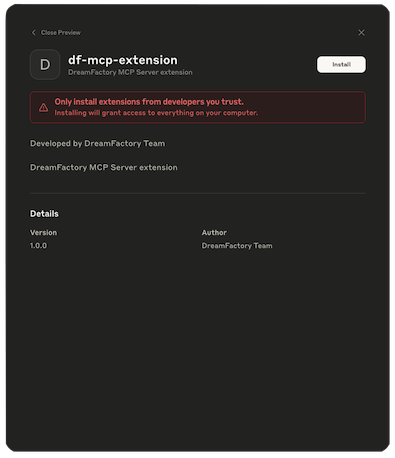
Click the Install button and you'll see:
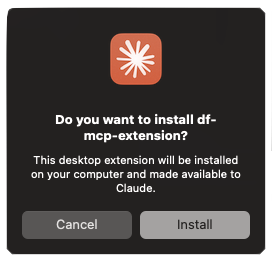
Click Install and if all goes well you'll be prompted to input a DreamFactory API key and service URL:
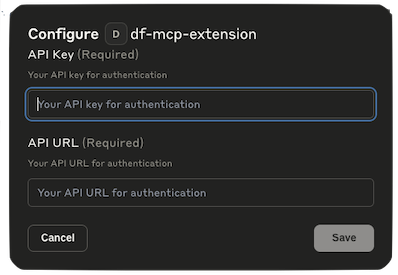
If you don't have this information readily available, just click Cancel. You can add it later by clicking on the Extensions tab inside Settings and then clicking Configure:

In either case, before you can use the DreamFactory MCP Server you'll need to manually enable it by flipping the Disabled switch to Enabled:

Clone this repository and then install dependencies:
cd df-mcp
npm install
Build the project:
npm run build
Install Claude Desktop from https://claude.ai/download.
Open Claude Desktop and navigate to Settings.
In the Settings menu, go to the "Developer" section.
Click on "Edit Config" to modify Claude's configuration.
Add the following configuration to enable the DreamFactory MCP server:
{
    "mcpServers": {
        "add": {
            "command": "node",
            "args": [
                "/Users/dreamfactory/Documents/df-mcp/build/index.js"
            ],
            "env": {
                "DREAMFACTORY_URL": "https://example.dreamfactory.com/api/v2/<service-name>",
                "DREAMFACTORY_API_KEY": ""
            }
        }
    }
}
Important: Modify the path in the args array to match your local installation path if different from /Users/dreamfactory/Documents/df-mcp/.
Add your DreamFactory URL and API key to the DREAMFACTORY_URL DREAMFACTORY_API_KEY environment variables as required.
Save the configuration and restart Claude Desktop.
DreamFactory MCP requires Node 22.10.0 or newer. Even if you are running Node 22.10 or newer, you may encounter a confusing issue if you're running NVM (Node Version Manager) which hampers installation. Sometimes these issues are further complicated if you're additionally using other developer tools such as Laravel Herd which make additional changes to Node paths.
If the MCP server log indicates the wrong version of Node is being used by Claude Desktop, you can easily force it to use the desired version by creating a shell script that looks something like this:
#!/bin/zsh
source ~/.zshrc
exec /Applications/Herd/config/nvm/versions/node/v22.17.1/bin/node
Call the script node-for-claude.sh or similar, and place it in /usr/local/bin. Then make it executable:
$ chmod +x node-for-claude.sh
Finally, update the claude_desktop_config.json file to point to this script:
{
  "mcpServers": {
        "df-mcp": {
            "command": "/usr/local/bin/node-for-claude.sh",
            "args": [
                "/Users/wjgilmore/Software/df-mcp/build/index.js"
            ],
            "env": {
               "DREAMFACTORY_URL": "<URL>",
                "DREAMFACTORY_API_KEY": "<API_KEY>"
            }
        }
  }
}
Once configured, the DreamFactory MCP server will be available to Claude Desktop. You can use DreamFactory's capabilities through Claude's interface.
docker build -t df-mcp .
Add this configuration to your Claude Desktop config file:
Location:
Configuration
{
  "mcpServers": {
    "dreamfactory-mcp": {
      "command": "docker",
      "args": [
        "run",
        "--rm",
        "-i",
        "--env", "DREAMFACTORY_URL=https://your-dreamfactory-instance.com/api/v2/<service-name>",
        "--env", "DREAMFACTORY_API_KEY=your-api-key-here",
        "dreamfactory-mcp:latest"
      ]
    }
  }
}
After updating the configuration, restart Claude Desktop to load the MCP server.
Run the included test script to validate the Docker setup:
./test-docker.sh
This will verify that the container builds correctly, responds to MCP commands, and all tools are properly registered.
src directorybuild directorynpm start to run the built server directlyFound a security issue? Email us at security@dreamfactory.com.
Claim this server with your GitHub account to request manual ownership verification.
Link to the catalog listing for DreamFactory MCP server from your README. This badge does not certify ownership, compatibility or security.
[](https://awesome-mcp.com/servers/df-mcp)Public repository statistics could not be verified. Check the configured source address; unavailable counts are not zero.
来源、范围和时段分别列出;不相加,不代表安装人数、活跃用户或安全审核。
尚无已审核的包 / 镜像标识,暂不展示下载统计。
Alternative and complementary servers in the same category
This is a Model Context Protocol (MCP) server for interacting with AIStor object stores.

A Model Context Protocol server that lets AI assistants run SQL queries against AWS Athena databases and retrieve results.

A Model Context Protocol (MCP) server that exposes access to an InfluxDB v2 instance using the InfluxDB OSS API v2.