
A directory listing describing a cancellation-letter and mailing-address service. The configured public GitHub repository returned 404 during source verification.
Repository stats unavailable
Developer Tools
An MCP server that renders DGMO text markup into many diagram types and hands diagrams off to a web or desktop editor for refinement.
Diagrammo MCP server for rendering text markup into diagrams is cataloged as an MCP server attributed to diagrammo. An MCP server that renders DGMO text markup into many diagram types and hands diagrams off to a web or desktop editor for refinement. It is categorized under developer tools. See the capability inspector for recorded interfaces and their independent review status; consult upstream documentation for the current interface.
Installation configuration is not reviewed. No executable setup is offered for this entry; inspect the source repository before proceeding.
Catalog license label: MIT. Check the source repository's current license and terms before using, modifying or distributing this software.
能力定义尚未审核。未核验的采集内容不会作为可信接口展示。
暂无可展示的已审核记录。这不表示上游不支持此能力。
暂无可展示的已审核记录。这不表示上游不支持此能力。
暂无可展示的已审核记录。这不表示上游不支持此能力。
Email delivery is not connected. This page does not collect email addresses or create subscriptions.
Browse the registry for current listings instead.
Reviews for Diagrammo MCP server for rendering text markup into diagrams are not available yet
Review publishing and storage are not connected. This page does not collect or publish ratings or comments, including after sign-in.
No; all rendering is local, and diagram markup and produced images stay on the machine except when share_diagram is explicitly called.
Yes, it can serve streamable HTTP on a configurable host, port and path, though it has no authentication of its own and binds loopback by default.
README.md · 4ccf12950674 · 采集于 2026-11-13 12:07:04 UTC
保留上游原文,不做 AI 改写。为安全起见过滤脚本、表单和不安全链接。
当前显示最后一次成功采集的文档快照,请以来源页面为准。
Turn a conversation into a real diagram — without leaving your AI tool.



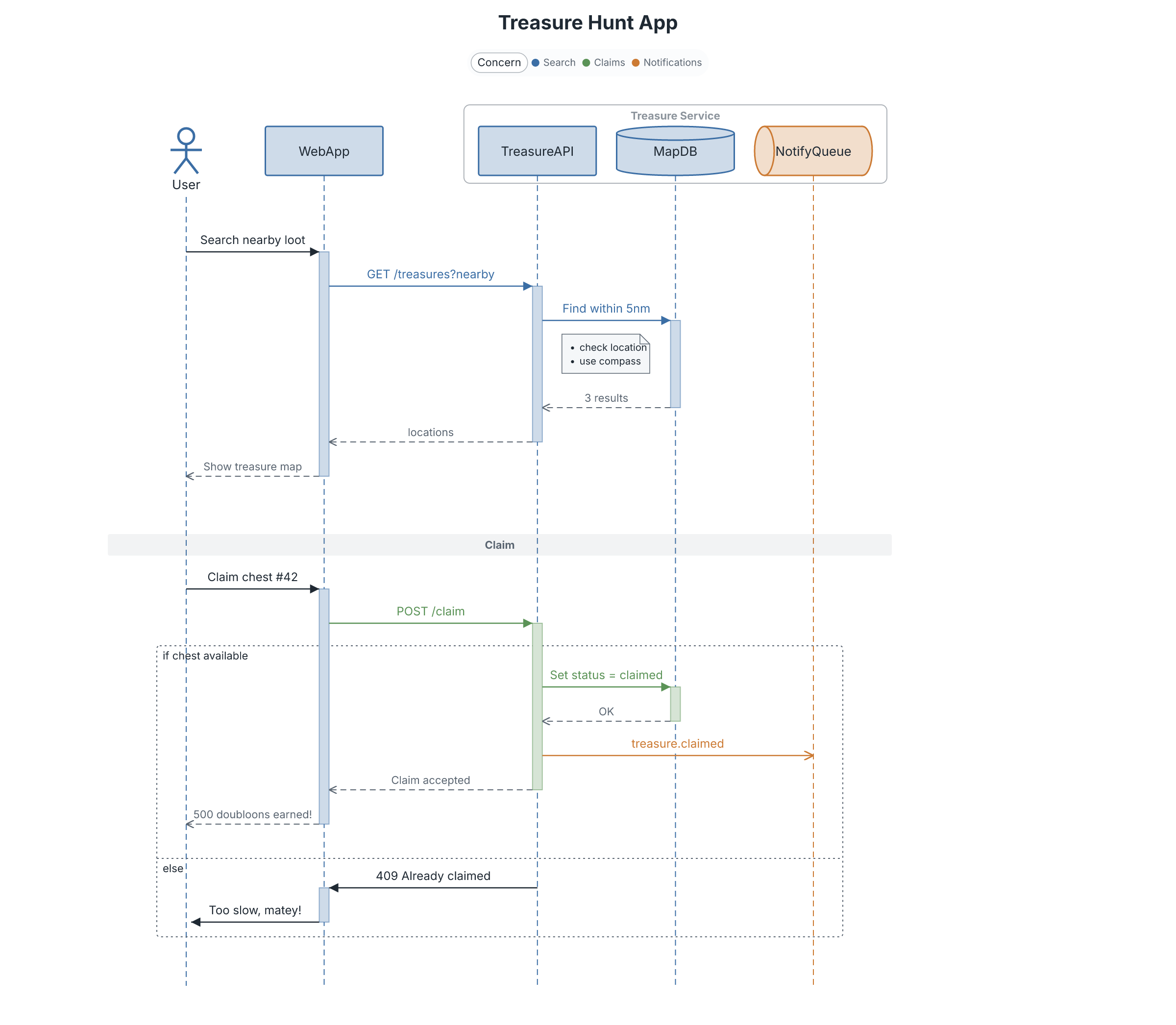
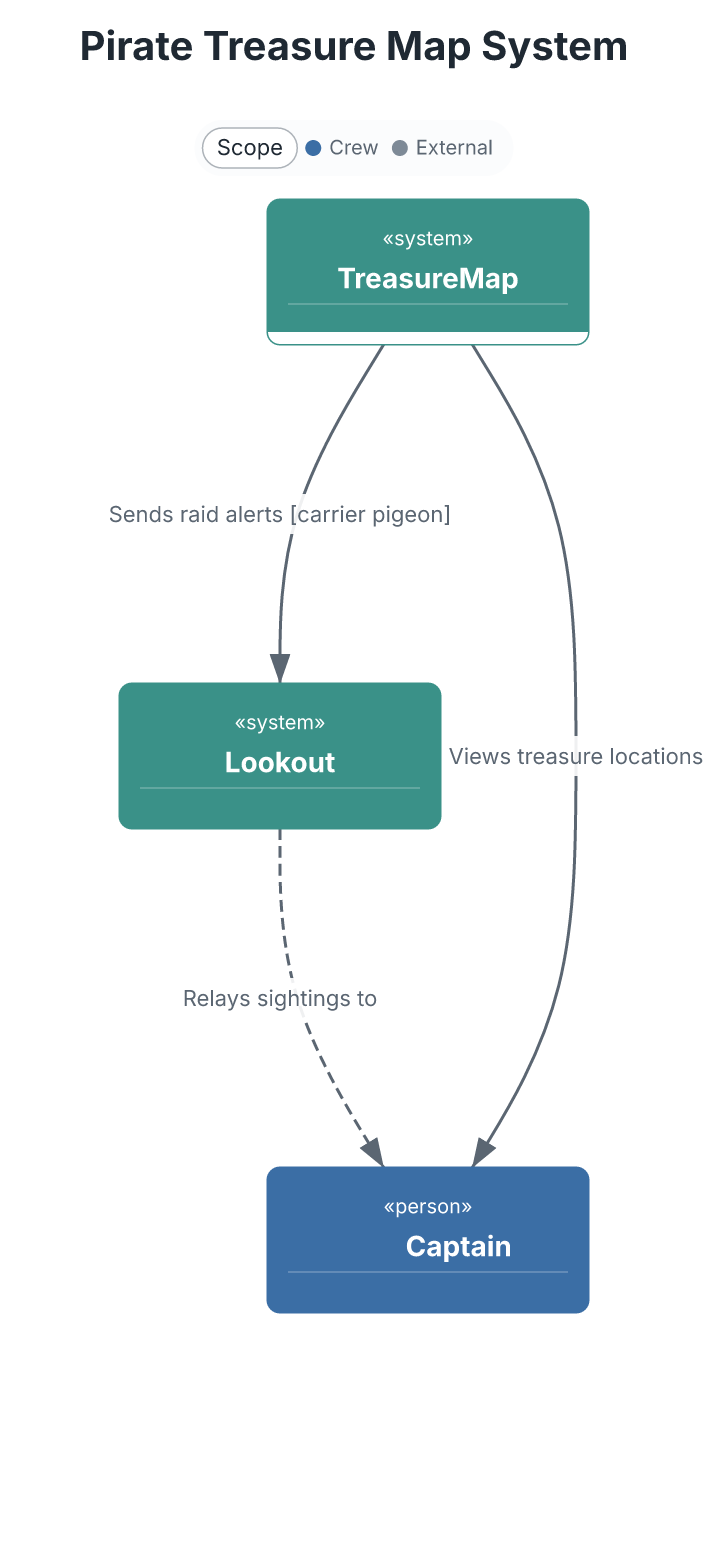
This MCP server gives Claude (and any MCP-compatible AI tool) the ability to render sequence diagrams, flowcharts, ER diagrams, C4 architecture, gantt charts, and 40+ other chart types from concise text markup — then hand the result off to a full editor for refinement. Ask for a diagram in chat; get a real one back.
 |  |
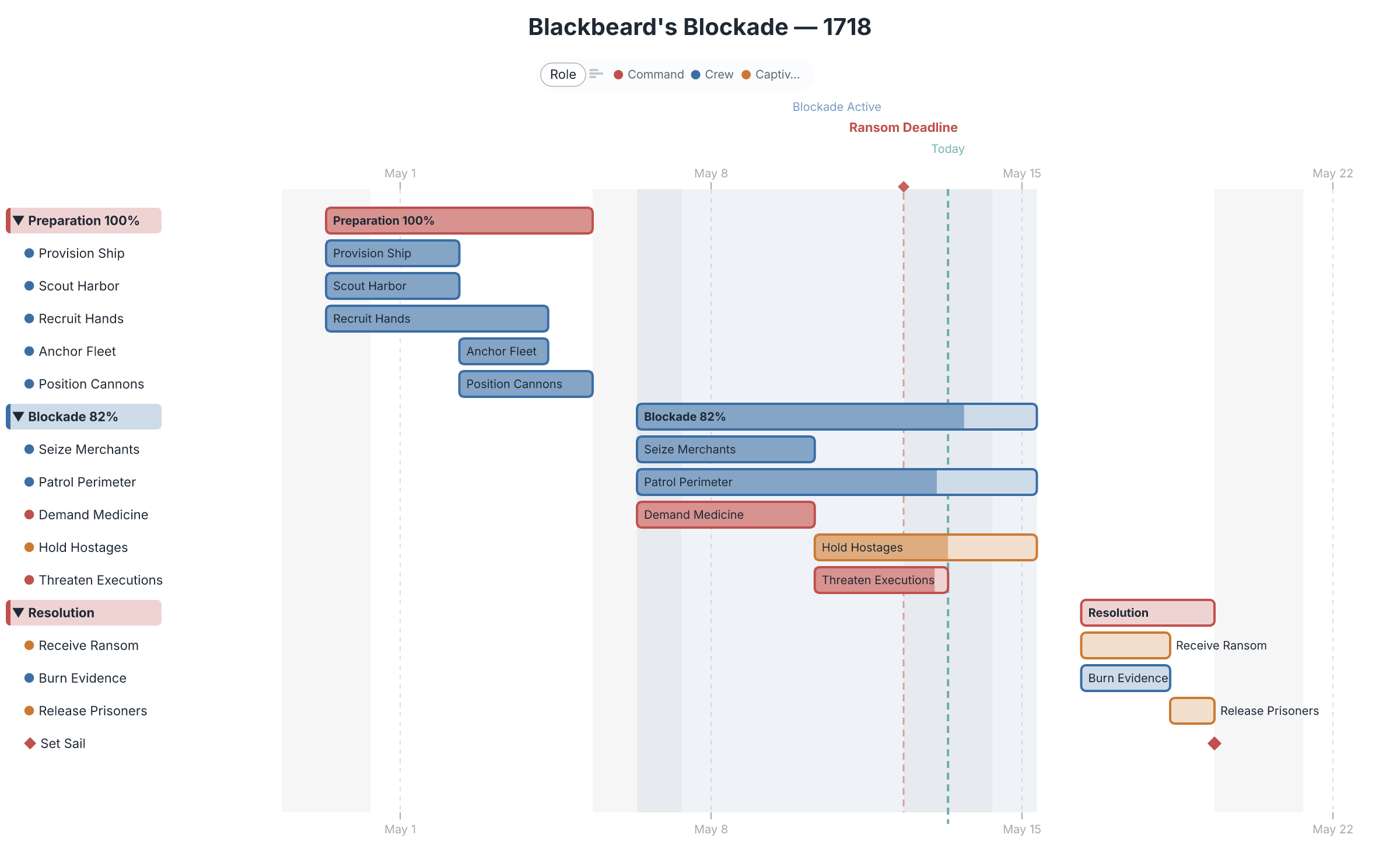 | 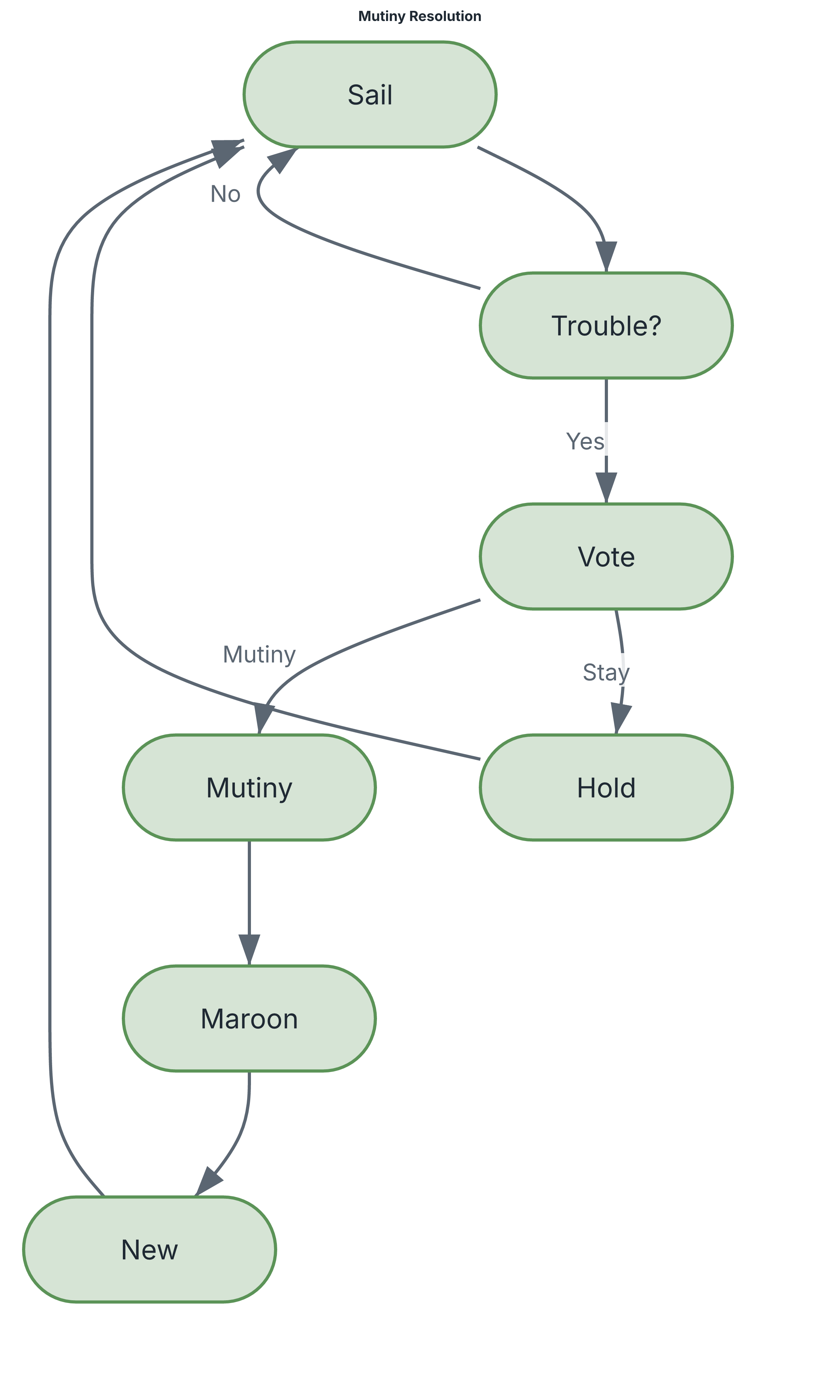 |
Ask in plain language — "diagram the auth flow as a sequence", "chart the Q3 plan as a gantt", "draw our services as a C4 diagram" — and Claude writes the markup and renders it. The markup stays readable and diffable:
flowchart Mutiny Resolution
direction-tb

[Sail]     Set sail under the captain
{Trouble?} Discontent in the crew?
{Vote}     Crew vote called
[Mutiny]   Seize the ship

(Sail) -> (Trouble?)
(Trouble?) -Yes-> (Vote)
(Vote) -Mutiny-> (Mutiny)
→ renders to the flowchart above. All rendering happens locally — no diagram data leaves your machine.
| Tool | What it does | Over HTTP |
|---|---|---|
render_diagram | Render DGMO markup to SVG or PNG | yes |
validate_diagram | Check markup and report parse errors, without rendering | yes |
suggest_chart_type | Suggest the chart types that fit a description | yes |
list_chart_types | List all supported chart types, marking the beta ones | yes |
get_language_reference | Get DGMO syntax documentation for accurate generation | yes |
get_examples | Fetch worked examples for a chart type | yes |
share_diagram | Get a shareable diagrammo.app URL — hand your diagram to the web editor | yes |
open_in_app | Open the diagram straight into the Diagrammo desktop app for editing | no |
check_app_installed | Report whether the desktop app is installed | no |
preview_diagram | Render one or more diagrams and open an HTML preview in the browser | no |
generate_report | Build a polished multi-section HTML report with ToC and optional source | no |
put_space_diagram | Write a diagram into a Diagrammo Cloud space, by folder and title | yes |
get_space_diagram | Read a diagram from a Cloud space, by id or by folder and title | yes |
list_space_diagrams | List every diagram in a Cloud space | yes |
The three space tools send the diagram to Diagrammo Cloud. They need a space API key
(minted on the Diagrammo account page) as DGMO_API_KEY in the server's environment —
never as a tool argument, so the key stays out of the transcript.
share_diagram and open_in_app are the bridge out of chat: a diagram Claude generates
becomes something you can refine, restyle, and embed — see below.
The four marked no open a browser or launch the desktop app. Over HTTP that would happen on the machine running the server rather than on yours, so they are not offered there — see Serving over HTTP.
The MCP server is one entry point into Diagrammo — a whole ecosystem built on the same DGMO markup. Generate in chat, refine in a real editor, embed anywhere:
open_in_app drops an
AI-generated diagram straight into it, with live preview, palettes, and export.share_diagram URLs open right here.npx @diagrammo/dgmo-cli file.dgmo -o out.png, or install it with npm install -g @diagrammo/dgmo-cli (macOS and Linux).One markup, everywhere. A diagram you generate here renders identically in the app, in your docs, and in Obsidian — because they all speak DGMO.
→ Try it free at diagrammo.app
Install the dgmo CLI and let it wire everything up:
npm install -g @diagrammo/dgmo-cli   # macOS and Linux
dgmo install                         # auto-detects Claude Code, Codex, Claude Desktop, Cursor, …
Prefer Homebrew or pacman? See diagrammo.app/dev.
dgmo install configures each detected assistant non-interactively and points it at dgmo mcp, so there's no separate package to install or prompts to answer. Target one surface with dgmo install claude-code (or codex, claude-desktop, …).
Prefer to edit configs yourself? Point any MCP client at the server via npx (no global install needed):
Claude Code — .claude/settings.local.json; Claude Desktop — ~/Library/Application Support/Claude/claude_desktop_config.json:
{
  "mcpServers": {
    "dgmo": {
      "command": "npx",
      "args": ["-y", "@diagrammo/dgmo-mcp"]
    }
  }
}
If you have the dgmo CLI installed, { "command": "dgmo", "args": ["mcp"] } works too. Restart the client after saving — the tools appear automatically.
The setups above launch the server as a child process and talk to it over its standard input and output. That needs the server and the client on the same machine. Where they are not — a hosted agent platform, a container, one server shared by several people — start it as an HTTP endpoint instead. The same endpoint also suits one machine, when you want a single server always running for every AI tool you use:
dgmo mcp --http                              # with the dgmo CLI installed
npx -y @diagrammo/dgmo-mcp --http            # http://127.0.0.1:3333/mcp
MCP_TRANSPORT=http MCP_PORT=8080 npx -y @diagrammo/dgmo-mcp
Every option takes a flag or an environment variable, whichever your setup can express:
| Flag | Variable | Default | What |
|---|---|---|---|
--http | MCP_TRANSPORT=http | off | Serve streamable HTTP instead of stdio |
--port <n> | MCP_PORT | 3333 | Port to listen on |
--host <addr> | MCP_HOST | 127.0.0.1 | Interface to bind |
--path <path> | MCP_PATH | /mcp | Path the endpoint answers on |
--allow-host <h> | MCP_ALLOWED_HOSTS | loopback | Extra Host headers to accept, repeatable |
--allow-origin <o> | MCP_ALLOWED_ORIGINS | own origin | Origin headers to accept, repeatable |
Each request is served independently — no sessions, nothing kept between calls — so one endpoint can serve several clients at once.
The server has no authentication of its own. It binds loopback by default and rejects requests carrying a
Hostheader it was not told to expect, or anOriginheader other than its own unless--allow-originnames it, which is enough for a client on the same machine or inside the same container. Anything reachable from a wider network needs your own authentication in front of it, and--allow-hostfor the hostname it will be reached by. Binding a non-loopback interface without naming a host prints a warning saying so.
--help prints all of this from the installed version.
Run the server as a background service so it starts at login and restarts if it stops.
Change the dgmo path to what which dgmo prints.
Linux — systemd user service, saved as ~/.config/systemd/user/dgmo-mcp.service:
[Unit]
Description=Diagrammo MCP server over HTTP
After=network.target

[Service]
ExecStart=%h/.local/bin/dgmo mcp --http
Environment=PATH=%h/.local/bin:/usr/local/bin:/usr/bin:/bin
Restart=on-failure
RestartSec=3

[Install]
WantedBy=default.target
systemctl --user daemon-reload
systemctl --user enable --now dgmo-mcp
macOS — launchd agent, saved as ~/Library/LaunchAgents/app.diagrammo.mcp.plist:
<?xml version="1.0" encoding="UTF-8"?>
<!DOCTYPE plist PUBLIC "-//Apple//DTD PLIST 1.0//EN" "http://www.apple.com/DTDs/PropertyList-1.0.dtd">
<plist version="1.0">
<dict>
  <key>Label</key><string>app.diagrammo.mcp</string>
  <key>ProgramArguments</key>
  <array>
    <string>/opt/homebrew/bin/dgmo</string><string>mcp</string><string>--http</string>
  </array>
  <key>EnvironmentVariables</key>
  <dict><key>PATH</key><string>/opt/homebrew/bin:/usr/local/bin:/usr/bin:/bin</string></dict>
  <key>RunAtLoad</key><true/>
  <key>KeepAlive</key><true/>
</dict>
</plist>
launchctl bootstrap gui/$(id -u) ~/Library/LaunchAgents/app.diagrammo.mcp.plist
Then point each AI tool at http://127.0.0.1:3333/mcp as a streamable-HTTP MCP server.
All rendering is local. Your diagram markup and the images it produces never leave
your machine, except when you explicitly call share_diagram (which encodes the diagram
into a diagrammo.app URL). See the privacy terms.
pnpm hub
One command, one server, one browser tab. The hub opens a tabbed shell over the three AI-tuning dev tools — switch between them with the top tabs, no separate ports or commands to remember:
suggest_chart_type, score prompts live, save back to triggers.json.claude -p.<!-- TIPS --> blocks in dgmo's language-reference.md, sliced
into get_language_reference): pick a type, edit how the AI is told to style
it, run a prompt against a committed dataset fixture (so inputs never move
between runs), and see the generated DGMO + rendered image side by side. The
picker doubles as a coverage bar; "Compare 3×" renders no-guidance vs your
tips for a by-eye check; Save validates and writes back to
language-reference.md.These tools are dev-only and never bundled into the published server. (The
standalone pnpm harness and pnpm studio scripts still run a single tool each
if you ever want one in isolation.)
Development setup and the release workflow live in CONTRIBUTING.md.
MIT
Claim this server with your GitHub account to request manual ownership verification.
Link to the catalog listing for Diagrammo MCP server for rendering text markup into diagrams from your README. This badge does not certify ownership, compatibility or security.
[](https://awesome-mcp.com/servers/dgmo-mcp)Public repository statistics could not be verified. Check the configured source address; unavailable counts are not zero.
来源、范围和时段分别列出;不相加,不代表安装人数、活跃用户或安全审核。
尚无已审核的包 / 镜像标识,暂不展示下载统计。
Alternative and complementary servers in the same category
A directory listing describing a cancellation-letter and mailing-address service. The configured public GitHub repository returned 404 during source verification.

A hosted MCP service for browsing and searching through Singapore mobile-network proxies.

A directory listing describing a Markdown-to-PDF service. The configured public GitHub repository returned 404 during source verification.