
A Rust CAD application with an MCP server for creating, inspecting and rendering drawings, either headlessly or through a connection to the desktop app.
8K
Media & Design
An MCP server that generates cloud architecture diagrams, flowcharts, sequence diagrams, and more using mingrammer/diagrams, Mermaid, and PlantUML rendering engines.
diagrams-mcp-server: an MCP server for generating diagrams is cataloged as an MCP server attributed to byteoverdev. An MCP server that generates cloud architecture diagrams, flowcharts, sequence diagrams, and more using mingrammer/diagrams, Mermaid, and PlantUML rendering engines. It is categorized under media design. See the capability inspector for recorded interfaces and their independent review status; consult upstream documentation for the current interface.
Installation configuration is not reviewed. No executable setup is offered for this entry; inspect the source repository before proceeding.
Catalog license label: MIT. Check the source repository's current license and terms before using, modifying or distributing this software.
能力定义尚未审核。未核验的采集内容不会作为可信接口展示。
暂无可展示的已审核记录。这不表示上游不支持此能力。
暂无可展示的已审核记录。这不表示上游不支持此能力。
暂无可展示的已审核记录。这不表示上游不支持此能力。
Email delivery is not connected. This page does not collect email addresses or create subscriptions.
Browse the registry for current listings instead.
Reviews for diagrams-mcp-server: an MCP server for generating diagrams are not available yet
Review publishing and storage are not connected. This page does not collect or publish ratings or comments, including after sign-in.
Yes, the find_equivalent tool maps a node to an equivalent service on another provider, such as EC2 to ComputeEngine on GCP.
It exposes reference documentation via MCP resource URIs for diagram, edge, cluster, Mermaid, and PlantUML references.
README.md · 121aa4bef8af · 采集于 2026-11-13 12:09:10 UTC
保留上游原文,不做 AI 改写。为安全起见过滤脚本、表单和不安全链接。
当前显示最后一次成功采集的文档快照,请以来源页面为准。


MCP server for generating cloud architecture diagrams, flowcharts, sequence diagrams, and more — powered by three rendering engines: mingrammer/diagrams, Mermaid, and PlantUML.
Graphviz is required for the default local/in-process rendering mode. Mermaid CLI and PlantUML are optional — install them only if you need those specific rendering engines locally.
| Dependency | Required for | Install |
|---|---|---|
| Graphviz | render_diagram (cloud architecture) | brew install graphviz |
| Mermaid CLI | render_mermaid (flowcharts, sequence, etc.) | npm install -g @mermaid-js/mermaid-cli |
| Java + PlantUML | render_plantuml (UML diagrams) | brew install openjdk + download plantuml.jar |
Via uvx (recommended):
uvx diagrams-mcp-server
Via pip:
pip install diagrams-mcp-server
From source:
pip install git+https://github.com/ByteOverDev/diagrams-mcp.git
Add to your claude_desktop_config.json (Settings → Developer → Edit Config):
uvx (recommended):
{
  "mcpServers": {
    "diagrams-mcp": {
      "command": "uvx",
      "args": ["diagrams-mcp-server"]
    }
  }
}
pip:
{
  "mcpServers": {
    "diagrams-mcp": {
      "command": "diagrams-mcp-server"
    }
  }
}
Run:
claude mcp add diagrams-mcp -- uvx diagrams-mcp-server
Or add to your .mcp.json:
uvx (recommended):
{
  "mcpServers": {
    "diagrams-mcp": {
      "command": "uvx",
      "args": ["diagrams-mcp-server"]
    }
  }
}
pip:
{
  "mcpServers": {
    "diagrams-mcp": {
      "command": "diagrams-mcp-server"
    }
  }
}
Add to your .cursor/mcp.json:
uvx (recommended):
{
  "mcpServers": {
    "diagrams-mcp": {
      "command": "uvx",
      "args": ["diagrams-mcp-server"]
    }
  }
}
pip:
{
  "mcpServers": {
    "diagrams-mcp": {
      "command": "diagrams-mcp-server"
    }
  }
}
Add to your ~/.codeium/windsurf/mcp_config.json:
uvx (recommended):
{
  "mcpServers": {
    "diagrams-mcp": {
      "command": "uvx",
      "args": ["diagrams-mcp-server"]
    }
  }
}
pip:
{
  "mcpServers": {
    "diagrams-mcp": {
      "command": "diagrams-mcp-server"
    }
  }
}
Add to your .vscode/mcp.json:
uvx (recommended):
{
  "servers": {
    "diagrams-mcp": {
      "type": "stdio",
      "command": "uvx",
      "args": ["diagrams-mcp-server"]
    }
  }
}
pip:
{
  "servers": {
    "diagrams-mcp": {
      "type": "stdio",
      "command": "diagrams-mcp-server"
    }
  }
}
list_providers() → list[str] — List all diagram providers (aws, gcp, k8s, azure, onprem, etc.)list_services(provider) → list[str] — List service categories within a provider (e.g. aws → compute, database, network)list_nodes(provider, service) → list[dict] — List node classes for a provider.service pair with import pathssearch_nodes(query) → list[dict] — Search for nodes by keyword across all providers (e.g. "postgres", "lambda")render_diagram(code) → Image (PNG) — Execute a Python script using mingrammer/diagrams in a sandboxed subprocess. Returns a rendered cloud architecture diagram.render_mermaid(definition) → Image (PNG/SVG) — Render a Mermaid diagram definition (flowcharts, sequence, class, ER, state, Gantt, and more).render_plantuml(definition) → Image (PNG) — Render a PlantUML diagram definition (sequence, class, component, activity, state, deployment).find_equivalent(node, target_provider?) → dict — Find equivalent services across cloud providers (e.g. EC2 → ComputeEngine on GCP).list_categories() → list[dict] — List all 30 infrastructure role categories with mapped nodes across providers.The server provides reference documentation accessible via MCP resource URIs:
| URI | Description |
|---|---|
diagrams://reference/diagram | Diagram constructor parameters, defaults, and usage |
diagrams://reference/edge | Edge operators, labels, styling, and chaining |
diagrams://reference/cluster | Cluster nesting, styling, and graph attributes |
diagrams://reference/mermaid | Mermaid syntax examples for 6 diagram types |
diagrams://reference/plantuml | PlantUML syntax examples for 6 diagram types |
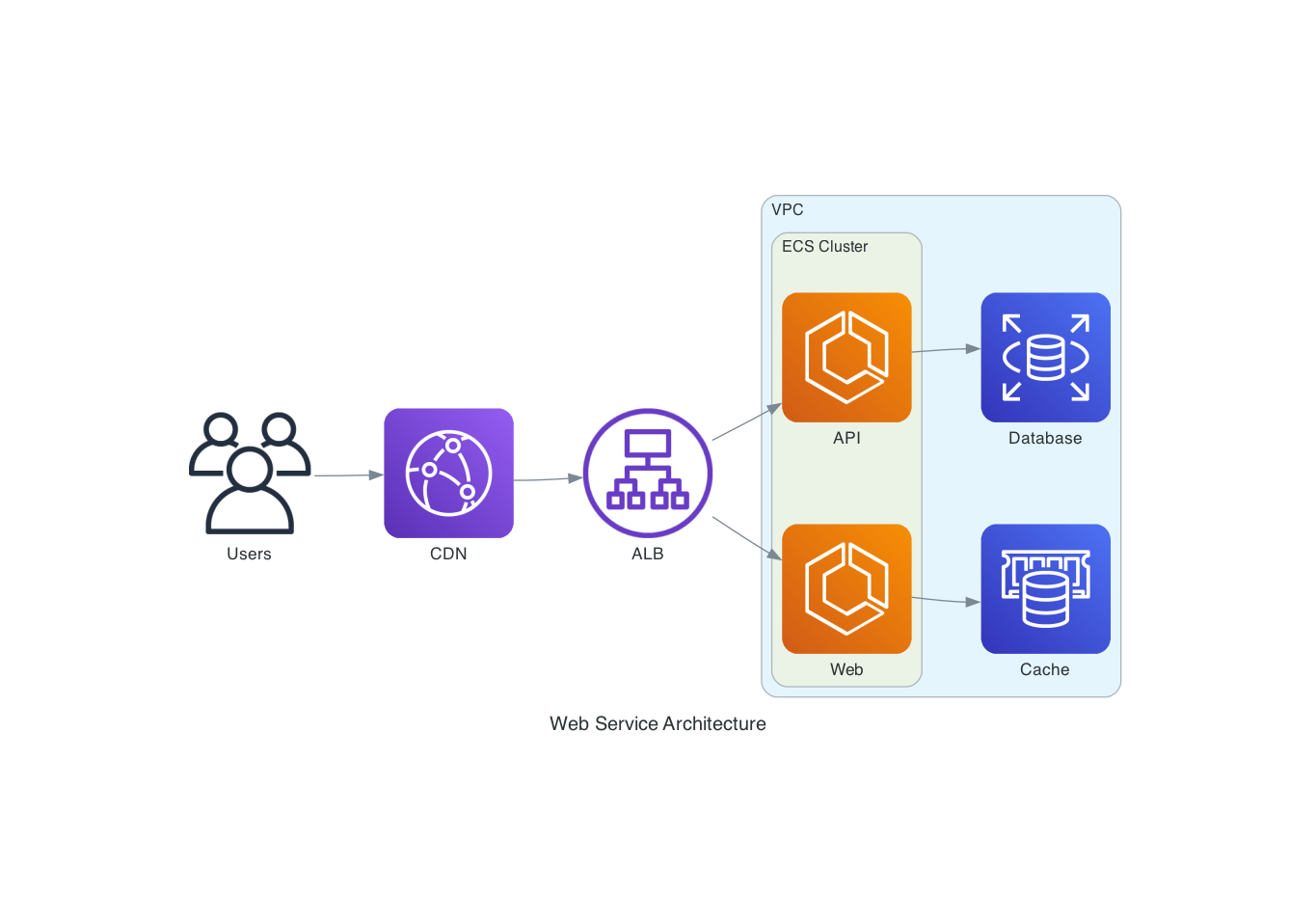
"Draw an AWS architecture with an ALB routing to two ECS services, backed by RDS and ElastiCache"
from diagrams import Diagram, Cluster
from diagrams.aws.network import ALB
from diagrams.aws.compute import ECS
from diagrams.aws.database import RDS, ElastiCache

with Diagram("ECS Service", direction="LR"):
    lb = ALB("ALB")

    with Cluster("ECS Cluster"):
        services = [ECS("Web"), ECS("API")]

    lb >> services
    services[0] >> ElastiCache("Cache")
    services[1] >> RDS("Database")
"Create a flowchart showing a CI/CD pipeline"

"Show the authentication flow between a client, API gateway, and auth service"
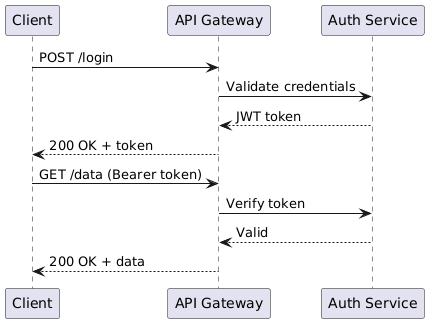
@startuml
Client -> "API Gateway": POST /login
"API Gateway" -> "Auth Service": Validate credentials
"Auth Service" --> "API Gateway": JWT token
"API Gateway" --> Client: 200 OK + token
Client -> "API Gateway": GET /data (Bearer token)
"API Gateway" -> "Auth Service": Verify token
"Auth Service" --> "API Gateway": Valid
"API Gateway" --> Client: 200 OK + data
@enduml
# Clone and install
git clone https://github.com/ByteOverDev/diagrams-mcp.git
cd diagrams-mcp
pip install -e ".[dev]"

# Run tests
pytest

# Lint and format
ruff check .
ruff format .

# Run the MCP server locally (stdio mode)
diagrams-mcp-server
For hosted deployments, the MCP server can run as a lightweight facade that delegates render work to a separate renderer service. This keeps the always-on MCP process small while Graphviz, Chromium, Mermaid CLI, Java, and PlantUML live only in the renderer image.
# Terminal 1: renderer service
RENDERER_HOST=0.0.0.0 RENDERER_PORT=8001 diagrams-renderer-server

# Terminal 2: HTTP MCP facade delegating to the renderer
FASTMCP_TRANSPORT=http \
FASTMCP_HOST=0.0.0.0 \
FASTMCP_PORT=8000 \
DIAGRAMS_RENDERER_MODE=remote \
DIAGRAMS_RENDERER_URL=http://127.0.0.1:8001 \
diagrams-mcp-server
Docker/Railway examples are included:
| File | Purpose |
|---|---|
Dockerfile.facade | Slim MCP facade image without renderer-only binaries |
Dockerfile.renderer | Renderer image with Graphviz, Chromium, Mermaid CLI, Java, and PlantUML |
railway.facade.toml | Example Railway facade service config |
railway.renderer.toml | Example Railway renderer service config |
Key environment variables:
| Variable | Purpose |
|---|---|
DIAGRAMS_RENDERER_MODE=remote | Makes the facade use the HTTP renderer service |
DIAGRAMS_RENDERER_URL | Renderer base URL, for example http://diagrams-renderer.railway.internal:8080 |
DIAGRAMS_IMAGE_STORE_DIR | Optional file-backed temporary image store directory |
BASE_URL | Optional public base URL used when returning absolute download links |
The render_diagram tool supports all providers from the mingrammer/diagrams library, including:
AWS, GCP, Azure, Kubernetes, On-Premise, AlibabaCloud, OCI, OpenStack, DigitalOcean, Elastic, Outscale, Generic, and Custom nodes.
Use list_providers() and search_nodes(query) to discover available nodes.
MIT
Claim this server with your GitHub account to request manual ownership verification.
Link to the catalog listing for diagrams-mcp-server: an MCP server for generating diagrams from your README. This badge does not certify ownership, compatibility or security.
[](https://awesome-mcp.com/servers/diagrams-mcp)Public repository statistics could not be verified. Check the configured source address; unavailable counts are not zero.
来源、范围和时段分别列出;不相加,不代表安装人数、活跃用户或安全审核。
尚无已审核的包 / 镜像标识,暂不展示下载统计。
Alternative and complementary servers in the same category
A Rust CAD application with an MCP server for creating, inspecting and rendering drawings, either headlessly or through a connection to the desktop app.

Liquid Composer is a browser-based Liquid Glass icon design tool that offers a local MCP server for agent-driven icon workflows.

agent-media makes short drama series and other short vertical videos from Claude, ChatGPT or Codex through one MCP connection, with OAuth sign-in and no API keys.